
Heavy Duty 3D Printer Stand with Filament Storage
4.8Editor score
32-spool dual-tier storage
Adjustable leveling feet
Compact square footprint
A 3D printer table stand with filament storage brings your printer, material, and essential tools into one organized workstation. The best models provide a stable platform, convenient spool access, useful storage, and enough work surface for maintenance or finished projects. These features matter whether you are printing at home or managing a busy studio.
We compared all ten products by examining their stated construction, dimensions, load capacity, filament capacity, integrated power options, mobility features, drawers, and assembly requirements. The list covers compact carts, large metal workstations, wood-and-metal designs, dual-printer stations, and rolling cabinets designed for workshops, offices, and studios.
Each review highlights the stand that best fits a particular workflow, from spacious filament storage to compact mobility and organized tool storage. Ratings and product details reflect the supplied information, while pricing changes frequently. Check the current listing for the latest specifications, availability, and cost before making a purchase.
4.8Editor score

4.4Editor score

4.6Editor score
As an Amazon Associate we earn from qualifying purchases.
The comparison below evaluates every stand across printer support, filament capacity, integrated utilities, and workspace footprint. Use the dimensions, load ratings, storage layouts, and mobility features to identify the model that best matches your printer collection and operating environment.

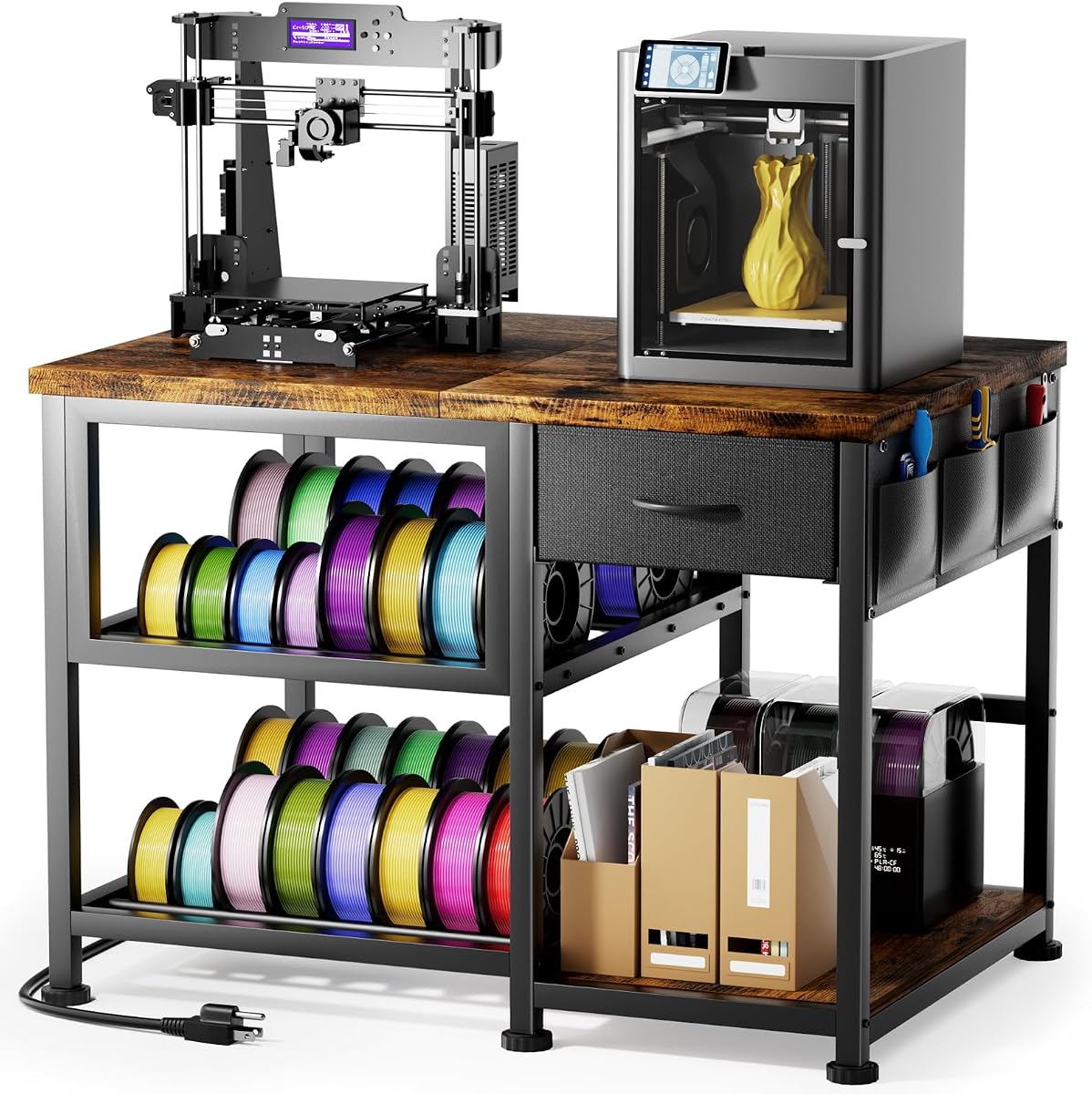


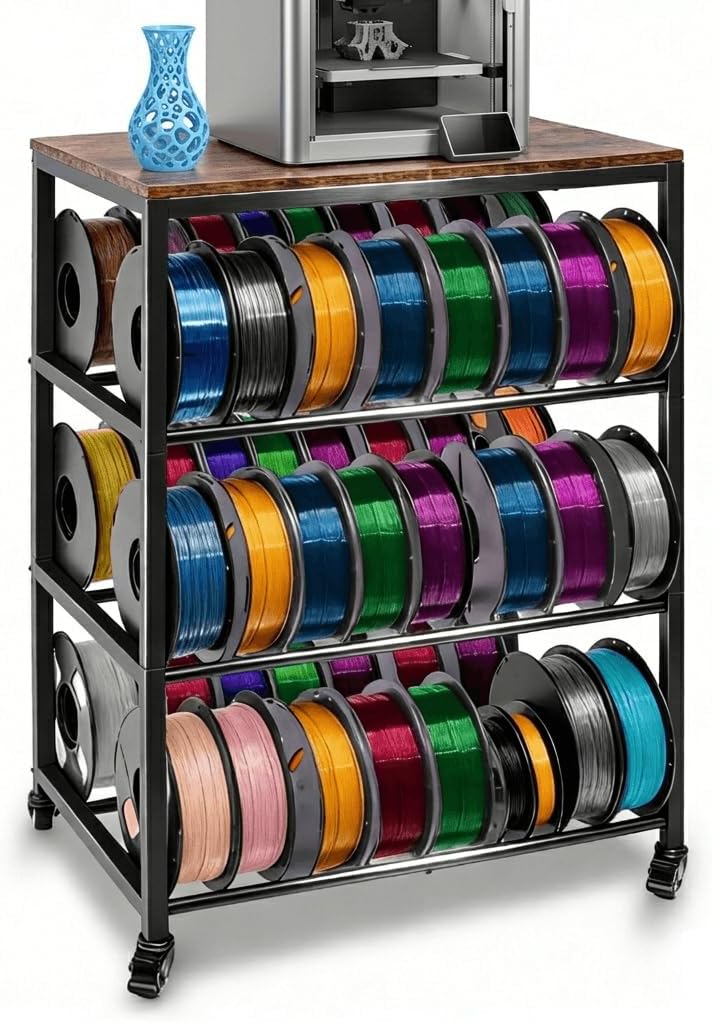
This all-in-one 3D printer workstation has a 4.4 rating and stands out for combining a large printer platform, filament storage, accessory organization, and integrated power management. Its stated dimensions are 39 inches long by 24 inches wide by 28 inches high, giving it enough room for a desktop printer and nearby supplies.
We may earn a commission when you buy through this link, at no additional cost to you.
The most distinctive feature is the built-in power hub. Two AC outlets and two USB ports can serve a printer, laptop, and lighting without requiring several separate power strips. An X-bracket-reinforced steel frame is intended to limit vibration and wobble, while the three-tier arrangement accommodates major printer models and different filament spool sizes.
Its footprint is the main consideration. Unlike rolling or compact options, this model appears designed to remain in one location and make the most of vertical storage. The absence of stated casters also means repositioning a loaded setup will be less convenient than it is with the mobile designs in this guide.
This is the strongest all-around recommendation for makers who want meaningful storage and convenient power in one station. Choose it when your printer area has enough floor space and cable management is a recurring frustration.
The integrated hub places power connections within easy reach of the working surface. It is particularly useful for setups that also require a laptop, task lighting, or another powered accessory beside the printer.
A dedicated drawer and dual compartments give nozzles, tools, filament, and stationery a place to live. This keeps small parts from taking over the printer platform or the surrounding floor.
We may earn a commission when you buy through this link, at no additional cost to you.
This stand combines a wood finish with metal components and carries a 4.7 rating, the highest among the ten options. It is positioned as a practical workstation for home offices, workshops, and studios where a printer table should also look coordinated with other furniture.
We may earn a commission when you buy through this link, at no additional cost to you.
The three-tier structure is the defining feature. It accommodates different filament types, colors, and spool sizes while separating the material vertically. A center drawer stores spare parts and documentation, and integrated side pockets keep frequently used flush cutters, scrapers, and tweezers within reach.
One limitation is that the supplied specification does not provide exact overall dimensions or a numerical spool capacity. Those measurements should be checked against the printer, available floor area, and desired filament inventory before ordering.
The result is a good choice for users who place equal importance on function and appearance. Its drawer, side pockets, power outlet, and mobile three-tier organization make it versatile without requiring a visually industrial setup.
The side pockets are a small but meaningful advantage. Frequently used hand tools can remain visible and reachable instead of being buried in a drawer with screws and replacement parts.
Natural wood paired with metal accents softens the appearance of a maker workstation. That makes the stand easier to integrate into a home office or creative studio where an all-metal cart might feel visually heavy.
We may earn a commission when you buy through this link, at no additional cost to you.
This compact stand has a 4.8 rating and a strong balance of stability, filament capacity, and footprint control. Its 23.6-by-23.6-inch MDF top is mounted on thick steel tubing, creating a practical platform for printers that do not require a large surrounding work area.
We may earn a commission when you buy through this link, at no additional cost to you.
Two slotted lower shelves can hold up to 32 filament rolls, and their spacing is adjustable to accommodate different supply sizes. The vertical three-tier arrangement keeps the printer elevated while making material visible and reducing desktop clutter.
Adjustable leveling feet help stabilize the stand on uneven floors and protect wood or tile surfaces. However, the model lacks a stated built-in power strip, so users will need a nearby outlet or a separate power solution if several devices must remain connected.
It is an excellent fit for compact rooms, dorm-style maker spaces, and users who want organized filament storage without a large table. The straightforward 20-minute assembly claim and included tools also make setup relatively approachable.
The square design uses vertical space efficiently. Thirty-two spool positions make this one of the strongest compact choices for keeping frequently used materials visible and organized.
Four rotating pads let the owner balance the stand on an uneven surface. A level base is especially helpful in workshops and older rooms where floors may not be perfectly flat.
We may earn a commission when you buy through this link, at no additional cost to you.
This rolling cabinet earns a 4.6 rating for combining printer support, protected filament storage, and easy repositioning. Its top work surface measures 29.5 by 18.9 inches, while the overall unit reaches 59 inches in height, making it a vertical storage solution rather than a low table.
We may earn a commission when you buy through this link, at no additional cost to you.
The middle tier provides open access to active filament, and the lower enclosed compartment is intended to protect sensitive spools from dust and moisture. Four 360-degree swivel casters make the entire setup mobile, while two locking brakes hold it steady during a print.
Its height and caster hardware increase the unit's visual and physical bulk. Buyers should verify doorways, overhead clearance, and whether the printer can be safely loaded onto the top. The supplied information also does not state an exact filament capacity.
Choose this model for studios that move printers between work areas or for users who want at least some filament protected from the surrounding environment. Its cabinet-like construction feels more substantial than open rolling racks.
The caster system separates easy movement from stable operation. Roll the cabinet where needed, then engage the brakes so the printer does not shift during longer jobs.
Active material can remain on the open middle tier, while less frequently used or more sensitive spools sit in the enclosed lower compartment. This creates a practical split between quick access and protection.
We may earn a commission when you buy through this link, at no additional cost to you.
This dual-zoned workstation is built for makers running two full-size printers and organizing material for both. It has a 4.2 rating and differentiates itself with separate working areas, two closed-loop metal frames, lower shelves, and hanging mesh storage.
We may earn a commission when you buy through this link, at no additional cost to you.
Each printer receives a dedicated surface and supporting frame, which helps distribute loads and lets one machine be serviced without physically sharing the other machine's platform. The workstation can organize more than 48 filament coils and has a stated static load capacity of 300 pounds.
Its focused purpose is also its main limitation. A two-printer configuration demands more room than a single-printer table, and the product data does not indicate that the unit has casters. The fixed structure may therefore be less convenient in shared or temporary workspaces.
This is the leading choice for a dedicated print room, classroom lab, or serious maker operation that regularly needs two printers. It is less suitable for a small apartment or a user who only needs occasional access to one compact machine.
Independent closed-loop frames support each working zone rather than transferring printer loads through shared cross-unit screws. This arrangement is designed to preserve rigidity when both areas are occupied.
Dual-side mesh racks can separate filament and tools according to the nearby printer. That makes color and material changes more predictable during busy production sessions.
We may earn a commission when you buy through this link, at no additional cost to you.
This 36-inch, three-tier stand has a 4.1 rating and focuses on dividing the maker workflow among the printer surface, filament shelves, and two fabric drawers. It can also serve as a display surface for completed models and assembled parts.
We may earn a commission when you buy through this link, at no additional cost to you.
Side and lower shelves are engineered for both 500-gram and one-kilogram spools, with stated capacity for more than 50 rolls. The twin drawers separate tools such as scrapers, pliers, hex wrenches, and replacement nozzle tips. Heavy-duty black steel supports a high-density particleboard structure rated for more than 150 pounds.
It does not offer integrated power outlets, and fabric drawers are less visually formal than solid cabinetry or a metal drawer. The product's lower rating may also reflect a preference among buyers for a design that feels less robust than all-metal alternatives, although the stated construction is substantial.
This model is well suited to hobbyists who print many colors and frequently sort small tools. It is a flexible organizer for a home office or garage, particularly when a single large drawer would not provide enough separation.
Separate fabric drawers make it easier to keep maintenance tools apart from spare components. Their soft-sided construction also suits lightweight accessories better than rigid storage.
The broad shelf can display finished prints, organize ongoing projects, or hold accessories. That flexibility makes the station useful even when a print is not actively running.
We may earn a commission when you buy through this link, at no additional cost to you.
This four-tier workstation pairs a modern wood-style desktop with a metal frame and offers a practical combination of printer support, filament storage, and integrated power. It holds a 4.3 rating and is designed for offices, workshops, and dedicated maker spaces.
We may earn a commission when you buy through this link, at no additional cost to you.
The rack keeps PLA, PETG, ABS, and other filament visible and accessible across four levels. Two AC outlets, one USB port, and one Type-C port provide convenient charging and power for a printer and related devices. A pull-out drawer holds nozzles, scrapers, pliers, cutters, and measuring tools.
The absence of a stated load rating or exact dimensions means buyers should verify compatibility more carefully than with models that publish detailed measurements. The drawer also offers less visible organization than open side pockets, so frequently used tools may take slightly longer to reach.
This stand is a strong fit for users who want a wood-style workbench with convenient power management. Its four-tier arrangement is especially attractive when material variety is high and every shelf needs to remain easy to inspect.
Two AC outlets and both USB-A and Type-C connections reduce the need for scattered adapters. Keeping the connections in one area makes the desk look tidier and speeds up routine setup.
The four-tier spool rack expands vertically instead of demanding more floor area. It provides an easy way to separate colors, materials, and empty spools without crowding the printer's work surface.
We may earn a commission when you buy through this link, at no additional cost to you.
The AHOWPD table has a 4.5 rating and combines a wide printer platform, two levels of filament storage, multiple fabric drawers, and a built-in power strip. Its listed dimensions of 39.4 by 23.7 by 28.4 inches fit a conventional workshop or home-office footprint.
We may earn a commission when you buy through this link, at no additional cost to you.
Metal tube racks on the middle and bottom shelves keep filament rolls organized, while fabric drawers contain screws, wrenches, parts, and maintenance tools. The embedded strip includes two AC outlets and two USB ports, and its 140-centimeter cord offers some freedom in positioning the table near a wall.
The product data does not provide a maximum load, and no wheels are listed. Buyers who need to move a loaded station frequently may find a dedicated cart more convenient, especially if the printer and full filament inventory make the unit heavy.
It is a versatile option for a maker who values both power access and component organization. The combination of wide top space, dedicated spool racks, and several drawers suits users who keep more than one type of consumable and a broad assortment of small tools.
The long power cord makes it easier to position the table where it is most useful without requiring the printer to sit immediately beside a wall outlet.
Fabric drawers are better suited than open shelves for screws, fittings, and other loose hardware. They reduce visual clutter and keep maintenance pieces together.
We may earn a commission when you buy through this link, at no additional cost to you.
This four-tier rolling cart has a 4.6 rating and emphasizes a high stated load capacity, mobile access, and extensive filament storage. The wooden top measures 24 by 16 inches, making it more compact than most wide printer tables in the group.
We may earn a commission when you buy through this link, at no additional cost to you.
The lower three tiers can hold 48 rolls of 200-gram, 500-gram, one-kilogram, or two-kilogram filament, with adjustable pipe spacing for different spool sizes. The stated overall load capacity is 480 pounds, with each layer rated above 120 pounds. Silent lockable casters permit movement, and adjustable feet provide an alternative on uneven ground.
The compact top is the key constraint. It may accommodate smaller desktop printers but leaves less room for a large machine, laptop, and active project at the same time. There is also no stated power hub, so nearby outlets or a separate power strip remain necessary.
This cart is a compelling choice for mobile storage-heavy workflows. It is especially useful in garages, classrooms, and studios where a printer can be rolled to different work zones and filament needs to travel with it.
The 480-pound stated capacity and 48-spool arrangement distinguish this cart from smaller stands. It is designed for users who maintain a deep inventory and want the material stored below the active machine.
Locking industrial casters secure the cart during a print, while adjustable feet can be used when the floor is uneven. This gives the user options beyond a simple fixed leveling pad.
We may earn a commission when you buy through this link, at no additional cost to you.
This industrial-style 3D printer table has a 4.3 rating and provides a broad 36-by-23.6-inch top, a metal drawer, and an open station that can hold up to 56 spools. Its all-metal appearance and matte black finish suit workshops and utility-focused spaces.
We may earn a commission when you buy through this link, at no additional cost to you.
A 230-plus-pound stated load capacity gives it more structural headroom than many compact models. The drawer is intended for scrapers, nozzles, spare parts, and maintenance equipment, while the open shelves serve as a centralized filament hub. The full footprint is compact enough to place in a garage, home office, or makerspace.
Compared with powered or rolling models, it lacks integrated outlets and casters. That means a separate power solution is needed, and repositioning a fully loaded station is less convenient. The black powder coating is described as scratch-resistant, but the fixed leveling feet may be less adaptable than wheels and adjustable pads.
This is a strong pick for users who prioritize filament inventory and an all-metal structure. Choose it when broad storage and a sturdy appearance matter more than mobility or built-in charging.
The stated capacity of 56 spools is the largest in this comparison. Open shelving also lets users identify colors and materials quickly rather than opening a series of concealed compartments.
A steel structure, metal drawer, scratch-resistant coating, and leveling feet create a practical workstation for daily use. The finish should also blend naturally into a garage or workshop environment.
We may earn a commission when you buy through this link, at no additional cost to you.
The right stand should match your printer footprint, filament inventory, room, and workflow. Consider stability and top dimensions first, then evaluate storage, power access, mobility, and assembly requirements before making a final choice.
A printer table must accommodate the full footprint of the machine, its controls, cables, and preferably some clearance for removing finished parts. Oversized printers and enclosed systems may also need extra room around the rear and sides for ventilation and maintenance. Compare the stated top dimensions with the manufacturer's printer specifications rather than relying only on the number of printers a stand can hold.
Stable furniture helps keep the printer level and reduces unwanted movement during operation. Look for steel tubing, reinforced frames, cross-bracing, a substantial top, and leveling feet. A stated load capacity gives a useful comparison point, but it may include the entire loaded stand rather than only the top surface. Owners should also consider where the weight is concentrated, especially when placing multiple filament spools on upper shelves.
Consider both the number of spools a stand can hold and whether the supports keep them upright. Slotted shelves, metal tubes, and hanging racks work differently: shelves conserve floor space, while hanging racks can free lower shelves for boxes or heavy material. Confirm compatibility with 500-gram, one-kilogram, or other spool sizes if your collection is not standard.
Integrated outlets and USB ports reduce cable clutter and make it easier to connect a printer, laptop, light, and small tools. Models with two AC outlets and multiple USB connections are the most flexible, but their cords and placement should be checked against available wall outlets. A stand without a power hub can still work well if your printer is close to a suitable outlet.
Locking casters are valuable in shared studios, classrooms, and garages because the entire workstation can move between locations. They should be locked during printing to prevent movement. If mobility is unnecessary, fixed feet may be simpler and reduce the visual clutter around the base. Adjustable feet are useful on uneven floors, while enclosed cabinetry can add weight and a larger footprint.
Small accessories become difficult to manage when they share the printer surface with active projects. A metal drawer offers a durable home for nozzles and tools, fabric drawers are useful for lightweight parts, and open side pockets provide the quickest access to frequently used cutters and scrapers. Choose an arrangement that reflects how often you need to retrieve each tool.
A large filament inventory can still require a compact stand if storage is arranged vertically. Compare width, depth, and total height with the available wall and floor space, especially for cabinets and dual-printer systems. Leave enough room to open drawers, access spools, move casters, and service the printer without blocking a walkway.
Metal frames generally suit demanding workshop environments, while wood or particleboard surfaces can create a more finished appearance. High-density board can be durable when properly supported, but exposed edges and hardware deserve attention in busy spaces. Clear instructions, labeled parts, included tools, and a stated assembly time make setup easier, especially for a large workstation assembled in a home.
Begin by assembling the stand on a level surface and install the printer according to its own instructions. Confirm that the top is stable, drawers move freely, shelves are securely positioned, and locking casters or leveling feet are engaged. Keep the printer's required ventilation space clear and route power cables without creating a trip hazard or snagging the moving bed.
Organize filament by type and color while leaving enough clearance to remove each spool easily. If a model includes an enclosed compartment, reserve it for material that benefits from greater dust or moisture protection, but avoid assuming the enclosure creates a fully controlled storage environment. Keep nozzles, tools, and replacement parts in the designated drawers or pockets, and remove oily residue from tools before placing them in fabric organizers.
For routine care, wipe the top and metal surfaces with a soft, slightly damp cloth and dry them promptly. Vacuum lower shelves and drawers to prevent dust from accumulating around spool holes. Inspect bolts, shelf supports, feet, and caster locks periodically, especially after moving a loaded unit. Do not exceed the stated load capacity, and recheck the stand's leveling before long print runs.
Choose a top that is wider and deeper than the printer's complete footprint, including controls and any rear clearance required by the manufacturer. Enclosed printers often need more ventilation space than open models. Also check the total height of the unit, especially if the printer includes a tall AMS unit or if the stand has an upper storage shelf.
Several models are explicitly designed to accommodate major printer models, while the dual-printer workstation even provides separate zones for two full-size machines. However, buyers should still verify the stand's top dimensions, stated load capacity, and weight requirements against the specific printer. A model that fits visually may not provide enough clearance, ventilation, or support.
Stated capacities range from 32 spools on the compact stand to as many as 56 on the large industrial table, with one dual-zone model claiming room for more than 48. The real usable count may differ based on spool diameter, spool weight, accessories, and whether items are stored on the upper or lower racks. Check the rack design as well as the headline capacity.
A rolling table should be stable when its locking casters are engaged and it is resting on an even floor. The two mobile models in this guide include locking features, while one also offers adjustable feet for uneven surfaces. Always lock the wheels before starting a print and avoid moving the unit while the printer is operating.
It is convenient but not essential. Integrated AC outlets and USB ports can reduce cable clutter and make it easier to power a laptop, light, and printer from one location. If you choose a model without a power hub, position the stand near a suitable outlet and use a safe power strip or surge protector.
Most models include some form of tool storage, including metal drawers, fabric drawers, open side pockets, or mixed compartments. Open pockets are best for frequently used scrapers, cutters, and tweezers, while drawers are more suitable for spare parts, screws, and nozzles. Avoid placing sharp or heavy tools where they can interfere with a drawer mechanism.
Keep spools upright when using tube-style racks, and follow the slot spacing specified by the manufacturer. Separate material types and colors so the correct spool can be identified quickly. If using an enclosed compartment, leave the filament in its original packaging and ensure the compartment is dry before closing it.
Check the complete parts list, hardware, and instructions before beginning. Make sure the assembly area has enough room to turn the unit if required, and assemble it where it will be used whenever possible. After tightening fasteners, level the feet, secure the shelves, test the drawers, and engage the caster brakes before placing the printer on top.
The Metal Power Hub Workstation is the most balanced overall choice because it combines a reinforced steel frame, generous work surface, integrated power, and multiple storage areas. The compact Heavy Duty Stand is the best budget-oriented option for organized filament storage in a smaller footprint, while the Rolling Printer Cabinet stands out for protected storage and mobile placement.
Your priorities should determine the winner. A dual-printer operation calls for the separated zones of the Dual-Zoned Printer Workstation, a large filament collection favors the 56-spool industrial table, and frequent room changes make a locking caster model more useful. Confirm printer dimensions, storage needs, and floor conditions before buying.
Product specifications, ratings, availability, and prices can change over time. Review the current Amazon listing before purchasing to confirm dimensions, included components, load details, power configuration, and the latest cost. That final check helps ensure the selected stand fits both your printer and the way you actually work.