
Hyperkin Trooper 2
4.1Editor score
Four-way arcade joystick
Six mappable buttons
Ten-foot USB cable
Explicit macOS support
This Mac game joysticks guide compares compatibility, controls, connectivity, precision, comfort, and features across ten leading arcade and flight options.
Mac game joysticks range from compact retro arcade sticks to specialized flight controls, so the right choice depends heavily on the games you play and how your Mac recognizes input devices. A useful joystick should offer dependable compatibility, responsive controls, comfortable operation, and a connection method that suits your setup.
We compared all ten products by examining their stated platform support, joystick movement, button layouts, connectivity options, customization capabilities, feedback features, and intended gaming applications. The list includes Mac-compatible arcade controllers, multi-platform gamepads, flight sticks, and specialist simulation equipment whose Mac support is more limited.
Each pick highlights a different route into joystick-based gaming, from inexpensive retro play to precision flight simulation and customizable arcade hardware. Ratings and specifications reflect the supplied product information, while availability and prices change frequently, so shoppers should confirm current details before ordering.
4.1Editor score

4.3Editor score
4.6Editor score
This side-by-side comparison shows the strongest platform support, control formats, connection methods, and customization options across all ten products, with particular attention to their usefulness on a Mac.


The Hyperkin Trooper 2 is a straightforward USB arcade controller built around a classic four-way joystick. Its supplied information explicitly lists macOS alongside Windows, Linux, and Raspberry Pi, making it one of the clearest choices for buyers seeking a traditional joystick experience on a Mac. It carries a 4.1 rating and prioritizes simple operation over advanced wireless features.
We may earn a commission when you buy through this link, at no additional cost to you.
The six mappable buttons provide enough flexibility for many arcade, computer, and retro titles without turning the layout into a complicated enthusiast platform. Chamfered corners, a soft rubber grommet, and a solid base are intended to improve grip and stability. A ten-foot cable gives the controller useful reach from a Mac desk, while the long cord also reduces dependence on a nearby USB port.
Its limitations are important for realistic expectations. This is a wired, single-stick arcade design rather than a modern pro controller, and it does not offer the wireless connectivity, broad remapping suite, or Hall Effect sensors found on more advanced picks. The fixed four-way movement is ideal for classic arcade games but may feel restrictive in modern titles that expect full analog axes.
The Trooper 2 is a strong recommendation for Mac owners building an inexpensive retro or arcade setup, especially if simple USB plug-and-play operation matters more than wireless flexibility. It is less suitable for flight simulation, modern console-style games, or anyone who wants a full analog stick and premium components.
The four-way stick and six-button layout recreate the essential mechanics of older arcade cabinets without requiring a full-size modern gamepad. This makes the controller especially approachable for classic fighting, action, and retro collections.
The long USB cable, rubber joystick grommet, and chamfered grip support stable use at a desk. It also avoids battery management entirely, making the controller convenient for repeated sessions.
We may earn a commission when you buy through this link, at no additional cost to you.
The Thrustmaster T-Flight Stick X is a dedicated flight controller for PC users who want more than a small gamepad joystick. With a 4.2 rating, it combines an adjustable-resistance stick, a heavily weighted base, an integrated throttle, a rotating handle for rudder control, and twelve reprogrammable buttons in a single desktop unit.
We may earn a commission when you buy through this link, at no additional cost to you.
Its setup is designed to be immediate. The controller is described as being recognized by the system without complicated installation, reducing the configuration burden for flight simulators, space simulations, and combat flight games. Adjustable resistance lets users tune the feel of banking, climbing, and aggressive maneuvering, while the locking rotating handle provides dedicated rudder input without requiring separate pedals.
Mac compatibility is the principal caveat. The supplied title and specifications identify PC rather than macOS, so buyers should not assume that the product will be recognized or fully configurable on a Mac. It is also a specialized flight setup rather than a general-purpose arcade or console gamepad, and its feature set does not mention wireless operation.
This joystick is best suited to Windows-based flight simulation enthusiasts who want a self-contained throttle, rudder, and stick arrangement in a compact footprint. For a Mac user, it could still be considered only after confirming the current software and game support, but the more clearly Mac-oriented controllers in this guide offer a safer starting point.
The integrated throttle and twist handle replace several separate flight-control accessories. That consolidation can free desk space and make a first flight simulator setup more approachable.
Adjustable resistance allows the stick response to be tailored to different maneuvering styles. The weighted base helps keep the controller planted when inputs become more forceful.
We may earn a commission when you buy through this link, at no additional cost to you.
The abxylute C6 is the most versatile modern gamepad in this guide, with explicit support for Mac and macOS in addition to Windows, Switch, Steam Deck, Android, iOS, and Tesla. Its 4.3 rating reflects a feature-rich approach that combines conventional console controls with Mac connectivity, Hall Effect joysticks and triggers, turbo functions, rechargeable wireless operation, and 1000Hz polling in the appropriate connection modes.
We may earn a commission when you buy through this link, at no additional cost to you.
Three connection modes are offered: wired, Bluetooth through a USB dongle, and standard Bluetooth wireless. The product information recommends the dongle for the lowest-latency experience, while standard Bluetooth provides a more cable-free option. The rechargeable 600mAh battery is stated to deliver up to 18 hours of continuous play, adding useful flexibility for travel or a shared gaming setup.
The dual Hall Effect sticks and triggers are designed to resist drift and reduce wear compared with conventional sensing. Four vibration levels and a Switch-oriented gyro function can improve immersion, although the supplied information notes that gyroscope availability depends on the game. Users should also verify individual titles and macOS versions, because a listed platform does not guarantee identical functionality across every software environment.
The C6 is a compelling recommendation for a Mac owner who wants one controller for modern games, emulation, Switch play, and mobile or tablet use. It is especially attractive for wireless flexibility and anti-drift components, though dedicated arcade-stick buyers may prefer the more focused physical layout of a MAYFLASH product.
Mac support is explicitly listed, while wired, dongle, and Bluetooth modes make the controller adaptable to different desks and games. The choice between maximum responsiveness and a fully wireless setup remains with the user.
Hall Effect joysticks and triggers are intended to provide accurate input while resisting drift and mechanical wear. These features are particularly useful for games that demand reliable directional and trigger response.
We may earn a commission when you buy through this link, at no additional cost to you.
The MAYFLASH F300 is a customizable arcade fight stick with explicit support for macOS, Windows, Steam Deck, Android, and several console platforms. Its 4.5 rating makes it one of the strongest-rated products here, and its compatibility with Sanwa Denshi buttons and joysticks gives it an unusually clear path for owners who want to personalize their layout.
We may earn a commission when you buy through this link, at no additional cost to you.
Supporting both XINPUT and DINPUT on PC is useful because games can recognize arcade sticks under different control standards. The platform also includes adjustable turbo functions with multiple speed settings. These features make it suitable not only for traditional fighting games but also for arcade collections, shoot-em-ups, retro conversions, and other titles that benefit from a lever-and-button layout.
The F300 is a base platform rather than a finished enthusiast arcade stick. It is compatible with Sanwa parts, but the exact components included may be less premium than those in the F300 Elite. Buyers with strong preferences for lever feel, button weight, cable routing, or panel layout should account for the possibility of further modification. It is also not intended to replace a modern analog gamepad.
For a Mac gamer who values customization and broad game compatibility, the F300 offers a particularly flexible route into arcade-style controls. It is a sensible first choice for emulators, indie arcade games, and fight-game training, particularly for users comfortable learning how digital inputs map to individual actions.
Compatibility with standard Sanwa Denshi controls lets owners alter buttons and joystick behavior as their preferences or supported games change. The open arcade-stick approach is more adaptable than a fixed console gamepad.
Mac users benefit from explicit platform support and the inclusion of both XINPUT and DINPUT on PC. This broadens game compatibility and reduces the need for one stick to serve only a narrow category of titles.
We may earn a commission when you buy through this link, at no additional cost to you.
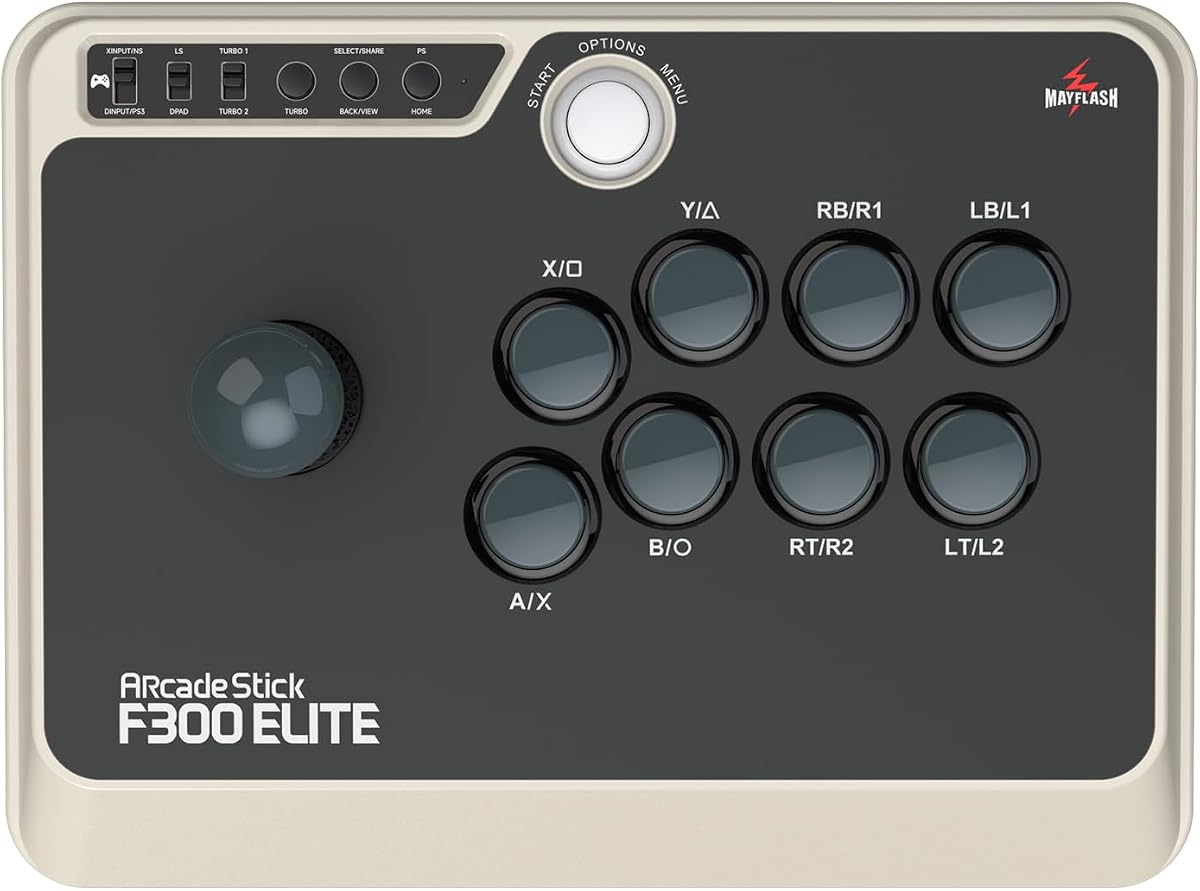
The MAYFLASH F300 Elite is the highest-rated product in the guide at 4.6, and it stands out through a combination of premium Sanwa components, broad platform support, and an internal design aimed at customization. It explicitly supports macOS alongside Windows, Steam Deck, Android, Switch, and multiple Xbox and PlayStation systems.
We may earn a commission when you buy through this link, at no additional cost to you.
The joystick is a precision four-way lever accompanied by nine responsive Sanwa buttons. These components are intended to deliver immediate, consistent input during repeated arcade sessions. The platform is also accessible internally, and both the joystick and buttons can be changed, allowing owners to develop a more personal setup as their requirements become clearer.
On PC, the F300 Elite supports XINPUT and DINPUT, giving it useful flexibility across arcade titles and emulated systems. It also includes turbo functionality. PS5 compatibility requires an additional MAYFLASH Magic-S Ultimate adapter or MagicBoots-S5 converter, an important distinction for console-focused buyers, although it does not affect the stated Mac support.
This is the strongest recommendation for Mac owners who want a polished arcade stick rather than a basic joystick. The premium Sanwa parts and modification potential justify a more focused investment, particularly for fighting-game fans, but the fixed one-stick layout and enthusiast orientation make it less suitable for users wanting a general-purpose controller for modern console-style games.
The supplied Sanwa buttons and precision four-way joystick focus on fast, repeatable action. They are a natural fit for fighting games and arcade titles where clear lever and button feedback matters.
Accessible internals and interchangeable controls make the Elite practical for modding enthusiasts. It offers a polished starting point without preventing later personalization.
We may earn a commission when you buy through this link, at no additional cost to you.
The Thrustmaster SimTask FarmStick is a specialist joystick designed for Farming Simulator 25 on PS5 and PC. Its 3.7 rating is the lowest in the group, but that figure should be considered alongside its extremely focused purpose: providing realistic control of tractors, loaders, and construction machinery rather than serving as a general arcade controller.
We may earn a commission when you buy through this link, at no additional cost to you.
A three-axis joystick handles movement in a way that resembles operating heavy equipment. The control set expands beyond the stick with buttons, a thumbwheel, mini-stick, triggers, and rocker switches, providing up to 33 programmable inputs. Hall Effect magnetic sensors are used to reduce drift and wear, supporting consistent operation in games that require careful manipulation of machinery.
Mac users need to be cautious because the supplied compatibility information identifies PS5 and PC rather than macOS. The product also requires a racing wheel for its intended setup, which is sold separately. Even two FarmSticks can be used together, but that arrangement is centered on building a dedicated farming cockpit rather than a straightforward desktop Mac accessory.
The FarmStick is a compelling specialist recommendation for players who regularly operate agricultural or construction equipment in Farming Simulator 25 and have a compatible PC or PS5 setup. It is not a general-purpose choice for Mac arcade gaming, flight simulation, or modern action games, and Mac compatibility should be verified before purchase.
The three-axis stick and extensive control set translate familiar physical actions into digital machinery commands. This focused design offers more relevance than a standard gamepad for detailed farm work.
Hall Effect magnetic sensing is intended to limit drift and wear. That focus supports consistent calibration during long sessions involving repeated precision movements.
We may earn a commission when you buy through this link, at no additional cost to you.
The 8Bitdo Ultimate 2 is a modern wireless controller aimed at PC, Apple, Steam, and Android users. Its title explicitly includes Apple support, making it a natural option for a Mac-focused guide. The controller has a 4.5 rating and combines TMR joysticks, a low-latency 2.4GHz connection, selectable trigger modes, motion controls, and a charging dock.
We may earn a commission when you buy through this link, at no additional cost to you.
Its 8Speed wireless technology is described as providing a stable 2.4GHz connection with latency under 1ms and a range of up to 10 meters. A 1000Hz polling rate is offered for 2.4GHz and wired connections, making the controller suitable for fast-response play when a game supports standard gamepad input. The included multifunctional charging dock and USB-C adapter add convenience for a regular setup.
The sticks use TMR sensing to target sensitivity, precision, and durability. Users can switch between linear Hall Effect triggers and non-linear tactile triggers, allowing the feel to be adapted to different genres. Additional rear paddles, extra bumpers, a turbo function, rumble, customizable six-axis motion, and software support broaden its competitive feature set.
For Mac users who want a polished console-style gamepad rather than a traditional arcade lever, the Ultimate 2 is a strong recommendation. Its Apple focus and stable wireless connection distinguish it from many conventional PC controllers, although it cannot provide the lever-and-button ergonomics of the MAYFLASH options or the specialized functions of a flight stick.
Apple support makes this a practical option for Mac and iOS ecosystems. The broad multi-device positioning also lets one controller serve PC, Steam, and Android games.
The 2.4GHz connection, under-1ms stated latency, and 1000Hz polling in supported modes are intended to provide responsive input. A charging dock helps keep the wireless controller ready between sessions.
We may earn a commission when you buy through this link, at no additional cost to you.
The Moonag Wireless Controller combines an arcade-inspired gamepad shape with modern analog components and broad wireless support. It carries a 4.3 rating and is listed for PC, Switch, iOS, and Android use, making it relevant to Mac owners through its Bluetooth connectivity, particularly for gaming across Apple and mobile devices.
We may earn a commission when you buy through this link, at no additional cost to you.
A 2.4GHz USB receiver and wired mode both support up to a 1000Hz polling rate, while standard Bluetooth is available for connection to compatible devices. Hall Effect joysticks are designed to limit drift and wear. The controller also includes dual vibration, turbo, programmable macros, and dynamic RGB lighting around the joysticks and buttons, allowing users to tailor both feedback and appearance.
The 800mAh rechargeable battery supports an untethered setup, and the supplied information says the controller can be used while charging. Its textured, non-slip grip and balanced weight are designed to reduce fatigue during extended sessions. On the other hand, the controller is explicitly incompatible with Xbox and PlayStation consoles, which narrows its appeal compared with more universally supported gamepads.
This is a good recommendation for Mac and mobile gamers who want a visually distinctive controller with wireless switching, Hall Effect sticks, and programmable features. It is less suitable for buyers who expect one controller to cover current Xbox or PlayStation systems, and it is a conventional gamepad rather than a lever-based arcade stick.
Bluetooth support and a 2.4GHz receiver allow the controller to move between compatible devices with less cable management. The ability to play while charging adds useful session flexibility.
Turbo, programmable macros, dual vibration, and RGB lighting allow users to adapt feedback to different titles. These features make the controller more configurable than a basic wired gamepad.
We may earn a commission when you buy through this link, at no additional cost to you.
The Logitech G X56 is a full HOTAS-style flight and space simulation controller, combining a joystick, throttle, numerous switches, and an extensive programmable control set in one housing. Its 4.0 rating reflects a highly specialized design that appeals to dedicated simulator players but serves a much narrower purpose than the arcade sticks and general gamepads in this list.
We may earn a commission when you buy through this link, at no additional cost to you.
Twin throttles include a friction adjuster and throttle lock, while the main stick provides 16-bit aileron and elevator axes using Hall Effect sensors. Four interchangeable spring options allow users to adjust the force required to move the stick. A separate mini analog stick can control additional functions, including independently controlled weapons, and RGB backlighting adds visual customization.
Compatibility is the main issue for this guide. The stated system requirements are Windows 11, 10, 8.1, or 7 and two USB 2.0 ports, with no macOS support included in the supplied information. The X56 also demands substantial desk space, and its many controls may be overwhelming for casual users. Even experienced pilots may need to consult the software to customize more than 189 programmable controls effectively.
The X56 is a specialist recommendation for Windows users building a serious flight or space simulator setup. Mac buyers should not choose it without independently validating driver, operating system, and game compatibility. For a Mac arcade stick or multi-platform gamepad, the Hyperkin, abxylute, MAYFLASH, and 8Bitdo options offer clearer support.
Combining the stick, twin throttles, mini stick, and many switches eliminates the need for several peripheral types. That integrated layout supports a more immersive and realistic simulation cockpit.
Four spring options alter stick resistance, while a friction adjuster and throttle lock refine throttle handling. Hardware differentiation can make important functions easier to locate without relying entirely on software labels.
We may earn a commission when you buy through this link, at no additional cost to you.
The SPEEDLINK SL-650212-BKRD Competition PRO EXTRA is a digital USB joystick designed around the appearance of a classic arcade cabinet. It has a 3.9 rating and is clearly aimed at arcade and retro gaming rather than modern console-style play. Its nostalgic design draws directly from the original Competition Pro arcade machine stick.
We may earn a commission when you buy through this link, at no additional cost to you.
As a single-stick digital controller, it offers a traditional arcade control pattern without the dual-stick, trigger, or paddle configuration of a modern gamepad. The Anniversary Edition includes a collection of 20 retro games for download, adding convenience for buyers who want an immediately playable package rather than only a controller.
The supplied product information identifies PCs and Android devices but does not explicitly mention macOS. That makes actual Mac recognition uncertain and should be checked before purchase. The listing also gives no detailed information about button mapping, platform support, cable length, or customization, so the controller appears best suited to buyers who prioritize the classic design and uncomplicated digital operation.
The SPEEDLINK is a fitting recommendation for a Mac owner who wants a visually authentic retro joystick and can verify compatibility beforehand. It may be less practical for modern Mac gaming than the explicitly compatible alternatives, particularly if broad platform support, Hall Effect sensing, or programmable controls are important.
The design takes its visual cues from the original Competition Pro arcade stick. That nostalgic appearance can be especially appealing for retro cabinet builds and simple desk gaming setups.
The Anniversary Edition includes 20 downloadable retro games. This gives new owners immediate content while preserving the focused single-stick arcade experience.
We may earn a commission when you buy through this link, at no additional cost to you.
The best Mac joystick depends on platform recognition, the kind of games you play, and the degree of control customization you need. These factors separate a basic retro stick from a modern wireless gamepad or specialist simulation controller.
Start by confirming that the product explicitly supports macOS or Mac. The Hyperkin Trooper 2, abxylute C6, MAYFLASH F300, MAYFLASH F300 Elite, 8Bitdo Ultimate 2, and Moonag controller all identify Mac or Apple support in the supplied information. This is especially important for Bluetooth devices, for which operating-system recognition and game support can vary.
Check the game’s input requirements as well as the device’s platform label. A Mac-compatible controller may still need a particular input standard, adapter, or configuration profile. For options with ambiguous support, such as the SPEEDLINK stick, confirm the current driver situation before ordering.
A four-way arcade joystick is ideal for classic fighting, action, and retro games that use digital directional commands. A modern gamepad is better for console-style releases, platformers, racing games, and titles that rely on two analog sticks plus triggers. Flight and farm simulators need even more specialized layouts, including throttles, mini-sticks, rockers, or realistic multi-axis control.
Choose the control format that matches the games rather than simply selecting the controller with the most buttons. A compact arcade stick may be superb for fighters but frustrating in a modern action game, while a full gamepad may be inefficient for a flight simulator that expects separate axis controls.
Wired USB gives a direct, reliable connection and removes battery concerns. That makes the Hyperkin Trooper 2 appealing for dedicated retro setups. Wireless options provide freedom around the desk or allow easy switching between a Mac, Switch, phone, or tablet, but connection mode can affect latency and feature availability.
The abxylute C6 supports wired, Bluetooth dongle, and standard Bluetooth modes and specifically recommends its dongle for low latency. The 8Bitdo Ultimate 2 and Moonag controller emphasize 2.4GHz wireless and wired performance. If competitive response is the priority, verify the supported polling mode and use the connection recommended by the manufacturer.
Analog precision matters when games expect smooth movement rather than simple eight-way or four-way commands. Hall Effect sticks and triggers are intended to reduce drift and wear, making them attractive for modern controllers. The abxylute C6 and Moonag controller both use Hall Effect joysticks, while the 8Bitdo Ultimate 2 uses TMR sticks and switchable Hall Effect triggers.
Sensor technology is only one part of the experience. Button quality, lever tension, software support, and whether a game maps the controls properly also affect the result. For custom arcade systems, the F300 Elite’s precision four-way Sanwa joystick provides a different kind of input quality from a modern analog stick.
Mac games differ in how they treat arcade sticks, standard gamepads, flight controllers, and specialty controls. A product that supports multiple standards, such as the MAYFLASH F300 and F300 Elite with XINPUT and DINPUT, can be more adaptable across a varied library. Products with programmable buttons, presets, macros, or remapping software offer another layer of control.
Mapping is especially valuable for flight sticks. The Thrustmaster T-Flight Stick X includes 12 reprogrammable buttons, preset storage, and an exclusive mapping button. The Logitech X56 goes much further with more than 189 programmable controls, although its extensive setup and Windows-focused requirements make it unsuitable for most Mac configurations.
The right joystick should feel natural during long sessions. Arcade users may prefer a stable base, a grippy housing, and a lever that returns consistently to center. A four-way stick is different from a full analog stick and will not suit every title, but its movement can feel crisp and predictable in compatible games.
For modern gamepads, ergonomics involve stick reach, button spacing, grip texture, trigger travel, and overall weight. The Moonag controller uses a textured non-slip grip and balanced weight, while the Hyperkin Trooper 2 uses chamfered corners and a rubber grommet. For specialist simulation controls, a heavier base can prevent sliding during forceful inputs.
Rumble can add impact in racing, sports, action, and modern console-style games, while motion control may matter for selected Switch titles. The abxylute C6 provides four vibration levels and gyro functionality in supported Switch games. The 8Bitdo Ultimate 2 offers rumble, customizable six-axis motion, and selectable trigger modes.
Feedback should complement the games rather than act as a universal priority. Classic arcade games often need little or no vibration, and a digital retro stick will not offer the same effects as a modern wireless gamepad. The best choice is the one whose physical feedback matches the software experience you actually want.
A durable joystick is valuable because repeated use exposes weak points such as loose buttons, inconsistent lever tension, cable damage, and drifting analog sticks. The F300 Elite combines premium Sanwa components with an accessible internal platform, making it especially attractive to buyers who expect to modify the stick or replace parts as their preferences develop.
Check the warranty and component standard when investing. A modifiable arcade platform is not automatically better than a sealed modern gamepad, but it offers a different path. For example, the F300 provides a customizable foundation, the F300 Elite supplies more premium parts, and the Hyperkin Trooper 2 favors a straightforward fixed design with a long cable.
Begin by checking the controller’s connection instructions and the game’s supported input methods. Wired USB controllers should be connected directly to the Mac, while Bluetooth devices may require pairing through macOS settings. For products offering several protocols, follow the manufacturer’s recommended mode for the game and for the lowest latency. Update any listed control software before adjusting mappings, triggers, stick behavior, lighting, or vibration.
Configure the controller inside the game or its software rather than assuming every button is recognized automatically. Arcade sticks may use XINPUT, DINPUT, keyboard mapping, or a game-specific setup, and a flight controller may need axis calibration. Test menus, movement, firing, and secondary commands before starting a long session. For dual-stick or multi-controller games, assign each device to a separate player and verify that the correct inputs move the correct character.
Care for the controller by keeping it on a clean, level surface and avoiding drinks or debris near the base. Do not force a stuck lever or twist a joystick beyond its intended range. Wireless controllers should be recharged on a safe surface and kept away from heat, while cables should be supported rather than pulled from the connector. Periodically check for loose buttons, damaged cables, software updates, and changes in Mac or game compatibility.
The Hyperkin Trooper 2 is among the simplest options because it explicitly supports macOS over USB and does not require battery charging or wireless pairing. Its four-way stick and six-button layout suit arcade and retro games. Mac users should still confirm that the specific game recognizes the controller or can be configured to do so.
They are excellent for titles designed around digital arcade controls, including many fighting games, arcade compilations, and emulated classics. They can be awkward for modern games that require two analog sticks, trigger pressure, or extensive remapping. Check the game’s control requirements before choosing a one-stick layout.
It depends on the controller. The abxylute C6 explicitly supports Mac and macOS, while the Moonag controller lists Bluetooth support for iOS and Android, which may also cover Mac use. The 8Bitdo Ultimate 2 is explicitly positioned for Apple platforms. Buyers should confirm Bluetooth pairing and the game’s support for the controller.
None of the listed flight-focused products explicitly states macOS support, so they should be treated cautiously. The T-Flight Stick X is a USB flight controller for PC, and the Logitech X56 lists Windows requirements. A Mac gamer should verify current operating-system and game compatibility or choose a Mac-focused gamepad for broader support.
It depends on the game and the Mac configuration. The MAYFLASH F300 and F300 Elite support both XINPUT and DINPUT on PC, which can make them adaptable to different titles. On Mac, users may need the game’s own controller settings, a translation layer, or another input-mapping method, so game-specific guidance is important.
Hall Effect and magnetic sensing use changes in a magnetic field to detect analog movement. The abxylute C6 and Moonag controller feature Hall Effect sticks intended to reduce drift and mechanical wear. They still require compatible software and can be affected by environmental or installation issues, so sensor type is only one part of overall performance.
Wired operation is usually simpler because it avoids pairing, battery concerns, and potential wireless interference. The Hyperkin Trooper 2 offers a long USB cable for this reason. Wireless controllers provide greater flexibility and easy device switching, and some offer very low latency in their preferred 2.4GHz or dongle modes.
The MAYFLASH F300 Elite is the strongest dedicated customization option because its internal platform is accessible and its buttons and joystick can be replaced. Among general-purpose controllers, the abxylute C6, 8Bitdo Ultimate 2, and Moonag controller provide programmable functions, motion options, macros, or selectable trigger behavior. The right level of customization depends on whether you prefer physical parts or software controls.
The Hyperkin Trooper 2 is the clearest budget choice for classic arcade and retro gaming, offering explicit Mac support, a familiar four-way stick, and a long wired connection. The abxylute C6 is the most versatile general recommendation, combining Mac compatibility, wireless flexibility, Hall Effect controls, and multi-platform use. For a more premium arcade experience, the MAYFLASH F300 Elite stands out with Sanwa components and modification potential.
The right priority depends on the software in your library. Buy a four-way arcade stick for fighting and retro games, a modern gamepad for console-style and multi-device gaming, and a dedicated simulation controller only when the target game supports it. Always verify the game’s input format, the current Mac version, and any required adapter or software before finalizing a purchase.
Ratings, compatibility, and product configurations can change, and current prices fluctuate. Checking current product pages, availability, warranty details, and recent Mac compatibility information will help ensure that the selected joystick works smoothly with the games and setup you already use.
