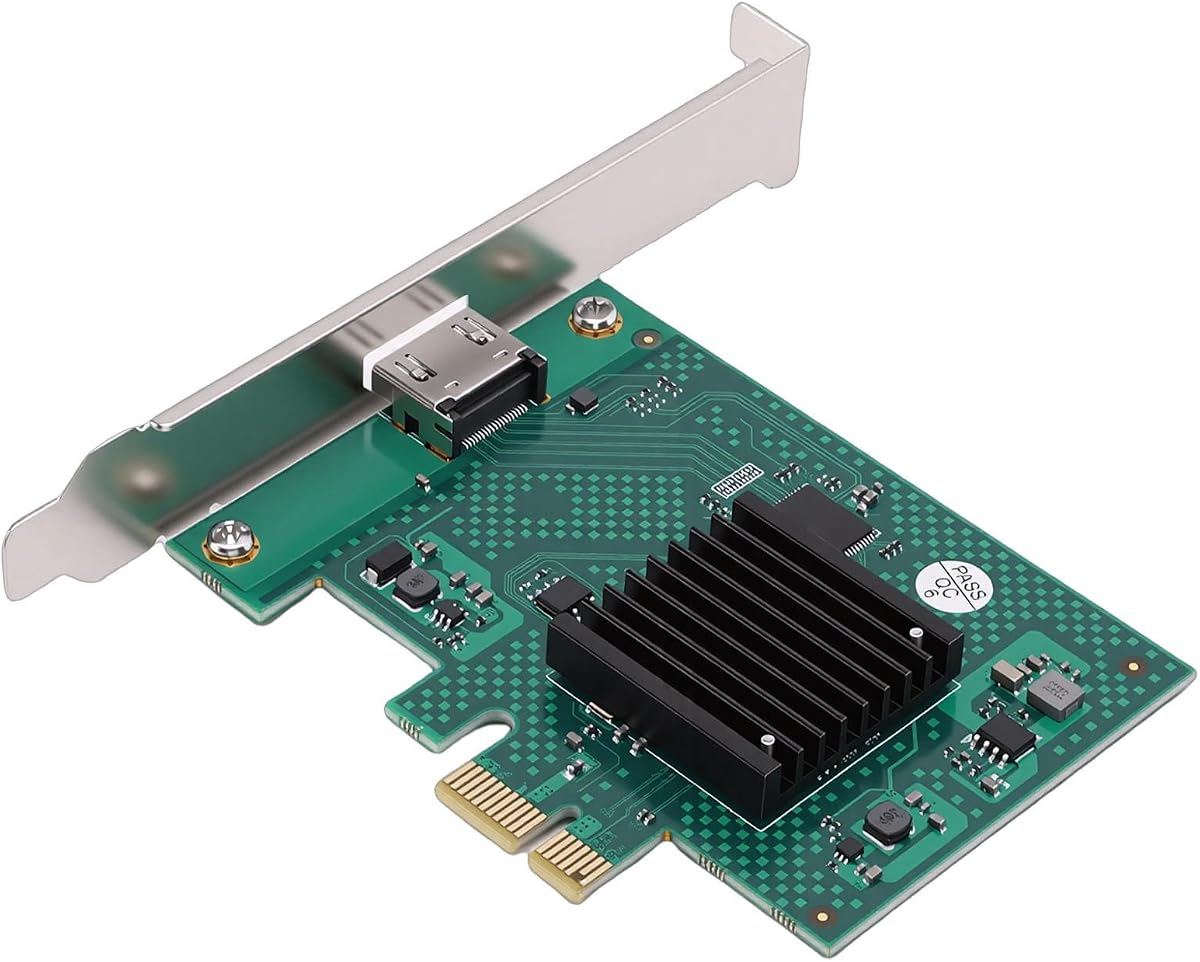
Gugxiom PCIe x1 SM750
Dedicated PCIe x1 interface
Single HDMI output
1920×1440 maximum resolution
Wide temperature operating range
Our Pci Express X1 Graphics Card guide compares ten options for industrial displays, compact PCs, media centers, gaming, professional work, and everyday use.
A Pci Express X1 Graphics Card can add dedicated display handling, broader video connectivity, and more flexibility to a compatible computer. The best choice depends on the slot, outputs, cooling approach, and intended workload, from industrial panels and point-of-sale systems to compact media PCs and modern gaming builds.
We compared all ten products by examining their stated interfaces, display support, memory configurations, cooling designs, physical formats, and intended applications. The guide also separates compact and professional options from full-size gaming cards, since a card can support PCIe while still using a wider physical connector than a true x1 design.
Each pick shows what the available specifications suggest about fit, display utility, and system demands. Ratings are included only where supplied, and product details remain limited to the listed information. Prices and availability can change, so confirm the current listing and your computer requirements before ordering.
The list includes three closely focused industrial 2D accelerators, one professional x1 board, and several PCIe graphics cards with broader gaming or media capabilities. That mix makes it possible to compare purpose-built cards with general-purpose alternatives, although they are not equivalent substitutes for every system.

4.4Editor score

4.7Editor score
This side-by-side comparison highlights each card's interface, display configuration, memory, cooling, and intended use, helping readers distinguish specialized x1 accelerators from general-purpose PCIe graphics options.


The Gugxiom PCIe x1 SM750 is a purpose-built display accelerator for industrial computers, point-of-sale equipment, and embedded systems. It uses a PCI Express x1 connection, adds a single HDMI output, and provides hardware-assisted 2D graphics. No customer rating was supplied, so the card's appeal comes from its clearly specified interface and deployment features rather than a measured review score.
We may earn a commission when you buy through this link, at no additional cost to you.
Its maximum stated resolution is 1920×1440, and the card supports multiple displays and panels according to the supplied description. It can also rotate displayed images by 90, 180, or 270 degrees, a useful capability for vertically mounted panels and changing kiosk orientations. The wide operating range of minus 40 to 85 degrees Celsius makes it more appropriate for industrial environments than many general-purpose desktop cards.
The important trade-off is that this is a specialized 2D accelerator, not a gaming graphics card. Its single listed HDMI connection and focus on display layers mean it should be matched to a motherboard and panel arrangement that actually requires those functions. Driver support, operating system compatibility, and exact bracket or mounting details should be confirmed before purchase because they are not fully described in the available data.
It is a sensible pick for a builder who specifically needs a narrow PCIe x1 card for an industrial, POS, or multi-panel installation. It may also serve as an economical dedicated display card when integrated graphics are unavailable. For ordinary gaming, modern 3D rendering, or systems requiring several digital outputs, one of the multi-output general-purpose cards in this list is a better fit.
The stated support for panels, video display layers, and a broad temperature range gives this card a clear industrial and embedded orientation. These are more meaningful buying points than raw 3D performance for kiosks, POS terminals, and operator stations.
Support for 90, 180, and 270-degree image rotation can simplify deployments where the display is mounted vertically or changes orientation. That flexibility is more specialized than the output configuration found on most gaming cards.
We may earn a commission when you buy through this link, at no additional cost to you.
The PUSOKEI PCIe x1 Graphics Card is another compact 2D accelerator aimed at industrial automation, POS, and medical display environments. It combines a PCI Express x1 interface with a single HDMI port, a maximum stated resolution of 1920×1440, and an operating temperature range from minus 40 to 85 degrees Celsius. No customer rating was provided for this listing.
We may earn a commission when you buy through this link, at no additional cost to you.
Its strongest selling points are deployment-specific rather than gaming-oriented. The card supports multiple displays and panels, hardware-assisted 2D processing, video display layers, and rapid image rotation. Those characteristics make it relevant to systems with digital signage, diagnostic interfaces, transaction terminals, or other displays that benefit from a dedicated graphics accelerator.
The main limitation is that the listed configuration does not expand into modern gaming features. There is one stated HDMI output, no detailed gaming specification is provided, and the product's stated focus remains 2D graphics. Buyers should also verify the physical bracket, operating system drivers, panel timing, and whether the host motherboard exposes a suitable PCIe x1 slot.
Choose this card when a narrow industrial graphics solution and wide temperature tolerance matter more than game rendering or a broad port selection. It may fit vertical kiosks and embedded panels, but it is not the most convenient option for a conventional desktop that needs several displays with different connector types. Confirming the complete installation requirements is essential before finalizing a purchase.
Industrial automation, medical equipment, and point-of-sale terminals often value stable display operation over 3D performance. This card's stated environmental and interface specifications align directly with those needs.
A maximum resolution of 1920×1440 covers many common control-panel and commercial display formats. Actual output still depends on the connected panel, its refresh rate, and the system's driver configuration.
We may earn a commission when you buy through this link, at no additional cost to you.
The GOWENIC PCIe Interface Graphics Card is designed around industrial computers, multi-display panels, and POS systems. It includes a 2D graphics accelerator, supports multiple displays and panels, and has a stated maximum resolution of 1920×1440. Its supplied customer rating is 4.0, giving it a modest positive history in the available listing.
We may earn a commission when you buy through this link, at no additional cost to you.
The combination of multi-panel support and screen rotation at 90, 180, and 270 degrees makes this card more relevant to control rooms, retail terminals, and vertically configured information panels. Video display-layer support further points toward commercial interface applications rather than entertainment graphics.
Compared with the Gugxiom and PUSOKEI cards, its most attractive advertised distinction is the explicit emphasis on multiple panels. However, the supplied information does not list the exact connector count or connector types, so prospective buyers should not assume a particular number of simultaneous displays. Its 2D focus also means it is unsuitable as a substitute for a modern 3D gaming card.
This is a reasonable option for an industrial multi-screen installation that specifically benefits from 2D acceleration and rotation. It may be especially useful when a system needs dedicated panel management but not gaming performance. Confirm the output inventory, slot clearance, power requirements, and operating system support before ordering, because those details are not fully specified.
The explicit multi-display panel focus is valuable for operator stations and commercial control systems. It helps distinguish this model from single-output cards within the same industrial category.
Four selectable image orientations support both standard and vertically mounted panels. This can reduce the need for software-side rearrangement in specialized display setups.
We may earn a commission when you buy through this link, at no additional cost to you.
The ASUS NVIDIA GeForce GT 730 combines four HDMI outputs, 2GB of GDDR5 memory, and passive single-slot cooling in a compact general-purpose graphics card. It is one of the most versatile products in this guide for media centers, office displays, and home-theater PCs. Its supplied rating is 4.4, which provides a favorable customer-history indicator.
We may earn a commission when you buy through this link, at no additional cost to you.
Four dedicated HDMI ports are the standout feature. They allow a system to connect multiple high-definition displays for productivity, monitoring, signage, or entertainment without relying on a hub. The 64-bit memory configuration and 2GB GDDR5 allocation are modest by current gaming standards, but they are more substantial than the purely specialized 2D accelerators at the top of the list.
Passive cooling keeps the card silent and removes the need for a fan, making it attractive near speakers, recording equipment, or quiet workspaces. The one-slot format also leaves room for additional expansion cards. Its trade-offs are the older PCIe 2.0 interface, limited suitability for modern games, and the fact that it is not a true x1 card.
This is an excellent general recommendation for users who want a quiet, straightforward way to drive several HDMI displays. Choose it for a compact media center, office productivity system, or multi-monitor setup that does not require modern ray tracing or gaming performance. Verify the case depth, monitor connector requirements, and your desired resolution and refresh combinations before installation.
Four HDMI ports reduce cable-switching and adapter clutter in display-heavy installations. This is particularly useful for offices, control stations, and media systems that routinely use several panels.
The fully passive cooling design removes fan noise while the single-slot body preserves valuable expansion space. It works especially well in home-theater and office environments where acoustics matter.
We may earn a commission when you buy through this link, at no additional cost to you.
The NVIDIA NVS 300 by PNY is the most explicitly professional graphics board in the group, and one of the few products explicitly identified as PCI Express Gen 2 x1. It provides 512MB of DDR3 memory, a low-profile form factor, and a DMS-59 connector that can support dual DVI-I or VGA configurations through a cable. The supplied rating is 3.5.
We may earn a commission when you buy through this link, at no additional cost to you.
Its strongest appeal is compatibility with compact professional systems that require a dedicated business display card and legacy output support. The low-profile design is useful in small chassis, while the 400MHz RAMDAC and maximum stated resolution of 2048×1536 at 85Hz target conventional office and diagnostic displays rather than modern high-refresh displays.
This is a legacy platform rather than a modern gaming solution. The included connector arrangement depends on a DMS-59 adapter cable, and the memory capacity and DDR3 technology reflect an older generation. The 3.5 rating also suggests that buyer satisfaction is positive but not as strong as the leading general-purpose cards in the list.
Buy the NVS 300 if you are maintaining an older professional workstation or compact industrial computer that specifically accepts a PCIe x1 card and uses DVI-I or VGA monitors. It is a better match than modern gaming cards for that setting. For new systems, ensure the appropriate cable, operating system driver, and bracket are available before committing.
Few products in this guide explicitly identify a true x1 interface alongside a professional low-profile format. That combination makes the NVS 300 particularly relevant to legacy business workstations and specialized compact systems.
The DMS-59 connection supports dual DVI-I SL or VGA arrangements through the appropriate cable. This is useful in installations that still rely on professional monitors with legacy video connectors.
We may earn a commission when you buy through this link, at no additional cost to you.
The ASUS Dual Radeon RX 9060 XT 16GB is a modern gaming-oriented card with generous GDDR6 memory and a 4.6 supplied rating. Although it is not a true x1 option, it represents the high-memory end of the broader PCIe graphics-card category covered by the list. It is intended for conventional gaming and performance builds rather than embedded or industrial systems.
We may earn a commission when you buy through this link, at no additional cost to you.
Its most notable specification is 16GB of GDDR6. Dual axial-tech fans support cooling, and the card's 0dB technology allows silent operation during light workloads. A dual BIOS switch gives users the choice between Quiet and Performance profiles, while dual ball fan bearings are stated to last up to twice as long as sleeve-bearing designs.
The 2.5-slot design provides more cooling capability than a one-slot card but also demands more case clearance. The listed OC and default clock differences are small, so the profile choice may matter more for acoustics and thermals than for raw performance. As a gaming product, it does not address the narrow slot or specialized panel needs served by the x1 models.
Choose this card when modern gaming, a generous memory allocation, and a full-size graphics upgrade matter more than a compact industrial format. Check the power supply requirements, available case space, and the length of the card before ordering. Its supplied 4.6 rating and extensive memory make it a strong option in a modern gaming PC.
A 16GB GDDR6 allocation provides substantial capacity for current gaming workloads and high-resolution textures. It also makes the card more relevant to users who want one modern card for both entertainment and other GPU-accelerated tasks.
The dual BIOS switch allows a Quiet mode for lighter activity and a Performance mode when greater output is desired. This flexibility is particularly useful in a workstation that alternates between media, productivity, and gaming.
We may earn a commission when you buy through this link, at no additional cost to you.
The ASUS GeForce GT 1030 2GB GDDR5 is a straightforward entry-level graphics card for adding or improving display capability in a compatible desktop. It features a 1506MHz boost clock, 2GB of GDDR5 memory, and passive cooling. Its supplied rating of 4.6 is among the strongest in the guide, reflecting favorable customer feedback.
We may earn a commission when you buy through this link, at no additional cost to you.
The ASUS-exclusive heatsink and passive cooling configuration are especially relevant to quiet home-theater PCs and multimedia centers. DirectX 12 support provides a useful baseline for compatible games and applications, while the 2GB GDDR5 allocation is more appropriate for display duties and light graphics than demanding modern titles.
The main limitation is its modest memory capacity and older GT 1030 performance tier. It is not designed to compete with the Radeon RX 9060 XT or GeForce RTX options in the same list. As with the GT 730, buyers should not interpret its PCIe compatibility as evidence that it is a true x1 card.
This is a good match for an office, HTPC, or older gaming system that needs a quiet dedicated card and does not require modern graphics performance. It can also provide a straightforward upgrade path when integrated display support is inadequate. Check the card's connector layout, physical length, and system requirements before purchasing.
Passive cooling avoids fan noise, making this card well suited to a living-room media center or quiet office system. It can provide dedicated display output without introducing a noisy cooling fan.
The combination of 2GB GDDR5, a 1506MHz boost clock, and DirectX 12 support offers a practical baseline for light gaming and multimedia. It remains best viewed as an entry-level card rather than a performance-focused upgrade.
We may earn a commission when you buy through this link, at no additional cost to you.
The MSI Gaming GeForce GT 1030 4GB DDR4 64-bit pairs 4GB of memory with a 1430MHz boost clock and a useful selection of modern digital outputs. It includes DisplayPort 1.4a and HDMI 2.0b, plus HDCP and DirectX 12 support. Its supplied customer rating is 4.5, placing it among the better-reviewed products here.
We may earn a commission when you buy through this link, at no additional cost to you.
Compared with the ASUS GT 1030, its main advantages are the larger 4GB allocation and support for both DisplayPort and HDMI. This makes it a more accommodating option for mixed-monitor systems. The low-profile designation and single-fan cooler also make it potentially easier to use in a compact chassis, subject to verifying the full card dimensions.
DDR4 graphics memory and the GT 1030 class limit its suitability for demanding modern games. The single fan will also be easier to hear than a fully passive alternative during sustained activity. It is therefore most useful when output flexibility and memory capacity matter more than peak gaming performance or absolute silence.
Pick this MSI card for a compact desktop, office workstation, or light gaming system that benefits from 4GB of memory and both HDMI and DisplayPort. It is less appropriate for a workstation requiring true x1 compatibility or a gaming system aiming for high frame rates in modern titles. Check the low-profile bracket and power requirements before ordering.
The 4GB allocation gives this entry-level card more headroom than many basic display accelerators. It can be useful for media applications and light gaming, although the DDR4 specification still places it well below modern high-performance cards.
DisplayPort 1.4a and HDMI 2.0b cover many current and legacy monitors. Supporting both standards reduces the likelihood of needing adapters in a mixed-display office or media installation.
We may earn a commission when you buy through this link, at no additional cost to you.
The ASUS Dual GeForce RTX 3050 6GB GDDR6 OC Edition is a modern two-slot gaming card with a 4.7 supplied rating. It offers 6GB of GDDR6 memory, a listed 1500MHz OC boost clock, and NVIDIA Ampere features including second-generation RT cores, third-generation Tensor cores, and improved power efficiency.
We may earn a commission when you buy through this link, at no additional cost to you.
Its two-slot design balances modern performance with better clearance than a 2.5-slot card. Axial-tech fans use a smaller hub, longer blades, and a barrier ring intended to increase downward air pressure. A stainless steel bracket adds structural strength, while IP5X dust resistance is stated to help protect against particle ingress.
This card is much more capable for gaming than the GT 1030 and GT 730 products, but it does not serve the narrow purpose of a true PCIe x1 accelerator. It also takes more space than a single-slot media card, and users should verify power, clearance, and connector requirements. Its appeal lies in modern graphics features in a relatively restrained two-slot design.
Choose the RTX 3050 for a modern gaming build that wants more capability than an entry-level card without moving to a large 2.5-slot model. It is a strong recommendation based on its 6GB allocation, 4.7 supplied rating, and two-slot format. It is not the right choice for a motherboard or chassis designed specifically around narrow x1 cards.
Second-generation RT cores, third-generation Tensor cores, and DLSS support distinguish this card from the older GT 1030 and GT 730 choices. They make it better suited to current games and GPU-accelerated workflows.
The two-slot design offers more room for cooling than a one-slot card while using less depth than many 2.5-slot models. It provides a practical balance for builds with moderate clearance.
We may earn a commission when you buy through this link, at no additional cost to you.
The ASUS Prime NVIDIA GeForce RTX 5070 is the premium modern graphics option in this guide. It uses the NVIDIA Blackwell architecture, supports DLSS 4, provides 12GB of GDDR7 memory, and operates over PCI Express 5.0. Its 4.7 supplied rating is tied for the highest among the listed products.
We may earn a commission when you buy through this link, at no additional cost to you.
Its most unusual feature is SFF-Ready positioning, which makes it appealing for compact enthusiast systems that usually struggle to accept large graphics cards. The 2.5-slot design balances cooling performance with better build compatibility. Axial-tech fans improve airflow, and a phase-change GPU thermal pad is intended to maintain heat transfer and reliability.
Despite its compact ambition, it is still a major gaming card rather than an x1 accelerator. System builders need to account for physical dimensions, power requirements, case clearance, and the demands of 12GB GDDR7. Its dual BIOS feature provides a way to choose between different operating profiles, although the exact behavior should be confirmed in the system documentation.
This is the best premium choice for a modern gaming or compact high-performance build where capability and relative space efficiency both matter. Its warranty and strong supplied rating add confidence, but it cannot be recommended for a system requiring a narrow PCIe x1 slot. Verify the power connector, card length, available space, and display outputs before purchase.
The SFF-Ready design targets one of the toughest constraints in compact PC building: fitting a powerful card into limited chassis space. The 2.5-slot format still requires care, but it is more accommodating than many large gaming designs.
The NVIDIA Blackwell architecture and DLSS 4 support position this card for modern games and AI-assisted rendering features. Combined with 12GB of GDDR7, it is a substantial upgrade over the entry-level and media-oriented alternatives.
We may earn a commission when you buy through this link, at no additional cost to you.
The right choice begins with physical compatibility, but interface width, display outputs, cooling, and workload determine whether a card is genuinely useful. Treat x1 industrial accelerators, professional legacy boards, and full-size gaming cards as different categories rather than interchangeable options.
Choose based on the actual connector, not the marketing name alone. For an industrial system, a genuine PCIe x1 card is usually the cleanest fit; for a modern gaming PC, a conventional multi-slot card is the more relevant choice.
Do not rely on a general reference to multiple displays without confirming the port inventory. Bring the intended monitors, adapters, and cable lengths into the decision.
Prioritize the workload first, then performance. Buying a large gaming card for a simple display job adds unnecessary cost, power demand, and size, while an industrial accelerator may not satisfy a modern 3D application.
Match the output path to the panel. A legacy DVI setup, an HDMI 2.0b connection, and a DisplayPort 1.4a connection have different capabilities, so connector verification is essential.
Choose cooling according to the environment. A passive card suits quiet rooms, while a higher-output gaming card benefits from active airflow and a chassis designed to support it.
Measure the available space and leave the required airflow clearance. A card that appears to fit by connector width can still conflict with drive cages, side panels, or neighboring components.
Driver support is a purchase requirement, not an afterthought. An otherwise perfect card is not useful if the host system cannot operate it reliably.
A modern GPU in an underpowered or physically compact system can cause instability. Check both the power supply rating and the card's connector requirements before ordering.
Before installation, power down the computer completely, disconnect the power cable, and use suitable anti-static precautions. Confirm that the selected slot, mounting bracket, cable configuration, and physical clearance match the system. Install the card according to the motherboard and graphics-card manuals, secure the bracket, connect any required display cables, and attach auxiliary power only when the card explicitly requires it.
After installation, boot the system and install the appropriate graphics driver from a trusted source. Connect the intended monitor using the required connector, configure the desired resolution and refresh rate in the operating system's display settings, and verify that every attached display is detected. For multi-screen industrial arrangements, test the configured orientation, rotation, and panel arrangement before placing equipment into service.
Good airflow and clean connectors help maintain stability. Keep the card bracket and unobstructed areas free from dust, avoid abrupt power changes, and never modify the card or its connectors. Periodically inspect the seating of the card, the condition of display cables, and any warning messages. Do not overclock or alter power limits unless you understand the cooling and electrical consequences.
A full-size card may physically fit some x1 slots, but its full connector can obstruct adjacent components. True x1 cards are the safest choice when only one narrow slot is available. Check the motherboard layout, card dimensions, and slot coverage before installing a wider card.
Generally, the specialized 2D cards in this guide are not modern gaming solutions. For gaming, compare the GT 1030, GT 730, Radeon RX 9060 XT, RTX 3050, and RTX 5070 options according to performance, memory, power, and case clearance. A true x1 card is better for industrial display duties than for 3D-intensive games.
It provides a dedicated graphics processor and display outputs while communicating through a narrow PCIe link. Such cards are frequently used for POS systems, industrial panels, signage, and other embedded display tasks. Their suitability depends on the accelerator's 2D or 3D capabilities, outputs, drivers, and operating-system support.
Some models support multiple displays, but the exact output count and connector types must be verified. The GOWENIC card explicitly mentions multi-display panels, while the Gugxiom and PUSOKEI cards list one HDMI port. Also confirm whether the host system can drive the intended number and resolution of panels.
Passive cards are often convenient because they do not add fan noise. The ASUS GT 730 and GT 1030 are examples in this list with passive cooling. They are best suited to relatively low thermal loads, and a quiet system still needs adequate chassis airflow for the processor and other components.
It depends on the model. The ASUS GT 730 is described as needing no cables from the power supply, while modern high-performance cards may require auxiliary power. Follow the card's documentation and verify your power supply capacity and connector type before installation.
Start with the connectors built into your monitors and the cables already in your installation. The NVS 300 uses DMS-59 for dual DVI-I or VGA configurations, the GT 730 offers four HDMI ports, and the MSI GT 1030 provides DisplayPort 1.4a plus HDMI 2.0b. Match both connector type and the target resolution and refresh rate.
It can provide the primary display output when the motherboard and processor lack usable integrated graphics. Compatibility still depends on the card's architecture, system drivers, operating system, slot, and power supply. Verify all of those details, especially for specialized industrial and legacy professional cards.
The best choice depends on whether you need a true narrow-slot industrial accelerator, a quiet multi-display card, a legacy professional board, or a modern gaming upgrade. The Gugxiom PCIe x1 SM750 is the most directly focused budget pick, the ASUS GeForce GT 730 is the most versatile media-oriented recommendation, and the ASUS Prime RTX 5070 leads the premium modern category.
For industrial or embedded use, prioritize the interface, operating temperature, display orientation, panel support, and driver compatibility. For office or home-theater use, focus on connectors, passive cooling, and multi-monitor flexibility. For gaming, evaluate GPU class, memory, power demand, and chassis clearance rather than treating a full-size PCIe card as equivalent to a dedicated x1 accelerator.
Product specifications and customer ratings offer a starting point, but they do not replace checking the current listing. Prices, availability, driver packages, and compatible accessories can change over time. Before ordering, confirm the card's full dimensions, output inventory, power requirements, operating-system support, and exact fit in your system.