
GPU Backplate Memory Heatsink with Dual 70mm PWM Fan & 1.2mm 7W Thermal Pad
4.2Editor score
Dual 70mm PWM fans
1500–2800RPM speed range
6061 aviation aluminum
1.2mm thermal pad included
Elastic quick-release latch
GPU Backplates guide comparing fit, cooling, materials, installation, support, and budgets for popular graphics cards, with expert picks for different build
GPU backplates are more than decorative covers for the rear of a graphics card. A well-chosen model can reinforce the PCB, protect exposed components, spread heat, improve airflow, and help prevent sagging in demanding builds. The right choice depends heavily on card model, dimensions, mounting patterns, cooling approach, and case clearance.
This guide compares ten GPU backplates and closely related graphics-card cooling or support accessories using the supplied specifications. It covers passive aluminum plates, finned memory radiators, active coolers, anti-sag brackets, and an I/O shield bracket, with particular attention to compatibility and installation requirements.
The list illustrates what distinguishes each option, from broad-purpose finned heatsinks to precision-fit replacement backplates. Ratings and specifications reflect the product information available at the time of the roundup, while prices and availability can change, so buyers should confirm current listings and verify their exact graphics-card model before purchasing.
4.2Editor score

5.0Editor score

4.6Editor score
This side-by-side comparison distinguishes the products by their primary function, material, cooling method, and stated card compatibility, helping builders identify the most appropriate option for a specific graphics card and case.




This large aluminum heat sink is a practical passive cooling option for builders who want to improve heat dissipation around a graphics-card PCB or another dense electronic assembly. Its 4.7 rating reflects a generally favorable customer response, while the stated dimensions and fin count make its scale immediately clear.
We may earn a commission when you buy through this link, at no additional cost to you.
The central strength is the 294-fin construction, which expands the available surface area for passive heat transfer. Its aluminum body, black finish, and 4.3mm base board provide a substantial structure, while the pre-applied thermal conductive adhesive tape simplifies mounting without requiring screws or a fan connection. The product is also described as useful for GPUs, HDDs, power transistors, FETs, ICs, routers, voltage regulators, and other electronics.
The trade-off is flexibility. This is a general-purpose finned module rather than a contoured replacement backplate shaped around one exact board, so buyers must check footprint, component clearance, and case dimensions carefully. Adhesive mounting also makes repositioning less convenient than screw-secured installation. Its passive design cannot provide the directed airflow of an active radiator.
It is best suited to builders seeking a straightforward way to add a large cooling surface to a compatible RTX 3090 or other electronic assembly. Users should clean and dry the mounting surface, confirm that the surrounding components will not be obstructed, and use the included tape only where a secure thermal interface can be maintained.
The 294 fins increase the exposed surface area available for heat transfer without requiring a powered fan. That makes this module useful in compact electronics projects where cable routing or acoustic simplicity matters.
Pre-applied conductive adhesive provides a much easier installation than individually placed thermal compound. The mounting area should still be prepared carefully so the plate makes consistent contact.
We may earn a commission when you buy through this link, at no additional cost to you.
The GOWENIC GPU Backplate Radiator combines an aluminum alloy backplane with a four-pin cooling fan and thermal pad, offering a more active approach than a purely passive cover. Its 4.0 rating indicates positive but less emphatic customer feedback than the leading products in this roundup.
We may earn a commission when you buy through this link, at no additional cost to you.
The integrated fan can move air across the rear of the card, where memory and power components may benefit from additional circulation. The supplied thermal pad provides a contact layer between cooler and board, while the anodized black CNC-machined aluminum construction adds rigidity. A four-pin connection allows the fan to use a compatible motherboard fan header and be controlled according to the system configuration.
This cooler is not a universal drop-in plate. It is specifically listed for RTX 3090, 3080, and 3070 graphics cards, and its 15mm depth means the installer must confirm that the cooler will not interfere with the case, adjacent hardware, or the installed card. It also adds a cable that must reach a fan header, and the supplied four-pin arrangement may limit which header or controller options are available.
The product is a good candidate for an RTX 3070, 3080, or 3090 owner who wants directed cooling rather than a simple protective plate. Before buying, compare the cooler outline with the actual card revision, inspect available fan headers, and plan the cable route so it does not interfere with installation.
Unlike a passive plate, the integrated fan can circulate air over the rear side of the graphics card. This may be particularly useful on densely populated boards that receive limited airflow from the case.
The CNC-machined aluminum alloy body serves as both a mounting structure and heat spreader. Its rigid construction also adds some physical support to the card without replacing a dedicated anti-sag stand.
We may earn a commission when you buy through this link, at no additional cost to you.
This aluminum backplate is designed specifically for GIGABYTE GeForce RTX 5060 and RTX 5050 OC Low Profile 8GB graphics cards. Its 3.6 rating is the lowest among the rated products here, so prospective buyers should weigh its strong model-specific design against more favorable feedback received by the alternatives.
We may earn a commission when you buy through this link, at no additional cost to you.
The plate is CNC-cut to follow the PCB layout without blocking ports or conflicting with the low-profile bracket. It uses thick, rigid aluminum to protect the board and sensitive rear components from dust, cable pressure, and handling damage. It also acts as a passive heat spreader, distributing GPU and VRM heat more evenly and adding anti-sag support for compact or vertically mounted systems.
Its limitations are tightly defined compatibility. It should not be assumed to fit other RTX 5060 or RTX 5050 partner cards, and the wording specifically emphasizes GIGABYTE low-profile models. While installation is straightforward, the included holes must align with the original mounting points. The product does not add a powered fan or directly cool memory beyond passive heat spreading.
This option makes the most sense for a builder with the exact GIGABYTE RTX 5060 or RTX 5050 OC Low Profile 8GB card named in the listing. Confirm the board partner, model suffix, dimensions, and mounting pattern before ordering, especially if the card is installed in a compact case.
A precision-cut plate follows the board's layout more closely than a universal rectangular cover. That helps protect rear components while avoiding interference with ports and brackets.
The rigid construction can reduce flex in a low-profile card and offers useful reinforcement in small cases. It complements rather than entirely replaces a properly positioned anti-sag support.
We may earn a commission when you buy through this link, at no additional cost to you.
The Hilitand GPU Backplate Radiator is a 15mm-thick aluminum alloy cooler designed for RTX 3090, 3080, and 3070 cards. Its 4.0 rating places it alongside other actively cooled options in the list, reflecting a broadly positive but not exceptionally strong customer response.
We may earn a commission when you buy through this link, at no additional cost to you.
Its anodized black CNC-machined design combines a rigid backplane with a standard four-pin fan arrangement. A thermal pad helps establish contact with the intended board area, while the fan adds airflow across memory and other rear-side components. The product is also described as suitable for vertically mounted graphics cards, giving builders some flexibility in compact or vertically oriented systems.
As with any full-width cooler, clearance is the main practical concern. The 15mm body must not intersect the case, drive cages, fans, or neighboring components, and the four-pin cable needs an available compatible header. Compatibility is also limited to the listed RTX models, with no claim that the unit fits every card revision or form factor.
The Hilitand is best considered by someone who wants active memory-area cooling on a compatible RTX 3070 through RTX 3090 and is willing to manage the extra thickness and wiring. Measure the card and case before ordering, and verify that the fan control and header arrangement meet the intended build configuration.
The fan moves air across the rear of the card while the aluminum alloy body provides a firm mounting structure. This combination is useful when additional rear-side circulation is desired.
The included pad is intended to improve contact between the radiator and the graphics-card surface. Correct positioning is essential for effective heat transfer.
We may earn a commission when you buy through this link, at no additional cost to you.
The Alloy GPU Backplate Radiator provides a four-pin active fan, aluminum construction, and a thermal pad for RTX 3090, 3080, and 3070 graphics cards. Its 4.5 rating is stronger than those of the other actively cooled backplane radiators included here, although the supplied information does not provide enough detail to explain the reasons behind individual customer experiences.
We may earn a commission when you buy through this link, at no additional cost to you.
The anodized black CNC-machined design gives the product a finished appearance while adding structural support to the rear of the card. Its 15mm depth, thermal pad, and fan work together to provide both a heat-spreading structure and forced airflow. The listing specifically notes compatibility with vertical mounting, which can be useful when the graphics card is suspended in a compact enclosure.
The same limitations that apply to most add-on radiators remain relevant. The card must match one of the listed RTX models, the physical outline and mounting locations must align, and the case must have enough clearance. The four-pin lead also needs a suitable header, with care taken to route it away from moving fans and sharp edges.
This radiator is a sensible choice for a compatible RTX card that benefits from active rear cooling and where the builder can accommodate a 15mm accessory. It is best chosen after comparing the card dimensions, available headers, and the positions of nearby components rather than selecting only by the RTX generation.
The black anodized surface gives the radiator a coordinated appearance while the aluminum body adds stiffness. The finish also helps the product blend into a dark build.
A four-pin connection allows the included fan to use a compatible system fan header. Depending on the motherboard and fan-control setup, the user may be able to adjust its speed with the rest of the cooling system.
We may earn a commission when you buy through this link, at no additional cost to you.
The California JOS GPU Support Bracket focuses on a specific structural problem: gravity-induced graphics-card sag. Its 4.7 rating indicates strong customer approval, and the adjustable aluminum design makes it a useful companion for heavier cards or cases with limited support points.
We may earn a commission when you buy through this link, at no additional cost to you.
The large black bracket is made from aluminum alloy and adjusts in height to accommodate different GPU sizes and case configurations. It is described as compatible with most ATX, M-ATX, and ITX cases. Installation is tool-free, and the package includes one large support bracket packed in an ESD bag for storage.
This product should not be confused with a replacement GPU backplate. It is an external brace that supports the card from below, so it does not protect the entire rear PCB, spread heat across the board, or cool memory. Placement must avoid blocking case fans, and the base needs to rest on a solid surface without obstructing removable drive cages or other components.
It is an excellent choice for users who understand the term GPU backplate broadly and primarily need anti-sag support. Pair it with the card's original backplate or a model-specific replacement for full rear protection. Users should confirm the case's available interior space and ensure the support's height adjustment can reach the underside of the GPU.
Supporting the weight of the card reduces the bending force applied to the PCIe connector and the board near the mounting area. This is particularly useful with large, heavy graphics cards.
The adjustable design is intended to work across common ATX, M-ATX, and ITX layouts. Exact compatibility still depends on the available floor or support area inside the chosen case.
We may earn a commission when you buy through this link, at no additional cost to you.
The High Power Large Aluminum Heat Sink Plate is a broad-purpose finned module for graphics cards, computer components, routers, and other electronic assemblies. Its 4.6 rating reflects favorable feedback, and the substantial 294-fin structure offers a large passive surface in a rectangular package.
We may earn a commission when you buy through this link, at no additional cost to you.
The plate measures 150 x 93 x 15mm, with a stated base-board thickness of 4.3mm and fin-board thickness of 2mm. Its many fins increase the area available for heat transfer, while the aluminum construction and black anodized finish make it suitable for a range of electronics projects. The stated applications include GPUs, HDDs, power transistors, FETs, ICs, power amplifiers, docking stations, Wi-Fi routers, voltage regulators, MOSFETs, and SCRs.
The major consideration is clearance. Because the module is not shaped to a specific PCB outline, it may extend beyond a small graphics card or interfere with nearby components. Users must also consider the gap between the motherboard and any installed cooler. Unlike active products, it adds no cable and no moving parts, which simplifies integration but limits airflow.
This heatsink is best for builders with a compatible RTX 3090 or 3080, or for a router or another electronics project that can accommodate a large finned surface. Confirm the available mounting area and thermal-contact requirements before installation, and use an appropriate thermal interface where direct metal-to-board contact is not sufficient.
The 294 fins substantially increase the surface exposed to surrounding air. This passive approach can complement existing case airflow without adding another powered fan.
The module's broad compatibility makes it relevant to router, dock, regulator, transistor, and other electronic assemblies. Its general-purpose design can be especially helpful for custom projects.
We may earn a commission when you buy through this link, at no additional cost to you.
This EVGA I/O shield backplate is a narrow but clearly defined accessory for certain RTX 3060 Ti, 3070, 3080, and 3090 FTW3 XC3 graphics cards. It does not have an available customer rating in the supplied information, so the product's feedback cannot be compared numerically with the rated entries in this roundup.
We may earn a commission when you buy through this link, at no additional cost to you.
The bracket measures 12cm by 3.8cm and is made from black zinc alloy. Its stated purpose is to safeguard the graphics-card slot area or external bracket, and installation requires only screws. That makes it a straightforward replacement for a damaged or missing matching piece, provided the EVGA model and bracket dimensions match.
This is not a conventional rear GPU backplate. It does not cover the card's PCB, spread heat across rear components, or prevent sag. Its compatibility statement is narrow, so similar model names from other board partners should not be treated as compatible. Users should compare the mounting holes, bracket shape, and physical dimensions with the original part before ordering.
The product is best for an EVGA owner who needs a specific external bracket rather than full rear-board protection. Verify the exact card model and compare the replacement against the original bracket, then ensure the card is fully powered down and disconnected before fitting it.
A screw-secured bracket can restore a missing or damaged external cover without complex modification. The narrow compatibility makes careful model identification especially important.
The stated zinc alloy construction provides a rigid, durable external piece. It is separate from the card's internal or rear thermal-management system.
We may earn a commission when you buy through this link, at no additional cost to you.
The ZOTAC RTX 5060/5050 Backplate is purpose-built for ZOTAC RTX 5060 Solo 8GB and RTX 5050 Solo 8GB cards. Its 5.0 rating is the highest numerical score among the products in this guide, making it a particularly strong candidate when the builder owns one of the specifically named models.
We may earn a commission when you buy through this link, at no additional cost to you.
CNC-machined aluminum provides rigidity, while the plate's dimensions and cutouts are engineered around the PCB layout, mounting holes, and ports. Ventilation openings help preserve airflow around the original cooling system, and the aluminum also acts as a passive heat spreader for GPU and VRM heat. The stated anti-sag benefit adds structural support to the card without requiring a separate stand.
The fit is specific to the ZOTAC Solo variants, so users should not generalize it to every RTX 5060 or RTX 5050 on the market. Although the product includes pre-drilled holes and a complete installation kit, the installer must align it carefully and avoid forcing it against ports or nearby components. As a passive design, it does not cool memory with a dedicated fan.
This is a compelling choice for a ZOTAC RTX 5060 Solo 8GB or RTX 5050 Solo 8GB owner seeking a factory-like replacement with protection, airflow, and anti-sag benefits. Confirm the exact card label and compare the rear layout before purchase, then install the plate according to the included hardware and the card maker's guidance.
Matching the PCB layout, mounting holes, and ports helps the plate sit in its intended position. That precision reduces the chance of conflicts with nearby connectors.
Strategically placed cutouts help maintain airflow around the existing cooling system. The aluminum body spreads heat passively, offering thermal benefits without a fan or additional cable.
We may earn a commission when you buy through this link, at no additional cost to you.
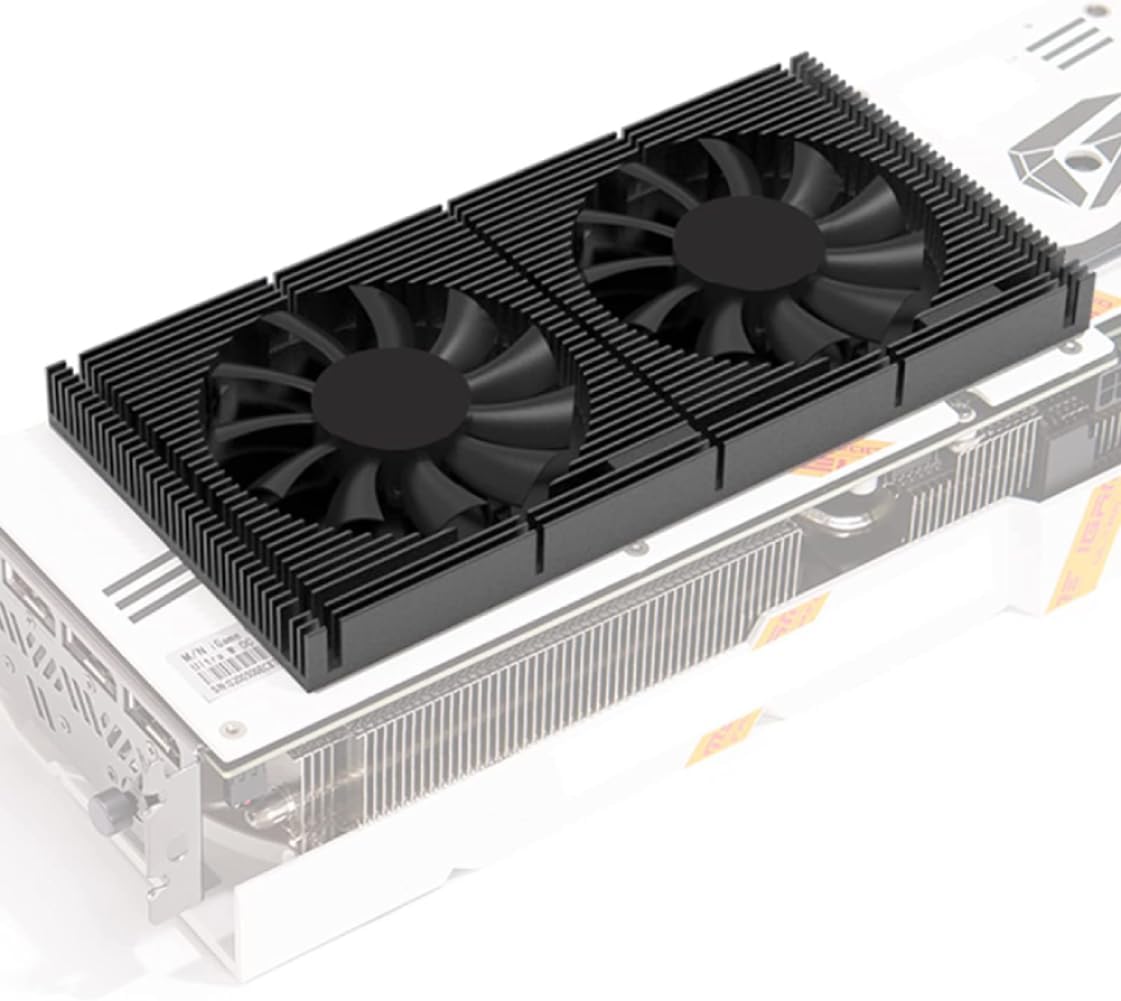
The Dual-Fan GPU Memory Heatsink is the most elaborate active design in the roundup, combining a large aluminum backplate with two 70mm PWM fans and an included 1.2mm thermal pad. Its 4.2 rating indicates a positive response, while the unusually comprehensive specification set makes its intended role clear.
We may earn a commission when you buy through this link, at no additional cost to you.
Two dual-ball-bearing 70mm fans provide a stated adjustable speed range of 1500–2800RPM. The 6061 aviation aluminum body is described as lightweight, sturdy, and oxidation resistant, with a 1.5mm plate thickness and a 180 x 90 x 15mm overall size. A 50cm four-pin cable connects the fan assembly, and the stated noise range is 16–20dBA. An elastic latch is designed to make installation and removal easier.
Its size and complexity demand careful planning. The 180mm length may not suit compact cards, and the 15mm height adds substantial clearance requirements. The product is primarily designed for the RTX 3090 and is also listed as compatible with the RTX 3080 and 3070, but only when the radiator can be installed on a flat surface. The 50cm cable must reach a compatible header without creating a sharp bend.
This cooler is best for a builder with a large compatible RTX card who wants a substantial active cooling solution and has sufficient case clearance. The included 1.2mm pad improves contact where appropriate, but users should verify surface alignment and component clearance before applying or mounting the assembly.
The pair of 70mm fans distributes airflow over a wider area than a single compact fan. Their PWM range also allows the system to vary speed according to operating conditions.
The 6061 aluminum construction balances rigidity and weight, while the stated 1.5mm plate is thicker than many alternatives. The included 1.2mm pad is intended to maintain contact with the target surface.
We may earn a commission when you buy through this link, at no additional cost to you.
The best GPU backplate is the one that matches the exact card, protects the areas that need protection, and fits the available physical space. Compatibility, mounting method, cooling needs, structural support, and connector placement should be evaluated before choosing an accessory.
Start with the full model name printed on the card or its packaging. A backplate designed for one board partner's RTX 5060 may not match another partner's version because PCB dimensions, screw positions, ports, and rear components can differ. Products named for RTX 3070, 3080, or 3090 models may also vary substantially in length, height, and cooler layout. For universal finned modules, compare the footprint against the available surface and check whether an existing backplate or mounting hardware must be removed.
In short, buy for the exact board and revision whenever possible, not merely the GPU family name.
A passive aluminum plate primarily protects the PCB, adds rigidity, and spreads heat gradually into the surrounding air. A finned passive heatsink creates more surface area but still relies on ambient movement. An active radiator adds a fan to move cooler air across memory, VRMs, or other rear-side components. Active designs can be more effective in specific arrangements, but they require clearance, a fan header, a cable, and consideration of noise.
Choose passive protection for a clean, low-complexity build, or an active cooler when directed rear-side airflow is a priority and the card can accommodate the added depth.
Aluminum is common because it combines low weight, corrosion resistance, and useful thermal conductivity. The product listings mention aluminum, aluminum alloy, 6061 aviation aluminum, and black zinc alloy for different items. Thickness and machining quality also matter: a rigid plate can help resist PCB flex, while a thin decorative cover may provide little structural benefit. Anti-sag support is a separate concern that may be better handled with an adjustable bracket.
Look for a rigid metal construction that fits the card, then add a separate support if the graphics card is heavy or the case lacks a suitable mounting point.
Screw-secured, card-specific plates usually provide the most controlled alignment and are easier to assess before installation. Universal heatsinks may use pre-applied thermal adhesive tape, which is convenient but difficult to reposition after the bond is set. Active coolers may use clamps, latches, or screws and can require removal of an existing plate. A product that promises no drilling or permanent modification is especially attractive to builders who want to preserve the original card.
Choose an installation method that matches your comfort level and leaves the card reversible whenever possible.
The metal plate must make consistent contact with the intended hot area. Thermal pads can fill small gaps and provide a removable interface, while adhesive-backed modules may require more careful alignment because they cannot easily be lifted and repositioned. For passive plates, the benefit comes primarily from even heat distribution and structural protection; for dedicated memory coolers, the pad's thickness and placement are more central to cooling performance.
Verify pad thickness, contact area, and placement, and avoid leaving a wrinkle or gap between the cooler and the board.
A 15mm-thick radiator, a 180mm-long dual-fan cooler, and a finned plate with 15mm height create very different clearance requirements. Measure from the graphics-card slot to the case wall, drive cages, fans, and neighboring expansion cards. Active products also need a four-pin header and a route for a 50cm cable or another specified lead. Secure the cable so it cannot interfere with a rotating fan or be pinched by a card.
Measure the whole installation path, not just the mounting area, before ordering a thick or powered accessory.
A backplate can add some rigidity, but a dedicated support bracket offers a more direct solution to GPU sag. Adjustable supports can be installed from the case floor and raised until they contact the card. Their effectiveness depends on case geometry, available interior space, and the weight and balance of the graphics card. In vertical installations, support may be even more important because the card's weight can pull away from the motherboard slot.
For a heavy card, combine a well-fitted backplate with a properly positioned support rather than expecting the cover alone to prevent bending.
Check what arrives in the package and whether the product includes screws, a thermal pad, adhesive tape, or an installation kit. A complete set can simplify assembly, but the quality and count of the included fasteners should still be verified. Some accessories may use an elastic latch for quick removal, while others require screws and alignment with original PCB mounting points. Review the product instructions before removing the graphics card from the system.
A complete, model-specific hardware set is usually the most convenient and least error-prone installation path.
Before installation, power down the computer, switch off the power supply, and unplug the graphics card. Remove the side panel, disconnect the display and power cables, release the retention hardware, and remove the card if the accessory must sit directly against the PCB. Clean the card's rear surface and the accessory's contact area with appropriate electronics-safe material so dust or old thermal material does not interfere with contact.
Install the backplate or radiator according to its design. For a screw-secured model, align every pre-drilled hole and fasten gradually to avoid warping the plate. For adhesive mounting, keep the contact area clean and flat, align the product before pressing, and avoid placing excessive force on nearby components. For active coolers, connect the four-pin lead to a suitable header and route the cable away from rotating parts.
After fitting the accessory, inspect the entire installation before closing the case. Confirm that the card, heatsink, fan, and neighboring expansion devices do not touch. Power on the system and monitor graphics-card temperatures, fan behavior, and stability during a normal workload. Clean dust from the fins periodically, keep airflow paths unobstructed, and avoid placing the graphics card or cooler directly on a surface that could block its fans.
No. Many modern graphics cards already include a substantial factory backplate that provides structural rigidity and basic protection. An aftermarket plate is most useful when the original cover is missing, damaged, flimsy, or insufficient for a demanding installation. A separate support bracket may also be more appropriate when the main concern is card sag rather than missing rear protection.
A rigid, precision-fit backplate can reduce flex and provide some anti-sag benefit, but it does not carry the card's full weight in every installation. A dedicated adjustable support is generally more direct because it supports the card from below. Builders with large cards should consider using both a quality backplate and a properly positioned support.
Only to the extent that its material spreads heat and surrounding air carries that heat away. A passive plate can help distribute thermal load, while a finned or active radiator can move cooler air across memory and VRM areas. The effect depends on contact, placement, case airflow, and the thermal design of the graphics card.
Check the brand, exact model, memory configuration, and any suffix such as OC, LP, Solo, FTW3, or XC3. Compare the card dimensions, mounting-hole positions, port openings, and rear-component layout with the product listing. Model-specific wording is especially important because the same GPU generation can use very different PCB and cooler designs across manufacturers.
The active products in this guide use four-pin connections, so they require a compatible power source and a correctly routed cable. Some motherboards can control a four-pin fan through the system fan interface, but users should confirm the header type, available connectors, and whether the graphics card's fan-control software is required.
Only if the product is specifically designed for that card's low-profile layout. Bracket height, total card thickness, screw locations, and port openings must all be compatible. A full-height accessory may prevent the card from fitting in a small-form-factor case, while a low-profile-specific plate may still add enough depth to exceed the chassis limit.
Not exactly. A universal finned heatsink is a thermal module that can be mounted over a suitable electronics surface, whereas a replacement backplate is shaped around a particular PCB and mounting pattern. Universal modules require careful clearance planning and may be used on other components such as routers or power modules, but they do not automatically provide the same full-board protection.
Removal is strongly recommended for any accessory that attaches directly to the rear PCB, especially one with adhesive, a latch, or a fan that must be positioned precisely. Power down and unplug everything, then follow the card and case removal procedures. If the accessory mounts externally without reaching the card, removal may not be necessary, but the manufacturer instructions should still be followed.
The ZOTAC RTX 5060/5050 Solo 8GB backplate stands out for its precision fit, CNC-machined aluminum, ventilation, and strong 5.0 rating, while the dual-fan 6061 aluminum heatsink offers the most substantial active cooling in the group. The large finned heat sink provides a simpler passive approach, and the California JOS bracket solves the distinct problem of GPU sag without trying to function as a rear cover.
Compatibility should take priority over every other feature. A card-specific plate that fits correctly is usually more useful than a universal accessory that is larger, harder to mount, or unable to clear nearby components. Once fit is confirmed, consider whether the card needs simple structural protection, passive heat spreading, directed fan-assisted cooling, or a separate anti-sag support.
Before purchasing, verify the exact board-partner model, dimensions, mounting points, case clearance, and available fan header. Current prices and listing details can change, so shoppers should review the latest product page and manufacturer compatibility information at the time of purchase.