
TP-Link AC1200 WiFi Extender
4.2Editor score
AC1200 dual-band performance
Up to 1,500 square feet
One-Touch WiFi setup
Our Long Range WiFi Extender guide compares ten indoor and outdoor models for range, wireless speed, Ethernet support, setup ease, and device capacity.
A long range WiFi extender can eliminate weak signals in distant bedrooms, basements, garages, and outdoor areas that sit beyond the useful reach of a main router. The right model depends on home size, wall construction, device count, wired-backhaul options, and whether the system must operate indoors or outdoors.
We compared all ten products by examining their stated wireless standards, maximum theoretical bandwidth, coverage claims, supported connections, antenna designs, Ethernet capabilities, operating modes, and setup features. The list includes conventional dual-band extenders, tri-band and WiFi 7 models, a full mesh system, and weather-resistant outdoor units.
Each review explains where the product stands out, identifies the trade-offs supported by its specifications, and clarifies the type of home or installation it suits best. Ratings and product details reflect the supplied listings, while prices and availability can change, so readers should confirm current listing details before buying.
4.2Editor score

4.1Editor score

4.2Editor score
The comparison below highlights the most important differences among indoor range extenders, a mesh alternative, and weather-resistant outdoor models, including their radio classes, claimed coverage, connection capacity, and wired connectivity.




The TP-Link AX3000 WiFi 6 Dual-Band Range Extender is the most versatile conventional extender in this group. It carries a 4.1 rating and combines dual-band WiFi 6 performance with a stated coverage area of up to 2,400 square feet. Two directional antennas, beamforming, and support for as many as 64 devices make it a credible choice for improving a medium or large home without replacing the entire networking system.
We may earn a commission when you buy through this link, at no additional cost to you.
Its headline bandwidth is 2,978 Mbps across the two bands, comprising up to 2,404 Mbps on 5 GHz and 574 Mbps on 2.4 GHz. These figures are theoretical maximums rather than guaranteed real-world transfers, and the manufacturer explicitly cautions that an extender does not increase the speed of the originating internet connection. Even so, a stronger and more reliable signal can improve the experience at the fringe of a router's reach.
The gigabit Ethernet port adds meaningful flexibility. It can provide a wired connection to a desktop, television, game console, or other Ethernet-ready device, while AP mode can turn that port into a Wi-Fi hotspot. EasyMesh compatibility allows the extender to join a compatible router as part of a unified network, although it is expressly not compatible with TP-Link Deco systems.
This is the best overall recommendation for readers seeking a current WiFi 6 extender, app-assisted setup, and a wired connection without moving to a complete mesh deployment. It is particularly suitable for a home with WiFi 6 routers and compatible devices. The listed rating is lower than several alternatives, but the specification balance makes it a more future-conscious selection than basic AC-rated extenders.
Beamforming and the two high-gain directional antennas work together to focus the extender's signal. The gigabit Ethernet port can also create a fast, stable link back to the main network when running a long cable is practical.
The Tether app provides setup guidance, an intelligent signal indicator for finding a better location, and access to firmware updates. EasyMesh support helps compatible networks behave as one system rather than forcing manual switching.
We may earn a commission when you buy through this link, at no additional cost to you.
The TP-Link AC1200 RE315 is a practical budget selection for filling a moderate dead zone without installing a full mesh network. Its 4.2 rating reflects a generally favorable customer response, while its dual-band design and up-to-1,500-square-foot coverage estimate make it appropriate for apartments, smaller homes, and individual rooms far from the router.
We may earn a commission when you buy through this link, at no additional cost to you.
The extender offers up to 867 Mbps on the 5 GHz band and 300 Mbps on 2.4 GHz. As with other repeaters, those are maximum radio rates and do not represent a guaranteed increase in internet speed. The more important practical benefit is extending usable coverage into areas where the original signal becomes unstable. Adaptive Path Selection is designed to help the device choose a suitable path back to the router.
Setup is intentionally approachable. One-Touch Connection supports a quick WPS-based pairing process, and the TP-Link Tether app assists with configuration, placement, and management. The intelligent signal indicator makes it easier to find a location that receives a strong signal without placing the extender too close to the main router.
The RE315 is best for readers who want uncomplicated coverage extension, reliable dual-band WiFi, and a familiar app. Its Ethernet port is rated as fast Ethernet rather than gigabit, and its stated device capacity and coverage are lower than those of higher-end models. Those limitations are reasonable for a value-focused indoor installation, making it our Best Budget pick.
The RE315 focuses on the common task of extending a signal into a nearby bedroom, office, or upstairs landing. Adaptive Path Selection and automatic connection to the strongest signal help reduce the need for manual network management.
The Tether app includes an intelligent signal indicator, firmware access, and setup prompts. Combined with One-Touch Connection, it makes the extender approachable for first-time network owners.
We may earn a commission when you buy through this link, at no additional cost to you.
The TP-Link AC1900 RE550 is a strong indoor extender for users who prioritize coverage and a gigabit wired connection over adopting the newest wireless generation. It has a 4.3 rating, three adjustable external antennas, and a stated coverage area of up to 2,100 square feet. Those characteristics make it well suited to larger homes that need a targeted dead-zone solution.
We may earn a commission when you buy through this link, at no additional cost to you.
Its dual-band radio combines a maximum 1,300 Mbps rate on 5 GHz with up to 600 Mbps on 2.4 GHz. The product supports up to 32 connected devices and can connect to almost all Wi-Fi-enabled routers and access points. EasyMesh compatibility improves integration with compatible networks, while the manufacturer notes that it cannot be used with Deco mesh systems.
The gigabit Ethernet port expands the possibilities beyond conventional wireless repeating. A computer or smart television can be connected directly for a stable wired link, and AP mode turns the extender into a wireless access point. The Tether app supports initial setup, firmware updates, and signal-based placement guidance, which helps reduce the common problem of installing an extender where it cannot receive a strong upstream signal.
The RE550 suits readers with an AC1200 or faster router who want broader indoor reach and gigabit networking. It does not offer WiFi 6, so newer systems with WiFi 6 clients may find a WiFi 6 extender more forward-compatible. Even with that caveat, its combination of 4.3-star feedback, strong coverage claims, and a gigabit port makes it an excellent traditional extender.
Three adjustable external antennas let installers orient the radio toward problematic parts of a property. Fine positioning can be more useful in irregular homes than relying exclusively on a fixed internal antenna pattern.
The Ethernet port supports direct connections for compatible devices. In AP mode, it also allows the RE550 to create a wireless access point from an existing wired network.
We may earn a commission when you buy through this link, at no additional cost to you.
The Eboous 2026 WiFi Extender Signal Booster stands out for its unusual breadth of claimed features. It has a 5.0 rating, an asserted coverage area of up to 15,000 square feet, support for more than 65 simultaneous devices, eight high-gain antennas, and an Ethernet port. These specifications make it an intriguing option for very large homes, offices, or properties with numerous connected devices.
We may earn a commission when you buy through this link, at no additional cost to you.
The product uses a bionic chip alongside four stated high-gain antennas and a 4+4 high-power FEM antenna arrangement. Its listing claims six-times-faster performance, faster wireless connections, and smoother experiences for 4K streaming and gaming. Because the listing does not provide the same detailed band-by-band maximum rates or wireless generation as the TP-Link models, the headline claims should be treated carefully.
Setup flexibility is a meaningful strength. WPS pairing provides a one-button path to configuration, while Repeater, Bridge, Access Point, Mesh, and Router modes cover several installation scenarios. The device also supports WEP, WPA, and WPA2 encryption, which can help protect connected phones, cameras, televisions, baby monitors, and other internet-connected equipment.
This extender is best for buyers who prioritize antenna count, operating-mode flexibility, and a very large stated capacity rather than a clearly documented WiFi standard. Its 5.0 rating is impressive, but ratings alone do not validate a coverage estimate. Placement, walls, router capability, and interference will still determine actual results, so readers should verify compatibility and signal strength in their own environment.
Repeater mode extends an existing signal, Bridge mode links separate networks, and Access Point mode adds wireless access to a wired connection. Router and Mesh modes provide additional ways to organize a home or office network.
The stated capacity of more than 65 devices targets smart homes with cameras, speakers, televisions, phones, and computers. Real performance still depends on the router and internet connection feeding the extender.
We may earn a commission when you buy through this link, at no additional cost to you.
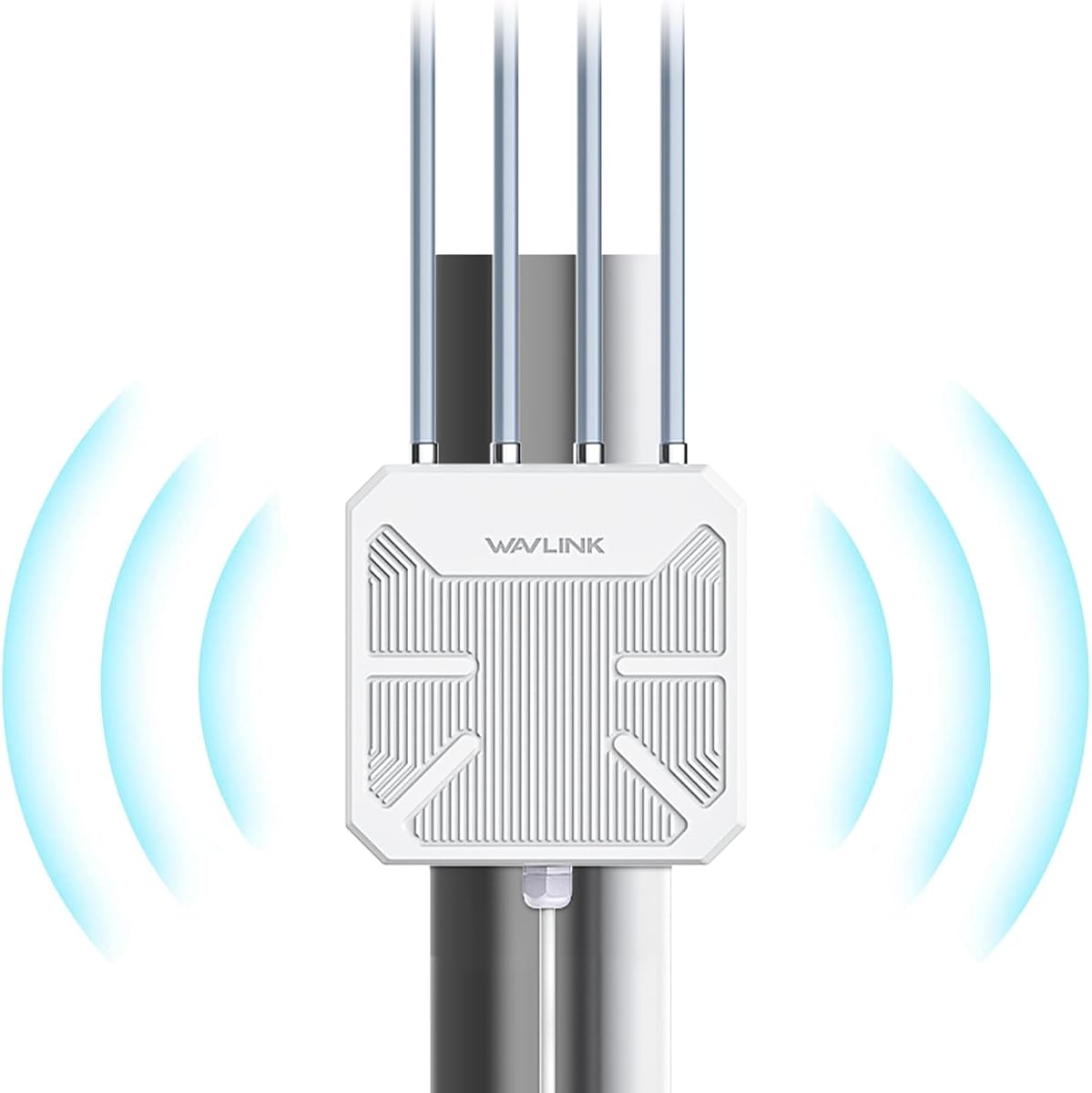
The 2026 WAVLINK AX3000 Outdoor WiFi 6 Extender is the strongest choice here for extending a network into a yard, garage, farm, estate, parking area, or other exposed environment. It carries a 4.2 rating and combines a documented AX3000 dual-band radio with an IP67 waterproof enclosure, detachable antennas, amplifiers, and a gigabit Ethernet port.
We may earn a commission when you buy through this link, at no additional cost to you.
Its maximum stated rates are 2,402 Mbps on 5 GHz and 573 Mbps on 2.4 GHz. The listing gives a radius estimate of 200 to 300 meters in line-of-sight conditions and a capacity of up to 256 connections. These figures illustrate the scale of the system, although walls, terrain, vegetation, and competing radio signals will materially affect real outdoor performance.
Environmental protection is a defining feature. The unit is rated for rain, snow, wind, and thunder, with stated operating temperatures from -20 to 50 degrees Celsius, 15kV ESD protection, and 6kV lightning protection. It supports both 802.3af/at active PoE and passive PoE, allowing data and power to travel over a single Ethernet cable when a nearby outlet is unavailable.
The variety of operating modes makes it suitable for professional and advanced residential installations. Mesh, AP, Router, Repeater, and AP-plus-Repeater modes cover common outdoor networking roles, while beamforming, MU-MIMO, band steering, and seamless roaming are supported. One caution is that the supplied PoE converter is not waterproof and must be installed indoors. For readers extending a network beyond the house, this is the premium outdoor recommendation.
The sealed IP67 enclosure and stated surge protections make the unit more appropriate for rain, snow, dust, and temperature changes than an indoor repeater. The product still requires secure mounting and careful cable routing.
Active and passive PoE support reduce installation friction where an electrical outlet is not nearby. The Ethernet run should use CAT5E or better and remain within the stated maximum cable length.
We may earn a commission when you buy through this link, at no additional cost to you.
The TP-Link BE3200 Wi-Fi 7 Dual-Band Range Extender RE223BE is designed for homes that have already adopted a WiFi 7 router. Its 4.2 rating reflects generally positive feedback, while support for Multi-Link Operation, 160 MHz channels, 4K-QAM, and newer client devices gives it a clear role in modern high-end networks.
We may earn a commission when you buy through this link, at no additional cost to you.
The extender offers maximum stated rates of 2,594 Mbps on 5 GHz and 688 Mbps on 2.4 GHz. Four optimally positioned antennas and beamforming support a stated coverage area of up to 2,400 square feet and capacity for as many as 64 devices. As with other wireless extenders, the listing correctly notes that it improves coverage rather than increasing the underlying internet speed, and real results depend on the source network.
Multi-Link Operation becomes relevant when the extender is paired with a WiFi 7 router. It can combine frequency bands to improve throughput, latency, and reliability. The device also supports EasyMesh integration, automatic roaming, gigabit Ethernet, and app-based placement and firmware management. These features make it straightforward to add coverage while maintaining a coherent household network.
The important limitation is that this remains a dual-band unit without 6 GHz support. Its full potential is best realized with a WiFi 7 router and WiFi 7 clients, not an older network that can only negotiate slower standards. It is a compelling choice for early adopters who want a dedicated WiFi 7 extender and understand that the rest of their network must be ready to benefit.
Multi-Link Operation, 160 MHz support, Multi-RUs, and 4K-QAM can improve the experience when paired with compatible equipment. Existing WiFi 6 or older clients will continue to connect, though they cannot use WiFi 7-specific capabilities.
EasyMesh compatibility, smart roaming, a gigabit port, and app-assisted setup make the RE223BE suitable for extending a current high-speed network without converting it to a separate wired subnet.
We may earn a commission when you buy through this link, at no additional cost to you.
The TP-Link RE815X AX5400 WiFi 6 Tri-Band Range Extender is built for busy homes where a single extended network must serve many devices. It has a 4.3 rating, a stated coverage area of up to 2,800 square feet, support for up to 96 devices, and a tri-band design that separates traffic across two 5 GHz bands and one 2.4 GHz band.
We may earn a commission when you buy through this link, at no additional cost to you.
Maximum throughput is listed at 2,402 Mbps across the two 5 GHz bands and 574 Mbps on 2.4 GHz. Four high-gain directional antennas and six FEM components work with beamforming to strengthen and direct the signal. Although extenders cannot accelerate the source internet connection, a more reliable signal in a poorly served area can improve streaming, browsing, and application responsiveness.
Its gigabit Ethernet port can connect a fixed device or provide a wired connection back to the network, and Access Point mode can turn the port into a wireless hotspot. OneMesh compatibility allows it to work with compatible TP-Link OneMesh routers, while the listing notes that it is not compatible with Deco systems. The Tether app handles setup, signal placement, and firmware updates.
The RE815X is best for larger, device-dense homes with a reasonably capable WiFi 6 router and users who want tri-band capacity without deploying three mesh nodes. It is a more specialized purchase than a basic dual-band extender, but its 96-device capacity and broad coverage claim make it an attractive option for smart homes, busy offices, and media-heavy households.
The two 5 GHz bands and one 2.4 GHz band provide more radio paths than a conventional dual-band extender. This can be useful in crowded environments where managing different clients and traffic types matters.
A stated limit of 96 devices accommodates phones, televisions, cameras, speakers, and other connected equipment. The number is a capacity claim, while everyday responsiveness still depends on the main router and internet service.
We may earn a commission when you buy through this link, at no additional cost to you.
The TP-Link Deco X55 AX3000 WiFi 6 Mesh System is included because a three-node mesh network is often a better answer than repeatedly extending a signal. Its 4.4 rating is the highest among the TP-Link products reviewed, and the system is stated to cover up to 6,500 square feet while supporting up to 150 devices.
We may earn a commission when you buy through this link, at no additional cost to you.
Each node uses dual-band WiFi 6 with 2,402 Mbps on 5 GHz and 574 Mbps on 2.4 GHz. The Deco app guides setup and management, while AI-driven mesh technology is designed to learn the home's network environment. Unlike a conventional repeater that can create a separate network name, a properly configured mesh system presents a unified experience with coordinated roaming.
Every Deco X55 node has three gigabit Ethernet ports, allowing flexible connections and the option of wired Ethernet backhaul between units. Backhaul can be especially valuable in homes where running a cable is practical because it keeps the communication link between mesh nodes separate from client traffic. Any node can also function as a router according to the listing.
This is the best choice for a large home with several difficult-to-reach areas, heavy device use, or a willingness to install multiple nodes. It is not a direct substitute for a single extender in terms of hardware count, and the product description explicitly positions it as an alternative to traditional boosters. Buyers should plan node placement carefully to avoid creating unnecessary overlap.
Mesh networking is intended to provide more uniform roaming and centralized control. The Deco app handles configuration for the three included units and adjusts the network as it learns the surrounding environment.
The available gigabit ports allow nodes to be linked with Ethernet where possible. This can improve the inter-node link and provide reliable wired access points in challenging parts of a large property.
We may earn a commission when you buy through this link, at no additional cost to you.
The AC1900 Dual Band WiFi Repeater is a feature-focused indoor alternative with a 5.0 rating. Its listing claims coverage up to 13,880 square feet, support for as many as 105 devices, and dual-band AC1900 performance. Those numbers position it for large homes, basements, garages, and other spaces where a modest extender may struggle to reach.
We may earn a commission when you buy through this link, at no additional cost to you.
The product is designed to support phones, laptops, tablets, smart televisions, and a wide range of smart-home devices. Its Ethernet port allows a compatible television, desktop, or game console to be connected by cable, providing a useful option when wireless performance is inconsistent or the device benefits from a wired path.
WPS one-touch setup reduces the configuration process, and an intelligent LED signal indicator helps identify a location with a stronger connection to the main router. The stated compatibility covers most routers, gateways, and Wi-Fi-enabled devices that support 802.11a/b/g/n/ac. It is a conventional repeater rather than a complete mesh ecosystem, so placement remains decisive.
This booster is best for buyers seeking high device capacity and a broad claimed area from one unit, especially where the network must support numerous smart-home products. The absence of separate 5 GHz and 2.4 GHz maximum rates in the listing means the AC1900 label provides less technical detail than some competitor specifications. Its 5.0 rating and stated capacity still make it a notable high-capacity choice.
The listed capacity of 105 devices is among the highest in this roundup. It is well suited to homes where many sensors, cameras, speakers, and entertainment devices are online at the same time.
The LED signal indicator assists with setup, but the extender still needs a strong upstream connection. Placement halfway toward the dead zone is generally more productive than pushing the unit as far away as possible.
We may earn a commission when you buy through this link, at no additional cost to you.
The 2026 WAVLINK AX1800 Outdoor WiFi 6 Extender is a well-documented outdoor option with a 4.4 rating. It is designed to extend a home or rural network into yards, farms, estates, garages, RV parking areas, and other open environments where an indoor router cannot provide sufficient line-of-sight coverage.
We may earn a commission when you buy through this link, at no additional cost to you.
The unit offers a maximum AX1800 aggregate rate of 1,800 Mbps, divided into 1,201 Mbps on 5 GHz and 574 Mbps on 2.4 GHz. Four detachable 8dBi omni-directional antennas are claimed to support a radius of up to 200 to 300 meters in open environments and as many as 256 connections. The listing also describes compatibility with Starlink Gen 2 and Gen 3 through a Starlink Ethernet Adapter.
A sealed IP67 enclosure is rated for moisture, dust, heat, and cold, while the unit has stated 6kV lightning and 15kV static-shock protection. Active 802.3af/at PoE and passive PoE are supported, making one-cable installations possible. The included passive adapter is not waterproof, so it must remain indoors or inside a suitably protected enclosure.
Mesh, AP, Router, Repeater, and AP-plus-Repeater modes allow the unit to be adapted to different network roles, although Mesh mode is limited to compatible WAVLINK series products. This is a strong recommendation for readers extending service to an outdoor camera, workshop, secondary building, or open property. It is less suitable for simple indoor use because its weatherproofing, mounting needs, and PoE installation add unnecessary complexity indoors.
The IP67 casing and stated electrical protections suit exposed installations better than an indoor repeater. Secure mounting, suitable cable routing, and compliance with local electrical guidance remain essential.
Power and data can share a single Ethernet run, which is useful for gardens, farms, and outbuildings. CAT5E or higher is recommended, and the overall cable length should remain within 100 meters.
We may earn a commission when you buy through this link, at no additional cost to you.
The right extender depends on where the signal fails, how much bandwidth the local devices need, and whether a wired connection can be used. Comparing radio standards, antennas, range claims, and installation requirements prevents buyers from choosing on headline numbers alone.
Choose a device intended for the size and complexity of the affected area, but treat maximum square-footage figures as estimates rather than guarantees.
Match the extender standard to the router first, then confirm that important devices can benefit from the newer generation.
Use Ethernet backhaul when possible; reserve wireless repetition for locations where a cable cannot be installed.
Expect real-world range to vary, and position the unit where it receives a strong router signal before focusing on maximum transmission.
Choose enough stated capacity for current and planned devices, while recognizing that the source router remains the primary bottleneck.
Check compatibility and select the mode that matches the intended network structure before installation.
Never install a basic indoor extender outdoors; select a model explicitly designed for environmental exposure.
Select the simplest system that addresses the actual coverage problem, and confirm that setup and maintenance fit your comfort level.
Begin by identifying a location that is partway between the main router and the weak-signal area. Plug in the extender, connect it to the router through WPS, One-Touch Connection, or the manufacturer's app, and use the intelligent signal indicator to move it until it receives a strong upstream connection. Avoid placing it immediately beside the router, because that can create unnecessary interference and may prevent the extended signal from reaching the intended area.
After connecting, update the firmware, confirm that the extender has joined the correct network, and test speed and reliability in the rooms that previously suffered from dead zones. Use Ethernet for fixed devices whenever possible, and choose Access Point mode when the extender will receive a wired connection. For outdoor equipment, mount the enclosure securely, protect non-weatherproof adapters, and route the Ethernet cable through a suitable exterior-rated pathway.
Periodically check signal indicators, device connections, and firmware notices. If performance declines, move the extender closer to the router or investigate interference from nearby wireless networks. Large homes may benefit from repositioning an extender or adding a mesh node rather than adding more repeaters that compete for the same upstream signal. Keep indoor units away from enclosed cabinets, direct sunlight, metal appliances, and other obstructions that can weaken radio performance.
An extender normally cannot make the underlying internet connection faster because it receives and retransmits the existing network signal. It can improve practical performance in weak areas by restoring reliability and reducing buffering or dropped connections. The largest gain usually appears where a weak signal previously prevented devices from using the available connection efficiently.
A single extender is usually sufficient for one dead zone and is less involved to install. A mesh system is often better for a large home with several weak areas because multiple nodes can create a unified network and distribute coverage more evenly. If a cable can be run between nodes, wired mesh backhaul may provide a stronger solution than repeated wireless extension.
Generally, yes. A wired Ethernet link between the router and extender avoids the signal loss and shared-band congestion that occur when the extender communicates wirelessly. Use wireless backhaul only when a suitable cable route is unavailable, and position the unit where its connection to the router remains strong.
Many WiFi 6 extenders are compatible with earlier Wi-Fi routers, but the WiFi 6 benefits are then limited. The extender can still extend coverage using the standards supported by the source network. To gain the full benefits, the router and important client devices should also support WiFi 6.
Choose a model explicitly designed for outdoor use, such as the WAVLINK AX3000 or AX1800 models featured here. Both have IP67 enclosures, external high-gain antennas, and PoE options for remote installations. Follow the supplied electrical guidance, keep the PoE adapter indoors when it is not waterproof, and use appropriate exterior cable protection.
The stated area is a best-case estimate and can be reduced by walls, floors, metal objects, router capability, and interference. Even a model listing a very large coverage area may perform poorly if it is placed too far from the router. A strong upstream signal and deliberate placement are more meaningful than the maximum number printed on the box.
It depends on the model and operating mode. EasyMesh- or OneMesh-compatible units can integrate with compatible routers and provide unified roaming, while some configurations use a separate network name. Access Point mode adds WiFi to a wired network, and a basic repeater may create additional network names. Check the desired integration before setup.
Place it roughly halfway between the router and the area that needs coverage, but closer to the router if walls make the midpoint weak. Use the signal indicator to find a location with strong reception from the main network. The goal is not to place the unit at the farthest possible point, but to give it a reliable link back to the router.
The TP-Link AX3000 WiFi 6 extender is the strongest all-purpose indoor choice, combining current wireless standards, gigabit Ethernet, EasyMesh support, and app-assisted management. The TP-Link RE315 is the value-focused option for smaller dead zones, while the WAVLINK AX3000 Outdoor leads the premium outdoor category with weather protection, high-gain antennas, and flexible PoE installation.
Prioritize the source connection, backhaul method, and intended location over headline range numbers. A gigabit Ethernet backhaul and a strong upstream signal can outperform a more powerful-looking antenna arrangement. Use a mesh system for broad, multi-area coverage; choose a weatherproof model outdoors; and verify standards and ecosystem compatibility before installation.
Product listings, ratings, specifications, and prices can change over time, and each home has a different combination of walls, interference, router capability, and client devices. Review the current product page and confirm compatibility, coverage needs, and installation requirements before making a final purchase.