
Amazon Basics Compact USB Speakers
4.2Editor score
Direct USB power connection
Front-mounted volume control
No driver installation required
Compact 2.76-inch width
Our expert guide compares 10 best small speakers for computers, covering USB power, Bluetooth, AUX connectivity, sound quality, controls, and compact designs.
Small speakers for computers can transform a crowded workstation, improve spoken-dialog clarity, and provide more convincing music and game audio without requiring a large entertainment system. The right pair should fit your available desk area, connect cleanly to your computer, deliver balanced sound, and offer controls that are easy to reach. Compact size alone does not guarantee good performance, so the most important factors include driver design, amplification, connectivity, and practical features.
This guide compares ten small computer speaker systems using the supplied specifications, customer ratings, connectivity options, physical design, and intended uses. The list includes USB-powered stereo sets, Bluetooth-enabled models, compact sound bars, a conference speakerphone, and a larger 2.1 system with a subwoofer. Every selection offers a distinct balance of features, so the recommendations focus on identifying which model best fits a particular desk, listening habit, or communication setup.
The top selections demonstrate how small speakers can serve very different needs: the Creative Pebble V3 emphasizes clear dialogue and flexible wired or wireless use, the compact Amazon Basics model prioritizes straightforward plug-and-play operation, and the Klipsch ProMedia 2.1 delivers a dedicated subwoofer and much greater low-end output. Ratings, availability, and prices can change, so shoppers should confirm the current product details before purchasing.
4.2Editor score

4.4Editor score

4.5Editor score
This side-by-side comparison highlights the different connections, output levels, control layouts, and listening roles represented across the list, helping readers distinguish a basic USB desktop pair from a wireless sound bar or a dedicated 2.1 system.





The Creative Pebble V3 is a compact 2.0 desktop speaker system that combines a 4.4 rating with one of the most versatile connection arrangements in this guide. It can serve as a straightforward USB-C computer speaker, connect wirelessly through Bluetooth 5.0, or accept a 3.5mm analog signal from another source. That combination makes it a strong general-purpose choice for users who want more than a basic permanent desktop installation.
We may earn a commission when you buy through this link, at no additional cost to you.
Its largest distinguishing feature is the built-in gain switch, which works with a compatible 10W USB-C or USB-A port. The supplied specifications also describe 8W RMS output, up to 16W peak power, custom-tuned 2.25-inch full-range drivers, and enhanced bass reproduction. Clear Dialog processing is particularly relevant for YouTube, television content, and streaming video because it is designed to make speech intelligible while preserving background effects.
The main compromises involve connection convenience rather than core functionality. A USB-C to USB-A converter is included for older computers, but users of a USB-A system will still need to account for that adapter. The 3.5mm AUX cable is not included, and the model is designed primarily for use at a desk rather than for portable battery operation. These are reasonable limitations for a fixed workspace speaker.
This is a particularly good recommendation for people who move between laptop work, video viewing, and casual Bluetooth listening. It is also appropriate for anyone who wants spoken content to remain easy to understand without constantly raising the overall level. For a small computer speaker with modern USB-C integration, dialogue-oriented processing, and wireless flexibility, the Creative Pebble V3 is among the most complete choices available here.
Clear Dialog processing targets the most common weakness of compact computer speakers: speech can become difficult to understand when music or effects are mixed in. The Pebble V3's processing is designed to clarify spoken content without removing background audio, making it useful for instructional videos, webcasts, television, and streamed series.
A single USB-C cable handles both power and computer audio on compatible systems, keeping the desk less cluttered. Bluetooth 5.0 adds a convenient wireless path for music from a phone or other paired device, while the AUX input broadens compatibility with additional analog sources.
We may earn a commission when you buy through this link, at no additional cost to you.
The Creative Pebble 2.0 earns a 4.6 rating, making it the highest-rated product among the ten options, and it offers a particularly straightforward approach to computer audio. The pair operates from a single USB cable connected to a computer or laptop, eliminating the need for a separate power adapter. It is a natural fit for users who want their speakers ready whenever the computer is connected.
We may earn a commission when you buy through this link, at no additional cost to you.
The design uses custom-tuned far-field drivers with rear-facing passive radiators to improve bass reproduction. Its 45-degree elevated drivers are intended to project sound more directly toward a seated listener, a useful detail on a desk where both speakers can be angled toward the user. Front-facing controls make everyday volume adjustments easy without reaching behind either speaker.
Compared with the Pebble V3, this version is less versatile. It does not offer the Bluetooth 5.0 connection, Clear Dialog processing, USB-C arrangement, or gain switch listed for the newer model. Its stated frequency response begins at 100Hz and extends to 17kHz, which is a narrower range than some alternatives, though specification figures alone do not describe the complete listening experience.
The Creative Pebble 2.0 is a strong recommendation for a fixed office or home-computer setup where simplicity, compact styling, and customer satisfaction matter most. It also suits users who do not need Bluetooth and want the computer to remain the single source of audio. Among conventional wired desktop speakers, it offers a particularly polished combination of convenience and design.
Connecting the speakers through one USB cable reduces desk clutter and removes the need for a wall adapter. This arrangement suits a permanently installed pair, especially when the computer already provides a conveniently placed USB port.
Rear-facing passive radiators supplement the far-field drivers with additional low-frequency support. Raising the drivers by 45 degrees also helps direct sound toward the listening position rather than away across the desktop.
We may earn a commission when you buy through this link, at no additional cost to you.
The Amazon Basics Stereo 2.0 is a two-speaker set designed specifically for amplifying PC or laptop audio, and its supplied rating is 4.4. It uses USB power from the computer while accepting sound through the included 3.5mm connection. That division of responsibilities is common for basic desktop speakers and gives users a simple path from computer output to a more powerful stereo pair.
We may earn a commission when you buy through this link, at no additional cost to you.
An in-line volume control provides convenient adjustment without requiring software changes. Blue LED lights indicate that the speakers are active, while the metal finish and scratch-free padded base give the set a practical desk presence. A bottom radiator is included to add a more pronounced bass response than an extremely thin miniature speaker would normally provide.
The model remains firmly in the basic desktop category. It does not list a numerical output rating, Bluetooth, USB audio, or a headphone output, so buyers seeking more flexible connections or a higher power specification should look elsewhere. Its appeal comes from straightforward operation, familiar controls, and a generally restrained visual design rather than advanced features.
This pair is a sensible choice for a home office, dorm room, or study area where a computer is the primary source and a small stereo upgrade is desired. It works particularly well for users who value accessible physical controls and do not need to move the speakers between devices. For uncomplicated USB-powered stereo audio, it provides a useful balance of size and function.
The in-line control puts basic volume adjustment within reach, which can be more convenient than navigating computer menus. Blue LEDs provide an immediate visual indication of power without adding complexity to the setup.
A padded base helps the speakers remain stable and reduces the risk of marking the desk. The basic metal finish also gives the set a more substantial appearance than many extremely small plastic computer speakers.
We may earn a commission when you buy through this link, at no additional cost to you.
The Amazon Basics Compact USB is built for small desks and simple computer setups, with a 4.2 rating and dimensions of 2.76 by 3.55 by 5.3 inches. It draws 5V power directly from the computer and receives audio through the standard 3.5mm output found on many desktop and laptop systems. The pair weighs approximately 1.4 pounds in total.
We may earn a commission when you buy through this link, at no additional cost to you.
Its most useful feature is the front control, which combines power, standby, and volume adjustment in a position that is easy to reach. The speakers are plug-and-play and require no driver installation, making them approachable for users who do not want to configure additional software. A front 3.5mm headphone output provides a convenient way to switch to private listening.
The trade-off is output. Total RMS power is listed at 2.2 watts, or 1.1 watts per speaker, which is modest compared with amplified systems such as the Creative Pebble V3 and the 14W FUNLOGY set. The specified frequency range of 103Hz to 20kHz is also less deep at the bottom end. The compact dimensions are valuable, but they limit how much acoustic output can be expected.
This model is best for a small workspace, a temporary computer setup, or a user who values simplicity and footprint over high volume. It can also serve as a convenient second pair in another room. If the goal is an easy, unobtrusive upgrade from laptop or monitor audio, it is a practical recommendation with clearly defined limitations.
The compact enclosure makes these speakers easy to place beside a monitor, laptop, or compact desktop. Their small size is especially useful where every inch of desk space matters or where the computer is used in a temporary workspace.
The combined front power, standby, and volume control lets users start listening and adjust the level without leaving the computer. The headphone jack adds private-listening flexibility without requiring a separate adapter.
We may earn a commission when you buy through this link, at no additional cost to you.
The Logitech Z207 2.0 is a versatile compact speaker system with a 4.3 rating and support for both Bluetooth 4.2 and a 3.5mm cable. That makes it more adaptable than permanently wired desktop pairs and useful for anyone who alternates between a computer, television, smartphone, tablet, or music player.
We may earn a commission when you buy through this link, at no additional cost to you.
Logitech's Easy-Switch technology is intended to simplify movement between sources. The supplied description says playback can be shifted by pausing audio on one device and pressing play on another. Each speaker contains one active full-range driver and a passive radiator for bass extension, while a headphone jack, pairing control, power control, and volume adjustment are conveniently placed on the speaker.
The main technical limitation is the Bluetooth 4.2 specification, which is less current than Bluetooth 5.0 found in the Pebble V3 and Nylavee sound bar. The product data also does not identify USB power or USB audio as a feature. Consequently, setup depends on Bluetooth or the analog input rather than a stated single-cable USB arrangement.
The Z207 is a strong match for a multi-device desk where wireless switching is more valuable than the newest Bluetooth version. It is also appropriate for listeners who want to move from watching content on a computer to playing music from a phone without reconnecting a cable. For flexible source handling in a compact 2.0 format, it remains a well-rounded choice.
Easy-Switch reduces the friction of moving between paired devices. It is especially convenient when a computer handles work while a phone or tablet supplies music during a break.
Power, volume, wireless pairing, and headphone access are all available on the speaker enclosure. Keeping these controls within reach makes the system easier to operate than one that relies entirely on software menus.
We may earn a commission when you buy through this link, at no additional cost to you.
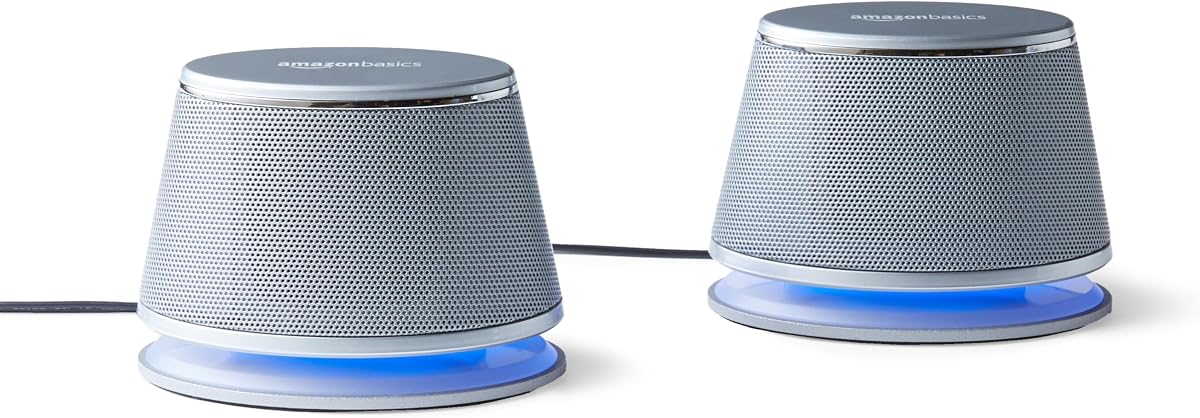
The Amazon Basics Silver 2.0 combines a familiar compact stereo format with USB-powered operation and a 4.4 rating. It is designed for PC, laptop, or desktop use, receiving audio through a 3.5mm AUX connection while drawing power from a USB port on the computer.
We may earn a commission when you buy through this link, at no additional cost to you.
Physical controls are located on the inline cable, so volume can be changed without opening a software menu. Blue LED lights provide an obvious operating indicator, and the silver metal finish gives the system a somewhat brighter appearance than the black version in this guide. A bottom radiator is included to contribute additional bass response.
Like the black Amazon Basics pair, this model does not list Bluetooth, USB digital audio, a headphone jack, or a numerical power rating. It is therefore most appropriate for users who want a conventional stereo setup with immediate volume control and do not need to alternate between devices. The illumination is a visual convenience rather than a functional substitute for a wireless connection.
The Silver 2.0 is a good recommendation for a shared office, dorm, or home desk where a traditional computer-speaker appearance is preferred. It offers the same core advantages as the black version in a different finish, making it worth comparing carefully with that model based on appearance. For basic, reliable USB-powered stereo playback, it remains easy to recommend.
The blue LEDs confirm that the system is powered without requiring users to infer its state from sound or software. This can be especially helpful in a shared or frequently rearranged workspace.
Separate left and right speakers create a conventional stereo image for music, video, and games. The 3.5mm input and USB power arrangement are also widely compatible with conventional computer outputs.
We may earn a commission when you buy through this link, at no additional cost to you.
The FUNLOGY Speaker is a compact USB-powered stereo system rated at 4.2, with 14W of total output and a 30-degree upward tilt. Its two 48mm full-range drivers and passive radiators are designed to provide clear mids, crisp highs, and more pronounced bass than many small desktop alternatives.
We may earn a commission when you buy through this link, at no additional cost to you.
The elevated layout is a practical acoustic choice. Instead of firing directly across the desk, the speakers are angled upward toward the listener, which can improve perceived clarity and make the system easier to place near a monitor. A single volume dial provides direct control, while included USB and 3.5mm cables support a conventional connection.
The listed output is more substantial than many compact pairs, but it does not create a true 2.1 system. There is no dedicated subwoofer, and the stated setup requires both USB power and the analog audio cable. Bluetooth is also absent, so the system is less flexible than the Creative Pebble V3, Logitech Z207, or Nylavee sound bar.
This FUNLOGY model is a good choice for a compact gaming or productivity setup where more volume is desired without moving to a large desktop system. Its broad compatibility with computers, monitors, smartphones, and gaming consoles is useful, while the one-year warranty adds support for the purchase. It combines meaningful output, compact size, and angled placement in a particularly practical package.
The 14W total specification and dual 48mm drivers give the system a noticeable output advantage over basic small speakers. That makes it useful for gaming, video, and music in spaces where a larger stereo system would be inconvenient.
The 30-degree tilt directs sound toward a seated listener and makes the speakers practical to position close to a monitor. The upward-facing layout combines space efficiency with more deliberate acoustic projection.
We may earn a commission when you buy through this link, at no additional cost to you.
The Nylavee Bluetooth Sound Bar is a single-bar desktop speaker with a 4.3 rating, offering a different form factor from the two-speaker sets elsewhere in the guide. Its enclosure contains four speaker units and two independent bass diaphragms, with a cavity design intended to increase the audible output of those components.
We may earn a commission when you buy through this link, at no additional cost to you.
Bluetooth 5.0 and 3.5mm AUX are the two audio connection methods. USB supplies power, and the speakers turn on automatically once plugged into a power source. A side knob handles the functions of the system, reducing the need to reach for separate buttons in the middle of an audio session.
The sound bar does not publish a numerical power figure, which makes direct output comparisons with the FUNLOGY or Creative systems impossible from the supplied data. It also has no internal battery, so it is intended for a fixed desk rather than portable use. Even with those limitations, the combination of multiple internal drivers, dedicated bass diaphragms, and a one-piece enclosure is distinctive.
The Nylavee is a good fit for a clean, uncluttered workspace where a long sound bar can sit beneath a monitor. It is also useful for users who want current Bluetooth connectivity while retaining a wired option. For a broad desktop footprint, a single sound bar can be an attractive alternative to two separate boxes, especially in compact offices and home workspaces.
Four speaker units and two bass diaphragms give the sound bar a more layered internal layout than a conventional miniature pair. The enclosed cavity is intended to make that array more audible while preserving a clean one-piece footprint.
A single side knob puts the system functions within easy reach. This straightforward control scheme is useful for a monitor-mounted or desk-centered installation where users want quick access without navigating a separate interface.
We may earn a commission when you buy through this link, at no additional cost to you.
The Dell SP3022 Speakerphone is a compact desk audio device with a 4.2 rating, built primarily around business communication rather than conventional music playback. Its Microsoft Teams and Zoom certifications make it a purpose-built option for online meetings, conference calls, and collaborative office work.
We may earn a commission when you buy through this link, at no additional cost to you.
The most important feature is full-duplex audio with AI noise cancellation, which allows multiple people to speak while remaining clearly heard. LED indicators show Microsoft Teams status, call and hang-up functions, volume changes, and microphone mute state. A dedicated Teams button provides quick access to meetings and notifications, reducing the need to manage calls through the computer interface.
Connectivity is handled through USB-A or USB-C, giving the device broad support for modern monitors, laptops, and desktops. Its elegant compact enclosure is designed to sit on a monitor base or beside a laptop or desktop computer. Because this is a speakerphone, its feature set is specialized and should not be compared directly with music-focused stereo systems.
The Dell SP3022 is an excellent recommendation for hybrid workers, small conference rooms, and anyone whose computer regularly handles group calls. It prioritizes intelligibility, meeting controls, and clear status feedback over immersive sound. For that reason, it belongs on a shortlist for communication but is not the natural choice for someone seeking a compact music-and-movies stereo pair.
Full-duplex operation allows participants to speak naturally during a meeting, while AI noise cancellation is designed to improve clarity. These features make the speakerphone more purpose-driven than a standard computer audio system.
LED indicators communicate call state, mute status, volume, and Teams-related information. The dedicated Teams button further reduces the number of steps required to manage a meeting from the desk.
We may earn a commission when you buy through this link, at no additional cost to you.
The Klipsch ProMedia 2.1 THX is the largest and most powerful system in this guide, earning a 4.5 rating and a place as the premium choice for listeners who want bass beyond the limits of a miniature stereo pair. It combines two satellite speakers with a dedicated 6.5-inch, side-firing, ported subwoofer.
We may earn a commission when you buy through this link, at no additional cost to you.
Each satellite uses a three-inch midrange driver and Klipsch MicroTractrix horn technology, which is designed to improve clarity and control sound dispersion. The system is specified at 200W peak power and 110dB in-room output. A separate control pod provides main volume and subwoofer gain, allowing the bass level to be adjusted independently rather than only through the computer.
Its primary disadvantage is size. The satellites measure 8.5 by 4.2 by 5.67 inches, and the subwoofer measures 9.5 by 9.8 by 10.2 inches, so this is less appropriate for a very confined workspace than the compact pairs and sound bar. It also uses a 3.5mm input and is not presented as a USB or Bluetooth system.
The ProMedia 2.1 is best for a home office, gaming desk, or entertainment area that can accommodate a subwoofer. It suits listeners who want deeper low-end response for games, films, and music, as well as buyers who value THX certification and separate satellite controls. Among the products compared here, it offers the most substantial approach to desktop audio.
The ported 6.5-inch subwoofer handles low-frequency output separately from the satellite speakers. That division allows the system to deliver more pronounced bass than a small 2.0 pair, while the adjustable subwoofer gain lets the user balance the result.
MicroTractrix horn technology is designed to control dispersion and send sound more efficiently toward the listener. Paired with the three-inch midrange drivers, it forms the system's main pathway for voices, instruments, and game effects.
We may earn a commission when you buy through this link, at no additional cost to you.
Choosing small computer speakers involves balancing desk space, output, connection method, control convenience, and the type of audio you listen to most. The most important step is to identify how the computer sends sound and which features will improve your everyday experience.
USB power and USB audio are related but not identical. A USB-powered speaker may draw electricity from the computer while receiving sound through a separate 3.5mm cable, whereas a USB-C audio model can carry both power and digital sound over one connection. The distinction affects cable clutter, compatibility with newer laptops, and how portable the setup can be.
Choose a single-cable USB audio system when your computer has a compatible USB-C port and you want the cleanest desktop arrangement. A USB-power-plus-AUX model is more broadly adaptable to older computers, provided you are comfortable using the analog headphone or line-out connection.
Small speakers should leave room for your monitor, keyboard, mouse, and other equipment. Some models use two narrow satellites, while the Nylavee uses one horizontal sound bar and the FUNLOGY system uses angled enclosures. Even products called compact vary significantly in size, so measure the available area before choosing.
Prioritize a footprint that matches your actual workspace rather than selecting only by product description. Under-desk placement can help with larger systems, but the Klipsch subwoofer still needs enough room for its side-firing port and cabinet.
Output specifications provide a useful starting point for comparing volume, but they do not tell the entire acoustic story. The compact Amazon Basics pair has 2.2W total RMS output, the Creative Pebble V3 reaches 8W RMS, and the FUNLOGY system is listed at 14W. The Klipsch 2.1 reaches 200W peak power and adds a dedicated subwoofer.
Match the expected level to the room. Small desktop use generally needs less power than gaming or music, while a dedicated subwoofer is the clearest route to deeper bass. Driver size, passive radiators, enclosure design, and placement also influence how the output is perceived.
Wired speakers provide a consistent path from computer to speakers and are ideal for a permanent workstation. Bluetooth removes the audio cable and allows convenient switching among computers, phones, and tablets, while AUX remains useful with many legacy devices. Some systems support both wired and wireless operation.
If the speakers will always remain beside one computer, USB power with 3.5mm audio may be enough. If you regularly move between devices, prioritize Bluetooth 5.0, Easy-Switch behavior, or another convenient source-selection method. Confirm that the computer and selected pairing device support the required connection.
Computer speakers are frequently used for podcasts, online lessons, video calls, television, and streaming shows. Clear Dialogue processing on the Creative Pebble V3 is specifically designed to improve the intelligibility of speech while retaining background effects. Conference-oriented products such as the Dell SP3022 take voice performance further with full-duplex operation and AI noise cancellation.
For speech-heavy work, consider clarity features and microphone-related functions before focusing entirely on music output. For music and games, a wider stereo presentation, stronger bass extension, or a subwoofer may take priority.
Reachable controls can make a compact system much easier to operate. Front-facing buttons, inline volume controls, top-mounted dials, and side knobs each have advantages depending on where the speakers are placed. LED indicators help confirm power, Bluetooth pairing, mute state, or meeting status without opening software.
Choose a control layout that suits your seating position and setup. A user who often adjusts volume while working may prefer front or inline access, while a monitor-mounted sound bar may be easier to operate through a side knob. Conference users should prioritize clear mute and call-status feedback.
A 2.0 system uses two main channels to create left and right separation, while a 2.1 system adds a dedicated subwoofer for low-frequency output. A sound bar places multiple drivers in one enclosure and uses its internal cavity to create a broader presentation. These formats can all work well, but they deliver different results for games, films, and music.
Choose 2.0 speakers for conventional stereo positioning and limited space. Consider a sound bar for a cleaner single-unit footprint. Select a 2.1 system when the added cabinet and independent bass control are justified by your room, listening habits, and need for deeper low-end response.
Most small computer speakers are designed for a desk and require a power connection, even if their dimensions suggest portability. The compact Amazon Basics model can move easily between rooms, while the Nylavee and most USB-powered models remain tied to a power source. The Logitech Z207 offers wireless source flexibility without claiming a built-in battery.
Think about where the system will be used most often. A permanent office benefits from simple USB operation, a shared meeting area may require conference controls, and a gaming desk benefits from stronger output. Checking the connection and power arrangement before ordering prevents an attractive speaker from becoming an inconvenient one.
Start by identifying the audio output on your computer and the required power source. For USB-audio models, connect the supplied USB cable to a compatible computer port. For a USB-powered and 3.5mm system, connect the power lead to a USB port and the audio lead to the headphone or line-out jack. Position the speakers at the sides of the monitor and angle them toward your listening position.
Set the computer volume low before switching on the speakers, then raise the level gradually with the hardware control. For Bluetooth models, use the pairing control and select the speakers from the device's Bluetooth menu. When switching sources, pause playback on one device before starting another, particularly with Easy-Switch equipment, to avoid overlapping audio.
Keep the drivers and ports clear of dust, liquids, and obstructions, and avoid pushing the volume beyond a comfortable level. Use the available gain, bass, or subwoofer controls to balance the sound rather than compensating entirely with extreme volume. When moving a system, disconnect cables first and place the subwoofer upright so its side-firing port remains unobstructed.
No. Most small computer speakers use a 3.5mm audio connection for sound and obtain power from an external adapter or USB port. Some newer models carry digital audio and power through USB-C, while others also support Bluetooth. Check the computer's available outputs and the speaker's listed connections before buying.
Bluetooth is more convenient when you switch among phones, tablets, and computers or want to reduce cable clutter. Wired models can provide a consistent connection and are often simpler for a fixed workstation. The right choice depends on convenience, source flexibility, and whether a permanent desk setup is your main use.
Small speakers can provide clear spoken content and enjoyable music at normal desktop listening levels. Gaming and more energetic music may benefit from greater output, passive radiators, or a dedicated subwoofer. The Klipsch ProMedia 2.1 and the FUNLOGY 14W system offer more substantial output than the smallest basic pairs.
A 2.0 system has two main stereo channels without a separate bass unit. A 2.1 system adds a dedicated subwoofer, which can produce deeper and more impactful low-frequency sound. The 2.1 format generally requires more space but offers greater flexibility for music, films, and games.
Most of the models in this guide use standard USB, analog, or Bluetooth connections and are designed to work without driver installation. The Amazon Basics Compact USB is explicitly described as plug-and-play, while the FUNLOGY system similarly requires no installation. Any special meeting features on the Dell SP3022 are managed through its platform integration and physical controls.
The Creative Pebble V3 stands out because its Clear Dialog processing is designed to improve spoken intelligibility without removing background effects. It also offers USB-C operation, Bluetooth 5.0, and an AUX input. Users focused on group calls should consider the Dell SP3022 instead because it is designed around full-duplex conference communication.
Place the left and right speakers on opposite sides of the monitor and angle them toward your seating position. Models with elevated drivers are designed to direct sound upward, while other speakers benefit from being raised slightly above desk level. Leave space around ports and subwoofer openings, and use the included cables to keep the arrangement orderly.
That depends on the model. The Creative Pebble V3, Logitech Z207, and Nylavee support Bluetooth, making them suitable for paired phones, tablets, or other compatible devices. The FUNLOGY system lists smartphone and gaming-console compatibility through its 3.5mm connection, while the Klipsch system also supports televisions, music players, and consoles with a compatible 3.5mm input.
The Creative Pebble V3 is the most versatile all-around recommendation because it combines USB-C computer audio, Bluetooth 5.0, a 3.5mm input, elevated drivers, and Clear Dialog processing. The Amazon Basics Compact USB stands out for straightforward operation and a very small footprint, while the Klipsch ProMedia 2.1 THX is the premium option for shoppers who want a dedicated subwoofer and substantially more low-end output.
Prioritize the connection method that matches your computer and the kind of listening you do most often. Choose a single-cable or compact wired setup for a fixed workstation, Bluetooth for frequent device switching, a sound bar for a clean one-piece footprint, and a conference speakerphone for meetings. For deeper sound, compare total output and the presence of passive radiators or a dedicated subwoofer rather than relying on physical size alone.
Ratings and product details can change over time, as can availability and pricing. Before purchasing, verify the current specifications, included cables, computer compatibility, desk space, and return options. Those checks help ensure that the selected small speakers remain suitable for your computer, room, and preferred type of audio.