
SSK Portable SSD 1TB External Solid State Hard Drive USB C Up to 1050MB/s
4.5Editor score
Up to 1050MB/s reads
USB-C and USB-A cables
Compact 36.6g aluminum design
S.M.A.R.T. health diagnostics
256-bit encryption support
Our expert guide compares the best external SSD for Linux, covering speed, compatibility, durability, encryption, capacity, portability, and key buying
An external SSD for Linux can turn limited internal storage into a fast, flexible workspace for projects, backups, media, and portable applications. The best choice depends on your Linux distribution, USB controller, file system, workload, and need for portability or rugged protection.
We compared the following drives using their published specifications, interface generations, stated transfer speeds, physical design, encryption features, capacity, and supported uses. The list covers NVMe performance, durable enclosures, compact models, and practical options for everyday Linux workflows.
Each review explains where a particular drive fits best and where its specifications may fall short of your needs. Ratings reflect the supplied customer feedback, while features and compatibility still require attention to current firmware, Linux support, and system configuration. Prices and promotions can change.
4.5Editor score

4.7Editor score

4.6Editor score
The comparison table highlights each drive's interface, stated speed, capacity, portability, and protection features, making it easier to match an external SSD with your Linux system and intended workload.





The 2TB SanDisk Extreme Portable SSD combines generous capacity, fast USB 3.2 Gen 2 performance, and a genuinely travel-friendly enclosure. Its supplied rating is 4.6, and its headline read speed of up to 1050MB/s places it among the quickest options in this guide when connected through a compatible USB 3.2 Gen 2 or newer controller. That makes it a strong all-round choice for Linux users who want room for archives, project files, virtual disks, and backups without relying on internal storage.
We may earn a commission when you buy through this link, at no additional cost to you.
Its strongest qualities are the balance between capacity and physical protection. The drive is rated IP65 for water and dust resistance, and SanDisk states drop protection up to 3 meters. The included carabiner loop makes it easy to attach the drive to a belt or bag, while the compact body avoids the bulk of a full-size external hard drive. Security-conscious users can also use the included password-protection feature with 256-bit AES hardware encryption, an important advantage when the drive contains work files or personal archives.
The main trade-off is that Linux users may not get the same dedicated management experience available for some Samsung models. SanDisk's supplied information points to the Memory Zone app for file management and automatic space cleanup, while the operating temperature range is listed as -20°C to 85°C. Actual performance will depend on the host device, USB controller, cable, file size, and workload. Reaching the advertised rate also requires a suitable USB 3.2 Gen 2 port and a system that can drive the enclosure at its intended speed.
This is an excellent recommendation for Linux builders, video editors, developers, and travelers who need a balance of speed, capacity, and durability. It is particularly attractive when a drive must survive being carried between locations or used as a shared working disk. Users with older USB ports can still connect it, but should expect lower throughput. The SanDisk Extreme is not the fastest model here, yet its combination of 2TB capacity, rugged construction, encryption, and proven portability makes it the most versatile overall choice.
The advertised NVMe performance makes this drive well suited to moving large project folders, creating local backups, and working with media that would otherwise occupy scarce internal storage. Linux results will vary with the USB host and file system, but the interface is capable of speeds that are useful for demanding transfers rather than merely quick document copies.
IP65 protection, stated three-meter drop resistance, and hardware encryption add useful safeguards for portable data. Linux users should format the drive with a file system appropriate to their systems and enable the drive's password protection when sensitive information is stored.
We may earn a commission when you buy through this link, at no additional cost to you.
The 1TB Samsung T7 Portable SSD is a polished, high-performance option for Linux users who want speed in a small enclosure. It carries a 4.7 rating and uses USB 3.2 Gen 2 with NVMe technology, delivering stated read and write speeds of up to 1,050MB/s and 1,000MB/s. Those figures are well above the 10Gbps interface's theoretical transfer ceiling in common real-world terms, but they still position the T7 as a high-speed choice for large files and active project directories.
We may earn a commission when you buy through this link, at no additional cost to you.
The drive's construction is one of its most appealing qualities. Samsung describes a solid aluminum unibody that is both compact and rigid, with shock resistance and fall protection up to six feet. That makes it suitable for regular travel between a desktop and a laptop. It is also designed for broad compatibility, including PCs, mobile devices, cameras, and consoles. The supplied information specifically highlights direct Ultra High Resolution video recording, including 4K 60fps workflows on supported devices.
Its most relevant limitation for Linux is that management features may not be equally convenient across operating systems. Samsung's ecosystem and Magician tools are not substitutes for verifying support, firmware, and encryption behavior within a specific Linux distribution. The drive should also be paired with a proper USB 3.2 Gen 2 controller and a cable capable of preserving performance. Although the aluminum shell helps dissipate heat, sustained heavy transfers depend on the host, thermal conditions, and workload.
The T7 is a compelling premium pick for developers, photographers, editors, and power users who want a fast, durable drive without the bulk of a desktop enclosure. The smaller 1TB capacity may be restrictive for extensive archives, but it is a sensible amount for active projects and rotating backups. For users who value a refined enclosure, strong feedback, and high transfer rates, the Samsung T7 offers an excellent balance and earns the top-premium recommendation.
The solid aluminum unibody gives the T7 a durable, premium feel while remaining small enough for a pocket or laptop sleeve. Its stated six-foot fall protection makes it better suited to mobile work than an ordinary enclosure, provided the drive is not exposed to water or extreme conditions beyond its design.
Fast sustained transfers make the T7 useful for video, photography, and other large working sets. A Linux user should test the target file system and application workflow, since the supplied maximum speeds represent ideal conditions rather than a guarantee for every host and workload.
We may earn a commission when you buy through this link, at no additional cost to you.
The Samsung T9 Portable SSD is the performance leader in this group, with a stated maximum of 2,000MB/s and a 4.6 customer rating. It uses USB 3.2 Gen 2×2, a newer interface generation that can deliver substantially more bandwidth than the common USB 3.2 Gen 2 connection found on many computers. For Linux users with a compatible controller, it is the natural choice for intensive transfers, large media libraries, and applications that benefit from near-PCIe-class external storage performance.
We may earn a commission when you buy through this link, at no additional cost to you.
Samsung emphasizes sustained read and write performance rather than relying only on short burst results. The Dynamic Thermal Guard is designed to control heat during extended use, helping the drive remain stable when large projects are moving continuously. Firmware updates, extra encryption options, and continual drive-health monitoring can be managed through Magician Software, although Linux users should confirm that the specific management functions they need are supported by their chosen distribution and version.
The important caveat is the interface. A Gen 2×2 drive cannot create a faster connection on hardware that only supports USB 3.2 Gen 2. Many older laptops, desktops, and USB hubs will negotiate the slower standard, and some cables or adapters may also limit throughput. Linux kernel support for the host controller, the selected USB host, and the file system should be verified before relying on the maximum specification. A drive that advertises 2,000MB/s can still be an excellent portable SSD at lower speeds, but the strongest performance requires the complete chain to support it.
This drive is best suited to creators, developers, and enthusiasts with modern hardware who value short transfer times and sustained throughput. It may be excessive for ordinary document storage, yet it offers a clear advantage when moving multi-gigabyte archives, virtual machine images, or 4K footage. With a 1TB capacity, the T9 is optimized for an active working disk rather than an all-purpose archive. It is the fastest choice here and a compelling premium option for properly equipped Linux systems.
USB 3.2 Gen 2×2 can use two lanes of high-speed USB data, enabling the T9's stated 2,000MB/s ceiling. Linux users should check their controller and cable path, because plugging into an older port will limit the drive to the capabilities of that connection.
Dynamic Thermal Guard is a meaningful benefit for long file transfers and heavy creative work. It is designed to manage heat and maintain stable operation, though enclosure placement and airflow can still affect results in a crowded computer setup.
We may earn a commission when you buy through this link, at no additional cost to you.
The 1TB SSK Portable SSD combines useful Linux-friendly physical features with performance figures that rival more established premium models. It has a 4.5 rating, uses USB 3.2 Gen 2, and is stated to reach up to 1050MB/s reads and 1,000MB/s writes. The included USB-C and USB-A cables make it easier to connect to newer and older systems, a practical advantage when testing Linux installations on varied hardware.
We may earn a commission when you buy through this link, at no additional cost to you.
Its lightweight aluminum design stands out. The drive weighs just 36.6 grams and measures 2.6 by 1.5 by 0.5 inches, making it easy to carry between machines. The enclosure is only 2mm thick, and the supplied information reports a peak case temperature of 105.58°F during its described testing. S.M.A.R.T. diagnostics and adaptive TRIM are also listed, both useful indicators for maintaining consistent performance and drive health.
The most important performance detail is the SLC caching system. Up to 25% of available capacity is allocated as high-speed cache, allowing large transfers within that limit to benefit from the full 10Gbps interface. Once the cache is exhausted by a sufficiently large write operation, sustained performance may differ. Linux file systems and workload patterns can also influence how effectively that cache is used, so users should test their own scenarios instead of assuming every transfer will sustain the headline rate.
The SSK is a compelling value pick for Linux students, developers, and everyday users who want a compact 1TB drive with a modern interface. It also supports 4K60Hz ProRes HDR capture from compatible iPhones and draws less than 2.4 watts, which is helpful for mobile use. The supplied information does not clearly describe a Linux-specific management application, so users should rely on standard filesystem tools and hardware health information where available. Overall, it delivers a strong mix of portability, cable flexibility, diagnostics, and speed.
At 36.6 grams, the SSK is among the easiest drives in the guide to carry. Including both USB-C and USB-A cables reduces friction when moving between a modern Linux workstation and an older computer, provided the latter supports the USB 3.2 Gen 2 interface.
S.M.A.R.T. diagnostics and adaptive TRIM are positive features for long-term ownership. The SLC cache improves short and medium transfers, but very large writes can exceed it and produce different sustained results, making realistic workload testing important.
We may earn a commission when you buy through this link, at no additional cost to you.
The Lexar ES3 is built for users who prioritize a thin, discreet external drive without giving up modern transfer performance. It has a 4.4 rating, offers 1TB of capacity, and uses USB 3.2 Gen 2 with stated read and write speeds of up to 1050MB/s and 1,000MB/s. The supplied information also lists compatibility with laptops, cameras, Android devices, gaming consoles, and newer iPhone models.
We may earn a commission when you buy through this link, at no additional cost to you.
Its most distinctive physical feature is the 10.5mm-thick design. The drive weighs 42 grams, and Lexar describes it as smaller than a card, which is convenient for a pocket, laptop sleeve, or a compact mobile production kit. A Type-C cable is included for straightforward connection. The option of 256-bit AES encryption through Lexar DataShield adds a useful layer for private files, though Linux users should check how they intend to manage encryption before relying on it in a mixed-device workflow.
Compatibility requires care. The supplied data states that support covers the iPhone 17 series but not iPhone 14 and older models. It also notes that the MagSafe feature is unavailable in this version. Mac and other systems that do not support USB 3.2 Gen 2 may operate at reduced speed. These limitations are unlikely to affect a typical Linux desktop, but they matter if the drive is intended as a shared accessory across a broad collection of modern and older devices.
The ES3 is a strong fit for Linux users who want a slim drive for travel, temporary working storage, or carrying between systems. It is not the strongest option for heavy sustained editing, and its lower customer rating gives less evidence of broad satisfaction than several alternatives. Nevertheless, the combination of modern speed, 1TB capacity, broad stated compatibility, and a very small body makes it easy to recommend for portable projects. It is particularly attractive for users who value physical discretion and simple Type-C connectivity.
The 10.5mm profile and 42g weight make the ES3 convenient to carry every day. Its small dimensions reduce the chance of adding bulk to a bag while still providing enough capacity for a focused Linux work directory, media cache, or portable backup.
The list of supported devices is extensive but includes clear model boundaries. Linux users should also confirm that their USB controller and file system deliver the intended throughput, particularly when moving the drive between a desktop and a mobile device.
We may earn a commission when you buy through this link, at no additional cost to you.
The 2TB Samsung T7 Shield combines a high capacity with stronger physical protection than the standard T7. It carries a 4.7 rating and uses USB 3.2 Gen 2 for stated speeds of up to 1,050MB/s read and 1,000MB/s write. That is enough performance for demanding Linux transfers, project storage, and backups while still fitting into a portable workflow.
We may earn a commission when you buy through this link, at no additional cost to you.
Its ruggedization is the defining advantage. The drive has an IP65 rating for water and dust resistance, and Samsung states drop protection up to 9.8 feet. These figures make it appropriate for users who regularly carry important data between locations, work in variable environments, or want more confidence than a basic metal enclosure provides. The palm-sized format and broad compatibility with PCs, Macs, Android devices, and consoles reinforce its travel-friendly design.
Samsung Magician adds options for drive-health monitoring, protection, updates, and LED configuration. Linux users should verify which functions are usable under their chosen operating system, particularly if they need consistent management across multiple platforms. The supplied information also mentions iPhone 15 Pro 4K60fps video support and recommends the included cable. As with every USB 3.2 Gen 2 drive here, maximum results require a compatible port, suitable cable, and a host that supports UASP.
The T7 Shield is best for Linux users who need substantial capacity and travel durability. It is less compelling for someone who values minimal size above all else, but its 2TB capacity reduces the need to shuffle between multiple external drives. For field work, video production, or an important portable backup, the combination of high speed, environmental protection, strong rating, and Samsung's management features makes it one of the most confident recommendations in the guide.
The IP65 rating and stated 9.8-foot drop protection offer meaningful resilience for portable storage. Resistance is not a guarantee against every type of damage, so the drive should still be shielded from extreme heat, liquids beyond its rating, and violent impact.
With 2TB and USB 3.2 Gen 2 performance, the T7 Shield can act as a primary working volume for a Linux system. It is particularly useful for large project trees and local backup sets that would be slow to maintain on a spinning external hard drive.
We may earn a commission when you buy through this link, at no additional cost to you.
The 1TB Western Digital My Passport SSD offers a familiar portable-drive design with modern NVMe speed. Its supplied rating is 4.5, and it is stated to deliver up to 1050MB/s reads and 1,000MB/s writes through USB 3.2 Gen 2. For Linux users moving between system images, large libraries, and working directories, that makes it a practical alternative to conventional external hard drives.
We may earn a commission when you buy through this link, at no additional cost to you.
Security and durability are central to the product's appeal. Password-enabled 256-bit AES hardware encryption helps protect private information, while the drive is described as shock and vibration resistant with drop resistance up to 6.5 feet. The supplied information also confirms cross-compatibility between USB 3.2 Gen 2 and USB-C, with USB-A support for older systems. That range of connections is useful for Linux administrators who need to deploy the same drive across different machines.
The trade-offs are mostly about configuration rather than core performance. First, maximum transfer speeds depend on the host device, usage conditions, drive capacity, and other factors, as Western Digital notes. Second, Linux compatibility for the password and management workflow should be confirmed before sensitive production data is placed on the drive. File-system support and hardware encryption access can vary by operating system, and the presence of a USB-A connection does not guarantee that an older computer offers USB 3.2 Gen 2 bandwidth.
The My Passport SSD is a good fit for users who need a portable Linux drive with solid speed and hardware-level protection. It is less attractive than higher-capacity choices for massive archives, but 1TB remains sufficient for a working system disk, a curated media collection, or rotating backups. It also appeals to buyers who recognize the My Passport product line and want a compact, durable SSD version with broad connection options.
Password-enabled 256-bit AES hardware encryption is a notable security feature for backups and confidential documents. Linux users should test the intended unlock and management method on the specific distribution before depending on the drive for business-critical files.
NVMe speed makes the drive useful for large transfers, but the host must provide a suitable USB 3.2 Gen 2 connection. The stated cross-compatibility with USB-C and older USB-A systems simplifies physical setup, although older ports will reduce speed.
We may earn a commission when you buy through this link, at no additional cost to you.
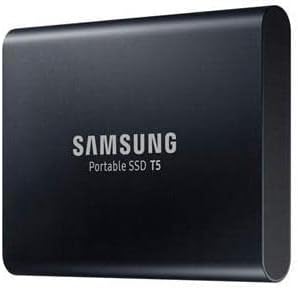
The 2TB Samsung T5 Portable SSD remains a compelling option for Linux users who value established portability, strong customer feedback, and ample capacity over the newest interface standard. It has the highest supplied rating in this comparison at 4.8. Its USB 3.1 connection provides up to 540MB/s, which is noticeably slower than the 1,050MB/s and 2,000MB/s headline figures of several newer models, but it remains fast enough for most backups, documents, and active project files.
We may earn a commission when you buy through this link, at no additional cost to you.
The physical design is simple and durable. A metal enclosure fits in the palm of the hand, and the drive is described as shock resistant. Samsung also provides optional password protection with 256-bit AES hardware encryption, covering both convenience and security. USB Type-C-to-C and Type-C-to-A cables are included, reducing the chance that users will connect the drive with an unsuitable cable and lose expected performance.
The central compromise is speed relative to newer options. Transfers involving large project directories, virtual machine images, or high-resolution media will benefit more from a Gen 2 or Gen 2×2 enclosure. In exchange, the T5 may appeal to buyers who already know the product line or want a straightforward 2TB drive without the premium complexity associated with the newest interfaces. Linux users should check that their USB controller, kernel, and chosen file system support the drive as expected.
The T5 is an excellent secondary backup, archive, or general-purpose portable drive. It is especially attractive for users who need more capacity than the selected 500GB models and do not require the fastest possible transfer rate. With a 4.8 rating, compact metal construction, hardware encryption, and included cables, it remains a well-rounded Linux-compatible storage choice. Its role in this guide is that of a mature, high-capacity option rather than the performance leader.
The T5's long-established design and high supplied rating make it a familiar choice for general storage. Its 540MB/s maximum is still well above many conventional external hard drives and adequate for everyday backup and transfer tasks.
The 2TB capacity is useful for larger collections that no longer fit comfortably on a laptop. It can serve as a rotating backup destination, media library, or secondary working disk while remaining compact enough to carry.
We may earn a commission when you buy through this link, at no additional cost to you.
The 500GB Samsung T7 delivers the speed of a modern USB 3.2 Gen 2 drive in a more compact storage capacity. It has a 4.7 rating and states read and write speeds of up to 1,050MB/s and 1,000MB/s. That makes it well suited to Linux users who need a quick scratch disk, portable boot volume, or local cache for active files rather than a large long-term archive.
We may earn a commission when you buy through this link, at no additional cost to you.
Samsung includes several practical safeguards. Dynamic Thermal Guard manages heat and can reduce transfer speed if necessary, which helps maintain reliable operation during long transfers. The drive is shock resistant and withstands drops from six feet, while password security adds protection for private material. The included USB Type-C-to-C and Type-C-to-A cables are also important because Samsung specifically notes that non-original cables may degrade performance due to internal resistance.
Capacity is the defining limitation. At 500GB, the available space after formatting will be lower, and it may be quickly consumed by Linux applications, container images, virtual machines, high-resolution media, or multiple backup sets. A Linux user should also install the latest firmware through Portable SSD Software 1.0, as Samsung recommends, and ensure the host supports both USB 3.2 Gen 2 and UASP to reach maximum performance.
The smaller T7 is best for students, professionals, and developers who need a fast pocket drive for a defined set of files. It works well as a temporary working volume, a Linux installation medium, or a supplemental drive for a project that does not require terabyte-level storage. It is not the best choice for a complete library or primary backup target, but its strong rating, modern speed, thermal management, and drop resistance make it a highly portable and capable option.
The T7's interface and controller performance remain modern even though the capacity is modest. It is a sensible way to carry a focused project or Linux installation between computers without carrying a larger archive drive.
Using the supplied cables helps avoid performance degradation, and current firmware can improve reliability and management. Linux users should confirm UASP and USB 3.2 Gen 2 support on the host before interpreting any slower result as a drive failure.
We may earn a commission when you buy through this link, at no additional cost to you.
The 500GB Samsung T5 is a straightforward external SSD for Linux users who want reliable portable performance at the older USB 3.1 standard. It carries a 4.8 rating, the highest supplied customer feedback score among the ten products, and provides up to 540MB/s transfer speeds. That is fast enough for routine backups, document storage, a lightweight Linux installation, and many creative-file transfers.
We may earn a commission when you buy through this link, at no additional cost to you.
Its design is compact and durable. The top-to-bottom metal body is shock resistant and small enough to fit in a pocket or purse. Optional password protection and AES 256-bit hardware encryption help protect sensitive data. The package includes USB Type-C-to-C and Type-C-to-A cables, making it easier to connect to a range of systems. Samsung also states compatibility with PCs, Macs, smartphones, and other compatible devices.
The supplied product information carries an important historical compatibility note. It lists Windows 7, Mac OS X 10.9 Mavericks, Android 4.4 KitKat, or higher, while cautioning that older versions may not be supported. Modern Linux distributions will generally provide contemporary USB storage support, but users should check the current kernel and file-system behavior for their exact setup. The 540MB/s ceiling also means this model trails newer Gen 2 and Gen 2×2 drives when moving very large working sets.
The T5 is a good choice for a smaller, portable Linux accessory, especially for users who prefer a simple metal drive and do not need maximum throughput. At 500GB, it is best treated as a focused working or backup drive rather than a large archive. Its 4.8 rating, shock-resistant construction, encryption, and broad device support make it an easy recommendation for everyday use. Those willing to trade some speed for familiarity, portability, and strong customer feedback will find it particularly convincing.
At 500GB with speeds up to 540MB/s, the T5 suits focused storage rather than high-volume media workflows. It can provide a portable home for configuration files, an installation image, a small project directory, or a secondary backup.
AES 256-bit hardware encryption and a shock-resistant metal enclosure make the drive practical for private files that travel. Linux users should confirm the intended password-management workflow and use a file system that matches every system that will access the drive.
We may earn a commission when you buy through this link, at no additional cost to you.
Choosing an external SSD for Linux involves balancing interface speed, usable capacity, portability, file-system support, thermal behavior, and security. The advertised transfer rate is only one part of the decision because the computer, controller, cable, Linux distribution, and workload all influence real results.
USB 3.2 Gen 2 is the most broadly useful interface represented here, with stated headline read speeds around 1050MB/s. USB 3.2 Gen 2×2 can reach higher rates, including the T9's stated 2000MB/s, but the entire connection path must support that mode. A Gen 2×2 drive connected to a Gen 2 port still works, but it cannot exceed the slower port's capabilities. Linux users should check the USB controller, kernel support, port placement, and whether a hub is limiting performance.
Capacity needs should reflect both current files and expected growth. The 500GB models are appropriate for scratch space, installation media, and focused projects, while 1TB provides more room for active work and rotating backups. The 2TB options are better for media libraries, larger archives, or a single external working volume. Displayed capacity is lower after formatting and file-system overhead, so leaving additional free space can also help maintain consistent performance, particularly on drives using a write cache.
Linux supports several file systems, but not every choice works equally well across Windows, macOS, Android, and other devices. ext4 is native to Linux and supports Linux-specific features, whereas exFAT is widely portable across operating systems but offers fewer advanced options. NTFS can be useful in mixed environments, although Linux support typically requires appropriate drivers and may involve limitations when assigning ownership and permissions. Users should format the drive for the systems that must access it, not merely for the computer used to create it.
A compact drive is easier to move between a desktop, laptop, and field location. The SSK weighs 36.6 grams and measures 2.6 by 1.5 by 0.5 inches, while the Lexar ES3 is only 10.5mm thick and weighs 42 grams. Rugged enclosures add some bulk but may be worthwhile for frequent travel. The goal should be a drive that fits the intended carrying method while still offering enough capacity and protection for the data it will hold.
Drop, shock, water, and dust ratings help distinguish a portable SSD from an ordinary external enclosure. The SanDisk Extreme and Samsung T7 Shield carry IP65 ratings, while the T7 Shield states protection from falls up to 9.8 feet. Other models emphasize metal construction or shock resistance without the same environmental rating. These figures should guide realistic use, not create an assumption that any drive is indestructible. Heat, moisture, impact, and enclosure deformation can still cause failure.
Hardware encryption is valuable when a portable drive may be lost or borrowed. The SanDisk Extreme, Samsung T7, T5, T7 Shield, Western Digital My Passport SSD, and Lexar ES3 all have stated 256-bit AES encryption support. Linux users should confirm that they can enable, unlock, and manage the chosen drive under their distribution. Encrypted volumes are also less convenient for recovery if the password or required key material is lost, so an additional encrypted backup is advisable for irreplaceable files.
Peak read speed is not the same as long-term write performance. The SSK uses an SLC cache sized at up to 25% of available capacity, so very large writes may behave differently once that cache fills. The Samsung T9 and 500GB T7 use thermal management features intended to control heat during sustained use. Linux users handling long transfers should leave ventilation around the enclosure, avoid covering it beneath other devices, and monitor for unusually slow or inconsistent results.
A fast SSD cannot outperform a slow or unsuitable cable. Several products include both USB Type-C-to-C and Type-C-to-A leads, which helps when connecting older systems. Samsung specifically recommends its included cables because internal resistance in non-original cables may reduce performance. Linux users should use a direct connection when possible, inspect connectors for damage, and avoid unpowered hubs that cannot supply enough current for sustained operation.
Before using a new drive on Linux, inspect it for physical damage and connect it directly to a USB port. Identify the device name with the system's storage tools, confirm the mount point, and create a dedicated directory for the drive rather than writing immediately to the filesystem root. Choose a file system that matches every operating system expected to use it, format the drive if appropriate, and verify that it appears with the intended name and free space.
For important data, enable the drive's available hardware encryption or use a strong encrypted filesystem solution. Set filesystem ownership and permissions for the intended Linux users, set a descriptive label, and create a second backup before migrating important files. When moving or deleting data, use the file manager or command-line tools to confirm that operations have completed. Unmounting cleanly through the desktop or the operating system's unmount command reduces the risk of write errors.
During long transfers, keep the enclosure ventilated and connected to a reliable controller. Avoid frequently unplugging the drive, and do not use the same physical drive as the only copy of irreplaceable files. Periodically inspect available space, review the drive's health information where supported, and replace the cable or connection if transfers become unstable. For travel, use a protective sleeve and respect the manufacturer's water, heat, and drop limits.
Yes, the external SSDs in this guide use standard USB connections and should work with modern Linux kernels. Support depends on the USB controller, the drive's bridge or internal interface, and the file system. Check that your distribution recognizes the device and formats it with a compatible file system before transferring important data.
ext4 is generally the most feature-complete native Linux choice and is appropriate when only Linux systems will use the drive. exFAT is easier for sharing files with Windows and macOS, although it has fewer advanced filesystem features. If a drive must be used across several systems, test it on each one and use a single consistently supported format.
The advertised rate is usually a maximum under favorable conditions. A slower USB port, an inadequate cable, a hub, an incompatible controller, thermal throttling, the file system, and the size of the transfer can all reduce results. Check the negotiated link speed, connect directly to the motherboard, and test with a large file to determine the practical limit.
It is worth it when the Linux computer, port, controller, and cable all support the newer two-lane mode. The Samsung T9 can then take advantage of its much higher stated transfer ceiling. On a system limited to USB 3.2 Gen 2, the drive remains usable but will not deliver the same performance as its headline specification suggests.
Yes, an external SSD can hold a Linux installation or be used for a home directory, application data, and project files. USB performance can be less consistent than internal storage, especially during boot or heavy random I/O, so it is wise to keep the operating system on internal storage if possible and use the external drive for files, backups, or a secondary environment.
Defragmentation is generally unnecessary for SSDs because solid-state drives do not suffer the same performance decline from fragmented data as magnetic hard drives. Linux tools can optimize free-space allocation and issue TRIM commands, but simply leaving some free space and using a compatible file system usually provides more practical benefit.
Unmount the file system before removing the drive. In most desktop environments, use the eject command or the system tray icon; from a terminal, unmount every mounted partition associated with the device. Wait for the operation to finish, then unplug the enclosure. This reduces the chance of interrupted writes and file-system errors.
Yes. An external SSD is a convenient working or transfer device, but it can fail, be lost, or suffer damage just like any other storage medium. Keep important data on at least one additional drive or cloud service, and periodically test that a restore copy is complete and readable.
The SanDisk Extreme Portable SSD 2TB is the strongest all-around recommendation because it combines generous capacity, fast USB 3.2 Gen 2 performance, IP65 protection, encryption, and easy portability. The Samsung T7 1TB stands out for its refined enclosure and broad device support, while the Samsung T9 1TB delivers the highest stated speed for Linux systems with a compatible USB 3.2 Gen 2×2 controller.
Prioritize the complete connection path rather than the largest advertised number. A fast drive is only useful if the Linux computer, controller, cable, and file system support the required interface. Capacity should match the workload, and portable or sensitive data benefits from a compact body, water and dust protection, and hardware encryption. Sustained-transfer behavior and thermal management are especially important for large media and development files.
Finally, compare current prices, promotions, warranty terms, and Linux support information before purchasing. Product listings and prices can change over time, so verify the exact model and accessories shown on the current product page. Whichever drive you select, maintain a separate backup and handle the enclosure within its stated environmental limits.