
Novation Launchkey 49 MK4
4.7Editor score
Premium full-size keybed
Sixteen polyphonic FSR pads
Broad DAW compatibility
Scale and chord assistance
Native Kontrol Standard support
Our MIDI Keyboard Controllers guide compares ten leading models for portability, key feel, DAW integration, pads, connectivity, and value for beginners and
A MIDI keyboard controller turns software instruments, studio hardware, and connected computers into responsive musical instruments. The best model depends on key count, playing style, DAW requirements, portability, and the controls you use most, from velocity-sensitive keys to drum pads, faders, and assignable knobs.
We compared ten controllers based on the supplied specifications, including keybed size, velocity sensitivity, drum-pad layouts, transport controls, software integration, connectivity, and creative features. The list covers compact beginner models, full-size performance keyboards, travel-friendly controllers, and premium instruments aimed at serious production and live use.
Each pick reveals a different path into music-making: streamlined models prioritize simple setup, while feature-rich alternatives add sequencing, arpeggiation, chord tools, faders, and deeper DAW integration. Ratings and specifications reflect the provided product information, while prices can change, so check the current listing before purchasing.
4.7Editor score

4.6Editor score

4.7Editor score
The comparison below highlights the differences in keybed size, performance controls, creative tools, and setup requirements, helping you identify the controller that best matches your studio, stage, and composition needs.




The Akai Professional MPK Mini IV combines a 25-key velocity-sensitive keybed with eight assignable knobs, eight RGB MPC pads, a full-color display, and a push/turn encoder. Its 4.6 rating reflects a balanced approach to music production, beat making, and portable performance. It is especially appealing to creators who want more control than a basic keyboard without carrying a large studio controller.
We may earn a commission when you buy through this link, at no additional cost to you.
Its strongest feature is the combination of pads and real-time controls. The velocity- and pressure-sensitive MPC pads support finger-drumming and sample triggering, while the illuminated surface provides immediate visual feedback. The eight 360-degree knobs can handle plugin parameters, the screen simplifies navigation, and the encoder offers another way to change values without moving to the computer. Pre-mapped DAW support includes Ableton Live Lite 12, Logic Pro, and FL Studio, helping shorten the path from unpacking to making music.
The main limitation is the compact mini-key format. Although the keys are velocity-sensitive and intended for portable playing, pianists accustomed to full-size keys may find the spacing less familiar. There is also no dedicated volume fader, so mixing relies more heavily on knobs and DAW controls. These are meaningful trade-offs for a highly mobile unit, but they do not undermine its strength as a portable production and performance hub.
This is a strong choice for beat makers, songwriters, learners, traveling producers, and stream-oriented creators. The included virtual instruments, lessons, Splice access, advanced arpeggiator functions, and Native Kontrol Standard integration make it more versatile than a basic practice keyboard. Choose the black model for a conventional studio appearance, or consider the white version if a distinctive finish better matches your setup.
The MPK Mini IV concentrates numerous studio actions into a compact surface. Knobs, pads, transport functions, arpeggiator modes, and the screen let a creator shape sounds and navigate software without constantly returning to the mouse.
Pre-mapped DAW integration, Ableton Live Lite 12, a large virtual instrument collection, Melodics lessons, and temporary Splice access give new owners usable creative tools from the beginning while preserving room to develop a more personal setup.
We may earn a commission when you buy through this link, at no additional cost to you.
The M-Audio Keystation 49 MK3 is a conventional 49-key controller designed for musicians who want full-size playing surfaces and straightforward software control. Its 4.6 rating is supported by a specification set centered on velocity-sensitive keys, transport buttons, a volume fader, octave controls, pitch and modulation wheels, and sustain pedal input. It fits pianists, composers, and home-studio users particularly well.
We may earn a commission when you buy through this link, at no additional cost to you.
The 49 full-size keys offer more familiar spacing and greater melodic range than mini-key controllers. Physical controls make common DAW actions easier to locate, including playback, recording, directional navigation, and volume adjustment. The ergonomically designed pitch and modulation wheels add expression for lead playing, and the sustain input supports more natural phrasing. Plug-and-play operation for Mac or PC removes much of the setup friction, while compatibility with iOS devices can be enabled with a separately sold Apple to USB Camera Adapter.
Its primary omission is a dedicated pad bank. Beat makers who expect finger-drumming or sample triggering as central functions may find themselves relying on computer input or a separate pad controller. The control surface also does not emphasize a prominent display, so some parameter changes will remain less visual than on screen-equipped models. On the other hand, the straightforward layout can be easier for beginners than a densely featured controller.
Choose the Keystation 49 MK3 if full-size keys, familiar transport controls, and a clean setup process matter more than integrated pads. It is particularly valuable for keyboard practice, composing, virtual piano performance, and managing software instruments in a Mac or PC studio. Included software such as MPC Beats, Ableton Live Lite, Velvet, XPand2, Mini Grand, and Touch Loops expands its usefulness beyond basic MIDI input.
The 49 full-size velocity-sensitive keys are the defining advantage for users accustomed to acoustic or digital pianos. The broader layout supports more natural melodic passages while keeping the overall controller compact enough for most desks.
A volume fader, transport buttons, directional navigation, octave shifting, wheels, and sustain input provide a practical set of frequently used actions. Their physical placement reduces screen hunting and makes the controller approachable for focused writing sessions.
We may earn a commission when you buy through this link, at no additional cost to you.
The Akai Professional MPK Mini MK3 is a 25-key USB controller that emphasizes beat production in a compact format. It carries a 4.6 rating and brings together velocity-sensitive mini keys, eight backlit MPC-style pads, eight assignable knobs, a four-way thumbstick, and a built-in arpeggiator. Its combination remains appealing for creators who alternate between chords, drum patterns, and sound tweaking.
We may earn a commission when you buy through this link, at no additional cost to you.
The eight pads support Note Repeat and Full Level, making them useful for programming drums, triggering samples, and controlling virtual instruments or DAW functions. Backlighting helps the user identify active pad states, while the eight knobs handle mixing, effects, and synthesizer parameters. A four-way thumbstick supplies dynamic pitch and modulation control, and the arpeggiator includes adjustable resolution, range, and modes. For a compact controller, the range of performance and production tools is extensive.
The MPK Mini MK3 has no integrated display, so detailed setup and parameter review must occur in software. Its mini keys are also less suitable for players who require a conventional piano feel or substantial two-handed spacing. However, the editing software can map knobs and the thumbstick, adjust keyboard and arpeggiator behavior, and save custom programs, which largely compensates for the lack of an on-device screen.
This model suits mobile producers, beat makers, students, and anyone building a compact studio around a laptop. Its Native Kontrol Standard support, three complementary Native Instruments bundles, a starter production kit, MPC Beats, and two months of Splice make it a capable package. Buyers who want a more modern display and USB-C-focused design may prefer the fourth-generation Mini, but the MK3 remains a rich and highly portable option.
Eight backlit, velocity-sensitive MPC-style pads make this more than a miniature piano. Note Repeat, Full Level, and the included production software support beat programming, sample triggering, and hands-on control of virtual instruments.
The Editor allows users to remap knobs and the thumbstick, modify keyboard and arpeggiator settings, and store programs. That flexibility makes the small footprint less restrictive for users willing to invest a little time in configuration.
We may earn a commission when you buy through this link, at no additional cost to you.
The Akai Professional MPK Mini Plus stands out because it combines a 37-key dynamic keybed with a built-in 64-step sequencer and unusually broad connectivity. Its 4.5 rating reflects a flexible controller aimed at musicians who want to work with computers, standalone production stations, modular systems, and other MIDI equipment. Three full octaves make it more musically complete than most compact alternatives.
We may earn a commission when you buy through this link, at no additional cost to you.
The internal sequencer includes one track for drums and another for melodic material or chords, with up to eight notes per track. That makes it possible to capture and organize ideas directly on the controller. Eight premium RGB MPC pads add finger-drumming and sample performance capabilities, while chord and scale modes help simplify harmonic playing. Eight assignable endless rotary knobs, a DAW transport section, and USB power make the unit convenient for both hardware and software workflows.
Its distinguishing specification is support for CV/Gate and MIDI I/O alongside USB. This opens the controller to modular gear, sound modules, synthesizers, and other external sound sources. The trade-off is a larger footprint than a 25-key Mini, and there is no integrated display for detailed menu navigation. As a result, learning the sequencer and browsing functions may take more deliberate exploration than on a screen-equipped model.
The MPK Mini Plus is a strong recommendation for producers who want an onboard sequencer but do not need a full-size piano keyboard. It also appeals to modular and hardware-synthesis enthusiasts because of its flexible connections. MPC Beats, Native Kontrol Standard support, complementary Native Instruments bundles, and temporary Splice access make it a well-rounded package for sketching, arranging, and performing.
The two-track, 64-step sequencer gives the controller a role beyond simple note entry. Drum and melodic tracks can capture compact ideas on the move, while chord and scale modes make the keybed more approachable for songwriters.
USB, CV/Gate, and MIDI I/O expand the possible uses of the MPK Mini Plus. It can control software instruments, standalone production gear, synthesizers, and compatible modular equipment without being confined to a computer-based workflow.
We may earn a commission when you buy through this link, at no additional cost to you.
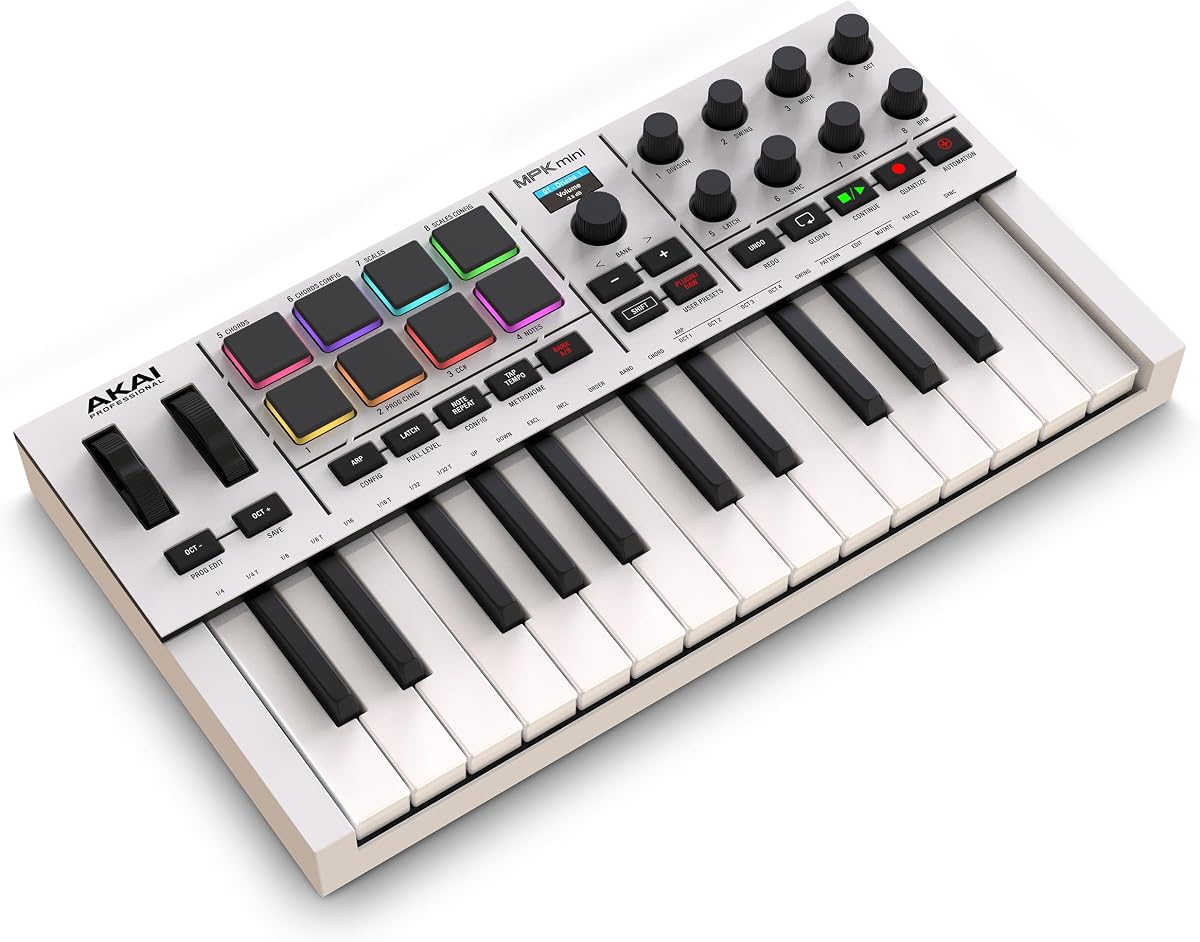
The white Akai Professional MPK Mini IV offers the same modern 25-key design as the black edition, with velocity-sensitive mini keys, eight assignable knobs, eight RGB MPC pads, a full-color screen, and a push/turn encoder. Its 4.6 rating makes it an equally strong option for creators building a mobile setup. The distinction is primarily visual, allowing buyers to match a brighter studio aesthetic.
We may earn a commission when you buy through this link, at no additional cost to you.
USB-C connectivity and plug-and-play support for Mac, PC, and mobile systems reduce setup requirements, while full-size MIDI Out provides a route to external hardware. The display presents important information without forcing the user to rely entirely on software windows. The RGB pads respond to velocity and pressure, offering visual feedback suited to finger-drumming and sample triggering. Eight knobs, an encoder, and DAW-mapped transport controls add direct manipulation for production tasks.
Like other mini-key controllers, the 25-key range is not ideal for pianists who want a full-size playing experience. The lack of dedicated faders also means that detailed mix moves generally rely on knobs, software, or a display-driven control system. The supplied software collection is extensive, which adds value but can also make the initial setup process more involved than the simple plug-and-play description suggests.
This model is a compelling choice for mobile musicians, content creators, learners, and producers who value a screen, modern connectivity, and a broad feature set. Choose the white finish if it suits your workspace, and compare it with the black edition only if appearance is part of the decision. For players who need full-size keys, a keyboard-first model will be a more logical starting point.
A full-color screen and push/turn encoder make settings, presets, and DAW functions easier to manage from the controller. This is especially useful in a mobile session where opening a small software window would interrupt the creative flow.
The lightweight body, USB-C connection, and plug-and-play operation suit travel and compact rigs. Full-size MIDI Out broadens the connection options for users who also work with external synthesizers or other MIDI devices.
We may earn a commission when you buy through this link, at no additional cost to you.
The Novation Launchkey 49 MK4 is an all-in-one controller for musicians who want a premium keybed, extensive DAW operation, and a flexible pad system in one package. Its 4.7 rating makes it one of the strongest options in this roundup. The 49-key format is familiar and capable, while 16 responsive FSR pads offer more control options than a traditional eight-pad layout.
We may earn a commission when you buy through this link, at no additional cost to you.
The FSR pads go well beyond finger-drumming. They can function as step sequencers, clip launchers, chord triggers, and performance controls, and they support polyphonic aftertouch. The controller is designed for major DAWs including Ableton Live, Logic, Cubase, Reason, Reaper, FL Studio, and Ardour. Scale Mode helps users stay in tune, single-key chord triggering creates fuller harmonic parts, and the arpeggiator can be mutated for more varied results.
Native Kontrol Standard support allows hands-on control of compatible Native Instruments software, while the package includes Ableton Live Lite, Cubase LE, Novation Play, sounds from several developers, and Melodics lessons. The trade-off is its size compared with 25-key or 37-key models, and the feature set may be more than a beginner needs. Nevertheless, the premium keybed and broad integration make it appropriate for established and developing production environments.
The Launchkey 49 MK4 is ideal for songwriters, performers, producers, and musicians working across multiple DAWs. It is particularly attractive to users who want pads, keys, chord assistance, and transport tools without assembling several separate devices. Its 49-key size offers enough room for expressive playing while remaining more manageable than a 61-key arrangement.
The 16 FSR pads can switch between drumming, sequencing, clip launching, and chord triggering. Polyphonic aftertouch adds an additional expressive dimension, making the pad bank useful in both DAW performance and instrument control.
Purpose-built workflows for Ableton Live, Logic, Cubase, Reason, Reaper, FL Studio, and Ardour reduce the need to relearn navigation when changing software. That flexibility makes the controller a dependable hub for a multi-platform studio.
We may earn a commission when you buy through this link, at no additional cost to you.
The Akai Professional LPK25 delivers a focused set of musical tools without attempting to be a full production console. It has a 4.7 rating and includes 25 responsive mini keys, octave controls, a sustain button, a built-in arpeggiator and clock, and eight programmable preset slots. Its approachable design makes it a strong starting point for students, songwriters, and anyone seeking a simple Mac or PC controller.
We may earn a commission when you buy through this link, at no additional cost to you.
The arpeggiator and clock can shape notes and synchronize with connected sound sources, including software instruments, synthesizers, and USB-enabled modular equipment. Dedicated octave buttons make it possible to cover a wider note range despite the compact keyboard. Eight preset slots allow mappings for DAWs and virtual instruments to be recalled quickly, and the supplied editor supports creating, editing, and managing those presets from a computer.
The LPK25 does not include a dedicated drum-pad bank, which may limit it for beat-focused workflows compared with the Akai MPK models. It also lacks a screen, so visual feedback is limited. Even so, the simple control set avoids the complexity that can make a first controller intimidating, and compatibility spans popular applications including GarageBand, Logic, Studio One, Cubase, Ableton Live, ProTools, FL Studio, Digital Performer, and Adobe Audition.
This is an excellent choice for budget-conscious learners, keyboardists, composers, and performers who want the essentials in a compact package. Plug-and-play USB power and broad application support keep the setup straightforward, while presets and the arpeggiator add useful depth. A separate pad controller can be added later if finger-drumming becomes a priority.
The LPK25 avoids a crowded interface while providing arpeggiation, timing, octave shifting, sustain, and stored mappings. That balance makes it easy to begin with but still useful as a daily writing controller.
USB power and plug-and-play compatibility for Mac and PC reduce configuration time. Broad support for major music applications also makes the controller a practical starting point for creators who may switch between different production environments.
We may earn a commission when you buy through this link, at no additional cost to you.
The Novation Launchkey 61 MK4 extends the Launchkey concept into a larger performance-oriented format. It has a 4.7 rating, a 61-key premium keybed, 16 FSR pads, and integration with major DAWs. The additional key range makes it particularly attractive to pianists, keyboardists, and producers who want a broader instrument layout without moving to a much larger weighted controller.
We may earn a commission when you buy through this link, at no additional cost to you.
Its FSR pad bank supports finger-drumming, step sequencing, clip launching, and chord triggering, with polyphonic aftertouch for expressive control. Scale Mode, chord triggering, and the arpeggiator help users develop ideas while reducing common performance obstacles. The bundled software includes Ableton Live Lite, Cubase LE, Novation Play, sounds from GForce, Klevgrand, Orchestral Tools, and Native Instruments, plus free Melodics lessons. Native Kontrol Standard compatibility extends hands-on control to supported Native Instruments software.
The obvious trade-off is desk space. A 61-key body is less convenient for compact travel rigs and may dominate a small workspace, while the range of features is more than a user seeking only a basic keyboard might need. It also does not include a conventional weighted-key specification, so pianists seeking a heavy hammer action should verify their exact playing requirements before choosing it.
The Launchkey 61 MK4 is a strong recommendation for serious home-studio musicians, performers, and composers who value both musical range and hands-on control. Its full-size layout can simplify playing extended arrangements, while the pad bank and DAW integration make it useful for hybrid production and live performance. Select it when the broader keybed will be used regularly rather than simply adding unused keys to a desk.
The 61-key layout offers a wider view of the instrument, which can make chord progressions, bass lines, and arrangements easier to visualize and play. It is a practical middle ground between compact controllers and large stage-oriented keyboards.
Polyphonic FSR pads, chord assistance, scale tools, and deep DAW workflows make the controller useful beyond note entry. The same hardware can support composition, beat creation, mixing navigation, and live clip launching.
We may earn a commission when you buy through this link, at no additional cost to you.
The Arturia MiniLab 37 combines a compact 37-key keyboard with eight DAW-integrated pads, faders, a real-time display, and a collection of creative tools. Its 4.7 rating reflects an effective balance of portability and control. The 12 additional signature slim keys expand the layout beyond a traditional 25-key controller, making two-handed play more practical without adopting the footprint of a full-size piano.
We may earn a commission when you buy through this link, at no additional cost to you.
The stacked 2-by-4 pad arrangement supports finger-drumming and clip launching while keeping related controls within a small area. Faders provide direct manipulation of common parameters, and the mini display makes information easier to see during a session. A built-in arpeggiator, chord mode, transposition, and custom DAW mappings support both composition and live control. The overall design is shallow, lightweight, and suited to space-conscious studios and mobile rigs.
The slim key profile is the most important compromise. Musicians accustomed to standard or weighted keyboards may need time to adjust, and the controller offers fewer dedicated physical controls than a larger professional model. It also focuses on a compact feature set rather than the extensive hardware sequencing offered by the MPK Mini Plus. Nevertheless, the display, pads, and faders provide more visible and tactile control than a minimal keyboard-only model.
The MiniLab 37 is a compelling option for electronic musicians, producers, learners, and anyone who wants a space-efficient controller with useful creative aids. It works particularly well in a small studio where a large keyboard would be inconvenient, while the display and pad bank keep essential actions close at hand. Confirm that the slim key feel suits your playing style before committing.
The arpeggiator, chord mode, transposition, and DAW mappings turn the compact keybed into more than a basic input device. These features help users test ideas, simplify harmonic decisions, and shape arrangements quickly.
The shallow chassis, stacked pads, faders, and mini display are arranged for a compact working area. It is well suited to mobile rigs and smaller studios where efficient use of desk space is important.
We may earn a commission when you buy through this link, at no additional cost to you.
The Novation FLkey 2 49 is purpose-built for FL Studio users who want a hardware workflow closely connected to the software. Its 4.6 rating reflects a feature-rich combination of 49 semi-weighted keys, 16 velocity-sensitive pads, eight knobs, nine precision faders, and pitch and modulation wheels. The mixer-style control section distinguishes it from general-purpose controllers that offer only a small set of knobs.
We may earn a commission when you buy through this link, at no additional cost to you.
Its pads are designed for step sequencing in the Channel Rack and finger-drumming with FPC, Slicex, or Fruity Slicer. The knobs and faders map directly to FL Studio functions, allowing levels, filters, effects, and other parameters to be adjusted by hand. Scale and Chord modes simplify melodies and progressions, while the arpeggiator provides another route to generating patterns. The semi-weighted keys also provide more nuanced response than a lightweight mini keyboard.
Its specialization is the main drawback for users who work primarily in other DAWs. Although a MIDI controller can still send standard performance data, the most direct mappings and workflow benefits are designed around FL Studio. The dense control surface also requires some learning, and its size is greater than a 25-key or 37-key model. For an FL Studio producer, however, that concentration of relevant controls is an advantage rather than wasted complexity.
The FLkey 2 49 is a strong fit for FL Studio musicians, beat makers, and producers who spend substantial time in the Channel Rack and mixer. It is especially useful for performers who want to sequence, play, and mix from hardware. Included access to FL Studio Producer Edition, Novation Play, and partner instruments gives new users a substantial starting point.
The Channel Rack, mixer, and pattern-focused pad layout are reflected in the physical controls. Users can move from software navigation to tactile sequencing without switching between a mouse, keyboard, and separate pad controller.
Eight knobs and nine precision faders provide more direct control than most compact keyboards. The layout allows filters, effects, levels, and other mix parameters to be adjusted with consistent tactile feedback.
We may earn a commission when you buy through this link, at no additional cost to you.
The right MIDI keyboard controller depends on how you create music, the software you use, and the space and portability you need. Keybed size, velocity response, control layout, connectivity, and creative features should be matched to your normal workflow rather than to a single universal specification.
Key count determines both the musical range visible at a glance and the amount of desk space a controller occupies. A 25-key model is highly portable and sufficient for melodies, basic chords, and compact beat-making workflows. A 37-key layout adds a more useful two-handed playing area, while 49-key and 61-key options provide a familiar piano-like range for arrangements, bass lines, and performance. Keybed style matters just as much as the number: mini keys improve portability, full-size keys feel more familiar to pianists, semi-weighted keys add some resistance, and slim keys offer a distinct lightweight feel that some players may not prefer.
Velocity sensitivity allows the controller to transmit changes in key pressure, enabling software instruments to respond with different levels of volume, brightness, or attack. It is especially valuable for expressive piano sounds, realistic drum triggering, and nuanced virtual instruments. Pitch and modulation wheels provide additional expression that a button or knob cannot reproduce as naturally. Some controllers also add pressure-sensitive pads, such as the RGB MPC pads on the Akai MPK models and the polyphonic FSR pads on the Novation Launchkey. These features broaden the expressive range but require compatible software and suitable technique to exploit fully.
The physical controls beyond the keys determine how comfortably you can perform and mix without returning to the computer. Eight-pad layouts support finger-drumming, sample triggering, clip launching, or step sequencing, while larger 16-pad banks offer more space for arrangement and performance. Knobs suit plugin parameters and effects, faders provide faster and more precise level control, and transport buttons allow playback, recording, and navigation. Display screens can reduce dependence on computer windows, although they add complexity and consume desk space. Buyers should identify the actions they use most and select a control layout that places those functions within easy reach.
A MIDI keyboard can send standard performance data to most music applications, but dedicated DAW integration can make operation much more efficient. Mapped controls allow a controller to launch clips, move through sessions, operate the Channel Rack, or adjust functions that would otherwise require repeated mouse use. Native Kontrol Standard support is another valuable layer because it allows compatible Native Instruments libraries to respond to a controller's hardware. Confirm that the model is designed for your primary DAW, including dedicated workflows for Ableton Live, Logic, Cubase, Reason, Reaper, FL Studio, or Ardour where applicable.
USB is the standard connection method for computer-based production, and plug-and-play operation can minimize setup time. USB-C offers a modern, widely used interface, while MIDI DIN and full-size MIDI Out can connect the controller to external synthesizers, drum machines, and production stations. The MPK Mini Plus adds CV/Gate for compatible modular equipment, giving it a broader hardware role. Portability also depends on chassis depth, weight, and key size. A travel-friendly controller should fit easily in a bag, require minimal accessories, and operate from USB power without a separate supply.
Arpeggiator and clock functions can generate ideas, synchronize with other equipment, and reduce the need for additional software. Chord and scale modes help users create consonant harmonies or stay within a chosen key, particularly when learning or composing quickly. The MPK Mini Plus goes further with an onboard 64-step sequencer that can retain patterns without a connected computer. Software bundles can add considerable value as well: MPC Beats, Ableton Live Lite, Novation Play, virtual instruments, sound libraries, and lesson subscriptions may help a new user begin immediately. Evaluate the quality and relevance of these extras rather than assuming every included tool will become part of your workflow.
Some MIDI controllers are designed to work as standalone instruments with compatible hardware, while others make the computer or mobile device essential to the advertised workflow. The MPK Mini Plus is particularly relevant to standalone use because of its sequencer and external connections. The MPK Mini IV supports Mac, PC, and mobile setups through USB-C, and the LPK25 provides broad computer compatibility. If you plan to travel, consider whether you will use an iPad, laptop, phone, or dedicated production station, and check the appropriate connection accessory. A controller should fit the destination rather than force a complicated setup away from the desk.
A controller should fit the space where it will actually be used. Mini-key models are easiest to position beside a laptop or on a small stand, while 49-key and 61-key layouts demand more horizontal room. Consider wrist support, controller depth, the height of the display, and whether the controls are reachable without repeatedly twisting your body. A display may improve navigation but raise the viewing angle, while a dense fader section can occupy desk space. If the keyboard will be the main writing surface, its own weight and stability also matter. Trying the layout at your intended workstation is helpful even when purchasing online.
Begin by connecting the controller to the computer or compatible production device with the appropriate cable, then power it on and open your DAW or virtual instrument. Select the controller as the MIDI input, confirm that a key or pad produces sound, and adjust the software's input channel as needed. If your model includes preset slots or an editor, begin with a default mapping rather than changing every control at once. This makes it easier to confirm that notes, velocity, wheels, pads, and transport functions are reaching the software correctly.
Build a practical control layout by assigning the actions you use most often. Start with track volume, playback, recording, and essential instrument parameters, then add creative tools such as arpeggiation, chord triggering, or scale assistance. Save the configuration in the controller's preset slots or the supplied editing software so it can be recalled reliably. When changing DAWs, consult the model's dedicated workflow or mapping resources and create a separate preset for each project type rather than overwriting a configuration that already works.
For care, place the controller on a stable surface and avoid placing heavy objects on the keys, pads, knobs, or display. Keep the unit away from excessive moisture, dust, direct heat, and liquids, and clean it with a soft, dry or lightly damp cloth rather than harsh chemical cleaners. When moving a controller, disconnect cables carefully rather than pulling them from the socket. Periodic software and firmware updates can improve stability or expand compatibility, so check the manufacturer's support resources and keep your mappings backed up.
A controller is not strictly required because many computers and mobile devices can play software instruments through an on-screen interface. It becomes highly useful when you want velocity-sensitive performance, physical expression, reliable note entry, drum pads, or hands-on control over a DAW. It is especially valuable for composition, keyboard performance, beat making, and mixing efficiency.
Most MIDI controllers can send standard note, velocity, pitch, and control data to major DAWs and virtual instruments. Dedicated mappings can add convenience, however, by controlling transport functions, clips, mixer channels, or plugin parameters. Check the product information for explicit compatibility with Ableton Live, Logic, Cubase, Reason, Reaper, FL Studio, Ardour, and other applications you use.
Mini keys make a controller smaller and more portable, but they provide less spacing for fingers accustomed to a standard piano. Full-size keys offer a more familiar layout and are generally better for pianists, classical techniques, and two-handed playing. Semi-weighted or weighted keybeds can add realistic resistance, while slim keys offer a different lightweight feel.
Pads are valuable for finger-drumming, sample triggering, step sequencing, chord triggering, and clip launching, but they are not essential for every type of music production. A user focused on melodic composition may prefer more knobs, faders, or a larger keybed. A beat maker may prioritize a responsive pad bank and the associated software workflow instead.
Most controllers are input devices and make little or no sound without an external source. Their keys and pads send instructions to a computer, mobile device, synthesizer, sampler, modular system, or other MIDI equipment. Some models include sequencers or other standalone features, but a sound source is still normally required to hear the performance.
Native Kontrol Standard is a control integration supported by compatible hardware and Native Instruments software. It allows supported controllers to browse, select, and adjust parameters in participating virtual instruments more directly. Native Kontrol Standard support can be especially helpful for users who regularly work with Native Instruments plugins, but it is not necessary for general MIDI control.
Choose 25 keys for maximum portability, 37 keys for a balance of range and compactness, 49 keys for a familiar piano-like workflow, and 61 keys for a broader performance range. Your priority should be the amount of music you expect to play, available desk space, and whether full-size or mini keys suit your technique.
Many modern controllers advertise plug-and-play operation, meaning basic note input can work without a separate driver installation. Some advanced features, editor utilities, firmware updates, or specialized configurations may still require software from the manufacturer. Check the included documentation and support resources before assuming that every function is available immediately.
The Akai Professional MPK Mini IV is the most versatile all-round choice in this guide, combining mini keys, RGB pads, assignable knobs, a full-color display, creative modes, and broad software support. The Novation Launchkey 49 MK4 stands out as the premium DAW controller, while the Akai LPK25 delivers the most focused and approachable starting point for budget-conscious learners and songwriters.
Prioritize the features that match your daily workflow rather than choosing solely by the number of buttons. Pads matter for rhythm and sequencing, faders and knobs matter for mixing and sound shaping, displays improve navigation, and a larger keybed matters when you regularly play extended arrangements. DAW-specific mapping, external connections, portable dimensions, and an expressive keybed can be more meaningful than a long list of secondary features.
Finally, review the current listing for availability, package contents, compatibility details, and the latest price before purchasing. Product configurations and software access can change, and a controller that looks ideal on paper should also fit your playing style, available space, and preferred DAW. Use this guide to narrow the field, then confirm the final model against your own setup.


