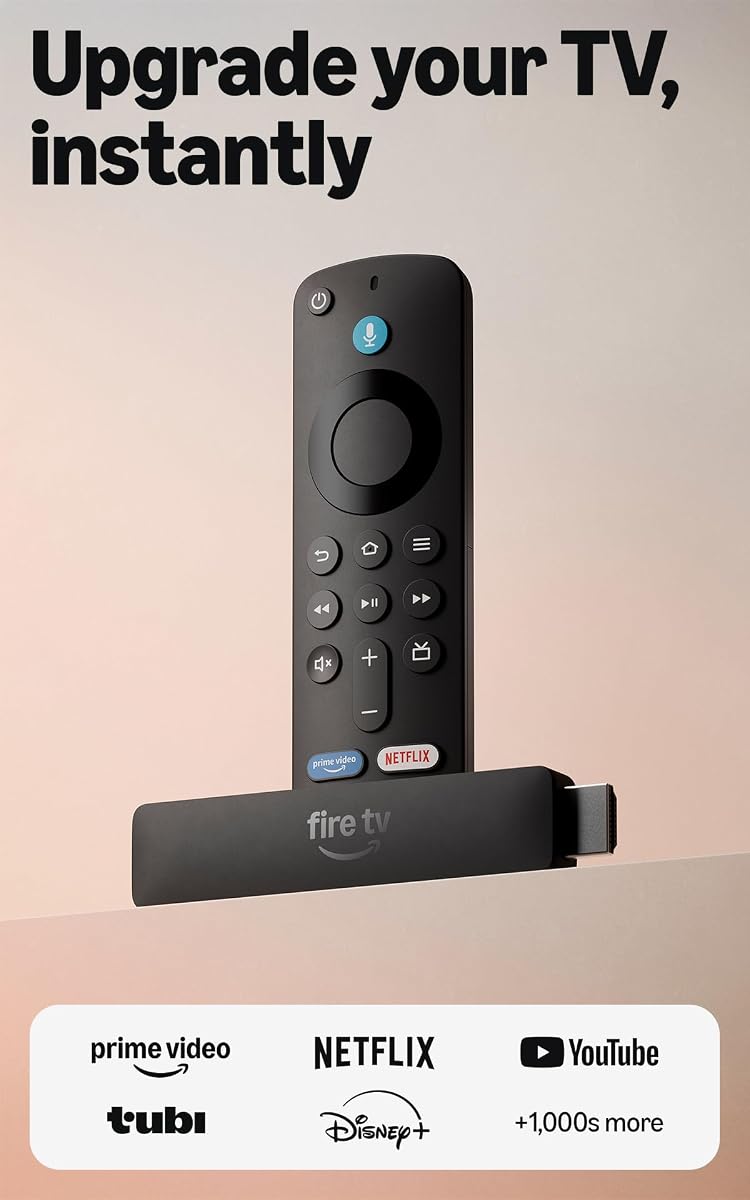
Amazon Fire TV Stick HD
4.1Editor score
Full HD streaming
Wi-Fi 6 support
Alexa+ voice search
Amazon Fall Prime Day tech deals can make it easier to upgrade your entertainment, smart home, audio setup, or everyday productivity gear. The strongest offers pair useful improvements with products that fit comfortably into modern homes, offer straightforward setup, and deliver features people will actually use rather than novelty functions that quickly become clutter.
This guide compares ten Amazon products spanning Fire TV streaming devices, Echo speakers and displays, a Fire HD tablet, smart plugs, a voice remote, and Amazon purchase protection. We evaluated the supplied specifications, feature sets, compatibility details, and customer ratings to distinguish budget picks, versatile recommendations, and more advanced options.
Each review explains what the product does best, who it suits, and where its limitations matter. The list shows why every selection belongs in a tech-deals roundup, while the buying guide focuses on practical factors such as resolution, display size, ecosystem fit, network requirements, and long-term usefulness.
4.1Editor score

4.7Editor score

4.6Editor score
As an Amazon Associate we earn from qualifying purchases.
This side-by-side comparison highlights the core capabilities, display or audio characteristics, connectivity, and ideal use for every product in the guide, helping readers find the most relevant Amazon Fall Prime Day tech deal for their setup.






The Amazon Fire TV Stick HD is an approachable way to bring streaming apps and free ad-supported programming to a television that lacks modern smart features. With a 4.1 customer rating, it offers Full HD picture quality, Wi-Fi 6 support, a voice remote, and access to a large collection of entertainment apps. It is especially compelling for secondary televisions, guest rooms, and budget-conscious households.
We may earn a commission when you buy through this link, at no additional cost to you.
The newest Fire TV experience is one of its main strengths. Its modernized interface, dedicated content categories, app pinning, personalized Alexa+ recommendations, and natural-language search reduce the need to scroll through long menus. The device supports Prime Video, Netflix, YouTube, Disney+, Apple TV, HBO Max, Hulu, Peacock, Paramount+, and many other services, while subscription fees may apply depending on the content selected.
Its limits are straightforward. Full HD output is sufficient for many screens but lacks the 4K resolution and advanced HDR formats offered by higher-tier Fire TV models. The standard remote also does not include the remote-finder function, backlighting, or dual customizable shortcuts found on the Alexa Voice Remote Pro. Those omissions are reasonable if the goal is a simple, low-cost streaming upgrade.
This stick is a strong recommendation for anyone who wants an inexpensive way to modernize an older television, add another streaming device, or test the Fire TV ecosystem without making a major commitment. It is less compelling for a modern 4K television or a home theater where Dolby Vision, Dolby Atmos, and advanced gaming features matter. For everyday streaming at Full HD, however, it delivers the right balance.
Direct Power uses the television's USB connection, so the included USB-C cable can reduce cable clutter and eliminate the need for a wall adapter. After connecting to Wi-Fi, Alexa voice search and the streamlined Fire TV interface make it easy to find supported apps and content.
The thin, lightweight design connects directly to a television's HDMI port without blocking adjacent ports. That makes the Fire TV Stick HD a practical choice for travelers, renters, guest rooms, and anyone who wants portable access to their supported streaming services.
We may earn a commission when you buy through this link, at no additional cost to you.
The Amazon Fire TV Stick 4K Select brings 4K Ultra HD and HDR10+ support to a streamlined streaming stick. Its 4.1 rating reflects an accessible route to higher-resolution viewing, while AI-powered search and the 2026 Fire TV interface make supported programs easier to locate. It fits well for buyers who want 4K without moving to the most feature-heavy model.
We may earn a commission when you buy through this link, at no additional cost to you.
The device includes access to popular services such as Prime Video, Netflix, YouTube, Disney+, Apple TV+, HBO Max, Hulu, Peacock, and Paramount+. Alexa+ can search across apps and launch shows through natural voice requests. The Select also supports cloud-streamed Xbox games through Xbox Game Pass, including a selection of major titles, though a compatible controller and subscription are required.
Compared with the Fire TV Stick 4K Plus, the Select omits several features intended to improve premium home-theater performance. It does not list Dolby Vision, Dolby Atmos, or Wi-Fi 6 support, so picture quality and network headroom are less advanced. These are meaningful differences for people with high-end televisions, demanding audio systems, or crowded home networks.
Choose the 4K Select if your television supports 4K but you want to keep the device focused on everyday streaming. It is also a good fit for a second 4K room or a rental where advanced format support is unnecessary. Viewers who regularly watch Dolby Vision content, value immersive audio, or game on a crowded network should compare it with the Fire TV Stick 4K Plus.
The Select covers the essentials for a modern television: 4K Ultra HD output, HDR10+ support, fast app access, and a refreshed interface. It is a sensible middle ground when Dolby Vision, Dolby Atmos, and Wi-Fi 6 are not priorities.
Supported streaming apps, free ad-supported viewing, live television, and optional Xbox cloud gaming give the device more uses than a conventional smart television app. Checking service availability and controller requirements before setup helps prevent disappointment.
We may earn a commission when you buy through this link, at no additional cost to you.
The Amazon Echo Dot is a compact smart speaker with a 4.7 customer rating, the highest rating among the products in this guide. It combines useful voice assistance, music playback, smart-home routines, and built-in eero mesh Wi-Fi expansion in a device suited to bedrooms, dining rooms, offices, and other small spaces.
We may earn a commission when you buy through this link, at no additional cost to you.
Music and spoken content can be played through Amazon Music, Apple Music, Spotify, and other supported services, as well as over Bluetooth. Alexa can provide weather updates, set timers, answer questions, and extend alarms. Built-in motion and indoor temperature sensors also support routines, such as turning on lights when someone enters a room or starting a fan when the temperature rises.
The strongest unusual feature is the built-in eero extender, which can add coverage of up to 1,000 square feet to an existing eero network. That does not replace a full mesh system, and its value depends on having compatible eero equipment and suitable placement. The lack of a display also makes it less useful for recipes, visual camera feeds, and video calls than the Echo Show models.
For most buyers seeking a small everyday speaker with meaningful smart-home utility, the Echo Dot is an excellent recommendation. It is particularly helpful in rooms where a larger speaker would be intrusive, especially if multiple Echo devices can be paired for multi-room audio. It also serves as a home-theater component when paired with Fire TV.
The Echo Dot does more than play music. Voice questions, timers, alarms, routines, temperature sensing, and smart-device control make it a useful household hub that can remain in use throughout the day.
Compatible Echo speakers can be grouped to fill multiple rooms with music, while the built-in eero extender can improve coverage in a suitable area. Buyers should confirm their network and speaker compatibility before relying on either feature.
We may earn a commission when you buy through this link, at no additional cost to you.
The Amazon Echo Show 11 is a large smart display designed to combine entertainment, visual information, video calls, and smart-home control. Its 4.3 rating reflects a capable product with a vibrant 11-inch Full HD touchscreen, 60% more viewing area than Echo Show 8, spatial audio, and an AZ3 Pro processor.
We may earn a commission when you buy through this link, at no additional cost to you.
The larger display is useful for watching supported programs, checking recipes and calendars, reviewing shopping lists, viewing camera feeds, and displaying favorite photos. Alexa+ can assist with finding recipes, making reservations, and ordering groceries. Its Omnisense technology is intended to support personalized routines based on temperature, presence, or visual identification, while the built-in smart-home hub reduces the need for a separate hub with compatible devices.
Video calls benefit from a centered auto-framing camera, 3.3x zoom, and noise reduction. Privacy controls include a combined microphone and camera enable or disable button plus dedicated camera controls on the device and in the app. The main tradeoff is physical size: an 11-inch display is less convenient for a cramped bedside table, compact office, or small kitchen than a smaller Echo Show.
This is the most visually capable smart display in the roundup and a strong choice for households that want a central information panel. It is particularly suitable for a kitchen, family room, or home office where recipes, schedules, calls, and smart-home controls are used regularly. Anyone primarily seeking voice audio can get a more discreet and less expensive option from the Echo Dot.
The 11-inch Full HD display provides more room for recipe steps, calendars, camera feeds, and entertainment than compact smart displays. Its size is useful for shared spaces but demands more counter or tabletop space.
Spatial audio, wider sound staging, and increased bass compared with the earlier Echo Show 8 support music, shows, and spoken content. The integrated smart-home hub also allows compatible lights, thermostats, and cameras to be managed through the display or voice.
We may earn a commission when you buy through this link, at no additional cost to you.
The Amazon Fire TV Stick 4K Plus is the most advanced streaming stick in this guide, combining 4K Ultra HD, Dolby Vision, HDR10+, Dolby Atmos, Wi-Fi 6, and an improved Fire TV experience. Its 4.6 rating makes it a compelling option for buyers who want a more capable television, sound system, and gaming platform without replacing an entire smart TV.
We may earn a commission when you buy through this link, at no additional cost to you.
AI-powered search, dedicated content categories, app pinning, Alexa+ recommendations, and natural-language voice search improve the way users move through supported services. The included Alexa Voice Remote has application presets, power and volume controls, and smart-home functions. The device also supports Xbox Game Pass cloud gaming when a compatible controller and subscription are available.
The advanced format support requires compatible hardware and content. Dolby Vision needs a television and streaming source that support the format, while Dolby Atmos depends on the television, app, and audio system. Wi-Fi 6 can make 4K streaming smoother when many devices share the router, but older routers will not receive the same benefit. These dependencies are the primary trade-offs.
The 4K Plus is best for a modern 4K television, upgraded home theater, or crowded wireless network where stronger features justify moving beyond the Select. It is less necessary for an older Full HD set or for viewers who only need a basic app interface. For a premium Fire TV setup, however, it offers the most complete combination of picture, sound, search, and gaming features.
Dolby Vision, HDR10+, 4K Ultra HD, and Dolby Atmos support allow the device to take advantage of compatible televisions, content, and sound systems. Using the most capable formats provides the clearest reason to choose this model over a basic streaming stick.
Wi-Fi 6 support is particularly useful in homes with many connected devices competing for bandwidth. It cannot repair a weak internet connection, but it offers additional network headroom when the router and local coverage are suitable.
We may earn a commission when you buy through this link, at no additional cost to you.
Complete Protect is a protection plan for eligible Amazon purchases rather than a conventional electronics device. It offers one monthly plan covering eligible past and future purchases, including technology, tools, appliances, and furniture, subject to the plan's terms. Its 4.3 rating reflects a practical option for frequent Amazon buyers.
We may earn a commission when you buy through this link, at no additional cost to you.
The plan's strongest distinguishing feature is that protection can begin immediately for eligible purchases from the previous 90 days and can extend to future eligible purchases. Portable items may be covered for drops or spills in addition to malfunctions and failures. Digital scam detection for emails and texts adds a cybersecurity component beyond physical product protection.
Important limitations apply. Products used commercially are excluded, and the plan includes a total claim limit of up to $5,000 during each 12-month period. The supplied terms also state that the plan renews monthly until canceled, while coupons applied at checkout do not renew monthly. Claim eligibility should therefore be checked before purchasing.
Complete Protect is most relevant to households that buy many eligible products from Amazon and want a single protection arrangement. Occasional buyers who already have manufacturer warranties, credit-card benefits, or standalone insurance may see less value. Read the current terms carefully, confirm eligible items, and consider whether the plan's coverage, exclusions, and limits fit your household.
The plan can cover eligible recent purchases as well as future eligible Amazon purchases, which is useful for households acquiring several devices and appliances over time. Protection remains tied to the plan's eligibility rules and claim limits.
Claims can be filed through the designated Asurion site for a repair or reimbursement up to the purchase price. Reading the requirements before an incident occurs helps buyers understand what documentation and service options may be needed.
We may earn a commission when you buy through this link, at no additional cost to you.
The Amazon Fire HD 10 is a large, lightweight tablet aimed at streaming, reading, web browsing, gaming, and video calls. Its 4.5 rating reflects a well-rounded device with a vibrant 10.1-inch 1080p Full HD display, an octa-core processor, 4 GB of RAM, and 32 GB of storage.
We may earn a commission when you buy through this link, at no additional cost to you.
Amazon states that the tablet performs 25% faster than the previous generation, improving the experience for streaming, reading, and games. The 13-hour battery supports extended use, while the strengthened aluminosilicate glass and tested durability make it practical for regular household use. A 5 MP front-facing camera handles video calls and content creation.
The included 4 GB of memory and 32 GB of storage are sensible for mainstream use, but additional storage requires a separately sold micro-SD card. The compatible Made for Amazon Stylus Pen is also sold separately and adds 4,096 levels of pressure sensitivity for writing and sketching. Amazon Kids and Alexa features broaden the device's usefulness, although some content and services require subscriptions.
The Fire HD 10 is a good choice for families seeking a straightforward second screen for entertainment, reading, and casual browsing. Its large display is more comfortable than a compact tablet for movies, recipes, and video calls, while the performance increase helps with streaming and games. Buyers should consider extra storage if they plan to download a large media library offline.
The 10.1-inch 1080p display, 13-hour battery, and faster processor support extended viewing and general productivity. Its lightweight construction also makes the tablet easier to move around the home than a small-screen device.
Pressure-sensitive stylus support, smart writing and summarization tools, and a front-facing camera make the tablet useful for notes, sketches, video calls, and social content. The stylus is an additional purchase.
We may earn a commission when you buy through this link, at no additional cost to you.
The Amazon Echo Show 5 provides a compact way to add visual information and smart-home control to a small room. Its 4.2 rating reflects a capable 5.5-inch touchscreen device with a camera, richer audio, access to supported streaming services, and Alexa+ functionality in a relatively unobtrusive format.
We may earn a commission when you buy through this link, at no additional cost to you.
The display can show news, weather, music titles, supported shows, camera views, shopping lists, and rotating photo slides. The 2 MP camera supports video calls with people using the Alexa app or another compatible screen-based Echo device, while compatible video doorbells and home cameras can be viewed when away. The improved bass and clearer vocals are meaningful for a speaker of this size.
Its 5.5-inch display is the central compromise. It works well for glanceable information, but reading long recipes, browsing websites, or joining a video call is less comfortable than on the 11-inch Echo Show 11. The audio improvements also cannot match a dedicated speaker designed primarily for critical listening, and cloud photo features can depend on membership status.
The Echo Show 5 is an excellent bedside, office, or kitchen companion for people who want a small visual Alexa device without taking over the room. It suits quick weather checks, timers, camera viewing, music, and controlling compatible lights or thermostats. Those wanting a larger cooking and entertainment hub should consider the Echo Show 11 instead.
The 5.5-inch display is suited to quick answers, compact camera views, timers, weather, music details, and other glanceable information. It fits naturally on a nightstand, desk, or kitchen counter.
A combined microphone and camera control and a physical camera shutter provide visible ways to disable those functions. The device also supports viewing end-to-end encrypted Ring video for compatible users.
We may earn a commission when you buy through this link, at no additional cost to you.
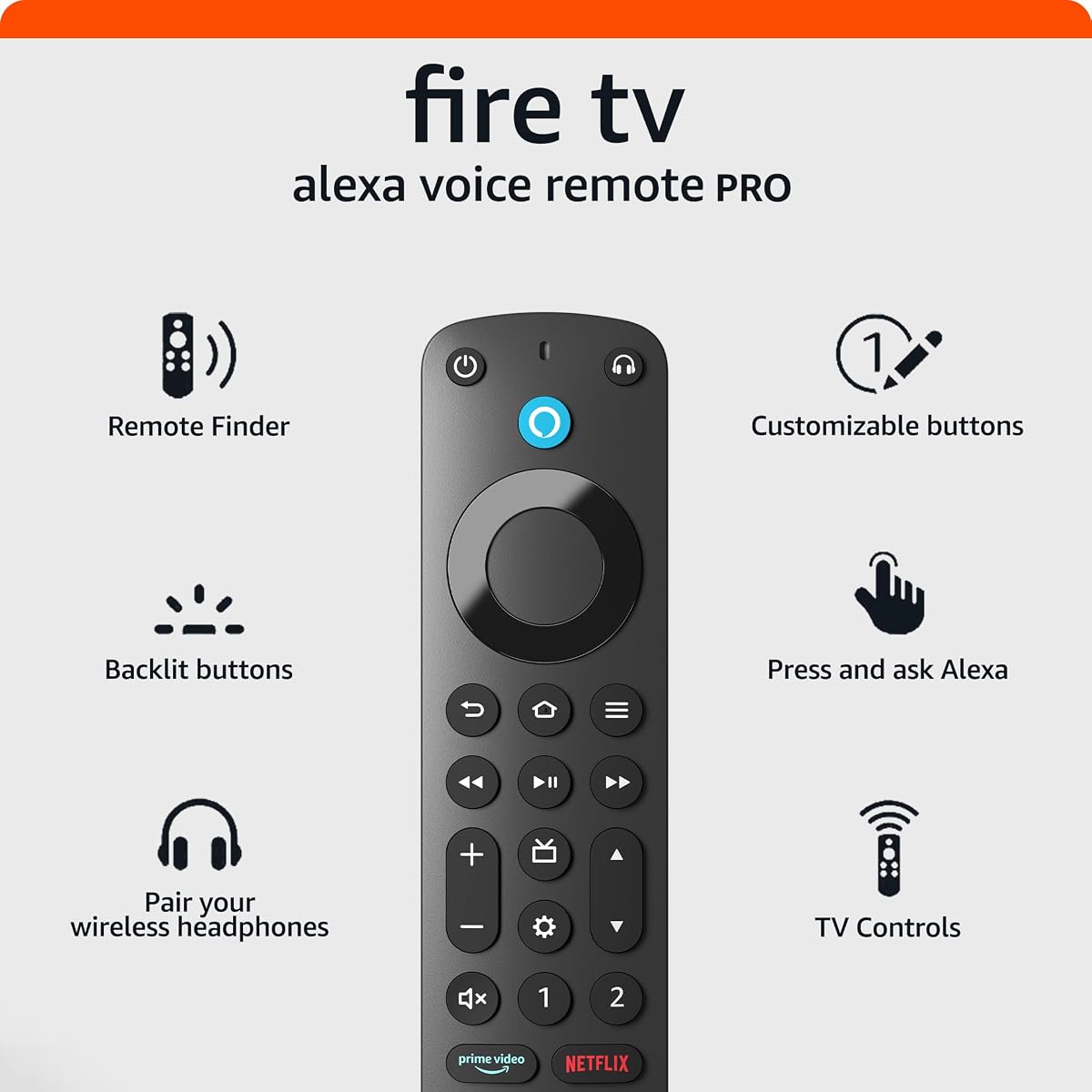
The Alexa Voice Remote Pro is a practical upgrade for compatible Fire TV users. Its 4.5 rating reflects a well-liked accessory that combines voice search, a remote finder, backlit buttons, customizable shortcuts, and dedicated television controls in a familiar remote format.
We may earn a commission when you buy through this link, at no additional cost to you.
The remote finder is especially useful for anyone who regularly loses the remote between sofa cushions. Pressing the appropriate Alexa request makes the remote emit a ring. A motion-activated backlight illuminates the controls in dim rooms, while two customizable buttons can open favorite applications, channels, or Alexa commands.
Compatibility is the main limitation. The remote works with most Fire TV streaming media players, Amazon Fire TV smart televisions, and Fire TV-equipped smart televisions, but it is not compatible with Fire TV first- or second-generation models, first-generation Fire TV Stick, Element Fire TV Edition, Insignia HD and FHD models, the Hisense U6HF 4K ULED Fire TV Series, or Echo Show 15. Its dedicated headphone button opens the Bluetooth menu rather than acting as a universal Bluetooth control.
This accessory is a strong choice for owners of a compatible Fire TV device who frequently misplace their remote, watch television in a dark room, or want one controller for streaming and television functions. It is less useful if the original remote already meets your needs or if your television system falls outside the compatibility list. Checking the model before ordering is essential.
The ringable remote-finder function removes the need to search manually when the device is somewhere nearby. A compatible Alexa-enabled device, the Alexa app, or the Fire TV app can trigger the sound.
Motion-activated illumination helps users identify the correct button without switching on a bright lamp. Dedicated television power, volume, and channel controls reduce the need to reach for a separate remote.
We may earn a commission when you buy through this link, at no additional cost to you.
The Amazon Basics Smart Plug is a four-pack of compact plugs designed to make compatible household devices remotely controllable through Alexa. Its 4.4 rating reflects a straightforward product with app-based management, voice control, scheduling, and no requirement for a separate smart-home hub or third-party application.
We may earn a commission when you buy through this link, at no additional cost to you.
Setup can begin during checkout with a zero-touch option when users link the device to their Alexa account. Once connected, lights, fans, and other compatible plugged-in appliances can be scheduled or controlled remotely through the Alexa app. Routines can run at set times, through voice commands, and at sunrise or sunset, while the compact design leaves adjacent outlets available.
The important limitation is the explicit Alexa-only compatibility. Buyers who use another smart-home ecosystem should not assume that the plugs will integrate with it. They also need a 2.4 GHz Wi-Fi connection, which may require network configuration on a dual-band router. Users should also confirm that the appliance they want to automate is suitable for smart-plug control.
The four-pack makes this a convenient starting point for a new Alexa household, especially when several lamps or fans need scheduling. It is also useful for holiday lighting, heaters, kettles, and coffee makers where remote control is convenient. For people already invested in the Alexa ecosystem, its direct app management and hub-free design keep setup uncomplicated.
Linking the plug to an Alexa account during checkout can streamline initial setup. The included four-pack makes it possible to automate several compatible appliances without purchasing individual plugs one at a time.
Users can set on and off times, trigger routines by voice, or use sunrise and sunset automation. Because the plugs rely on 2.4 GHz Wi-Fi, network compatibility should be confirmed before installation.
We may earn a commission when you buy through this link, at no additional cost to you.
The most useful tech deal is one that solves a real need, integrates with equipment you already own, and remains convenient after the promotional event ends. Consider the category, display quality, ecosystem, network, setup burden, and ongoing compatibility before choosing.
Start by identifying the primary job. A streaming stick belongs beside a television, a smart speaker serves voice and audio tasks, a display adds visual information, a tablet supports portable entertainment, and a smart plug automates an existing appliance. Complete Protect addresses a different need entirely by providing protection for eligible Amazon purchases. Choosing by category prevents a feature-rich product from distracting you from a simpler solution that does the job well.
For televisions, compare Full HD with 4K Ultra HD and look for supported HDR formats. The Fire TV Stick HD provides Full HD, while the Select and 4K Plus support 4K, with the latter adding Dolby Vision and Dolby Atmos. For displays, screen size is equally important: the 5.5-inch Echo Show 5 suits glanceable information, while the 11-inch Echo Show 11 is better for recipes, calls, and entertainment. Speakers should be evaluated for placement, room size, and whether visibility is necessary.
These products work best within a connected Amazon setup. Fire TV devices provide access to a wide range of streaming apps, Echo speakers can pair with Fire TV, Echo Show devices act as smart-home hubs, and the smart plug is designed specifically for Alexa. Before buying, confirm that your television, soundbar, streaming subscriptions, smart devices, and routines are compatible. Ecosystem-only products can be limiting if you already use another platform for home automation.
Streaming quality depends on both the device and the network. Wi-Fi 6 support on the Fire TV Stick HD and 4K Plus can provide extra headroom in busy homes, but a modern router and adequate coverage are still necessary. The Amazon Basics Smart Plug requires 2.4 GHz Wi-Fi, which may require router adjustment. The Echo Dot's eero extension can add coverage only to an existing compatible eoro network and cannot substitute for a complete mesh solution.
The best deal should not create a frustrating setup process. Fire TV devices generally require a television connection and Wi-Fi setup, while Echo devices can be added through Alexa. The Fire TV Stick HD can draw power from the television, reducing cable clutter. The smart plug supports checkout linking and direct management in the Alexa app. Consider how often you will use controls, whether physical buttons matter, and how much space a device occupies.
Some useful features require additional purchases. The Fire HD 10's pressure-sensitive stylus and micro-SD storage are sold separately, while cloud gaming requires an Xbox Game Pass subscription and compatible controller. The Fire TV Stick 4K Plus's Dolby features require compatible content and equipment. The Alexa Voice Remote Pro must match your Fire TV device, and the smart plug needs 2.4 GHz Wi-Fi. Review the full compatibility list before checkout.
A protection plan should be judged by its terms rather than its headline promise. Complete Protect covers eligible past and future Amazon purchases and may cover drops or spills for eligible portable items, but commercial-use products are excluded and annual claim limits apply. It also renews monthly until canceled. Compare the plan with manufacturer warranties and any benefits already provided by a credit card or home insurance policy.
A promotional deal can encourage unnecessary spending, so consider how long the product will remain useful. Streaming devices benefit from current app support, smart displays from compatible routines, and speakers from ongoing music and Alexa use. Favor products that solve repeated problems and fit your existing routine. Accessories and protection can complement a core device, but they rarely provide more value than choosing the right main product first.
Begin by inventorying the devices, services, network equipment, and compatible accessories you already own. Read the quick-start instructions, check the compatibility list, and update your television, router, or Alexa environment before setup. Connecting Fire TV devices to the correct HDMI input, positioning Echo displays where the camera and microphones can operate as intended, and confirming 2.4 GHz coverage for the smart plug can prevent early setup problems.
Configure only the functions you intend to use. For Fire TV, pin priority applications and adjust the television's picture and sound settings to match the supported formats. In Alexa, create routines for lighting, temperature, music, timers, and information. Schedule the smart plug for realistic periods, avoid automating appliances that require continuous supervision, and use the Echo Show's privacy controls whenever the camera is not needed.
Care for the products by keeping streaming devices and smart plugs within their recommended electrical and environmental conditions, and avoid placing the Fire HD 10 where moisture or excessive heat could shorten its life. Clean Echo Show screens and fabric surfaces gently, and review linked camera, microphone, routine, and account permissions periodically. Keep remote batteries in good condition, update compatible software when offered, and revisit subscriptions or protection plans that no longer provide value.
The Fire TV Stick 4K Plus offers the most advanced features in this guide, including 4K Ultra HD, Dolby Vision, HDR10+, Dolby Atmos, and Wi-Fi 6. The 4K Select also provides 4K and HDR10+ but lacks several of those premium capabilities. The standard HD stick is best reserved for Full HD televisions or secondary screens.
The listed Fire TV models support major services such as Prime Video, Netflix, YouTube, Disney+, Apple TV or Apple TV+, HBO Max, Hulu, Peacock, and Paramount+. Availability can vary by country, model, and subscription plan, and premium content may require separate subscriptions. Confirm that your required apps are available before buying.
Choose the Echo Dot when your priority is compact voice assistance, music, smart-home routines, and multi-room audio without a screen. Choose an Echo Show when you want visual information, recipes, calendars, camera views, photo displays, or video calls. The Echo Show 5 is compact, while the Echo Show 11 offers a much larger viewing area.
Yes. The smart plug is managed through the Alexa app and does not require a separate smart-home hub or third-party application. It does require compatibility with Alexa and a 2.4 GHz Wi-Fi network, so buyers with a different smart-home ecosystem should check carefully before purchasing.
Yes, the Fire HD 10 supports reading, drawing, and writing, and it is compatible with the separately sold Made for Amazon Stylus Pen. Its 10.1-inch Full HD display is comfortable for reading and streaming, while 4,096 levels of pressure sensitivity make stylus input more natural in supported applications.
Its motion-activated backlight illuminates the buttons when the remote is moved, making them easier to identify without turning on a bright lamp. It also includes power, volume, and live-TV channel controls, a remote-finder function, and two customizable shortcut buttons.
Complete Protect covers eligible Amazon purchases, including eligible past purchases from the previous 90 days and eligible future purchases. Portable items may receive malfunction, failure, drop, and spill coverage, but terms, exclusions, and claim limits apply. The plan renews monthly until canceled, so buyers should review the current terms before enrolling.
Promotional pricing can change before, during, and after an event, and a deal may vary by account, region, stock level, or product bundle. Compare the current Amazon listing with your preferred retailer and confirm the exact model, color, capacity, and accessories before making a purchase.
The Fire TV Stick HD is the strongest value-oriented choice for Full HD streaming, while the Amazon Echo Dot stands out as the most versatile everyday Alexa device thanks to its high customer rating, compact form, routines, and built-in eero extension. The Fire TV Stick 4K Plus is the premium selection for 4K, Dolby Vision, Dolby Atmos, Wi-Fi 6, and cloud gaming.
Prioritize compatibility before everything else. Check your television type, router and Wi-Fi band, smart-home platform, streaming subscriptions, required accessories, and room limitations. The Echo Show 11 suits a large shared space, the Fire HD 10 offers a portable entertainment screen, the smart plug simplifies routines, and the remote upgrade is most useful for supported Fire TV systems.
Finally, check current prices, deal eligibility, stock, and the exact product variant at the time of purchase. Promotions can shift quickly, and a discounted item is only a good deal when it meets your needs and works with the rest of your setup.