
Ostrich 65W 45W Round Tip Power Adapter
4.5Editor score
Supports 65W and 45W laptops
Includes 4.5mm converter cable
Offers broad round-tip compatibility
Replacement Dell Laptop Charger guide comparing 10 options for connector fit, wattage, voltage, safety, portability, and model compatibility.
A replacement Dell laptop charger must match the connector, voltage, current, and power profile of the computer it will charge. Beyond those essentials, consider worldwide input support, electrical protections, cord length, portability, warranty terms, and the exact Dell models or part numbers listed by the manufacturer.
This guide compares ten roundup listings covering barrel-style and USB-C adapters, including options for Latitude, XPS, Inspiron, Chromebook, Dell Pro, and older Dell systems. Specifications and compatibility claims come from the supplied product information, while listings with missing details are identified transparently rather than treated as fully documented alternatives.
The picks show why connector type matters more than the word Dell alone, how 45W, 60W, and 65W adapters differ, and which features are most useful for travel, office replacement, or bulk purchasing. Ratings and prices can change over time, so compare the current listing details before making a final decision.
4.5Editor score

4.8Editor score

4.6Editor score
This side-by-side comparison separates barrel-tip and USB-C chargers, checks the stated power ratings and voltage ranges, and highlights the most important compatibility and practical-use details for each listing.



The Ostrich Charger Compatible with Dell Laptop Computer 65W 45W Round Tip Power Adapter is a practical choice for replacing a missing or damaged barrel-style Dell adapter. Its 4.5-star rating reflects a generally favorable customer history, while its defining advantage is the combination of broad family compatibility, a useful 4.5mm-to-7.4mm converter, and support for both common Dell power levels. It is particularly appealing for Inspiron, XPS, and Vostro owners with the round connector rather than USB-C.
We may earn a commission when you buy through this link, at no additional cost to you.
The adapter is rated for a maximum output of 65W at 19.5V and 3.34A, which also accommodates 45W Dell laptops. Its 100-240V input makes it suitable for use in many countries, reducing the need for a separate travel transformer. The package includes the power adapter, a power cord, and a converter cable for systems using a 7.4mm by 5.0mm connector. That inclusion is important because many visually similar Dell round tips are not physically identical.
The listing also emphasizes protections against short circuits, overvoltage, overcurrent, and internal overheating. A stated 30-day return and exchange window, together with a lifetime exchange commitment for defects, adds reassurance that is not always emphasized in replacement-accessory listings. The tradeoff is that this is designed for the round-tip ecosystem; it cannot serve a modern Dell notebook that requires a USB-C plug, and buyers should still verify the charging protocol expected by their specific computer.
This is the budget-oriented recommendation for someone who owns a compatible round-tip Dell laptop and wants a 65W replacement with a converter included. It is less suitable for a USB-C-only system or for a user who prioritizes a compact travel adapter. Confirm the connector shape, required wattage, and original adapter label before ordering, then retain the model and power requirements for future replacement needs.
The included conversion cable expands compatibility with Dell systems that use the larger 7.4mm by 5.0mm round connector. It makes one adapter more useful across several laptop generations without changing the core power specifications.
The stated return and lifetime defect-exchange commitments provide useful recourse if the adapter develops a fault. Buyers should still follow the listing's support instructions and retain proof of purchase.
We may earn a commission when you buy through this link, at no additional cost to you.
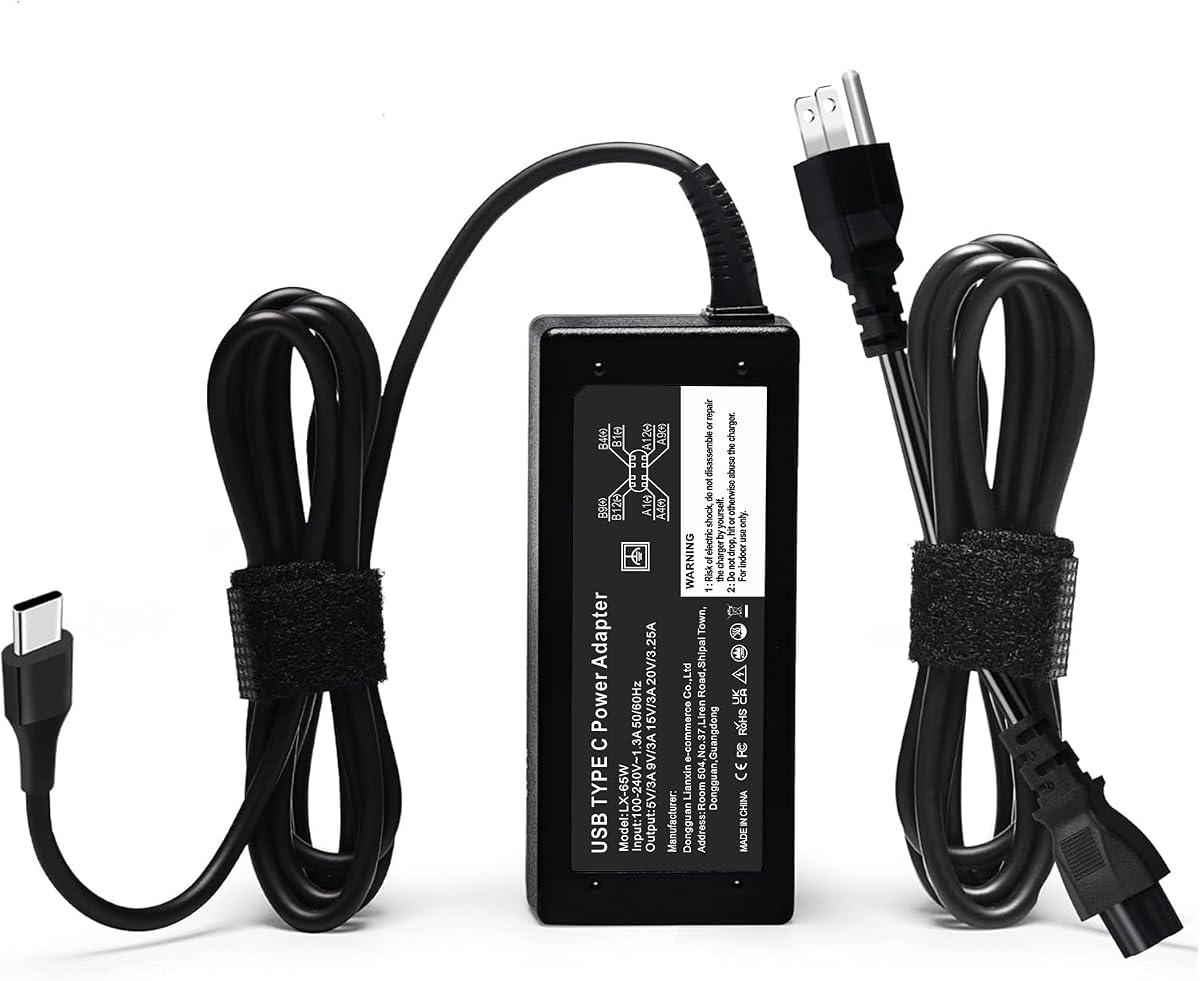
The Replacement for Dell Laptop Charger 65W Watt USB Type C AC Power Adapter stands out with a 4.8-star rating, the strongest documented rating among the listed products with full information. It combines a 65W output, worldwide input, broad model support, and an extensive replacement-part-number list. For a USB-C Dell user comparing modern adapters, that combination of specificity and flexibility makes this one of the strongest all-around choices in the roundup.
We may earn a commission when you buy through this link, at no additional cost to you.
Its output reaches 20V at 3.25A, while the input accepts 100-240V. The supplied information says it supports select Dell 65W, 60W, and 45W USB-C laptops, including many Latitude, XPS, Inspiron, Chromebook, and Dell Pro models. It also lists numerous original part numbers such as LA65NM170, DA65NM190, HKA65NM200, and several others. This makes checking compatibility unusually straightforward if the original adapter label is still accessible.
Built-in safeguards reportedly cover overvoltage, overcurrent, overheating, overload, and short circuits. The adapter is also described as compact enough for a laptop bag or suitcase, with a power cord included in the package. Its limitation is equally important: USB-C physical compatibility does not guarantee that every USB-C Dell laptop will negotiate the same power profile. The model and part-number lists should therefore be treated as the primary purchase checks rather than relying on connector shape alone.
Choose this adapter when your Dell notebook uses USB Type-C and appears in the listing's supported models or part numbers. It is a strong candidate for a home-office replacement, travel kit, or general-purpose USB-C charger that covers a broad selection of Dell equipment. Before ordering, compare the model number on the laptop, the connector, and the original adapter's electrical label. If all three align, the extensive coverage and strong rating make this the Editor's Choice.
The listing identifies compatible Latitude, XPS, Inspiron, and Chromebook systems in detail. That makes it easier for a buyer to verify fit and power requirements instead of relying only on a generic Dell logo.
Universal 100-240V input and a compact adapter body make this option convenient for trips and changing work locations. The included cord allows use in homes, offices, classrooms, and hotels.
We may earn a commission when you buy through this link, at no additional cost to you.
The Dell 45W Replacement AC Adapter for Dell is positioned as a more original-style option for owners of compatible 45W Dell laptops. Its 4.6-star rating is strong, and the specification set is notably straightforward: original Dell part numbers, a maximum 45W output at 19.5V and 2.31A, worldwide input, and an included power cord. For a matching 45W system, the focused approach can be preferable to carrying a larger universal adapter.
We may earn a commission when you buy through this link, at no additional cost to you.
The listing identifies original part numbers 0KXTTW and LA45NM140, giving shoppers concrete identifiers to compare with the label on a lost charger. Input spans 100-240V at 50/60Hz, so it is designed for broad international use. Because this is a 45W adapter, it is important to distinguish it from the many 65W replacements in this guide: a lower wattage does not automatically make it better, but it may be the correct factory-style match for a lower-power notebook.
The product's premium designation comes from its original-Dell positioning and focused fit rather than from premium features such as multiple ports, rapid charging, or unusually long cables. Those are not necessary for a standard replacement adapter. The main limitation is model applicability. It is intended for systems using the referenced 45W platform, not for modern USB-C-only machines, and it would not satisfy a laptop that requires the higher 65W profile or a different connector.
This is the preferred choice for someone who can confirm that the original charger used part number 0KXTTW or LA45NM140 and required 19.5V at 2.31A. It is especially relevant to older business-oriented Dell laptops and systems no longer covered by newer USB-C listings. Confirm both connector and electrical rating before purchase. When they match, the original-style specification, included cord, and strong rating justify this as the premium pick.
Matching 0KXTTW or LA45NM140 to the original adapter makes this a precise replacement rather than a broad compatibility guess. A photograph of the old label can also help when the original unit is missing.
A 45W adapter is appropriate when it matches the laptop's required power profile. Deliberately matching the original specification can be preferable to choosing a superficially higher-output replacement.
We may earn a commission when you buy through this link, at no additional cost to you.
The Replacement for 65W Dell Laptop Charger USB-C is especially interesting for offices, schools, repair shops, and other buyers who may need several identical adapters. It carries a 4.2-star rating and provides a 65W USB-C specification with broad support for Dell Pro, Latitude, XPS, and other compatible systems. The unusual emphasis on bulk-ready case packaging distinguishes it from typical single-adapter consumer listings.
We may earn a commission when you buy through this link, at no additional cost to you.
Its stated input is 100-240V at 50-60Hz and 1.8A. Output levels include 5V, 9V, 12V, 15V, 18V, and 20V, with a maximum current of 3.25A at 20V. Compatible models span Dell Pro 13, 14, and 16 families and many Latitude 5000- and 7000-series systems. The 65W rating aligns with the growing number of USB-C Dell notebooks that accept a 65W supply.
The listing describes oxygen-free copper wiring with thickened tin plating, along with overvoltage, overcurrent, short-circuit, and real-time temperature protections. Those are useful attributes for a device expected to see frequent use. Its biggest purchasing complication is the 50-unit case configuration. Although the listing frames this as an efficient institutional option, a household shopper should confirm that a single unit is actually available and should not assume the visual retail configuration matches a bulk shipment.
For an institution replacing dozens of compatible USB-C chargers, this listing is worth evaluating because of its case-ready presentation, consistent electrical specification, and broad model list. For an individual, it remains a viable adapter if the product can be purchased in the required quantity. Verify the exact models, connector, and output before ordering, and consider the individual-versus-bulk structure carefully.
The standardized 65W output and wide model list are valuable for organizations deploying a consistent replacement fleet. Bulk packaging can simplify receiving and inventory management.
The adapter offers several output settings rather than a single fixed voltage. That flexibility supports different compatible Dell USB-C systems while retaining a maximum 65W rating.
We may earn a commission when you buy through this link, at no additional cost to you.
The DECSZDY Replacement for Dell Laptop Charger 65W USB-C offers broad compatibility for a 4.1-star-rated adapter aimed at Latitude, XPS, Inspiron, and Chromebook owners. Its 65W maximum output and USB-C connector fit many modern Dell laptops, while the extensive list of supported models and original part numbers gives shoppers multiple ways to check whether it is appropriate for their system.
We may earn a commission when you buy through this link, at no additional cost to you.
The listed electrical profile is 100-240V input at 50-60Hz and 1.8A, with outputs from 5V through 20V and a 20V rating of 3.25A. The compatibility list includes many Latitude 3000, 5000, 7000, and 9000-series models, XPS 13 and 15 systems, and several Inspiron 13-, 14-, and 16-inch models. The supplied part numbers cover common 45W, 60W, and 65W adapter families, although the overall product is marketed as a 65W unit.
A built-in IC chip is described as providing short-circuit, overcurrent, overvoltage, overheating, and overload protection. The package includes one power adapter and one power cord, and the seller advertises email support around the clock. These features make it a self-contained replacement, but the very broad compatibility presentation also means that careful verification matters. A model appearing on the list should still be checked for the correct USB-C power profile and connector orientation.
Choose this option if its specific model or part-number list includes your Dell computer and you want a modern USB-C replacement with a conventional adapter-and-cord package. It is less compelling than the highest-rated options for a buyer who values primarily customer feedback, and it cannot help owners of a round-tip laptop. Nevertheless, the broad coverage and stated protections make it a credible general replacement for compatible USB-C machines.
Start with the number printed on the original charger, then compare it with the listing's part-number list. Matching one of those identifiers can be faster than comparing a long series of model names.
Both the AC adapter and power cord are included. That makes the package suitable for replacing a lost complete setup rather than only replacing a damaged wall plug or adapter body.
We may earn a commission when you buy through this link, at no additional cost to you.
The 60W 65W USB C Laptop Charger fits for Dell Pro 14 16 13 Plus USB-C Adapter is tailored to newer Dell Pro configurations while also covering several Latitude, XPS, Inspiron, and Chromebook systems. Its 4.4-star rating and emphasis on recent model families make it an interesting option for buyers whose Dell computer uses the expanding range of USB-C power designs introduced in recent business laptops.
We may earn a commission when you buy through this link, at no additional cost to you.
The adapter accepts 100-240V at 50-60Hz and offers several output settings: 15V at 3A, 20V at 2.25A, 20V at 3A, and 20V at 3.25A. Its maximum rating is 65W, and the listing notes compatibility with 60W and 45W models. A particularly useful feature is the included 10-foot cord, which provides more placement flexibility in a desk, conference room, or home office than a compact cable.
Specific compatibility includes Dell Pro 14 Plus and 16 Plus systems, Dell Pro 13 Plus, Dell Pro 13 Premium, and Dell Pro 16 Plus variants, along with Dell Pro 3, 5, and 7 families. The listing also names Latitude 5420, 5450, 5520, 5530, 5540, 7440, 7450, 7340, 7350, 3540, 9440, and other models. It warns that some Inspiron models fit only when they are 65W USB-C laptops, so a model-family match alone is not enough.
This adapter is a sensible pick for a newer Dell Pro or supported Latitude system where USB-C is required and a long power lead is useful. It can also serve compatible 60W or 45W machines, provided their power requirements are supported. Users with very compact travel kits may find the 10-foot cord inconvenient, but for fixed workstations the extra reach is likely the more important advantage. Confirm the exact model and required wattage before ordering.
The compatibility information targets several recent Dell Pro 13, 14, and 16 configurations, including Plus, Premium, and numbered product families. This gives it an advantage for buyers with newer business notebooks.
The 10-foot cord offers considerable placement flexibility around a desk or meeting table. It may eliminate the need for an extension or a less convenient charging position.
We may earn a commission when you buy through this link, at no additional cost to you.
The Dell 45W Replacement AC Adapter for Dell offers a focused solution for owners of older Dell laptops designed around the 45W adapter platform. Its 4.6-star rating is among the strongest in the roundup, while the concise specification information is easy to verify. It may not provide the flexibility of the multi-model USB-C choices, but that focused nature is exactly what makes it useful when it matches the original equipment.
We may earn a commission when you buy through this link, at no additional cost to you.
The listing identifies Dell part numbers 0KXTTW and LA45NM140. Electrical specifications are 100-240V AC input at 50/60Hz and 19.5V at 2.31A, with a maximum output of 45W. A power cord is included. These values should be compared with the original adapter, not merely with the laptop's screen size or product family, because Dell systems within one family can have different power requirements.
The advantage over a more general replacement is the possibility of recreating the intended power specification. The disadvantage is a narrower target: it is inappropriate for USB-C systems, higher-wattage notebooks, and Dell computers using other barrel-tip or proprietary connector designs. The product information also does not list a long model-number array, so the part numbers and electrical output are the most important verification points.
Buy this adapter when the original charger carried 0KXTTW or LA45NM140, used a round connector, and delivered 45W. It is especially relevant for an older Latitude, Inspiron, or other compatible Dell laptop whose original adapter is no longer readily available. If those identifiers do not match, move on to a better-documented option rather than assuming all 45W Dell chargers are interchangeable.
The output rating and original part numbers narrow the field considerably. That precision is useful because similar-looking Dell adapters can still differ in voltage, current, and connector requirements.
A 100-240V input range allows the adapter to be used across many mains systems. The included cord completes the setup for normal wall-powered use.
We may earn a commission when you buy through this link, at no additional cost to you.
The 65W AC Charger for Dell Inspiron 11 13 15 17 3000 5000 7000 La65ns2-01 is built for the large installed base of older Dell Inspiron notebooks that use round power connectors. Its 4.4-star rating and unusually long compatibility list make it a useful alternative for owners of 3000-, 5000-, and 7000-series systems, including many models released before Dell moved toward USB-C charging.
We may earn a commission when you buy through this link, at no additional cost to you.
The adapter supports both 4.5mm by 3.0mm and 7.4mm by 5.0mm sockets, reducing the risk that a connector mismatch will make an otherwise suitable charger unusable. Maximum output is 65W at 19.5V and 3.34A, input spans 110-240V, and the cord is listed at 8.8 feet. The broad model list includes Inspiron 15 and 17 systems, 13-7000 and 11-3000 families, 2-in-1 models, and numerous individual model numbers.
A useful feature is the long list of replacement identifiers, including KXTTW, 04H6VH, ADP-45XD BA, D0KFY, 332-1827, DA45NM140, and others. These can help a buyer match the charger even when the computer model is difficult to identify. The listing also states that the new adapter has CE and FCC safety certification and identifies model number SK90195334 as compatible with BRJ65195334.
This is a compelling option for a legacy Inspiron with a round tip, particularly when the original charger has failed or disappeared. The long lead and dual connector support add practical flexibility, but buyers should not apply it to a USB-C computer merely because the Inspiron model name is similar. Verify the original plug size, output requirements, and at least one model or replacement identifier before purchasing.
The model list includes many notebooks from earlier Inspiron generations. This makes the adapter particularly relevant where the original system outlived the availability of its factory charger.
Supporting both 4.5mm by 3.0mm and 7.4mm by 5.0mm connectors expands the pool of compatible legacy laptops. Visual confirmation should still be followed by an electrical and model check.
We may earn a commission when you buy through this link, at no additional cost to you.
The listing associated with ASIN B0F371QBYX does not include a product name, image, rating, price, or descriptive specifications in the supplied dataset. It is therefore included to maintain the ten-product roundup structure, but it cannot be evaluated as a documented charger alternative. Nothing in the available information confirms the connector, output wattage, voltage, input range, supported Dell models, or contents of the package.
We may earn a commission when you buy through this link, at no additional cost to you.
Because the product category requires a precise connection between the adapter and the laptop, missing specifications are a substantial limitation. A USB-C charger and a round-tip barrel adapter may both carry Dell branding, while their electrical profiles can differ. Without a part number or model list, there is no reliable way to determine whether this item would meet the requirements of a particular notebook.
The absence of a supplied image also prevents meaningful visual assessment of the connector, adapter body, label, or included cable. Likewise, the lack of stated safety protections, warranty terms, and customer rating means a shopper cannot evaluate build support, replacement policy, or market feedback from the data provided. Those omissions are especially important for any electrical accessory.
This listing should not be selected on the basis of this guide. A prospective buyer should open the current product page and verify the exact title, connector, input, output, compatible models, package contents, and warranty before considering a purchase. If those details are unavailable or remain ambiguous, choose a thoroughly documented alternative from the list. Transparency about the missing information is more useful than suggesting compatibility that cannot be confirmed.
A charger cannot be validated without basic electrical and connector information. This listing's absent specifications make a safe compatibility assessment impossible from the supplied data.
Shoppers should review the current Amazon page for the exact model and product details. They should proceed only if the connector, power requirements, and model support are clearly documented.
We may earn a commission when you buy through this link, at no additional cost to you.
The product associated with ASIN B0921QPWQX has no supplied title, image, rating, price, or about-the-item information. As a result, it functions in this roundup only as a place to account for all ten supplied product records. It cannot be credited with a specific connector, wattage, voltage, compatibility range, safety system, or package configuration because none of those claims appear in the available data.
We may earn a commission when you buy through this link, at no additional cost to you.
This lack of information matters more for a charger than for many less technical accessories. Matching requires at least the plug geometry, output voltage, maximum current, and supported charging profile. A seller may later update a listing, but the current dataset cannot confirm those details, and a shopper should not infer them from the Dell association implied by the search category.
No customer feedback score is available either, and there is no image with which to distinguish a full-size power brick from a compact USB-C wall adapter. Without a package description, it is also impossible to know whether a cord is included. A buyer who assumes that every Dell replacement includes a detachable AC cable could end up with an incomplete setup.
The responsible recommendation is to treat this as an unverified listing rather than a ranked recommendation. If the live page provides clear model numbers, electrical specifications, connector dimensions, and included accessories, it may become assessable. Until then, choose one of the documented options in this guide, where compatibility and safety claims can be evaluated directly. Avoid purchasing an electrical replacement whose core specifications cannot be confirmed.
The record does not establish that the item supports any specific Dell laptop. Compatibility should never be inferred from a category association alone.
The other entries provide connector, wattage, input, model, and package details. They offer a more reliable basis for choosing a replacement charger.
We may earn a commission when you buy through this link, at no additional cost to you.
The right replacement is determined by the exact charging interface and electrical requirements of the laptop, followed by practical considerations such as portability, protection, warranty, and whether the cord is included.
Match the connector before considering any other feature. A visually similar plug can still fit incorrectly or fail to charge.
Use the original charger label or the laptop's manual to identify the required wattage. Matching the original specification is the safest approach.
Check voltage and current together, not wattage alone. The correct connector and the correct output profile must both be present.
For frequent travel, prioritize universal input, manageable size, and a connector type that suits your laptop.
Favor chargers that state specific electrical protections and provide clear support, returns, and defect-replacement terms.
Verify the exact model and original part number whenever possible. A model-family match alone is not a complete compatibility check.
Verify that both adapter and cord are included, then choose a cord length that suits the intended workstation or travel setup.
Confirm the current warranty and return terms before ordering. Clear post-purchase support is especially valuable for electrical accessories.
Before connecting the charger, identify the laptop model and confirm that the connector shape, output wattage, voltage, and current requirements agree with the replacement. Read the label on the new adapter and compare it with the old adapter or the manufacturer's service information. If the original charger is gone, use the model and part-number lists supplied by the seller and Dell documentation. Do not rely on a general statement that a charger works with a Dell family.
Place the adapter on a stable, dry surface with ventilation openings unobstructed. Connect the cord securely to the adapter and wall outlet, then attach the DC or USB-C plug to the laptop without forcing it. For barrel connectors, align the plug straight rather than twisting it while inserted. Avoid extension cords that are overloaded, and do not use the adapter near liquids, excessive heat, or confined areas where heat cannot dissipate.
Inspect the cable and connector periodically for fraying, discoloration, looseness, bent pins, or impact damage. Stop using the charger if you notice an unusual smell, buzzing, discoloration, or excessive heat, and disconnect it safely. Keep the connector clean and dry, coil the cable without creating sharp bends, and store the adapter in a protective bag during transport. For continued use, follow the laptop battery-care guidance provided by Dell.
No, not directly. USB-C and round barrel connectors are physically different, and a cable or adapter would need to support the correct electrical profile on both ends. Even with a physical converter, the barrel side must match the voltage, current, and plug configuration. For the safest result, choose a replacement with the connector and output rating already specified for your laptop model.
It can be safe when the charger and laptop support compatible USB-C power profiles, because USB-C charging negotiates the appropriate power level. For a barrel-tip 45W system, however, the connector and voltage requirements must also match; simply relying on the higher wattage is insufficient. Several listings state that they support 45W models, but the specific model or part number should still be confirmed.
Look for the model number printed on the bottom or side of the laptop, then check the original adapter's connector, wattage, voltage, and current. Search that information among the seller's model and part-number lists. A photograph of the original charger label can be especially helpful if the part number is worn. The adapter's own output label should remain readable and undamaged.
That depends on the design. The fully documented options in this guide include a power cord, but some compact USB-C wall adapters plug directly into an outlet and do not use a separate cord. The two listings with missing information do not confirm their contents. Read the package description carefully to determine whether you are receiving an adapter-and-cord set or a wall-plug unit.
Most fully documented choices accept 100-240V input, which supports use across many countries. You may still need a physical plug adapter because the cord's plug shape may not fit the destination outlet. Do not use a simple voltage-conversion plug to operate a 120V-only adapter on a higher-voltage supply. Check the input label and local electrical requirements before departure.
Disconnect it and verify that the connector, laptop model, and power profile match. Try a known-compatible outlet and inspect the plug and cable for damage, then confirm that the laptop recognizes a compatible USB-C power adapter. For barrel-tip systems, check that the connector is fully seated and that the correct pin arrangement is being used. If the problem persists, contact the seller and Dell support rather than forcing the connector.
They can be suitable when they provide accurate electrical specifications, credible protection systems, clear compatibility information, and responsive return or warranty support. The supplied listings mention various safeguards, but buyers should review current details rather than assuming every claim. Matching the model and original part number, checking certification statements, and avoiding unknown or overly vague listings all reduce compatibility and safety risks.
Choose the rating required by the laptop and its supported charging profile, not the highest number available. A 45W replacement may be exact for a lower-wattage system, while a 65W USB-C unit may support a broader range of modern models. Some listings accommodate 45W, 60W, and 65W devices, but always confirm the connector and model. Matching the original charger is the most reliable starting point.
The strongest general choice is the QXA 65W USB-C AC Power Adapter because it combines the highest documented customer rating, broad model and part-number coverage, universal input, and stated electrical protections. The Ostrich round-tip adapter is a compelling budget option for compatible 45W and 65W systems, especially because it includes a 4.5mm-to-7.4mm converter. For a verified 45W platform, the original-style Dell adapter offers a focused and well-rated replacement.
Whichever option you consider, prioritize the connector and electrical profile before anything else. Verify the exact laptop model, original part number, wattage, voltage, and current, and avoid relying on broad family claims alone. Then consider cord length, portability, safety protections, package contents, and return support. The GVKRLXZ option may suit bulk organizational purchasing, while the STJJNNWI adapter offers extensive newer Dell Pro coverage and a long cord.
Ratings, product details, and prices can change, so confirm the current listing before purchasing. Two records in this roundup lack enough information to validate, which illustrates why documentation is essential for any electrical accessory. Checking the live product page and the manufacturer's service information can prevent an expensive mismatch and help ensure that the replacement charger fits both the laptop and the way you intend to use it.

