
Satisfye ZenGrip 2
4.7Editor score
Asymmetrical ergonomic construction
Anti-scratch floating silicone tabs
Original-dock compatibility
Explore the best Switch 2 Joycon Grips for comfort, control, charging, portability, protection, and better handheld ergonomics for every player.
Switch 2 Joycon Grips can transform the way the console feels in your hands, especially during extended handheld sessions. A well-matched grip improves comfort, steadies your hold, protects the controllers, and can make detached Joy-Cons feel more substantial. The right choice depends on whether you prioritize portability, charging, precise control, or a full ergonomic housing.
This guide compares ten distinct grip and thumb-grip options for Switch 2 players, including compact comfort grips, full-shell ergonomic grips, magnetic charging grips, anti-slip handles, and textured joystick caps. The evaluation considers fit, compatibility, installation, control access, docking, charging convenience, portability, protection, and the practical value of each design.
The list includes a separate thumb-grip category because these accessories can alter stick feel without replacing the Joy-Cons themselves. Each review highlights verified features and honest limitations, while the buying guide explains how to choose for different play styles. Prices and promotions can change, so check the current listing before buying.
4.7Editor score

4.7Editor score

This side-by-side comparison covers full-controller grips, compact handles, charging grips, ergonomic shells, and thumb-stick caps, making it easy to compare compatibility, attachment style, control access, portability, and protection.
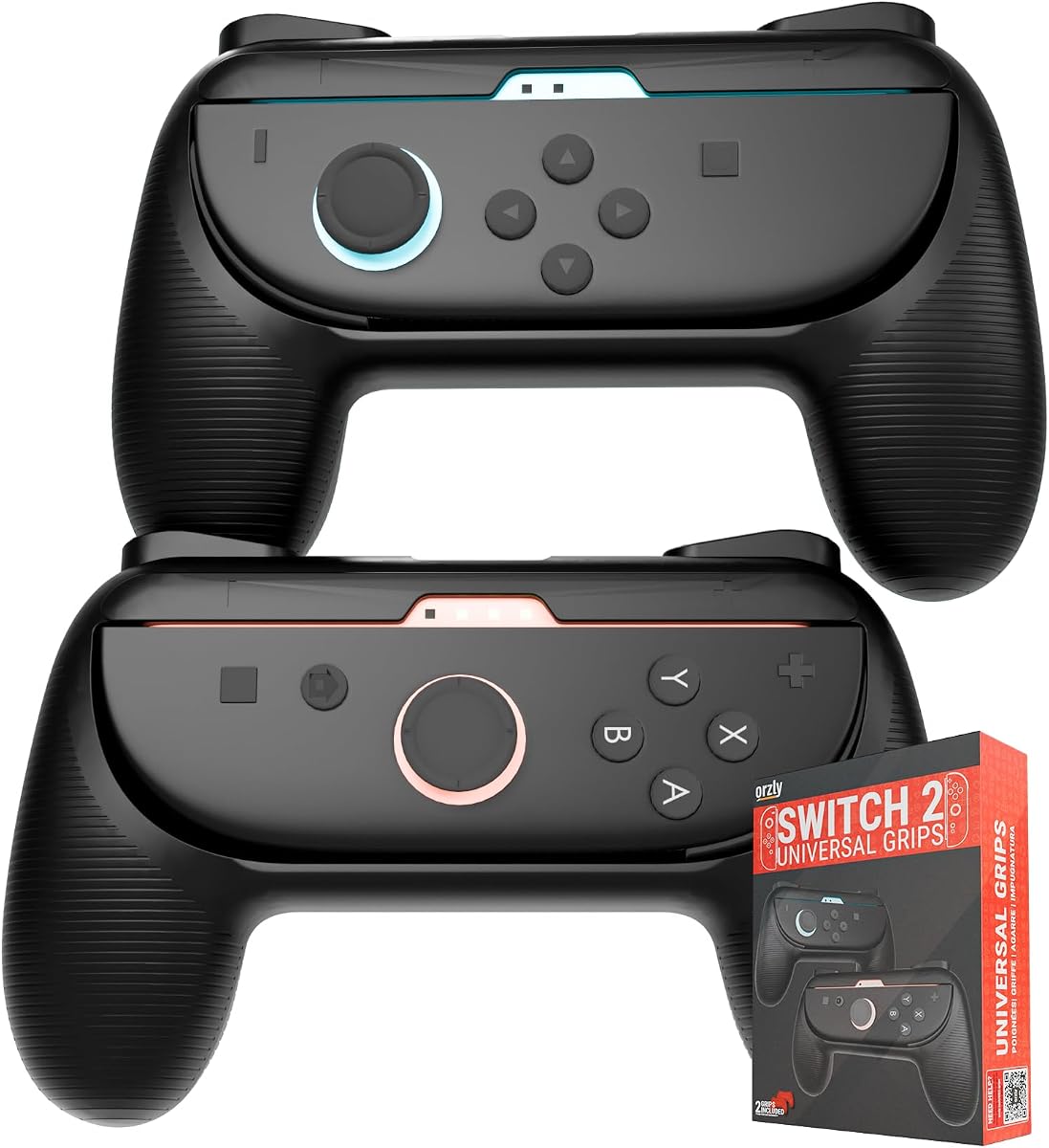


The Orzly Joycon Grips 2 Pack targets players who want more support around the upper edges of the Switch 2 Joy-Cons. Its headline feature is the extended shoulder-button design, which can make the detached controllers feel more substantial and may improve access to SL and SR buttons during demanding games. The product carries a 4.6 rating, placing it among the stronger choices in this guide.
We may earn a commission when you buy through this link, at no additional cost to you.
The extended form should appeal to players who tend to cradle the Joy-Cons with their palms rather than using a tiny, purely decorative sleeve. A larger grip can distribute pressure more effectively and create room for fingertips, particularly during longer handheld sessions. Because the product is sold as a two-pack, it also provides a matched grip for each side of the console.
The available product information focuses on the Switch 2 fit, extended shoulder buttons, and ergonomic intent, but it does not provide a detailed list of materials, dimensions, or docking features. That makes it harder to confirm some practical considerations without inspecting the listing. Players who routinely dock their console should verify the current product description and images for clearance before ordering.
This is a sensible option for players seeking a more substantial grip without moving to a full console case. It is especially relevant for action games, competitive shooters, and sessions where a firmer palm grip feels better than the bare Joy-Con shape. My recommendation is to choose Orzly when extended shoulder access and a fuller handheld feel matter more than elaborate charging or quick-release features.
The extended geometry gives the Joy-Cons a larger contact area than the original hardware, which can feel more secure during movement-heavy or action-focused games.
The two-pack keeps both sides visually and functionally consistent, avoiding the mismatched feel that can occur when one Joy-Con uses a different grip.
We may earn a commission when you buy through this link, at no additional cost to you.
These thumb grips offer one of the broadest control experiments in the guide because each six-piece set includes low-, mid-, and high-rise caps. The product supports Switch 2 Joy-Con 2 controllers as well as Switch 1 and 2 Pro Controllers, making it useful for players who own more than one compatible controller. Its 4.7 rating reflects strong customer satisfaction.
We may earn a commission when you buy through this link, at no additional cost to you.
Low caps favor quick movements, while the mid profile aims to balance control and comfort. Taller caps provide extra leverage for precise aiming, tracking, and other tasks that call for smaller thumb adjustments. The textured silicone surface is intended to reduce slipping, protect the original joystick caps from scratches and dust, and remain comfortable during extended play.
The main consideration is that thumb caps alter the physical shape of each stick rather than simply protecting it. Players accustomed to the original Switch 2 sticks may need time to adjust, and some may find taller options less suitable for rapid directional changes. The instructions state that installation is tool-free and does not affect sensitivity, but personal preference will still determine which height feels best.
This set is best for players who want to experiment with their control feel. Competitive shooters, racing games, and action titles can all benefit from added thumb traction or leverage, although low-profile options are likely the easiest transition for beginners. The included storage case also makes it convenient to keep unused height profiles organized.
Trying one low, one mid, and one high option makes it easier to identify which shape improves both movement speed and aiming accuracy in your favorite games.
The stretch-on silicone design adds a removable layer over the original sticks, reducing everyday wear while preserving the underlying controller components.
We may earn a commission when you buy through this link, at no additional cost to you.
The PowerA Joy Con Comfort Grips use a lightweight, ergonomic approach and double-injected rubber to make the detached controllers more comfortable to hold. The slide-in design secures each Joy-Con without complicated installation, and visible player-indicator lights preserve an important multiplayer detail. The grips carry a 4.7 rating.
We may earn a commission when you buy through this link, at no additional cost to you.
Their relatively light construction is a meaningful advantage for handheld play. A grip that adds mass without improving the shape can make fatigue worse, whereas this product focuses on shaping the original controllers around the player's hands. The rubber surface should also provide a more secure, tactile hold than bare plastic, especially when hands become damp.
The crucial caveat is compatibility. The supplied title specifically identifies the grips for Nintendo Switch rather than Switch 2, and no Switch 2-specific dimensions are provided. Joy-Con shapes and button arrangements can differ between console generations, so buyers should not assume these original Switch accessories will fit the newer system. The current listing should be checked for updated fit information.
For an original Switch owner, this is a straightforward comfort upgrade with attractive player-light visibility. A Switch 2 buyer should only consider it if the retailer confirms compatibility in writing or the product page includes a clear Switch 2 fit demonstration. It remains a good example of why generation-specific fit should be evaluated before any grip purchase.
The lightweight construction improves the hand feel without turning each detached controller into a bulky traditional gamepad.
Openings around the player-indicator lights help distinguish the left and right Joy-Cons during local multiplayer sessions.
We may earn a commission when you buy through this link, at no additional cost to you.
MystiForge combines a curved, lightweight design with quick-release attachment, making it the most balanced overall pick in this guide. It was designed specifically for Nintendo Switch 2 Joy-Con 2 controllers and holds a 4.7 rating. Each grip is shaped to sit naturally in the hand while adding minimal bulk, which is valuable for portable play.
We may earn a commission when you buy through this link, at no additional cost to you.
At approximately 53 grams per pair, the grips are designed to reduce fatigue without creating a heavy controller. A laser-textured TPU back supplies sweat-resistant traction, and precision cuts maintain access to the front and shoulder buttons. The sturdy frame also helps shield the Joy-Cons from scratches and bumps, giving the design benefits beyond comfort.
Its most practical feature is the quick-release arrangement. Players can detach the Joy-Cons in seconds for tabletop play and reconnect them without a complicated locking mechanism. The grips also allow docking and wrist-strap use, solving common problems with grips that force a choice between docking, motion controls, or a secure wrist connection.
MystiForge is the recommendation for most Switch 2 owners who want a comfortable grip without sacrificing portability. It is less protective than a full shell but better suited to travel and frequent Joy-Con changes. The combination of low weight, broad compatibility, anti-slip texture, and quick release makes it especially useful for hybrid-console play.
The quick-release structure makes it easy to move from handheld play to tabletop or docked sessions without repeatedly fitting and refitting a rigid enclosure.
Curved TPU and a low stated weight give the grips a natural palm feel while remaining practical for travel and extended handheld gaming.
We may earn a commission when you buy through this link, at no additional cost to you.
The NEWDERY LIFE Magnetic Charging Grip stands out for one clearly defined purpose: keeping the Joy-Con 2 controllers powered while they remain in your hands. It has the highest numerical rating in this guide at 4.8 and is built exclusively for Nintendo Switch 2. The magnetic design allows each controller to snap into place for a stable grip.
We may earn a commission when you buy through this link, at no additional cost to you.
Its angled handle is designed to keep the wrist in a more natural position than flat grip attachments, which may reduce discomfort during long sessions. The grip is also portable and pocket-sized, and it remains compatible with Joy-Con 2 protective cases. That combination makes it easier to carry without removing a separate controller cover every time you play.
Charging requires a cable and access to power, so it is not completely self-contained. A player traveling without a suitable outlet or battery may still prefer a noncharging grip. The built-in intelligent charging protection is another reassuring feature, guarding against over-current, over-voltage, and over-charging during normal use.
This is the leading choice for players who regularly experience battery anxiety during long adventures, competitive matches, or travel. The included 4.9-foot cable provides a practical starting point, while the magnetic fit and angled form improve everyday handling. Choose it when uninterrupted play is more important than a completely wireless accessory.
Charging while playing reduces the need to stop a session when the Joy-Con 2 batteries run low, especially during lengthy games or travel.
The magnetic attachment makes controller positioning straightforward, while the angled body encourages a more natural wrist alignment.
We may earn a commission when you buy through this link, at no additional cost to you.
The Satisfye ZenGrip 2 is a premium, full-grip approach designed to recreate the reassuring feel of a traditional controller while the Switch 2 is in handheld mode. Its asymmetrical ergonomic shape is the central feature, and the product carries a 4.7 rating. It is explicitly made for Switch 2 and not the original console.
We may earn a commission when you buy through this link, at no additional cost to you.
Satisfye addresses several issues often associated with third-party grips. The floating anti-scratch silicone tabs keep the console from resting directly against the grip, and the design leaves space for warm air to escape around the back. The updated structure can also dock in the original dock with the console installed, preserving access to television play.
Unlike a lightweight split handle, the ZenGrip 2 surrounds the console and provides a much fuller, gamepad-like hold. That additional structure is excellent for comfort but does make the setup bulkier. Players who value the console's compact handheld design may prefer a removable grip for occasional use, while dedicated handheld gamers may appreciate the stability of a permanent-style enclosure.
This premium grip is best for players who find the bare Switch 2 uncomfortable and want a more traditional controller shape. Its dockability, anti-scratch design, and ergonomic focus distinguish it from simple comfort sleeves. It is less suitable for anyone who needs maximum portability or already owns accessories designed around a minimal footprint.
The asymmetrical shape supports the palms and fingers more like a conventional gamepad, reducing the awkwardness some players experience with detached Joy-Cons.
Floating silicone tabs separate the console from the grip, while original-dock compatibility allows the protected setup to transition to television play.
We may earn a commission when you buy through this link, at no additional cost to you.
The Belkin Nintendo Switch 2 Grip Case combines console protection, a textured ergonomic hold, and several convenient usage modes. Designed exclusively for Switch 2, it has a 4.2 rating, the lowest numerical score among the products reviewed here. That does not make it unsuitable, but it is worth comparing its features and construction closely before buying.
We may earn a commission when you buy through this link, at no additional cost to you.
The non-slip outer texture supports a steadier hold during long sessions, and the case is designed to remain on the console while docking. Quick-release Joy-Cons allow the controllers to be removed without taking off the grip, while the kickstand supports tabletop play. The result is a product designed to make the Switch 2 work across handheld, docked, and social gaming arrangements.
Belkin states that the grip contains at least 75% recycled plastic and includes two-year coverage. Those are meaningful ownership considerations, although neither changes the physical bulk associated with a full shell. The case may also add more weight and visual size than players who prefer bare or lightly covered Joy-Cons will want.
This case is a compelling choice for households that use the console in several locations or regularly share it for tabletop games. Those prioritizing protection, a stable grip, and easy mode changes will get the most value. Players focused on the lightest possible handheld kit may prefer the MystiForge or RAVEtone approach instead.
Keeping the grip installed while removing the Joy-Cons makes it easier to move between handheld control, tabletop sessions, and television play.
The outer shell supports a secure hold and helps protect the console during the ordinary bumps and scratches associated with portable gaming.
We may earn a commission when you buy through this link, at no additional cost to you.
RAVEtone offers a straightforward comfort upgrade for players who do not want a large enclosure. The two-pack includes curved grips designed for Nintendo Switch 2 Joy-Cons, with an ergonomic shape, anti-slip construction, and four internal rubber pads. No numerical customer rating is supplied, so the product's appeal here rests on its listed design rather than a rating comparison.
We may earn a commission when you buy through this link, at no additional cost to you.
The grip surface uses a rubber blend with a matte texture intended to resist sweat, wear, and slipping. Curved hand support helps distribute pressure through the palms, while internal pads keep the Joy-Cons stable and reduce contact with the grip's edges. An extended pin design is also intended to maintain responsive access to the SL and SR buttons.
The simplicity is both its strength and its limitation. A slide-on installation requires no tools, and the two-piece format is less complicated than a full shell or charging grip. However, there are no stated features for docking, charging, kickstand support, or quick release, so players with those requirements may need a different product.
This is an appealing choice for Switch 2 owners who mainly play handheld and want a basic anti-slip handle without a large case. It is especially suitable for players who want more palm support while keeping their setup small. Confirm that the current listing shows the same compatibility and feature details, then check the final cost against other simple grip options.
A matte rubber texture and internal pads provide a steadier hold without requiring a rigid frame that surrounds the entire console.
The slide-on construction makes the grips easy to add before a session and remove when the compact native Joy-Con shape is preferred.
We may earn a commission when you buy through this link, at no additional cost to you.
The NEWDERY Replacement Thumb Grips are intended specifically for the larger analog sticks found in the 2025 Switch 2 controllers. They have a 4.5 rating and use a flexible TPU construction with an upgraded diamond texture. The ten-piece black set provides practical replacements for worn or damaged stick caps.
We may earn a commission when you buy through this link, at no additional cost to you.
The textured surface is designed to improve thumb traction and keep fingers in a consistent position during precise control. The material also protects the original joystick caps and surrounding stick surfaces from scratches, dust, and everyday wear. Because the caps fit larger Switch 2 sticks precisely, they should create a more secure result than generic stick covers.
Unlike the three-height set elsewhere in this guide, this option does not offer a choice of profiles. That makes it more focused and less experimental. It is specifically incompatible with Switch 1, OLED, Lite, and Pro Controller models, so buyers should not treat it as a universal replacement. It also provides no improvement to the overall palm grip or controller protection.
These thumb grips are best for Switch 2 owners whose original caps are worn, slippery, or visually damaged, and who want a textured replacement with a precise fit. Players searching for different stick heights should choose a multi-height set instead. For everyone else, the large ten-piece quantity provides useful backups and replacements.
Replacing a worn or damaged cap can restore a clean, consistent surface without replacing the entire analog stick assembly.
The raised texture gives the thumb more purchase during aiming, steering, and other precision-oriented control tasks.
We may earn a commission when you buy through this link, at no additional cost to you.
The WEOTOO eight-piece set provides a simple way to change the feel of the Switch 2 analog sticks. It includes both low and tall profiles, giving players a basic choice between quick reactions and enhanced precision. The product has a 4.3 rating and is designed exclusively for the 2025 Switch 2.
We may earn a commission when you buy through this link, at no additional cost to you.
Its textured surface is intended to improve grip and stability while aiming and moving through different game environments. Flexible materials shield the original Joy-Con sticks from dust, scratches, and daily wear. The low and tall options also cover common preferences: lower caps preserve a more familiar profile, while taller caps create more room for deliberate thumb placement.
The Switch 2-specific design excludes original Switch, OLED, Lite, and Pro Controller models. It also does not improve the palm hold, meaning players who find the detached controllers uncomfortable will still need a full grip. The two-profile arrangement is more limited than the low, mid, and high choices offered by the other thumb-grip set in the guide.
WEOTOO is a reasonable choice for Switch 2 players who want a modest control upgrade and some replacement caps. It is best suited to shooting, racing, and exploratory games where a more stable thumb contact may help. Compare the available profiles carefully and make sure the current listing clearly confirms fit with the larger Switch 2 joystick stems.
Low caps support familiar movement, while tall caps give the thumb more surface area for deliberate aiming and precision adjustments.
The removable caps create a protective layer against dust, scratches, and the repeated contact associated with regular handheld play.
We may earn a commission when you buy through this link, at no additional cost to you.
The best Switch 2 Joycon Grips depends on how and where you play. Start with compatibility and attachment style, then consider comfort, stick control, charging, docking, portability, and the level of protection you need.
Compatibility is the most important filter because Joy-Con dimensions, controls, and analog stick sizes can vary across Nintendo Switch models. Some products are explicitly designed for Switch 2 Joy-Con 2 controllers, while others are listed only for the original Nintendo Switch. The PowerA grip in this guide, for example, is titled for the original Switch and does not include Switch 2-specific fit details, while the MystiForge, Belkin, RAVEtone, and charging options expressly target Switch 2 hardware.
Check the full product title, bullet points, images, and fit information rather than relying on a broad phrase such as Nintendo Switch accessory. For thumb caps, also confirm whether the product supports Joy-Con 2, Pro Controllers, or both. If a listing remains ambiguous, treat the item as incompatible until the seller provides a clear answer.
A handle-style grip adds palm support while leaving most of the console body exposed. It is generally lighter, more compact, and easier to carry, but it provides less impact and scratch protection than a full shell. A shell-style grip surrounds more of the console and creates a more traditional gamepad feel, usually with greater bulk. The Satisfye ZenGrip 2 and Belkin Grip Case represent the fuller end of this spectrum, while MystiForge and RAVEtone favor compact handles.
Choose a handle when travel, quick mode changes, and low weight are priorities. Choose a shell when consistent palm support, a substantial grip, and broader console protection matter more. Your normal play style is the best guide: frequent travelers may prefer a removable handle, while players who mostly stay near a table can benefit from a larger ergonomic enclosure.
Comfort depends on shape, weight, surface texture, and how the accessory distributes pressure. Curved grips that follow the natural line of the palm can reduce the strain associated with holding two narrow controllers. Lightweight materials also help because an accessory that adds unnecessary mass can become tiring over time. MystiForge emphasizes a stated low weight, while NEWDERY's charging grip uses an angled handle to encourage a natural wrist position.
Look for curved surfaces, adequate palm coverage, and a non-slip texture. Pay special attention to whether the design can be held comfortably for an entire game rather than merely appearing ergonomic in a photograph. If possible, compare the grip's bulk and opening dimensions with the way you naturally hold the console. Comfort is personal, so a feature that works well for one hand position may not suit another.
Thumb grips do not change the shape of the entire controller; they change how the stick feels beneath your thumb. Low caps tend to permit quicker directional movement, high caps provide more leverage and surface area, and mid-height caps seek a compromise. The three-height set offers the broadest experiment, while WEOTOO provides low and tall profiles and NEWDERY focuses on one textured replacement design.
Choose a thumb cap when your main issue is thumb slip, limited leverage, or worn original stick caps. Begin with a familiar low profile if you are new to stick modifications, then try a taller option if you want more precision. Avoid installing caps that are not sized for the larger Switch 2 sticks, as a loose or poorly fitted cap could compromise the control experience.
A grip that suits handheld play but prevents docking can become frustrating if you regularly connect the console to a television. The MystiForge grips are listed as dockable, the ZenGrip 2 is designed to dock in the original dock with the console inside it, and the Belkin case is intended to remain on during docking. Other simple handles may not make equivalent claims, so buyers should verify clearance rather than assume it.
Also consider tabletop play. Quick-release Joy-Cons, visible button access, and a usable kickstand can make social games much easier to enjoy. If you detach the controllers often, prioritize a quick-release or tool-free design. If you rarely change modes, a more rigid shell may be simpler and provide stronger protection.
Charging grips are especially attractive for long adventures, travel, and players who dislike watching the Joy-Con 2 battery indicator fall. The NEWDERY magnetic grip supports charging while the console is being played, adds an angled ergonomic handle, and includes a charging cable. That convenience comes with a power connection, so it is not as cable-free as a conventional comfort grip.
Decide whether uninterrupted play is worth the added cable and power requirements. If you normally finish a session before the batteries become a concern, a noncharging split grip may be simpler and more portable. If you regularly play near a TV, travel without outlets, or play long story-driven games, charging while in use can be a substantial practical benefit.
Grip styles vary in how much they protect the console and controllers. Soft TPU or rubber handles can reduce scratches and improve grip without completely enclosing the hardware. Full shells provide a broader barrier against drops and bumps, although they add size and weight. Some products also use raised tabs or internal pads to keep the Joy-Cons from rubbing against the grip. Protection should be weighed against the desire to keep the system compact.
For travel, a small split handle or removable thumb set is usually easier to pack than a full case. For storage between sessions, a shell may keep the console and controllers together and reduce accidental damage. Look for precision cuts that maintain access to buttons, charging ports, headphone connections, and other essential features. A protective grip is less useful if it obstructs normal functions.
Installation should be straightforward and should not require permanent modification. Most options in the guide use a slide-on, stretch-on, or magnetic connection, and none require adhesive according to the supplied information. Tool-free designs are convenient for players who move between handheld and tabletop modes or who travel with their console.
Before installing, compare the accessory with the controller shape and consult the included instructions. Clean the contact surfaces according to the manufacturer's guidance, and avoid forcing a grip onto an incompatible controller. Remove accessories before exposing them to moisture or extreme heat, and periodically check for looseness, trapped debris, or damaged pads that could affect fit.
Start by confirming that the accessory is designed for the controller model you own. For a handle or shell, compare the rail openings, button clearances, and overall dimensions with the Joy-Con 2. For thumb caps, check the stem size and the stated controller compatibility before stretching the material over the stick.
Install the accessory according to its design. Slide or press handle grips into place until they are secure, attach magnetic components until they sit fully aligned, or stretch thumb caps evenly over the stick without twisting them. Confirm that SL and SR buttons, analog sticks, charging ports, and any kickstand remain accessible. If a grip interferes with a control, do not force the setup into service.
For care, remove loose dirt with a soft dry cloth and avoid abrasive cleaners or soaking the controller. Keep charging grips dry around the cable connection, inspect magnetic contacts for debris, and follow the charging guide for the correct power source. Check fit and condition regularly, especially after frequent travel, and replace worn thumb caps or loose pads before they affect control.
No. Many products are designed specifically for Switch 2 Joy-Con 2 controllers, and some are compatible with additional controller types. Accessories listed for the original Nintendo Switch may not fit the larger Switch 2 hardware. Always check the exact model names and fit information in the product listing before ordering.
No. A thumb grip is a small cap fitted over an analog stick to change its texture or height, while a controller grip supports the Joy-Con in your palm or surrounds the console. Thumb grips can improve control precision, whereas full grips focus on comfort, stability, charging, and protection.
Some do, but compatibility is product-specific. The MystiForge, Belkin, and Satisfye options in this guide include docking-related features. Other compact handles may interfere with the dock or kickstand, so check the seller's dimensions and usage guidance before attaching a grip.
It depends on the design. The MystiForge grips are specifically listed as wrist-strap compatible, while full cases may restrict or conceal strap routing. A full-size shell may also change where the strap sits on your wrist, so consider the attachment method and the grip's coverage before making a selection.
No. Taller grips can provide extra leverage and a larger surface for deliberate aiming, but they may slow quick directional movement or feel unfamiliar. Low-profile caps are generally easier to adjust to, while mid-height options offer a compromise. The best choice depends on game type and personal control preference.
No. A charging grip is a convenience for players who want to continue playing while the Joy-Con 2 controllers recharge. Other players can charge the controllers separately in the console or dock and use a lighter comfort grip. A charging model requires access to a suitable cable and power source during play.
A grip may reduce scratches, improve grip, and offer some protection from minor bumps, but it does not make the console drop-proof. Full shells generally provide more coverage than narrow handles. Use a protective carrying case for travel and avoid leaving the console or Joy-Cons in an unprotected grip where they can fall.
Use a soft, slightly damp cloth for light surface dirt and dry the grip thoroughly before attaching it. Avoid soaking the product, using alcohol or abrasive cleaners unless the manufacturer permits them, and keeping moisture away from the Joy-Con, charging contacts, and buttons. Replace thumb caps that have stretched or become excessively slippery.
MystiForge is the strongest all-around choice because it combines a lightweight curved design, quick release, anti-slip texture, and compatibility with docking and wrist straps. The Satisfye ZenGrip 2 is the premium ergonomic option for players who want a fuller gamepad-like enclosure, while RAVEtone delivers a simple, budget-friendly handle for basic palm support.
Prioritize exact controller compatibility first, followed by the way you actually play. Choose NEWDERY's magnetic charging grip if continuous play and travel matter, a quick-release handle for frequent mode changes, and a full shell when protection and substantial comfort come first. For stick control, choose a multi-height thumb set when experimenting or a textured replacement cap when restoring a worn surface.
Product listings, promotions, and availability can change, so check the current details before making a final purchase. Confirm the exact controller model, button access, docking behavior, and included components. Those checks are especially important because accessories marketed for different Nintendo Switch generations may look similar while offering very different fits.