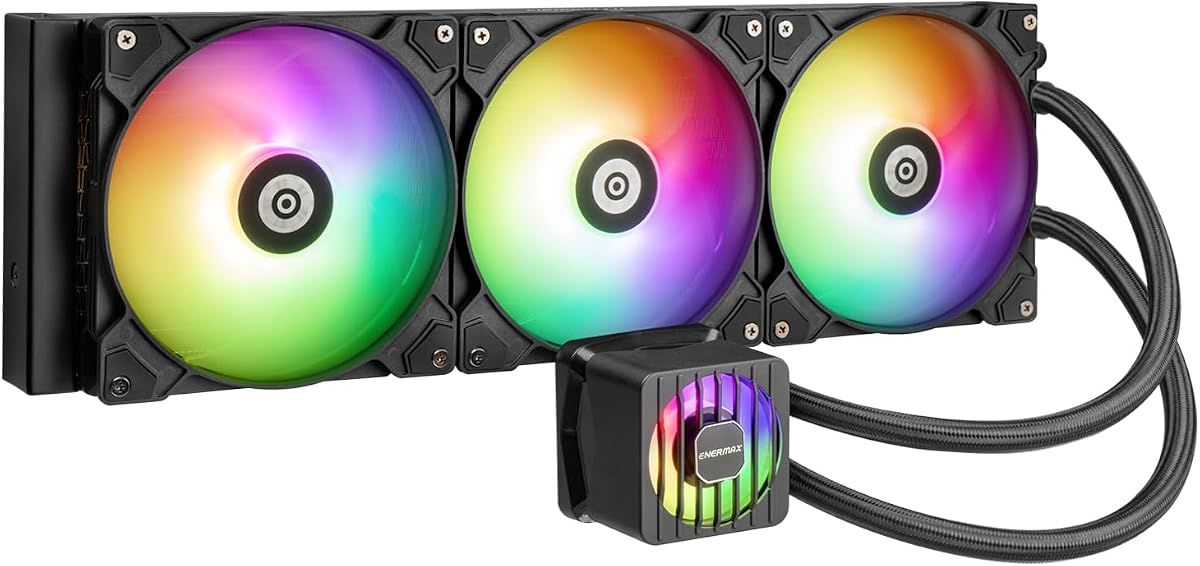
ENERMAX LIQMAXFLO 420mm A-RGB
4.1Editor score
Pressure-optimized 140mm fan
Magnetic pump-cover rotation
Pre-applied thermal paste
A 420mm AIO liquid cooler combines a large radiator with a dedicated pump, giving demanding Intel and AMD processors more thermal headroom than compact air coolers. The best models balance heat capacity, restrained noise, tidy installation, useful monitoring, and compatibility with the case and CPU socket.
This guide compares ten 420mm liquid coolers using their published specifications and customer ratings. It covers radiator thickness, fan configurations, pump and display features, mounting support, lighting, cable management, and the practical distinctions that matter when building a new gaming or workstation system.
The recommendations range from straightforward high-performance models to premium coolers with LCD panels, extensive lighting, and elaborate installation systems. Each pick highlights a different strength, so readers can prioritize thermal capacity, acoustics, appearance, display utility, or value. Prices and availability can change.
4.1Editor score

4.6Editor score

4.7Editor score
As an Amazon Associate we earn from qualifying purchases.
The comparison below places all ten 420mm AIO liquid coolers side by side, emphasizing radiator size, fan count, pump design, lighting, displays, and notable installation or compatibility features.


The ARCTIC Liquid Freezer III Pro 420 A-RGB combines a 420mm-class radiator platform with an integrated VRM fan, offset cold-plate mounting, and unusually practical cable routing. Its 4.6 customer rating reflects a well-rounded package, although buyers should still verify case clearance. It stands out because several practical cooling details are handled without turning the design into a visually complicated centerpiece.
We may earn a commission when you buy through this link, at no additional cost to you.
The native offset mounting shifts the cold plate toward the CPU hotspot, which is intended to improve heat transfer where the processor actually generates concentrated heat. A dedicated contact frame for Intel LGA1851 and LGA1700 distributes mounting pressure more evenly than relying only on the standard backplate arrangement. The integrated PWM-controlled VRM fan adds another layer of airflow around the power-delivery area, making this cooler especially interesting for systems that place the pump block near a crowded CPU socket.
Cable management is another meaningful strength. The radiator fan PWM wiring is integrated into the hose sheathing, leaving only one visible cable connected to the motherboard rather than a separate bundle for each fan. This reduces clutter around the radiator and can make a glass-sided build look considerably cleaner. The P14 PRO fan platform also supports strong cooling with quieter operation at lower speeds, while A-RGB illumination adds visual appeal for builders who want more than a plain pump block.
This is the strongest general recommendation for a builder who wants serious thermal capacity, tidy installation, and polished lighting without moving to an LCD-equipped premium design. It is particularly suitable for powerful Intel systems using LGA1700 or LGA1851, though the appropriate mounting kit should still be confirmed before assembly. Case builders need to measure the radiator position, fan thickness, tubing route, and clearance for the integrated VRM fan. With those checks completed, the balance of cooling features, organization, and customer feedback makes it the most versatile pick in the group.
The offset cold plate is designed to place the coolant pickup closer to the processor hotspot, while the Intel contact frame promotes even pressure across the mounting area. Together, they form the core thermal argument for choosing this model.
Integrating the fan PWM wiring into the hose sheath reduces the number of visible motherboard connections. The dedicated VRM fan also adds localized airflow without requiring another separate cooling accessory.
We may earn a commission when you buy through this link, at no additional cost to you.
The non-RGB ARCTIC Liquid Freezer III Pro 420 is a straightforward high-performance AIO built around three 140mm radiator fans. Its 4.4 rating reflects broad appeal, and the absence of decorative lighting may be an advantage for builders who want performance without a visually busy pump block. It retains many of the platform's useful features, including native offset mounting, an integrated VRM fan, and wiring integrated into the hose sheathing.
We may earn a commission when you buy through this link, at no additional cost to you.
Three 140mm fans give the radiator considerable airflow capacity, which is particularly useful in a spacious chassis with front intake and rear or top exhaust. The listed P14 PRO fan design is described as more powerful and quieter than the earlier P14 at lower speeds, allowing the user to tune the curve more effectively than with a fan that becomes conspicuous at low output. The pump block's offset mounting brings the cold plate toward the processor hotspot for more efficient heat transfer.
This model is attractive for practical performance builds because it does not depend on proprietary display software or intricate lighting control. A contact frame is listed for Intel LGA1851 and LGA1700, while the native offset mounting is described for both Intel and AMD platforms. The VRM fan is PWM controlled, allowing it to react to operating load rather than running constantly. Meanwhile, integrated PWM wiring keeps the visible cable arrangement relatively simple despite the three-fan radiator.
Choose this cooler if you want the full three-fan configuration and prioritize acoustics, mounting flexibility, and straightforward operation over visual effects. The main limitation is that it offers no integrated screen for temperature monitoring or custom graphics. It is best suited to a case with enough room for a 420mm radiator, its attached fans, and the necessary tubing bend radius. For users who want lighting, the related A-RGB version adds visual appeal, but this model may be the more discreet and practical selection.
Using three 140mm fans spreads cooling demand across the full radiator. This configuration is most effective in cases designed for a 420mm radiator with unrestricted intake and a sensible exhaust path.
The P14 PRO fans and PWM-controlled VRM fan can be tuned through the motherboard. A carefully configured curve helps maintain useful airflow while keeping unnecessary low-speed noise in check.
We may earn a commission when you buy through this link, at no additional cost to you.
The be quiet! Silent Loop 3 420mm has the highest customer rating in this roundup at 4.7, matching the brand's emphasis on controlled acoustics. Its defining feature is a three-chamber pump that is designed to reduce turbulence and associated noise. The result is a premium 420mm AIO aimed at builders who want substantial thermal capacity and a quiet system without relying on a display as the main attraction.
We may earn a commission when you buy through this link, at no additional cost to you.
The pump uses a dampened, adjustable six-pole motor, giving users another layer of control over operating behavior. Three Silent Wings 4 140mm PWM high-speed fans sit on the radiator, with reinforced corners intended to support nearly inaudible operation. Cooling is further supported by an engineered cooling block and a wide CPU plate that covers more of the processor surface, with Threadripper support extending its relevance to high-end workstation platforms.
ARGB lighting provides visual interest without turning the pump into an information center. That is a meaningful distinction for many builders: the cooler can serve as a coordinated lighting element while preserving the cleaner appearance of the enclosure. Its focus remains acoustics and cooling architecture, which makes it different from the LCD-equipped NZXT, Thermaltake, and MAGFloe options in the same list.
This is the best choice for premium systems where low noise, refined cooling engineering, and broad processor support matter more than an integrated dashboard. It is particularly relevant to Threadripper owners, although general desktop users can also benefit from the wide contact plate and three-fan cooling package. Verify radiator thickness, motherboard socket support, and case clearance before buying. For those who value a mature acoustic design and do not need a screen, the Silent Loop 3 is the most compelling premium choice here.
The multi-chamber pump structure is intended to reduce fluid turbulence, one of the common sources of mechanical noise. A dampened six-pole motor adds refinement when the system is lightly loaded.
The wide cooling plate and Threadripper support make this model relevant beyond standard desktop CPUs. That broader coverage can be valuable for sustained workstation workloads and processors with large contact surfaces.
We may earn a commission when you buy through this link, at no additional cost to you.
This ARCTIC Liquid Freezer III Pro 420 A-RGB combines the practical foundation of the Pro 420 platform with addressable lighting. It carries a 4.4 customer rating and supports both Intel and AMD systems through native offset mounting. The combination of a large radiator, integrated VRM fan, contact frame, and cable management makes it a well-equipped option for builders assembling a high-powered system.
We may earn a commission when you buy through this link, at no additional cost to you.
Its most distinctive thermal features are the offset cold-plate position and the contact frame for Intel LGA1851 and LGA1700. Offset mounting shifts the cold plate toward the processor hotspot, which aims to improve heat transfer at the source. The contact frame helps distribute mounting pressure across a wider area. The PWM-controlled VRM fan adds airflow near the voltage regulators, a thoughtful detail for sustained workloads where motherboard power stages also generate heat.
The A-RGB treatment is more than a superficial distinction from the plain model. It allows the pump and fans to coordinate with a compatible motherboard controller or other lighting software, creating a unified appearance across the build. At the same time, integrating the radiator fan PWM cables into the hose sheathing limits cable clutter. The result is a design that attempts to make a sophisticated cooling system look tidy rather than visually chaotic.
This model makes sense for a builder who wants both Intel and AMD flexibility and coordinated lighting but does not need an LCD. It is also attractive for users who appreciate the VRM fan and native offset design but prefer a slightly different ARCTIC package from the rank-one listing. As with every 420mm AIO, radiator and fan thickness must be checked against the case, and the tubing route needs adequate space. Confirm that the included mounting hardware matches the exact socket before completing the purchase.
Native offset mounting for Intel and AMD expands the practical appeal of this AIO. Buyers should still match the correct socket hardware and contact frame to their processor.
The dedicated VRM fan handles a secondary heat source close to the CPU, while A-RGB lighting allows the cooler to match the rest of a coordinated system.
We may earn a commission when you buy through this link, at no additional cost to you.
The NZXT Kraken Elite 420 RGB is built around a large 2.72-inch IPS LCD, making its display the defining feature. With 640 by 640 resolution, a smooth 60 Hz refresh rate, 690 cd/m² backlight, and 24-bit color, it can function as both a system monitor and a customizable centerpiece. Its 4.4 rating indicates that buyers generally appreciate the combination of visual customization and liquid-cooling convenience.
We may earn a commission when you buy through this link, at no additional cost to you.
The custom NZXT Turbine pump is designed for high flow and head pressure, supporting strong heat removal from demanding CPUs. Display users can show a favorite image or GIF, monitor real-time performance, and integrate services such as Google Photos, Spotify, and YouTube. The RGB LED ring can also synchronize with on-screen content and compatible RGB devices, creating a more unified visual presentation than a conventional pump cap and radiator lighting alone.
Installation is positioned as straightforward through pre-applied thermal paste, tool-free mounting brackets, and a single breakout cable. The listed support covers the latest AMD AM5 and AM4 platforms as well as Intel LGA1851, LGA1700, LGA1200, and LGA115X sockets. On the radiator, the RGB Core single-frame fan combines airflow with lighting and an integrated appearance intended to simplify connectivity and control.
This cooler is best for a builder who wants the display to be a genuine part of the system rather than a tiny optional readout. It is also a good fit for creators who may display images, application artwork, or monitoring information. The trade-offs are the premium market position, dependence on software for display features, and additional power requirements associated with an LCD. Confirm case clearance, software compatibility, and the desired visual style before choosing it over a simpler AIO.
The square display has enough resolution and color depth for custom artwork as well as monitoring information. Its brightness and refresh rate make it more ambitious than a basic temperature-only LCD.
Pre-applied thermal paste, tool-free brackets, and a single breakout cable reduce common installation obstacles. Broad socket support also makes it easier to reuse across generations.
We may earn a commission when you buy through this link, at no additional cost to you.
The Geometric Future Eskimo Pro combines a 420mm radiator with an advanced K6 liquid pump rated at 1.5 liters per minute. That substantial flow rate is one of its most attractive published specifications, particularly for high-power processors. It also uses a 55.8 by 55.8 millimeter copper base and includes three preinstalled high-static-pressure Squama 2503 ARGB fans. The result is a visually coordinated package aimed at modern gaming builds.
We may earn a commission when you buy through this link, at no additional cost to you.
The large copper base gives the pump block substantial contact area with the processor, while the pump's specified flow rate indicates an emphasis on moving coolant efficiently through the radiator. High-static-pressure fans are particularly relevant when the radiator sits behind a restrictive front panel or other intake obstruction, because they can maintain useful airflow against resistance. Their ARGB illumination and the pump block's diffused lighting create a consistent appearance without requiring separate decorative light panels.
Installation and processor support are the main practical considerations. The product is listed for Intel LGA1700 and AMD AM5, but buyers should check whether the package includes the hardware required for their exact CPU and motherboard. Because the model designation and suffix indicate a specific 420mm configuration, it is worth confirming the included radiator size, fan count, and mounting components against the case and socket before purchase.
The Eskimo Pro is a strong option for builders who prioritize stated pump flow, a large copper base, and integrated lighting rather than an LCD or proprietary display ecosystem. Its 4.6 rating is favorable, although less-established product support can be a consideration for buyers who prioritize long-term parts availability. It is most compelling in a modern AM5 or LGA1700 system where the case provides enough space for the radiator, fans, and tubing.
A stated flow rate of 1.5 L/min gives the pump a performance-oriented foundation. Actual results also depend on radiator placement, fan curves, and system restrictions.
Three preinstalled ARGB fans and a diffused pump-block light provide a unified appearance. The design reduces the need to coordinate separate fan and pump lighting solutions.
We may earn a commission when you buy through this link, at no additional cost to you.
The ASUS ProArt LC 420mm combines a large 420mm radiator with a professional, minimalist aesthetic. Its defining components are Noctua NF-A14 industrialPPC-2000 PWM fans, a three-phase motor pump, and an illuminated meter that reports system load, temperatures, and fan speeds. The 4.4 rating suggests that buyers appreciate its design and feature set, although its premium positioning is substantial.
We may earn a commission when you buy through this link, at no additional cost to you.
Noctua's NF-A14 fans are specified to provide high airflow with minimal noise, making them a natural fit for a system intended to remain quiet under load. The pump uses a three-phase motor for cooling capability and quieter operation. Rather than a conventional large LCD, the cooler presents information through a more restrained illuminated meter, preserving the clean appearance associated with the ProArt component family.
The 450 millimeters of reinforced sleeved tubing offers flexibility in routing the pump block around graphics cards, drive cages, and motherboard features. A thicker radiator with larger coolant storage is also included, with the stated intent of enhancing overall cooling performance. These details indicate that the product is designed with both thermals and installation flexibility in mind, rather than relying only on screen size or lighting as selling points.
The ASUS ProArt LC is best suited to a premium workstation or creator system where visual restraint is preferred over an entertainment-style display. It also makes sense for users already committed to Noctua fans or the wider ProArt ecosystem. Before buying, check the case's maximum radiator thickness, including attached fans, and ensure the tubing has enough space for an appropriate bend. The potential drawback is the limited value proposition for builders who do not value the professional styling or premium hardware.
The specified NF-A14 industrialPPC-2000 PWM fans emphasize strong airflow and low noise. Their reputation makes them a notable choice for quiet workstation builds.
The illuminated meter communicates system load, temperature, and fan speed in a restrained format. It offers useful monitoring while maintaining the ProArt family's minimalist design language.
We may earn a commission when you buy through this link, at no additional cost to you.
The Thermaltake TH420 V2 Ultra ARGB is an expansive 420mm AIO with three 140mm ARGB fans, a copper cold plate, and a 2.1-inch square LCD. Its 4.0 rating places it below several technically similar alternatives, but the product still offers a broad feature set for builders who prioritize display customization, RGB synchronization, and extensive socket coverage.
We may earn a commission when you buy through this link, at no additional cost to you.
The pump block display uses a 480 by 480 resolution and can display photos or video with support for 16.8 million colors. The industrial-style casing gives the familiar Ultra-series display a more restrained appearance. Around the system, the three radiator fans run from 500 to 1800 RPM and use PWM control, while the copper base is intended to accelerate heat conductivity and maintain efficient contact with the processor.
Lighting is one of the main attractions. The cooler can synchronize with ASUS Aura Sync, GIGABYTE RGB Fusion, MSI Mystic Light Sync, and ASRock Polychrome. However, the supplied product information specifically notes that Ultra Series products are supported by TT RGB Plus 2.0, so the control software should be selected and installed before assuming every function will be available through another motherboard package.
Socket compatibility is extensive, covering numerous Intel generations from LGA2066 through LGA1150 and AMD platforms from AM5 through FM1. That makes the package versatile for a new build or an upgrade involving an older platform. It is best for a builder who wants a colorful display, synchronized fans, and broad processor support, but who is comfortable managing Thermaltake software. Buyers seeking a quieter-looking or simpler installation should compare alternatives with less emphasis on RGB and displays.
The 2.1-inch LCD supports a broad color palette and can present photos or video. Its square format is useful for system artwork and compact monitoring layouts.
Extensive Intel and AMD socket coverage makes the package flexible. Common motherboard RGB ecosystems are supported, though TT RGB Plus 2.0 remains the relevant control application for Ultra Series features.
We may earn a commission when you buy through this link, at no additional cost to you.
The MAGFloe 420 Ultra is visually defined by its 3.95-inch square LCD, the largest display among the products compared here. It also carries three 140mm SWAFAN EX fans, a 420mm radiator, magnetic fan connections, and reversible fan blades. Its 3.3 rating is the lowest in the group, so buyers should weigh the extensive feature set carefully against less favorable customer feedback.
We may earn a commission when you buy through this link, at no additional cost to you.
The large display can present pictures, videos, and performance data, giving the pump block the appearance of a small secondary display rather than a conventional cooling cap. MAGForce 2.0 retains magnetic fan-to-fan connections and daisy-chained cables, while increasing the pin-to-pad contact area to improve reliability and reduce signal-drop problems caused by misalignment.
Airflow configuration is unusually flexible. The 140mm SWAFANs operate from 500 to 2000 RPM and are listed at 3.17 mmH2O static pressure with 81.6 CFM airflow in the standard orientation. Reversed blades are included and are listed at 2.73 mmH2O static pressure with 79.3 CFM airflow. Reversing selected fans allows the illuminated side to remain visible while changing the visual direction of the airflow.
Compatibility covers a wide range of modern and legacy Intel and AMD sockets. The principal concern is physical: a 3.95-inch square pump display may conflict with tall memory modules, graphics-card clearance, or a front-mounted radiator in a compact chassis. It is most appropriate for a showpiece system with enough open space around the CPU socket. The feature set is extensive, but the lower rating suggests buyers should review recent customer feedback and confirm their expectations before buying.
The 3.95-inch LCD can serve as a visual centerpiece and display system data. Its unusual size makes case clearance around the CPU socket especially important.
Included reverse blades let users alter the visible airflow direction without replacing the entire fan. The magnetic connection system also simplifies linking multiple fans into a coordinated setup.
We may earn a commission when you buy through this link, at no additional cost to you.
The ENERMAX LIQMAXFLO 420mm A-RGB delivers a substantial cooling package at a value-oriented tier. It combines a 38mm-thick radiator, a pressure-optimized silent 140mm FDB PWM fan, a 60mm VRM fan, and a pump capable of reaching 3000 RPM. Its 4.1 rating is modest compared with the leaders, but the specification density and practical organization make it worth considering.
We may earn a commission when you buy through this link, at no additional cost to you.
The pump can operate up to 3000 RPM, which supports a strong performance ceiling for processors generating substantial heat. Its pressure-optimized FDB bearing fan is designed to maintain airflow through restrictive radiator positions, while the separate 60mm VRM fan provides targeted airflow around the motherboard's power components. PWM control across the pump and both fans allows the system to balance cooling output and noise more effectively than a fixed-speed design.
Installation details are unusually helpful. The magnetic detachable pump cover can rotate by 90 degrees for customization, while three tube clips organize both the tubing and wiring. A daisy-chained cable design simplifies connections, and the package includes pre-applied Dow Corning TC-5888 thermal grease plus an extra tube. RGB effects can coordinate with supported software and compatible motherboards.
This is the best budget-oriented recommendation for a new Intel or AMD build that needs a 420mm AIO without paying for a large LCD. Its main practical limitation is the 38mm radiator thickness, which must be checked against the case and included fan thickness. Socket support includes Intel LGA1700, LGA1200, and LGA115X, along with AMD AM5 and AM4. For budget-conscious builders who value a VRM fan, organized cables, and ample pump performance, it is a practical package.
A pump rated up to 3000 RPM provides a strong performance ceiling, while the dedicated 60mm VRM fan targets heat around the power-delivery area. Both can be tuned through PWM control.
Daisy-chained wiring, tube clips, and a removable magnetic pump cover simplify installation and appearance. The included thermal paste further reduces preparation before mounting.
We may earn a commission when you buy through this link, at no additional cost to you.
The right 420mm AIO depends on case clearance, processor behavior, acoustic priorities, lighting preferences, and the amount of installation effort you want. Use the following factors to narrow the field before checking current availability.
A 420mm radiator offers substantial surface area, but its usable cooling performance depends on fitting it inside the case without restricting fans or tubing. Pay close attention to radiator thickness, the thickness of attached 140mm fans, and whether the case supports top mounting, front mounting, or both. Some cases label a position as compatible with a 420mm radiator but still lack enough room for a thick model. The ENERMAX LIQMAXFLO, for example, has a stated radiator thickness of 38mm, making physical verification especially important before ordering.
A liquid cooler must physically support the processor socket and include the correct mounting hardware. The products here cover combinations of AM5, AM4, AM3-family, FM-family, LGA1851, LGA1700, LGA1200, LGA115X, LGA2066, and older Intel platforms. Support for a socket does not always mean every optional contact frame is included, so compare the package details carefully. Broad coverage can be useful for future upgrades, while a narrower list may be sufficient when the processor is already known.
Pump specifications help indicate the intended cooling capacity, but they should be considered alongside the radiator, fan design, mounting quality, and case airflow. The Geometric Future Eskimo Pro advertises a 1.5 L/min flow rate, while the ENERMAX lists pump speeds up to 3000 RPM. ARCTIC's offset mounting focuses on cold-plate placement, and be quiet! uses a multi-chamber pump design. No single specification guarantees lower temperatures, so the best choice is the complete system rather than the boldest number.
The included 140mm fans are a major advantage of the 420mm format because they can move substantial air while operating at relatively low RPM. Static pressure becomes important behind a thick front panel, a restrictive intake grille, or a mesh-covered radiator. MAGFloe publishes airflow and pressure figures for both standard and reversed orientations. For quiet builds, look for PWM control, quality bearings, and a fan design explicitly optimized for low noise, as found in the Silent Loop 3's Silent Wings 4 fans.
LCD-equipped coolers can display temperature, utilization, custom images, or animations, but they add cost, power requirements, and software dependencies. The NZXT Kraken Elite has a 2.72-inch IPS panel with a 640 by 640 resolution, while Thermaltake uses a 2.1-inch panel. MAGFloe goes larger with a 3.95-inch display. If the screen is a primary reason for buying, confirm software compatibility, aspect ratio, brightness, and supported media before ordering.
A-RGB lighting can coordinate a cooler with fans, memory, a keyboard, or other illuminated components. ARCTIC's A-RGB models, the Geometric Future Eskimo Pro, the ENERMAX LIQMAXFLO, and the be quiet! Silent Loop 3 offer integrated lighting, while the plain ARCTIC model avoids it. Review the required control software, connection method, and synchronization support. A restrained design may integrate better with a professional workstation theme than a bright pump or embedded display.
Large AIOs can be among the most involved parts of a build. Look for pre-applied thermal paste, straightforward brackets, daisy-chained wiring, integrated fan cables, and clips that keep tubes in place. ARCTIC routes radiator fan PWM wiring through the hose sheath, ENERMAX uses magnetic and daisy-chained connections, and NZXT supplies a single breakout cable. These details can save time and improve the final appearance, although radiator removal for memory access may still be necessary in some layouts.
Some 420mm AIOs are explicitly designed to cover larger processors. The be quiet! Silent Loop 3 lists wide CPU plate coverage and Threadripper support, while several models support long lists of mainstream sockets. For Threadripper or other high-core-count CPUs, confirm the mounting kit, contact-frame arrangement, and case support for sustained high-power workloads. Wider processor coverage is useful, but it should be matched to a sturdy mounting solution.
Begin by identifying the correct socket hardware and reading the included mounting instructions. Install the appropriate standoffs or backplate for the CPU platform, apply the supplied thermal paste if it is not already present, and tighten the cold plate in a balanced cross-pattern. Do not remove the protective film from the copper contact surface. Confirm that the pump block sits squarely against the CPU without shifting the mounting hardware out of alignment.
Mount the radiator in the case position that provides the cleanest intake and exhaust path. Connect the pump and fans according to the motherboard manual, use the supplied PWM and RGB connections, and route the tubes with broad, untwisted bends. Avoid kinking the tubing or placing the pump block above the radiator if that positioning conflicts with the manufacturer's guidance. A small amount of radiator movement during installation is normal, but the tubes should not be stretched or sharply bent.
After the first boot, verify that the pump and every radiator fan spin. Check CPU temperatures, pump behavior, fan curves, RGB settings, and display content in the relevant software. A short burn-in under a representative workload can reveal installation problems, unusual noise, or an inadequate airflow path. For long-term care, keep the radiator and fans free of dust, monitor for gurgling or intermittent flow, and avoid software updates until the current system configuration has been saved.
A 420mm AIO can offer stronger thermal headroom in spacious cases, particularly with high-power processors. Air coolers can be simpler, less prone to installation complications, and highly effective when the case cannot accommodate a large radiator. The better choice depends on available clearance, acoustics, appearance, and maintenance preferences.
Only if the case supports a 420mm radiator at the intended mounting position. Check radiator thickness, attached fan thickness, CPU-socket clearance, and tubing space rather than relying only on the case's 420mm label. Thick radiators and powerful 140mm fans can prevent installation even when the nominal radiator length is supported.
Noise depends heavily on the pump, fan design, fan curve, and case restrictions. Models with PWM-controlled fans and purpose-designed low-noise bearings, such as the be quiet! Silent Loop 3, provide tools for quieter operation. A well-tuned curve that permits the fans to spin slowly during moderate loads can make a noticeable difference.
No. A display is optional and not necessary for effective liquid cooling. The ARCTIC, be quiet!, Geometric Future, and ENERMAX options focus on cooling architecture and lighting, while the NZXT, Thermaltake, and MAGFloe models add displays for monitoring and customization.
Most models with RGB or A-RGB lighting require compatible motherboard software or the manufacturer's control application. Supported ecosystems vary: Thermaltake specifically notes TT RGB Plus 2.0 for its Ultra Series, while the Geometric Future and ENERMAX products list broader RGB synchronization. Check the required software before building so the lighting can be configured immediately.
They can be, provided the cooler includes the appropriate mounting hardware and the CPU contact surface is covered adequately. The be quiet! Silent Loop 3 explicitly lists wide CPU plate coverage and Threadripper support. For any Threadripper build, confirm the exact mounting kit and case clearance before purchasing.
Yes. A front or top radiator generally benefits from clean intake air, while rear and top exhaust positions complete the airflow path. A radiator behind a restrictive intake can lose performance even if its fans are powerful, so case filtration, grille restrictions, and the direction of the installed fans should all be considered.
Inspection frequency depends on dust accumulation and the operating environment. Check radiator fins and intake filters every few months, clean gently with compressed air or a soft brush, and power the system down before servicing. Avoid directing moisture into the fans or disturbing the sealed coolant loop.
The ARCTIC Liquid Freezer III Pro 420 A-RGB is the most balanced overall choice because it combines offset mounting, a dedicated VRM fan, integrated cable routing, and attractive lighting. The be quiet! Silent Loop 3 is the premium choice for refined acoustics and broad CPU plate coverage, while the ENERMAX LIQMAXFLO provides the strongest value-oriented combination of pump performance, VRM cooling, and installation convenience.
Prioritize case fit before any aesthetic feature. Confirm radiator and fan thickness, socket hardware, pump-block clearance, and tube routing, then decide whether a display, elaborate lighting, or a quieter multi-chamber pump best matches the build. For high-power processors, a 420mm radiator paired with well-tuned 140mm fans offers an effective balance of capacity and manageable installation.
Customer ratings, prices, availability, software versions, and socket kits can change over time. Review the current product listing and mounting contents before purchasing, and compare live prices among the shortlisted coolers. The right model is the one that fits the chassis, supports the CPU, and satisfies the build's priorities without paying for features that will go unused.