
Korg KAOSS Pad V
4.6Editor score
Dual-touch XY performance pad
Direct guitar and bass input
Eight-bar sampling and looping
Integrated USB audio interface
Discover the best MIDI pads for guitarists, with ten expert-recommended models compared for features, connectivity, pad response, and workflow control.
MIDI pads give guitarists a tactile way to trigger samples, control effects, launch clips, and shape performances without repeatedly reaching for a mouse. A useful pad controller should feel responsive, integrate cleanly with your software, and offer enough controls to support both focused studio work and fluid live improvisation.
This guide compares ten pad controllers based on pad sensitivity, MIDI connectivity, assignable controls, bundled software, portability, and suitability for guitar-centered workflows. It covers options for Ableton Live, general DAW use, finger drumming, sound triggering, and live performance rather than focusing on any single genre.
Each review explains the strongest reasons to consider a controller, along with its limitations and ideal audience. Ratings reflect the supplied customer feedback, while availability, software bundles, and prices can change, so readers should verify current product details before making a purchase.
4.6Editor score

4.8Editor score

4.4Editor score
The table below places all ten controllers side by side, emphasizing pad layout, control options, connectivity, and the production environments each model targets best.


The Akai Professional MPD218 combines 16 substantial MPC-style pads with 18 assignable rotary knobs, giving guitarists a versatile control surface for samples, effects, virtual instruments, and DAW automation. Its supplied rating is 4.4, and the balance between tactile control, portability, and included software makes it an especially complete general-purpose option.
We may earn a commission when you buy through this link, at no additional cost to you.
The three accessible pad banks expand the playing surface to 48 assignable pads without making the unit physically cumbersome. Velocity-sensitive pads support expressive finger drumming, while note repeat and full-level controls help performers build rhythmic patterns quickly. For guitarists, that means triggering guitar-friendly ambient layers, rhythmic stabs, drones, and effect changes can happen together without navigating menus.
The 18 knobs are split across three banks, providing much more parameter control than a basic eight-pad controller. Ableton Live Lite, Drum Synth 500, and MPC Beats Software expand the value for newcomers, while the optional Camera Connection Kit opens access to compatible iOS applications. The trade-off is that the MPD218 does not provide a piano keyboard, so musicians who need melodic note entry may need another controller or software mapping strategy.
This is a strong recommendation for a guitarist who wants a single portable pad surface for beat creation, sample triggering, and live effect control. It may not be the simplest choice for someone committed entirely to Ableton Live, but its broad DAW compatibility and substantial control set make it one of the most versatile picks in this guide.
The three banks of knobs let a guitarist keep amp, delay, reverb, filter, and virtual-instrument settings within immediate reach. That depth makes the controller valuable in dense live rigs where stopping to select software menus would interrupt the performance.
Its slim, USB-powered format fits easily into a laptop bag, while the thick MPC-style pads provide a familiar response for finger drummers. The included software also helps bridge the gap between learning basic mappings and building complete arrangements.
We may earn a commission when you buy through this link, at no additional cost to you.
The Akai APC Mini MK2 is built around a bright 8×8 RGB matrix, making it a natural fit for guitarists who use Ableton Live to organize loops, vocal fragments, guitar phrases, and effect chains. Its 4.6 rating reflects a strong reception, and its compact design preserves essential performance controls without requiring a large tabletop controller.
We may earn a commission when you buy through this link, at no additional cost to you.
The 64 pads can launch clips and trigger loops, samples, or melodic content with immediate color feedback. Nine assignable faders provide hands-on mixer control, while device mode exposes Ableton macros. Drum mode integrates with Drum Rack, and the Smart Scale View in Note mode helps players select notes more confidently, which can be especially useful for guitarists translating riffs into software-instrument parts.
USB power and plug-and-play operation simplify both studio and stage use on Mac or PC. The included Ableton Live Lite software and a virtual instrument package make the controller approachable for new users. Its main limitation is specialization: musicians working primarily in Logic Pro, Cubase, Studio One, or hardware synths will need to create their own mappings and may prefer a more universal design.
Choose the APC Mini MK2 if your guitar-centered workflow revolves around clip launching and live arrangement in Ableton Live. It offers an unusually effective combination of compactness, visual feedback, and tactile mixer control for a controller that can travel easily between rehearsal spaces, studios, and stages.
RGB colors communicate the state of clips across the full matrix, reducing visual searching during a performance. A guitarist can arrange backing loops, vocal textures, and processing stations in a layout that remains understandable at a glance.
Eight assignable faders and a master fader bring volume, pan, and device control directly under the player's hands. This makes it easier to automate transitions and shape a mix while continuing to play guitar.
We may earn a commission when you buy through this link, at no additional cost to you.
The Akai Professional LPD8 delivers eight RGB-backlit pads, eight assignable Q-Link knobs, and four preset slots in a slim package. Its 4.4 rating and broad compatibility with major production applications make it a practical entry point for guitarists who want tactile MIDI control without a large hardware commitment.
We may earn a commission when you buy through this link, at no additional cost to you.
The pads can trigger samples, loops, virtual instruments, and other programmed events, while the knobs provide direct control over DAW parameters, software instruments, and insert effects. Preset slots make it easier to recall distinct performance banks for different songs or signal chains instead of rebuilding mappings each time.
USB power and plug-and-play operation remove the need for a driver installation or external adapter on Mac and PC. The lightweight housing is easy to store in a laptop bag, though eight pads offer less visual and physical room than the larger grid controllers. Guitarists who need broad hardware MIDI connectivity may also need to confirm their required outputs against the latest product documentation.
The LPD8 is a strong fit for songwriters, producers, and mobile guitarists seeking a simple way to launch samples and adjust effects. It offers the most approachable balance of portability, tactile control, and useful features in this list, making it an especially sensible choice for building a first home-studio or rehearsal setup.
Eight responsive pads and eight knobs cover the essential MIDI-control functions without introducing a complex control surface. That makes the LPD8 approachable for beginners while remaining useful for producers who need compact, repeatable performance presets.
The four programmable preset slots can preserve distinct configurations for different projects. A guitarist can move between practice, writing, and live arrangements while keeping essential mappings immediately available.
We may earn a commission when you buy through this link, at no additional cost to you.
The Korg KAOSS Pad V is unlike a conventional grid of trigger pads. Centered on a dual-touch XY surface, it is designed for expressive manipulation of effects, samples, and live guitar sounds. Its 4.6 rating reflects a strong feature set, with the direct Hi-Z input and built-in USB audio interface especially relevant to guitarists.
We may earn a commission when you buy through this link, at no additional cost to you.
Two fingers can control two effect parameters simultaneously, enabling dramatic pitch, filter, modulation, or texture changes while the instrument is playing. The Voice FX engine adds harmonies, pitch shifting, and vocal tones, while the direct guitar or bass input lets performers shape sounds through the unit before sending the result to a computer, amplifier, or recording system.
Sampling and looping are built in, including recording up to eight bars depending on tempo, overdubbing layers in real time, and using playback or slicing modes. The integrated USB audio interface reduces external routing, while simultaneous MIC, LINE, and USB inputs and external MIDI connectivity offer flexible studio and stage setups.
This controller is best for an adventurous guitarist who wants a self-contained effects and sampling instrument rather than a simple MIDI trigger surface. The learning curve is real, but for players focused on improvisation, unusual textures, and direct instrument control, it offers capabilities that ordinary pad grids cannot replicate.
The direct Hi-Z input and XY surface let players move continuously between effect positions while playing. This tactile approach can make delay, pitch, filter, and modulation changes feel more like manipulating a physical effect pedal than editing software parameters.
Eight-bar capture and real-time overdubbing allow a guitar phrase to become a loop that is manipulated immediately. That makes the unit useful for building evolving textures without leaving the performance or relying on a separate computer screen.
We may earn a commission when you buy through this link, at no additional cost to you.
The Akai MPK Mini IV combines 25 velocity-sensitive mini keys with eight velocity- and pressure-sensitive MPC pads, offering guitarists a broader musical toolkit than a pad-only controller. Its 4.6 rating, full-color screen, assignable knobs, and USB-C design make it particularly suitable for mobile songwriting and hybrid performance.
We may earn a commission when you buy through this link, at no additional cost to you.
The keyboard supports piano-style playing, synth leads, and sample triggering, while the pads provide a finger-drumming surface with RGB feedback. Eight assignable knobs and a push-turn encoder give direct access to settings and DAW functions. The included suite contains more than 1,000 sounds across drums, keys, synths, bass, and effects, including content from AIR, Akai Professional, and Moog.
Its advanced performance tools include arpeggiator functions for pattern, freeze, and mutate, along with chord and scale modes. Pre-mapped support for Ableton Live Lite 12, Logic Pro, and FL Studio can shorten setup time. The mini keys are compact, however, so players accustomed to full-sized keyboards may find certain voicings cramped, and the dense feature set may overwhelm absolute beginners.
This is an excellent choice for a guitarist who wants to sketch melodies, trigger beats, and control software instruments from one portable device. The combination of keys, drums, MIDI output, and a substantial sound package makes it particularly versatile for mobile musicians and small production spaces.
The keys let a guitarist capture a melody while the pads keep drum programming and sample triggering close at hand. This faster workflow is useful for converting guitar ideas into complete arrangements without switching between separate devices.
More than 1,000 included instruments and effects provide immediate material for experimenting. Pre-mapped DAW support and lesson tools also reduce the setup burden for users who are unfamiliar with MIDI controllers.
We may earn a commission when you buy through this link, at no additional cost to you.
The LEKATO PD705 combines nine dual-zone, velocity-sensitive pads with a large percussion library of more than 592 sounds and 30 drum kits. Its 4.3 rating makes it a compelling choice for guitarists who want to turn rhythm instruments into an expressive MIDI controller rather than using a minimal sample launcher.
We may earn a commission when you buy through this link, at no additional cost to you.
Each pad includes individual LED feedback, while the dot-matrix display reports audio-level activity. The controller supports two additional dual-zone trigger pads or acoustic drum triggers, and a velocity-sensitive foot switch can control the kick and hi-hat. Five-pin MIDI input and output expand its usefulness with external synthesizers and hardware percussion modules.
Custom kits can be saved to a 32GB SD card or USB drive, and the supplied WaveManager software for Windows and macOS allows custom samples to be imported. This makes the PD705 useful for building a personal palette of percussion sounds. Its range of inputs, editing workflow, and hardware options create more complexity than a basic USB pad, and song-specific sample preparation may take time.
Choose the PD705 if rhythm is a central part of your guitar performance and you want to combine electronic percussion, samples, foot control, and external triggers. It is less suited to someone who only needs a few pad assignments, but its flexibility strongly rewards musicians building a dedicated live or studio percussion system.
External trigger pads, acoustic drum triggers, and a foot switch make it possible to build a more complete percussion setup. Guitarists can use their existing rhythmic instincts while freeing both hands for the instrument.
Custom kits, SD-card storage, and sample importing provide a path beyond the included library. This is useful for matching percussion sounds to a specific song, rehearsal room, or live set.
We may earn a commission when you buy through this link, at no additional cost to you.
The Korg nanoPAD2 offers 16 solid, velocity-sensitive pads in a slim housing, providing a straightforward way for guitarists to trigger samples and enter drum data. Its supplied rating is 4.0, and its enduring appeal comes from a compact footprint, uncomplicated USB operation, and a dedicated X-Y touchpad.
We may earn a commission when you buy through this link, at no additional cost to you.
The pads can play software sounds or function as conventional MIDI triggers for a DAW. Velocity response gives finger-drumming performances some dynamic variation, while the X-Y touchpad provides access to multiple parameters without adding bulky knobs or faders. That combination makes the unit more versatile than a bare trigger block despite its modest layout.
Its low-profile body is easy to place near a laptop, pedalboard, or compact studio desk and can travel without taking up much room. Compared with current multi-bank controllers, it offers fewer assignable physical controls and less elaborate visual feedback. Guitarists accustomed to RGB pad grids may also find the minimalist layout less engaging during large live performances.
The nanoPAD2 remains a sensible choice for a musician who wants dependable, portable MIDI triggering rather than extensive integrated production features. It works particularly well for quick drum programming, compact live rigs, and setups where minimizing desk or bag space matters most.
The slim design leaves room for a guitar, audio interface, and laptop without crowding the workspace. It is particularly useful for rehearsal rooms and traveling musicians who need a straightforward way to trigger recurring sounds.
The X-Y touchpad provides continuous parameter control in a very small area. Guitarists can assign filter sweeps, effect mixes, or virtual-instrument controls without needing a separate knob-heavy controller.
We may earn a commission when you buy through this link, at no additional cost to you.
The Alesis Sample Pad 4 is a compact four-pad unit designed to make custom sampling immediate and understandable. Its supplied rating is 4.1, while its main appeal is the combination of velocity-sensitive pads, SD-card sample access, eight ready-to-play kits, and MIDI output for external sound modules.
We may earn a commission when you buy through this link, at no additional cost to you.
The built-in library maps 25 commonly requested percussion and electronic drum sounds across eight kits, giving users a usable starting point. Users can then add samples through a standard SD card, tune them, apply reverb, and assign the results to any of the four pads or the kick input. This makes the unit useful for isolating a particular guitar-layer rhythm or presenting only the most important sounds during a performance.
A dual trigger input allows an additional pad or external source to be incorporated, and MIDI output expands the unit beyond a stand-alone percussion box. The limited four-pad layout and relatively small selection of onboard sounds mean it lacks the immediacy of a larger kit for complex finger-drumming patterns, but it remains focused and easy to place in a compact rig.
Choose the Sample Pad 4 if you want a streamlined way to load one or two custom sounds, control a hardware drum module, or supplement a guitar setup with a few carefully selected percussion triggers. It is better suited to focused live use than to broad beat programming.
Standard SD-card loading lets a guitarist bring exact sounds to rehearsal or a show. The simple pad assignments make it easier to focus on the performance than on navigating a large editing interface.
MIDI output allows the unit to trigger a sound module in addition to operating as a standalone pad. That makes it a compact bridge between software percussion and external hardware.
We may earn a commission when you buy through this link, at no additional cost to you.
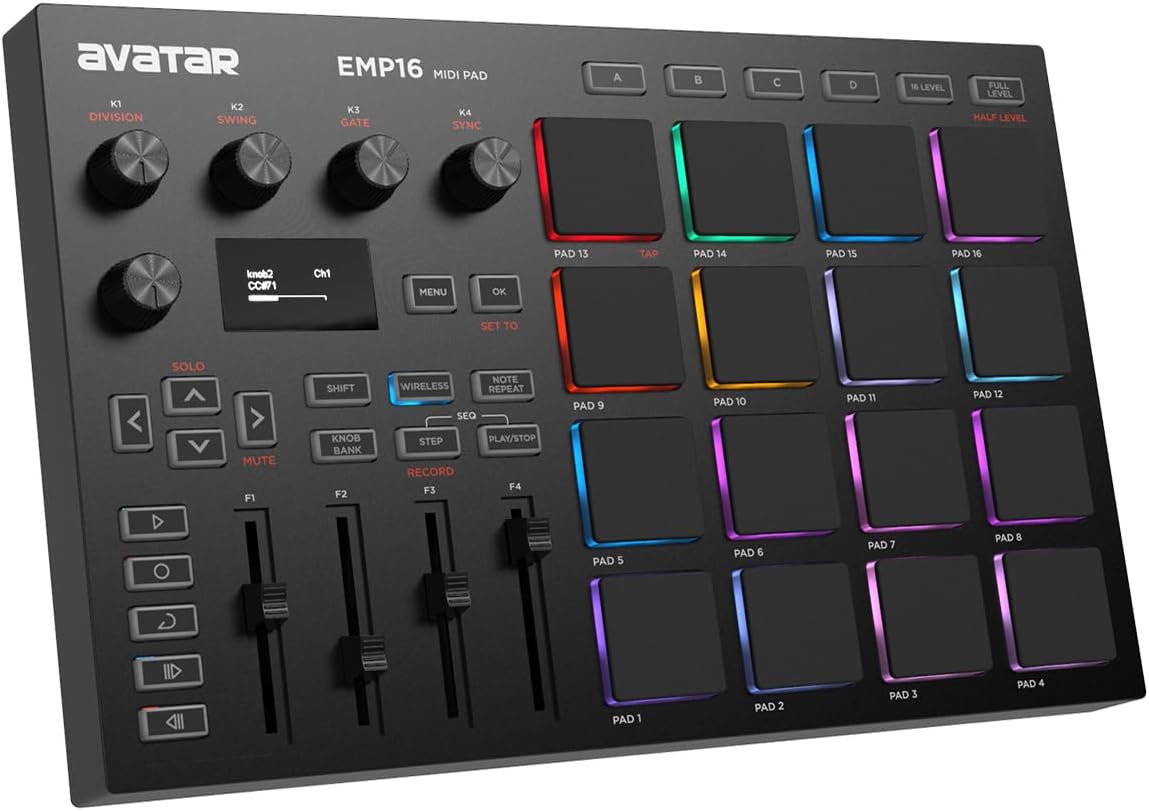
The EMP16 stands out through wireless MIDI support, with Bluetooth 5.0 connectivity for compatible iPhones, iPads, iPod touch devices, and Macs. Its supplied rating is 4.2, and the combination of 16 RGB pads, 64 assignable positions, USB MIDI, and traditional MIDI connections makes it a flexible choice for mobile guitar rigs.
We may earn a commission when you buy through this link, at no additional cost to you.
The pads offer selectable velocity curves, level controls, full and half-level modes, and aftertouch support, with adjustable thresholds helping reduce unwanted crosstalk. Four banks provide more assignments than the visible pad count suggests. An OLED display presents settings without requiring the computer, while note repeat, swing, gate, sequencer, clock synchronization, transport, and tap tempo functions support repeated rhythmic parts.
Four assignable faders, five buttons, and four endless knobs provide another layer of hardware control across three banks. USB MIDI and standard MIDI input and output allow connection to computers and external gear. The wireless connection eliminates several cables, though users must ensure their mobile operating system and applications support the intended Bluetooth MIDI workflow. The included Cubase LE and Cubasis LE options are provided through redemption rather than being entirely self-contained.
This controller is a good match for guitarists who rehearse away from a permanent studio or want to move between a phone, tablet, and computer without managing a dedicated MIDI cable. Its broad feature set rewards users who want to configure timing and performance behavior directly on the hardware.
Bluetooth MIDI can simplify rehearsal setups where the controller sits near a guitar and the computer or mobile device is farther away. USB remains available when a wired connection is preferable.
Swing, gate, note repeat, and clock synchronization tools help shape repeating parts without requiring software adjustments. The OLED display also provides immediate confirmation of selected values.
We may earn a commission when you buy through this link, at no additional cost to you.
The Akai APC40 MKII is a dedicated performance controller for Ableton Live, and its supplied 4.8 rating is the highest among the listed options. The 5×8 RGB clip-launch matrix, nine channel faders, eight control knobs, and eight device controls create a direct connection between a guitarist's hands and the software mix.
We may earn a commission when you buy through this link, at no additional cost to you.
Pads trigger clips, loops, and samples while RGB feedback communicates clip status and color coding. The faders and knobs cover mixer parameters, virtual instruments, effects, and device controls. A conveniently placed assignable A/B crossfader supports DJ-style transitions, and the interface can also be adapted to lighting cues for stage use.
USB-powered plug-and-play operation works on Mac and PC, while the included software provides Ableton Live Lite and a selection of production tools. The main limitation is specialization: although generic MIDI mapping may be possible, the design is optimized for Ableton Live. Its large desktop footprint also makes it less convenient than the APC Mini MK2 for mobile use, and the crossfader is best suited to particular live workflows.
Choose the APC40 MKII when Ableton Live is central to your guitar performance and you want to launch, arrange, and mix clips without touching the mouse. It is an especially compelling choice for musicians building elaborate live sets, backing arrangements, or synchronized audiovisual performances.
The dedicated clip matrix mirrors Ableton Live's visual organization in a tactile form. Guitarists can start loops, vocal fragments, and processing chains in a predictable spatial layout during a live set.
Nine faders and eight device controls make the controller useful well beyond clip launching. The same hardware can manage mix transitions and lighting cues, provided the appropriate mappings and software are in place.
We may earn a commission when you buy through this link, at no additional cost to you.
The right MIDI pad controller depends on how you trigger sounds, which DAW you use, and whether the unit must travel. Consider the guitar workflow, available controls, software integration, and connection method before comparing models.
A compact layout favors portability and focused live use, while a larger grid supports clip launching, complex finger drumming, and more simultaneous assignments. Guitarists should consider whether they primarily need a few dependable trigger sounds, a matrix that mirrors software clips, or a traditional keyboard-and-pad combination. Pad count alone does not determine usefulness; bank access, visual feedback, and the clarity of each button's role are equally important.
Velocity sensitivity allows pads to respond to how firmly they are struck, giving drum patterns and sample triggers a more natural dynamic range. Some advanced controllers also support pressure, aftertouch, selectable velocity curves, threshold settings, and full or half-level behavior. Guitarists who rely on dynamics should verify these features because a basic on-off pad may be useful for switching effects but less expressive for percussion.
Ableton Live users can gain substantial value from controllers with dedicated clip-launch grids and pre-mapped controls. For other DAWs, look for broad compatibility, straightforward preset management, and enough assignable buttons or knobs for common actions. The listed Korg nanoPAD2 and Akai LPD8 are general-purpose options, whereas the APC models focus heavily on Ableton Live workflows.
Knobs, faders, buttons, and an XY surface can make complex guitar effects easier to perform, but excessive controls create a setup burden. Consider which parameters you actually change live: filters, delay mix, amp gain, virtual-instrument controls, clip launches, or mixer levels. Controllers with several banks are useful because they expand capacity without increasing the physical footprint, though users must learn how mappings change between banks.
USB MIDI is the most straightforward connection for a laptop-based home studio, while Bluetooth can eliminate cable clutter in mobile rehearsal setups. Traditional MIDI input and output remains valuable for controlling hardware synthesizers, drum modules, and effects. Check the exact ports, included adapters, operating-system support, and power requirements because not every wireless feature works identically across computers and mobile devices.
A guitarist who plays shows or rehearses away from home benefits from a slim, lightweight controller that fits in a laptop bag. Larger grid and fader surfaces may remain stable on a desk or stage but can be awkward to transport. Pads with firm, responsive surfaces are useful for rhythmic triggering, while a low-profile body may be preferable for guitarists who want to keep the setup visually and physically compact.
Bundled DAWs, virtual instruments, samples, and lessons can lower the barrier to starting a project. Akai's MPD218, APC Mini MK2, and MPK Mini IV include substantial software resources, while the Korg KAOSS Pad V offers built-in sampling and effects for more instrument-like operation. Distinguish between software that is included outright and offers that require a manufacturer website, account, or redemption code.
Most MIDI pads send control data rather than audio, so they require a separate audio interface unless they include one. The Korg KAOSS Pad V is unusual in this group because it provides a built-in USB audio interface and direct Hi-Z input for guitar. If your current interface has limited inputs or no instrument input, that integrated routing capability may matter more than additional pads or assignable buttons.
Connect the controller to the audio interface or computer before opening the DAW, then confirm that the software recognizes a MIDI input. Load the relevant instrument or effect, assign the pads, and begin with a small set of sounds such as a kick, snare, sustained guitar layer, delay control, and reverb control. Keeping the initial mapping simple makes it easier to remember which sound or function belongs to each pad.
Build performance banks by separating sounds from effects. For example, reserve one bank for samples and another for live effect changes, or assign different banks to individual songs. In Ableton Live, take advantage of the clip-launch mapping on the APC controllers; with general-purpose pads, use software templates and map notes or CC messages. Test every control at performance volume and check that velocity, pitch bend, aftertouch, or program-change behavior matches the intended software.
Protect the controller by keeping liquids away from the pads, avoiding heavy impacts, and storing it in a padded bag during transport. Clean the surface with a soft, lightly damp cloth and avoid abrasive cleaners that could damage the finish or printed markings. Periodically save mappings and export or photograph essential presets, especially before changing firmware or computer software.
Yes. Guitarists commonly use MIDI pads to trigger samples, sustain or switch guitar layers, launch backing loops, and manipulate virtual effects. The pads can also act as momentary controls for filters, delay, reverb, and other parameters. Their main advantage is immediate visual and tactile access during a performance.
Most USB MIDI pads connect directly to a computer and do not require a dedicated MIDI interface. You still need an audio interface for guitar audio unless the pad controller includes one. The Korg KAOSS Pad V is the notable exception here because it includes a USB audio interface and a direct Hi-Z instrument input.
The Akai APC40 MKII offers the deepest hardware integration, while the APC Mini MK2 is smaller and more portable. Both are designed around Ableton Live's clip-launching and mixer workflows. Choose the APC40 MKII for extensive live control and the APC Mini MK2 for a compact traveling setup.
That depends on whether the effects unit accepts MIDI and which parameters it exposes. The LEKATO PD705 and EMP16 include standard MIDI connections, making them better suited to controlling external hardware. Software support varies by device, so consult the effect unit's MIDI manual before purchasing.
Velocity sensitivity matters most for rhythm and percussion because it allows quieter and louder strikes to produce different MIDI values. It can also affect virtual instruments and sample behavior. For a controller used mainly to switch effects, expression features may be less important than reliable program-change assignments.
Most USB-equipped models support Mac and PC, and compatible iOS devices can often connect through suitable adapters or wireless MIDI. The EMP16 includes Bluetooth 5.0 support for compatible mobile devices, while the MPD218 can control iOS apps with a separately sold Camera Connection Kit. Always confirm the latest compatibility details for the operating system and software in use.
A pad controller is stronger for launching clips, triggering samples, and keeping performance controls visual and compact. A keyboard controller is better for melodies, harmony, and software instruments. The MPK Mini IV combines both, making it useful when a guitarist wants to capture riffs or play synth parts without adding a second device.
Four to eight pads can support a focused live setup with carefully chosen sounds and effects. Sixteen pads provide more room for songs, variations, and bank switching, while a 32- or 40-pad grid supports detailed clip-launch workflows. The right number depends on how much you want to change during a performance and whether your software automatically recalls assignments for each song.
The Akai APC40 MKII is the strongest all-around choice for guitarists committed to Ableton Live, while the Korg KAOSS Pad V offers the most distinctive performance experience with direct guitar input, dual-touch expression, sampling, and integrated audio. The Akai LPD8 serves as the strongest budget-oriented option, combining eight RGB pads with useful knobs and presets in a portable package.
Prioritize the features that will affect your actual workflow: a clip grid for live arrangement, an XY surface for expressive effects, a keyboard for melody writing, or wireless MIDI for mobile rehearsal. Check software compatibility, expression support, hardware connectivity, and the number of controls you can learn before committing to a controller.
Prices, bundles, ratings, and software availability can change over time, so confirm the current listing and included components before purchasing. The most effective controller is not necessarily the largest one; it is the one that places your most important sounds and effect changes within immediate reach.