Rosewill FBM-X5
4.9Editor score
Pre-installed 400W power supply
Flexible AIO radiator support
Micro-ATX and Mini-ITX compatible
Rear 120mm PWM fan
Explore the best Rosewill computer cases for NAS, gaming, and compact builds, with expert comparisons of cooling, storage, connectivity, and compatibility.
A computer case establishes the foundation of every build, determining how much hardware fits, how effectively heat moves away from components, and how polished the finished system looks. Rosewill covers everything from compact office desktops to full-size NAS towers and micro-ATX gaming cases, so the right choice depends heavily on form factor, cooling, and storage needs.
This guide compares ten cases for airflow, included fans and power supplies, radiator support, drive capacity, front connectivity, motherboard compatibility, and practical features such as tempered glass, dust filters, and connector-hidden motherboard support. It also includes closely related alternatives for shoppers comparing the broader case market.
The recommendations reveal three distinct approaches: a feature-rich micro tower for compact gaming, a storage-oriented mid tower for home servers, and a straightforward mini tower for office builds. Ratings and configurations can change over time, and current prices should be checked before purchasing.
4.9Editor score

4.6Editor score

4.0Editor score
The following side-by-side comparison highlights the major differences in case size, cooling, power supply inclusion, storage capacity, and connectivity, making it easier to identify the model suited to a particular build.


The Rosewill Helium NAS Max is a storage-focused ATX mid tower built for DIY network-attached storage, media servers, and data-intensive workstation setups. Its 4.0 rating reflects a generally capable package, with the standout attraction being support for up to eleven 3.5-inch hard drives alongside a full-size ATX motherboard layout. The result is a case designed around storage density rather than the decorative priorities common among conventional gaming towers.
We may earn a commission when you buy through this link, at no additional cost to you.
Cooling is handled by a mesh front panel and four included 140mm PWM fans, giving the enclosure substantial airflow potential for a system that may operate for long periods under heavy storage workloads. The spacious mid-tower design also accommodates ATX boards and connector-hidden BTF motherboards, while the front USB 3.2 Type-C connection provides convenient access for compatible storage devices and accessories. Its all-black exterior also suits a home office or professional server-room setting.
The tradeoff is the size of the storage layout. Eleven 3.5-inch drive positions make this a more substantial enclosure than a compact office or gaming case, and buyers should ensure they have enough desk or shelf space. Its 4.0 rating is also lower than several alternatives in the guide, but ratings alone do not reflect the special value of a chassis expressly configured for high-capacity NAS use. The included fan count remains a substantial advantage for a drive-heavy system.
Choose the Helium NAS Max when assembling a multi-drive home server, large media library, or storage platform where drive capacity and sustained airflow matter more than a compact footprint. It is our premium pick because it combines extensive 3.5-inch storage support with a full ATX interior, four large PWM fans, and a clean front I/O layout. For a general-purpose PC, one of the smaller micro-ATX models will be easier to accommodate.
With support for eleven 3.5-inch hard drives, the Helium NAS Max can accommodate a much denser storage arrangement than most mid towers. That makes it especially relevant for media libraries, backups, virtual-machine data, and small-business storage that would otherwise require several external enclosures.
Four 140mm PWM fans and a mesh front panel provide the cooling foundation for a case expected to hold numerous drives and other heat-producing components. This factory fan package also reduces the need to purchase several additional case fans before the first startup.
BTF motherboard compatibility allows builders to route power and data connections behind the motherboard tray, reducing visible wiring. The black finish, understated styling, and USB-C front connection make the enclosure practical for a workstation or server placed in an office.
We may earn a commission when you buy through this link, at no additional cost to you.
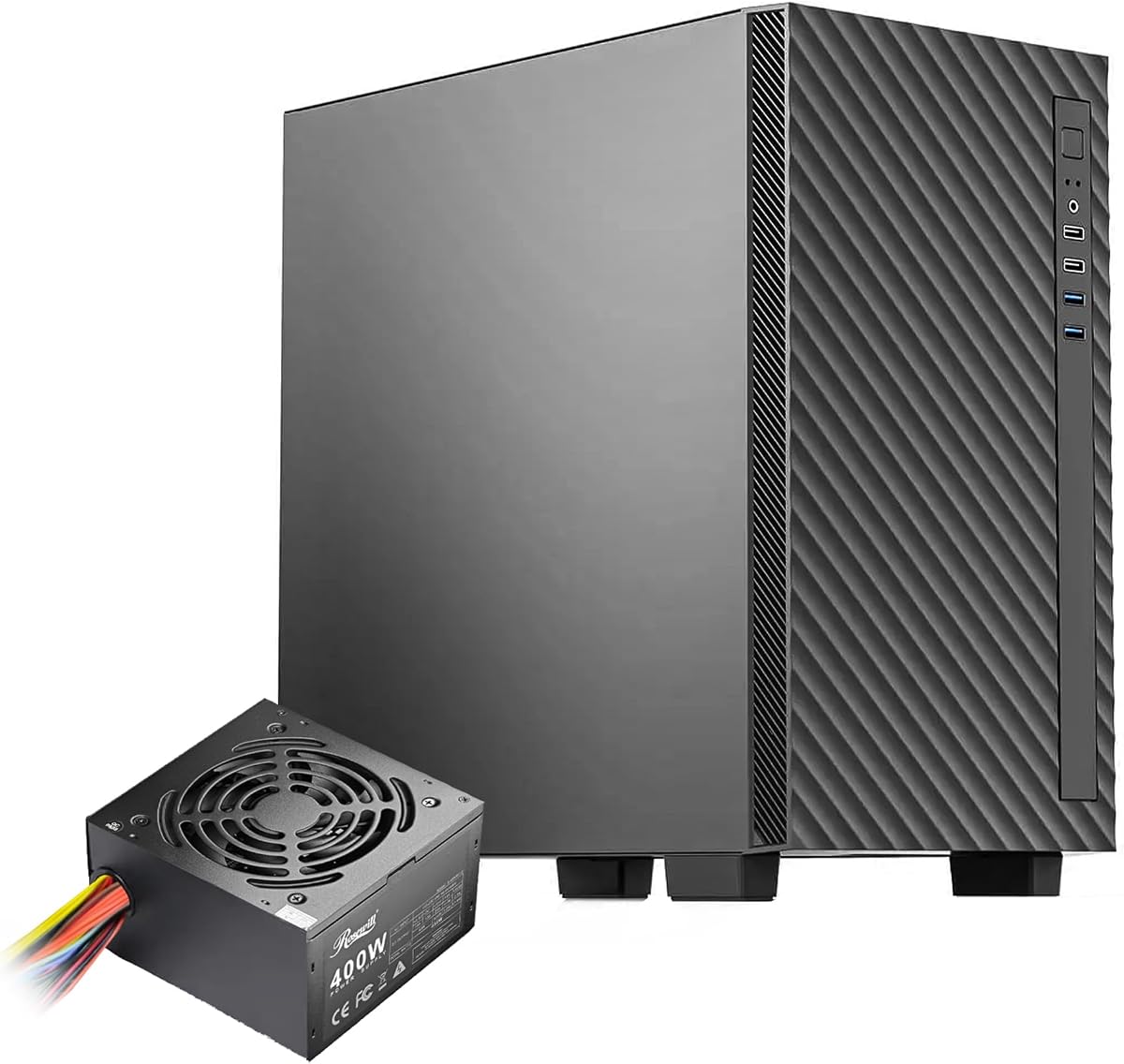
The Rosewill FBM-X5 is a compact micro-ATX mini tower that combines a pre-installed 400W power supply with a versatile range of cooling options. Its 4.9 rating is the highest among the cases reviewed, making it an especially attractive choice for budget-conscious builders assembling an office desktop, compact gaming system, or straightforward everyday computer.
We may earn a commission when you buy through this link, at no additional cost to you.
The chassis supports microATX and Mini-ITX motherboards, four expansion slots, one 3.5-inch drive bay, and two 2.5-inch drive bays. A rear 120mm PWM fan is included, while the cooling layout can accept two front 120mm fans, two top 120mm fans, or a 240mm front radiator. Although 280mm AIO support is advertised in the product title, the supplied feature list specifically identifies a 240mm front radiator option, so builders should confirm the exact mounting arrangement for their selected all-in-one cooler.
Its most valuable feature is the CE/FCC-certified, non-modular 400W power supply already installed inside the chassis. That can simplify a first build and make the case attractive to anyone who does not want to select a separate PSU. The tradeoffs are a modest included fan count, a non-modular cable design, and less room for drives and expansion cards than a full mid tower. It is better suited to efficient office components or a modest gaming configuration than to a heavily upgraded enthusiast system.
The FBM-X5 is our budget pick because it packages a motherboard, power supply, and fan with a chassis that still offers meaningful cooling flexibility. It is particularly useful for first-time builders and compact work setups. As long as the planned processor, graphics card, and storage fit within the available space, it provides a straightforward path to a complete functional computer.
A pre-installed 400W power supply removes one of the more confusing components from a first-time build. The bundled supply is also non-modular, so unused cables cannot be removed, making cable routing less tidy than with a modular unit.
Although only one 120mm PWM fan is included, the chassis can accommodate additional fans or a front 240mm AIO radiator. This allows a builder to begin with a basic configuration and add stronger cooling later if the processor or graphics workload demands it.
MicroATX and Mini-ITX support covers the two most popular smaller motherboard standards. The case includes one 3.5-inch bay and two 2.5-inch positions, enough for a basic system but not intended for an expanding library of large hard drives.
We may earn a commission when you buy through this link, at no additional cost to you.
The Rosewill Helium NAS is an ATX mid tower aimed at DIY network-attached storage, media servers, virtual machines, and small-business applications. Its 4.1 rating accompanies a strong specification centered on drive capacity: ten 3.5-inch hard-drive positions and three 2.5-inch SSD positions, allowing a flexible mix of bulk storage and faster system drives.
We may earn a commission when you buy through this link, at no additional cost to you.
Airflow is provided through all-mesh side panels and four 140mm PWM fans. This enclosure is more explicitly designed for continuous cooling than many visually oriented cases, which makes sense when multiple hard drives operate under load. It also supports 360mm AIO radiators for builders who want liquid cooling, along with standard ATX motherboards and a front USB Type-C connection for convenient peripheral access.
The largest tradeoffs are the space dedicated to drives and the mid-tower dimensions that come with that commitment. A server-oriented layout can feel restrictive compared with a general-purpose gaming case, and a builder adding a large graphics card would need to check clearance carefully. The all-mesh surfaces also demand regular dust-filter attention, as the exposed ventilation can collect particles over time.
This Helium NAS is best recommended for users whose primary requirement is a substantial number of drives rather than a visually dramatic gaming system. Its combination of ten HDD positions, three SSD bays, four large fans, and 360mm radiator support gives it a clear purpose. Home-server builders and media-library enthusiasts should favor it over a compact micro tower for its dramatically greater storage flexibility.
Ten 3.5-inch hard-drive bays provide substantial capacity for media, backups, and archives, while three 2.5-inch SSD positions support operating systems, databases, caches, or virtual-machine data. Keeping fast and high-capacity storage separate can also simplify backup planning.
The all-mesh side panels and four 140mm PWM fans prioritize a steady flow of air through the storage and processing components. That focus is particularly relevant for a home server that may remain powered on for extended periods rather than only operating during short desktop sessions.
Support for a 360mm AIO radiator gives builders an option beyond the four included fans. It can be useful for a high-core-count processor used for transcoding, virtual machines, or other sustained workloads, subject to the case's exact mounting layout.
We may earn a commission when you buy through this link, at no additional cost to you.
The Rosewill Walnut Mesh Case stands apart from conventional gaming enclosures with a walnut-finished front panel and a tempered glass side that exposes the internal components. Its 4.6 rating reflects a balanced combination of visual character, cooling provisions, and practical hardware support, making it a strong option for a micro-ATX gaming build where appearance matters.
We may earn a commission when you buy through this link, at no additional cost to you.
Three 120mm PWM fans are pre-installed, with two positioned at the front for intake and one at the rear for exhaust. The case supports as many as nine fans and two 360mm radiators, one at the top and one at the bottom. It accepts Mini-ITX and micro-ATX motherboards, graphics cards up to 395mm long, and CPU coolers up to 175mm high, providing useful room for substantial gaming components.
A front-mounted power supply uses downward-facing connectors, reducing visible cable clutter and supporting connector-hidden BTF motherboards. The front I/O includes USB 3.2 Gen 2 Type-C and two USB 3.0 connections, while dust filters cover the top, front, bottom, and side. The main compromise is subjective: the walnut finish creates a distinctive look, but it will not appeal equally to everyone. It also does not include RGB lighting, which some gaming buyers may expect.
Choose this case for a gaming system that needs serious cooling options without a full-size mid tower. The unusual front treatment, tempered glass panel, long graphics-card allowance, and dual-radiator capability make it a particularly expressive micro-ATX option. It is an excellent match for builders who value clean cable presentation and substantial cooling headroom but prefer a natural accent over illuminated gaming styling.
The walnut-finished front panel gives the case a warmer, furniture-like character that differs from the black metal and RGB treatments seen in many competitors. It is especially suited to a desk setup where the case remains visible and visual restraint is desirable.
Three included 120mm fans establish usable airflow immediately, while support for nine fans and dual 360mm radiators provides broad expansion. The 395mm graphics-card allowance gives builders room to consider more substantial cards than many compact cases can accept.
The downward-facing front-mounted power supply and BTF motherboard support help keep wiring behind the tray. Thumb screws, clasps, and full dust-filter coverage also make routine access and maintenance more convenient than a design with fixed panels.
We may earn a commission when you buy through this link, at no additional cost to you.
The Rosewill FBM-Z1-650 is a compact micro-ATX mini tower whose defining feature is a pre-installed 650W ATX 3.1 power supply with 80+ Gold certification. It targets builders who want more power headroom and a modern specification without sourcing a separate PSU. Its 3.4 rating is the lowest numerical score in the guide, so buyers should examine the complete specification rather than relying on rating alone.
We may earn a commission when you buy through this link, at no additional cost to you.
The case includes a black tempered-glass side panel, a 120mm PWM rear fan, and front connectivity consisting of one USB 3.0 port, one USB Type-C port, and HD audio. It supports a 360mm radiator, which is a meaningful cooling option in such a compact chassis, although a single included fan leaves the final cooling configuration dependent on the builder's processor and graphics choices.
A 650W supply can accommodate a broad range of desktop components, but its pre-installed form makes case and power supply inseparable. The front-mounted layout is designed to maximize space, and the product specifications list a maximum GPU length of 340mm, CPU cooler height of 160mm, and PSU length of 150mm. These constraints require attention during planning, particularly for oversized graphics cards or tower coolers.
This model makes sense for a builder who values the convenience of a substantial bundled power supply and ATX 3.1 support. It is less suitable if the goal is an immediately quiet or heavily cooled gaming system because only one fan is included. Among the compact cases here, it is the most distinctive for its power-supply emphasis, and it may serve users who already know their components require a robust 650W unit.
The bundled 650W ATX 3.1 unit offers meaningful capacity for a performance desktop in a smaller chassis. Its 80+ Gold efficiency rating also makes it a more refined starting point than choosing a very basic supply solely because it is inexpensive.
Support for a 360mm radiator gives the enclosure flexibility beyond the included 120mm rear fan. Builders should verify the physical orientation of the radiator and the resulting clearance with their chosen CPU cooler and graphics card.
The stated 340mm GPU limit, 160mm cooler-height limit, and 150mm PSU length provide a useful planning baseline. Checking these figures before ordering avoids the common disappointment of discovering that a favorite component cannot fit the compact enclosure.
We may earn a commission when you buy through this link, at no additional cost to you.
The Rosewill RWM1 is a well-balanced micro-ATX gaming case with a 4.6 rating, three included PWM fans, a ventilated mesh front, and an RGB lighting strip. It combines a compact footprint with unusually broad cooling options, modern connectivity, and a concealed front-mounted power supply, making it the most versatile general-purpose gaming option in the guide.
We may earn a commission when you buy through this link, at no additional cost to you.
Its cooling layout supports up to dual 360mm radiators, while the three pre-installed 120mm fans provide immediate airflow. Graphics cards up to 395mm are supported, and both Mini-ITX and micro-ATX motherboards fit. The front I/O combines USB 3.2 Gen 2 Type-C, two USB 3.0 connections, and audio jacks. An integrated RGB hub connects lighting through a 5V three-pin header, allowing a coordinated illuminated appearance without relying entirely on an external controller.
The front-mounted PSU has downward-facing connectors, helping move power leads behind the motherboard tray and keeping the visible interior tidy. BTF motherboard support reinforces that clean-build approach. Dust filters cover the top, front, and bottom, while thumb screws and clasps simplify access. The mesh front promotes intake airflow, although a black gaming aesthetic and RGB lighting will not suit a user who wants a completely understated or non-illuminated case.
The RWM1 is our Editor's Choice because it avoids an obvious weak point: it offers strong cooling capability, modern ports, a tidy layout, and useful hardware clearance within a micro-ATX form factor. It is the best choice for a gaming build that wants visual character and future cooling flexibility. Users seeking maximum storage capacity should choose a NAS-oriented mid tower instead, but most gaming builders will find this balance more versatile.
Three included fans and support for two 360mm radiators allow the RWM1 to scale from a modest configuration to a more thermally demanding system. The 395mm GPU allowance also gives it room for longer graphics cards, a useful advantage for modern gaming builds.
The built-in RGB hub and five-volt three-pin header are intended to simplify coordinated lighting. The illuminated front strip supplies a recognizable gaming aesthetic while allowing the case interior and tempered or mesh surfaces to remain the focus.
Thumb screws and clasps make side-panel removal less dependent on tools. Top, front, and bottom dust filters support routine cleaning, which is particularly important for a mesh-front case that relies on sustained intake airflow.
We may earn a commission when you buy through this link, at no additional cost to you.
The Rosewill FBM-Z3-400 is a compact micro-ATX mini tower distinguished by its built-in top carry handle. It includes a 400W power supply, one 120mm PWM rear fan, a tempered-glass side panel, and support for a 240mm radiator. Its 3.3 rating is tied for the lowest numerical score among the featured cases, making it most appropriate for buyers who value portability and simplicity over advanced cooling features.
We may earn a commission when you buy through this link, at no additional cost to you.
Front I/O provides two USB 3.0 ports and HD audio connections, covering the needs of most accessories without crowding the panel. The 240mm radiator option gives builders an option for a more capable CPU cooler, while the tempered glass allows the compact system to display its components. The case is constructed in steel and has a compact, space-saving internal layout.
Its central tradeoffs are limited included cooling and a more basic feature set than the RWM1 or walnut-finished Rosewill gaming cases. The 400W power supply is suitable for many office and mainstream desktop builds, but demanding gaming components deserve careful power and clearance planning. The stated limits of 340mm for GPU length and 160mm for CPU cooler height should be checked before selecting unusually large parts.
The FBM-Z3-400 is best for a compact office, LAN-style, or frequently transported system. Its carry handle is a genuine convenience when moving a completed computer to another room, event, or temporary workspace. For a stationary gaming machine with ambitions for additional cooling or RGB, one of the more feature-oriented micro-ATX cases will be a stronger match.
The integrated top handle makes the completed case easier to carry between locations. This is a practical feature for people who move their computer to offices, events, shared spaces, or storage areas rather than leaving it permanently on one desk.
Two front USB 3.0 ports and HD audio connections cover most everyday peripheral requirements. The compact front panel avoids unnecessary clutter while keeping frequently used devices within easy reach.
The 240mm radiator allowance provides a path to stronger CPU cooling, even though only a 120mm rear fan is included. Confirming the intended mounting position helps avoid conflicts with the compact power-supply and storage layout.
We may earn a commission when you buy through this link, at no additional cost to you.
The DARKROCK EC2 is an ATX mid-tower gaming case with a 4.4 rating, a mesh front panel, tempered-glass side panels, and Type-C-ready connectivity. Although it appears in this Rosewill-focused roundup as a relevant market alternative, it offers a different approach: a conventional full-size chassis with broad motherboard support and extensive fan potential.
We may earn a commission when you buy through this link, at no additional cost to you.
The enclosure can hold ATX, micro-ATX, and Mini-ITX motherboards. It supports up to eight 120mm fans and a single 360mm radiator at the front. Graphics cards up to 340mm long and power supplies up to 200mm long are supported, providing useful dimensional limits for planning a build. Separate magnetic dust filters mount at the top and bottom and can be removed for maintenance.
A major consideration is that no power supply is included, giving buyers more freedom to choose a unit that matches their components and modular cabling needs. That also means the total build must account for PSU selection from the outset. Tempered glass displays the internal hardware, while the mesh front supports cooling. The listed single-radiator support is less expansive than the dual-radiator configurations offered by the Rosewill RWM1 and walnut-finished model.
The EC2 is a sensible alternative for a builder who prioritizes a standard mid-tower layout, flexible motherboard support, and the freedom to select a separate power supply. It may appeal to gamers who want more space than a micro tower without moving to a multi-drive NAS chassis. Shoppers seeking a bundled supply and a larger radiator option may find the Rosewill FBM-X5 or RWM1 more convenient.
ATX, micro-ATX, and Mini-ITX support makes the EC2 flexible across a wide range of builds. The standard mid-tower format also gives builders a familiar layout for component installation and future expansion.
Support for up to eight 120mm fans allows the builder to establish a balanced intake-and-exhaust arrangement. The front radiator position adds a liquid-cooling option for processors that need more thermal headroom than the case fans alone can provide.
Removable magnetic filters at the top and bottom make routine cleaning more convenient. Keeping these filters clean is important in a mesh-front design because unrestricted intake can otherwise pull dust directly into the system.
We may earn a commission when you buy through this link, at no additional cost to you.
The Rosewill FBM-Z2-400 is a compact micro-ATX mini tower designed as a straightforward desktop enclosure with a pre-installed 400W power supply. It offers tempered-glass presentation, a 120mm PWM rear fan, support for 240mm and 280mm radiators, and front connectivity that includes two USB 3.0 ports, one USB 2.0 port, and HD audio.
We may earn a commission when you buy through this link, at no additional cost to you.
The case uses a steel construction and a front-mounted power supply to free interior space. Its stated component limits are 340mm for graphics-card length and 160mm for CPU cooler height. The radiator support is broader than that of the smaller FBM-Z3-400 configuration, although buyers should confirm the precise position of the 280mm mounting option and how it interacts with other components.
The main drawback is the limited number of newer connectivity options. There is no front USB Type-C port, and only one of the three front USB ports is USB 2.0. There is also no current numerical rating, so the visible customer feedback provides less context than it does for the other models. These limitations matter most for users who frequently connect high-speed external storage or modern Type-C accessories.
This case is best suited to an office, home productivity system, or modest general-purpose computer that benefits from a bundled power supply. Its tempered-glass panel adds visual appeal without requiring a complex RGB-focused design. For a gaming system requiring modern Type-C, extensive fans, or extensive expansion, the RWM1 offers a more advanced feature set.
The front-mounted power supply is positioned to preserve room for the motherboard and other components. This makes the case suitable for a compact workspace where a full mid tower would be inconvenient.
Support for both 240mm and 280mm radiators gives builders several cooling pathways, even though the enclosure includes only one 120mm rear fan. The exact mounting orientation should be checked before ordering a nonstandard radiator.
Two USB 3.0 ports cover common keyboards, mice, and external drives, while the additional USB 2.0 connection supports older accessories. HD audio provides convenient access to headphones and speakers.
We may earn a commission when you buy through this link, at no additional cost to you.
The GAMDIAS AURA GC1 ELITE is an ATX mid-tower gaming case with a 4.3 rating and an unusually generous factory fan package. Four 120mm ARGB fans are pre-installed behind the mesh front panel, providing both cooling and illumination from the first build. A full-sized tempered-glass side panel reveals the completed system and uses tool-free installation for convenient access.
We may earn a commission when you buy through this link, at no additional cost to you.
The case supports up to six 120mm fans in total and accepts a 360mm AIO radiator. Motherboard compatibility spans ATX, micro-ATX, and Mini-ITX, while seven PCIe expansion slots make it suitable for a broad range of desktop configurations. Its stealth-black exterior and airflow-focused mesh create a conventional but versatile gaming design.
Storage and front I/O are more basic than those of several competing cases. The listed drive arrangement offers either two 3.5-inch positions or a combination of 2.5-inch and 3.5-inch cages, alongside two 2.5-inch trays. Front connectivity includes one USB 3.0 port, two USB 2.0 ports, HD audio, and an LED-control connection, but no front Type-C is identified.
The AURA GC1 ELITE is most attractive to a builder who prioritizes an immediate RGB-filled appearance and does not want to purchase four separate ARGB fans. It is a well-rounded mid tower for standard gaming hardware, and the 360mm radiator support provides room for a more serious cooling configuration. Buyers needing faster USB ports, larger storage arrays, or the very latest Type-C connectivity should look elsewhere in the guide.
Four ARGB fans are already installed behind the mesh front, so the case can achieve a coordinated illuminated appearance without a separate fan purchase. Their presence also strengthens the initial front-to-rear airflow path.
The full-sized tempered-glass panel displays the system while its tool-free installation simplifies upgrades and maintenance. This is a useful feature for builders who expect to add memory, storage, or cooling hardware after the initial assembly.
Seven PCIe slots and support for ATX, micro-ATX, and Mini-ITX boards make the chassis suitable for a conventional desktop. The main limitation is its modest front I/O selection, which may not satisfy users centered on USB-C accessories.
We may earn a commission when you buy through this link, at no additional cost to you.
The right case depends on the hardware it must hold, the space available, and the priorities of the build. Motherboard format, cooling layout, drive requirements, power supply arrangement, and front connectivity should be considered before choosing an enclosure.
Begin with motherboard form factor because it determines much of the internal layout. ATX mid towers provide the greatest freedom for full-size boards, long graphics cards, multiple storage devices, and elaborate cooling. Micro-ATX and Mini-ITX cases reduce the footprint but can still accommodate powerful components if the chassis offers sufficient clearance. The Rosewill Helium models support ATX, while the compact FBM and RWM1 models support micro-ATX and Mini-ITX boards.
A case's cooling potential depends on both included fans and the locations where additional fans or radiators can be installed. The RWM1 and walnut-finished case support dual 360mm radiators, while the Helium NAS supports a 360mm AIO. More compact models vary, with the FBM-X5 supporting a 240mm front radiator and the FBM-Z1-650 listing 360mm support. Check mounting position, radiator thickness, and clearance with the graphics card or CPU cooler.
Storage needs can separate a basic desktop case from a dedicated server enclosure. The Helium NAS Max supports eleven 3.5-inch hard drives, while the Helium NAS supports ten 3.5-inch drives and three 2.5-inch SSDs. Smaller office and gaming cases offer only a few drive positions, making them better for a boot drive and a small amount of secondary storage than for a large media library.
Several Rosewill cases include a pre-installed power supply, which can simplify a first build and create a coordinated package. The FBM-X5, FBM-Z3-400, and FBM-Z2-400 include 400W units, while the FBM-Z1-650 includes a 650W ATX 3.1 unit. Cases without a bundled PSU, such as the DARKROCK EC2 and GAMDIAS AURA GC1 ELITE, provide more freedom in wattage, efficiency, and modular cabling but require an additional purchase.
Compact cases demand careful measurement of every large component. The RWM1 and walnut-finished Rosewill case support graphics cards up to 395mm, while several FBM models list a 340mm limit. CPU cooler limits range from 160mm in the smaller FBM cases to 175mm in the walnut-finished model. A front-mounted PSU can create a different cavity shape from a conventional top-mounted design, so dimensions should be checked rather than inferred.
Front I/O should match the devices used every day. USB 3.2 Type-C appears on the Helium NAS Max, Helium NAS, walnut-finished case, RWM1, and FBM-Z1-650. The FBM-Z2-400 offers two USB 3.0 ports and one USB 2.0 connection, while the GAMDIAS AURA GC1 ELITE lists one USB 3.0 and two USB 2.0 ports. Consider whether a Type-C port is genuinely needed or whether standard USB-A is sufficient.
Exterior design affects how prominently the case appears in a room. The RWM1 uses an RGB strip and integrated hub, the walnut-finished model offers a more natural aesthetic, and tempered-glass models display internal components. Mesh fronts and all-mesh sides improve airflow but make dust filters more important. Look for removable filters, tool-free panels, thumb screws, and clasps when planning routine cleaning.
Connector-hidden BTF motherboard support can produce a cleaner interior by routing power and data cables behind the motherboard tray. The Helium NAS Max, walnut-finished case, and RWM1 explicitly support this approach. Front-mounted power supplies with downward-facing connectors also reduce visible clutter. For a display-oriented build, inspect cable-routing openings and the space behind the tray before deciding.
Begin by assembling the system with the case laid on a stable, nonconductive surface and all components disconnected from power. Install the power supply first, route its cables behind the motherboard tray, and connect the front-panel switches and USB ports before securing the motherboard. Fitted or modular hard drives should be mounted with their cables routed away from intake fans and any rotating storage areas.
After the build is complete, connect the power and data leads to each fan, radiator, pump, storage device, and front I/O component. Use the included fan configuration as a starting point, then add intake and exhaust fans according to the component layout. Verify that every fan spins before closing the panels, and confirm that no cable interferes with a fan, radiator, drive cage, or graphics card.
For care, clean removable dust filters periodically, especially in mesh-front and all-mesh cases. Use a short burst of compressed air while holding fan blades so that the fans do not spin from the airflow. Keep the case away from floor-level dust, direct heat sources, and areas where cables can be snagged. Periodically inspect the feet, screws, and panel latches, and tighten or reseat any connection that develops visible looseness.
The Helium NAS Max is the strongest choice for a drive-heavy NAS because it supports up to eleven 3.5-inch hard drives and includes four 140mm PWM fans. The Helium NAS is also highly relevant, offering ten 3.5-inch HDD positions and three 2.5-inch SSD positions. Choose according to the exact drive count and whether a 360mm AIO radiator is required.
Yes, provided the selected graphics card and CPU cooler fit the published clearance limits. The RWM1 and walnut-finished case support graphics cards up to 395mm and include cooling options suitable for demanding systems. Smaller FBM models generally list a 340mm GPU limit, so the exact dimensions should always be checked before ordering.
It depends on the case and the components. The FBM-Z1-650 includes a 650W ATX 3.1 supply with 80+ Gold certification, which provides more headroom than the 400W units in several compact models. A 400W supply can still work with an efficient system, but the processor and graphics card should be considered before making a final selection.
A 360mm radiator is physically larger and can move more air and absorb more heat than a 240mm unit. It may support a higher processor power level or simply run its fans more quietly. Compatibility is more important than size, so check the case's supported radiator positions and any stated GPU, CPU cooler, or PSU dimensions.
The included fans provide a basic airflow foundation, but the correct number depends on the build. The Helium cases and walnut-finished model already include four large fans, while the RWM1 includes three. The compact FBM cases generally include one rear fan, so adding front intake fans or an AIO can improve cooling and reduce fan speed under load.
BTF or connector-hidden motherboard support lets power and data connections plug in from the back of the board. This keeps the visible side of the motherboard tray cleaner because most cables can be routed behind it. It is especially useful in display-oriented builds such as the RWM1, walnut-finished case, and Helium NAS Max.
Inspection every few months is a sensible starting point, with cleaning occurring sooner in dusty environments. Cases with mesh fronts and all-mesh side panels should receive particular attention because their airflow design depends on clean intake paths. Remove filters according to the case instructions and use compressed air without allowing the fan blades to spin freely.
Tempered glass primarily improves the visual presentation of the internal components. It is not itself a cooling feature, and a case can still provide effective airflow through its front, side, and rear vents. Consider the mesh design, fan placement, radiator support, and dust filtration alongside appearance rather than treating the glass panel as a performance specification.
The Rosewill FBM-X5 stands out as the best budget option because it combines a high customer rating with a pre-installed 400W power supply and flexible cooling positions. The RWM1 is the Editor's Choice for gaming, offering three fans, dual-radiator support, modern Type-C connectivity, RGB lighting, and a tidy front-mounted PSU. For premium storage builds, the Helium NAS Max provides the most capable 3.5-inch drive arrangement.
Prioritize motherboard format, hardware clearance, and cooling layout before appearance. NAS builders should count hard drives and plan cable routing, while gaming builders should compare GPU length, radiator placement, and front I/O. A bundled PSU can simplify a new build, but choosing separately may provide a better modular design or more appropriate wattage for a specialized system.
Ratings, configurations, and prices can change, so verify the current product listing and hardware specifications before ordering. Confirm that every major component fits and that the case's power supply or chosen alternative meets the system's needs. Checking those details at the end of the process helps ensure that the selected Rosewill case works as well on the desk as it did on the specification sheet.