
TONGVEO 1080P 3X PTZ Camera and Speakerphone System
4.4Editor score
1080P at 60fps
AI speaker tracking
3X optical zoom
Our Ptz Conference Camera guide compares 10 AI-tracking, 4K, and USB conference cameras for zooming, streaming, and large-room meetings, with audio bundles.
A PTZ conference camera gives meeting rooms the ability to pan, tilt, and zoom without an operator continually adjusting a conventional webcam. The best models also capture clear room audio, follow active speakers, and connect easily to laptops, streaming software, or presentation systems.
We compared the ten cameras in this guide using resolution, optical zoom, tracking behavior, pan and tilt range, output interfaces, audio capabilities, installation options, and compatibility. The list includes standalone cameras, camera-and-speaker bundles, and professional models intended for live production or larger spaces.
Each review explains the most useful capabilities and the compromises involved. Our leading selections cover practical meeting-room bundles, a 4K tracking system, and a more specialized 20X camera, while retail pricing and availability can change at any time.
4.4Editor score

4.8Editor score
4.7Editor score
The comparison below highlights the major differences among standalone and bundled PTZ conference cameras, including zoom capability, tracking, maximum video format, connection methods, and room-audio support.


The TONGVEO all-in-one conference room system combines an AI auto-tracking PTZ camera with a Bluetooth conference speakerphone, making it an appealing practical choice for small-to-medium rooms. Its 4.4 rating reflects a solid combination of 1080P at 60fps, 3X optical zoom, flexible wired outputs, and room-oriented audio. The package addresses two common conference-room needs without requiring the buyer to assemble every component separately.
We may earn a commission when you buy through this link, at no additional cost to you.
The camera uses a 1/2.8-inch 2.38-megapixel sensor and provides simultaneous HDMI and USB 3.0 output at 1920 by 1080 and 60fps. Its 350-degree horizontal rotation, 180-degree vertical rotation, and 114-degree field of view give it a broad view of a conference table. Humanoid and face recognition allow the camera to detect and follow a lecturer or speaker while the included speakerphone provides hands-free audio pickup within approximately 16.4 feet.
The trade-offs are clear. A 3X lens cannot isolate a distant subject as effectively as a 12X or 20X optical zoom, and the 114-degree field of view is more useful for a smaller table than a large auditorium. The PTZ camera itself is wired even though the speakerphone supports Bluetooth, USB, and a wireless dongle. The listed system is intended for groups of roughly 8 to 12 people rather than a large event audience.
This is the best budget-oriented choice for a business meeting room, classroom, consultation office, or live online session where 1080P motion quality and automatic framing matter more than extreme magnification. Check that the meeting platform supports the camera over USB and that the room layout gives the camera a clear view. For a straightforward all-in-one package without 4K, it offers a notably balanced feature set.
The camera and speakerphone can operate at the same time, allowing remote participants to see the room and hear its occupants through one coordinated system. The speakerphone connects by USB, Bluetooth 5.0, or its wireless dongle without requiring additional drivers.
Humanoid and facial recognition give the camera useful automatic-follow behavior when a presenter changes position. This reduces the need to touch the controls during lectures, training sessions, and discussions where different people take turns speaking.
We may earn a commission when you buy through this link, at no additional cost to you.
The TONGVEO 4K conference room system is our editor's choice because it combines high-resolution imaging, automatic tracking, and a portable conference speakerphone in one package. It carries a 4.8 rating, the highest among the listed products. The camera supports 4K at 30fps through HDMI and 1080P through USB 3.0, giving integrators flexibility to use a presentation display or a computer-based meeting application.
We may earn a commission when you buy through this link, at no additional cost to you.
Its 1/2.8-inch 8.29-megapixel sensor, 93-degree field of view, and 3X optical zoom are well suited to small-to-medium conference rooms. Pan, tilt, and zoom movements cover 350 degrees horizontally and 180 degrees vertically. AI-based human and face recognition helps the camera follow active speakers and automatically select framing, while the 4-microphone speakerphone handles hands-free pickup within a stated range of 16.4 feet.
The important limitation is that the two wired outputs do not offer the same format. HDMI provides 4K at 30fps, whereas USB 3.0 is listed as 1080P. Users whose conferencing platform captures video over USB will not receive the camera's full 4K resolution even if the display connected by HDMI can. Its 3X optical zoom also does not provide the reach of the 12X and 20X models, although the wider field of view helps include more of the table.
The system is a strong overall choice for a business conference room, worship space, telemedicine office, or classroom that wants a coordinated camera and audio solution. It can sit on a desk, wall, tripod, or ceiling, while the speakerphone remains easy to carry between meetings. Its broad platform support, simple setup, and 4K presentation output make it particularly versatile for organizations that need both conferencing and direct screen presentation.
The camera's improved facial and humanoid tracking algorithms are designed to keep a selected participant centered. Automatic frame selection can be useful in meeting rooms where the active speaker frequently moves between different seating positions.
HDMI and USB 3.0 can operate simultaneously, allowing the same camera to feed a conference display and a computer. The difference between 4K HDMI output and 1080P USB output should be considered before selecting a meeting platform.
We may earn a commission when you buy through this link, at no additional cost to you.
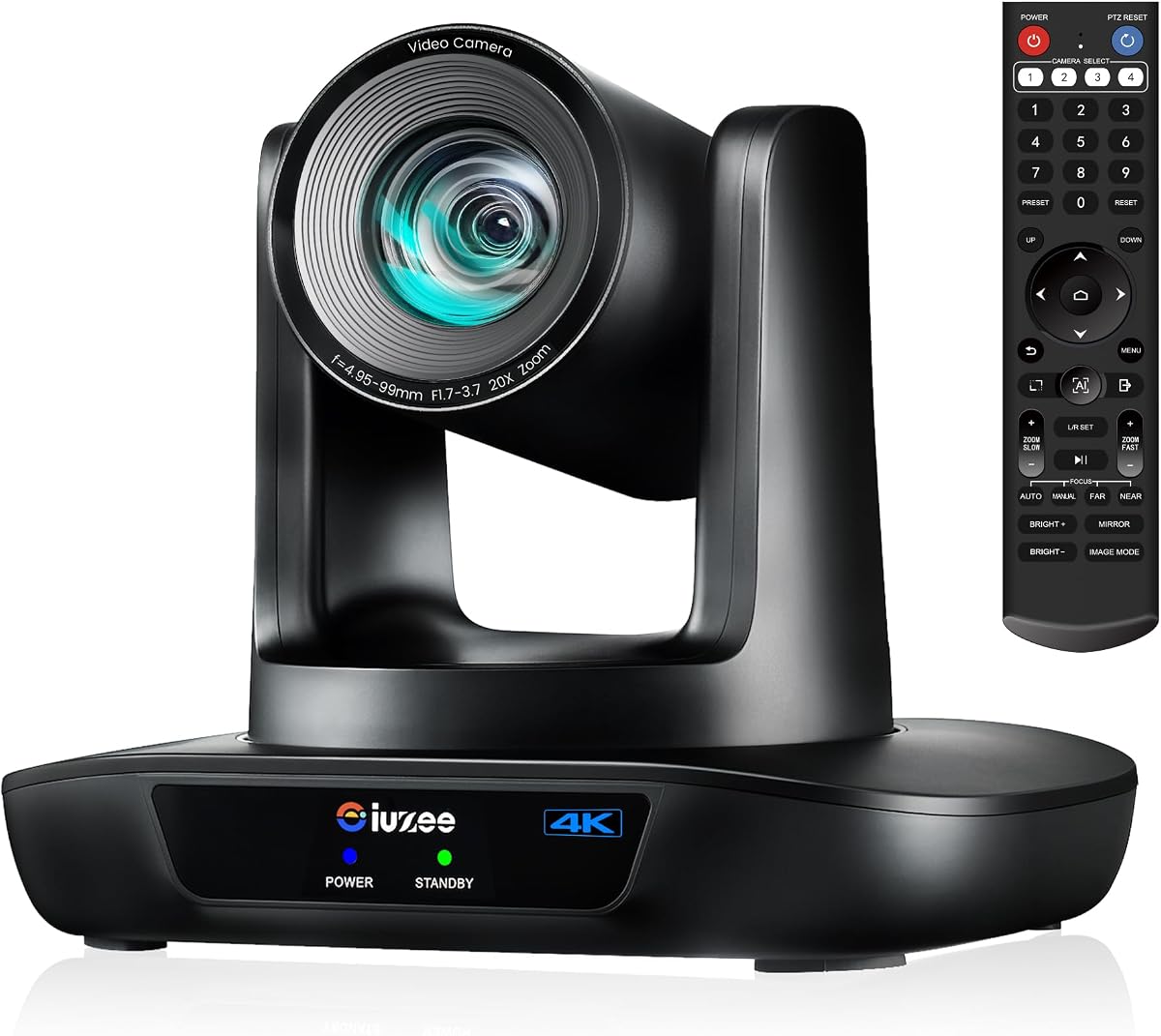
The iuZee 4K PTZ camera is the premium selection for buyers who need professional reach, network installation, and advanced tracking in one standalone camera. Its 4.7 rating reflects a capable standalone design built for conference rooms, education, worship, and event streaming. Unlike the bundled TONGVEO systems, it is a camera rather than a complete camera-and-audio package, which allows more deliberate audio selection.
We may earn a commission when you buy through this link, at no additional cost to you.
A 1/2.8-inch 8.29-megapixel CMOS sensor records 4K at 30fps, while a 20X optical lens and 63-degree wide view make it possible to frame distant presenters or details. The camera supports simultaneous USB 3.0, HDMI, and LAN outputs. Its network functions include MJPEG, YUY2, H.264, and H.265 encoding, along with PoE under IEEE 802.3af, RTSP, RTMP, and SRT support for professional streaming workflows.
AI face and figure tracking, automatic framing, presenter mode, and millisecond-level response are major advantages for event and educational production. The camera can be controlled through a web browser and supports up to 255 presets, although the included remote directly recalls 10. PoE requires compatible network infrastructure, and the absence of a built-in microphone means the operator must add a suitable room microphone. It is also more involved than a basic USB webcam.
This camera is best suited to a professional installation in a church, university classroom, seminar room, or larger conference venue where long-distance framing and streaming flexibility outweigh the simplicity of an all-in-one bundle. It also suits operators who need one-camera feeds to a computer, presentation display, and network workflow. Those wanting ready-to-use room audio should plan to pair it with a suitable conference audio solution.
The 20X optical lens lets operators tighten the view on a distant speaker, whiteboard, or presentation detail. Optical magnification preserves image information better than relying exclusively on digital zoom, making the camera more useful in large venues.
USB 3.0, HDMI, and LAN outputs provide distinct paths for computer conferencing, local displays, and network-based production. H.264 and H.265 support also make the camera relevant to streaming setups that need compressed IP video.
We may earn a commission when you buy through this link, at no additional cost to you.
The NexiGo N990 Gen 2 is a straightforward 4K PTZ webcam for offices and meeting spaces that value a familiar computer-camera form. It has a 4.4 rating and a Zoom Certified designation, while its remote provides direct control of framing and common camera functions. Unlike the more elaborate AI models in this guide, it is designed around deliberate manual operation and saved positions.
We may earn a commission when you buy through this link, at no additional cost to you.
Its 8.5-megapixel Sony Starvis sensor delivers up to 3840 by 2160 at 30fps. The camera supports 5X digital zoom at 1080P, pan from negative 170 to positive 170 degrees, and tilt from negative 35 to positive 85 degrees. Two presets can be stored and recalled with smoother motorized transitions. A remote also handles power, volume, zoom, and image mirroring or flipping.
Audio is handled by built-in dual stereo microphones with noise cancellation, and a 3.5mm audio jack permits connection to external microphones. Automatic low-light correction helps in dim rooms, while wall mounting or a threaded base provides installation flexibility. The compromises are the lack of stated AI subject tracking, digital rather than optical zoom, and only two presets for facilities that switch among many views.
This is a compelling option for a compact conference room, executive office, or home business where participants want 4K quality and PTZ movement without network-camera complexity. It works with Windows, macOS, Android, smart TVs, and popular conferencing applications. It is best for an operator who values simple setup, Zoom certification, and a physical remote over automatic speaker tracking.
USB 2.0 handles the main connection, and USB-C is listed for video only. With broad operating-system and conferencing-platform support, the N990 can serve as a conventional high-quality webcam that also pans, tilts, and zooms.
The integrated stereo microphones provide a simple starting point for calls, while the 3.5mm jack allows an external microphone to be added. This is helpful when a room needs a separate directional mic or a more specialized conference audio system.
We may earn a commission when you buy through this link, at no additional cost to you.
The TONGVEO 4K 20X system combines a long-reach AI tracking camera with a Bluetooth conference speakerphone, offering one of the most complete configurations in the guide. It has a 4.8 rating, matching the highest listed score. The pairing is especially appealing for large remote meetings, lecture recordings, church streaming, and professional events where both detailed framing and room audio are needed.
We may earn a commission when you buy through this link, at no additional cost to you.
The 1/2.8-inch 8.29-megapixel sensor supports 4K at 30fps, and the 20X optical zoom is paired with a 63-degree wide-angle lens and autofocus. HDMI, USB 3.0, and IP/LAN outputs can be used for computer conferencing, local displays, and network streaming. The camera also supports PoE, RTSP, RTMP, and H.264 or H.265 encoding, which is a notable expansion beyond basic USB presentation use.
AI-based face and humanoid recognition lets the camera lock onto a speaker and maintain framing as that person moves. The included speakerphone uses four microphones, supports USB, Bluetooth 5.0, or a wireless dongle, and provides a stated pickup distance of 16.4 feet. Its battery is rated for 6 to 8 hours of continuous use. The camera is wired and must be placed carefully, while the speakerphone should remain near participants for the best room coverage.
This bundle is a strong recommendation for a medium-to-large meeting room that wants 4K output, optical reach, tracking, and conference audio in one purchase. It also suits live production because the LAN interface adds options beyond direct computer capture. Buyers should verify their network equipment supports the required PoE and streaming standards, and should plan mounting and microphone placement before installation.
The camera and speakerphone are coordinated for simultaneous operation, so the room can be seen and heard without sourcing two unrelated products. Multiple speakerphone connection methods also make it easier to place the audio unit where it captures voices effectively.
HDMI, USB, and LAN outputs expand the camera beyond standard video calling. RTSP, RTMP, and modern codec support make it useful for operators who may move between meetings, recorded presentations, and live broadcasts.
We may earn a commission when you buy through this link, at no additional cost to you.
The TONGVEO Gesture 5X system stands out for gesture-based camera control, a 120-degree field of view, and a bundled conference speakerphone. Its 4.3 rating reflects a capable but more specialized package. The camera supports AI tracking, 5X digital zoom, remote operation, and programmable gestures, giving meeting participants another way to influence framing without reaching for controls.
We may earn a commission when you buy through this link, at no additional cost to you.
The 1/2.8-inch 8.29-megapixel sensor records 4K at 30fps and rotates 350 degrees horizontally and 180 degrees vertically. Listed gestures include an OK sign to enable multi-human tracking, a V sign for solo tracking, directional gestures for zooming, a thumbs-up for multi-human tracking, and an open palm to disable tracking. These functions can also be switched through the remote or on-camera menu.
A full-duplex speakerphone with two stereo microphones, noise reduction, and a stated 16.4-foot pickup range connects by USB cable or dongle. Its built-in 2400mAh battery offers 6 to 8 hours of standby, according to the supplied description. The main compromises are digital rather than optical zoom, the need for equipment and software to support 4K, and a mirror-image setting that may require adjustment in Zoom, Teams, or other applications.
This package is most interesting for small and medium meeting rooms that want a very wide view and hands-free camera commands. It can be installed on a desk, wall, tripod, or ceiling, while the portable speakerphone supports mobile meetings. It is less appropriate when a long-distance optical close-up is the priority, but it provides a distinctive and flexible control experience.
The gesture suite makes it possible to start or stop tracking and adjust solo-view zoom without touching the remote. For presenters who move around, this can reduce the interruption caused by reaching for a control surface.
A 120-degree field of view can include participants seated around a broad table and reduces the need for extreme panning. It is a useful complement to the 3X and 5X zoom levels when the priority is capturing the whole room.
We may earn a commission when you buy through this link, at no additional cost to you.
The TONGVEO 1080P 20X system is built for users who prioritize optical reach and smooth motion over 4K resolution. It has a 4.2 rating and offers 1080P at 60fps with a 20X optical zoom. That combination is well suited to church streaming, education, online events, and conference rooms where a presenter may be far from the camera.
We may earn a commission when you buy through this link, at no additional cost to you.
Its AI system supports single-person tracking and multi-person auto-framing, automatically adjusting pan, tilt, and zoom to maintain a useful composition. The camera covers 350 degrees of horizontal movement and 180 degrees of vertical movement. Up to 255 preset positions can be stored, and the included remote enables rapid recall, reducing manual adjustment in productions that switch among several views.
HDMI and USB 3.0 outputs support direct computer or display connections, with compatibility listed for OBS, vMix, Zoom, Microsoft Teams, and YouTube. No drivers are required, which simplifies deployment. The camera does not include a conference speakerphone, so audio must be handled separately. It also remains a 1080P model rather than a 4K option, and its stated tracking is less elaborate than some of the dedicated production cameras in this list.
Choose this model for a large room or stage where the presenter is distant and fluid movement at 60fps matters. The broad preset system is particularly valuable for live production, allowing an operator to move quickly between wide, close, and alternate room angles. For a simpler office conference room where 3X zoom is enough, a bundled 4K system may be easier to use.
The 255-position preset capacity is unusually useful for staged events, large classrooms, and multi-camera-style workflows. Presets can be recalled with the included remote, allowing a trained operator to change composition quickly.
1080P at 60fps provides a useful balance for online meetings and live events because it captures motion more smoothly than 30fps output. The 20X optical zoom can isolate a faraway subject without relying on digital magnification.
We may earn a commission when you buy through this link, at no additional cost to you.
The Logitech PTZ Pro 2 is an established USB conference camera aimed at professional meeting rooms, training environments, and large events. It has a 4.3 rating and takes a simpler approach than the AI-heavy systems in this guide. Rather than promising autonomous subject recognition, it emphasizes sharp 1080P imaging, color reproduction, optical accuracy, and smooth mechanical camera movement.
We may earn a commission when you buy through this link, at no additional cost to you.
Its motorized pan, tilt, and zoom allow the camera to alternate between a wide room view and close-ups of objects, whiteboard content, or individual participants. Preset transitions are designed to move smoothly, which helps maintain a professional appearance during meetings and recorded sessions. Processing video within the camera can also free bandwidth for smoother operation in applications such as Skype for Business, according to the supplied information.
Compared with newer 4K models, the PTZ Pro 2 offers less resolution, no stated AI tracking, and no integrated conference speakerphone. Those limitations do not matter for every installation. A permanent conference room with fixed camera positions, trained operators, and existing room audio may value predictable manual control over advanced automation.
This is a sensible pick for organizations already familiar with Logitech equipment or seeking a no-frills professional PTZ camera. It is particularly useful for training rooms, boardrooms, and event spaces where an operator can recall views and make smooth close-ups. Those requiring unattended speaker tracking or 4K resolution should examine the more automated models in the guide instead.
Smooth movement between preset positions helps the camera look composed in meetings and recordings. The ability to zoom toward whiteboard details or individual attendees makes it a versatile presentation camera rather than only a room overview.
USB connectivity keeps the installation understandable for offices already using computer-based conferencing. The camera's internal video processing is also designed to support smoother streaming in compatible business applications.
We may earn a commission when you buy through this link, at no additional cost to you.
The TONGVEO 12X bundle occupies a practical middle ground between compact 3X systems and long-reach 20X production cameras. Its 4.4 rating reflects a balanced set of features: 1080P at 60fps, 12X optical zoom, AI tracking, and a Bluetooth conference speakerphone. It is particularly relevant to medium rooms where participants are spread across a larger table.
We may earn a commission when you buy through this link, at no additional cost to you.
The camera uses a 1/2.8-inch 2.07-megapixel sensor and provides simultaneous USB 3.0 and HDMI output at 1920 by 1080 and 60fps. Its 12X lens provides considerably more reach than a typical conference webcam, while the 75-degree field of view helps establish a natural room perspective. Pan coverage reaches 350 degrees and vertical movement reaches 180 degrees, with 10 preset positions available.
Humanoid detection and facial recognition allow the camera to follow a presenter or lecturer. The included speakerphone has a stated pickup distance of 16.4 feet and connects by USB, Bluetooth 5.0, or a wireless dongle. The product description positions the combination for medium-to-large rooms and groups of approximately 20 to 30 people, although actual intelligibility depends on room dimensions, furnishings, and acoustics. The camera is wired, while the speakerphone is portable.
This system is a good option for a boardroom, training room, medical consultation space, or worship environment that needs a middle-distance lens and integrated conference audio. It offers more useful magnification than a short-zoom camera without requiring the 20X reach of a professional stage model. Confirm your platform supports 60fps 1080P and position the speakerphone centrally for the best result.
The 12X lens helps isolate participants in a medium room while the 75-degree field remains broad enough for a contextual wide shot. This balance is useful when a meeting needs both group coverage and closer views.
AI recognition reduces the need to reposition the camera manually, while the four-way speakerphone connection options simplify its relationship to the meeting computer. The bundled audio unit can be moved to a different table as the room layout changes.
We may earn a commission when you buy through this link, at no additional cost to you.
The 4K HDMI 20X camera is a flexible standalone PTZ model with extensive control and streaming options. Its 4.6 rating makes it one of the stronger choices in the guide, especially for installations that need long-range framing without a bundled conference speakerphone. It is relevant to schools, churches, hospitals, broadcast environments, and professional meeting rooms.
We may earn a commission when you buy through this link, at no additional cost to you.
A 1/2.8-inch CMOS sensor, 20X optical zoom, 54-degree wide-angle lens, and fast autofocus support 4K output. HDMI defaults to 4K and can be configured for 1080P at 60fps, while USB and IP can also carry video. The camera supports IP, USB 3.0, HDMI, RS232, and RS485. Control options include the included infrared remote and serial connections, with VISCA, Pelco-D, and Pelco-P protocols listed for compatible systems.
Network functionality includes ONVIF, SRT, RTSP, and RTMP, and AI algorithms provide monocular human auto-tracking. These capabilities are valuable for professional streaming but may be more than a small office needs. The camera does not include a built-in microphone, and RS232 or RS485 integrations require compatible control equipment. Unlike the iuZee model, PoE is not stated as a supported feature.
This camera is best for a technically capable buyer who wants one device to feed computers, displays, and network streams while supporting both IR and professional serial control. It is also a strong church or education choice when long-distance 4K detail is important. More straightforward meeting users should consider a bundled TONGVEO system, while operators prioritizing PoE can look to the iuZee alternative.
VISCA, Pelco-D, Pelco-P, RS232, and RS485 options make the camera easier to integrate into existing professional control systems. The included IR remote remains a convenient way to manage framing without specialized equipment.
The camera can stream up to 4K through HDMI, USB, and IP simultaneously. RTSP, RTMP, SRT, and ONVIF support extend its usefulness beyond standard desktop video calls into managed network and live-production environments.
We may earn a commission when you buy through this link, at no additional cost to you.
The right PTZ conference camera depends on room size, subject distance, connection methods, tracking expectations, and whether a separate conference microphone is required. Comparing these factors before buying prevents an expensive mismatch between the camera and the meeting environment.
Optical zoom changes the captured image by moving the lens, while digital zoom enlarges and crops the existing image. A 3X lens is usually sufficient for a small conference table, a 12X lens offers useful middle-distance reach, and a 20X lens is better for large rooms, stages, classrooms, and distant presenters. Field of view works in the opposite direction: a wider angle includes more participants but makes each face occupy fewer pixels, while a narrower angle emphasizes a particular area.
Choose based on the farthest person who needs a readable close-up, not merely the largest zoom number. A broad 93-, 114-, or 120-degree view can be excellent around a table but may not isolate a speaker in a large venue.
Resolution determines how much fine detail can be preserved, while frame rate affects the smoothness of motion. 4K at 30fps is well suited to presentations, recording, and streaming, whereas 1080P at 60fps can look smoother for live movement. Many cameras offer different capabilities through HDMI and USB, so buyers should confirm the exact output of the port they intend to use rather than relying on the headline resolution.
A 4K display is required to see the full detail of a 4K HDMI feed. If conferencing software captures only 1080P over USB, a 4K-capable camera may still deliver excellent results, but the extra resolution will not reach the meeting recording.
AI tracking uses face or human-body recognition to identify a participant and adjust pan, tilt, and zoom automatically. This is valuable in presentations and hybrid meetings where people move between seats, although tracking quality can vary with lighting, occlusion, and how many people enter the frame. Some cameras also offer multi-person framing, solo tracking, presenter modes, and gesture commands.
If automation is essential, look for explicit face and humanoid recognition rather than a generic auto-follow label. Test the camera in the actual room whenever possible, and remember that a remote operator may still need to correct unusual transitions.
USB is the simplest route for laptop and desktop conferencing, while HDMI connects the camera to a local display or presentation system. LAN adds long-distance network operation, IP streaming, and centralized control. RS232 and RS485 interfaces support professional camera-control systems, and PoE can reduce cable requirements by carrying data and power over one network connection when compatible infrastructure is available.
Match the camera to the meeting software and production workflow. Confirm operating-system support, required codecs, IP protocols, and whether the platform will accept the camera's USB format. A camera can have excellent hardware but still be awkward if its signal path does not fit the room.
A PTZ camera captures video, but room participants still need to be heard clearly. Bundled speakerphones are convenient because they include full-duplex speaker operation, multiple microphones, echo cancellation, and options such as Bluetooth, USB, or a wireless dongle. Standalone cameras offer more freedom over audio but require a separate conference phone, directional microphone, or installed sound system.
Pay attention to placement. A tabletop speakerphone should be located near the center of the discussion and away from laptops or HVAC noise. In a large room, a single compact speakerphone may not provide adequate intelligibility, so a dedicated audio system can be a better investment.
Preset positions save the camera's pan, tilt, and zoom settings so an operator can recall them quickly. A small number of presets is fine for a compact boardroom, while dozens or hundreds benefit large venues with several stage angles, whiteboard views, and audience shots. Remote controls, browser interfaces, joysticks, and serial protocols provide different levels of direct control.
Consider who will operate the system. A simple remote and a few useful presets are usually easier for occasional users, whereas a professional production environment benefits from programmable memory and external control systems.
PTZ cameras are commonly placed on a desk, monitor, tripod, wall, or ceiling. Ceiling mounting is useful when no table space is available, while wall mounting can provide a higher and clearer view of the room. Verify the supplied bracket, cable lengths, power requirements, ventilation needs, and whether the camera can be inverted without affecting tracking or menu orientation.
Plan the camera's line of sight before installation. Place it where it can see the active speaker without crossing a bright light, and keep cable routes protected. A tidy installation improves reliability and makes later servicing easier.
Begin by choosing the correct output for the meeting. Connect USB to a laptop or desktop for direct video-calling use, or use HDMI to feed a local display. If the camera supports LAN, configure the network address and confirm that the meeting or streaming application recognizes the UVC or compatible video feed. Connect the conference speakerphone separately using USB, Bluetooth, or its supplied wireless dongle, then place it near the center of the discussion.
Power on the camera and allow time for its operating system or conferencing platform to recognize the connection. Select the appropriate resolution and frame rate, set the tracking and framing mode, and adjust exposure, focus, pan speed, tilt speed, and zoom through the menu. Save important wide, medium, and close views as presets. During a meeting, avoid abrupt unnecessary movements and use presets for repeatable transitions.
For maintenance, keep the lens clean with a soft dry cloth and do not spray cleaning fluid directly onto the camera. Protect the unit from dust, moisture, and extreme temperatures, and avoid blocking ventilation openings. Inspect wall or ceiling fasteners periodically, keep power and signal cables strain-free, and update meeting software when compatibility improvements are available.
Optical zoom physically moves the camera lens to magnify the subject, preserving more image detail as the view tightens. Digital zoom enlarges and crops the image already captured by the sensor, which can reduce clarity. A 20X optical camera is generally more useful for distant presenters than a 5X digital model with a similar headline zoom figure.
AI tracking is useful when the active presenter moves around and no dedicated operator is available. It can automatically follow faces or people and frame the subject, but it is not a substitute for every professional camera-control need. Fixed-room installations with an operator may manage very well with presets and manual PTZ controls.
It depends on the platform, connection, display, and room. A 4K camera can provide better detail for recording, presentations, and large displays, but many USB workflows capture video at 1080P even when the camera supports 4K. Check the output format of the exact port you plan to use before assuming that all participants will receive 4K.
Usually not. A PTZ camera is primarily a video device, and many models in this guide do not include a conference speakerphone. A bundled system includes separate audio hardware, while standalone cameras need a suitable USB speakerphone, conference mic, or installed sound system for reliable room coverage.
A 12X optical lens can be a useful middle ground for medium rooms because it offers more detail than a 3X camera without reaching the size and complexity of many 20X production models. The correct choice still depends on the farthest participant and the width of the room, since a narrow view can exclude people seated nearby.
They serve different purposes and may offer different resolutions or control features. USB is convenient for direct computer capture, HDMI is common for local displays, and LAN supports network streaming and longer installations. A camera can use several outputs simultaneously, but each destination may have its own format and bandwidth limitations.
A boardroom may need only a few views, such as the full table, a close-up position, and a whiteboard. Large venues, production studios, and churches may benefit from many more because operators can switch quickly among presenters, screens, and audience views. More presets are useful only if they are framed and labeled well.
Place the camera high enough to see participants without obstructions and within its useful horizontal and vertical movement range. Position the speakerphone near the center of the table or discussion area, away from laptop fans, television speakers, and hard surfaces that create echo. Test both the visual framing and voice pickup before the first important meeting.
The TONGVEO 1080P 3X system is the most practical budget-oriented bundle, combining automatic tracking, smooth 1080P video, and a portable conference speakerphone. The TONGVEO 4K 3X system is the strongest all-around meeting-room choice because it adds 4K HDMI presentation output, a wide view, and a high customer rating.
For specialized professional needs, the iuZee 4K 20X camera provides long-distance optical framing, advanced AI modes, and USB, HDMI, and LAN connectivity. Prioritize optical reach for large rooms, wide field of view for group coverage, the correct output format for your software, and a separate audio plan whenever a bundled speakerphone is not included.
Before making a final decision, confirm room dimensions, mounting options, operating-system support, tracking behavior, and the exact video format delivered through your chosen connection. Retail pricing and availability change frequently, so review the current listing and included accessories at the time of purchase.