
Bambu Lab A1
4.7Editor score
10,000 mm/s² acceleration
Automatic bed calibration
AMS lite compatibility
Quiet motor operation
Beginner-friendly controls
Our 3D Printer for Cosplay Props guide compares ten FDM printers for speed, build volume, multi-color output, materials, accuracy, and easier fabrication.
A 3D printer for cosplay props must balance speed, accuracy, material support, and enough build volume to create helmets, armor pieces, weapons, and wearable accessories. The right machine also depends on whether your designs require detailed facial features, flexible components, bold color changes, or large one-piece structures.
We compared ten FDM printers based on the specifications and capabilities listed for each model, including print speed, acceleration, build volume, automatic calibration, enclosed or heated chambers, multi-color systems, cameras, and supported filaments. The list covers entry-level machines, large-format printers, and advanced multi-material workhorses.
Each review explains how a printer fits different cosplay workflows, from quick costume accessories to oversized set pieces and complex prototypes. Ratings reflect the supplied customer feedback, while features and trade-offs come from the available product information. Prices and availability can change, so verify current details before purchasing.
4.7Editor score

4.7Editor score

4.0Editor score
The comparison below highlights the most relevant differences for cosplay fabrication, including print volume, maximum speed, multi-color capability, thermal control, and monitoring features. Each printer offers a distinct combination of accessibility, throughput, and material flexibility.




The Bambu Lab P2S Combo pairs an enclosed FDM printer with the AMS 2 Pro, making it one of the most complete options here for colorful cosplay accessories, layered costume pieces, and detailed props. Its 4.7 rating reflects strong customer feedback, while the stated 600 mm/s print speed should shorten production time for geometry that does not demand unusually slow or refined settings.
We may earn a commission when you buy through this link, at no additional cost to you.
The included AMS 2 Pro separates filament handling from the printer itself and supports multicolor and multimaterial printing. It also dries filament at up to 65°C, which is useful for hygroscopic materials and long production sessions. Adaptive airflow balances cooling and heat retention, allowing sharp overhangs in some situations while maintaining a 50°C chamber for engineering-grade materials.
Setup is designed to be approachable, with automatic calibration, AI failure detection, and quick-swap nozzles reducing the need for manual intervention. A carbon filter supports a cleaner printing environment, and the supplied workflow includes Bambu Studio and Bambu Handy alongside access to a large model library. The principal distinction is that multicolor capability belongs to this Combo package rather than the standalone P2S configuration.
This is a strong all-around recommendation for makers who want color, speed, enclosed printing, and automated operation without assembling a heavily customized machine. It is particularly useful for convention-day accessories, patterned armor accents, fantasy props with distinct material zones, and rapid iteration. Buyers should confirm their own design requirements and current configuration details before ordering.
The AMS 2 Pro is the defining feature of this package. It enables seamless color and material changes while adding active filament drying, making the printer more useful for costumes that need deliberate color blocking rather than a single uniform shell.
Automatic calibration, failure detection, active flow-rate compensation, and adaptive airflow reduce common sources of failed prints. These features are particularly valuable when producing a series of matching pieces on a busy convention-preparation schedule.
We may earn a commission when you buy through this link, at no additional cost to you.
The Bambu Lab A1 is an approachable way to begin producing cosplay props, costume accessories, and display pieces. It combines a 4.7 rating with a 10,000 mm/s² acceleration figure, active flow-rate compensation, and automatic bed leveling, reducing the setup demands that can discourage newcomers from making their first printable accessory.
We may earn a commission when you buy through this link, at no additional cost to you.
The printer supports multicolor work when paired with the AMS lite, although that unit is not included with the base model. Its 1-Clip quick-swap nozzle, simplified touchscreen, and active motor noise cancellation make routine operation more approachable. These are useful qualities for shared workspaces, bedroom workshops, and makers who want a capable machine without a complex multi-material toolchanger.
The open format is the main compromise compared with enclosed competitors. It is well suited to PLA and other common prop materials, but it does not offer the same sealed environmental control as models with heated chambers. AMS lite compatibility also means a creator who later wants extensive color work may need to add another component.
The A1 is best for beginners, students, convention makers on a constrained budget, and anyone producing smaller costume parts where detail and reliable calibration matter more than industrial throughput. It is a strong first machine for experimenting with scale, fit, and printability before moving to larger or more specialized builds.
Full-auto calibration handles Z-offset and bed leveling, while flow-rate compensation helps maintain extrusion consistency. These automated systems reduce setup time and make it easier to move from a downloaded model to a finished cosplay piece.
Active motor noise cancellation and a straightforward touchscreen support use in a home or shared creative area. The printer is particularly appealing when it will operate in short sessions while costume designs are still changing.
We may earn a commission when you buy through this link, at no additional cost to you.
The Sovol SV08 MAX is built for large cosplay projects that exceed the dimensions of ordinary desktop printers. Its 500×500×500 mm print space can accommodate large armor shells, wearable structures, scenery elements, and oversized props, while the stated 700 mm/s speed and 40,000 mm/s² acceleration prioritize production throughput.
We may earn a commission when you buy through this link, at no additional cost to you.
CoreXY motion keeps the toolhead assembly compact and allows rapid acceleration with reduced vibration. An eddy-current scanning system handles contactless bed leveling, while pressure-sensing touch points contribute to automatic calibration. The built-in 1280×720 camera supports remote monitoring, time-lapse recording, and integration with Obico for cloud control and failure detection.
The hotend supports temperatures up to 300°C and works with PLA, TPU, PETG, ABS, ASA, PA, PC, and reinforced variants such as PLA-CF and PETG-CF. Optional 0.6 mm and 0.8 mm nozzles can support faster material delivery, although they are sold separately. A heated-chamber module is also reserved for future use and must be purchased separately.
This printer is best for experienced makers producing full-scale prototypes or oversized costume components. Its build volume and industrial intent are compelling, but the advanced configuration and specialized ecosystem may be less convenient for a first-time builder who only needs small costume pieces.
A 500 mm cube creates room for helmet shells, large shoulder structures, and display props without extensive panel joining. It is the standout advantage for creators whose finished costume silhouette is larger than standard machine envelopes.
The CoreXY platform supports rapid travel and acceleration while maintaining a compact moving assembly. That combination is useful when many large components must be repeated, provided the chosen filament and layer settings support the printer's stated speed.
We may earn a commission when you buy through this link, at no additional cost to you.
The FLASHFORGE Creator 5 Pro is a strong option for props that combine several filament types. Four independent, preloaded, preheated toolheads let the machine change material without repeatedly loading, unloading, and purging a single extruder. Its 4.3 rating reflects a capable machine aimed at engineering and production workflows.
We may earn a commission when you buy through this link, at no additional cost to you.
The listed material range includes PLA, PETG, TPU, ABS, PVA, ASA, PA-CF, PET-CF, PAHT-CF, PPA-CF, PPS-CF, and HIPS. This opens possibilities such as a flexible grip beside a rigid shell, dissolvable supports beneath complex geometry, or a heat-resistant prop component exposed during use. A 65°C chamber and 320°C hardened nozzle support demanding materials.
Adaptive airflow refreshes the chamber around low-temperature deposits, helping overhangs and bridges remain defined. Flow Dynamics Calibration accounts for changes in extrusion behavior, including wear, residue, and moisture. The machine's complexity is the main consideration: four independent tools add capability but also make the system more involved than a simple single-extruder printer.
Choose this model when a cosplay build genuinely benefits from mixed materials and you can manage a more advanced workflow. It may be less compelling for a single-color beginner project, yet it can consolidate several fabrication tasks into one machine for experienced cosplay builders and small prop studios.
Preloaded and preheated toolheads make material changes comparatively direct. A maker can assign rigid, flexible, and support materials to separate channels without repeating the purge cycle associated with conventional filament-changing systems.
The actively heated chamber maintains a more uniform environment for materials such as ABS and ASA. Combined with a hardened nozzle and dynamic calibration, it is aimed at large, dimensionally sensitive pieces that benefit from stable thermal conditions.
We may earn a commission when you buy through this link, at no additional cost to you.
The Bambu Lab P1S provides an enclosed printing environment, automatic leveling, and a stated 500 mm/s speed in a design aimed at making prop production straightforward. Its 4.5 rating gives it a strong customer-feedback profile, while the 15-minute setup claim lowers the barrier for newcomers.
We may earn a commission when you buy through this link, at no additional cost to you.
The printer can handle up to 16 colors when a Bambu Lab AMS is connected. That accessory requirement makes the P1S less complete for immediate multicolor work than the P2S Combo, but it still provides a straightforward upgrade path for makers who later need layered colors. Speed and acceleration figures of 500 mm/s and 20,000 mm/s² support efficient production.
Its fully enclosed body improves consistency with advanced filaments compared with an open printer. PLA, PETG, TPU, PVA, PET ABS, and ASA are listed as ideal; PA and PC are considered capable. Carbon- or glass-fiber-reinforced polymers are not recommended, which matters for makers considering reinforced lightweight prop shells.
The P1S suits cosplay builders who want more environmental control than the A1 without moving to a four-tool system. It is especially relevant for ABS and ASA accessories, enclosed supports, and a general-purpose workshop machine that can later gain multicolor capability.
The enclosed design helps preserve a stable internal environment, making the P1S a practical choice for multiple material types. It can serve as a dependable general-purpose printer for helmet liners, buckles, frames, and wearable components.
The lack of an included AMS keeps the initial setup focused, while compatibility preserves a route to as many as 16 colors. That flexibility can suit makers who start with uniform props and later develop more elaborate color-blocked costume pieces.
We may earn a commission when you buy through this link, at no additional cost to you.
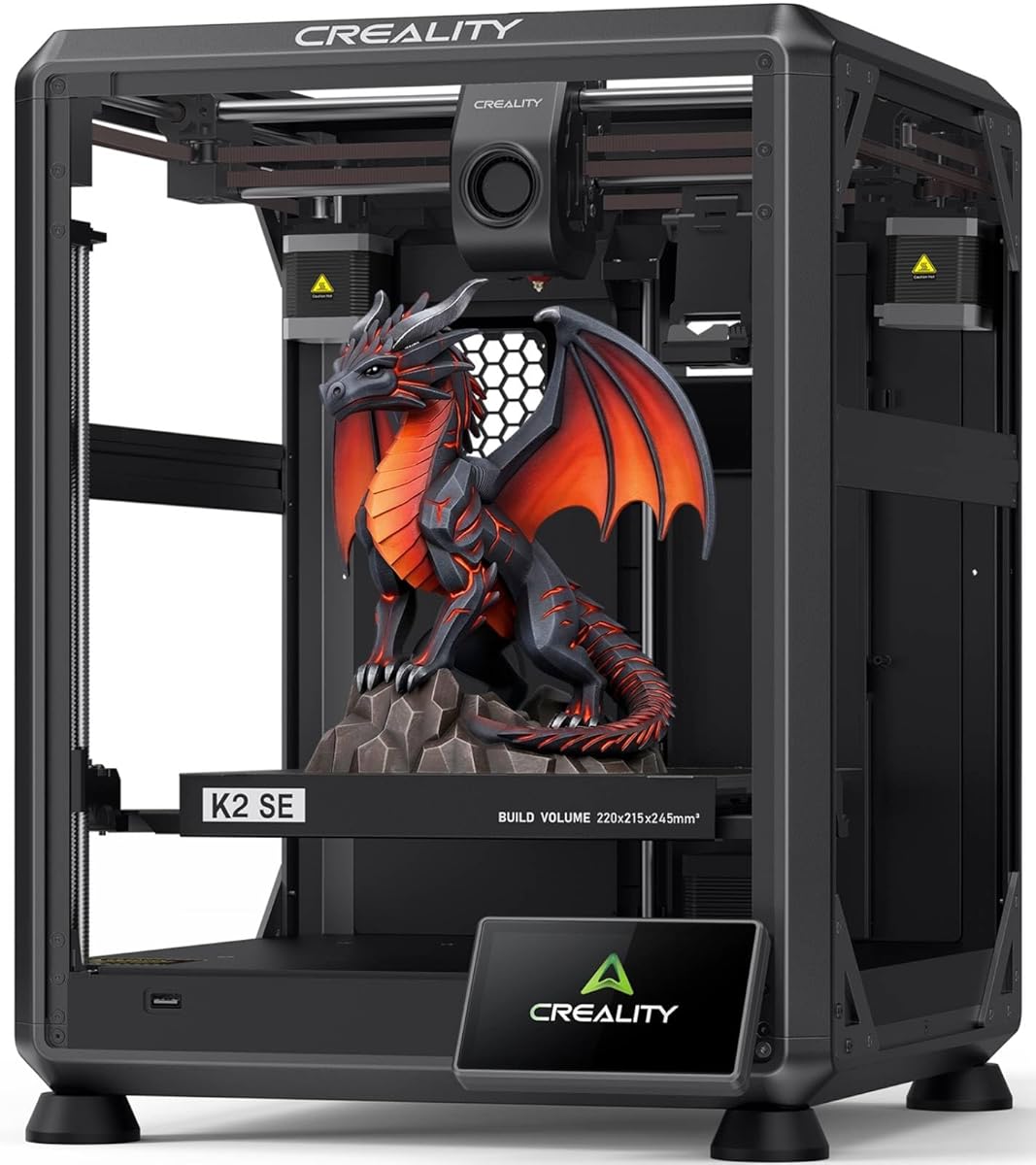
The Creality K2 SE is a compact, high-speed printer intended to cover common cosplay prop tasks while leaving room for multi-color expansion. Its 3.8 rating is lower than those of several rivals in this list, so prospective buyers should weigh the available features carefully and consider how their experience level matches the machine's workflow.
We may earn a commission when you buy through this link, at no additional cost to you.
The lightweight CoreXY system reaches a stated 500 mm/s with 20,000 mm/s² acceleration. Input shaping and a vibration sensor help reduce ringing, while the die-cast aluminum frame, corner gussets, and crossbeams improve rigidity. These traits are useful for repeated costume parts and detailed props that must maintain consistent dimensions.
The printer supports the separately sold Creality CFS, adding automatic filament identification, relay switching, tangle and run-out detection, and multicolor slicing in Creality Print. Its modular direct-drive extruder includes hardened steel gears, a run-out sensor, and a quick-swap nozzle. The stated build volume is 220×215×245 mm, which is ample for many accessories but limited for large armor shells.
The K2 SE is a good fit for creators working on compact props who value speed, rigid construction, and a potential path to color. It is less suitable for those requiring a large build area or a fully enclosed heated environment, and the optional CFS should be considered when calculating the complete system cost.
The metal structure and crossbeam reinforcement help limit frame flex during rapid movement. That stability is useful when producing small repeated details, buckles, clips, weapon ornaments, and costume components that need consistent shapes.
CFS compatibility gives the machine useful multi-color potential, while direct-drive feeding offers precise control and quick nozzle changes. Creators who do not immediately need color can begin with a standard single-material setup.
We may earn a commission when you buy through this link, at no additional cost to you.
The FLASHFORGE Adventurer 5M Pro combines a stated 600 mm/s speed with a fully enclosed CoreXY platform, making it attractive for fast, repeatable cosplay production. Its 4.0 rating places it in the middle of this group, while its all-metal frame, vibration compensation, and automatic leveling target consistent surfaces and reliable first layers.
We may earn a commission when you buy through this link, at no additional cost to you.
A quick-release nozzle can be changed in approximately three seconds and accepts 0.25, 0.4, 0.6, and 0.8 mm options. One-click auto-leveling simplifies bed setup, while the enclosed chamber helps maintain thermal stability. The dual filtration system, camera, Flash Studio monitoring, filament detection, and power-loss recovery make it easier to supervise long prints.
The hotend reaches 280°C and the heated bed reaches 110°C, expanding material options to include ABS, ASA, and PETG-CF alongside PLA and PETG. At the same time, the printer lacks an integrated multi-color mechanism, so elaborate color changes require separate equipment or a different model. Its 50°C chamber temperature also differs from the higher-temperature industrial models.
This printer is best for makers who prioritize speed, enclosure, quiet operation, and convenient monitoring over multi-material production. It can handle costume accessories, stylized weapons, helmet details, and functional supports, while remaining approachable through automatic setup and a large touchscreen.
The CoreXY structure and 20,000 mm/s² acceleration support quick movement between print features. For a cosplay workshop producing multiple matching pieces, that speed can be as valuable as the largest build volume.
Filament detection, power-loss recovery, a camera, and mobile control reduce the need to remain beside the machine. These remote-management features are useful when a detailed prop must print overnight.
We may earn a commission when you buy through this link, at no additional cost to you.
The FLASHFORGE Creator 5 Pro 4-Toolhead is designed for efficient multi-material and multi-color production. Four independent toolheads and a seven-second FlashSwap mechanism avoid the extensive purging associated with single-nozzle systems, a meaningful benefit when producing props with repeated color transitions or different material zones.
We may earn a commission when you buy through this link, at no additional cost to you.
Its fully enclosed frame and actively heated chamber reach 65°C to reduce warping in ABS, PC, and PA. A rigid integrated architecture combines CoreXY motion, precision linear rails, and high-torque belts to support a stated 600 mm/s speed. Toolhead offset calibration, vibration compensation, and dynamic flow calibration help maintain first-layer and extrusion quality.
The dual HEPA13 and activated-carbon filtration system captures particles and fumes while a continuous airflow system maintains the chamber. A built-in HD camera supports time-lapse generation and remote operation through Flash Studio. These features make the system more of a production platform than a simple desktop printer.
Choose it for advanced cosplay workshops that regularly need several colors or materials and can take advantage of reduced waste. It is less appropriate for a first machine or occasional single-color prop because the four-tool architecture adds complexity that many casual makers will never need.
Swapping preloaded toolheads lets the printer move between filaments without flushing one nozzle for every transition. That design can reduce material waste and shorten multi-color print sequences.
The chamber camera and Flash Studio integration provide live visibility and time-lapse capture. Remote monitoring is valuable for long builds, while automated calibration supports repeatability across multiple prop components.
We may earn a commission when you buy through this link, at no additional cost to you.
The FLASHFORGE Creator 5 Pro Industrial combines four independent extruders with a 65°C actively heated chamber, giving cosplay builders a controlled way to create color-separated props. Its 4.4 rating is among the stronger customer-feedback results in this list, although its industrial design targets makers with specialized multi-material needs.
We may earn a commission when you buy through this link, at no additional cost to you.
Each toolhead has its own nozzle, allowing colors and materials to remain separate without flushing through a shared nozzle. The stated 600 mm/s speed and 30,000 mm/s² acceleration support high throughput, while the rigid all-metal frame and CoreXY architecture reduce vibration. Automatic platform leveling and toolhead offset calibration support repeatable first layers.
An outside-in cooling mode protects deposits from external drafts while preventing nozzle clogging. The sealed enclosure and HEPA13 recirculation filter capture volatile particles and odors, making the printer suitable for shared offices, schools, or home workshops where ventilation matters. A four-inch full-color touchscreen, filament sensors, and tool-less nozzle changes simplify operation.
This model is best for creators who need clean color separation, multiple material types, and stable printing of engineering-grade thermoplastics. Its listed 256 mm³ build volume may restrict larger shells, but it remains a capable choice for detailed accessories, segmented armor, and moderately sized costume components.
Dedicated nozzles prevent cross-contamination between colors and reduce transition delays. That makes the system attractive for props whose appearance depends on sharp boundaries between distinct materials.
Maintaining up to 65°C supports stronger layer bonding and limits warping in ABS, ASA, PC, and Nylon. The sealed enclosure also gives the printer a consistent baseline for repeatable production.
We may earn a commission when you buy through this link, at no additional cost to you.
The Creality K2 Pro Combo combines a 300×300×300 mm build volume with an included CFS Smart Filament System, offering a balanced route to large multicolor cosplay props. Its 3.9 rating sits in the middle of this group, while the package includes a hardened steel nozzle and a starter roll of Hyper RFID filament.
We may earn a commission when you buy through this link, at no additional cost to you.
The CFS supports up to 16 colors and multi-material operation, with automatic filament identification, intelligent feeding, and moisture-proof storage. A 600 mm/s print speed and 20,000 mm/s² acceleration are joined by FOC step-servo motors and linear rails, providing a high-speed platform for large armor shells and multi-part batches.
Active chamber heating reaches 60°C to reduce corner warping with ASA and PPA. The chamber camera handles monitoring, build-plate checks, failure detection, and time-lapse recording, while the nozzle camera supports real-time flow tuning, pressure-advance optimization, and waste-chute blockage detection. The direct-drive extruder uses hardened steel gears, supports 40 mm³/s flow, and includes filament cutting.
This printer is a good match for creators who need a substantial build volume and multicolor capability in one package. It is less compelling for very small accessories that can be produced faster on a compact printer, but its chamber, cameras, and included CFS make it versatile for complex costume builds.
The 300 mm cubic volume provides useful space for helmet components, segmented armor, and batches of smaller pieces. It bridges the gap between a compact desktop printer and a substantially larger industrial machine.
The included CFS simplifies multicolor acquisition, while dual cameras add visibility and automated checks. Together, these features support unattended or remote workflows for long, detailed prop prints.
We may earn a commission when you buy through this link, at no additional cost to you.
The right printer depends on the scale, materials, finish, and color complexity of your costumes. Consider build volume, speed, calibration, thermal control, multi-color options, monitoring, and the amount of maintenance your workflow can support.
Build volume determines whether a prop can be printed in one piece or must be divided into sections. A compact printer around 220 millimeters on each side is useful for accessories and smaller costume elements, while 300 mm cube systems suit many helmet and armor designs. The Sovol SV08 MAX goes much further with a 500×500×500 mm space, making it the strongest choice listed for oversized props and large armor shells. Build volume alone does not guarantee a good result, however; the rigidity, calibration, and temperature control of the machine also affect whether the machine can use that space effectively.
Prioritize enough clearance for the largest finished piece, not merely its digital dimensions. Allow room for supports, brim, fasteners, and minor scaling differences. Select the smallest volume that comfortably fits your usual work unless you specifically want to manufacture oversized set pieces.
Fast motion can shorten the time required to produce repeated buckles, armor segments, decorative pieces, and supports. Most printers here list maximum speeds between 500 and 700 mm/s, with acceleration figures of 10,000 to 40,000 mm/s². These numbers indicate machine capability rather than guaranteed output at every speed. Geometry, filament, nozzle size, layer height, and surface-finish goals determine how much of that potential can actually be used.
For a one-off convention accessory, speed may matter less than simplicity. For a maker producing matching pieces for several costumes or characters, faster travel and reliable repeatability can save substantial workshop time. Favor systems that pair speed with input shaping, vibration compensation, and automatic calibration.
Cosplay designs frequently need skin tones, colored armor sections, contrasting weapon details, or flexible inserts. AMS 2 Pro, AMS lite, CFS, and four-tool systems provide different ways to introduce colors and materials. The P2S Combo and K2 Pro Combo include a multi-color unit, while the A1 and K2 SE require a separate AMS lite or CFS. Four-tool printers can separate multiple filament types without extensive purging but introduce a more complex workflow.
Choose color support only when your models genuinely benefit from it. A single-nozzle machine is simpler and may waste less filament if each prop is printed in one color. Multi-material systems become more valuable when a design combines rigid shells, flexible trim, water-soluble support, or wear-resistant surfaces.
An enclosed printer protects the filament from drafts and helps maintain consistent layer adhesion. A heated chamber goes further, helping materials such as ABS, ASA, PC, and nylon resist warping. The Creator 5 Pro models use a 65°C active chamber, the K2 Pro reaches 60°C, and the P2S can maintain a 50°C chamber under the described airflow system. Open-frame machines such as the A1 may be perfectly adequate for PLA props but offer less environmental control.
Match the chamber to the material. If your project remains in PLA or PETG and cosmetic flatness is not critical, enclosure may be sufficient. Durable costume parts exposed to heat, or large ABS and ASA shells, benefit more from active heat and filtration.
TPU is valuable for flexible armor edging and costume details, PETG produces durable decorative parts, and ASA or ABS can suit larger shells. Reinforced filaments add stiffness but require hardened components and careful settings. The P1S is explicitly not recommended for carbon- or glass-fiber-reinforced polymers, whereas several industrial models include hardened nozzles or list reinforced materials as supported. High nozzle temperatures help handle demanding polymers, but the chamber should also meet the requirements of the selected filament.
Review the listed filament support before committing. Also consider whether different nozzle sizes are available. A larger nozzle can move more material for fast structural props, while a smaller nozzle supports fine facial details, miniature accessories, and decorative engraving.
Cosplay parts often need to match or align with other components. Automatic bed leveling, first-layer calibration, flow compensation, and toolhead offset calibration help maintain consistency between prints. The SV08 MAX uses eddy-current scanning for contactless bed leveling, while the A1 and P1S emphasize automatic calibration and quick setup. A1's flow-rate compensation and the Creator 5 Pro's dynamic calibration address another common source of variation.
Look for a system that calibrates the features your designs depend on. A stable first layer matters more than a headline speed for a helmet that must fit a wig base, and consistent extrusion matters when several identical rivets or armor plates must appear identical under stage lighting.
Large or detailed props can take many hours, making remote monitoring valuable. Cameras, time-lapse recording, filament run-out alerts, power-loss recovery, and remote control help identify problems before an entire print is lost. The SV08 MAX includes a 1280×720 camera with Obico integration, the Adventurer 5M Pro offers camera monitoring through Flash Studio, and the Creality K2 Pro adds chamber and nozzle cameras.
For beginners, automatic failure detection can be more valuable than advanced tuning controls. It does not replace good preparation, but it provides another layer of protection when the printer runs overnight and the maker cannot watch every layer.
ABS, ASA, PC, and reinforced polymers can produce fumes and particles, making filtration important in a shared room. The Creator 5 Pro variants include HEPA13 and activated-carbon filtration, while the P2S uses a carbon filter. Noise can also influence where a printer lives. The Adventurer 5M Pro lists operation under 50dB, and the A1 uses active motor noise cancellation. Finally, check physical clearance, ventilation, electrical access, and whether quieter operation is required for an apartment or bedroom workshop.
A safe workspace should provide appropriate ventilation rather than relying only on a filter. Lower noise is helpful for shared spaces, while a filtered enclosure is preferable for engineering-grade thermoplastics. Consider these needs before selecting a large, enclosed production printer.
Begin by selecting a design that fits the printer's build volume, then orient it to minimize supports and place the most cosmetically important surfaces upward. In the slicer, match the filament profile to the printer, set an appropriate layer height, and inspect the preview for thin walls or unsupported overhangs. Run the machine's calibration process before the first job, confirm the nozzle and build plate are clean, and verify that the model will remain firmly attached during printing.
Load filament according to the printer's instructions and choose the correct material setting for every spool. For multicolor systems, name or program the filament slots consistently so the slicer can request the correct material in the proper sequence. Monitor the first layers closely, particularly for large armor shells, and avoid changing a working temperature or flow setting simply to chase a faster advertised speed. Use cameras or remote monitoring for long prints and respond to run-out, clog, or leveling alerts.
After printing, let the part cool before removing it, then detach supports with tools that will not scratch the finish. Clean the nozzle and plate, remove scraps, and store filament in a dry, sealed environment. Inspect the finished prop for sharp edges, layer lines, fit, and structural weak points before painting, assembling, or wearing it. Periodically clean filters and check belts, rails, fans, and nozzle condition according to the manufacturer's maintenance guidance.
The Sovol SV08 MAX has the largest listed build space at 500×500×500 mm, making it the strongest match for oversized armor shells and set pieces. The Creality K2 Pro Combo also offers a useful 300 mm cube for many helmets and segmented pieces. Build volume should be considered alongside material, heat management, and whether the prop must be split into printable sections.
Not for every design. A single-color printer is simpler and often more economical when props are painted after printing. Multi-color systems become valuable for layered logos, skin-tone details, contrasting costume sections, or designs that cannot easily be painted. The P2S Combo, K2 Pro Combo, and four-tool Creator 5 Pro models offer the most integrated options in this guide.
PLA is easy to print, produces fine detail, and works well for decorative pieces, masks, props, and lightweight costume components. It can soften in a hot car or warm outdoor environment, so creators should consider stronger options for heat exposure, repeated handling, or load-bearing parts. PETG, ASA, ABS, and flexible TPU may suit different requirements.
Enclosed printers generally offer better protection from drafts and more stable conditions for materials such as ABS and ASA. An actively heated chamber provides additional control against warping. For PLA-only work in a stable room, an open printer can still produce excellent props, so enclosure is helpful but not automatically essential.
A smaller nozzle is suitable for fine facial details, jewelry, text, and thin decorative elements. A 0.6 mm or 0.8 mm nozzle can move material faster for bulky props, although the listed models may require separately purchased larger nozzles. Match the nozzle to the layer height and filament diameter, and confirm that the printer supports the chosen size.
It is very important because consistent first layers support accurate dimensions and reliable adhesion. Automatic leveling reduces manual setup and is especially useful when the printer will make several matching components. It should still be checked before a large or particularly important print, because debris and an uneven plate can interfere with the process.
Several models list TPU support, including the P2S Combo, A1, P1S, K2 SE, and Creator 5 Pro. TPU is useful for flexible trim, straps, bracers, and other pieces that need flexibility. Direct-drive systems and quick-swap nozzles can make flexible filament easier to handle, but appropriate settings and a well-tuned feed path remain important.
Yes. Inspect the part for sharp edges, supports, visible gaps, and weak sections, then test its fit before adding paint or glue. Sanding, filling, priming, and sealing can improve both appearance and safety. Large wearable pieces should also be checked for adequate strength, ventilation, heat exposure, and attachment to the wearer.
The Bambu Lab P2S Combo is the most balanced overall recommendation because it combines fast printing, enclosed operation, automatic setup, and the AMS 2 Pro for multicolor work. The Bambu Lab A1 stands out as an accessible option for beginners and smaller projects, while the Sovol SV08 MAX leads for oversized armor, scenery, and full-scale structures. Different costume challenges clearly call for different machines.
Prioritize the feature your finished prop actually requires. Choose a large build volume for shells, a heated chamber for demanding thermoplastics, multiple tools for mixed colors and materials, and quiet operation if the printer will live in a shared space. Simplicity can be just as important as peak speed, particularly for someone producing one detailed accessory rather than a repeated batch.
Ratings, bundle contents, accessory compatibility, and prices can change, so check the current listing before buying. Verify build dimensions, included accessories, filament requirements, and the specific version of multi-color or heating hardware shown on the product page. That final check ensures the chosen printer matches both the costume and the available workshop space.