
CyberPower CP1500PFCLCD
4.5Editor score
1500VA and 1000W capacity
Pure sine-wave output
Twelve protected outlets
Color LCD status display
Two USB charging ports
Our Battery Backup for Gaming Laptop guide compares ten UPS and inverter options for runtime, output quality, protection, connectivity, portability, and use at
A gaming laptop can lose power without warning, but an adequate backup solution helps protect the computer, display, router, and other connected equipment. A useful system must provide compatible AC output, enough capacity for the load, and protection from voltage fluctuations, surges, and sudden outages.
This guide compares ten battery backup options based on their stated capacity, output type, outlet configuration, surge protection, display features, charging ports, and intended use. It covers both traditional uninterruptible power supplies for wall-powered setups and portable inverters for use with a separate battery system.
Each pick highlights a different practical strength, from pure or simulated sine-wave output to short-depth construction, LCD monitoring, and mobile power conversion. Ratings and specifications reflect the supplied product information, while availability and current prices can change, so readers should confirm the latest listing details before buying.
4.5Editor score

4.6Editor score

4.5Editor score
The table below compares all ten options by device type, power capacity, output characteristics, and the most useful connection or monitoring features.


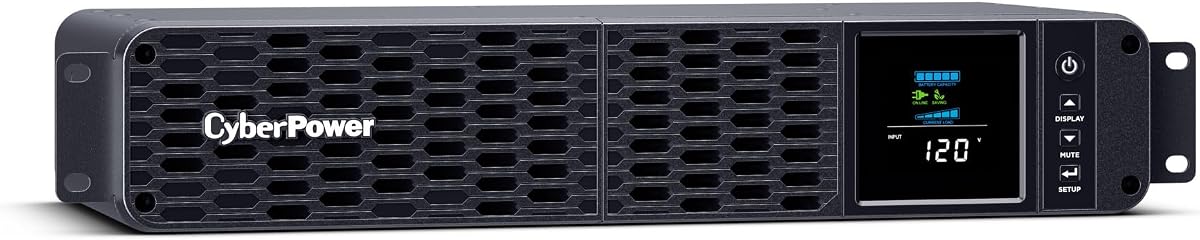


The CyberPower CP1500PFCLCD is a 1500VA, 1000W uninterruptible power supply with a 4.5 rating in the supplied data. Its standout feature is pure sine-wave output, which is especially relevant to modern gaming laptops because the product is designed to support Active PFC and conventional power supplies without the irregularity associated with some budget backup systems.
We may earn a commission when you buy through this link, at no additional cost to you.
Six of the twelve NEMA 5-15R outlets provide battery backup and surge protection, while the other six are surge protected. The color LCD presents detailed power and battery information and can tilt up to 22 degrees for easier viewing. Automatic voltage regulation corrects minor fluctuations without needlessly moving the system onto battery power, while Type-A and USB-C ports add convenient charging for phones and tablets.
The main limitation is that 1000W is a maximum supported load rather than a guarantee of long runtime for a power-hungry gaming laptop and external display. It also lacks the remote-management capability found in the CyberPower BRG1500AVRLCD2. Even so, those omissions are reasonable for a home or dorm setup focused on outage protection, surge suppression, and clean backup output.
This is a strong recommendation for gamers who want pure sine-wave compatibility without moving to a premium rack-oriented system. It can serve as the laptop battery backup, while additional outlets accommodate a router, monitor, or other low-power peripherals within the overall capacity. Buyers should still estimate their combined load and confirm that the gaming laptop power adapter operates properly on backup power.
Pure sine-wave output is the defining advantage for anyone concerned about power quality. The CP1500PFCLCD is explicitly designed for Active PFC and conventional supplies, giving it broader relevance to current gaming hardware than a basic surge protector or inverter with an uncertain compatibility profile.
Surge protection, automatic voltage regulation, and a detailed color display work together as a practical monitoring package. The screen can alert users to developing power or battery problems, while the UPS corrects minor voltage fluctuations without unnecessarily consuming reserve battery capacity.
We may earn a commission when you buy through this link, at no additional cost to you.
The CyberPower EC850LCD is an 850VA Ecologic UPS rated 4.4 in the supplied information. It is designed primarily as a compact, efficient backup for computers and peripherals rather than as a high-capacity system for a power-intensive gaming setup. Its defining feature is ECO mode, which is intended to reduce power consumption when the connected computer is off or asleep.
We may earn a commission when you buy through this link, at no additional cost to you.
The unit has twelve NEMA 5-15R outlets, divided between six battery-backed and surge-protected connections and six surge-protected connections. Three outlets are ECO controlled. A multifunction LCD displays battery and power conditions, and the included PowerPanel Personal Edition software provides a downloadable management option for compatible systems.
The tradeoff is capacity. A gaming laptop can vary considerably in power use depending on its processor, graphics configuration, display brightness, and whether a high-performance charger is used. The EC850LCD may be better suited to a laptop with a modest power draw, or to a setup that keeps only essential equipment connected to battery-backed outlets. ECO mode also requires some thought because connected peripherals may be intentionally shut down.
This model makes the most sense for a gamer focused on extending the life of an otherwise efficient setup, especially when a monitor, network device, and laptop can share the available capacity. It is a sensible option for dorm rooms, apartments, and offices where reducing unnecessary peripheral consumption is more important than supporting a heavily loaded desktop replacement.
ECO mode is valuable when a gaming desk contains several always-on accessories. Once the system recognizes that the main computer is off or in sleep mode, it can remove power from designated ECO-controlled outlets, helping avoid the small but persistent energy draw of standby devices.
Six battery-backed outlets provide flexibility for a laptop and essential network equipment, while the remaining outlets retain surge protection for peripherals. This lets users reserve UPS-supported connections for equipment that genuinely benefits from continued operation during an outage.
We may earn a commission when you buy through this link, at no additional cost to you.
The CyberPower CP1500AVRLCD3 combines a 1500VA, 900W capacity with an intelligent color LCD and a generous outlet arrangement. Its supplied 4.5 rating reflects a balanced package for workstations, networking devices, and home entertainment equipment. For a gaming laptop setup, it offers enough scale to support the computer and several essential peripherals while still prioritizing surge protection.
We may earn a commission when you buy through this link, at no additional cost to you.
Six of its twelve NEMA 5-15R outlets supply battery backup and surge protection, while the other six provide surge protection. The multifunction color display provides immediate information about battery and power conditions and can issue alerts before an issue affects uptime. Automatic voltage regulation addresses minor fluctuations without switching to battery, and USB-A and USB-C ports provide convenient charging for mobile devices.
Its simulated sine-wave output differs from the pure sine-wave design of the CP1500PFCLCD. That distinction matters to buyers with particularly sensitive or high-performance electronics, although the supplied information identifies this model as suitable for workstations, networking equipment, and home entertainment systems. It also lacks the optional remote-management interface offered by the BRG1500AVRLCD2.
The CP1500AVRLCD3 is a premium recommendation for a desk with numerous connected devices and a need for clear power monitoring without a rack-mount form factor. It is particularly attractive when USB charging and a color display are desired, while the 900W maximum load provides a useful balance for typical laptop-based gaming arrangements.
The color LCD gives this model a more informative role than a simple UPS with LEDs. It communicates power and battery conditions and provides early warnings, helping the owner identify a developing issue before it becomes a larger interruption.
Twelve outlets make it easier to organize a gaming setup without choosing between battery support and basic surge protection. The laptop, display, router, and selected accessories can be assigned according to how important they remain during a power interruption.
We may earn a commission when you buy through this link, at no additional cost to you.
The CyberPower AVRG900LCD earns the Editor's Choice distinction because it combines a 4.6 supplied rating with a balanced set of protection, monitoring, and outlet features. Its 900VA, 480W specification is smaller than several alternatives, but the abundant NEMA outlets and intelligent LCD make it particularly practical for a laptop-centered gaming desk.
We may earn a commission when you buy through this link, at no additional cost to you.
Six outlets provide battery backup and surge protection, and six additional outlets provide surge protection. Data-line protection helps stop surges traveling through telephone lines, adding another layer for connected network equipment. Automatic voltage regulation corrects minor fluctuations without switching to battery, while the multifunction color LCD presents detailed operating information.
The principal compromise is its 480W maximum load. A gaming laptop with a power-hungry configuration, external display, and several peripherals could approach that limit when the charger is operating at full output. The output is also simulated sine wave rather than the pure sine wave used by the CP1500PFCLCD, so buyers prioritizing the smoothest stated output should examine that alternative.
This is the ideal pick for a gamer who wants an informative display, plenty of protected sockets, and dependable day-to-day voltage correction without needing a large capacity system. It is especially useful when the laptop is the primary load and the network, monitor, and peripherals remain within a moderate combined demand.
The intelligent LCD allows the user to review immediate power and battery conditions instead of relying only on a single status light. That visibility is useful during long gaming sessions, when an unexpected warning would be easy to miss.
Data-line protection expands the focus beyond power cords and plugs. It is a worthwhile feature for users with routers, modems, or other network hardware that could otherwise be exposed to surges arriving through connected lines.
We may earn a commission when you buy through this link, at no additional cost to you.
The CyberPower CP1500AVRT is a 1500VA, 900W UPS with a 4.3 rating in the supplied data. It is a direct and uncomplicated option for users who want substantial stated capacity and automatic voltage regulation without paying attention to a detailed screen or managing more advanced interfaces.
We may earn a commission when you buy through this link, at no additional cost to you.
Its ten NEMA 5-15R outlets split evenly between five battery-backed and surge-protected outlets and five surge-only outlets. The simulated sine-wave output is specified for workstations, networking devices, and home entertainment equipment. LED indicators show power status and wiring faults, giving users a simple way to identify basic operating conditions.
Compared with the CP1500AVRLCD3 and BRG1500AVRLCD2, it omits the color LCD and USB charging ports, and it offers two fewer total outlets. It also lacks a data-line protection feature according to the supplied specification. These are meaningful differences for buyers who value monitoring or a specific type of connectivity.
Despite those trade-offs, the CP1500AVRT offers a useful middle ground for a gaming laptop and associated equipment. Its 900W rating is more accommodating than smaller 480W-class systems, while the simple indicators reduce the learning curve. It suits users who want automatic voltage correction and outage protection without requiring a large display.
LED status lights provide quick feedback on power-on and wiring-fault conditions. While less informative than an LCD, the indicators are straightforward and sufficient for users who mainly need to know whether the system is operating normally.
Automatic voltage regulation corrects minor fluctuations without moving the UPS to battery mode. This approach can preserve reserve runtime for a genuine outage while reducing unnecessary battery cycling.
We may earn a commission when you buy through this link, at no additional cost to you.
This APC Back-UPS package includes two different UPS models rather than one larger unit. The supplied information lists a 1050VA, 600W model with six outlets and a 500VA, 300W model with four outlets, creating an opportunity to protect a main gaming system and a smaller secondary setup separately.
We may earn a commission when you buy through this link, at no additional cost to you.
Both models offer USB-C and USB-A charging for phones and tablets. User-replaceable batteries are a notable long-term advantage because they allow the internal batteries to be renewed rather than requiring the entire backup unit to be discarded. The package also includes equipment protection policies providing 75,000 coverage per unit, or 150,000 in total according to the listed information.
The supplied listing does not provide a numeric customer rating, and it does not specify the output waveform. That makes it harder to compare the APC units directly with CyberPower models that clearly state whether they use pure or simulated sine-wave output. Buyers who depend on a particular laptop power supply should therefore check the current product documentation and compatibility details.
The set is most attractive to a user who wants two protected locations or different capacity levels. A larger unit can serve a gaming laptop and core desk equipment, while the smaller model protects a network device, secondary computer, or essential accessory. It is less convenient for someone who only needs one compact UPS, but the flexibility can be valuable.
Including both a 1050VA and a 500VA model allows the buyer to match protection to different equipment groups. This can be useful in a dorm, home office, or shared space where one system needs to support a main computer and another only needs to keep essential hardware running.
Replaceable batteries improve the long-term ownership experience. Instead of treating the UPS as disposable when its internal battery ages, the owner can install a suitable replacement and continue using the protection system.
We may earn a commission when you buy through this link, at no additional cost to you.
The CyberPower CP1500PFCRM2U is a 1500VA, 1000W pure sine-wave UPS with a 4.2 supplied rating. Its defining advantage over many conventional home-office units is its short-depth rack-mount form, which is only 10.5 inches deep and intended to fit installations where rack space is limited.
We may earn a commission when you buy through this link, at no additional cost to you.
The eight NEMA 5-15R outlets provide battery backup and surge protection. A multifunction color LCD reports power and battery conditions, while automatic voltage regulation corrects minor fluctuations without switching to battery. The pure sine-wave output is designed to support Active PFC and conventional power supplies, making it relevant to modern gaming laptops and other sensitive electronics.
Eight outlets are fewer than the ten or twelve offered by several competing CyberPower units, so the model may require careful cable management. Its rack-oriented construction can also be more than a casual buyer needs. The stated application for the shorter chassis is rack installation, and the supplied information does not identify it as a conventional freestanding desktop enclosure.
This pick is ideal for a gamer with a compact home rack, small server enclosure, or other space-constrained installation. It combines pure sine-wave output with detailed monitoring and strong stated capacity. For a basic desk-only setup, one of the larger-outlet models may be easier to arrange, but this unit is the more specialized choice when rack depth matters.
The combination of pure sine-wave power and a 10.5-inch depth is unusual in a consumer UPS. It allows sensitive modern electronics to receive stable backup power without requiring a deep rack enclosure.
The short-depth chassis is most useful where every rack unit matters. Gaming enthusiasts with organized equipment can place the UPS close to network and computing hardware without taking up the depth of a conventional full-size model.
We may earn a commission when you buy through this link, at no additional cost to you.
This 3500W inverter is designed to convert 60V DC battery power into 110V AC household-style output. It differs fundamentally from the UPS products in this list because it is not a self-contained wall power unit. The user must connect it to a compatible battery system to provide backup power in a vehicle, campsite, boat, or emergency setup.
We may earn a commission when you buy through this link, at no additional cost to you.
The inverter supplies two standard North American 110V AC outlets and uses pure sine-wave output. Its continuous 3500W rating provides a very high stated ceiling, making it potentially useful for a gaming laptop, display, and other equipment when paired with an appropriately sized battery and power distribution setup. A digital LED display shows operating information, and dual cooling fans are intended to dissipate heat.
Thermal, overload, overvoltage, undervoltage, and low-voltage alarm protection are listed, along with grounding for the internal board and output and a built-in fuse. These safeguards make the unit more suitable for mobile use than a basic travel adapter. However, the absence of a supplied numeric rating and the need for a correctly configured 60V battery limit the certainty of a direct comparison with the rated UPS models.
Choose this inverter when portability and battery-based power are the priorities, such as gaming away from a permanent wall outlet. The buyer must also account for battery capacity, cable sizing, grounding, ventilation, and the laptop charger's input requirements. It is not a turnkey substitute for a UPS that accepts wall AC and contains its own reserve battery.
The inverter can provide standard 110V AC output from a compatible DC battery system, making it useful for mobile gaming and emergency power. Its pure sine-wave output aligns with the needs of modern electronics, including Active PFC laptop power supplies.
Thermal, overload, overvoltage, undervoltage, and low-voltage protections address common risks outside a controlled wall installation. Grounding, a fuse, and active cooling further support use in RV, boat, camping, and emergency environments.
We may earn a commission when you buy through this link, at no additional cost to you.
The CyberPower BRG1500AVRLCD2 has the highest numeric rating in the supplied group at 4.7. It is a 1500VA, 900W intelligent LCD UPS designed to safeguard workstations, networking devices, and home entertainment equipment, combining a substantial outlet array with optional remote-management support.
We may earn a commission when you buy through this link, at no additional cost to you.
Six NEMA outlets offer battery backup and surge protection, while six more are surge protected. Type-A and USB-C charging ports are included for mobile devices. The color LCD displays detailed battery and power information, and automatic voltage regulation corrects minor fluctuations without switching to battery. Remote management requires an optional RMCARD205, RCCARD100, or RWCCARD100 management card.
Its simulated sine-wave output places it below the CP1500PFCLCD and CP1500PFCRM2U for buyers who prioritize pure sine-wave power. The remote-management feature also requires additional hardware rather than operating out of the box. In return, the model offers a five-year warranty including the battery, compared with the three-year coverage stated for most competing CyberPower systems in the list.
This is a compelling choice for a gamer who wants substantial capacity, detailed monitoring, abundant outlets, and the option to integrate the UPS into a managed setup. It is particularly relevant to users with more complex equipment or who anticipate adding remote control later. For a simple laptop-only arrangement, the extra capability may go unused, but the core protection remains strong.
Support for optional management cards gives this UPS a path toward more advanced monitoring. That is useful in a multi-device or rack-oriented environment where the user may want to check status or manage the system without being physically beside it.
The five-year warranty including the battery is a meaningful distinction from the three-year coverage listed for several alternatives. It adds ownership confidence for a device intended to remain on the gaming desk or in an equipment enclosure.
We may earn a commission when you buy through this link, at no additional cost to you.
The 3500W 60V Smart Screen Inverter offers a high-capacity pure sine-wave conversion solution for mobile and emergency use. It accepts power from a compatible battery system and delivers 110V AC through two standard North American outlets, allowing a gaming laptop and selected accessories to operate where conventional wall power is unavailable.
We may earn a commission when you buy through this link, at no additional cost to you.
The digital smart screen provides a more visually prominent operating display, while dual intelligent cooling fans are designed to manage heat during power conversion. The stated 3500W continuous output is considerably higher than the wattage listed for the conventional UPS options, although actual runtime will depend on battery capacity, system design, and the combined device load.
Automatic thermal, overload, overvoltage, and undervoltage protection are listed, along with a low-voltage alarm. Grounded output, a built-in fuse, and an aviation aluminum alloy housing add protection for travel, camping, RV, boat, and outdoor use. As with the other inverter in this guide, the product requires the user to supply and correctly configure the DC battery system.
The Smart Screen version is a good fit for someone who wants large stated output and a more modern status display in a portable package. It may be especially useful for extended gaming away from an ordinary outlet or as part of a mobile emergency-power plan. Users should verify the battery voltage, connection method, ventilation, and charger requirements before operating a gaming laptop from it.
A 3500W continuous rating leaves considerable stated headroom for a gaming laptop and portable accessories. It is aimed at users who need more capacity than a compact UPS can provide and who already understand the importance of a substantial DC battery system.
The smart-screen interface provides an at-a-glance view of inverter conditions. Together with the low-voltage alarm and automatic protection functions, it helps users monitor a mobile installation where problems may arise far from a normal outlet.
We may earn a commission when you buy through this link, at no additional cost to you.
The right battery backup depends on the gaming laptop's power draw, the equipment that must remain online, the quality of the available electrical supply, and whether the system will stay at home or operate from a separate battery.
Start with the power requirements of the gaming laptop power adapter, external display, router, speakers, and every other device that should operate during an outage. Compare the sum of those requirements with the backup unit's stated wattage, leaving sensible headroom for power peaks and for the possibility that a charger draws more than the laptop's average operating consumption.
Choose capacity above your expected peak load. A 480W model may suit a modest laptop setup, while 900W or 1000W systems offer more room for displays and peripherals.
Pure sine-wave output is generally the more conservative choice for modern electronics and is explicitly supported by the CP1500PFCLCD and CP1500PFCRM2U. Simulated sine-wave systems are presented as suitable for workstations and other common equipment, but buyers with demanding or sensitive power supplies should verify compatibility before purchasing.
Prioritize pure sine wave for sensitive loads. For ordinary desktop equipment, simulated sine wave may be sufficient when manufacturer guidance confirms compatibility.
A UPS is a self-contained backup unit that accepts wall AC, charges an internal battery, and supplies AC when power fails. An inverter performs a different role: it converts DC from a separate battery into AC, making it useful for vehicles, camps, boats, and mobile emergencies but requiring more setup and battery-management knowledge.
Choose a UPS for a fixed gaming desk. Choose an inverter when operating from a separate battery system in a mobile setting.
The total number of outlets is not the same as the number available during an outage. Several products in this guide provide six battery-backed outlets and six surge-only outlets, while the CP1500AVRT has five battery-backed outlets, and the rack-oriented CP1500PFCRM2U has eight total outlets with battery backup and surge protection.
Prioritize the number of battery-backed sockets. Place the laptop, router, and other essential equipment on those outlets.
An LCD can provide more useful information than basic LEDs, including details about battery and power conditions. The CP1500PFCLCD, CP1500AVRLCD3, AVRG900LCD, EC850LCD, and BRG1500AVRLCD2 all feature displays, while the CP1500AVRT uses status lights for power-on and wiring-fault information.
Choose an LCD for detailed awareness. Choose LEDs when simple status confirmation is enough.
Automatic voltage regulation corrects minor power fluctuations without switching to battery power. That behavior can preserve reserve runtime and avoid unnecessary battery use when the problem is a modest voltage change rather than a complete outage.
Look for AVR in a fixed UPS. It is especially useful where the utility supply fluctuates regularly.
USB-A and USB-C ports can provide convenient charging for a phone, tablet, controller battery, or other accessory while the desk is operating on backup power. The CP1500PFCLCD, CP1500AVRLCD3, and BRG1500AVRLCD2 include both types, and both APC models in the set also provide USB charging.
Choose USB-A and USB-C for accessory charging. Data-line protection is also useful for connected network hardware.
Several CyberPower units include a three-year warranty covering the battery, while the BRG1500AVRLCD2 lists five years. The latter also supports optional remote-management cards. These features matter more for an always-installed system than for a portable inverter, but they can extend control and ownership confidence in a permanent gaming setup.
Check the full warranty terms. Consider remote management for a complex, permanently installed setup.
Place the UPS on a stable, dry surface with ventilation around the housing, and keep it accessible so the LCD or status indicators can be read. Connect only the laptop and essential peripherals to battery-backed outlets, while nonessential accessories can use surge-protected-only connections. Avoid extension cords unless the installation has been checked for safe load handling.
Read the display after installation and verify that the unit reports normal power, battery, and wiring conditions. Test the backup function by disconnecting the wall power under the manual's guidance and confirming that connected equipment continues operating. Reconnect wall power afterward and allow the internal battery to recharge as directed.
Use the management software when compatible with the chosen system, and schedule periodic checks of battery condition, runtime expectations, and warning messages. Do not overload the unit, block its fans, expose it to heat, or place the inverter in an enclosed space without adequate ventilation. For inverter-based systems, also follow the battery manufacturer's charging and wiring instructions.
Runtime depends on the laptop, its charger, the display brightness, graphics activity, and the capacity of the UPS battery. A lower-watt gaming system on a higher-capacity UPS may run longer than a high-watt machine on a smaller unit. Use the stated wattage only as a maximum ceiling and leave headroom for power peaks. Actual run time will also change as internal batteries age.
Pure sine-wave output is generally the safer match for modern Active PFC laptop chargers because it provides a smooth AC waveform. The CyberPower CP1500PFCLCD and CP1500PFCRM2U are the pure sine-wave choices in this guide. Simulated sine-wave models are also listed for common workstations and electronics, but compatibility should be confirmed for a particular charger and desktop replacement.
A UPS generally supplies the same AC power that the laptop's normal wall adapter provides, so you normally continue using the manufacturer charger connected to a battery-backed outlet. It is not a USB laptop charger and does not charge the laptop's internal battery any faster. The USB ports on some models are intended for phones, tablets, and smaller accessories rather than a gaming laptop.
If the goal is to keep gaming online during an outage, the router should use a battery-backed outlet. A monitor and other peripherals can also use one if their combined power draw leaves enough capacity. Nonessential accessories can remain on surge-only outlets, reducing load and extending the available runtime for more important equipment.
A UPS accepts normal wall power, stores energy in an internal battery, and automatically supplies backup AC power when an outage occurs. A power inverter converts DC from a separate battery into AC and does not include that battery by default. Inverters are therefore better suited to vehicles, boats, camps, and other mobile installations, while UPS units are easier for a stationary gaming desk.
The listed inverters produce 110V AC and explicitly identify notebook computers among suitable devices. You still need a compatible 60V DC battery system, appropriate connections, proper grounding, and ventilation. Confirm that the laptop charger accepts the inverter's output and stay within the inverter's continuous and protected power limits.
Battery-backed outlets remain powered during an outage, while surge-only outlets stop supplying power but continue protecting connected devices from surges. This lets essential equipment stay online without allowing every lamp, speaker, or accessory to consume the limited backup power budget. It also gives gamers an easy way to distinguish critical from noncritical connections.
Follow the manufacturer's testing and replacement schedule, and test the system periodically under realistic load. A UPS that no longer carries its connected equipment through a brief outage may need a replacement battery. Models with user-replaceable batteries make this maintenance easier, but the correct battery type and installation procedure must still be confirmed in the product documentation.
The CyberPower CP1500PFCLCD is the strongest all-around budget-oriented choice because it combines 1000W of stated capacity with pure sine-wave output, twelve outlets, a color LCD, and USB charging. The AVRG900LCD is the most balanced editor's pick for moderate loads, while the CP1500AVRLCD3 provides a more feature-rich premium option for a desk with numerous connected devices.
The most important priorities are total load, waveform compatibility, and the number of battery-backed outlets needed. Fixed gaming desks are generally best served by a UPS, while the 3500W pure sine-wave inverters suit mobile users who already have a compatible battery system. Features such as LCD monitoring, AVR, data-line protection, and replaceable batteries should then determine the final choice.
Ratings, product details, availability, and prices can change, so readers should review the current listing and technical documentation before ordering. Confirm the laptop charger requirements, calculate the combined device load, and check the system's output and connection specifications before purchasing.