
Thermalright Trofeo Vision LCD AIO Display 9.16”
4.2Editor score
Wide 1920×480 sensor display
Real-time CPU and GPU monitoring
TRCC theme customization
Single-cable USB-C connection
A PC thermal monitoring display adds an always-visible hardware dashboard inside or beside a desktop case. The best models combine readable temperature and usage information, useful customization options, clean USB connections, and mounting hardware that suits different case layouts. A good panel should make processor and graphics card activity easier to inspect without occupying a valuable graphics output.
This guide compares ten compact PC sensor displays based on panel size and resolution, supported hardware readings, operating-system requirements, bundled software, connection methods, installation flexibility, and physical design. It covers options for simple monitoring, elaborate themed dashboards, desk placement, and internal case installation, helping builders identify the format that best matches their system and preferences.
Each review identifies the product's standout capabilities, practical limitations, and ideal owner. The list places the strongest general-purpose choices at the top while also highlighting a value-oriented option and a premium ARGB model. Product availability and pricing can change, so readers should verify current listings, compatibility, and the latest manufacturer documentation before purchasing.
4.2Editor score

5.0Editor score

4.4Editor score
As an Amazon Associate we earn from qualifying purchases.
The comparison below shows the major differences in panel format, monitoring software, connection style, and installation flexibility. Every option is a compact sensor display rather than a conventional desktop monitor, although one model also supports extended-screen workflows.


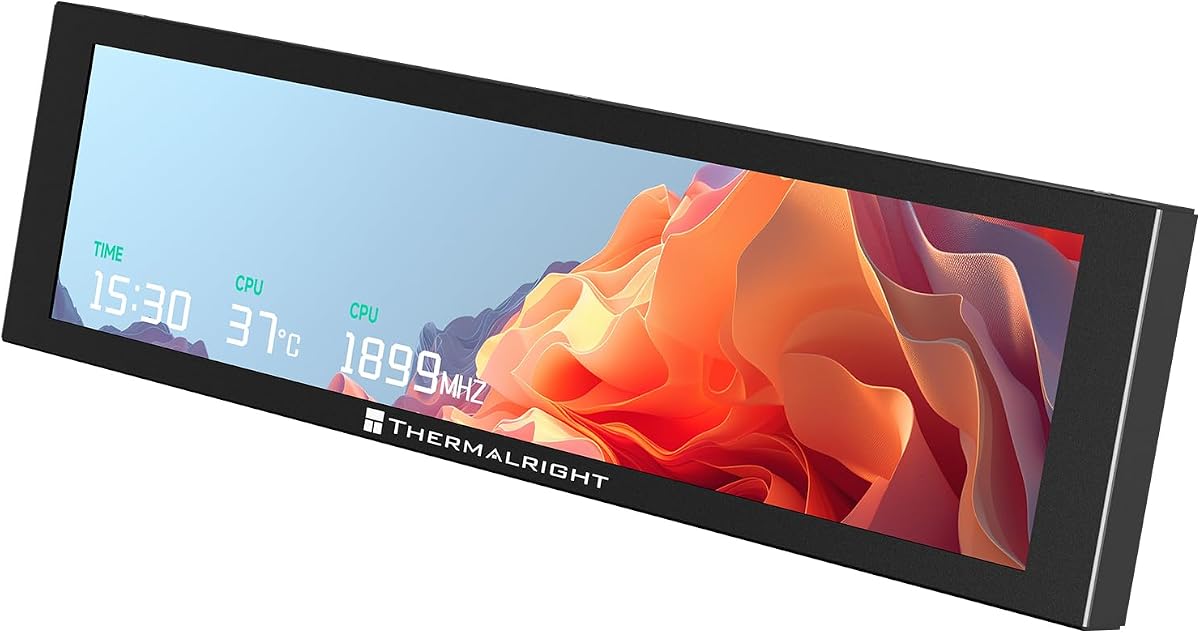

The Thermalright Trofeo Vision LCD AIO Display 9.16” PC Monitor combines a wide sensor panel, straightforward monitoring, and extensive personalization in a remarkably compact enclosure. Its 4.2 rating reflects a generally capable product, and the main appeal is how many useful functions it provides without demanding a dedicated graphics output. A 1920×480 panel is ideal for a horizontal dashboard rather than conventional desktop multitasking.
We may earn a commission when you buy through this link, at no additional cost to you.
The display can present processor and graphics card temperatures, fan speed, memory use, and other live system information. TRCC software adds preset themes and DIY layouts, allowing the screen to carry more than a single temperature. The 251×68×17 millimeter housing is small enough for many internal installations, and its USB-C connection simplifies both power and data. The ability to place it inside or outside a case also makes it practical for temporary monitoring or cleaner desk arrangements.
There are some reasonable compromises. The software is described as compatible with most Windows systems, so Mac or Linux builders should not assume support. Unlike some competing screens, this model is a sensor display rather than a general-purpose extended monitor. Its stretched resolution can also make conventional desktop text less comfortable, although that limitation is irrelevant when the panel is designed around wide rows of metrics, clocks, and graphics.
This is a strong choice for a builder who wants core temperatures and usage information, a polished themed appearance, and uncomplicated installation. It combines useful data with attractive customization without introducing a more elaborate platform. The Thermalright is easiest to recommend to Windows users seeking a dependable internal dashboard with a compact footprint and a simple USB-C connection.
CPU and GPU temperatures are only the beginning of what this panel can show. Fan speed and memory usage add valuable context, helping viewers understand whether a component is under load and how the system is responding. The wide format gives related readings room to remain visible without requiring a large conventional display.
TRCC's preset themes and DIY options make it easy to create a screen that feels integrated with the rest of a build. Users can choose between information-focused and decorative approaches, while the USB-C connection keeps cable routing relatively tidy. This combination makes the product well suited to both first-time builders and experienced enthusiasts refining an existing case.
We may earn a commission when you buy through this link, at no additional cost to you.
The darkFlash V92 9.2" PC Case Screen, 1920×462 IPS Sensor Panel Monitor, Black is designed for builders who want more than a basic temperature readout. Its 4.1 rating accompanies a broad feature set covering CPU and GPU temperatures, usage, RAM, fan speeds, clocks, weather, news, and custom widgets. The 1920×462 IPS screen offers a naturally wide presentation for horizontal layouts.
We may earn a commission when you buy through this link, at no additional cost to you.
Station Space is central to the experience, providing themes, plugins, JPG and GIF support, MP4 playback, weather, news, and stock widgets. It must remain running for these functions to work. Connectivity is unusually flexible: the screen can use an external USB port or a motherboard USB 2.0 9-pin header, with both cables included. This avoids the need for HDMI or DisplayPort and leaves graphics card outputs available for other tasks.
The black aluminum enclosure is slim at 242.4×63.1×12 millimeters and can be mounted horizontally or vertically. An included case fan bracket and rear threaded holes broaden the installation possibilities. The main caveat is the software requirement, which makes the V92 less appealing to users seeking a completely independent hardware display. It is also limited to Windows 10 and 11 rather than macOS or Linux.
The V92 is a good fit for an enthusiast who enjoys dashboards, rotating widgets, and mixed information-and-media layouts. It is particularly compelling when a case has a suitable fan position or rear opening and the builder wants to preserve GPU display outputs. Buyers should confirm the listed 9.54×2.48×0.47-inch clearance before ordering, particularly in compact cases.
The V92's broad widget support gives it a different role from a minimal sensor display. Weather, news, stock information, images, and video can supplement live PC metrics, allowing users to create a more personal information strip. That flexibility is useful for a visible desk installation or a dashboard that changes throughout the day.
The slim aluminum body and included mounting hardware support horizontal and vertical orientations. Users can use the fan bracket or threaded mounting points, but they should measure clearance and inspect the case beforehand. Planning the position before purchase helps prevent problems with radiator clearance, panels, and cable routing.
We may earn a commission when you buy through this link, at no additional cost to you.
The Lian Li SM088X 8.8" Universal LCD Screen with ARGB Frame, Black (US88 v1) is the most visually ambitious option in this guide. Its 4.4 rating reflects a strong balance of hardware features and build aesthetics. The compact 8.8-inch screen can serve as a statistics display, media panel, or custom visual centerpiece, while the diffused ARGB frame gives it a more integrated appearance.
We may earn a commission when you buy through this link, at no additional cost to you.
L-Connect 3 provides preset themes, modular information elements, and the ability to upload personal videos and photos. The screen can operate independently through a 9-pin port or Type-A USB, preserving valuable graphics outputs. A versatile bracket supports height and tilt adjustments and can attach to fan frames, case panels, or flat surfaces with adhesive pads. These options make the display suitable for both internal and external positioning.
Installation requires care. The manual specifically calls for the designated H screws when attaching the screen and stand, and the longer G screws should not be used. The model also depends on L-Connect 3 for its richest controls, and users should expect the same care required by any software-driven sensor panel. The ARGB frame adds a visual element that some minimalist builders may not want.
This is the premium recommendation for a coordinated gaming or workstation build where lighting, adjustment, and polished customization matter as much as temperature monitoring. It offers the strongest aesthetic feature set without requiring a graphics display connection. Buyers who want a coordinated case ecosystem and already use or are willing to install L-Connect 3 will find it especially compelling.
The diffused lighting strip can be customized through L-Connect 3 and synchronized with a compatible system aesthetic. Rather than treating the panel as a purely functional sensor, the product turns it into a coordinated visual element. This is a major reason to choose it over a similarly capable display without integrated illumination.
Height and tilt adjustment make the screen easier to view from different desk positions and when mounted at varied heights inside a case. The included bracket also expands placement beyond a permanent fan-slot installation. Users who continually adjust their viewing position or rotate their case can benefit from that added flexibility.
We may earn a commission when you buy through this link, at no additional cost to you.
The Thermalright Trofeo Vision LCD AIO Display 11.3” PC Monitor is the largest panel in the Trofeo Vision range, offering a broader canvas for system data and visuals. Its 3.8 rating is the lowest among the reviewed products, but the underlying feature set remains useful for builders who prefer a larger physical footprint. The screen retains the familiar 1920×480 stretched format.
We may earn a commission when you buy through this link, at no additional cost to you.
Real-time monitoring covers CPU and GPU temperatures, fan speed, and memory usage. TRCC software supplies presets and DIY customization, so the display can shift between a technical dashboard and a more decorative build element. Its USB-C connection provides a straightforward path for power and data, avoiding the need to occupy a graphics card's HDMI or DisplayPort output.
The trade-off is size. At 272×70×14 millimeters, the unit is longer and likely harder to fit than the 9.16-inch Trofeo Vision models. That makes careful case measurement essential, especially around radiators, reservoir tubes, motherboard trays, and fan mounts. The lower rating may also warrant checking recent customer feedback for details that matter to a particular setup.
The 11.3-inch version makes the most sense for spacious cases, tabletop installations, or builders who want more visual breathing room for multiple metrics. It is less attractive for compact systems where every millimeter matters. Those who can accommodate it gain a larger way to view the same essential monitoring and customization features found in the smaller Trofeo Vision.
The larger panel gives custom layouts more physical room, which can improve readability when several metrics appear at once. It also makes animated or static visuals more prominent. The stretched resolution remains specialized, so the benefit comes from dashboard presentation rather than conventional desktop work.
At only 14 millimeters thick, the display can fit more easily into narrow spaces than its dimensions initially suggest. The 70 millimeter height and 272 millimeter length still require careful clearance checks. Users should compare the panel against their available motherboard-tray or desk area before ordering.
We may earn a commission when you buy through this link, at no additional cost to you.
The Lian Li SM088X 8.8" Universal LCD Screen with ARGB Frame, White (US88 v1) combines a 4.4 rating with a distinctive light enclosure for white-themed systems. It offers a 60Hz IPS LCD at 1920×480 and 500-nit brightness, making it a visually capable panel for both monitoring and custom content. The diffused ARGB frame adds an adjustable accent without the sharp edges associated with exposed lighting strips.
We may earn a commission when you buy through this link, at no additional cost to you.
L-Connect 3 controls preset themes, modular information, and personal media. The screen receives power and data over USB through a 9-pin port or Type-A connection, allowing it to function independently without taking a GPU port. Its mounting bracket supports height and tilt adjustment, while different mounting approaches accommodate fan frames, panels, and flat surfaces.
As with the black version, installation requires the specifically designated H screws; the longer G screws should not be used for the stand and screen. White hardware can also be less forgiving in a case with mixed-color components, although it can create a striking contrast in an otherwise coordinated build. Buyers should check the case's color scheme before choosing.
This model is an excellent choice for a white or pastel build in which a black sensor panel would feel visually inconsistent. Its stated brightness and 60Hz refresh rate also make it well suited to animated themes and media. For users who value panel specifications, coordinated lighting, and flexible placement, it is one of the most refined options available here.
The white enclosure allows the display to blend into a light case rather than becoming a contrasting block. Diffused ARGB lighting further integrates it with the case aesthetic. Builders can coordinate the panel and surrounding hardware more deliberately than with a generic black sensor screen.
A 500-nit panel and 60Hz refresh rate support crisp, lively custom content, including animated layouts. The 1920×480 resolution is ideally shaped for a horizontal bar, and the screen can switch between hardware information, media, and uploaded visual content through L-Connect 3.
We may earn a commission when you buy through this link, at no additional cost to you.
The TR Trofeo Vision 9.16in LCD PC Sensor Panel, 1920×480 USB-C, Black offers a flexible mix of live PC information and personal media. Its 4.0 rating reflects a balanced product for builders who want a sensor panel that can also display static images, animated GIFs, and video clips. The 9.16-inch 1920×480 format provides enough width for compact layouts and wide visuals.
We may earn a commission when you buy through this link, at no additional cost to you.
Bundled software lets users create displays for CPU and GPU usage, temperatures, memory use, and network activity. The same platform supports media, allowing a build to alternate between a technical dashboard and a branded animation. A single USB Type-C cable carries both power and video signal, which simplifies installation and reduces the number of internal cables.
The slim 251×68×17 millimeter body and included mounting accessories support placement along the motherboard tray, near radiators, or behind a glass panel. Builders still need to check clearance around cooling hardware and ensure that the USB cable can reach the selected connection point. Like other software-driven panels, it requires configuration before every feature is available.
This product is best for users who want their PC sensor panel to double as a customizable visual element. It is especially useful when a case has a prominent glass side through which an animation or themed layout can be seen. The practical hardware monitoring foundation is solid, while media support gives it more personality than a fixed numerical display.
The ability to combine live system information with images, GIFs, and video makes this more than a fixed telemetry screen. Users can create a dashboard that feels personal to the build while retaining access to key component readings. Rotating layouts can also keep the display from becoming visually repetitive.
Using one USB Type-C connection for both power and data simplifies internal wiring. The included accessories support several visible locations within a case, although placement near radiators or tight motherboard-tray areas should be checked carefully before installation.
We may earn a commission when you buy through this link, at no additional cost to you.
The 9.2" IPS Mini Monitor 1920×462, USB Sensor Panel, Stretched Bar Display is the most complete entry for a builder who wants monitoring and flexible placement in one package. Its 5.0 rating is the highest listed among these products, and the included multi-angle stand allows it to move between a desktop position and an internal case installation.
We may earn a commission when you buy through this link, at no additional cost to you.
The 1920×462 IPS panel operates at 60Hz and includes anti-scratch glass. Bundled USR software displays CPU, GPU, and RAM usage, temperature, time, network speed, and other information. Static wallpapers, dynamic video backgrounds, adjustable sensor layouts, an online theme library, and hotkey theme switching give the display a particularly broad customization range.
A single cable handles power and data through the included 4-pin-to-9-pin and USB Type-C adapter arrangement. The package also contains a multi-angle stand, screws, adhesive pads, and a manual. Compatibility is limited to Windows 7 64-bit or later, with no support for Mac, Linux, or Chrome OS. It also cannot serve as a true extended screen, so users seeking desktop windows should look elsewhere.
This is an excellent all-around choice for Windows users who want a polished sensor panel without assembling a separate stand or buying several adapters. It is particularly practical for builders who may move the display between the case and the desk. The strong rating, included hardware, and broad theme support justify an Editor's Choice recommendation, subject to confirming operating-system compatibility.
The included multi-angle stand supports both landscape and portrait orientation and can be used on a desk or attached inside a case with screws or adhesive pads. That flexibility makes the display easy to reposition as the user changes tasks, while avoiding the need to purchase a separate basic stand.
The bundled application supports static and dynamic backgrounds, custom sensor arrangements, a large online theme library, and hotkey switching. These options make it simple to move between a technical dashboard and a decorative panel. Windows remains the central requirement, so the software experience should be checked before purchase on non-Windows systems.
We may earn a commission when you buy through this link, at no additional cost to you.
The MT-VIKI 9.2 Inch USB PC Secondary Screen, 1920×462 Ultra-Wide IPS Display, Computer CPU GPU RAM Hardware Monitor, Custom Dynamic Themes & Extended Screen Mode, DIY PC Case Panel stands apart by supporting an extended desktop mode in addition to sensor monitoring. Its 4.0 rating reflects a capable but more involved software setup, and the product is intended for Windows 64-bit systems.
We may earn a commission when you buy through this link, at no additional cost to you.
The panel can show CPU and GPU temperatures, loads, RAM, HDD activity, and network speeds. Updated software also allows users to drag application windows and widgets onto the ultrawide display, automatically scaling them to the 1920×462 format. Dynamic MP4, MOV, and GIF backgrounds, layouts, and technical themes expand the creative options, while a desktop stand and internal 9-pin cable support both external and case-mounted use.
A dedicated application must be installed and run; this is explicitly not a plug-and-play-only product. Compatibility is limited to 64-bit Windows, with no Mac, Linux, or Chrome OS support. The included Game Mode pauses dynamic video backgrounds during play to reduce CPU and RAM overhead and maintain stable in-game performance, though users must still configure the software themselves.
This is the option to choose when a user wants a PC thermal monitoring display that can also function as a narrow secondary workspace. It is less convenient for a simple read-only dashboard, but the extended-screen feature adds genuine versatility. The horizontal or vertical rotation support and two included connection approaches also make it adaptable to different case layouts and desk arrangements.
Extended desktop mode can display selected application windows and widgets alongside the hardware dashboard. The unusual 1920×462 shape is better suited to compact controls, chat windows, or status panels than to conventional full-size applications. Users can move content onto the bar and let the software scale it to fit.
The built-in Game Mode pauses dynamic video backgrounds while gaming, reducing unnecessary background processing during a session. Hardware monitoring can remain part of the setup without preserving an animated background that might consume additional CPU and RAM. The feature is a thoughtful balance between appearance and performance.
We may earn a commission when you buy through this link, at no additional cost to you.
The Thermalright Trofeo Vision 9.16 LCD Black, 9.16-inch Full-Color LCD Magnetic Display Screen, 1920×480 Resolution, Easy to Install,Master CPU/GPU Temperature(Black) stands out through its magnetic metal frame. Its 3.8 rating is among the lower scores in the guide, but the installation concept remains useful for anyone who wants to reposition a sensor panel without tools.
We may earn a commission when you buy through this link, at no additional cost to you.
The full-color 9.16-inch IPS panel has a 1920×480 resolution and stable viewing angles. TRCC software supports hardware monitoring, switching between static and dynamic images, video playback, and personalized themes. It can run in the background after installation and control the screen's monitoring and power functions, giving the device a similar software model to other Trofeo Vision models.
The magnet provides the easiest installation approach in the roundup, allowing the display to attach to a magnetic chassis or a suitable metal wall desktop. The screen itself measures 251×68×17 millimeters, and power and data ultimately come through the motherboard's 9-pin USB interface and USB Type-C connector. The required wiring and TRCC setup should be completed before final placement.
This model is best for builders who want a removable panel or a sensor display that can move between a metal desktop and a case. The magnetic approach is convenient, although it depends on the presence of a compatible surface and sufficient retention. It also lacks the more extensive media and widget options found in some competing software ecosystems.
The magnetic frame allows the panel to be removed and relocated without loosening screws. This is useful for switching between a metal desktop and a visible chassis position. A suitable magnetic surface is necessary, and the attached panel should be positioned where it will not be bumped or exposed to moisture.
TRCC supports static images, dynamic content, and video playback in addition to system monitoring. That gives the display more personality than a basic numerical readout while preserving familiar access to temperature and performance data. The software remains the control center for all screen functions.
We may earn a commission when you buy through this link, at no additional cost to you.
The Thermalright Trofeo Vision LCD AIO Display 9.16” PC Monitor is another strong entry in the Trofeo Vision family, carrying a 4.3 rating and the same core hardware-monitoring concept as the first-ranked product. It offers a 9.16-inch wide LCD with 1920×480 resolution, making it suitable for a horizontal system dashboard inside a gaming PC or on a desk near the case.
We may earn a commission when you buy through this link, at no additional cost to you.
Real-time information includes CPU and GPU temperatures, fan speed, memory usage, and related statistics. TRCC software provides preset themes and DIY customization, allowing the display to present numbers, graphics, or a combination of both. USB-C carries the connection, and the 251×68×17 millimeter enclosure remains compact enough for many internal or external placements.
The main difficulty is distinguishing it from the first-ranked Trofeo Vision model because their supplied specifications are nearly identical. Differences in current listing details, bundled accessories, or component revisions may matter, so buyers should carefully compare the final listing rather than assuming the titles represent completely separate designs. The software also remains oriented toward Windows systems.
This is a worthwhile alternative for anyone who prefers the Trofeo Vision ecosystem but finds a more favorable listing or package under this ASIN. It delivers the same core combination of temperature monitoring, broad theme support, and a single-cable connection. Buyers should verify compatibility and included mounting pieces, but the 4.3 rating provides a favorable customer-response signal for this particular listing.
The 251×68×17 millimeter dimensions leave room around a slim motherboard tray or other visible case area. Because the display can be installed inside or outside a case, it also works as a temporary desktop monitoring panel. Cable reach and case clearance should still be checked before drilling or arranging permanent mounting.
TRCC is the central advantage of this alternative, providing preset interfaces and DIY theme controls. Users can build around a compact monitoring layout or add decorative elements without changing the underlying sensor platform. The USB-C connection keeps the physical setup straightforward.
We may earn a commission when you buy through this link, at no additional cost to you.
The right PC thermal monitoring display depends on case dimensions, operating system, desired software features, and whether the panel will remain stationary. Comparing physical specifications and compatibility before ordering can prevent most installation disappointments.
Choose a sensor-shaped panel when you want an always-visible dashboard. Choose a more flexible model only when its custom media or extended-desktop functions justify the extra software setup.
Measure the complete installation area, including brackets and cables, and compare it with the product dimensions before buying.
Check the case's USB headers, the display's included cables, and the intended screen position before installation.
Confirm both your primary operating system and any secondary systems before relying on a Windows-oriented sensor panel.
Choose software based on the dashboards and media you will use regularly, and verify whether the application must remain running.
Match the mount to your intended position, protect airflow, and make sure the display is stable and easy to view.
Choose a panel whose color, lighting, and size complement the case rather than treating it as a purely technical accessory.
Most builders need a sensor dashboard, while only some will benefit from the extra configuration required for extended-display workflows.
Begin by confirming the operating system, available USB connection, and intended mounting position. Install the required monitoring software before placing the panel permanently, then connect the display using the appropriate USB Type-C or motherboard 9-pin route. Follow the manufacturer's wiring diagram carefully, particularly on models that use the 9-pin header for both power and data. For the Lian Li stand, use only the specified H screws rather than the longer G screws.
After the computer starts, open the control application and select a preset sensor layout or create a custom dashboard. Check the displayed CPU and GPU temperatures, usage, fan speed, memory activity, and network information for sensible readings. If a value appears unavailable, verify sensor support in the software and confirm that all internal cables are fully seated. Apply the intended theme, set the display as the application permits, and adjust rotation or orientation before tightening any mounting hardware.
For daily care, keep the screen away from direct contact with cooling liquid, heavy dust, and sharp tools. Clean the panel with a soft microfiber cloth and avoid spraying liquid directly onto the display. Inspect magnetic or adhesive mounts periodically, especially if the computer is moved. Leave adequate ventilation around nearby fans and radiators, and use the included software rather than repeatedly disconnecting the screen. Updating the control application can improve layouts, compatibility, and extended-display features.
Usually, no. Most products in this guide are sensor displays designed for temperature, usage, fan, memory, and other hardware information, and several explicitly cannot operate as extended screens. The MT-VIKI is the notable exception, with Extended Desktop Mode that allows selected application windows and widgets to appear on its 1920×462 panel. It still requires dedicated Windows software and is not equivalent to a full-size general-purpose monitor.
No, the featured products use USB for power and data rather than requiring a dedicated graphics output. Depending on the model, connection may use an external USB Type-C port or a motherboard USB 2.0 9-pin header. This leaves graphics card video outputs available for the main display and other devices, although a suitable internal header must exist in the intended installation area.
Not universally. The darkFlash V92 explicitly supports Windows 10 and 11 only, the 9.2-inch IPS Mini Monitor supports Windows 7 64-bit or later, and the MT-VIKI requires 64-bit Windows. The listed products do not claim macOS, Linux, or Chrome OS support. Buyers using those systems should check the current manufacturer documentation and software requirements rather than relying on standard USB display behavior.
The size difference is small, but the resolutions and mounting features differ. Most 9.16-inch Trofeo Vision displays use 1920×480 resolution and emphasize TRCC monitoring, while the 9.2-inch products commonly use 1920×462 and offer different software ecosystems. Case clearance, panel brightness, stand quality, ARGB lighting, and extended-display support are usually more important than the fraction of an inch between the diagonals.
Yes, most models are designed for internal case installation. Depending on the product, mounting may use threaded holes, a fan bracket, screws, adhesive pads, or a magnetic metal frame. Check radiator and reservoir clearance, maintain airflow, and verify cable reach before ordering. The darkFlash V92 specifically supports horizontal and vertical mounting, while the magnetic Trofeo Vision is particularly easy to reposition.
Yes, after its monitoring application and required connections are configured. Supported panels can display CPU and GPU temperatures along with usage, fan speed, memory, clocks, and network information depending on the model and software. Some applications must remain running, and some presets may use fixed temperature units. Custom layouts can offer selectable Celsius or Fahrenheit units.
Several products support more than numerical monitoring. The Trofeo Vision products support static images, dynamic content, and video, while the Lian Li SM088X permits uploaded photos and videos through L-Connect 3. The darkFlash V92 supports JPG, GIF, MP4, weather, news, and stock widgets. The exact formats and file requirements depend on the bundled software and its current version.
A basic sensor display generally has minimal impact, but software-driven animation can consume some CPU and RAM. The MT-VIKI addresses this with a Game Mode that pauses dynamic video backgrounds during play. Users can also choose static layouts or close unnecessary applications. Keeping the control software current and avoiding heavy animated content provides the most conservative approach for performance-sensitive systems.
The Thermalright Trofeo Vision LCD AIO Display 9.16” PC Monitor offers the strongest balance of core monitoring, compact dimensions, USB-C convenience, and theme customization. The 9.2-inch IPS Mini Monitor stands out for its 5.0 rating, bundled adjustable stand, broad theme library, and flexible case-or-desk use. For builders seeking a more premium aesthetic, the black Lian Li SM088X adds an adjustable mount, independent USB operation, and a diffused ARGB frame.
Prioritize compatibility before appearance. Confirm the operating system, available motherboard header, case clearance, and whether the software must remain running. Next, decide whether you need a simple sensor dashboard, rotating widgets, custom media, or an extended workspace. Those requirements will narrow the field faster than small differences in diagonal screen size.
Finally, recheck the current product listing, included cables, mounting hardware, and manufacturer documentation before ordering. Inventory, software compatibility, and product bundles can change, and prices also fluctuate. Comparing the latest details ensures that the selected PC thermal monitoring display fits both the system and the intended dashboard style.