
WEELIAO MAXSUN Intel Arc Pro B60 48G
Dual Intel Arc GPUs
48GB GDDR6 memory
PCIe 5.0 bifurcation
Our Dual GPU AI Setup guide compares 10 powerful workstations and graphics options for local AI, based on GPU memory, compute, cooling, storage, and expansion.
A dual GPU AI setup can accelerate local language models, generative imaging, data science, simulation, and inference by dividing demanding workloads across more than one accelerator. The right configuration depends on memory capacity, compute throughput, cooling, expansion support, and whether your software can take advantage of multiple devices.
We compared ten products using the supplied specifications, focusing on GPU configuration, processor capability, system memory, storage, networking, power delivery, and physical design. The list includes complete workstations, rack-scale servers, a compact mini workstation, a dual-GPU graphics card, and a component designed for professional multi-GPU builds.
Each review explains what the hardware is best suited for, where it stands out, and where buyers should proceed carefully. Product availability, configurations, and prices can change, so verify the current listing and exact component list before making a purchase.


This side-by-side comparison highlights the distinct GPU counts, memory capacities, processors, storage options, and form factors represented across the ten selections, helping buyers match each system to a practical AI workload.


The WEELIAO MAXSUN Intel Arc Pro B60 48G Turbo combines two Intel Arc Pro B60 GPUs behind a single workstation graphics card. Its most attractive feature for a dual GPU AI build is the combination of two 20-Xe-core accelerators, 48GB of GDDR6 memory, and a combined quoted compute total of 394 TOPS. No customer rating is supplied, so buyers should evaluate software compatibility and fit rather than relying on review history.
We may earn a commission when you buy through this link, at no additional cost to you.
Memory capacity is the headline benefit. The card is designed to host substantial quantized models, including the supplied references to 70B-class and QwQ-32B workloads. Native support is listed for PyTorch, IPEX-LLM, vLLM, and popular open-source model families, while SR-IOV support can help divide resources among tasks. The dual-engine arrangement also offers more flexibility than a conventional single-GPU card when the application recognizes both devices.
The trade-offs center on platform setup and software maturity. This card uses PCIe 5.0 x8 plus PCIe 5.0 x8 connectivity and reaches full operation on a consumer motherboard only when x16 lane bifurcation is supported. Buyers must also verify that their power supply, chassis, driver stack, and AI framework support the exact configuration. Its blower, vapor chamber, and metal backplate are well suited to sustained workstation workloads, but physical clearance still needs checking.
This is a compelling option for a builder who wants two professional GPUs without assembling a complete tower. It is best suited to users comfortable configuring a bifurcated motherboard and validating their own software environment. For buyers seeking a polished turnkey system, one of the full workstations in this guide is simpler; for value-conscious multi-GPU experimentation, the Arc Pro B60 card stands out.
The combined 48GB allocation gives qualifying models more room than many single-consumer-GPU configurations. It is especially relevant when model weights, context, and concurrent operations must remain local rather than moving repeatedly to cloud infrastructure.
A compatible motherboard, supported CPU platform, and correct PCIe settings are essential. Confirm lane sharing, power requirements, cooling clearance, and driver support before treating this compact dual-GPU option as a complete system.
We may earn a commission when you buy through this link, at no additional cost to you.
The APC MES2X is a turnkey professional workstation built around two NVIDIA RTX PRO 6000 Blackwell GPUs. Each GPU carries 96GB of memory, creating a striking 192GB of combined VRAM for AI development and heavy graphics workloads. The Ryzen 9-9950X processor, 256GB of DDR5 memory, 8TB NVMe storage, and 1600W power supply make this a high-end system rather than a conventional office desktop.
We may earn a commission when you buy through this link, at no additional cost to you.
Its greatest advantage is usable accelerator memory without cloud dependence. Two 96GB cards can support demanding local model hosting, parallel inference, visualization, simulation, and other workflows that benefit from NVIDIA's professional software environment. The supplied configuration also includes a 360mm liquid cooler and comes with Windows 11 Pro and current drivers, reducing the amount of assembly and initial setup required.
Cost, power, and thermals are the main constraints. A dual RTX PRO 6000 build demands careful case airflow, adequate electrical capacity, and sustained cooling for both large graphics cards. No customer rating is provided for this listing, so the value proposition rests on the specifications and APC's stated testing rather than a visible review consensus. Buyers should also confirm the precise SSD RAID configuration and included accessories.
The MES2X is the pick for organizations and advanced professionals who prioritize memory headroom, professional graphics capability, and a ready-to-use Windows environment over minimizing system cost. It is particularly compelling for teams running large models, enterprise inference, engineering, or visualization tasks where a cloud-only strategy would be less convenient.
The two 96GB GPUs offer 192GB of combined VRAM, reducing the need to quantize aggressively or divide a workload across many smaller accelerators. That capacity can simplify model serving and experimentation on demanding local workloads.
Windows 11 Pro, installed drivers, liquid cooling, professional cable management, and stated system testing make this option attractive to buyers who want a configured machine rather than a collection of components.
We may earn a commission when you buy through this link, at no additional cost to you.
The APC ES620 combines two GeForce RTX 5090 GPUs with a Ryzen 9-9950X processor, 256GB of DDR5 memory, and an 8TB NVMe boot array. It offers 64GB of combined GDDR7 VRAM, making it a notably balanced dual GPU AI platform for local model experimentation, generative workloads, rendering, and machine learning. No customer rating is listed, so the evaluation relies on the detailed hardware specification.
We may earn a commission when you buy through this link, at no additional cost to you.
This workstation is designed to cover several professional needs without moving to an eight-GPU rack server. The processor provides 16 cores with boost capability up to 5.7GHz, while the dual 5090s offer the GPU throughput associated with NVIDIA's latest-generation GeForce line. An 8TB RAID NVMe configuration, 1600W power supply, 360mm liquid cooling, and extensive I/O support make it suitable for sustained professional use.
The main limitation is that GeForce RTX 5090 cards do not provide the enterprise memory features found in the RTX PRO alternative. Buyers relying on ECC, professional certifications, or managed multi-GPU features may need to move up the product list. They should also check display, storage, and networking needs against the supplied port list and ensure that the workstation's case can maintain airflow around two unusually powerful cards.
The ES620 is the strongest general-purpose recommendation for buyers who want a ready-to-run dual GPU AI workstation with contemporary GeForce hardware. It balances memory capacity, processor performance, storage, networking, and operating-system readiness particularly well. It is the most practical choice for independent developers, small teams, and advanced enthusiasts who do not require a full enterprise platform.
Two RTX 5090s, 256GB of RAM, and 8TB of NVMe storage create a versatile foundation for model loading, inference, data preparation, and graphics output. The balance makes this system useful beyond a single AI framework.
5Gb Ethernet, 15 USB ports, Wi-Fi 7, and Bluetooth 5.4 support peripheral-heavy and networked workspaces. The included Windows 11 Pro installation and current drivers improve readiness for business users.
We may earn a commission when you buy through this link, at no additional cost to you.
The NVIDIA DGX Spark two-pack consists of two compact Grace Blackwell desktop AI systems, each built around the GB10 chip. The listing carries a 5.0 rating, and the supplied configuration emphasizes up to one petaFLOP of AI performance per unit, 128GB of unified memory per system, and support for large models up to 200 billion parameters at FP4.
We may earn a commission when you buy through this link, at no additional cost to you.
This is a different approach from installing two conventional discrete graphics cards. Unified memory allows the CPU and GPU to work from a shared pool, reducing the VRAM partitioning limitations associated with separate accelerators. The pair also provides 256GB of combined unified memory across two nodes, which can be valuable for development, testing, local inference, and distributed large-model experimentation when the software supports communication between units.
Buyers should not interpret the two-pack as a single monolithic workstation. Workloads may need to be partitioned, distributed, or coordinated through supported frameworks, and practical throughput depends on the model, quantization, network fabric, and application. The specialized NVIDIA stack also creates a more opinionated environment than a general-purpose Windows PC. Its strong 5.0 listing rating is encouraging, but it does not replace workload-specific validation.
The DGX Spark two-pack is ideal for developers and research teams seeking compact, powerful local AI systems without building large towers. It is especially attractive for prototyping and experimentation with large models. Buyers who need plug-and-play multi-GPU rendering or conventional desktop expansion should examine a discrete-GPU workstation instead.
Each system pools 128GB through unified memory, offering more usable capacity for large models than many conventional desktop GPUs. The two-unit bundle can therefore serve demanding local experimentation while retaining a compact footprint.
Large workloads may need explicit model parallelism or other distributed techniques. Validate the intended framework, interconnect method, and model configuration before assuming both DGX Spark units will behave like two cards inside one conventional desktop.
We may earn a commission when you buy through this link, at no additional cost to you.
The ASUS 4U HPC server is designed for organizations that need dual GPU AI capability at data-center scale. Its listed configuration combines two AMD EPYC 9965 processors, up to eight NVIDIA RTX PRO 6000 Blackwell GPUs with 96GB each, and 2.3TB of 24-channel DDR5 ECC RDIMM memory. That scale places it well beyond a conventional desktop and firmly in the territory of cluster infrastructure.
We may earn a commission when you buy through this link, at no additional cost to you.
The architecture supports serious parallelism. Up to ten high-bandwidth 200GbE NICs and DPUs can reduce network latency, while storage can expand to ten PCIe 5.0 x4 NVMe drives, including eight hot-swap M.2 or U.2 locations with ZFS RAID support. The listed 3+1 3200W Titanium CRPS power configuration, toolless maintenance features, ASUS Control Center, and hardware Root of Trust support enterprise operations.
The main drawback is complexity. This server needs appropriate rack space, electrical capacity, cooling, operating-system support, and operational expertise. Some listings and configurations can vary, so buyers should confirm whether the GPU choice is RTX PRO 6000 Blackwell or H200 NVL, along with the exact drive, NIC, and memory population. No customer rating is supplied for this configuration.
For research laboratories, model-training organizations, and high-performance computing teams, this is the most capable premium system in the guide. It can serve as a cluster node for large AI, simulation, analytics, and scientific workloads. For a single user or small studio, its scale and operational demands would be excessive, making the APC or MINISFORUM systems more realistic.
Eight professional 96GB GPUs offer 768GB of aggregate accelerator memory. This enables large-scale parallel inference, training experiments, and simulation workloads that cannot be accommodated by ordinary dual-card desktops.
High-speed networking, hot-swappable storage, ECC memory, remote management, and a redundant power design address the needs of continuous multi-node operation. These enterprise features also require corresponding infrastructure and administration.
We may earn a commission when you buy through this link, at no additional cost to you.
The Cloud Ninjas Iron Bull combines a 32-core Ryzen Threadripper 9970X with an RTX 5090 32GB, 128GB of ECC DDR5 memory, and 4TB of NVMe storage. It is not listed as a dual GPU workstation, so it falls outside the strictest interpretation of the category. However, its workstation platform and 1600W power supply may make it relevant to buyers planning to add a second accelerator.
We may earn a commission when you buy through this link, at no additional cost to you.
For AI development and professional visualization, the strong Threadripper CPU, ECC memory, and high-end GeForce GPU create a capable platform. The 4TB PCIe Gen4 M.2 drive is specified with peak throughput up to 7,000 MB/s, while networking includes an AQC113C 10GbE LAN, 2.5GbE, and Wi-Fi 7. A 360mm AIO cooler and 80 PLUS Platinum power supply support sustained workloads.
The decisive question is expansion capability. The listing does not state that a second RTX 5090 is installed, nor does it guarantee that the motherboard, case, power distribution, and cooling can host one. Buyers should verify physical dimensions, PCIe lanes, slot spacing, power connectors, and total graphics power. Because the supplied title and specifications identify one GPU, this system should not be represented as a ready-made dual GPU configuration.
Iron Bull is most appropriate for a buyer who values a powerful Threadripper-based workstation and plans expansion carefully. For PIX4Dsurvey, engineering, rendering, or local AI development, it offers a strong platform. For an immediate two-GPU setup, choose a product explicitly configured with two accelerators.
The 32-core Threadripper and 128GB of registered ECC memory provide a capable host for data preparation, compilation, model orchestration, and visualization tasks that would otherwise compete with limited system resources.
A large power supply alone does not guarantee a second-GPU upgrade. Check chassis width, slot spacing, lane topology, motherboard bifurcation, cooling, and whether the included wiring supports another high-power accelerator.
We may earn a commission when you buy through this link, at no additional cost to you.
The Empowered PC triple RTX PRO 6000 workstation goes beyond a conventional dual GPU build with three 96GB NVIDIA professional accelerators. Combined VRAM reaches 288GB, while 768GB of DDR5-5600 ECC RDIMM memory and dual AMD EPYC 9965 processors create a large host-memory pool. The system is intended for generative AI, machine learning, engineering, rendering, simulation, and large local language models.
We may earn a commission when you buy through this link, at no additional cost to you.
Its strength comes from the balance between accelerator memory and system capacity. The listed GPUs provide dedicated professional memory, while the ECC RAM pool supports large datasets and complex virtualized workflows. Two 4TB Gen5 NVMe SSDs are included, and the EPC Pro 2 server chassis, TURIND8X-2T motherboard, 4U-SP5 cooler, and 2800W Titanium power supply indicate that the physical design is built for expansion and sustained operation.
Buyers must pay attention to electrical requirements. The listing states that the power supply operates at 120V/15A with reduced compute power and recommends 240V/20A for maximum utilization. Three RTX PRO 6000 cards also demand careful thermal design and data-center-style airflow. Although described as a desktop workstation, the 4U server chassis is not intended for an ordinary office desk.
This configuration is excellent for researchers, simulation teams, and organizations that need more memory than a dual-GPU system without operating a full eight-GPU rack server. Its three-card design can also give supported applications more scheduling options. Buyers who need only two accelerators should compare it carefully against the APC systems, while enterprise users should examine the ASUS eight-GPU server.
Three professional accelerators provide 288GB of VRAM and can distribute substantial work across more devices. Supported software must implement the desired parallelization method to realize the full benefit.
The system can deliver its highest capabilities only with the recommended electrical service. Facility power, circuit capacity, heat rejection, and rack or floor space are essential parts of the purchase decision.
We may earn a commission when you buy through this link, at no additional cost to you.
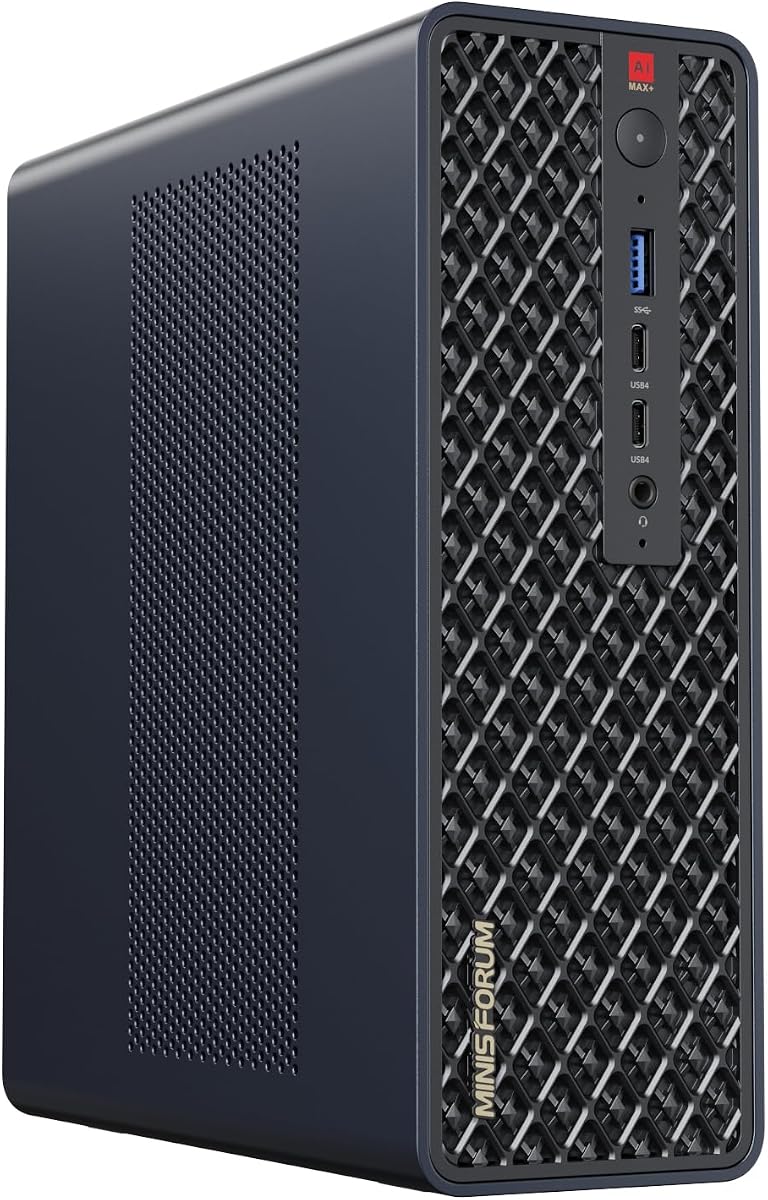
The MINISFORUM MS-S1 MAX is a compact AI workstation built around the Ryzen AI Max+ 395, with 16 CPU cores, 32 threads, RDNA 3.5 graphics, and an NPU rated at 50 TOPS. Its 128GB of LPDDR5x-8000 unified memory can be accessed by CPU and GPU, while a full-length PCIe x16 slot offers a path to add a discrete accelerator. It has a 4.5 rating.
We may earn a commission when you buy through this link, at no additional cost to you.
This configuration makes it unusually versatile for compact AI development. The unified memory pool helps address traditional VRAM constraints, and the listed cluster design allows two units to work together on a 235B Q4 model. The supplied information also reports a successful four-unit DeepSeek-R1 671B Q4 test and supports cascaded deployment, making the mini workstation relevant to buyers building a small local cluster.
A single MS-S1 MAX is not a dual discrete GPU computer, and its fixed unified memory cannot be upgraded like ordinary system RAM. The PCIe x16 slot may support an add-in card, but buyers should verify physical dimensions, power, cooling, and operating-system support for the specific accelerator. The stated 10.87 tokens-per-second cluster result is also workload-specific and should not be generalized to every model.
The MS-S1 MAX is best for compact experimentation, edge AI, and multi-node clusters where energy use and footprint matter. It is a compelling alternative to a large tower when two or four units can cooperate. For immediate dual-GPU rendering or CUDA-specific workflows, a workstation with installed discrete cards offers a more straightforward path.
Two-unit and multi-unit configurations can distribute large models across a small footprint. Cluster planning must include the supported interconnect, model partitioning software, power management, and adequate networking.
The PCIe x16 slot creates an opportunity for a discrete accelerator, but it does not guarantee compatibility. Check physical size, slot power, thermal clearance, firmware support, and driver behavior before upgrading.
We may earn a commission when you buy through this link, at no additional cost to you.
The NVIDIA RTX PRO 6000 Blackwell Max-Q is a professional graphics card rather than a complete dual GPU AI setup. Its 96GB of GDDR7 ECC memory, 24,064 CUDA cores, 188 fourth-generation Ray Tracing cores, and up to 3,511 TOPS of AI performance make it one of the strongest building blocks for a two-card or larger professional workstation.
We may earn a commission when you buy through this link, at no additional cost to you.
The Max-Q edition targets 300 watts, making it easier to pair multiple cards than a system built entirely around unrestricted high-power accelerators. Its 512-bit memory interface and stated 1,792 GB/s bandwidth suit large model hosting, data science, simulation, rendering, and multi-stream video work. ECC memory is particularly relevant to professional workloads where data integrity and sustained reliability matter.
Buyers still need a compatible motherboard, processor, system memory, power supply, chassis, and cooling. Multi-GPU scaling is not automatic; motherboard lane topology, application support, and workload design determine how effectively both cards work together. The listing also notes OEM or bulk packaging with no retail packaging, and no customer rating is supplied.
This card is an excellent choice for a system builder seeking professional multi-GPU capability with manageable per-card power. It can form the foundation of a dual GPU workstation without paying for a preassembled premium tower. Buyers wanting a ready-to-use system should choose the APC or Empowered PC configurations instead.
Combining 96GB of ECC GDDR7 memory with a 300W power target provides a practical foundation for multi-GPU workstations. The combination favors sustained professional workloads where capacity and reliability matter more than maximum gaming clocks.
A strong GPU cannot overcome an inadequate power supply, insufficient airflow, or unsupported PCIe topology. Plan the complete platform around the card's dimensions, connectors, heat output, and expected workload.
We may earn a commission when you buy through this link, at no additional cost to you.
The MINISFORUM MS-S1 Max combines the Ryzen AI Max+ 395 with Radeon 8060S graphics, 128GB of LPDDR5-8000 memory, and a 2TB PCIe 4.0 SSD. It carries a 4.5 rating and is designed as a compact workstation for AI, engineering, content creation, and professional display configurations. It is not a dual discrete GPU system, but its unified-memory architecture offers a different path to locally hosted AI.
We may earn a commission when you buy through this link, at no additional cost to you.
The processor supplies 16 cores and 32 threads with boost speeds up to 5.1GHz, while the supplied figures list total system performance of 126 TOPS and NPU performance of 50 TOPS. The large shared memory pool can support local language models, multimodal workloads, complex timelines, and graphics tasks without the strict VRAM partition boundaries of multiple discrete accelerators.
Its most distinctive practical feature is connectivity. Two 10GbE ports support advanced network roles, while HDMI plus two USB4 and two USB4 V2 outputs can drive up to five high-resolution displays. Storage expansion includes a second M.2 slot and RAID support, while the internal PCIe x4 slot offers some flexibility. However, the fixed LPDDR5 memory and compact chassis limit major upgrades.
This model is best for users who want a small, quiet, high-memory workstation and do not require two independent discrete GPUs. It can complement a larger AI server as a development, visualization, or control system. Buyers whose priority is unmistakable multi-GPU rendering should choose one of the explicitly dual-card workstations listed earlier.
The 128GB unified-memory configuration gives local AI and professional applications a generous workspace. Sharing memory between CPU and GPU can improve flexibility, though performance depends on how effectively the application uses the unified architecture.
Five 8K-capable outputs, dual 10GbE networking, Wi-Fi 7, and Bluetooth 5.4 make the system suitable for specialized desks, visualization stations, signage, financial monitoring, and engineering workflows.
We may earn a commission when you buy through this link, at no additional cost to you.
Choosing an effective dual GPU AI setup requires matching accelerator memory, compute, software support, expansion topology, power, and cooling to the workload. The following factors are more important than headline graphics performance alone.
Model size, quantization, context length, concurrency, and the number of accelerators determine how much GPU memory a workload needs. Two 32GB cards provide 64GB of aggregate VRAM only when the software can pool or shard that memory effectively, while cards with 96GB each offer substantially more headroom for demanding local inference, training experiments, and professional visualization. Unified-memory systems are different because CPU and GPU share a larger pool rather than two isolated VRAM pools.
Prioritize usable aggregate memory, not simply the number of cards. Check whether the application supports tensor parallelism, pipeline parallelism, model sharding, or direct memory sharing.
The hardware is only as useful as the software stack supporting it. NVIDIA systems generally provide broad support for CUDA-accelerated tools, while Intel Arc deployments may require specific kernels, drivers, and frameworks. The WEELIAO card lists PyTorch, IPEX-LLM, vLLM, SR-IOV, and several model families, but buyers should still test the exact release and configuration they intend to use.
Confirm support for your operating system, quantization method, inference server, and training framework. Multi-GPU operation should be validated with the actual model before purchase.
Two GPUs cannot communicate and load data efficiently if the platform does not provide suitable PCIe connectivity. Consumer motherboards may require x16 lane bifurcation for a card with two PCIe 5.0 x8 interfaces, while full-size professional systems may provide dedicated slots for each accelerator. CPU channel count, chipset limitations, and slot spacing can all affect throughput and compatibility.
Review the motherboard manual for supported bifurcation, physical slot arrangement, and lane sharing. Treat PCIe topology as part of the GPU decision rather than an afterthought.
Professional AI accelerators can consume several hundred watts each, and a complete dual GPU system adds CPU, memory, storage, fans, and power-conversion losses. A high-wattage power supply is necessary but not sufficient; connectors, circuit capacity, phase design, and wall-service requirements also matter. Some three- and eight-GPU systems explicitly need a 240V circuit for full performance.
Calculate expected system load and allow sensible headroom for transient demand. Verify the power-supply form factor, connector count, and electrical requirements in the product listing.
Two high-performance GPUs expel substantial heat and require unobstructed airflow. Blower-style cards can be effective in dense server chassis, while large open-air cards often need case width, spacing, and room for intake. Workstations also need CPU cooling capable of sustaining performance during long training or inference jobs. Fan noise and ambient temperature become practical concerns in offices and studios.
Compare accelerator dimensions with chassis clearance and inspect the cooling design. Sustained workloads are better served by a chassis designed around the combined thermal output of both cards.
System RAM holds model files outside GPU memory, stages datasets, supports concurrent users, and keeps the operating system and services running. Configurations such as 256GB of DDR5 or 768GB of ECC RDIMM provide room for larger data pipelines and professional workloads. Storage should be selected according to dataset size and loading speed; RAID can improve availability or performance depending on the array and workload.
Choose enough host memory to prevent excessive paging and enough NVMe capacity for models, datasets, checkpoints, and virtual environments. For shared systems, prioritize ECC memory and redundancy.
Distributed AI relies on fast, reliable communication between workers. Dual 10GbE ports suit small multi-node experiments, while up to ten 200GbE NICs and DPUs serve high-performance clusters with much lower latency requirements. Wi-Fi 7 can provide convenient access to models and datasets, but it generally should not replace wired networking for sustained multi-system training.
Match network bandwidth to the expected model size and parallel strategy. For clustered systems, verify supported topology, switch capacity, storage sharing, and coordinated startup.
A dual GPU AI setup can take the form of one graphics card, a full tower, a compact mini workstation, or a 4U server. Desktops are quieter and easier to operate, while rack systems provide density, remote management, hot-swap serviceability, and high-speed cluster networking. Compact unified-memory systems can also create multi-unit clusters without requiring conventional multi-GPU tower hardware.
Choose the form factor that fits the workspace and operating model. Consider noise, service access, display needs, rack space, remote management, and whether someone can maintain the system on-site.
Begin with a platform check before installing the operating system or AI framework. Update the motherboard firmware, confirm PCIe bifurcation or multi-slot topology, connect the required power cables, and install the current accelerator drivers. For rack or server systems, verify voltage, cooling, remote-management access, and storage initialization before moving workloads onto the machine.
Benchmark with the models and tools you actually intend to run. Monitor GPU memory, utilization, temperatures, power, storage throughput, and network activity during both short tests and sustained jobs. Keep airflow paths clear, use filtered or clean intake environments, and schedule firmware, driver, and software updates in a way that allows a rollback plan.
Protect the investment with sensible data practices. Keep models and important checkpoints on redundant storage, document the exact component configuration, use ECC and power-loss protection where available, and restrict remote access to trusted administrators. For multi-node systems, document model distribution, communication settings, and recovery procedures so the setup remains usable after a restart or component change.
Usable GPU memory is usually the first factor because model weights and active context must fit within the accelerator memory available to the application. Compute performance matters next, followed by PCIe topology, thermal design, and software support. A faster card with insufficient memory may be less useful than a slower configuration that can hold the intended model.
No. Scaling depends on the workload and software, which must support the GPUs, distribute tensors or model layers, and handle communication between them. Some tasks parallelize effectively, while others remain bottlenecked by memory, storage, CPU preparation, or network transfers.
A dual GPU card combines two accelerators in one physical expansion unit, which can simplify chassis fit and some power arrangements. It still depends on motherboard lane bifurcation, driver recognition, thermal clearance, and software support. Separate cards may offer more flexibility in replacement and physical arrangement but require more space and power coordination.
It can, provided the combined memory capacity fits the model, quantization level, context, and operating overhead. Systems with two 96GB professional GPUs provide 192GB of aggregate VRAM, while smaller configurations may require aggressive quantization or fewer concurrent requests. Verify the application's pooling or sharding support before deployment.
The platform should provide the required physical slots, adequate PCIe lanes, supported bifurcation where necessary, and enough power delivery. CPU and chipset selection also matter because the slots may share lanes. Check the motherboard manual for graphics-card spacing, lane topology, supported accelerators, and power connectors.
It can participate in a distributed multi-node setup if the software supports communication between machines. The MINISFORUM MS-S1 MAX supports a documented cluster design using multiple units and also offers a PCIe expansion slot. It is not equivalent to a conventional tower with two full-size discrete GPUs, so the intended workload must support distributed execution.
More RAM helps when datasets, model files, concurrent services, or virtual environments exceed available memory, but an excessive amount will not make every operation faster. Match RAM to the workload and consider ECC for professional or continuous operation. GPU memory remains the primary constraint for active model computation.
Start with the model and workload, then compare aggregate VRAM, compute capability, software compatibility, PCIe topology, cooling, power, memory, storage, and serviceability. Do not rely on processor or GPU headline figures alone. A configuration that can run the intended workload reliably is more valuable than one with a faster component that cannot be fully utilized.
The APC ES620 with dual RTX 5090 GPUs is the most balanced overall choice for a ready-to-run general-purpose AI workstation, combining 64GB of combined VRAM, 256GB of system memory, fast NVMe storage, and a Ryzen 9-9950X. The APC MES2X takes the professional route with dual 96GB RTX PRO 6000 GPUs, while the ASUS system represents the premium end with eight professional accelerators and enterprise infrastructure.
For buyers seeking a more economical route into multi-GPU computing, the WEELIAO MAXSUN Arc Pro B60 combines two GPUs and 48GB of GDDR6 memory in one card. Compact users can consider the MINISFORUM systems or a pair of DGX Spark units, provided their software supports the intended distributed workflow. Prioritize usable memory, supported frameworks, lane topology, and sustained cooling before focusing on isolated benchmark results.
The final configuration must be validated against the exact model, software stack, electrical environment, and workspace. Product options and prices can change, and listings may also vary in included components, so check the current specifications, warranty terms, dimensions, power requirements, and compatibility details before purchasing.