
ICY BOX TripleBay
4.5Editor score
Three independent drive bays
Offline one-touch cloning
Mixed M.2 and SATA support
USB 3.2 Gen 2 interface
Windows and macOS compatibility
SSD cloner hardware makes drive duplication more convenient by moving data from one storage device to another without relying on a host computer, complicated imaging software, or a temporary internal installation. The right unit depends on drive protocols, physical formats, capacity, cooling needs, and the types of upgrade, backup, or maintenance projects you expect to perform.
The products in this guide were compared using the information supplied for each model, with particular attention to supported drive types, cloning methods, USB interfaces, bay capacity, tool-free construction, thermal management, and the ability to double as an external storage dock. The list covers M.2-only duplicators as well as larger docks for SATA SSDs and hard drives.
Each review highlights the capabilities that distinguish the device, along with limitations that matter when planning a clone. The leading choices stand out for broad drive compatibility, 20Gbps host connections, multi-bay flexibility, or particularly simple one-button operation. Product availability and pricing can change, so readers should verify current listing details before purchasing.
4.5Editor score

4.6Editor score

4.4Editor score
As an Amazon Associate we earn from qualifying purchases.
This side-by-side comparison covers standalone duplicators, dual-bay M.2 docks, and larger mixed-drive stations. The key differences are supported protocols, USB speed, cloning method, physical bay support, cooling design, and whether a device can also serve as an external storage dock.




The Rosewill RS-N2-CL is a compact standalone NVMe duplicator with a 4.6 rating. It combines two M.2 drive bays, a 20Gbps USB 3.2 Gen 2×2 connection, one-click offline cloning, and health-monitoring features in a tool-free enclosure. Its principal attraction is the combination of a fast host interface and a cloning workflow that does not require a connected computer.
We may earn a commission when you buy through this link, at no additional cost to you.
The docking station supports both M-Key and B+M-Key NVMe SSDs, making it more adaptable than enclosures limited to one key configuration. Pressing a single button starts the duplicate operation, while the supplied 20Gbps USB-C cable and 10Gbps USB-A cable provide options for connecting the dock to different systems. The included power adapter is useful for sustained copying sessions where bus power alone may be less dependable.
S.M.A.R.T. monitoring and TRIM optimization add value beyond the headline cloning function. The former gives the device a way to monitor an SSD's health status, while the latter helps maintain operating efficiency. The trade-offs are equally clear: this is an NVMe-focused unit rather than a universal dock for SATA SSDs or hard drives, and cloning still requires the target to have enough capacity for the source data.
This Rosewill is well suited to technicians, system builders, and advanced users replacing an M.2 NVMe system drive or preparing a second compatible drive. It is especially compelling when a fast USB-C connection is important for dock use. For users who also need to clone SATA M.2 modules, the lack of SATA support is a decisive limitation, but for compatible NVMe drives it offers a focused and capable solution.
Overall, the RS-N2-CL stands out for its balance of speed, compactness, and straightforward operation. Its 20Gbps interface is a meaningful step above 10Gbps docks, and the standalone cloning function removes much of the setup associated with software-based duplication. It is a strong choice for users who want fast external access and dependable drive-to-drive copying in one enclosure.
The 20Gbps USB 3.2 Gen 2×2 interface provides a substantial bandwidth ceiling when the host and cable also support that standard. The enclosure can therefore function as a dual-drive external dock for fast file access rather than serving only as an offline copier.
The offline cloning function starts with a single button press after the source and target are installed. This makes the device convenient for migrations and backups that can continue without tying up a laptop or desktop.
We may earn a commission when you buy through this link, at no additional cost to you.
The ICY BOX TripleBay is the most versatile hard-drive and SSD cloner in this roundup, with a 4.5 rating. Its three bays can accommodate M.2 PCIe NVMe SSDs, 2.5-inch SATA SSDs and hard drives, and 3.5-inch SATA hard drives. A single-touch offline cloning process, USB 3.2 Gen 2 connectivity, and a tool-free design make it useful for mixed-format upgrade workflows.
We may earn a commission when you buy through this link, at no additional cost to you.
Its flexibility comes from the ability to clone between different drive types, including NVMe-to-NVMe and SATA-to-NVMe arrangements described in the supplied information. The three independent slots also allow several devices to be connected at once, which can simplify a data-transfer session involving a system drive, an archive, and a destination. A dual-purpose USB-C and USB-A cable reduces adapter friction, while the power adapter supports a desktop-style setup.
The device is also described as compatible with Windows and macOS, extending its relevance to mixed environments. Its main compromise is that the 10Gbps host interface is not the fastest available among the listed products. The three-bay format may also occupy more space than a compact dual-bay dock. Nevertheless, the ICY BOX prioritizes drive variety and physical expandability rather than headline interface speed.
Users who maintain systems with several generations of storage hardware will find this model especially useful. It is appropriate for upgrading from a SATA drive to NVMe, duplicating a hard drive, or managing several external devices from one station. People who only handle compact M.2 drives and want the highest USB bandwidth can find smaller or faster alternatives, but for a broad all-purpose cloning station, this is the strongest fit.
The TripleBay stands apart through its combination of three slots and unusually broad protocol support. It effectively bridges the convenience of standalone duplication with the flexibility of a general-purpose drive dock. For a technician or power user who regularly encounters both SSDs and hard drives, that versatility is likely more valuable than maximum transfer speed.
Independent slots make it possible to work with several drives at once instead of repeatedly changing a source or destination. That convenience is particularly helpful when a system upgrade involves both an old drive and a new one.
The supplied information supports cloning between M.2 NVMe and SATA drives, including SATA-to-NVMe migrations. This flexibility can reduce the need to buy separate equipment for each storage format.
We may earn a commission when you buy through this link, at no additional cost to you.
The SUITOK STK07 Pro is a dual-bay M.2 dock built around a three-step offline cloning process. It has a 4.4 rating and supports NVMe and SATA SSDs without requiring a laptop, desktop, software installation, or advanced technical knowledge. Its 10Gbps USB-C connection and tool-free tray design make it approachable for both experienced users and newcomers.
We may earn a commission when you buy through this link, at no additional cost to you.
Compatibility is one of its strongest features. The supplied information lists PCIe Gen 3 and Gen 4 NVMe drives alongside SATA SSDs in the 2230, 2242, 2260, 2280, and 22110 formats. It is also listed as compatible with Windows, macOS, Linux, Steam Deck, ROG Ally, ASUS Gaming Handheld, and PS5 expansion-drive use. The dock can access two drives simultaneously for storage, although cloning still follows the device's protocol restrictions.
The product claims sector-level 1:1 duplication and supports operating-system partitions, encrypted volumes, and hidden recovery sectors. Those features make it relevant to system migrations rather than simple file copies. Its tool-free tray construction reduces installation friction, while ventilation channels and active thermal management help address the heat generated by extended clone sessions.
The STK07 Pro also works as a dual-bay external enclosure with up to 16TB of combined capacity according to the supplied information. This makes it a multi-purpose peripheral for editing, archiving, or game libraries. The limitation is that a source and destination should generally use the same protocol, NVMe to NVMe or SATA to SATA, and that the 10Gbps host speed requires a compatible USB-C connection.
This SUITOK is an attractive choice for users who want simple hardware cloning without installing an operating system on a second device. It is particularly suitable for cloning into compatible gaming-console storage or replacing an M.2 system drive. Users who need to combine NVMe and SATA drives in one clone or demand a 20Gbps interface should choose a more specialized model.
A dedicated offline process means the source and target can be duplicated without installing cloning software on the host. The simple sequence of inserting both drives, pressing a button, and monitoring completion lowers the learning curve.
When used as an external enclosure, the two bays can provide access to large game libraries, project media, and archives. Compatibility with several popular handheld and console environments broadens its practical use.
We may earn a commission when you buy through this link, at no additional cost to you.
The SSK Dual Bay Dock is a compact M.2 cloning and docking solution with a 4.4 rating. Built around the RTL9210CDP chip, it supports both NVMe and SATA M.2 SSDs, provides a 10Gbps USB 3.2 Gen 2 connection, and includes a one-key offline cloning function. The unit is aimed at users who need a straightforward drive copier and a two-bay external adapter.
We may earn a commission when you buy through this link, at no additional cost to you.
Its one-button process creates a 1:1 duplicate without a computer. The supplied information specifies that cloning occurs within the same protocol, meaning NVMe to NVMe or SATA to SATA, rather than between the two protocol types. That restriction makes the behavior easier to understand and reduces the chance of an unsuitable drive pairing. UASP support assists with regular dock performance.
S.M.A.R.T. health checking and adaptive TRIM optimization are useful additions for drive management. The open-frame construction promotes airflow around the modules, which is important because M.2 SSDs can become warm under sustained transfer or cloning loads. The product information appropriately warns that drives may still become hot and should be allowed to cool before handling.
This SSK is most suitable for compact workstations, technicians, and users who regularly copy compatible M.2 drives and also want quick USB access to two SSDs. It is less appropriate for mixed-protocol migration projects, such as copying SATA directly to NVMe, because that type of operation is explicitly outside its stated cloning scope.
The SSK earns its place through a clear feature set rather than unusual expandability. It combines offline duplication, health checking, fast USB connectivity, and a cooling-conscious frame in a relatively small package. For same-protocol M.2 copying, it is a focused and practical option.
The restriction to NVMe-to-NVMe or SATA-to-SATA duplication gives users a defined operating model. It also means this dock is less appropriate when a project depends on moving directly between different M.2 interfaces.
The exposed structure allows heat to dissipate more effectively than a fully enclosed shell. Users should still avoid handling a drive immediately after a long operation if it feels hot.
We may earn a commission when you buy through this link, at no additional cost to you.
The StarTech M.2 Duplicator is a specialist standalone dock built for rapid NVMe duplication. It carries a 4.2 rating and claims sector-by-sector copying at up to 90GBpm, along with a 20Gbps USB 3.2 Gen 2×2 host connection. It is designed for backup, hardware upgrades, IT imaging, maintenance, and other tasks where a computer does not need to participate.
We may earn a commission when you buy through this link, at no additional cost to you.
The top-loading, toaster-style layout is notable because it is designed to accept PCIe M-Key drives even when they have preinstalled heat sinks. Status LEDs show power, progress, and SMART information, while an audible buzzer signals completion. Active and passive cooling help manage the heat created during a large transfer.
Compatibility extends across file formats and includes support for 4Kn sector sizes. The destination must be equal to or larger than the source, a normal requirement for disk-image duplication. No drivers or software are required, which makes deployment straightforward in offices, classrooms, repair benches, and other shared technical environments.
The main limitation is its narrow drive focus. The supplied details refer to M.Key PCIe NVMe SSDs rather than SATA M.2 modules or larger hard drives. The compact unit also has a lower customer rating than several alternatives, so buyers may want to consider the amount of feedback available for their specific market and use case.
For technicians who repeatedly image compatible NVMe drives, the StarTech's claimed speed and toaster-style loading are compelling. It is less attractive as a general-purpose external enclosure because the protocol and physical-format support are narrower than the best mixed-drive docks in this guide.
The device is engineered around complete drive copying rather than simple file transfer. It works with any file format and supports 4Kn sectors, making it suitable for system images and replacement media.
Power, progress, and SMART indicators make it easier to see what the dock is doing. The completion buzzer adds another layer of feedback during unattended-style workflows.
We may earn a commission when you buy through this link, at no additional cost to you.
The UGREEN 20Gbps Cloner is a dual-bay NVMe enclosure with a 4.4 rating. It combines a 20Gbps host interface, one-click offline cloning, tool-free installation, and an aluminum open-frame design. It is particularly suited to users with two NVMe drives who want a fast external dock and occasional computer-free duplication.
We may earn a commission when you buy through this link, at no additional cost to you.
The enclosure accepts M-Key and B+M-Key NVMe SSDs and can hold two 8TB drives according to the supplied information. It uses the JMS586U chip with UASP and TRIM, providing a high-bandwidth connection when both the host device and cable support 20Gbps. This matters because a faster dock cannot deliver its full interface speed through a 10Gbps host or cable.
One-button cloning operates without a connected computer. The source goes into one bay and the target into the other, with LEDs showing the process. The target must be equal to or larger in capacity than the source, and both drives need to be NVMe because SATA interfaces are not supported. These requirements are clearly stated and important to check before beginning a migration.
Thermal management is another strength. The open construction allows airflow around the drives, while the aluminum body assists heat dissipation. S.M.A.R.T. functionality monitors drive health, and anti-slip pads help keep the enclosure stable. The result is a practical design for fast file access, drive upgrades, and compact workstation storage.
The UGREEN is a good fit for Mac mini owners and other users with a 20Gbps-capable USB-C environment who need to work primarily with NVMe media. It is less suitable for anyone requiring SATA M.2 support, though it offers a refined enclosure and convenient tool-free operation for its intended drive type.
The ability to hold two large NVMe drives makes the enclosure useful for editing, backups, and local archives. A 20Gbps connection can reduce waiting when the host, cable, and SSD all support the full standard.
The aluminum construction is paired with an open layout to promote heat dissipation. This design can help sustain performance during large file transfers and cloning operations.
We may earn a commission when you buy through this link, at no additional cost to you.
The Quad Cooling M.2 Dock is a compact dual-bay device designed around cloning, external access, and thermal management. It has a 4.3 rating, uses an RTL9210CDP controller, and offers a 10Gbps USB 3.2 Gen 2 connection. The supplied information describes sector-level 1:1 replication and support for both NVMe and SATA M.2 drives.
We may earn a commission when you buy through this link, at no additional cost to you.
Its enclosure uses an anodized aluminum body, front heat-dissipating stripes, triple-sided ventilation, and vertical airflow channels. These details distinguish it from basic two-bay docks and make it attractive for extended sessions involving large databases or high-resolution media. Dedicated Type-C DC input provides a more stable power path than relying solely on host bus power.
The dock supports M-Key PCIe and B+M-Key drives in 2230, 2242, 2260, 2280, and 22110 sizes. Cloning remains within matching protocols: NVMe to NVMe or SATA to SATA. When both drives are connected to a computer, they can normally be used as a dual-drive workspace. If two different protocol drives are attached simultaneously, however, only one is recognized, an important limitation for mixed setups.
Compatibility also extends to Steam Deck, ROG Ally, and PS5 drives according to the supplied information. A tool-free, hot-swappable design, progress bars, ambient lighting, and anti-slip pads support portable field work. The included two-in-one USB cable, power cord, and manual add to the ready-to-use package.
This dock fits mobile technicians and compact workspaces where cooling, power delivery, and drive variety matter. It is less suitable for users who expect to copy an NVMe source directly to a SATA target or recognize both protocol types at the same time. Subject to those limits, it is a capable, travel-oriented cloning station.
Aluminum, striped heat dissipation, multiple ventilation sides, and vertical airflow work together to control heat. The design is particularly relevant during long sector-level copying sessions.
A dedicated Type-C power input, compact dimensions, tool-free swapping, and included cabling make the unit convenient to deploy at a client site or temporary workstation.
We may earn a commission when you buy through this link, at no additional cost to you.
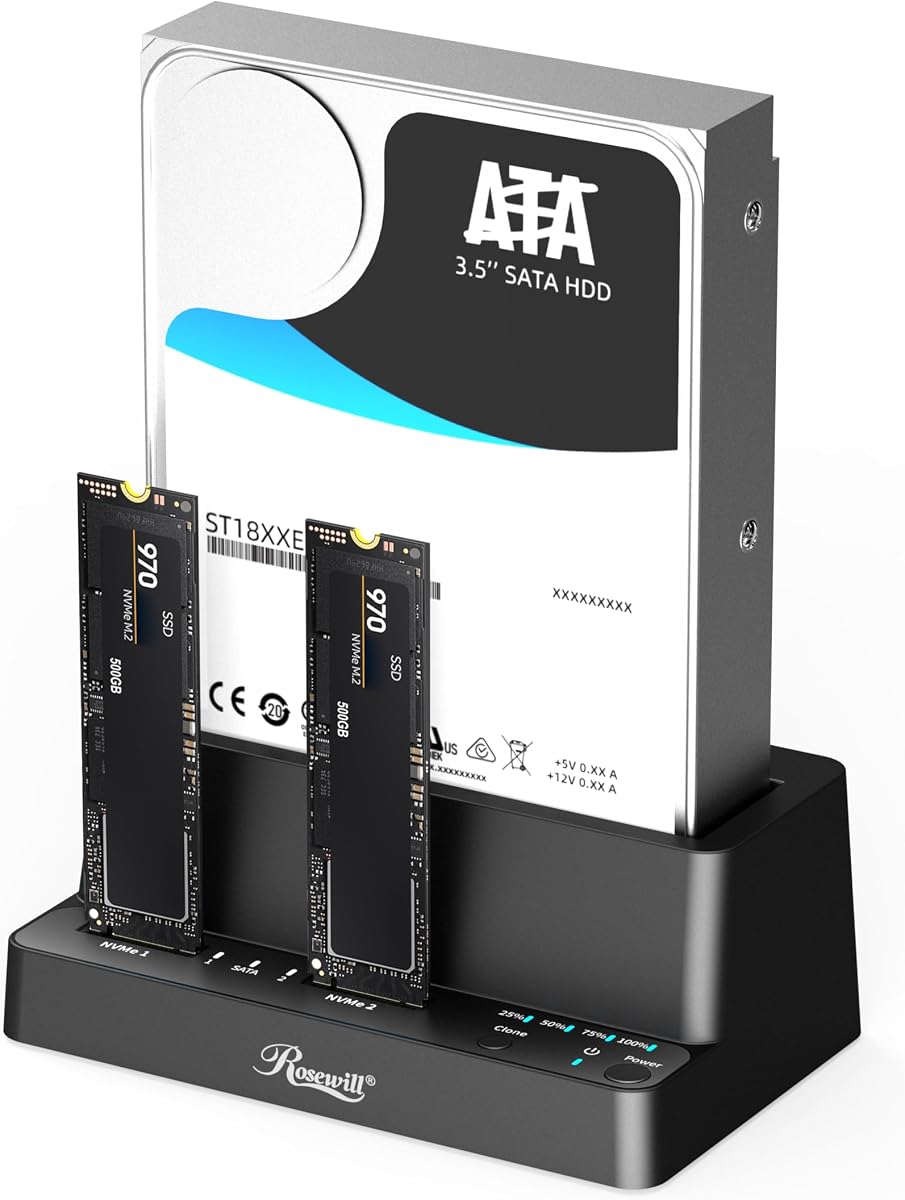
The Rosewill RS-N2S-CL is a triple-bay docking station that handles M.2 NVMe SSDs, SATA SSDs, and 2.5-inch or 3.5-inch hard drives. With a 4.5 rating, it offers offline cloning, a 10Gbps USB 3.2 Gen 2×1 connection, and tool-free drive installation. It is a practical option for users who need one station to manage both solid-state and rotational storage.
We may earn a commission when you buy through this link, at no additional cost to you.
Its physical flexibility allows the unit to cover system upgrades, legacy drive duplication, and general external access without requiring separate docks for every format. The offline cloning function removes the host computer from the copying process, which can be convenient during maintenance or when working with a drive that is not installed in a running system.
The supplied information emphasizes a lightweight and compact design, making the station easier to move between workspaces than a large desktop-only unit. Tool-free operation reduces the physical work involved in mounting and swapping drives. The USB 3.2 Gen 2×1 interface provides a 10Gbps ceiling for ordinary dock transfers.
One limitation is that the product information does not detail every cloning rule, such as whether cross-protocol copies are supported or how target capacity is validated. Buyers should consult the manual before assuming that any source-and-target combination is valid. The 10Gbps interface also sits below the 20Gbps options in this list.
Despite those points, the RS-N2S-CL is valuable for broad drive-format support in a portable form. It is a sensible choice for a repair bench or home office that still handles 3.5-inch hard drives but also needs modern NVMe docking and offline duplication.
Supporting M.2, 2.5-inch, and 3.5-inch devices makes the dock useful across older and newer storage ecosystems. That breadth can simplify backups, migrations, and everyday file access.
The lightweight chassis and simple drive insertion make the unit convenient to deploy in more than one workspace. No screws are required for routine drive changes.
We may earn a commission when you buy through this link, at no additional cost to you.
The Universal M.2 Cloner has the highest listed rating in this roundup at 4.7. It is a dual-bay dock with support for M.2 NVMe and SATA SSDs, a one-button offline cloning process, and a 10Gbps USB interface for external use. Its supported M.2 sizes include 22110, 2280, and 2260, and it is listed for Windows, macOS, and Linux.
We may earn a commission when you buy through this link, at no additional cost to you.
The cloning workflow is direct: install the source and target, press start, and allow the hardware to duplicate the drive. Progress LEDs display the status, and an alert signals completion. The source should be no larger than the target, and the supplied guidance recommends using the same protocol for both drives, either NVMe to NVMe or SATA to SATA.
The product information claims a 1TB drive can be cloned in under 12 minutes and describes a 16Gbps clone speed alongside 10Gbps external transfers. These figures depend on the source and target SSDs, the device's internal behavior, and the workload, so they should be treated as stated capabilities rather than a guarantee for every drive.
There is an interface ambiguity worth noticing: the product title includes 20Gbps, while the detailed feature description specifies a 10Gbps USB interface for enclosure transfers. The model may be marketed around a broader connection standard while retaining a 10Gbps stated transfer rate. Buyers should check the final specification and included cable before assuming 20Gbps host performance.
Despite that point, the model offers a clear operating procedure, strong platform support, and the highest rating in the group. It is a good match for users who want same-protocol M.2 duplication in Windows, macOS, or Linux environments and value straightforward status feedback.
The hardware-first workflow is easy to communicate and repeat. A single start control, visible progress LEDs, and a completion alert reduce uncertainty during lengthy duplication jobs.
Windows, macOS, and Linux support makes the dock useful in mixed technical environments. The same hardware can serve office desktops, workstations, and systems used for lightweight administration.
We may earn a commission when you buy through this link, at no additional cost to you.
The 2.5 to 3.5 Bracket Kit is included because it can support the physical installation stage of an SSD upgrade even though it does not duplicate drives. It has a 4.4 rating and converts two 2.5-inch HDD or SSD positions into standard 3.5-inch drive bays. That makes it a useful companion for a desktop with larger bay openings and unused 2.5-inch storage.
We may earn a commission when you buy through this link, at no additional cost to you.
The bracket fits two compact drives simultaneously and includes a screwdriver, 18 screws, two SATA data cables, and power adapters that split connections for multiple drives. The included power options are a 14-pin to dual 15-pin SATA cable and a 15-pin to dual 15-pin SATA cable. This kit removes the need to source extra mounting hardware and cabling for a straightforward two-drive installation.
Its stated data support reaches up to 6Gbps and remains backward compatible with SATA I and SATA II. The precise mounting holes are designed to make installation tidy and help organize cables inside the chassis. A two-year quality guarantee and 24-hour customer service are also listed in the supplied information.
The key limitation is that this is a passive mounting and connection kit, not an SSD cloner. It will not perform offline duplication, transfer files, or create an image. Anyone searching specifically for one-button cloning hardware will need a separate product from the nine duplicators and docks above.
The bracket is most relevant to a builder who has already chosen compatible SSDs and wants to mount two of them in a desktop that uses 3.5-inch bays. It is also helpful when the user needs additional internal SATA connections. For a complete upgrade, it can be paired with a cloner to move data into newly installed storage.
The metal adapter lets two 2.5-inch HDDs or SSDs occupy standard 3.5-inch positions. It is an efficient way to use chassis space that might otherwise remain unused.
Screws, SATA data cables, and the required power splitters are included. Buyers can install two compact drives without separately sourcing the basic mounting and connection accessories.
We may earn a commission when you buy through this link, at no additional cost to you.
Choosing SSD cloner hardware requires balancing supported protocols, physical formats, transfer speed, capacity rules, cooling, and the role the device will play after cloning. The most important step is matching the dock to the exact source, target, and computer systems involved in the project.
M.2 SSDs may use either NVMe/PCIe or SATA protocols, and not every cloner supports both. Many compact dual-bay units are restricted to same-protocol copies, meaning an NVMe source must be paired with an NVMe target and a SATA source with a SATA target. Larger mixed-format docks may support SATA-to-NVMe copying, but the supplied specifications vary considerably. Confirm both the protocols and physical connector type before ordering, and do not assume that every M.2 slot accepts every M.2 module.
M.2-only duplicators are compact and convenient for laptop and desktop SSD upgrades, while triple-bay stations can also accept 2.5-inch SATA devices and 3.5-inch hard drives. Consider not only the drives you have today but also the possibility of maintaining mixed hardware. A dual-bay design is often adequate for one source and one target, whereas a third bay allows an additional drive to remain connected for file access or archiving.
A 10Gbps USB 3.2 Gen 2 connection is common among compact M.2 docks, while several products in this guide offer 20Gbps USB 3.2 Gen 2×2 performance. The faster rating only matters when the computer, host port, and cable also support the same standard. USB-C is generally necessary for the highest listed speed, and using a 10Gbps USB-A host or cable will limit the result. For cloning, the standalone hardware path can be more important than dock-transfer speed.
Standalone hardware cloning is valuable when a drive is faulty, a system is not convenient to boot, or a technician needs to duplicate storage without installing an operating system. One-button and three-step workflows offer the clearest operation, while some models may rely on a host for more advanced tasks. Check whether the procedure is fully offline, whether it copies sectors or files, and whether encrypted volumes, partitions, and recovery areas are handled as expected.
Most duplicators require the target drive to have equal or greater capacity than the source. A device with more capacity is usually preferable because it can accommodate the source image plus additional space, although the exact outcome depends on the product's implementation. Capacity alone is not enough: protocol, key type, form-factor length, and file-system considerations should all be checked before starting a critical clone.
SSDs can become hot during long transfers, and thermal throttling can slow a clone or affect drive longevity. Open-frame aluminum designs, ventilation channels, heat-dissipating strips, and active cooling are all positive indicators. Fans and metal housings may increase bulk or noise, however, while passive designs benefit from airflow around the unit. Allow recently used drives to cool before handling them, and avoid blocking vents during a long operation.
S.M.A.R.T. monitoring can expose drive-health information, while TRIM helps maintain SSD performance during normal use. These functions are useful additions to a dock that will remain on a desk, but they are not substitutes for making a second verified backup. A cloning device copies a drive's contents; it does not protect against future failure, accidental deletion, ransomware, or physical damage to both source and destination.
A dedicated power adapter is valuable for long or high-capacity clone sessions, while a dual-purpose USB-C and USB-A cable improves compatibility with different computers. Some compact docks can operate from host bus power, but sustained transfers may benefit from external power. Consider the included accessories, the length of the supplied cable, the footprint of the enclosure, and whether tool-free insertion is important for the user's routine.
Begin by identifying the source, target, protocol, capacity, and physical format of both drives. The target must meet the manufacturer's capacity requirement, and both modules should normally use the same protocol unless the product explicitly supports a cross-protocol operation. Back up any irreplaceable data before starting, install the source and target according to the dock's orientation instructions, and keep unrelated storage disconnected during the procedure.
For an offline clone, connect the necessary power, insert the two drives, and start the duplication using the control described in the manual. Do not press the clone button repeatedly, disconnect the dock, remove a hot drive, or assume completion merely because a status light changes. Wait for the explicit completion indication, and verify that the target can be read by the intended computer before using it for a critical system role.
Afterward, allow the SSDs and hard drives to cool if they are warm, disconnect them safely, and store the dock in a dry, dust-free location. Keep the enclosure within its supported temperature range, avoid blocking ventilation openings, and use the specified power supply. Periodically check the drive's health information and maintain a separate backup, because a successful clone is a copy at one point in time rather than permanent protection against later data loss.
Yes, standalone SSD duplicators are specifically designed to copy between two drives without a host computer. The user inserts the source and target, starts the process with a button, and monitors the dock's status indicators. This is useful for system migrations, drive replacement, backups, and maintenance when a computer is unavailable.
That depends entirely on the cloner. Some larger mixed-drive docks support SATA-to-NVMe or NVMe-to-SATA operations, while many compact M.2 duplicators require both drives to use the same protocol. Always check the exact supported cloning directions before purchasing or beginning the copy.
Most standalone cloners require the target to have equal or greater capacity than the source. A larger target may provide additional usable space depending on the device's implementation, but it will not make a smaller target compatible. Confirm the capacity rule in the product manual before copying critical data.
Not necessarily. The 20Gbps figure is a host-interface maximum, and the actual result also depends on the SSD speeds, cloning controller, computer, port, and cable. Many SSDs cannot saturate a 20Gbps USB link, so real transfer times are commonly governed by the slower storage device.
Most dual-bay M.2 cloners also work as external storage when connected to a computer. This lets one device handle offline duplication and convenient access to two SSDs. Be aware that some models recognize only one drive when two different protocols are attached at the same time.
Some sector-level duplicators state that they copy partitions, encrypted volumes, and recovery sectors, while not every product makes the same claim. Encryption may require the same credentials on the destination, and hidden areas can depend on the cloning method. Review the specifications carefully if these features are essential to your migration.
Use the dock in a ventilated position, avoid enclosing it under papers or other equipment, and follow any cooling guidance in the manual. Open-frame or actively cooled models are preferable for long copies. Drives can remain hot after a transfer, so wait before removing them or handling their enclosures.
A standalone hardware workflow can be simpler and may copy complete disk images rather than selected folders. However, no cloning method protects against existing drive defects or future failures. Keep important information backed up separately and verify the cloned destination before relying on it.
The Rosewill RS-N2-CL leads for users who want a fast 20Gbps NVMe dock with one-click offline cloning, while the ICY BOX TripleBay is the most adaptable station for mixed M.2, SATA SSD, and hard-drive workflows. The SUITOK STK07 Pro offers a particularly approachable dual-bay alternative with broad M.2 compatibility, clear completion feedback, and a useful external-storage mode.
Your priority should be protocol and form-factor compatibility before interface speed. Confirm that the dock accepts the source and target, supports the required copy direction, and meets target-capacity rules. Then consider whether 10Gbps is sufficient, whether sustained cooling matters, and whether a dedicated power supply and the correct cables are included. A product that handles your exact drives reliably is more valuable than one with a faster headline specification.
Finally, verify the current listing, warranty information, included accessories, and manual before ordering, since product configurations and availability can change. Cloning creates a valuable copy, but it does not replace sound backup practices. A reliable cloner, paired with a verified destination and a separate recovery plan, can make storage upgrades and maintenance substantially easier.