
Logitech G Yeti Orb Condenser RGB USB Gaming Microphone – Black
4.5Editor score
Focused cardioid condenser capsule
LIGHTSYNC RGB illumination
Single-cable USB setup
Our Blue Yeti Microphone for Creators guide compares ten USB, XLR, and streaming microphones, covering sound, controls, monitoring, setup, and value for
A Blue Yeti microphone can serve as the foundation of a creator’s recording setup, but the best model depends on room acoustics, recording software, stream format, and preferred level of control. USB options emphasize quick setup, while XLR microphones offer a more scalable path for studio-quality production and advanced routing.
We compared ten closely related creator microphones using their supplied specifications, features, connectivity, pickup patterns, monitoring options, and intended uses. The list includes standard and compact Blue Yeti variants, Logitech G alternatives, and USB or XLR microphones that compete with the Yeti for podcasts, gaming streams, video calls, and voice recording.
Each review identifies the clearest reason to consider that microphone, along with important limitations. The top selections represent the strongest balance of capabilities for different budgets and ambitions. Product listings and prices can change, so confirm current specifications, software support, accessories, and availability before making a final purchase.
4.5Editor score

4.6Editor score

4.6Editor score
The comparison below covers ten creator-focused microphones across USB and XLR designs, showing how each model handles capture, connectivity, monitoring, pattern selection, and physical setup.



The standard Blue Yeti earns its place as the most versatile USB microphone in this guide, combining a 4.6 rating with unusually broad control over capture. Its three-capsule array supports cardioid, omnidirectional, bidirectional, and stereo patterns, allowing the same microphone to handle solo narration, interviews, room sound, two-person podcasts, and instrument recording.
We may earn a commission when you buy through this link, at no additional cost to you.
The hardware is particularly creator-friendly. Headphone volume, pattern selection, instant mute, and microphone gain are all accessible on the body, reducing the need to open software during a live session. A no-latency headphone output helps performers monitor themselves in real time, while the positionable body and adjustable desktop stand make it easy to align the capsule with the sound source. The included stand supports immediate desktop use, while compatibility with a standard mic stand or boom arm creates a path to more permanent positioning.
There are trade-offs. Four patterns provide room to experiment but can also overwhelm a first-time creator who only needs a straightforward cardioid setup. The microphone is large for a compact desk, and the software-based vocal effects and HD audio samples in Blue VO!CE require a compatible computer. In a untreated room, a less directional pattern can capture more reflections and background noise, so the flexibility should be used deliberately rather than selected at random.
This is the strongest all-around recommendation for a creator moving among streaming, podcasting, meetings, voice-over, and basic music work. Choose it when you want one USB microphone capable of several recording methods without moving to a complicated signal chain. For most users, the cardioid pattern and onboard controls cover the essential workflow, while the additional patterns provide a meaningful advantage as production demands grow.
The four-pattern array is the defining advantage of the full-size Yeti. Cardioid is a sensible default for solo speech, bidirectional can support a face-to-face podcast, stereo can capture wider instrument performances, and omnidirectional can be useful for ambient or group recording. This range makes the microphone easier to keep as a creator’s setup develops.
Onboard gain, mute, pattern selection, and headphone volume are valuable during recording and streaming. They provide immediate physical control, reduce reliance on menus, and make it easier to move from speaking to monitoring a performance without interrupting the session.
We may earn a commission when you buy through this link, at no additional cost to you.
The Midnight Blue Blue Yeti is functionally positioned as a color-focused version of the full-size USB microphone, carrying a 4.6 rating and the same three-capsule, four-pattern architecture. It suits creators who want the established Yeti control set while adding a more noticeable finish to a recording setup or camera frame.
We may earn a commission when you buy through this link, at no additional cost to you.
Its strengths are practical rather than cosmetic. The microphone connects directly to a Mac or PC, supports streaming, podcasting, gaming, meetings, YouTube production, and music recording, and includes physical controls for gain, mute, pickup pattern, and headphone volume. Its adjustable stand can be repositioned relative to the speaker, while no-latency monitoring makes it easier to judge vocal delivery and recording levels during use.
The limitation is that it does not solve any of the standard Yeti’s practical drawbacks. It occupies substantial desk space, a broad set of patterns may be more than a new user needs, and Blue VO!CE is responsible for effects, modulation, and audio samples rather than basic capture. The Midnight Blue color also may not complement every camera or studio aesthetic, and a darker environment can make the finish less noticeable than a brighter color.
Choose this model if your priorities are the full Yeti’s pattern flexibility and physical controls, but you specifically prefer Midnight Blue. It is a sensible option for streamers and podcasters building a coordinated visual identity. Functionally, it deserves the same serious consideration as the Blackout model, so the deciding factors may come down to appearance and current listing availability.
The four pickup patterns, three-capsule array, onboard controls, and adjustable stand make this a complete general-purpose USB microphone. It can move between a focused solo setup, a two-speaker podcast, and wider recordings without requiring another capture device.
Color can matter when a microphone remains in frame during a stream or recorded video. Midnight Blue gives creators an alternative to a conventional black microphone while preserving the familiar Blue Yeti design and control layout.
We may earn a commission when you buy through this link, at no additional cost to you.
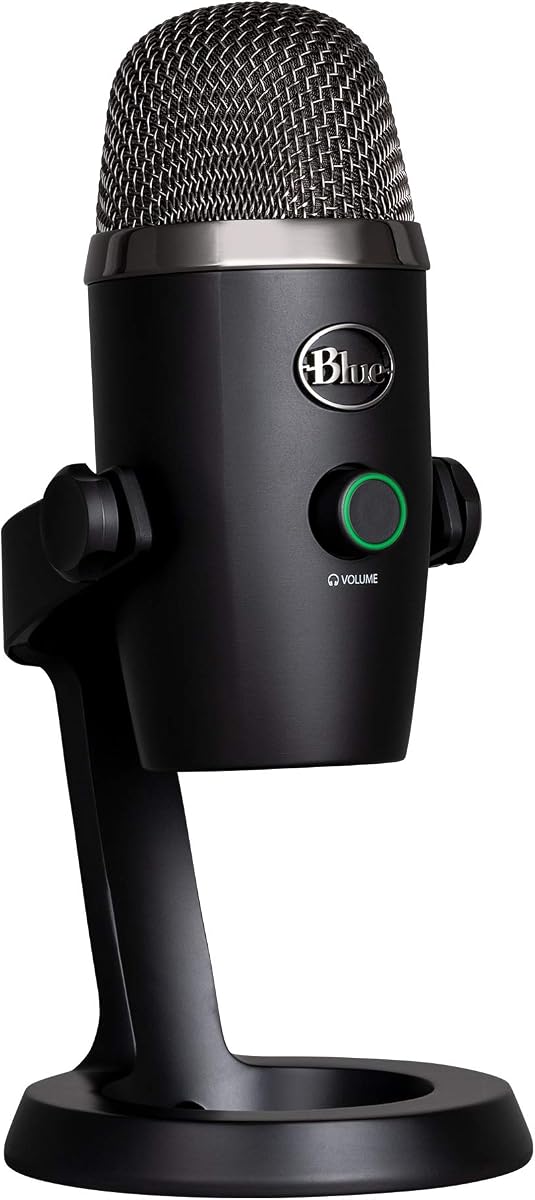
The Blue Yeti Nano is the compact alternative to the full-size Yeti, retaining a 4.6 rating and a two-capsule condenser design for creators with limited desk space. It targets gaming, streaming, podcasting, YouTube, Discord, voice-over, meetings, and other common computer-based recording tasks.
We may earn a commission when you buy through this link, at no additional cost to you.
Its two principal pickup patterns are cardioid and omni. Cardioid is especially practical for solo creators because it concentrates on the voice in front of the microphone, while omni offers a different option for group conversations or broader room capture. Onboard headphone volume, mute, and pattern controls provide direct control, and the included USB connection supports straightforward Mac and PC use.
Compared with the standard Blue Yeti, the Nano sacrifices some maximum versatility. It lacks the broader four-pattern selection and multi-capsule flexibility, so a creator who expects frequent changes in recording configuration may find the full model more accommodating. The smaller body also makes a dedicated boom arm or a carefully selected desktop position more important if you want consistent mouth-to-microphone distance.
The Yeti Nano is best for streamers, students, remote workers, and first-time podcasters who want recognizable Blue capture characteristics in a compact package. It is particularly compelling where desk real estate is limited but a dedicated USB condenser and direct monitoring are still important. Its simple setup, useful pattern choices, and strong rating make it a balanced entry point for everyday content creation.
The Nano preserves the core advantages of a direct USB workflow: no separate interface is required, the included connection reaches a Mac or PC, and the microphone is ready for recording shortly after setup. Its smaller footprint makes it easier to incorporate into a crowded desk or a mobile creator station.
Cardioid and omni cover the most common solo and group needs without creating an overwhelming control set. Creators can start with focused voice capture and move to omnidirectional recording when the format calls for it.
We may earn a commission when you buy through this link, at no additional cost to you.
The renewed Blue Yeti offers the familiar full-size design at a 4.3 rating, making it an option for cost-conscious creators who are comfortable assessing a refurbished product. Its three-capsule array, four pickup patterns, onboard controls, positionable body, and direct Mac or PC connection match the core feature set associated with the standard model.
We may earn a commission when you buy through this link, at no additional cost to you.
The pattern selection gives this microphone more flexibility than many compact USB condensers. A creator can use cardioid for solo commentary, bidirectional for a two-person podcast, stereo for instrument recording, or omnidirectional for a group discussion. Onboard controls for microphone level, mute, pattern, and headphone volume remain valuable during live production, and the adjustable stand helps position the microphone relative to the sound source.
Renewed status creates the central trade-off. Cosmetic wear, light functional wear, and included accessories may vary, so the listing should be reviewed carefully. The supplied information also states that Blue VO!CE software is supported but sold separately. As a result, the software should not be treated as an automatic included accessory, and buyers should confirm that the essential USB cable and stand are present.
This model makes the most sense for a creator who wants a genuine full-size Blue Yeti experience, recognizes the standard Yeti’s strengths, and can accept refurbished uncertainty in exchange for value. It is less suitable for someone who wants a spotless appearance, a comprehensive accessory package, or the reassurance associated with a new unit. Inspect the listing details and seller information before ordering.
The renewed model retains the most important reason to consider a traditional Yeti: multiple capture patterns in one unit. That versatility supports solo speech, interviews, podcasts, and instrument-oriented recording without requiring a different microphone for each format.
Condition and accessories are the variables to investigate. Confirm the exterior appearance, included stand, connection cable, functional controls, and software requirements. A renewed purchase can be sensible for a practical creator, but only when the listing provides enough detail to set expectations.
We may earn a commission when you buy through this link, at no additional cost to you.
The Logitech G Yeti Orb is a 4.5-rated USB gaming microphone built around straightforward cardioid capture and strong visual integration. It is a particularly natural choice for streamers who want a focused voice microphone, a simple setup, and RGB illumination that coordinates with other Logitech G equipment.
We may earn a commission when you buy through this link, at no additional cost to you.
The cardioid condenser capsule is optimized to concentrate on the front speaker while reducing unwanted sound such as key clicks. That makes the microphone well suited to gaming commentary, live broadcasts, and video content where the voice should remain dominant. Its USB connection removes the need for a separate audio interface, while G HUB provides a central place to control the microphone and compatible Logitech G devices.
The LIGHTSYNC RGB logo and status light allow custom illumination effects that can react to the creator’s setup. That feature is visually engaging, but it does not expand the microphone’s recording patterns or replace acoustic treatment. The Orb is less versatile than the full Blue Yeti for interviews, stereo recording, or bidirectional podcasts because it focuses on a single directional pattern.
Choose the Yeti Orb if gaming presentation and ease of use matter more than multi-pattern flexibility. It is particularly attractive to creators already invested in the Logitech G ecosystem who want coordinated lighting and software. For podcasters or musicians who may need multiple capture styles, the standard Blue Yeti offers more audio flexibility, but the Orb is a compelling specialized option for gaming-focused creators.
The cardioid pattern is the Orb’s central audio advantage. By prioritizing sound from the front, it helps a creator’s commentary remain clear when a gaming space also contains keyboard noise, mouse activity, fan sound, or other nearby distractions.
LIGHTSYNC integration allows the microphone to become part of a broader on-camera lighting scheme. Custom effects and status illumination can make a streaming setup look more intentional, although the visual benefits are separate from the core recording performance.
We may earn a commission when you buy through this link, at no additional cost to you.
The Elgato Wave:3 MK.2 carries a 4.7 rating, the highest in this comparison, and stands out for its integrated processing and carefully designed control system. It is a USB condenser microphone for PC and Mac creators who want a repeatable setup, strong level protection, and streamlined monitoring without building a hardware signal chain.
We may earn a commission when you buy through this link, at no additional cost to you.
Its cardioid condenser capsule is designed for focused vocal capture, and the USB-C connection supports immediate use on PC or Mac. Clipguard 2.0 uses a multi-stage system to reduce the likelihood of clipping, while Auto Gain establishes an appropriate starting level. Onboard voice enhancer, compressor, EQ, and other effects can make a basic recording sound more polished before the audio reaches a streaming or editing application.
The multifunction dial, tap-to-mute control, real-time LED feedback, and integrated headphone jack keep essential actions close at hand. Wave Link expands the workflow with routing, monitoring, and effects control, and the Wave FX Processor brings built-in processing and VST plugins into one signal chain. This is a strong feature set, but it also means advanced performance is tied to software compatibility and configuration.
The Wave:3 MK.2 is best for streamers and content creators who want an opinionated, software-assisted vocal chain in a single device. It is less flexible for a creator who wants multiple analog pickup patterns or plans to record several people with separate microphones. Within its intended single-speaker workflow, however, it offers a polished combination of capture, protection, processing, and monitoring.
Clipguard 2.0 and Auto Gain address two common streaming problems: overly loud peaks and inconsistent starting levels. The system reduces manual trial and error, although creators should still watch their meters and adjust gain according to performance and room conditions.
The onboard voice enhancer, compressor, and EQ can provide a more controlled presentation before mixing. Wave Link and the Wave FX Processor extend that chain with routing, monitoring, and VST plugin support, making the microphone attractive to creators who prefer integrated software workflows.
We may earn a commission when you buy through this link, at no additional cost to you.
The Logitech G Yeti Studio is a premium active dynamic XLR microphone with a 4.6 rating, designed for creators who want a broadcast-style signal chain and the flexibility of a professional connection. It differs fundamentally from the USB Yeti models by requiring an audio interface or external mixer rather than connecting directly to a computer.
We may earn a commission when you buy through this link, at no additional cost to you.
Its dual-diaphragm dynamic capsule is described as delivering smooth low-end and detailed sound, while the supercardioid pattern focuses on the voice and reduces unwanted room noise, equipment hum, and peripheral sounds. The built-in ClearAmp active preamp adds 25dB of gain, reducing the need for an external booster and making the microphone more practical in professional signal chains.
The design is tailored to broadcast and gaming presentation. A 290-degree swivel mount provides broad positioning freedom, interchangeable windscreens allow visual customization, and an internal shockmount helps protect the capsule from bumps and vibration. The XLR connection integrates with interfaces and mixers that offer more sophisticated routing, gain control, and multi-microphone expansion than a direct USB connection.
This microphone is best for a creator building a serious streaming, voice-over, or broadcast-oriented setup. The trade-off is complexity: a computer, interface or mixer, appropriate cabling, and gain staging are all required, so it is not the simplest starting point. For a creator whose priorities are focused vocal pickup, robust construction, and a durable path to a larger production system, the Yeti Studio offers a compelling professional foundation.
Using an XLR connection allows the Yeti Studio to sit within the same ecosystem as studio microphones, mixers, and interfaces. That makes it easier to add processors, route multiple sources, and upgrade the surrounding setup as production requirements become more sophisticated.
The supercardioid pattern and dynamic capsule are designed to prioritize the speaker’s voice over background sound. That makes the microphone attractive for creators working near gaming PCs, mechanical keyboards, home offices, or other spaces where useful environmental control is limited.
We may earn a commission when you buy through this link, at no additional cost to you.
The RØDE NT-USB Mini is a compact 4.5-rated condenser microphone for creators who prioritize a clean desk, fast setup, and uncomplicated USB recording. It connects directly to a Mac, PC, or iPad without an interface or driver installation, making it one of the simplest options in the comparison.
We may earn a commission when you buy through this link, at no additional cost to you.
Its condenser capsule and built-in, voice-tuned pop filter support focused spoken-word recording for calls, streams, and narration. Zero-latency headphone monitoring and a hardware volume control allow creators to hear themselves during recording, while the included USB-C cable provides a direct connection to compatible devices.
The magnetic desk stand is one of the product’s most useful practical details. It detaches quickly and can be mounted to an arm with a standard thread, allowing a creator to elevate the microphone, maintain a consistent distance, and improve the use of desk space. The minimalist approach does not provide the extensive onboard controls found on the full Blue Yeti, so gain, mute, or processing changes may need to happen in software.
Choose the NT-USB Mini for a small workspace, a simple content format, or a creator who wants a direct and tidy recording setup. It is especially well suited to solo voice work where a built-in pop filter and live monitoring remove several common obstacles. It is less appropriate for a multi-speaker setup that needs different pickup patterns or for a producer who wants extensive physical controls on the microphone itself.
The detachable magnetic stand allows the microphone to move from a compact desktop position to a boom arm without a complicated adapter. This flexibility is valuable when a creator wants to preserve desk space or maintain a consistent vocal distance.
The built-in pop filter, direct USB-C connection, and zero-latency monitoring create a simple path from unboxing to recording. There are fewer physical controls than on the full Blue Yeti, but fewer decisions are required for routine voice work.
We may earn a commission when you buy through this link, at no additional cost to you.
The Off White Logitech G Yeti Studio is the light-finished version of the active dynamic XLR microphone and shares the same 4.6 rating. It combines a dual-diaphragm capsule, built-in ClearAmp preamp, supercardioid pattern, 290-degree swivel, and internal shockmount with a distinctive appearance suited to visible production spaces.
We may earn a commission when you buy through this link, at no additional cost to you.
The built-in preamp provides 25dB of additional gain, so the microphone can reach an effective level without requiring a separate mic booster. Its supercardioid pattern is intended to keep the speaker’s voice prominent while limiting clicks and room noise. Interchangeable windscreens add another layer of customization, allowing the microphone to fit a specific broadcast or gaming visual identity.
As an XLR microphone, it needs an audio interface or external mixer to reach a computer. That requirement brings greater setup complexity but also provides access to professional gain control, routing, mixing, and future expansion. A creator must also consider the microphone’s size, cable management, and the need to position the stand properly within the recording space.
This Off White version is best for a creator who wants the serious signal chain of the Yeti Studio and specifically prefers a lighter visual treatment. It works well for broadcast-inspired streams, narrated video, and professional voice-over environments where the microphone is visible. Creators who prioritize a simple one-cable setup should choose a USB model instead, while those building a studio around an interface or mixer will find the XLR design more relevant.
ClearAmp adds 25dB of gain inside the microphone, reducing the need for an external booster. That makes the unit more convenient within a studio while still allowing the interface or mixer to manage the broader signal chain.
The Off White finish and interchangeable windscreens make the microphone suitable for camera-facing production. Visual customization can help a creator’s setup look more coherent, especially when the microphone is permanently mounted rather than hidden away.
We may earn a commission when you buy through this link, at no additional cost to you.
The RØDE NT1 Signature Series is a 4.6-rated large-diaphragm condenser microphone designed for creators who want a traditional studio vocal chain. Its recording pedigree and low self-noise make it especially relevant for voice-over, narration, vocals, acoustic instruments, and polished spoken content, although it requires an audio interface.
We may earn a commission when you buy through this link, at no additional cost to you.
The tight cardioid pattern focuses on the source while rejecting room sound, making disciplined microphone placement especially important. The stated very low self-noise provides a quiet foundation for detailed recordings, while the large-diaphragm condenser is positioned as a sensitive studio-style capture system. The package includes an SM6 shock mount with pop filter, an XLR cable, and a dust cover, covering several essential accessories at once.
The main disadvantage for a new creator is the lack of a simple built-in signal path. You will need an interface with suitable gain and an XLR input, along with software to route and record the signal. The fixed cardioid pattern also offers less on-device flexibility than a multi-pattern USB microphone, and a large condenser can pick up more room reflections if acoustic treatment is weak.
Choose the NT1 Signature when vocal quality, low noise, and a professional XLR workflow matter more than immediate plug-and-play operation. It is a strong choice for a creator moving from entry-level USB recording into a dedicated studio setup. The included mount, filter, cable, and cover make it a particularly complete starting point for that transition, provided you already have or plan to add a suitable interface.
The NT1 Signature’s very low self-noise is a meaningful advantage for quiet vocals, voice-over, and acoustic recording. It gives a creator a cleaner foundation for editing and mixing than a noisier alternative in the same working environment.
The included shock mount, pop filter, XLR cable, and dust cover reduce the number of separate accessories needed at the beginning. An audio interface remains the essential missing component, but the core physical recording setup is largely covered.
We may earn a commission when you buy through this link, at no additional cost to you.
The right creator microphone depends on your recording format, room, software, and future setup. Begin with capture style and connectivity, then narrow the field by monitoring, pattern control, construction, and the degree of processing you want the microphone to handle.
For a simple first setup, USB usually wins. For a studio-oriented system, XLR provides greater flexibility.
Match the pattern to your format, not to the longest feature list. Multiple patterns are useful only when you understand when to change them.
Prioritize direct monitoring when you need to judge your voice live. Otherwise, the audio interface becomes the central monitoring control.
The most useful control is the one you can operate quickly and accurately without interrupting your performance.
Use a dynamic model for focused voice work in a noisy room. Use a condenser when detail and sensitivity matter and you can control the environment.
Treat built-in processing as a starting point, not a substitute for proper gain, placement, and acoustic control.
Choose a body that fits the workspace, then prioritize a stable, repeatable position over unnecessary desk space.
Check the full accessory list before ordering, but plan the complete signal chain rather than buying only the microphone.
Begin by placing the microphone on a stable surface or mounting it on a compatible arm, then position the grille toward the speaker’s mouth. For a cardioid pattern, speak directly into the front of the microphone at a consistent distance and angle. Open the recording or streaming application, select the microphone as the input, and set the gain low enough to leave comfortable headroom before raising it gradually while watching the level meter.
Set the microphone gain for a strong but unclipped voice, then use the headphone volume for personal monitoring rather than changing the input gain unnecessarily. Test the pattern with the intended number of speakers and room conditions. Cardioid works well for one person, bidirectional can support a conversational two-person layout, and omnidirectional requires careful placement because it will capture more of the room. For XLR microphones, connect the cable to an interface or mixer, engage the appropriate phantom power only when the microphone requires it, and set the preamp before recording.
Keep the microphone away from computer fans, hard surfaces directly behind the speaker, harsh reflections, and unnecessary cable movement. Clean the grille and exterior with a soft dry cloth, and avoid liquids around the electronics. Store the microphone in a dry, protected place, protect USB and XLR connectors from dust, and review software updates before changing drivers or settings. If performance changes, test a new cable, confirm the selected input, inspect gain settings, and rule out room noise before assuming the microphone itself has failed.
The Blue Yeti remains a versatile creator microphone because it combines direct USB connectivity, onboard controls, zero-latency monitoring, and four pickup patterns. It works well for streaming, podcasts, meetings, narration, and basic music recording. Its value depends on choosing the right pattern, controlling the room, and using a current compatible software setup. The standard model is most useful for creators who want one microphone that can handle several recording formats.
Choose the full-size Blue Yeti if you want four pickup patterns, a positionable desktop body, and more extensive onboard controls. Choose the Nano if desk space is limited and cardioid plus omni will cover your needs. Both connect directly to a computer and provide headphone monitoring, but the standard model is more flexible for podcasts, stereo capture, and changing production requirements.
No. The standard Blue Yeti and Blue Yeti Nano connect directly to a compatible Mac or PC through USB, so an external interface is not required for normal recording or streaming. An interface may still be useful for advanced routing, multiple microphones, hardware inserts, or a more professional production chain. XLR alternatives such as the Yeti Studio and RØDE NT1 Signature do require an interface or mixer.
Cardioid is usually best for a solo podcast because it focuses on the speaker in front of the microphone. Bidirectional can work well for two people facing each other, provided each voice remains close to the microphone. Omnidirectional is useful for group conversations but captures more room sound. The full Blue Yeti lets you test these patterns, while the Nano also provides cardioid and omni.
Keep the microphone close to your mouth, aim its front grille directly at your voice, and use cardioid or another focused pattern. Place it on the opposite side of your keyboard if possible, use a shock mount or stable boom arm, and avoid positioning the microphone directly over the keys. The Logitech G Yeti Orb and the dynamic Yeti Studio are also designed with a strong focus on voice capture in gaming environments.
Blue VO!CE is not required for basic recording because the Yeti’s core capture and physical controls function independently. It adds vocal effects, modulation, and audio samples for more stylized recordings. Check the specific listing because software availability and inclusion can differ, particularly with renewed units. Use effects selectively so the processed sound remains natural and consistent across episodes or videos.
Yes. The standard Blue Yeti can be removed from its included desktop stand and connected to a compatible mic stand or boom arm. The Nano is also designed for desktop use and can be positioned with appropriate mounting hardware. The RØDE NT-USB Mini has a detachable magnetic stand with a standard thread for arm mounting. Always check the adapter and thread size needed for the chosen arm.
USB is usually easier for a creator beginning with one computer-based recording setup. XLR is more involved but offers more sophisticated routing, gain control, and expansion when paired with an interface or mixer. If your goal is immediate streaming and podcasting, a USB Yeti is likely sufficient. If you are building a permanent studio or multi-source production system, an XLR model may be the more sustainable choice.
The full-size Blue Yeti is the strongest all-around recommendation because it combines four pickup patterns, onboard gain and mute, headphone monitoring, and direct computer connectivity in one adaptable package. The Yeti Nano is the logical compact choice, the Yeti Orb focuses on gaming presentation and RGB integration, and the Yeti Studio is the premium option for creators building a serious XLR broadcast chain.
Prioritize the features that match your actual format. Choose pattern flexibility for changing podcast and recording needs, direct monitoring for live performance, physical controls for frequent adjustments, and an XLR connection when you intend to build a larger production system. A suitable microphone will not replace good placement, sensible gain control, or basic acoustic treatment, so evaluate the complete recording chain rather than focusing only on hardware specifications.
Before ordering, confirm current listing details, included accessories, software requirements, and connector compatibility. Prices and availability can change, and renewed units may differ in condition from new products. With those checks in place, you can select a Blue Yeti or creator-focused alternative that supports your present workflow while leaving room for future production growth.