
NETGEAR Nighthawk CAX30
4.1Editor score
DOCSIS 3.1 cable modem
AX2700 dual-band Wi-Fi 6
Four Gigabit Ethernet ports
Compare the best router for 800 Mbps internet, including Wi-Fi 6, Wi-Fi 6E, Wi-Fi 7, gaming, and cable modem router combos for households of every size.
A router for 800 Mbps internet must translate a fast internet connection into fast, dependable service on every device. Wi-Fi generation, wired port speed, processor capability, coverage, and ISP compatibility all influence the result. The right choice depends on your provider, home layout, device mix, and whether you want a standalone router or an integrated cable modem.
We compared all ten options by examining their stated wireless standards, theoretical bandwidth, Ethernet capabilities, coverage claims, multi-device features, security tools, management options, and provider compatibility. The guide includes budget Wi-Fi 5 and Wi-Fi 6 models, premium tri-band systems, a gaming-focused router, and a DOCSIS 3.1 modem-router combo. No rankings rely on personal testing claims.
Each review explains the router's strongest benefits, practical limitations, and ideal owner. The selections show that a higher headline speed is not automatically the best choice: an affordable dual-band router can serve a modest home well, while a multi-gig or tri-band system makes more sense for crowded networks. ISP support and equipment availability also change over time.
4.1Editor score

4.4Editor score

4.4Editor score
This comparison highlights the major differences among standalone Wi-Fi 5, Wi-Fi 6, Wi-Fi 6E, and Wi-Fi 7 routers, as well as two cable modem-router combinations. It also considers multi-gig Ethernet, wireless coverage, provider restrictions, gaming features, and the number of devices each system is designed to support.



The TP-Link Archer AX21 V5 is a dual-band Wi-Fi 6 router built around a practical balance of speed, coverage, features, and ease of management. Its stated aggregate bandwidth is 1.8 Gbps, divided between up to 1,200 Mbps on the 5 GHz band and up to 574 Mbps on 2.4 GHz. That gives an 800 Mbps internet plan ample wireless headroom while supporting devices that benefit from the longer 2.4 GHz range. The router carries a 4.4 rating, making it a strong all-around choice for a typical home.
We may earn a commission when you buy through this link, at no additional cost to you.
Its most important feature is OFDMA, which allows the router to communicate with multiple clients simultaneously on the same band. That is especially valuable when phones, televisions, laptops, speakers, and smart-home products are all active. Four high-gain antennas, Beamforming, and an advanced front-end module work together to direct signal toward connected devices and improve reach. The Archer AX21 also supports OpenVPN and PPTP server functions, allowing compatible home devices to reach a remote network securely through the router.
The main limitation is that it is a dual-band router with no 6 GHz support. It also has conventional Gigabit Ethernet rather than multi-gig ports, so it cannot take full advantage of a fiber or cable service delivering substantially more than one gigabit. Actual wireless throughput also depends on distance, walls, interference, client hardware, and the speed of the connected devices. These caveats are normal for a mainstream Wi-Fi 6 model and do not prevent it from pairing well with an 800 Mbps plan.
This is the router to choose when you already have a compatible modem, want proven Wi-Fi 6 behavior, and do not need Wi-Fi 6E or multi-gig wired connections. TP-Link states compatibility with major providers including Comcast, Charter, AT&T, Verizon, Xfinity, Spectrum, RCN, Cox, CenturyLink, and Frontier. Keep the firmware current through the Tether app for the best chance of a stable setup. For most households searching for a router for 800 Mbps internet, the Archer AX21 offers the strongest overall balance without unnecessary complexity.
OFDMA is particularly useful in a busy household because it divides wireless resources more efficiently among simultaneous clients. Instead of making every device wait for a separate transmission cycle, the router can serve multiple users concurrently. That can improve responsiveness when several people are streaming, gaming, joining calls, or downloading at once.
The Tether app puts firmware updates, Wi-Fi settings, and network management in an approachable mobile interface. Updating to the latest firmware is particularly important because router software can improve stability, compatibility, and security over time.
We may earn a commission when you buy through this link, at no additional cost to you.
The NETGEAR Nighthawk CAX30 combines a DOCSIS 3.1 cable modem with an AX2700 dual-band Wi-Fi 6 router. Unlike a standalone router that needs a separate modem, it can serve as the central connection point for a compatible cable service. Its stated provider support includes Xfinity plans up to 800 Mbps, Spectrum up to 1 Gbps, and Cox up to 1 Gbps. The 4.1 rating reflects a practical premium package, though installation still depends on ISP activation.
We may earn a commission when you buy through this link, at no additional cost to you.
The major advantage is DOCSIS 3.1. This newer cable standard gives the modem additional capability for current multi-gig service and future plan upgrades, with real-world results varying by provider network and subscription. On the wireless side, the router offers 2.7 Gbps of combined theoretical bandwidth and coverage of up to 2,000 square feet. NETGEAR says it can handle more than 25 connected devices, although actual performance depends on layout, building materials, device capabilities, and network demand.
Four Gigabit Ethernet ports provide dependable wired connections for a desktop, smart television, game console, or other high-use device. The Nighthawk app supports guided setup, Wi-Fi management, speed tests, pausing devices, and guest-network configuration. Security features include WPA3 encryption, firewall protection, denial-of-service prevention, and an optional NETGEAR Armor trial that becomes a subscription service. Those extras are worthwhile for users who want an all-in-one network appliance with little separate hardware to coordinate.
The CAX30 is specifically made for U.S. cable internet. It is not compatible with Verizon Fios, AT&T, CenturyLink, DirecTV, DISH, or bundled voice plans, and its provider approval must match the exact service. This makes it an excellent choice for a qualifying cable customer who wants one device and DOCSIS 3.1 readiness. Before purchasing, confirm that the model is approved for your address, provider, and plan tier. If it is supported, it is one of the strongest all-in-one answers for 800 Mbps internet.
Combining the modem and router reduces the number of devices connected to the home network and avoids the need to pair a standalone router with a separate cable modem. Installation still requires the provider to activate the equipment, but the Nighthawk app guides users through the local configuration process.
DOCSIS 3.1 is the defining feature for a higher-tier cable connection. While actual speeds still depend on the provider's network and plan, the standard provides a useful foundation for service tiers beyond the minimum level needed for an 800 Mbps plan.
We may earn a commission when you buy through this link, at no additional cost to you.
The TP-Link Dual-Band AX3000 is a straightforward Wi-Fi 6 router with unusually generous stated bandwidth for an entry-level model. It offers up to 2,402 Mbps on 5 GHz and 574 Mbps on 2.4 GHz, creating enough theoretical capacity for an 800 Mbps internet connection and demanding local wireless traffic. Its 4.4 rating suggests that many users find it delivers well for everyday streaming, gaming, video calls, and downloads.
We may earn a commission when you buy through this link, at no additional cost to you.
OFDMA is the key technical advantage over many older dual-band routers. It enables simultaneous communication with multiple clients, helping lower congestion and jitter when several devices are active. Four external antennas and Beamforming support broader, more focused coverage, while Target Wake Time can improve battery efficiency for compatible wireless clients. The revised cooling design uses a larger heat sink and airflow-focused enclosure to help the system maintain performance in demanding environments.
This router goes beyond basic wireless access with VPN server and VPN client support. That makes it useful for users who want to route selected traffic through a VPN or expose a secure service to a remote network, subject to configuration and client support. TP-Link HomeShield adds a security scan, IoT device identification, basic parental controls, quality-of-service settings, and scheduled reports. Alexa compatibility also provides basic voice control, although the app remains the primary management tool for most settings.
The AX3000 requires a separate cable or fiber modem for most providers. It supports common providers such as AT&T, Verizon, Xfinity, Spectrum, RCN, Cox, CenturyLink, and Frontier, but compatibility with an ISP does not guarantee that every supplied modem works with every service tier. This is a strong budget-oriented choice for a moderately sized home with many wireless devices. If you want modern Wi-Fi 6 behavior, generous 5 GHz speed, and useful network features without moving to a tri-band system, it fits well.
Most high-bandwidth activities such as 4K streaming, large downloads, and low-latency gaming benefit from the 5 GHz band. The router's stated 2,402 Mbps ceiling gives modern clients room to operate without the 5 GHz side becoming an immediate bottleneck.
The larger heat sink and redesigned case are intended to dissipate heat more effectively. Better cooling can help the router sustain performance during extended transfers, making it a relevant feature for households with heavy and recurring network activity.
We may earn a commission when you buy through this link, at no additional cost to you.
The TP-Link Archer A54 is a dual-band Wi-Fi 5 router designed for uncomplicated home networking. It provides up to 867 Mbps on 5 GHz and 300 Mbps on 2.4 GHz, for a stated aggregate of 1,200 Mbps. While that headline number is lower than the Wi-Fi 6 models in this guide, an 800 Mbps internet plan is generally limited by the connection itself, so a capable Wi-Fi 5 router can remain practical when the home and device count are moderate.
We may earn a commission when you buy through this link, at no additional cost to you.
Four external antennas help maintain connections throughout a space advertised to cover up to 1,000 square feet. Beamforming focuses wireless signals toward clients, while separate bands allow compatible devices to choose between faster 5 GHz performance and more forgiving 2.4 GHz reach. Access Point mode can transform a wired connection into a wireless access point, which is useful for an existing network or a larger home with Ethernet wiring.
The router supports IGMP Proxy and Snooping, Bridge mode, and Tag VLAN for IPTV and network segmentation tasks. WPA3 encryption improves wireless security, while the Tether app provides basic setup and firmware management. EasyMesh compatibility means the A54 can join a mesh network with a compatible router or range extender. That expansion path is important because Wi-Fi 5 cannot compete with newer systems on available spectrum, so coverage should be improved with additional access points rather than unrealistic expectations about one unit.
The Archer A54 is best for a budget-conscious household that does not need Wi-Fi 6, a 6 GHz network, or multi-gig Ethernet. A separate modem is required for most internet providers. Its simple feature set, broad provider compatibility, and mesh option make it a sensible foundation for a small or medium home. If clients include recent Wi-Fi 6 phones, laptops, and smart TVs, choosing a Wi-Fi 6 router may offer a longer-lasting upgrade path.
Wi-Fi 5 remains capable for many households, especially when the available internet service is the main limit. The A54's 5 GHz rate supports modern streaming and browsing, provided clients are reasonably close and the network is not burdened by unusually heavy simultaneous traffic.
EasyMesh compatibility allows the router to work with compatible extenders or access points under a unified network. This is a practical way to cover larger homes, eliminate dead zones, and avoid relying on a single unit placed too far from every device.
We may earn a commission when you buy through this link, at no additional cost to you.
The NETGEAR Nighthawk C7000 combines a DOCSIS 3.0 cable modem with a dual-band AC1900 router. It is listed as discontinued, which makes it more relevant as an option for existing owners or in the secondary market than as a long-term new purchase. Its 4.2 rating still reflects a recognizable platform capable of supporting Xfinity plans up to 800 Mbps and Cox plans up to 500 Mbps.
We may earn a commission when you buy through this link, at no additional cost to you.
The integrated design avoids requiring a separate modem, while four Gigabit Ethernet ports allow several devices to receive stable wired connections. The AC1900 wireless side provides advertised coverage of up to 1,800 square feet, with Beamforming+ intended to strengthen links to mobile clients. Although AC1900 is an older Wi-Fi 5 category, its stated bandwidth is more than adequate as a wireless counterpart to an 800 Mbps internet service in many homes.
The Nighthawk app provides guided setup, speed testing, device pausing, Wi-Fi management, and guest-network access. Security features include WPA2 encryption, firewall protection, and a separate guest network. 24×8 channel bonding supports DOCSIS 3.0 service, and NETGEAR includes free expert help for an initial period. These features make the unit understandable for users who want basic control without navigating a complex web interface.
The main concern is its discontinued status. A current platform offers newer cable standards, Wi-Fi generations, security improvements, and potentially better support lifecycle. It is also incompatible with Verizon, AT&T, CenturyLink, DirecTV, DISH, and bundled voice plans. Choose the C7000 only if the provider explicitly supports it, the equipment is already in your possession, or a favorable secondary-market opportunity makes it more practical than a current alternative. For a new 800 Mbps installation, the CAX30 is the more forward-looking cable option.
DOCSIS 3.0 and Wi-Fi 5 can satisfy a current 800 Mbps connection, but they offer less room for future service and client upgrades. The discontinued designation should be weighed carefully because firmware, parts, and provider support may become less suitable over time.
Four Gigabit Ethernet ports are still valuable for desktops, televisions, and game consoles that benefit from a stable wired path. Users can also connect a more advanced access point or mesh system while continuing to use the integrated modem.
We may earn a commission when you buy through this link, at no additional cost to you.
The TP-Link Archer A6 combines a 4.5 rating with a straightforward AC1200 dual-band design. It provides up to 900 Mbps on the 5 GHz band and 300 Mbps on 2.4 GHz, which totals 1,200 Mbps of stated bandwidth. For an 800 Mbps internet plan, the important strengths are its four Gigabit LAN ports, MU-MIMO support on 5 GHz, and flexible deployment modes rather than its maximum wireless generation.
We may earn a commission when you buy through this link, at no additional cost to you.
Four external antennas and Beamforming help extend and focus wireless signals. MU-MIMO allows the router to communicate with several devices on the 5 GHz band simultaneously, which can improve efficiency when multiple compatible clients are active. The four Gigabit LAN ports are especially useful for a home office, wired television, or game console. Access Point mode allows the A6 to extend an existing wired network with wireless access.
WPA3 encryption improves security compared with older WPA2-only equipment. OneMesh support creates a route to wider coverage by adding compatible OneMesh extenders and presenting a unified network name. The router also works with major providers including AT&T, Verizon, Xfinity, Spectrum, RCN, Cox, CenturyLink, and Frontier, although a separate modem is generally required. That makes it relevant for fiber, cable, or DSL customers who already own suitable provider equipment.
The Archer A6 is a good fit for a basic or medium-sized home whose devices do not require Wi-Fi 6. Its high user rating makes it an appealing option within the Wi-Fi 5 category, and its wired connectivity is well suited to an 800 Mbps plan. The limitation is future-facing performance: it lacks a 6 GHz band, multi-gig ports, and the higher OFDMA capabilities found in the Wi-Fi 6 models. Choose it for value and simplicity, or move to a Wi-Fi 6 option if many current devices support the newer standard.
MU-MIMO on 5 GHz allows the router to send data to multiple compatible devices at once. This improves efficiency compared with a purely single-client approach and makes the A6 more useful in a home with several active laptops, phones, or streaming devices.
Access Point mode lets users preserve an existing router while adding wireless coverage through Ethernet. OneMesh support provides another option for larger homes, offering a more scalable approach than expecting a single inexpensive router to reach every room.
We may earn a commission when you buy through this link, at no additional cost to you.
The GL.iNet GL-MT6000 Flint 2 is a high-performance Wi-Fi 6 gaming router with dual 2.5 Gigabit Ethernet ports and an eight-stream wireless design. Its stated wireless throughput reaches up to 6 Gbps, far beyond what an 800 Mbps internet connection requires by itself, but that headroom is useful for local transfers, high-density wireless networks, and demanding devices. The router carries a 4.5 rating.
We may earn a commission when you buy through this link, at no additional cost to you.
The two 2.5G ports are among the most distinctive features. Users can connect a compatible multi-gig modem, high-speed NAS, workstation, or gaming system without limiting the wired side to one gigabit. The router's 1 GB of DDR4 memory and 8 GB of eMMC storage also provide more resources for plugins and advanced network functions. For a crowded smart home or a heavily connected gaming setup, these specifications offer meaningful flexibility.
GL.iNet highlights rapid VPN performance, listing up to 900 Mbps for WireGuard and 880 Mbps for OpenVPN, subject to the ISP, network, server location, and VPN provider. AdGuard Home support adds local DNS-based blocking of unwanted tracking and selected advertisements. The platform is designed to accommodate more than 100 connected devices, although actual stability depends on client mix, traffic, radio conditions, and other network variables.
The Flint 2 is not as simple as a basic TP-Link model. Users may need to navigate a web administration panel, and GL.iNet explicitly recommends updating the firmware during initial setup to improve performance and the user experience. Setup can also begin by connecting a computer through Ethernet and accessing the administrative panel. It is best for gamers, technical users, and households that want multi-gig flexibility, local services, and detailed control rather than a minimalist appliance.
Dual 2.5G ports make the Flint 2 suitable for networks where a single gigabit Ethernet bottleneck is undesirable. A multi-gig fiber or cable gateway, fast network storage, or a performance-oriented computer can use the additional throughput when the service and devices support it.
AdGuard Home support and extensive memory make the router attractive to users who want DNS filtering and locally hosted features. These capabilities are more advanced than standard parental controls and may require some familiarity with network administration.
We may earn a commission when you buy through this link, at no additional cost to you.
The TP-Link Archer A8 is a dual-band AC1900 Wi-Fi 5 router with up to 1,300 Mbps on 5 GHz and 600 Mbps on 2.4 GHz. Its 4.5 rating makes it one of the strongest-rated standalone routers in this guide. The additional 5 GHz bandwidth compared with basic AC1200 models gives compatible devices more room for high-resolution streaming, downloads, and gaming within an 800 Mbps household.
We may earn a commission when you buy through this link, at no additional cost to you.
MU-MIMO supports three simultaneous data streams, which can improve efficiency when multiple compatible devices are connected. Beamforming focuses the signal toward clients, while the stated coverage of up to 1,200 square feet makes the A8 somewhat more ambitious than smaller dual-band routers. It also includes four Gigabit LAN ports and one Gigabit WAN port, allowing multiple devices to use stable wired connections without an external switch.
The Archer A8 supports OneMesh compatibility, making it possible to add compatible TP-Link OneMesh extenders for broader, more seamless coverage. It has no USB port, so it is not designed for router-based file sharing or USB peripherals. The Tether app provides setup and management, while parental controls can block inappropriate content and set daily usage limits for children.
As a standalone router, it requires a separate modem for most providers. It works with major ISPs, including AT&T, Verizon, Xfinity, Spectrum, RCN, Cox, CenturyLink, and Frontier. The A8 makes sense for a larger home that values wired connectivity and MU-MIMO but does not need the 6 GHz band, OFDMA, or multi-gig ports. For newer Wi-Fi 6 clients, a modern alternative offers better longevity, but the A8 remains a capable and well-rated Wi-Fi 5 option.
The 1,300 Mbps stated 5 GHz rate distinguishes the A8 from entry-level AC1200 models. It provides more theoretical capacity for compatible modern devices while maintaining a separate 2.4 GHz band for longer-range, lower-bandwidth equipment.
Five Gigabit Ethernet ports simplify connected-home and office setups. OneMesh support adds a practical way to improve coverage in larger homes without maintaining unrelated wireless network names throughout the property.
We may earn a commission when you buy through this link, at no additional cost to you.
The TP-Link Archer AXE75 is a tri-band Wi-Fi 6E router with up to 5,400 Mbps of aggregate bandwidth. Its three bands provide up to 2,402 Mbps on 6 GHz, 2,402 Mbps on 5 GHz, and 574 Mbps on 2.4 GHz. The 6 GHz band is the major attraction because it offers more available spectrum and lower congestion, although benefits depend on compatible clients and proximity.
We may earn a commission when you buy through this link, at no additional cost to you.
True tri-band operation and OFDMA increase capacity for simultaneous transmissions, which is useful in homes containing many modern phones, computers, tablets, and smart-home devices. A 1.0 GHz dual-core processor and 512 MB of high-speed memory support the platform's heavier feature set. The unique housing is designed to improve heat dissipation, helping the router sustain performance during extended use.
EasyMesh compatibility lets users extend the network with compatible routers, extenders, or wireless powerline adapters. The Archer AXE75 also supports OpenVPN, PPTP, and L2TP in both server and client roles. TP-Link HomeShield supplies basic network security, IoT device identification, parental controls, quality of service, and scheduled reporting. VPN and remote access features are particularly useful for people who work from home or frequently access household services while traveling.
The main limitation is that a 6 GHz network benefits only compatible devices, and many household products still operate on 2.4 or 5 GHz. It also uses Gigabit rather than multi-gig Ethernet. Even so, the AXE75 is a strong fit for a user who wants a current tri-band platform and a path toward newer wireless clients. It can comfortably complement an 800 Mbps connection while providing more capacity than a conventional dual-band router.
The 6 GHz band opens additional spectrum that can be less congested than the traditional 2.4 and 5 GHz bands. Compatible devices can experience lower contention and more available channel width, making it particularly appealing in dense neighborhoods.
The dual-core processor and 512 MB of memory provide resources for tri-band operation, VPN functions, and whole-home expansion. These specifications make the AXE75 better suited to complex networks than a basic dual-band model.
We may earn a commission when you buy through this link, at no additional cost to you.
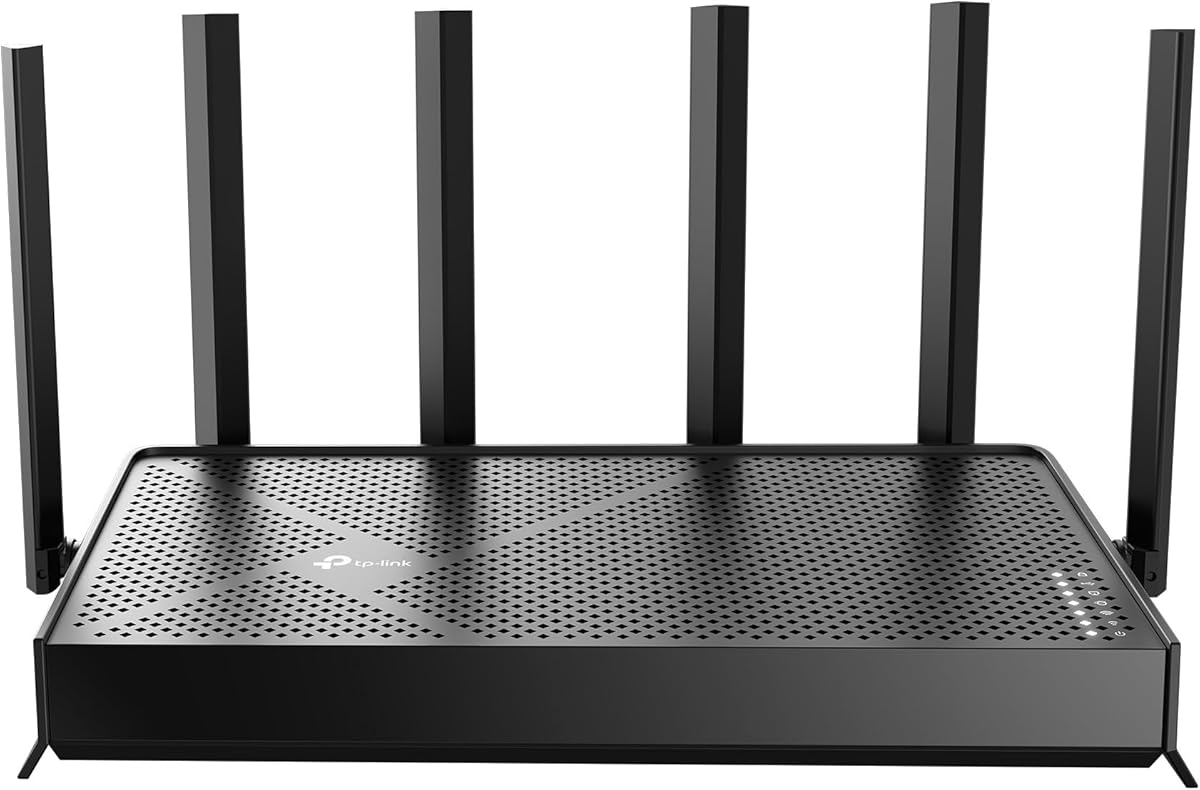
The TP-Link Archer BE600 is a tri-band Wi-Fi 7 router built for high-speed wireless clients, large homes, and multi-gig broadband. It uses an eight-stream BE9700 class designation with stated rates of up to 5,765 Mbps on 6 GHz, 2,882 Mbps on 5 GHz, and 1,032 Mbps on 2.4 GHz. The 4.2 rating reflects an ambitious new platform that may exceed the needs of an average 800 Mbps subscriber.
We may earn a commission when you buy through this link, at no additional cost to you.
Wi-Fi 7 features include Multi-Link Operation, Multi-RUs, 4K-QAM, and support for channels up to 320 MHz. Multi-Link Operation can combine multiple bands into one connection, while the other technologies are intended to improve efficiency and throughput. Compatible devices such as recent high-end phones, laptops, and gaming systems can take advantage of the newer standard, although owners should verify the specifications of each client before expecting a visible improvement.
The wired side is unusually flexible. It includes one 10 Gbps WAN/LAN port, one 2.5 Gbps WAN/LAN port, and three 2.5 Gbps LAN ports. That makes the Archer BE600 suitable for a multi-gig fiber or cable gateway, fast network storage, and other high-bandwidth equipment. The router is advertised to cover up to 2,600 square feet and support as many as 120 devices, aided by six antennas and Beamforming.
TP-Link HomeShield, robust parental controls, real-time IoT security, and VPN client functionality add practical value. Setup and management are available through the Tether app or web interface. This is the choice for a user with current Wi-Fi 7 hardware, a multi-gig service, or a crowded household seeking advanced capacity. For a basic 800 Mbps connection with older clients, however, the extra capabilities may remain largely unused. In that case, a less advanced Wi-Fi 6 model can provide a more proportionate solution.
The newest wireless features produce the greatest benefit when clients also support Wi-Fi 7. Check the specifications of phones, computers, televisions, and game consoles before choosing this model solely because of its higher aggregate speed.
The 10 Gbps and 2.5 Gbps ports remove several common wired bottlenecks. They allow a compatible internet gateway or local server to operate above gigabit speeds while keeping other high-performance devices connected to the 2.5G LAN ports.
We may earn a commission when you buy through this link, at no additional cost to you.
Selecting a router for 800 Mbps internet requires balancing provider compatibility, wireless generation, wired speed, range, processing capacity, and management features. The fastest advertised rate is not always the most useful result, especially when client devices, walls, and network congestion limit real-world performance.
Start with the exact type of service supplied by your internet provider. Standalone routers generally require a separate cable, DSL, or fiber modem, while a modem-router combination must support your provider's network, technology, and service area. The Nighthawk CAX30 is designed for compatible cable plans, including certain Xfinity, Spectrum, and Cox tiers, while the Nighthawk C7000 carries older DOCSIS 3.0 and discontinued-status considerations. Fiber providers may require their own approved gateway or an Ethernet connection compatible with a customer's existing equipment. Provider claims on a product page do not replace checking the compatibility list supplied by the ISP.
Choose based on the service you actually have. Confirm the technology, maximum supported plan, activation procedure, and whether bundled voice service is permitted.
An 800 Mbps internet plan supplies up to that amount of data, but a client receives only what both the router and the device can sustain. Wi-Fi 5 routers can handle an 800 Mbps connection in many homes, although faster Wi-Fi 6, 6E, and Wi-Fi 7 platforms provide more headroom for local traffic and numerous simultaneous users. Theoretical wireless figures are laboratory-style maximums rather than guaranteed real-world speeds. Walls, distance, radio interference, antenna design, device limitations, and the number of active clients all influence the result.
Prioritize a modern standard when many clients support it, but do not expect every advertised aggregate speed to reach a phone or laptop.
Coverage claims provide a useful starting point, but floor plans matter more than square footage alone. Multi-story homes, thick masonry, metal appliances, long hallways, and rooms with many walls can create dead zones. A router's placement near the center of the home usually produces better results than pushing it to one edge. Four to six external or internal antennas can improve directional performance, but extra antennas cannot eliminate every physical obstruction. For large homes, EasyMesh, OneMesh, or another coordinated access-point system may provide a better result than a single powerful router.
Measure the difficult areas first, and plan for additional access points when floor-plan barriers make a single unit insufficient.
An 800 Mbps plan may serve dozens of phones, computers, televisions, speakers, cameras, appliances, and other connected products. OFDMA and MU-MIMO can improve efficiency when many compatible clients share a band. The CAX30 is described as suitable for more than 25 connected devices, the Flint 2 for more than 100, and the Archer BE600 for up to 120. These figures are design targets rather than guaranteed limits. Light browsing, streaming, and smart-home traffic are not equivalent to simultaneous gaming, large downloads, and high-resolution video.
Count active clients, then favor a router with efficient multi-device scheduling and enough memory for the accessories you actually use.
Gigabit Ethernet is sufficient for a typical 800 Mbps broadband service, but multi-gig ports can matter when using a faster gateway, local network storage, or a high-end workstation. The Flint 2 includes two 2.5G ports, while the Archer BE600 combines 10G, 2.5G, and additional 2.5G connections. Most other models provide Gigabit ports. Consider how many wired devices you own, whether you plan to upgrade your service, and whether an external switch would be more useful than paying for faster individual ports.
For current 800 Mbps service, prioritize port count and reliability; for multi-gig service or local transfers, prioritize 2.5G and 10G connectivity.
Every home router acts as the gateway between trusted devices and the internet, so basic security should not be optional. Look for WPA3 support, WPA2 compatibility for older clients, a firewall, guest-network isolation, and automatic firmware updates. Advanced options such as VPN server or client support, IoT identification, parental controls, DNS filtering, and local network services can be useful, but they also increase setup complexity. TP-Link HomeShield and NETGEAR Armor include some no-cost features alongside optional paid services. Review what remains available without a subscription before choosing based on a premium protection label.
Favor strong built-in security, clear parental controls, and an interface you can actually maintain. Extra features are useful only when they fit your household.
Gaming routers can be helpful when a user values low-latency features, powerful processing, and advanced control, but an 800 Mbps connection still depends on the provider's latency and local network conditions. The Flint 2 offers eight-stream Wi-Fi 6, dual 2.5G ports, AdGuard Home support, and fast VPN protocols. Other models include VPN server or client functions. Wired connections remain valuable for gaming consoles and desktops because they reduce dependence on radio conditions. Whether a gaming label justifies a particular router depends on the features users will actually operate.
Choose advanced hardware for lower local latency, multi-gig transfer, or remote access needs rather than assuming a gaming label alone will improve the internet path.
A router requires initial configuration, password changes, firmware updates, and occasional troubleshooting. Mobile apps can simplify these tasks, while web interfaces may provide deeper controls. The CAX30 and C7000 require ISP activation; the Flint 2 recommends an immediate firmware update and can be initialized through a connected computer. Every reputable choice should be placed in an open central location rather than beside a television, microwave, metal cabinet, or thick wall. A stable power connection and current firmware help prevent avoidable performance and security problems.
Choose an interface you find easy to navigate, then plan to update the firmware and check network performance after major provider or device changes.
Begin by confirming that the router is compatible with your provider and service technology. Standalone models need a properly configured modem or gateway, while a cable combination requires ISP activation. Connect the internet-facing equipment using the appropriate WAN or coax connection, then follow the manufacturer's app or web setup assistant. Choose a unique administrative password, set a strong Wi-Fi password, and update the firmware before making extensive changes. Placing the router near the center of the home and away from enclosed cabinets can materially improve the experience.
After setup, test the connection close to the router and again in the rooms where you spend the most time. Run a speed test at different times, with and without nearby devices active, to distinguish an ISP limitation from Wi-Fi coverage. Separate 2.4 and 5 GHz networks when you need manual control, although a modern router may combine them automatically. Assign 5 GHz or 6 GHz to nearby high-bandwidth devices and use 2.4 GHz for distant IoT equipment when manual band selection is available. Wired connections remain ideal for stationary, high-use devices.
For long-term care, check for firmware updates every few months and apply them when the router is stable and the internet service is not critical. Review connected-device lists, remove unfamiliar clients, update guest-network passwords, and change the administrative credentials if they may have been exposed. Keep the router ventilated and away from heat, direct sunlight, and electronic interference. When performance declines, begin by checking placement, device saturation, and firmware before blaming the broadband service. If you add mesh nodes or access points, use the manufacturer's recommended coordinated system and keep all units on compatible firmware.
A gigabit Ethernet router is generally sufficient for an 800 Mbps internet connection because its wired port can carry more than the service's maximum rate. Wireless performance depends on the Wi-Fi standard, client device, distance, and interference. Wi-Fi 6 or newer can provide useful headroom, but a capable Wi-Fi 5 router may still satisfy a moderate household. Consider 2.5G or 10G ports if your provider supplies a faster gateway or you operate a high-speed local network.
No router can guarantee that every wireless device will receive 800 Mbps. Internet service is shared, wireless links are affected by distance and walls, and most client devices support lower connection rates. A modern router positioned well can provide strong performance across the home, but wired devices are more likely to approach the full service speed. Real-world results also depend on the provider, the plan, network congestion, and the capabilities of each connected device.
A standalone router normally needs a separate cable, DSL, or fiber modem or gateway. A modem-router combination includes both functions and may simplify installation while reducing the number of connected devices. The NETGEAR CAX30 is an example for compatible cable services. One-device setups remain subject to provider approval, activation requirements, plan limits, and restrictions on services such as bundled voice.
Wi-Fi 6E can be better when compatible clients use its dedicated 6 GHz band, especially in crowded areas where additional spectrum is valuable. However, not every television, phone, appliance, or laptop supports 6 GHz. For a smaller home with mostly Wi-Fi 6 clients, a well-positioned dual-band Wi-Fi 6 router may provide the same practical result. Wi-Fi 6E is most attractive for users adding several current high-end devices and needing more network capacity.
A Wi-Fi 7 router is most valuable when you already own compatible Wi-Fi 7 clients, use a multi-gig internet service, or operate a very dense network. Its faster local connections and multi-gig ports can benefit modern hardware, but an 800 Mbps plan alone does not require it. If most clients are older, spending the same budget on a good Wi-Fi 6 or Wi-Fi 6E system, better placement, or mesh expansion may produce a more noticeable improvement.
You can often use a provider-supplied gateway, but it may have limitations, restricted settings, or less advanced wireless performance than a standalone router. Check whether the gateway includes a Wi-Fi radio, whether it supports your exact plan, and whether you can connect a personal router in the correct configuration. Some providers offer equipment credit or waive rental fees when you use compatible customer-owned equipment. Confirm the current program directly with the ISP before replacing anything.
There is no single device limit because different activities consume very different amounts of capacity. Browsing, messaging, and routine streaming place modest demands on the network, while gaming, video calls, large downloads, and multiple 4K streams require more. Routers with OFDMA, MU-MIMO, tri-band operation, and adequate memory generally handle crowded homes better. Device count matters less when the active devices are spread across different usage patterns and both bands.
Place the router in an open, central location near the first floor or middle level of the home. Avoid cabinets, entertainment centers, closets, appliances, and low positions obstructed by furniture. If signals remain weak in distant rooms, improve the placement first and then consider EasyMesh, OneMesh, a wired access point, or another coordinated node. Adding a second unit without compatible roaming can create separate networks and cause devices to switch between them awkwardly.
The TP-Link Archer AX21 is the most balanced recommendation for an 800 Mbps connection because it combines dual-band Wi-Fi 6, OFDMA, broad provider compatibility, useful coverage features, and app-based management. The TP-Link AX3000 is a capable budget alternative with greater stated 5 GHz bandwidth, while the NETGEAR Nighthawk CAX30 is the strongest integrated choice for a compatible cable customer who prefers DOCSIS 3.1 and one-box operation.
Prioritize provider compatibility first, followed by the wireless standard used by your actual devices. Consider wired port speeds if you have a multi-gig gateway or high-performance local equipment, and think carefully about coverage in difficult rooms. A tri-band, Wi-Fi 6E, or Wi-Fi 7 router makes the most sense when newer clients can use it. For basic homes, a properly placed dual-band router may provide a better result than an advanced model whose features remain unused.
Finally, verify the exact model with your ISP, review the current specification and support information, and compare current retailer availability before buying. Internet equipment, firmware, and provider programs evolve, so confirm that the selected router still supports your address, service type, and intended plan. The right device is the one that delivers dependable service for your devices and layout while fitting the level of control you want to manage.
