
Bloody V7 Ergonomic Claw Grip Gaming Mouse
4.4Editor score
Built-in ergonomic claw shape
Eight programmable buttons
Broad operating system support
Discover the best Claw Grip Gaming Mouse for Small Hands, with expert comparisons of shape, weight, sensors, switches, wireless performance, comfort, and grip.
A claw grip gaming mouse for small hands must place the index, middle, and ring fingers naturally while keeping the palm lightly supported. Its overall length, rear hump, side width, and button shape can matter more than headline specifications. The strongest compact options balance low weight, accurate tracking, responsive clicks, and enough support for long sessions.
This guide compares ten gaming mice using the supplied specifications, including physical weight, shell layout, sensor capabilities, switch design, connectivity, and stated grip compatibility. The list covers wired and wireless models, symmetrical and asymmetric shapes, and options aimed at fingertip, claw, and hybrid palm-claw players without assuming that every small-handed gamer wants the same design.
Each review highlights the reason a product belongs on the list, along with its limitations and the player most likely to benefit. Ratings reflect the supplied customer feedback rather than personal testing, and product availability, configurations, and prices can change. Always confirm the current listing and exact variant before making a final purchase.
4.4Editor score

4.1Editor score

4.3Editor score
The table below places all ten candidates side by side, emphasizing the characteristics that most strongly affect a compact claw grip: body shape, weight, sensor performance, switch response, connectivity, and grip compatibility.


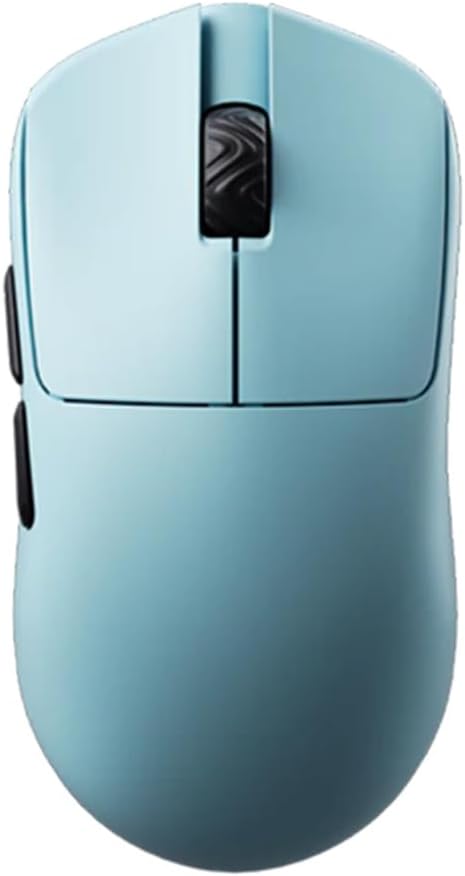
The Bloody V7 stands apart from this list because its selling point is not simply miniaturization but an explicitly ergonomic claw-grip shape. It carries a supplied customer rating of 4.4 and includes eight programmable buttons, macro support, scripting, and automation features. That makes it a practical choice for small-handed players who want dedicated finger placement rather than a generic miniature shell.
We may earn a commission when you buy through this link, at no additional cost to you.
The mouse uses a 3200 DPI optical sensor with adjustable CPI and report-rate options through Bloody 6 software. The listed report rates cover 125, 250, 500, and 1000Hz, allowing users to choose among lower-power and more responsive configurations. Additional next and previous buttons improve browser navigation, while the rubberized coating supplies a more secure surface for hands that become sweaty during extended play.
Its principal limitation is that the 3200 DPI sensor is less advanced than the 26,000, 30,000, and 32,000 DPI sensors found among the premium competition. It is also a wired design, and the practical effect of any cable drag depends on the cable and the player's preferred desk setup. The mouse's focus on macros and programmability could also be unnecessary for someone who prefers immediate plug-and-play operation.
Those trade-offs are acceptable for buyers prioritizing a recognizable ergonomic claw shape, programmable controls, and broad system support. It is particularly relevant to users of Windows or Mac systems who want a dedicated gaming and productivity mouse without moving to a wireless platform. For most small-handed claw players seeking an affordable, purpose-shaped starting point, the Bloody V7 is the recommendation to examine first.
Unlike a symmetrical miniature that mainly reduces size, the V7 is expressly engineered around claw-style finger placement. The angled body and separated main click areas can keep the index, middle, and ring fingers from drifting together, while the rubberized finish helps maintain control during longer sessions.
Eight programmable buttons expand the mouse beyond basic movement and clicking. Bloody 6 supports CPI and report-rate adjustments, while the extra browser controls make the device more useful when switching between gaming, work, and general computer tasks.
We may earn a commission when you buy through this link, at no additional cost to you.
The Pulsar X2H mini is one of the most convincing matches for the search phrase because its mini designation and higher rear hump specifically address players who want more support than a flat fingertip mouse provides. Its supplied rating is 4.2, and the elevated back, narrower waist, and symmetrical design are intended to help aggressive claw grip users maintain stability.
We may earn a commission when you buy through this link, at no additional cost to you.
The PixArt PAW3395 sensor supports up to 26,000 DPI, 650 IPS tracking, and 50g acceleration. Its default 1000Hz, 1ms polling rate is suitable for responsive competitive play, and the supplied information also states that it is 4K polling ready. Optical switches and a dust-proof blue encoder are designed to reduce unintended double-clicks and provide a more consistent click response.
A Nordic MCU manages the wireless electronics and supports a stated battery life of up to 100 hours at 1000Hz polling. This is a meaningful advantage over compact wired alternatives, although the mouse still needs regular charging and the quoted battery figure depends on usage and polling settings. Its symmetrical shell can be less naturally supportive for players who prefer a sculpted thumb rest.
The X2H mini is best suited to competitive players who understand the larger ecosystem behind the X2H line and can accept the premium-tier investment for a refined mini body. It offers an unusually clear combination of claw support, modern sensor performance, optical switches, and wireless freedom. It is our editor's choice because those features closely address the central requirements of this category.
The raised rear hump provides a contact point for the lower palm while the narrowed waist sits beneath the active finger zone. This structure is especially useful for an aggressive claw grip, where the player relies on stable support without committing to a full palm posture.
The PAW3395 sensor, 1000Hz polling, optical switches, and Nordic MCU provide a competitive wireless foundation. Four-kilohertz polling readiness can also appeal to users who later upgrade the receiver, although the standard configuration should be considered when judging everyday performance.
We may earn a commission when you buy through this link, at no additional cost to you.
The BenQ Zowie S2-C is a small, symmetrical esports mouse explicitly designed to work with both palm and claw grip styles. Its supplied customer rating is 4.3, and its compact proportions distinguish it from larger general-purpose gaming mice. It is a strong premium choice for players who want a predictable, immediate competitive setup.
We may earn a commission when you buy through this link, at no additional cost to you.
The mouse includes a 3360 optical sensor with four selectable DPI levels at 400, 800, 1600, and 3200 DPI. Polling can be adjusted among 125, 500, and 1000Hz without installing additional software. This driverless design keeps configuration understandable and reduces the chance that a new player will overlook an essential performance setting.
Its paracord cable is intended to minimize the pull and drag associated with stiffer cables. The small symmetrical body avoids heavy sculpting, which can be advantageous for claw players because the finger relationships remain neutral. The trade-off is the absence of wireless operation, a relatively modest maximum DPI figure, and fewer programmable controls than software-focused alternatives.
This mouse is ideal for competitive players who value a deliberately sized body, immediate setup, and consistent physical behavior over wireless convenience or extensive customization. Small hands that struggle with long mice may benefit substantially from its shorter footprint. It earns the premium recommendation because its design is focused and proven rather than relying on the highest specification numbers.
The S-C series uses a shortened, lighter symmetrical shell that suits players with smaller hands and allows either palm or claw contact. Its simplicity means fewer variables while learning, which is valuable for competitive users who want a mouse that feels familiar immediately.
Built-in DPI buttons and polling controls remove the need for a companion application. Four DPI levels cover common competitive sensitivity ranges, while selectable polling rates let the player balance responsiveness and efficiency without changing hardware.
We may earn a commission when you buy through this link, at no additional cost to you.
The Gwolves Skoll Mini combines a 50-gram shell with a small format, an ergonomic design, and a honeycomb structure. Its supplied rating is 4.4, placing it among the strongest customer-rated options here. It is a particularly relevant choice for claw-grip players who want a light mouse without moving to the more specialized premium category.
We may earn a commission when you buy through this link, at no additional cost to you.
The listed 3389 sensor supports up to 16,000 DPI, and the included PTFE skates are intended to deliver smooth movement across compatible surfaces. A detachable cable makes storage and transport easier than with a permanently attached lead. These details make the Skoll Mini straightforward to pair with a compact keyboard, portable gaming setup, or travel case.
As a wired mouse, it avoids charging and wireless interference, but the cable may still create a small amount of resistance. Honeycomb shells can also collect dust, and the lower sensor resolution and unspecified high-polling capability put it behind newer 30,000 DPI competition mice. Users who need extensive onboard programmability may find the basic feature set limiting.
The Skoll Mini is a strong recommendation for small-handed players seeking a light, compact claw mouse at a practical entry point. It delivers the essential ingredients—small dimensions, low mass, smooth feet, and precise movement—without the complexity of a premium ecosystem. It is particularly useful for players who value a wired connection and straightforward maintenance.
At 50 grams, the Skoll Mini reduces the effort needed to move and stop the mouse quickly. That low mass can help with repeated adjustments and rapid corrections, provided the player maintains a consistent claw posture rather than shifting the mouse excessively.
PTFE skates provide a low-friction contact surface and can be replaced as they wear. The detachable cable further simplifies transport, while the honeycomb pattern reduces overall mass and reveals more of the mouse's internal structure.
We may earn a commission when you buy through this link, at no additional cost to you.
The Lamzu Atlantis Mini Champion Edition has a supplied rating of 4.6, the highest customer rating among the products in this guide. At 51 grams, it combines a lightweight symmetrical shell with a modern PAW3950 sensor, optical switches, and wireless 8K receiver compatibility. The design explicitly mentions claw players, making its fit to this category unusually clear.
We may earn a commission when you buy through this link, at no additional cost to you.
The sensor supports up to 30,000 DPI and 750 IPS, while the Nordic 52840 MCU handles the wireless processing. The included information states that maximum 8K polling is available when using an 8K dongle, giving the mouse considerable performance headroom for competitive users with suitable hardware and settings.
Optical switches are described as having a lifespan of over 70 million cycles, and the dust-proof encoder is intended to support consistent operation. The broad back and curved top may help prevent finger cramping by supporting the claw posture, although the symmetrical shape still will not feel like an ergonomic sculpted mouse. It also requires battery maintenance and a suitable receiver setup.
The Atlantis Mini is an excellent choice for a player who prioritizes sensor capability, low latency, modern switches, and a light symmetrical body. It is especially relevant to small-handed competitive users who can take advantage of high-polling wireless performance. Those features make it a compelling premium option rather than merely a scaled-down conventional mouse.
The curved top and broad rear provide support for fingers that adopt a claw position while retaining a neutral symmetrical layout. This is useful for players who want consistent finger spacing but prefer not to use a strongly asymmetric body with a dedicated thumb ledge.
The PAW3950 sensor, Nordic controller, optical switches, and 8K receiver support combine to target fast, low-latency play. Even without the highest polling configuration, the 30,000 DPI and 750 IPS specifications place the mouse firmly in modern competitive territory.
We may earn a commission when you buy through this link, at no additional cost to you.
The Pulsar X3 LHD Crazylight is the clearest answer in this guide for a left-handed small player. Its supplied rating is 4.3, and at 43 grams it is lighter than every other product listed. The hybrid palm-claw shape combines a symmetrical button height with an asymmetrical body that follows the hand.
We may earn a commission when you buy through this link, at no additional cost to you.
The exclusive XS-1 sensor offers up to 32,000 DPI, 750 IPS tracking, and 50g acceleration, matching the strongest specifications here. Optical switches are intended to reduce unintended double-clicks, while the included TTC Golden dust-proof encoder and 16 UHMW-PE dot skates support smooth, durable movement on glass and hard pads.
The defining limitation is handedness. A left-handed design offers no benefit to a right-handed player and can be worse than a symmetrical alternative because the angled geometry does not match the user's natural hand. Its 43-gram shell may also feel insufficiently planted for someone who anchors the mouse with a firm palm, and it occupies the premium tier.
This mouse is recommended for left-handed players with small hands who want a very light body and a palm-claw hybrid posture. The combination of low mass, advanced tracking, and purposeful asymmetry is rare in the compact gaming category. For the matching audience, it may be the most specialized and compelling option in the list.
Rather than simply mirroring a right-handed shell, the X3 LHD follows the natural line of a left hand. Its hybrid palm-claw form provides more contact support than a fully symmetrical design while leaving the button elevations relatively even for controlled claw clicks.
A 43-gram body reduces the mass that must be accelerated during fast movements. The 32,000 DPI sensor, optical switches, and low-friction dot skates reinforce that performance focus, making the mouse particularly compelling for flick-oriented competitive play.
We may earn a commission when you buy through this link, at no additional cost to you.
The Scyrox V8 is built around an extremely light, symmetrical body with a stated nominal weight of 36 grams plus or minus 3 grams. Its supplied customer rating is 4.5, and the listing specifically identifies claw and fingertip gamers as the target audience. It is a natural candidate for players who want minimal hand and wrist effort.
We may earn a commission when you buy through this link, at no additional cost to you.
A PixArt PAW3950 sensor provides up to 30,000 DPI with an emphasis on accurate, stable tracking. Kailh optical switches support fast actuation and consistent clicking, while a Nordic 52840 MCU and stable 2.4GHz connection provide the wireless foundation. The included 8K dongle adds another configuration option for users with compatible setup requirements.
Extreme lightness is not universally desirable. Some players move a mouse by planting the palm and dragging it, and a shell that feels almost weightless may not meet that preference. As a symmetrical design, it also offers less palm support than a sculpted model, and wireless operation introduces charging and receiver-management considerations.
The V8 is best for small-handed players who favor quick, economical movement and can maintain a light claw or fingertip posture. It combines a compelling weight with current sensor and switch technology rather than treating low mass as the only selling point. Those making a shortlist should compare its featherweight feel with the slightly more substantial Lamzu and Pulsar alternatives.
At approximately 36 grams, the V8 is among the lightest conventional gaming mice represented here. That low mass can reduce perceived fatigue and make rapid directional corrections feel effortless, provided the user does not need substantial resistance from the mouse.
The PAW3950 sensor and Kailh optical switches create a strong technical foundation for competitive movement and clicking. A web-based driver can simplify configuration without a traditional desktop installation, while the included 8K dongle supports higher-polling setups.
We may earn a commission when you buy through this link, at no additional cost to you.
The Corsair IRONCLAW Wireless SE offers extensive controls, flexible wireless connectivity, and long stated battery life, but it is not a direct small-hand claw match. Its supplied rating of 3.9 is the lowest in this group, and the product information explicitly says the shape is intended for larger hands and right-handed palm-grip players.
We may earn a commission when you buy through this link, at no additional cost to you.
Despite that mismatch, the hardware is capable. The CORSAIR MARKSMAN sensor supports up to 26,000 DPI and surface calibration, while iCUE software allows users to program macros and remap ten buttons. RGB lighting covers the scroll wheel, logo, and front grill, with indicators for DPI and profile status.
Wireless performance is flexible, with 2.4GHz and Bluetooth options. Stated battery life reaches up to 285 hours over 2.4GHz and up to 532 hours using Bluetooth, although real-world results depend on activity, lighting, and connection method. The most important limitation for this guide is physical: a mouse explicitly designed for larger palms is unlikely to serve a small claw grip well.
The IRONCLAW Wireless SE makes sense for a right-handed player whose hands are larger than the target audience and who values programmable controls, lighting, and exceptional wireless endurance. It is included here to represent the broader gaming-mouse landscape and to help readers understand why a feature-rich model can still be a poor ergonomic fit. Small-handed users should favor a purpose-sized candidate instead.
Supporting both 2.4GHz and Bluetooth makes the mouse useful across gaming and productivity environments. The generous stated battery figures can reduce charging frequency, although the lower 2.4GHz estimate remains more relevant for uninterrupted competitive play.
A sensor resolution, extra buttons, and long battery life cannot compensate for a body that is too large for the user's fingers. The explicit larger-hand recommendation makes this a cautionary example: feature depth should be evaluated only after the mouse fits the player's hand.
We may earn a commission when you buy through this link, at no additional cost to you.
The Scyrox V6 offers a balanced alternative to extremely fingertip-oriented ultra-light mice. It weighs approximately 40 grams, uses a symmetrical shell, and is listed for both claw and palm gamers. With a supplied rating of 4.6, it ties the Lamzu Atlantis Mini for the highest customer rating in this comparison.
We may earn a commission when you buy through this link, at no additional cost to you.
The PixArt PAW3950 sensor supports up to 30,000 DPI and is designed to deliver accurate, low-latency tracking without noticeable acceleration or spin-outs. Concave main buttons are a notable ergonomic detail because their recessed profile can help the index and middle fingers locate the click surfaces more consistently during rapid or repeated clicking.
The mouse uses a stable 2.4GHz wireless connection, a web-based driver, and an included 8K dongle. Its symmetrical design is flexible for different hand sizes, but it does not provide the palm support of a strongly ergonomic body. The no-hole shell also gives the mouse a continuous outer surface, which may feel more enclosed than a perforated design and offers less visual ventilation.
The V6 is a strong recommendation for small-handed players who want the lightness of a competitive mini mouse without committing exclusively to a fingertip posture. Concave buttons, broad grip compatibility, and a high-resolution sensor make it particularly balanced. It is especially useful for players who alternate between light claw contact and occasional palm support during less intense sessions.
The recessed main buttons create a clearer physical target for the index and middle fingers. This can improve click consistency when moving rapidly, reducing the need to look down or exert extra force to find a flat button surface.
At approximately 40 grams, the V6 remains easy to move without becoming as weightless as the lightest models. Its symmetrical, no-hole shell and stated compatibility with both claw and palm styles offer flexibility for a wider range of small-handed players.
We may earn a commission when you buy through this link, at no additional cost to you.
The renewed Pulsar X2H mini provides much of the same compact aggressive-claw concept as the standard X2H mini at a more accessible acquisition point. It weighs 52 grams and has a supplied rating of 4.1. For a budget-conscious buyer who accepts renewed-condition variability, it can still deliver a competitive and modern platform.
We may earn a commission when you buy through this link, at no additional cost to you.
Its raised rear hump and narrower waist are designed to improve stability for aggressive claw grip and add palm support. The PAW3395 sensor supports up to 26,000 DPI, 650 IPS, 50g acceleration, and 1000Hz or 1ms polling. Optical switches, a dust-proof blue encoder, and an upgraded internal structure aim to provide clean clicks and less shell flex.
A Nordic MCU supports the electronics and a stated battery life of up to 100 hours. The mouse is also described as 4K polling ready, though that requires compatible hardware. Renewed products can vary in cosmetic condition, and the lower customer rating may reflect condition-related concerns as well as the product experience itself. Buyers should examine the listing and return terms carefully.
This renewed X2H mini is a sensible value-oriented route into a compact wireless claw mouse. It is best for players who prioritize the raised hump, light body, modern sensor, and optical switches while accepting a used or refurbished product. A thorough condition review is essential, but for the right buyer it can make a capable competitive setup more attainable.
The mini footprint reduces the distance between the hand's contact points and the mouse's movement center. Its elevated rear hump adds stability for aggressive claw positioning, while the narrow waist prevents the body from feeling overly broad under the fingers.
A renewed mouse may provide strong value, but cosmetic wear, packaging differences, and individual condition reports can affect the buying experience. Checking the seller's return policy, the included accessories, and the appearance of the feet and switches is particularly important for a heavily used product.
We may earn a commission when you buy through this link, at no additional cost to you.
The most important choice is physical fit, followed by weight, sensor quality, switch response, and connectivity. A technically advanced mouse cannot compensate for a body that is too long, too wide, or shaped in a way that forces the fingers to stretch.
A claw grip mouse for small hands should allow the fingertips to rest near the main buttons without the index finger extending toward the front edge or the ring finger falling far behind the mouse. Mini and small versions are generally more appropriate than medium or large shells, but the right length depends on finger length and the amount of palm contact. Compare the mouse's listed dimensions with the usable space between the hand and the desk rather than relying only on the size label.
An aggressive claw grip benefits from a rear that remains stable while the fingers make small, frequent corrections. A more pronounced hump can support the lower palm without requiring a full palm grip, while a flat symmetrical design may suit fingertip-oriented players. The Lamzu Atlantis Mini and Scyrox V8 use symmetrical layouts, whereas the Pulsar X2H mini and V6 emphasize a more supported claw posture. Determine how much of the palm actually touches the mouse during play.
Lighter mice can make quick pivots and flicks easier, but the lightest option is not automatically the most comfortable. Weight changes the way a mouse feels under the hand and can encourage more aggressive movement. The options range from the Scyrox V8 at approximately 36 grams to the Pulsar X2H mini at 52 grams, with several models near 40 to 50 grams. A middle option may be easier to control for players accustomed to using finger strength rather than wrist and arm movement.
The main buttons must sit where the index and middle fingers can trigger them accurately and rapidly. Concave buttons, as offered on the Scyrox V6, can create a more obvious target, while optical switches can improve consistency and reduce double-clicks. A claw grip also benefits from clear separation between buttons because accidental neighboring clicks become more likely when the fingers are tense or cramped. The shape of the buttons should therefore be considered alongside switch technology.
Sensor resolution is only one part of tracking quality, and extremely high maximum DPI rarely matters unless the user runs a very low sensitivity setting. The list includes 3200, 3360, 16,000, 26,000, 30,000, and 32,000 DPI options, along with 1ms and 8K-capable configurations. Polling can affect responsiveness, while sensor stability helps prevent tracking inconsistencies. Competitive players should also consider whether their computer can support the mouse's highest advertised mode.
Wireless mice offer cleaner desks and avoid cable resistance, but they require charging and compatible receiver space. The Pulsar X2H mini states up to 100 hours of battery life, while the Corsair IRONCLAW Wireless SE claims as many as 285 hours over 2.4GHz and 532 hours using Bluetooth. Actual life depends on polling rate, sensor activity, and lighting. Players should consider how often they can charge the mouse and whether they need a wired fallback during tournaments.
A symmetrical mouse can be easier to use with either hand and often supports multiple grip styles. An asymmetric body can feel more natural because it follows the anatomy of a particular hand, but it can be uncomfortable if the shape and handedness do not match. The Pulsar X3 LHD Crazylight is a specialized left-handed option, while the Corsair IRONCLAW Wireless SE is explicitly right-handed and designed for larger hands. Small players should avoid assuming that a mouse marketed as ergonomic will suit every hand.
The Bloody V7 emphasizes macros, scripting, automation, and eight programmable buttons, making it attractive for players who use many bindings. The Scyrox V6 and V8 use web-based drivers for configuration, and the Corsair model uses iCUE. The BenQ Zowie S2-C takes the opposite approach with driverless physical controls. More customization is not always better, however. Competitive players may prefer immediate operation, while productivity-focused users may value remapping, profiles, and onboard productivity features.
Begin by setting the DPI to a sensitivity that moves the pointer a controlled distance without requiring large arm movements. Keep the main fingers near the click surfaces, allow the mouse to rest beneath the palm, and make small corrections through the fingers rather than constantly lifting and replacing the device. If the hand cramps or the index finger reaches the front edge, revisit the mouse size and grip posture.
Use the supplied software or physical controls to set DPI and polling according to the specifications. A 1000Hz mode is a practical starting point for many competitive systems, while an 8K receiver should only be enabled when the connected computer, game, and configuration can support it. On wireless models, keep the receiver unobstructed and recharge the battery before long sessions rather than waiting for a complete interruption.
Clean the mouse periodically by disconnecting or switching it off, removing debris from buttons, openings, and the sensor, then wiping the body with a soft dry or lightly damp cloth. Avoid spraying cleaner directly onto the mouse. Replace worn skates, keep the cable straight to reduce drag, and allow a newly opened wireless mouse to charge fully before evaluating its battery life. For renewed models, inspect the feet, switches, shell, and accessories before the first extended session.
Physical fit is the most important feature. A suitable mouse should be short and narrow enough for the fingertips to reach the buttons without stretching, while providing enough rear support for the player's chosen claw posture. Sensor resolution and polling are useful only after the shape feels comfortable and controllable.
A symmetrical mini mouse can be an excellent choice because it offers a compact footprint and supports fingertip, claw, and palm-claw styles. The best result still depends on button placement, rear height, and finger length. The Lamzu Atlantis Mini and Scyrox V6 show how symmetrical designs can serve different claw preferences.
A lightweight mouse can reduce fatigue and make rapid movements easier, but weight preference is personal. Some players feel more control with a slightly heavier body, while others prefer the quickest possible movement. The list includes options from approximately 36 to 52 grams, providing several meaningful weight classes to compare.
Not necessarily. Maximum DPI is a capability limit rather than a required setting, and many competitive players use lower values with a larger mousepad. Sensor accuracy, stability, polling, and the ability to use a suitable sensitivity matter more than selecting the highest number available.
Modern wireless mice can offer low-latency performance and avoid cable drag, but they require battery maintenance and a clear receiver connection. Wired models provide uninterrupted power and a simple connection. The right choice depends on how the player values desk space, charging routine, polling options, and tournament reliability.
Optical switches can actuate quickly and reduce the chance of mechanical double-clicks, which may benefit players who click rapidly. They still need to feel comfortable in a particular mouse, and switch type alone cannot compensate for poor sizing or an uncomfortable shape. A comfortable grip should remain the first priority.
An aggressive claw posture generally benefits from a more pronounced rear hump and a narrow waist that stabilizes the hand during small corrections. A relaxed claw grip may be comfortable with a fuller, more symmetrical shape. The Pulsar X2H mini, Lamzu Atlantis Mini, and Scyrox V6 illustrate these different approaches.
Review the condition description, exterior wear, click response, scroll movement, sensor alignment, feet, cable or charging accessories, and the return policy. A renewed mouse can provide good value, but it should meet the same functional standards you would expect from a new unit.
The Bloody V7 is the best budget starting point for players who want a purpose-designed claw shape, programmable controls, and broad system support. The Pulsar X2H mini stands out as the editor's choice because its raised rear hump, compact wireless body, PAW3395 sensor, and optical switches closely match aggressive claw requirements. The BenQ Zowie S2-C is the premium choice for competitive players who prioritize a deliberately small body, immediate driverless controls, and a low-friction paracord cable.
Before purchasing, compare the mouse's length and width with the player's hand, identify the amount of palm support needed, and then choose a weight that feels controlled. Sensor specifications, switch design, polling, and wireless convenience are important, but they should refine a comfortable fit rather than compensate for a poor one. Left-handed players and those with specific ergonomic needs can also narrow the field using the dedicated X3 LHD Crazylight option.
Product configurations and prices can change, and customer ratings may evolve over time. Check the current listing, warranty, included receiver or accessories, compatibility details, and return terms before buying. The most valuable comparison ultimately comes from placing two or three well-fitting mice on the same large mat and testing them with the sensitivity, grip posture, and game used most often.