
Cooler Master Q300L V1
4.5Editor score
Supports Micro-ATX motherboards
Accommodates 360mm graphics cards
Flexible modular I/O placement
Looking for a compact E ATX case? This expert guide compares 10 compact models for motherboard fit, airflow, cooling support, cable management, and portability.
A compact E ATX case offers the balance between full-size component support and a smaller footprint, but fitment matters more than any exterior dimension. The best enclosure accommodates your motherboard, graphics card, power supply, and cooling hardware while directing airflow around the components that generate the most heat.
The products in this guide were compared using their published specifications, including motherboard support, maximum component clearances, radiator and fan options, front connectivity, cable-management features, and portability. The list includes true E-ATX models as well as compact ATX and Micro-ATX cases that can be appropriate for smaller builds.
Each review explains where the enclosure stands out, where its compatibility limits matter, and which builders it is likely to suit. Ratings and availability can change over time, and current product details should be verified before purchasing, particularly when coordinating a case with unusual or oversized hardware.
4.5Editor score

4.6Editor score

3.9Editor score
This side-by-side comparison focuses on motherboard fit, graphics-card clearance, cooling capacity, and practical usability, helping builders identify the most suitable enclosure for their hardware and available space.


The Cooler Master QUBE 540 is a compact ATX mid-tower that stands out for its unusually flexible approach to motherboard and case placement. It has a 4.4 rating and supports ITX, ATX, and large E-ATX motherboards, with the E-ATX format extending to 11 inches wide. That makes it one of the most directly relevant choices for builders searching for a compact E-ATX enclosure.
We may earn a commission when you buy through this link, at no additional cost to you.
Its most impressive specification is the stated 415mm graphics-card clearance without the front fan, which gives powerful desktop cards additional breathing room. The full front mesh panel and pre-installed SickleFlow 120mm fan support the high-airflow design, while the tempered-glass panel provides a clear view of the components. A reversed I/O panel and movable handles make it possible to use the case horizontally or vertically and reposition it more easily.
The important qualification is that fitting an E-ATX board within a compact chassis can restrict the placement of fans, cables, and power supplies. Buyers should verify the dimensions of their complete hardware rather than relying on motherboard support alone. The flexible orientation is useful, but a horizontal setup may not suit every desk, and a vertical setup requires enough clearance to operate the case comfortably.
This enclosure is recommended for builders who want genuine E-ATX support without moving up to a large full tower. It is particularly convincing for high-end graphics-card builds, provided the 415mm clearance is achieved with the required front-fan configuration. Among the cases reviewed, it offers the strongest balance of compactness, component accommodation, and orientation flexibility.
Supporting E-ATX boards up to 11 inches wide is a meaningful advantage in a compact chassis. The reversible I/O panel and movable handles also give users flexibility when arranging the case around a monitor, entertainment center, or limited workspace.
The full mesh front panel and included SickleFlow 120mm fan support active cooling, while the stated graphics-card clearance leaves room for substantial GPUs. Builders using a front radiator should confirm how the listed clearance changes in their chosen configuration.
We may earn a commission when you buy through this link, at no additional cost to you.
The Lian Li O11D Mini V2 combines a compact ATX footprint with a polished three-sided glass presentation. Its 4.7 rating is among the highest in this guide. Rather than targeting E-ATX, it focuses on standard ATX, M-ATX, and Mini-ITX motherboards, with particular attention to ATX boards using rear-connect layouts.
We may earn a commission when you buy through this link, at no additional cost to you.
The slanted 10-degree bottom improves direct cold-air intake and GPU cooling, while the protruded mesh side panel helps accommodate a full-size ATX power supply without abandoning the compact form factor. Horizontal and vertical GPU anti-sag brackets protect heavy graphics cards, and dedicated 24-pin motherboard-cable brackets help preserve a clean interior. Pillar-less tempered-glass panels offer an unobstructed view of the build.
Because the case is sold without fans, buyers must provide the cooling hardware needed for their system. That offers configuration freedom but may disappoint someone expecting a complete starter enclosure. It also does not meet the E-ATX requirement of this guide, so it works best for builders using a standard ATX board who value aesthetics and organized components over maximum motherboard size.
The O11D Mini V2 is ideal for display-oriented gaming builds and creators who want their components clearly visible. Its 4.7 rating, tempered-glass design, anti-sag hardware, and space for full-size ATX power supplies make it one of the most attractive choices here. It is not the most literal E-ATX solution, but it is a strong compact ATX alternative.
The pillar-less tempered-glass front and side panels minimize visual obstruction, while the slanted base and organized cable area keep the presentation tidy. It is especially suitable for builds placed where internal components are part of the room's visual presentation.
Separate horizontal and vertical anti-sag brackets make it easier to support a substantial GPU in either orientation. The full-size ATX PSU accommodation also gives builders more freedom when choosing a mainstream power supply.
We may earn a commission when you buy through this link, at no additional cost to you.
The Mechanic Master C34Pro is the most unconventional premium entry in the guide. Its 3.9 rating is lower than those of the other models, but the specification set is highly ambitious for a 30.6-liter enclosure. It supports ATX and E-ATX motherboards, with MATX expansion available through PCIe slot adjustments.
We may earn a commission when you buy through this link, at no additional cost to you.
Its stated compatibility extends to 360mm radiators, 165mm tower coolers, 420mm graphics cards, and 220mm ATX power supplies. Multi-zone fan mounts across the top, bottom, and front are supplemented by dust filters and an airflow-focused layout. Multiple power-supply mounting positions allow the builder to adapt the interior, while 18mm of cable-management space and the included magnetic screwdriver kit help streamline assembly.
A compact 30.6-liter volume inevitably creates restrictions, even with generous headline clearances. The 165mm cooler allowance is lower than some air-cooled alternatives, and the 220mm PSU figure requires a chassis arrangement that leaves less room for another component. The rating also suggests the product has not achieved the same level of broad customer satisfaction as several competing models.
Despite those concerns, the C34Pro is the strongest match for a builder who specifically wants a portable case capable of accepting E-ATX and flagship-class components. The integrated carry handle distinguishes it from conventional mid-towers, while the unusual 420mm GPU allowance offers valuable headroom. Buyers should plan the internal layout carefully and confirm the precise fit of every selected component.
The integrated carry handle makes the enclosure more practical for LAN events, moving between workstations, or rearranging a desktop setup. Portability is backed by a durable 2mm aluminum exterior and 1mm steel frame, though the case still requires careful handling when fully populated.
The 420mm graphics-card allowance, 360mm radiator support, and 220mm ATX PSU capacity create generous options within a small enclosure. These limits depend on the chosen mounting positions, so builders should map the full component stack before ordering.
We may earn a commission when you buy through this link, at no additional cost to you.
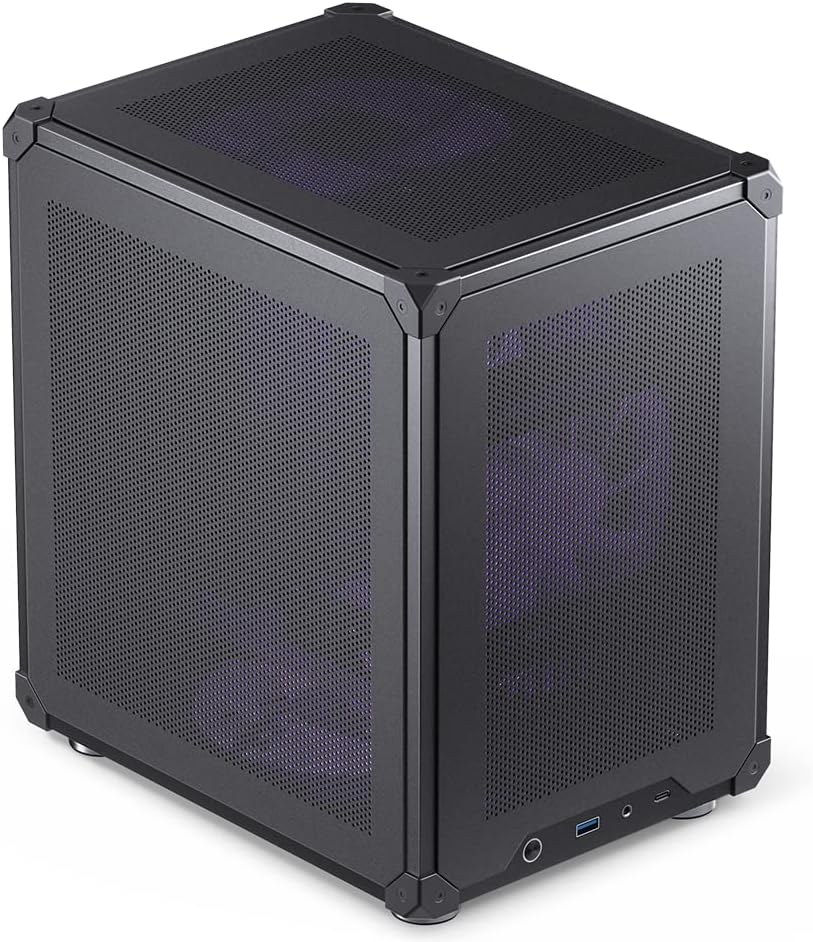
The Cooler Master Q300L V1 is a budget-minded compact enclosure for Micro-ATX and Mini-ITX builders. Its 4.5 rating reflects a favorable balance of airflow, expandability, and practical features. Although it cannot satisfy a strict E-ATX requirement, it is one of the most approachable compact cases for builds that do not need a full-size ATX board.
We may earn a commission when you buy through this link, at no additional cost to you.
The interior supports CPU coolers up to 159mm, graphics cards up to 360mm, and power supplies up to 160mm. It can also accommodate a 240mm liquid cooler and up to five fans. Its perforated sides promote airflow, while magnetic dust filters help reduce the buildup of debris. A transparent side panel lets users display the build, and the modular I/O panel can be positioned at the front, top, or bottom on either side.
The primary limitation is motherboard format. A standard ATX or E-ATX board will not fit, even though the case has useful space for long graphics cards. Buyers should also account for the comparatively short 160mm PSU allowance, particularly if considering a modular unit with a protruding cable connector. The image and product listing should be checked for the exact internal arrangement.
The Q300L V1 is recommended for first-time builders, budget-conscious gaming systems, and anyone who can use Micro-ATX or Mini-ITX. It offers useful cooling flexibility and a transparent panel without requiring the complexity of a larger chassis. For E-ATX specifically, it should be treated as a compact alternative rather than a direct match.
Perforated panels on all sides encourage air movement, and the magnetic filter system helps keep dust away from internal components. Support for five fans and a 240mm liquid cooler provides more cooling latitude than many similarly compact desktop cases.
The repositionable I/O panel can be moved among several edges and sides, making it easier to align the case with different desk layouts. The transparent panel also lets the system function as a visible centerpiece.
We may earn a commission when you buy through this link, at no additional cost to you.
The Mechanic Master C34 is an ultra-compact ATX enclosure that adds a practical carry handle to a familiar high-performance layout. Its 4.6 rating places it among the stronger-reviewed products in the guide. It supports standard ATX motherboards, full-size ATX power supplies, and graphics cards up to 335mm.
We may earn a commission when you buy through this link, at no additional cost to you.
Cooling options include a 240mm liquid radiator or an air cooler up to 162mm. The internal arrangement is designed to simplify component installation, and the metal front I/O panel includes USB 3.0 and USB Type-C connectivity. For the cleanest cable routing, however, the manufacturer recommends an SFX-L power supply, even though the enclosure can accommodate a larger ATX supply.
This is not an E-ATX case. It is better understood as a compact ATX option with unusually capable hardware support and a portability feature. Graphics cards longer than 335mm will not fit, so buyers of large modern GPUs should check dimensions carefully. The recommendation for an SFX-L PSU also changes the broader build plan and should be considered before selecting a power supply.
The C34 is a strong recommendation for users who want a standard ATX build small enough to carry between locations. Its handle, flexible cooling support, and modern Type-C interface make it especially useful for LAN-event and workstation mobility. It is less suitable for someone whose priority is fitting an E-ATX motherboard, but it serves compact ATX builders well.
The integrated handle makes it possible to move the completed computer between rooms, workstations, or events with greater convenience. The feature is particularly valuable for LAN attendees who regularly transport a finished gaming system rather than assembling it at the venue.
Standard ATX motherboard support, a 335mm GPU allowance, and 162mm cooler clearance provide a credible component platform inside a compact case. The 240mm radiator option lets builders use liquid cooling when the layout and budget suit it.
We may earn a commission when you buy through this link, at no additional cost to you.
The ASUS Prime AP201 is a highly rated 33-liter Micro-ATX case that emphasizes efficient use of space. With a 4.7 rating, it ties for the highest customer rating in this comparison. Although it cannot fit an E-ATX motherboard, its support for full-size ATX power supplies and long graphics cards makes it attractive for performance-oriented compact builds.
We may earn a commission when you buy through this link, at no additional cost to you.
Its quasi-filter mesh panels contain more than 57,000 precision-machined 1.5mm holes, creating extensive ventilation while retaining a view of the interior. Cooling support extends to 280mm and 360mm radiators and up to six fans. The chassis also accommodates graphics cards up to 338mm, ATX power supplies up to 180mm, custom liquid cooling, and multiple storage devices.
Build convenience is another strength. Tool-free side panels use a simple clip mechanism designed to remain secure during use, while the extended motherboard tray, strategically placed cutouts, and 32mm cable gap help keep wiring out of sight. As with every compact chassis, radiator size and graphics-card length can affect one another, so complete-system compatibility should be checked rather than relying on individual limits.
The AP201 is recommended for builders who want a polished, efficient Micro-ATX system with exceptional cooling potential. It works particularly well for a compact gaming PC using a long GPU and liquid cooling. Buyers requiring an E-ATX board should choose a larger or purpose-built enclosure, but for Micro-ATX systems, this is one of the strongest all-around options here.
The machined mesh pattern balances airflow with a clear view of internal components. Its density of openings helps direct air through the enclosure while maintaining the visual character of a premium desktop case.
Support for up to six fans and 280mm or 360mm radiators gives builders considerable cooling flexibility. A custom-loop build is particularly plausible within the 33-liter footprint, subject to pump, reservoir, and tubing space.
We may earn a commission when you buy through this link, at no additional cost to you.
The Cooler Master Q300L V3 updates the compact Case 3 concept with a 4.6 rating and a strong set of practical specifications. It is designed for Micro-ATX rather than E-ATX boards, but it gives builders room for substantial graphics cards, ATX power supplies, and a broad selection of cooling hardware.
We may earn a commission when you buy through this link, at no additional cost to you.
Graphics cards up to 366mm are supported, while the chassis accepts ATX power supplies up to 200mm. Cooling configurations can include up to six 120mm or 140mm fans, a 240mm AIO radiator, and CPU air coolers up to 178mm. A movable I/O panel, magnetic dust filters, tempered glass, and cable-management provisions make it a refined enclosure for display-oriented builds.
The long power-supply allowance is more generous than that of the earlier Q300L V1, although it may influence the placement of drives, radiator, or cable routing. The case also remains limited to Micro-ATX, so it cannot accommodate the ATX and E-ATX boards sought by some readers. The included 178mm CPU-cooler figure should be checked against the actual cooler and any adjacent components.
This model is recommended for gamers and creators who can use Micro-ATX but want room for a modern long GPU. It offers one of the stronger combinations of airflow, cooling, and front-facing appearance in the guide. For a strict E-ATX build, it is not the right enclosure, but it is a capable and well-rounded compact ATX alternative.
A 366mm graphics-card limit and 200mm PSU capacity give builders meaningful room for mainstream high-performance parts. These figures are especially useful for compact builds that would otherwise require a much larger chassis.
Six-fan capability, 140mm fan options, and 240mm AIO support make it possible to build a strong airflow system in a compact shell. The stated 178mm cooler height also provides room for many popular air coolers.
We may earn a commission when you buy through this link, at no additional cost to you.
The Zalman CUBIX M-ATX is the smallest case in the comparison by listed volume, offering 17.1 liters in a simple desktop-style enclosure. Its 4.5 rating indicates a well-received product, but it is designed around Micro-ATX boards rather than the E-ATX format. It suits builders who prioritize a small footprint over support for large motherboards and long graphics cards.
We may earn a commission when you buy through this link, at no additional cost to you.
Despite its small dimensions, the chassis uses 0.8mm steel construction and supports standard ATX power supplies. The maximum graphics-card length is 260mm, and CPU cooler height is limited to 137mm. A perforated front panel and pre-installed 80mm fan provide the basic cooling arrangement, while one USB 3.0 port, one USB 2.0 port, and a 3.5mm stereo audio connection cover the essential front I/O needs.
The narrow component allowances rule out many contemporary high-end builds, especially those using long GPUs or tall tower coolers. The included 80mm fan is modest, and the case lacks the broad fan and radiator support found in larger competitors. Buyers should also ensure that their PSU and graphics card can physically coexist in the limited internal space.
The CUBIX M-ATX is recommended for office work, light home computing, or a compact entertainment build using modest components. It is less appropriate for E-ATX, custom liquid cooling, or a current high-end gaming GPU. Within that narrower role, its small volume, steel construction, and straightforward design make it an efficient choice.
The 17.1-liter volume makes this one of the most space-efficient choices in the guide. It can fit neatly into a compact workstation or media setup where a conventional mid-tower would dominate the available area.
USB 3.0, USB 2.0, and 3.5mm audio provide the common connections required for everyday accessories. The simple front interface fits the case's general emphasis on compact practicality rather than enthusiast features.
We may earn a commission when you buy through this link, at no additional cost to you.
The JONSBO C6 Black Mini is a compact mesh chassis for ITX and Micro-ATX systems. Its 4.6 rating is strong for a case whose main appeal is a small desktop format, and its 202mm width, 266mm depth, and 295.2mm height keep it far smaller than a conventional mid-tower.
We may earn a commission when you buy through this link, at no additional cost to you.
Every side of the chassis uses mesh to encourage airflow, and the upper cover and side panel remove without tools. The front interface includes USB Type-C, one USB 3.0 connection, and combined audio and microphone inputs. Storage provisions cover one 3.5-inch hard drive or two 2.5-inch SSDs, while fan mounting positions include the top, bottom, and front areas.
The hardware limits are modest. CPU coolers are restricted to 75mm, graphics cards fall within a 200 to 255mm range, and ATX power supplies must be no longer than 185mm. These figures make the case best suited to a low-power processor, compact graphics card, and restrained cooling solution. It is not an option for E-ATX, full-size ATX boards, long GPUs, or tall tower coolers.
The C6 is recommended for a small-form-factor workstation, a compact HTPC, or a modest gaming system that prioritizes dimensions over upgrade headroom. Tool-free access and all-around mesh simplify airflow and maintenance. Buyers should check their full component list carefully, but within a small desktop role, it offers an attractive and capable layout.
The all-around mesh structure creates a clear path for outside air and helps warm exhaust leave the enclosure. Multiple mounting positions allow fans to be arranged around the compact motherboard area.
Tool-free upper and side panels can be removed quickly, making initial assembly and later maintenance more convenient. Front USB Type-C is a welcome feature in such a compact enclosure.
We may earn a commission when you buy through this link, at no additional cost to you.
The NZXT H5 Flow is a compact ATX mid-tower that combines a restrained footprint with a useful selection of cooling options. Its 4.6 rating makes it one of the most favorably reviewed products here. It supports standard ATX motherboards and is aimed at builders who want straightforward airflow and cable management without a large full tower.
We may earn a commission when you buy through this link, at no additional cost to you.
The perforated top, front, and side panels create airflow paths while filtering dust, and the perforated PSU shroud permits intake through two 120mm fan positions. Radiator support extends to 360mm in the front and 240mm at the top. Two 120mm Quiet Airflow fans are pre-installed, one at the front and one at the rear, giving a new build immediate airflow without requiring fan purchases.
Wide cable channels, hooks, and straps provide dedicated routing for a tidy interior. The front and top radiator positions still influence the rest of the layout, particularly for long graphics cards or tall air coolers, so those dimensions should be checked together. Like the Lian Li O11D Mini V2, the H5 Flow does not support E-ATX motherboards.
The H5 Flow is recommended for gaming and productivity builds that use standard ATX and benefit from included fans. Its radiator flexibility, mesh surfaces, and organized cable system make it a balanced all-around enclosure. While it is not a true E-ATX solution, it is an appealing compact choice for builders who want a ready-to-cool foundation.
Two 120mm fans are already installed at the front and rear, providing a functional starting point. Additional fan and radiator options allow the enclosure to grow into a more elaborate cooling configuration.
The PSU shroud is perforated on its side and bottom, allowing air to enter around the power supply rather than treating it as a sealed compartment. This supports cooler operation while retaining a visually tidy layout.
We may earn a commission when you buy through this link, at no additional cost to you.
Choosing a compact case requires balancing motherboard format, graphics-card length, power-supply size, cooling hardware, and every available dimension. The most important step is to build a complete hardware list and compare each component with the manufacturer's clearance figures.
E-ATX is not simply another label for a standard ATX board. E-ATX motherboards are physically wider, and an enclosure that supports them may still restrict cable routing, radiator placement, or access to internal headers. The Cooler Master QUBE 540 and Mechanic Master C34Pro explicitly support ATX and E-ATX, while the Lian Li O11D Mini V2 and NZXT H5 Flow are limited to standard ATX. The remaining cases target Micro-ATX or Mini-ITX and should be considered only when the smaller board format is acceptable.
Choose the case first based on the exact motherboard standard, then confirm that the board's width, ports, and mounting layout do not interfere with fans, drives, or the power supply.
Long modern GPUs are among the most common reasons a compact build does not fit as expected. Published GPU clearance may be measured with no front fan, with a different fan position, or with a radiator installed. The C34Pro offers the largest listed allowance at 420mm, followed by the QUBE 540 at 415mm and the Q300L V3 at 366mm. At the other end, the JONSBO C6 reaches only 255mm and the Zalman CUBIX stops at 260mm.
Compare the card's total length, including its cooler and any power connector, against the case specification. Also verify that the card will not block front intake fans, side panels, or drive bays.
A compact chassis can restrict even when it accepts a long graphics card. The C34 provides up to 162mm of air-cooler clearance, the Q300L V3 reaches 178mm, and the QUBE 540 is designed around mesh intake and liquid-cooling flexibility. The JONSBO C6 is limited to 75mm, meaning most conventional tower coolers will be excluded. A low-profile cooler or a 240mm AIO may be the more realistic choice for the smallest cases.
Measure the cooler from its mounting base rather than relying on a diagonal case specification. Include side-panel clearance and nearby fan positions when making the final decision.
Cooling support determines whether a case can handle sustained processor workloads without becoming noisy. The NZXT H5 Flow supports a 360mm front radiator and a 240mm top radiator, while the ASUS Prime AP201 and Mechanic Master C34Pro also accept 360mm radiators. Cases with high fan counts can use air cooling, but radiator support is usually the more important specification for compact performance builds.
Match radiator dimensions to the available mounting area and confirm the number of supported fans. A case that accepts a 360mm radiator may need a specific fan or bracket configuration that should be checked before purchase.
The power supply can determine the usable shape of an entire compact build. The C34Pro supports 220mm ATX power supplies and permits front, bottom, or side mounting, while the Q300L V3 accepts ATX units up to 200mm. The QUBE 540, C34, AP201, and JONSBO C6 offer different allowances ranging from 180mm to 185mm. Modular cables, connectors, and the position of the cable-management tray can reduce effective clearance further.
Select a power supply that fits both the stated length and the available mounting position. If clean routing is important, consider whether the manufacturer recommends a smaller SFX-L unit even when an ATX PSU can physically fit.
A case may support powerful components without directing air effectively through them. Mesh panels, perforated shrouds, and bottom intake can all improve pressure and cooling. The NZXT H5 Flow uses perforated PSU-shroud surfaces, the QUBE 540 places a 120mm fan behind a full mesh front, and the JONSBO C6 surrounds the interior with mesh. Radiator placement, fan direction, and the location of the motherboard tray also influence actual thermal results.
Prioritize cases with a clear intake and exhaust path and enough fan positions for balanced airflow. Remember that a case including fans may still need additional rear or top fans depending on the components and radiator arrangement.
Compact does not automatically mean portable. The Mechanic Master C34 and C34Pro include integrated carry handles, making them more practical for LAN events and moving a finished system between locations. Other cases may fit neatly on a desk but offer no dedicated way to lift the complete computer. A vertical or horizontal orientation can also change desk clearance, cable access, and front-panel usability.
Consider the route the case must travel, its weight with installed components, and whether the final location allows the required orientation. The QUBE 540's reversible I/O panel is particularly useful for flexible placement.
A compact case is only easy to build if its panels, trays, and cable routes provide sufficient access. The Lian Li O11D Mini V2 includes dedicated 24-pin brackets, the AP201 provides a 32mm cable gap, and the H5 Flow uses channels, hooks, and straps. Tool-free panels on the Q300L V1 and JONSBO C6 can save time during installation, while magnetic dust filters simplify routine maintenance.
Look for routing space behind the motherboard tray, accessible connectors, removable panels that do not require tools, and clear paths for thick 24-pin or PCIe cables. A neat layout also improves airflow and makes future servicing easier.
Before assembly, inventory every major component and compare its dimensions with the case specifications. Lay out the motherboard, power supply, graphics card, cooler, fans, and cables, then plan their positions around the available mounting points. Install the power supply and storage drives first, followed by the motherboard, cooling system, and graphics card, while keeping temporary packaging away from airflow paths.
After the first installation, power on the system and listen for unusual fan or coil noise before closing the panels. Check that every fan spins in the intended direction and that the operating system recognizes all storage devices and front-panel connections. Open the side panel briefly during initial stress testing to confirm that cables are not pinched and that intake or exhaust paths remain unobstructed.
Clean the case on a schedule by disconnecting power and removing the side panels. Use compressed air to clear dust from fan hubs, radiators, filters, and the power-supply intake without holding the fans stationary. Wipe accessible mesh and panels with a dry or lightly damp cloth, allow everything to dry fully before reassembly, and check that removable filters and panels remain secure.
An E-ATX motherboard is wider than a standard ATX motherboard, so a case that supports E-ATX must provide extra motherboard-tray width and compatible component spacing. A compact E-ATX case can still use a smaller overall footprint than a large tower, but power-supply, radiator, and cable arrangements may be tighter. Always verify both motherboard support and the individual clearance specifications.
No. Although E-ATX support often suggests room for substantial components, each case has its own power-supply length limit and mounting arrangement. The Mechanic Master C34Pro supports ATX power supplies up to 220mm, while other compact models have lower limits around 180mm to 200mm. Modular connectors and cable bends can also reduce the practical usable space.
Choose a case with more clearance than the measured length of your graphics card. The clearance may depend on whether a front fan or radiator is installed, so the relevant configuration should be checked rather than relying on a single headline figure. The C34Pro offers 420mm and the QUBE 540 offers 415mm, providing more room than compact models with limits near 255mm to 260mm.
No. Cases such as the ASUS Prime AP201, Cooler Master Q300L V1 and V3, Zalman CUBIX M-ATX, and JONSBO C6 are designed for smaller motherboard formats. They are included because they can be sensible alternatives when a compact footprint matters more than E-ATX support. The QUBE 540, C34Pro, and C34 are the more relevant selections for standard ATX or larger platforms, depending on their specific limits.
It depends on the case and the cooling plan. The NZXT H5 Flow includes two 120mm fans, the QUBE 540 includes a SickleFlow 120mm fan, and the Zalman CUBIX M-ATX includes an 80mm fan. The Lian Li O11D Mini V2 is specified without fans, while other cases list fan support without confirming that fans are included. Check the package contents and planned radiator configuration.
Compare the cooler's height with the case's published CPU-cooler limit, and include the side panel in the measurement. The JONSBO C6 has a particularly restrictive 75mm allowance, while larger models such as the Q300L V3 and C34 allow 178mm and 162mm respectively. A low-profile air cooler or a 240mm AIO can be a better choice when the available height is limited.
Mesh can improve airflow and reduce heat accumulation when the system draws air through the affected panel, but a complete cooling design also depends on intake, exhaust, fan direction, and component placement. Cases such as the QUBE 540, H5 Flow, and JONSBO C6 use mesh prominently. Compare the case's full airflow path rather than treating mesh alone as proof of superior thermal performance.
Compact cases require more deliberate planning than larger towers because cable space, fan positions, and component clearances overlap more closely. Tool-free panels on the Q300L V1 and JONSBO C6 can simplify access, while organized routing systems on the AP201, H5 Flow, and O11D Mini V2 improve cable handling. Assemble the system with the side panel open and verify the planned layout before permanently connecting power.
The Cooler Master QUBE 540 is the most directly aligned with the request for a compact E-ATX build, combining support for large motherboards, up to 415mm of graphics-card clearance, a mesh front, and flexible horizontal or vertical placement. The Mechanic Master C34Pro is the premium alternative for builders willing to plan a more unconventional layout in exchange for E-ATX support, 420mm GPU clearance, extensive cooling options, and a carry handle. The NZXT H5 Flow is the balanced compact ATX recommendation, with included fans, strong radiator support, and organized cable routing.
Prioritize the hardware already in your build rather than choosing a case only by its exterior dimensions. Confirm motherboard format, graphics-card length, CPU-cooler height, power-supply capacity, and radiator placement as one coordinated system. If E-ATX is non-negotiable, narrow the field to cases that explicitly support it, but also verify how much space remains for cables, fans, and power supplies.
Ratings, availability, and product configurations can change, and current manufacturer or retailer details should be checked before ordering. Use the comparisons here to identify the right envelope for your components, then confirm the final fitment and included accessories through the product listing.