
Calibrite Display 123
4.0Editor score
Guided 1-2-3 calibration workflow
Supports up to two displays
Includes before-and-after comparison
Explore our monitor calibration tool guide comparing 10 colorimeters for accuracy, workflows, display support, HDR performance, software, and value in 2026.
A monitor calibration tool measures a display and creates a color profile that helps software represent tones, whites, and contrast more consistently. A capable colorimeter can improve visual confidence for photography, video, graphic design, and other color-sensitive work, although the right model depends on display type, workflow, and required features.
This guide compares ten colorimeters based on their supplied specifications, including sensor capability, supported displays, calibration software, luminance range, multi-monitor support, and workflow controls. It covers approachable tools for everyday creative work as well as professional colorimeters designed for HDR, high-luminance panels, video standards, and more demanding production environments.
Each review identifies the strongest use case, important limitations, and features that distinguish the device from its alternatives. Ratings and product details reflect the supplied listings, while availability and prices can change, so readers should confirm the current product information and software requirements before purchasing.
4.0Editor score
4.5Editor score

4.0Editor score
The comparison below highlights the major differences among the ten colorimeters, from beginner-friendly workflows and multi-monitor support to 10000-nit HDR capability, video standards, camera profiling, and integrated display controls.


The Calibrite Display Pro HL combines a high-luminance colorimeter with a flexible calibration application, making it the strongest all-around option in this guide. Its supplied rating is 4.3, and its most attractive feature set combines modern panel support, adjustable targets, multi-monitor profiling, and validation utilities in one device.
We may earn a commission when you buy through this link, at no additional cost to you.
The sensor measures as high as 3000 nits, allowing it to work with LCD, mini-LED, OLED, Apple XDR displays, and compatible projectors. Calibrite PROFILER provides both Basic and Advanced modes, so a photographer can select a guided setup while a color professional can adjust white point, luminance, contrast ratio, gamma, and other parameters. Shared presets and custom patch sets are especially useful for studios that need repeatable results across workstations.
Quick Check, profile validation, uniformity checks, and flare correction make the package more useful than a basic profile creator alone. The main drawback is its complexity relative to simpler guided devices. Users who only need occasional correction may not use every control, while extreme HDR workflows may require the higher measurement range of the Display Plus HL. Even so, 3000 nits covers many demanding creative displays without reaching the specialist extreme of this list.
This is a strong recommendation for photographers, designers, editors, and studios working across modern high-luminance monitors. Choose it when you want flexible calibration, sound validation, and broad panel compatibility in one package. It is a particularly balanced fit for users who need more than an automatic setup but do not require the highest possible brightness measurement.
PROFILER's two operating modes create a useful balance between accessibility and precision. Basic mode handles routine calibration, while Advanced mode exposes white point, luminance, contrast, gamma, custom patch sets, and larger patch sets for users who need targeted profiles.
The included Quick Check, profile validation, uniformity check, and flare correction functions help determine whether a display remains consistent after setup. These tools are valuable when matching several screens or investigating shifts over time.
We may earn a commission when you buy through this link, at no additional cost to you.
The Calibrite Display 123 is designed for creators who want accurate viewing without a complicated calibration process. It carries a supplied rating of 4.0, and its defining advantage is the Easy 1-2-3 software workflow, which turns a technical color-management task into a short, guided sequence suitable for occasional users and first-time calibrators.
We may earn a commission when you buy through this link, at no additional cost to you.
The compact colorimeter measures approximately 34 millimeters tall and 37 millimeters in diameter, with an adjustable counterweight for secure placement against the screen. It supports USB-C, offers Native and Photo brightness targets, and can calibrate as many as two displays. A built-in before-and-after check lets users visually confirm whether the calibration has produced a meaningful difference.
Its limitations are understandable given the streamlined design. There are no indications of advanced luminance, gamma, custom patch-set, or video-standard controls comparable to the professional Calibrite models. The two-display ceiling is also narrower than several competitors, while high-luminance HDR measurement is not a stated priority. As a result, advanced users working across three or more panels or producing HDR masters may need a more specialized tool.
The Display 123 is a persuasive choice for photo editors, hobbyists, students, and professionals with one or two conventional displays. It is especially appealing to anyone intimidated by dense calibration interfaces. The straightforward workflow, visual comparison, and focused feature set make it the most accessible recommendation in this roundup, although it offers less control than premium alternatives.
The guided workflow removes much of the uncertainty from initial setup. Users can move through measurement and profile creation while receiving clear prompts, which helps reduce the likelihood that a display is left in a suboptimal condition between sessions.
Dual-display support serves many photographers and editors who keep a reference screen beside a working display. The before-and-after view provides a quick visual check after profiling, although it should not replace objective validation for demanding studio work.
We may earn a commission when you buy through this link, at no additional cost to you.
The Calibrite Display Plus HL is the most capable premium colorimeter in the roundup, with a supplied rating of 4.0 and a measurement range reaching 10000 nits. That range distinguishes it from conventional tools and makes it particularly relevant to HDR-capable mini-LED, OLED, Apple XDR, and super-bright displays used in demanding editing and grading environments.
We may earn a commission when you buy through this link, at no additional cost to you.
Calibrite PROFILER includes Basic and Advanced modes, full white point, luminance, contrast ratio, and gamma adjustments, custom patch sets, shared presets, and support for multiple displays. For video, it supports Rec.709 and offers BT.1886 tone-curve options for Rec.2020 workflows. Quick Check, Profile Validation, Uniformity Check, and Profiler Manager add tools for checking the result and maintaining consistency after calibration.
The trade-off is complexity and specialization. The broad controls and video options give professionals room to work, but they also create a steeper learning curve than the Display 123. A user whose displays operate in a standard office range may never need the extreme upper measurement capability. The device is therefore most compelling when brightness, panel technology, and monitoring standards are central to the work.
Choose the Display Plus HL for HDR video professionals, colorists, high-end photo studios, and teams standardizing several modern displays. It is the strongest option here for measuring exceptionally bright panels while retaining broad creative controls. Even users with sophisticated workflows should confirm that their software and target output are compatible before making it part of a production pipeline.
A 10000-nit measurement ceiling gives the Plus HL substantially more headroom than a standard colorimeter. This makes it relevant to HDR reference panels, super-bright laptop displays, and other high-luminance equipment used for critical color decisions.
Rec.709 support and BT.1886 options for Rec.2020 workflows add value for editors working toward specific viewing targets. These capabilities allow the calibration process to reflect the production standard rather than relying on a generic photo preset.
We may earn a commission when you buy through this link, at no additional cost to you.
The Datacolor Spyder X Pro combines a 4.4 supplied rating with a user-friendly approach aimed especially at photographers and first-time calibrators. Its lens-based color engine, single-click workflow, and 12 predefined targets make it straightforward to create a profile without requiring deep knowledge of color-management terminology.
We may earn a commission when you buy through this link, at no additional cost to you.
Room-light monitoring is a notable feature because ambient illumination affects how images appear. Automatic profile changing can apply a suitable profile as the working environment changes, reducing the need to remember when a different calibration target is appropriate. SpyderProof then provides a before-and-after evaluation using full-screen images, including the user's own files.
The software can calibrate multiple laptops and desktop monitors, which makes the X Pro more versatile than a single-screen solution. However, the supplied specifications emphasize photography and general screen color rather than high-luminance HDR measurement, custom video standards, or advanced luminance controls. It is therefore better viewed as a dependable photography-focused tool than a specialist mastering instrument.
This Spyder X Pro suits photographers, content creators, and office-based designers who want automatic convenience and a clear visual result. Its 4.4 rating is among the strongest in the list, and its single-click workflow is a major advantage for users who calibrate periodically rather than maintaining a full color-managed studio. Users with HDR reference displays should verify sensor limitations before committing.
Room-light monitoring helps account for the environment surrounding the display. For photographers who work in changing light, this can make routine profiles more representative of the conditions in which images are viewed.
The single-click workflow and predefined targets minimize setup time. Combined with automatic profile changing, the device is well suited to creators who need dependable results without navigating a dense set of specialist parameters.
We may earn a commission when you buy through this link, at no additional cost to you.
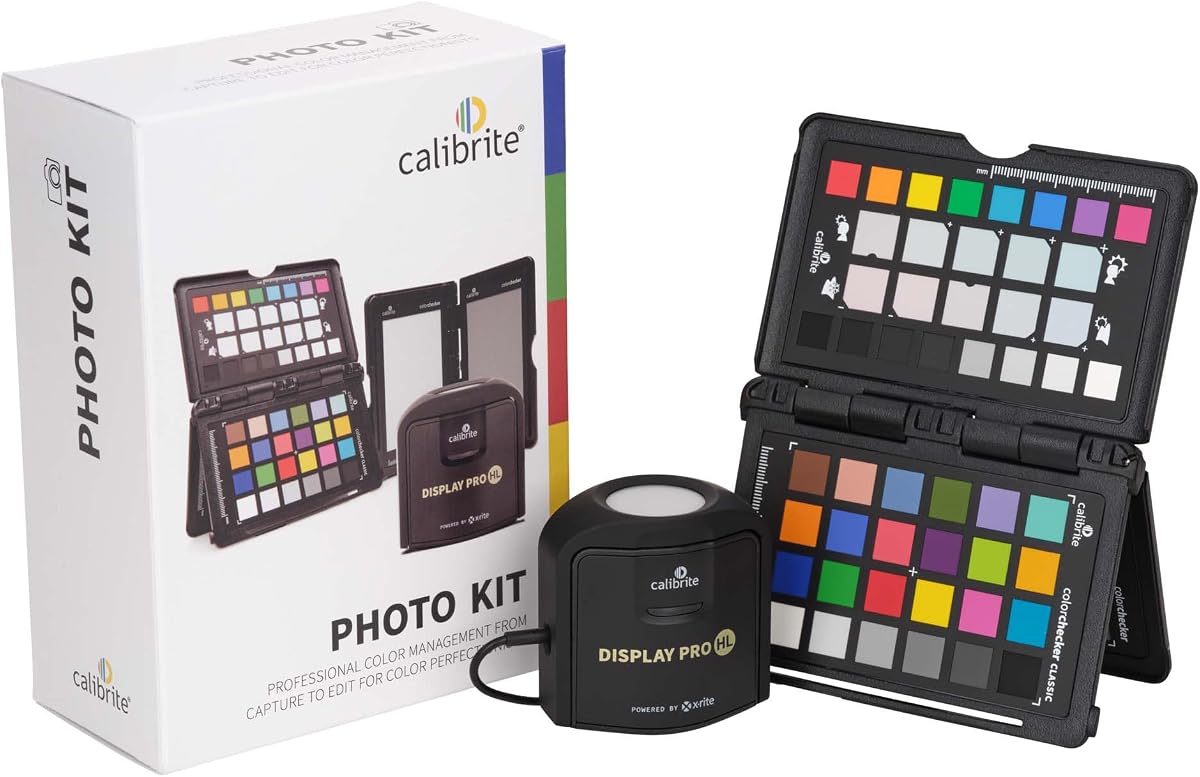
The Calibrite Photo Kit stands out because it addresses both sides of the photographic color process: capturing reliable color with the camera and viewing it accurately on the monitor. Its supplied rating of 4.5 is the highest among the ten products, and the kit combines the Display Pro HL colorimeter with a ColorChecker Passport Photo 2.
We may earn a commission when you buy through this link, at no additional cost to you.
The Passport supports custom camera profiles for RAW workflows, providing a repeatable reference for white balance and exposure. The Display Pro HL handles the viewing side, supporting mini-LED, OLED, Apple XDR, and other modern displays through its 3000-nit high-luminance sensor. Calibrite PROFILER supplies presets and customizable targets, including white point and gamma, so the two halves of the workflow can be coordinated.
This package is not a general-purpose video calibration solution, and it offers little advantage over a standalone colorimeter for someone who never creates camera profiles. Users who want only a quick display correction may find the broader capture workflow unnecessary. The included components also require a more deliberate process than a simple guided tool, with consistency depending on how the ColorChecker and software are used.
The kit is an excellent recommendation for photographers who shoot RAW, build custom camera profiles, and edit on a modern high-end display. It is especially compelling for a studio seeking a capture-to-edit process rather than a display-only correction. For that focused photography use case, it offers better cohesion than buying separate capture and calibration tools.
Custom camera profiles created with the ColorChecker Passport can give RAW files a repeatable starting point. Display Pro HL then helps ensure that the reference captured in-camera is viewed on a calibrated modern panel.
The kit is most meaningful when used as a connected process rather than treating the ColorChecker as an accessory. Photographers who profile cameras regularly can benefit from more repeatability across sessions, locations, and lighting conditions.
We may earn a commission when you buy through this link, at no additional cost to you.
The Datacolor Spyder X Elite is aimed at professional photographers and motion imagemakers who want more control than a one-click system. It has a supplied rating of 4.4 and combines a step-by-step assistant with an expert console, unlimited calibration settings, and support for TV and video standards.
We may earn a commission when you buy through this link, at no additional cost to you.
Its lens-based color engine is designed for accurate color across multiple monitors and compatible projectors. StudioMatch Assistant focuses on making separate displays look more alike, a valuable capability for photographers comparing images across a laptop and desktop or for studios using several workstations. Automatic profile changing and room-light monitoring support realistic daily operation.
SpyderProof gives users an immediate before-and-after evaluation with full-screen images, including personal files. The main caveat is its age relative to newer models in the category. The supplied information does not identify a 10000-nit measurement range, custom patch-set workflow, or explicit support for the latest high-luminance standards, so it is less compelling for cutting-edge HDR panel calibration.
The Spyder X Elite remains a relevant choice for professionals who value broad photo and video options, projector support, and detailed control. It is particularly useful in established workflows where an expert console and unlimited settings matter. Buyers should verify current operating-system compatibility before purchase, especially for an older model in a rapidly changing software category.
The step-by-step assistant lowers the barrier for less-experienced users, while the expert console exposes granular calibration choices. This dual structure allows the same device to serve a small studio and more demanding technical operators.
StudioMatch Assistant addresses one of the most visible problems in creative offices: screens that look different despite similar specifications. Projector calibration support expands the tool beyond desktop and laptop panels for presentation or review environments.
We may earn a commission when you buy through this link, at no additional cost to you.
The Datacolor Spyder4Pro focuses on the essentials of dependable display calibration. Its supplied rating is 4.2, while the full-spectrum color sensor, automated color and brightness calibration, and single-sensor multi-display support make it a practical option for offices and studios with several screens.
We may earn a commission when you buy through this link, at no additional cost to you.
The fourth-generation design uses double-shielded color filters intended to match CIE standards more closely and improve long-term stability. Supplied specifications also state improved consistency between Spyder units. These claims matter for teams that want repeatable results across multiple colorimeters rather than relying on a single device that may be unavailable for maintenance or travel.
The ReCAL assistant makes it easy to refresh the display profile as it changes over time. This is a practical feature for users who do not want to repeat a full setup every few months. However, the listed information does not highlight HDR brightness measurement, advanced video standards, custom patch sets, or the extensive control panels found in newer professional devices.
The Spyder4Pro is a sensible recommendation for photographers, designers, and general creative users who need solid multi-monitor correction and rapid recalibration. It is less suitable for users profiling extreme HDR reference monitors. Before buying, check whether the current software release and operating system support fit your computer, especially because the product belongs to an older hardware generation.
Double-shielded filters and improved unit-to-unit consistency are valuable when calibration results need to remain reliable over time. Those attributes can also help a studio maintain similar setups across several workstations.
ReCAL streamlines the process of compensating for display changes. Users can refresh profiles more frequently without repeating the entire workflow, which is useful for displays that drift or are adjusted often.
We may earn a commission when you buy through this link, at no additional cost to you.
The ASUS ProArt CaliContrO MCA02 is the most unconventional entry in the guide because it combines a colorimeter with display OSD control and an ASUS Dial. Its supplied rating of 1.5 is substantially lower than those of the other products, so prospective buyers should investigate current customer feedback carefully before choosing it.
We may earn a commission when you buy through this link, at no additional cost to you.
Specification-wise, the device supports measurement up to 10000 nits and is intended for LED, OLED, mini-LED, and other modern panel types. A reversible USB-C connection includes a counterweight for stable placement. A five-way navigator and shortcut key allow OSD adjustments, while the dial can be assigned to shortcuts within creator software.
That integration is the defining attraction and limitation. It can reduce the need to reach for a separate control method while adjusting a compatible ASUS display, making the package feel purpose-built for an ASUS ProArt desk. However, the 3-in-1 design does not automatically make calibration more accurate. The low rating may reflect the early stage of the product, software behavior, compatibility concerns, or customer experience, and the supplied information does not clarify which.
The MCA02 is best considered by ASUS ProArt users who prioritize integrated hardware controls alongside high-luminance measurement. The 10000-nit specification makes it technically interesting, but the 1.5 rating prevents an unqualified recommendation. Confirm operating-system and display compatibility, review recent feedback, and compare the included software workflow with established alternatives before making it a primary production tool.
Combining a colorimeter, OSD navigator, and programmable dial reduces the number of devices needed for a compatible ASUS workstation. The convenience may justify the integration for users who frequently adjust display settings and creative applications.
The stated 10000-nit range is impressive, but the lower customer rating deserves careful attention. Buyers should assess recent reviews, software stability, and actual panel compatibility rather than relying only on the headline measurement specification.
We may earn a commission when you buy through this link, at no additional cost to you.
The Datacolor Spyder X2 Elite is built for creators who divide their time between photography, video, and digital design. Its supplied rating is 4.0, and the device stands out through video and cinema targets, advanced display mapping, unlimited calibration settings, soft proofing, and StudioMatch support for multiple monitors.
We may earn a commission when you buy through this link, at no additional cost to you.
Rec.709 and Rec.2020 targets let users connect calibration to established video standards rather than a single generic workflow. The remastered software offers a cleaner, more concise interface, which is a meaningful improvement for users who want flexibility without an overwhelming control panel. Expert-recommended presets also help less-experienced creators start from a sensible configuration.
The limitation is that its supplied specifications do not identify an extreme high-luminance measurement range. That makes it less clearly suited to the newest HDR reference panels than the 3000-nit and 10000-nit Calibrite models. Soft proofing and advanced mapping can be valuable, but they add complexity for users whose requirements remain limited to basic desktop color correction.
Choose the X2 Elite for hybrid professionals who work across photo and video, especially when Rec.709, Rec.2020, soft proofing, and multi-monitor matching matter. It is a more advanced tool than the standard Spyder X Pro but not as specialized in extreme HDR measurement as the premium Calibrite products. The cleaner interface makes it approachable despite its broad feature set.
Rec.709 and Rec.2020 targets give the X2 Elite a clear advantage for motion workflows. Photographers can use the same device when a project shifts from still capture to graded or broadcast-oriented video output.
Advanced Display Mapping and Analysis can help users understand how a display behaves across its range. The redesigned interface presents these professional features in a more concise form, reducing friction without removing deeper controls.
We may earn a commission when you buy through this link, at no additional cost to you.
The Datacolor Spyder4Elite provides established color and brightness calibration in a full-spectrum package. Its supplied rating of 3.5 is lower than the other Spyder4-generation product in the guide, and its specifications emphasize broad display compatibility rather than HDR or contemporary creator software features.
We may earn a commission when you buy through this link, at no additional cost to you.
The colorimeter supports LED, OLED, LCD, and CRT displays, as well as laptops and front projectors. Double-shielded filters are designed to improve correspondence with CIE standards, long-term stability, average accuracy, and consistency between units. The ReCAL feature helps users restore profiles as displays change over time without repeating a complete setup.
Its age is the central concern. The lack of a stated high-luminance range means it should not be assumed suitable for modern HDR reference monitors. It also lacks the detailed video-standard, soft-proofing, display-mapping, and custom patch-set features listed for newer competitors. Users should verify current operating-system support and the availability of compatible software updates.
The Spyder4Elite remains practical for offices, education environments, and creative teams that need a full-spectrum device for varied legacy and modern screens. Its strengths are broad panel support and dependable automation, but a more recent model will usually offer a longer feature runway. It is therefore a value-oriented choice only when compatibility and availability are confirmed.
Support for LED, OLED, LCD, CRT, laptops, and front projectors makes the device adaptable to mixed environments. That breadth is useful for studios that have not standardized their screens or for offices supporting varied hardware.
ReCAL allows users to update a profile as a display ages or its settings change. Routine maintenance is essential because factory calibration, ambient conditions, and display aging can all alter the result over time.
We may earn a commission when you buy through this link, at no additional cost to you.
The right monitor calibration tool depends on display technology, the color standards you work with, the number of screens involved, and how much control you need. The following factors help separate basic correction tools from professional color-management instruments.
A colorimeter must measure the brightness range of the display it is intended to profile. Conventional office monitors and many laptop panels are generally within the reach of simpler devices, while mini-LED, OLED, Apple XDR, and HDR reference displays may require a high-luminance sensor. The Calibrite Display Pro HL reaches 3000 nits, while the Display Plus HL and ASUS CaliContrO MCA02 are specified to measure as high as 10000 nits. Choosing a sensor with adequate headroom gives the software more reliable readings across the panel's full brightness range.
Match the tool to your display. A lower-range model can still be useful for conventional creative work, but an underpowered sensor may struggle with exceptionally bright panels. Confirm the display technology and intended maximum brightness before purchasing.
Photo-oriented workflows generally begin with a neutral white point, suitable brightness, gamma, and a restrained gamut target. Video work may require Rec.709 or Rec.2020-related settings, while advanced users may want control over luminance, contrast ratio, custom patch sets, and individual primaries. The Calibrite PROFILER models provide Basic and Advanced modes, whereas the Spyder X2 Elite highlights unlimited settings and video targets.
Choose a software interface that matches your skill level and the decisions you actually need to make. Avoid paying for advanced controls you will never use, but do not choose a stripped-down interface if your work depends on specific standards.
Photography tools emphasize accurate shadows, white balance, and reference-image viewing. Video colorists need target standards, tone curves, and potentially extreme brightness measurement. Digital designers may care most about color consistency across multiple displays and applications. The Calibrite Photo Kit adds camera profiling for RAW workflows, while the Spyder X Elite and X2 Elite serve both photographic and motion-image tasks.
Select the calibration targets that match your deliverable. A general photo profile is not automatically an appropriate reference setup for graded video, just as a video-oriented target may be unnecessarily restrictive for basic print preparation.
Multiple displays can look different because of factory variation, age, panel technology, and operating-system settings. Professional colorimeters address this with multi-monitor profiling, display matching, shared presets, and uniform profiles. Calibrite's PROFILER software supports multiple monitors and shared presets, Datacolor StudioMatch assists with matching displays, and several Spyder models can calibrate multiple laptops and desktops.
Count the screens you need to profile and decide whether matching them is essential. Dual-display support may be sufficient for a small workspace, while studios with three or more panels should select software with explicit multi-display management.
A monitor is judged in the environment where it is used, and changing ambient light can alter the apparent contrast and color of an image. The Spyder X Pro includes room-light monitoring, while the Spyder X Elite adds the same type of environmental awareness alongside automatic profile changing. These features help align the display profile with a specific working condition rather than a generic isolated setting.
Look for room-light monitoring if you work in variable lighting or want a more context-aware setup. Otherwise, you can control the viewing environment by reducing glare and using consistent, neutral illumination.
Creating a profile is only one part of color management. Validation checks can reveal whether the profile still matches the display, while uniformity checks can help identify uneven brightness or color. The Calibrite Display Pro HL and Display Plus HL include Quick Check, Profile Validation, and Uniformity Check functions. Datacolor's ReCAL feature focuses on convenient recalibration as a display changes.
Prioritize devices with clear maintenance and validation functions. They make it easier to determine when a screen needs attention instead of assuming that a months-old profile remains accurate.
The colorimeter is only one part of the system; its companion software must run on your computer and integrate with the applications you use. The Calibrite PROFILER options support Mac and Windows, while Spyder products rely on Datacolor software. Newer models generally offer cleaner interfaces, but older hardware may depend on compatibility with the operating system's latest releases. A guided workflow is valuable for occasional users, while advanced dashboards serve technical teams.
Check operating-system requirements, current software support, and whether the interface matches your experience level. Do this before purchase, particularly for older models whose hardware may have limited upgrade paths.
A secure, repeatable sensor position improves workflow consistency. Many colorimeters include a hinged or weighted housing that rests against the display, while the ASUS device uses a counterweighted reversible USB-C cable. The Calibrite Display 123 is notably compact at approximately 34 millimeters tall and 37 millimeters in diameter. USB-C is common across the current selections, and many devices include a USB-A adapter for older computers.
Consider screen thickness, available desk space, cable direction, and whether your computer has the required connection. A device that is awkward to position can encourage skipped calibrations, undermining the value of the hardware itself.
Before calibrating, let the monitor reach a stable operating temperature and run for at least 30 minutes. Set it to the native resolution, use its recommended refresh rate, disable any separate display color profiles that might conflict with the new one, and restore the factory color settings. Keep the room reasonably dim and neutral, close curtains or blinds, and avoid direct light on the screen. Although some software can compensate for ambient conditions, a controlled environment produces the most consistent baseline.
Connect the colorimeter with the supplied cable, launch its calibration software, and choose the appropriate display and workflow. If the device supports multiple screens, profile each one in the same session and give each display a unique profile. During measurement, avoid touching the sensor or shifting the hinged housing. Keep the screen at the brightness target requested by the software rather than forcing an unrelated brightness preference, and allow every measurement pass to finish without interruption.
After calibration, inspect the before-and-after result and run any available validation or uniformity checks. Save the profile, close conflicting color-management utilities, and reopen the application you use most often. Recalibrate after a display adjustment, a major operating-system update, a change in room lighting, or when validation indicates a shift. Store the device in its pouch, protect the sensor surface from scratches and direct heat, and avoid liquids near the optical housing and connector.
A calibration tool is useful for photo editing because it creates a display profile that helps your editing application translate colors more accurately. The improvement is especially noticeable when a display has drifted, shows warm or cool casts, or differs from another screen in the same workspace. It does not guarantee that every photograph will look correct on every device, but it gives you a more dependable starting point for color decisions.
A practical schedule is every one to two months for a display used regularly for critical color work. More frequent checks may be appropriate if the monitor is adjusted often, exposed to changing light, used for HDR grading, or showing visible shifts. Recalibrate immediately after changing the operating system's color settings, installing a major update, or replacing a display, and follow the manufacturer's guidance for the specific device.
No. A higher measurement range, additional controls, and better software can make a premium device more appropriate, but accuracy also depends on correct operation, display quality, ambient conditions, and target settings. A well-used simpler colorimeter can be preferable to an advanced tool configured poorly. Match the sensor and workflow to your displays rather than assuming the most expensive option is always the right one.
Only with a colorimeter whose sensor range and software are designed for those displays. The Calibrite Display Pro HL supports modern mini-LED, OLED, and XDR panels up to its stated range, while the Display Plus HL reaches 10000 nits and targets HDR workflows. For any device, check the supported panel types, luminance specifications, and target options before attempting an HDR calibration.
Each connected display must be measured and profiled, although the software may make the process quicker by applying shared targets or presets. Matching tools such as Spyder StudioMatch can help reduce visible differences, but they cannot make different panel technologies physically identical. For critical work, review images on every display and confirm that each profile is assigned to the correct screen.
A neutral, dim, and consistent environment is generally best. Direct sunlight, strong colored reflections, and rapidly changing illumination can make both perception and measurements less reliable. If your room cannot be controlled, choose software with room-light monitoring and calibrate under the lighting conditions in which you will normally work. Avoid repositioning the display between calibration and critical editing sessions.
Yes, colorimeters are not generally restricted to a single display brand, although some products include features optimized for particular ecosystems. The ASUS CaliContrO MCA02 is especially integrated with display OSD and dial controls, while the Calibrite and Datacolor devices are designed for broader use. Check the software's current support for your operating system and display type before calibrating a less common or very new model.
The appropriate target depends on your display and the software's recommended method. Photo editing often benefits from a controlled brightness target that reflects a reasonable viewing environment, while video and HDR workflows may use standardized or luminance-specific targets. Let the software guide the process and avoid overriding its recommendations unless your professional workflow provides a clear, documented reason.
The Calibrite Photo Kit is the most complete option for RAW-focused photographers, combining display calibration with a ColorChecker Passport for capture consistency. The Calibrite Display Pro HL offers the strongest general balance for modern panels and professional controls, while the Calibrite Display Plus HL leads the group for extreme brightness, HDR, and advanced video requirements.
Prioritize compatibility with your actual display, the color standard you work in, and the number of screens you need to profile. A guided device such as the Calibrite Display 123 is a practical entry point, while Spyder options suit users who value room-light awareness, display matching, photo-video flexibility, or established multi-display workflows. Ensure the included software supports your computer before purchasing.
Prices, availability, software updates, and customer feedback can change, so review the current listing before buying. A good calibration tool is most valuable when used regularly, operated in controlled conditions, and combined with a proper viewing environment. Select the model that fits your workflow rather than choosing solely by sensor headline or feature count.