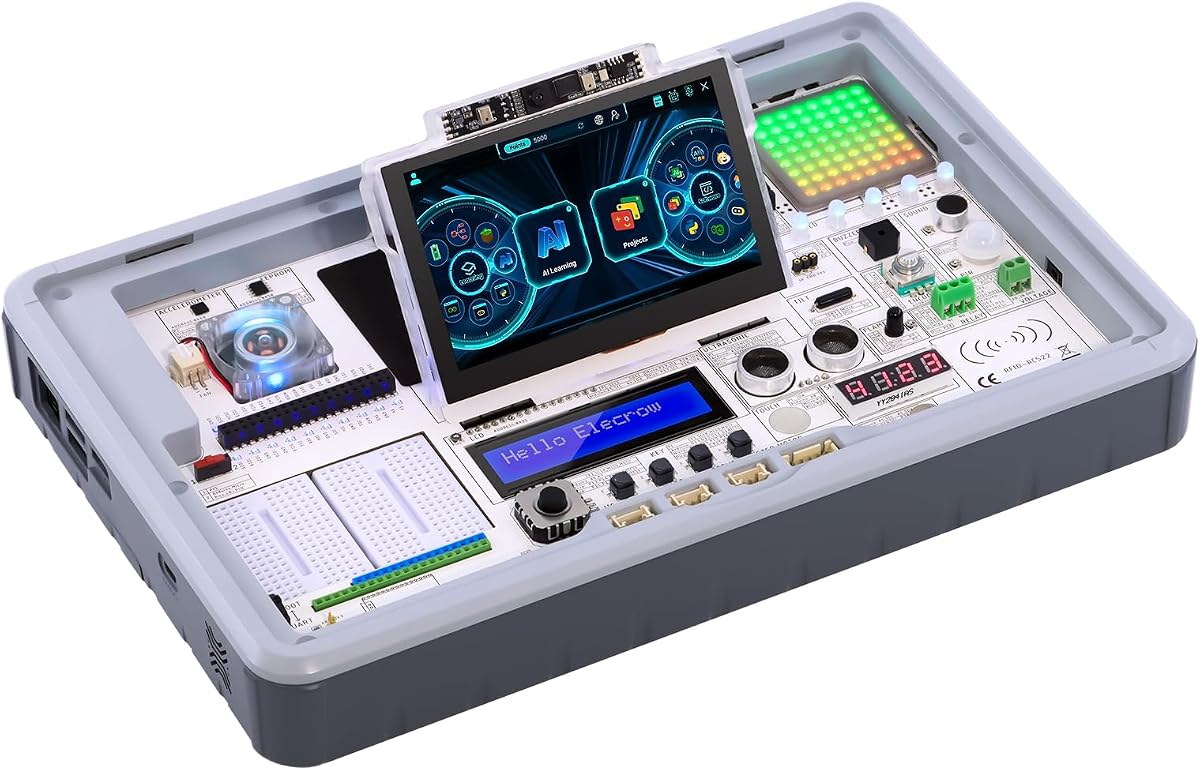
ELECROW CrowPi3 AI Learning Kit
4.3Editor score
Forty-one integrated components
Touchscreen and camera
Two hundred programming lessons
Our expert guide compares 10 AI Raspberry Pi kits, covering computer vision, LLMs, robotics, accelerators, learning resources, and Raspberry Pi 5 setups.
AI Raspberry Pi kits combine a compact computer with cameras, sensors, accelerators, motors, and educational materials for building practical artificial intelligence projects. A strong kit should make it easy to explore machine vision, voice interaction, language models, robotics, and embedded inference while providing clear instructions and dependable hardware.
We compared all 10 products by examining their included components, Raspberry Pi compatibility, AI-focused capabilities, learning materials, and suitability for different users. The list covers complete learning stations, standalone accelerator bundles, robotics platforms, modular experimentation kits, and Raspberry Pi 5 starter configurations with edge-computing foundations.
Each review explains what the kit is best equipped to build, who will benefit most, and where its compromises lie. Product configurations and availability can change, so check the current listing, included hardware, Raspberry Pi board requirements, and total system cost before making a final selection.
4.3Editor score

4.6Editor score

5.0Editor score
The table below compares each kit by its core AI focus, included hardware, educational support, and Raspberry Pi configuration, making it easier to match a platform to your preferred projects.
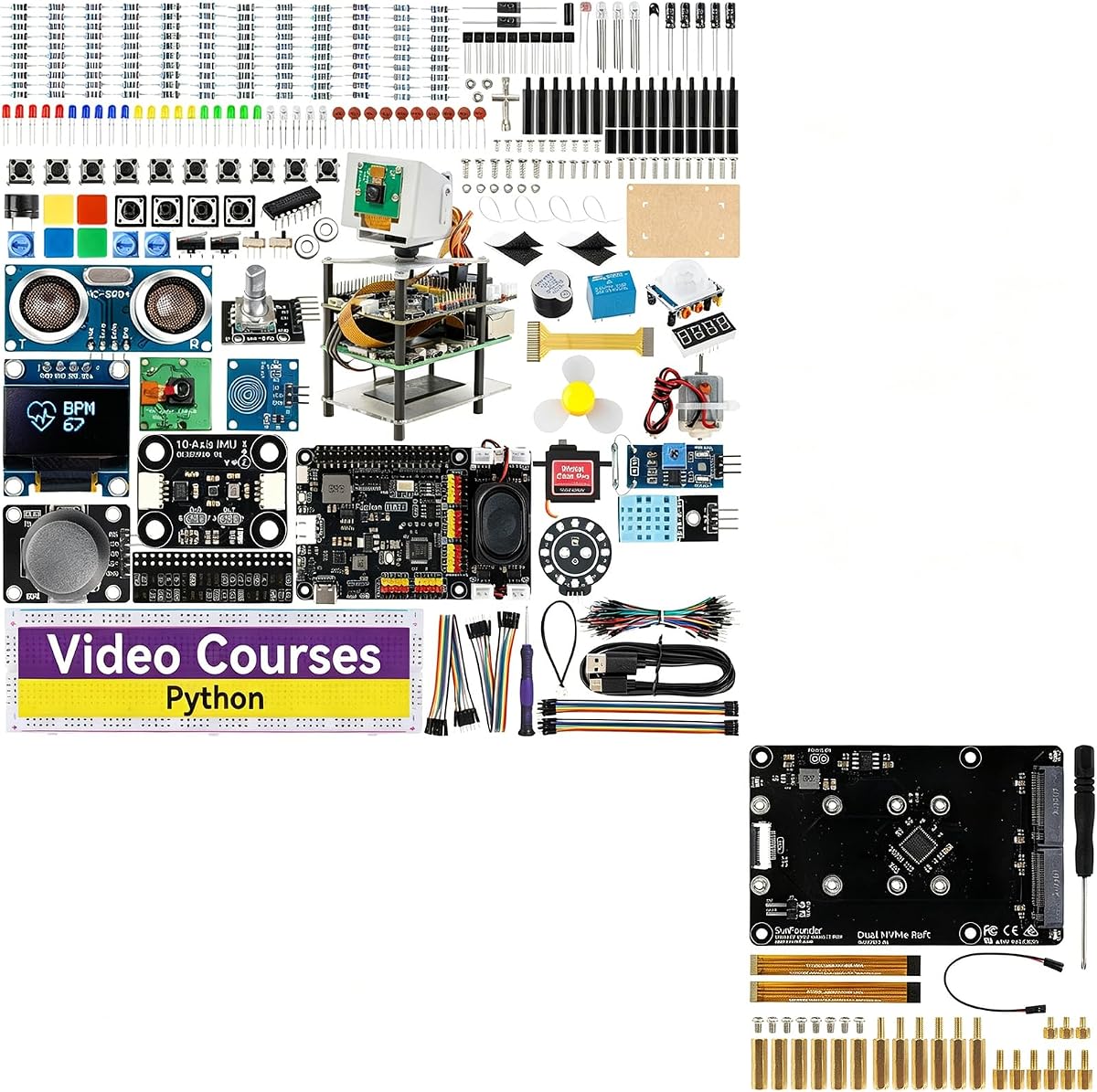


The SunFounder AI Fusion Lab Kit is an ambitious Raspberry Pi AI education bundle designed around multimodal projects rather than a single narrow application. It carries a 4.6 rating and supports Raspberry Pi 5, 4B, 3B+, 3B, and Zero 2 W boards. Its central strength is the combination of multiple language models, computer vision, speech, sensor input, and controllable pan-tilt hardware in one project-based system.
We may earn a commission when you buy through this link, at no additional cost to you.
The kit supports language-model services and tools including ChatGPT, Gemini, Grok, DeepSeek, Qwen, Doubao, and Ollama, giving learners several paths for experimenting with natural-language applications. Meanwhile, OpenCV, YOLO, and MediaPipe provide practical foundations for object detection, color tracking, movement analysis, and human-motion projects. The included camera and pan-tilt HAT allow software detections to drive physical movement, which makes the lessons more tangible than screen-only examples.
The Fusion HAT+ also consolidates hardware control, power management, safe shutdown, speaker output, and microphone input into a unified Python library. That approach can reduce wiring complexity for beginners while preserving the sensor and breadboard experimentation needed to understand electronics. Guided video lessons, sample code, documentation, technical support, and an active community provide additional structure. The principal trade-off is that the Raspberry Pi itself is not included, and first-time builders should expect some assembly work.
This is a strong recommendation for learners who want one platform to explore language models, speech recognition, text-to-speech, computer vision, robotics, and physical sensing. It suits students, educators, and developers who prefer guided projects over assembling every component independently. Choose it when broad AI exposure and visible, interactive results matter more than having the latest Raspberry Pi preinstalled.
Support for hosted and locally accessible language-model tools makes it possible to compare different interaction styles without changing the hardware platform. The curriculum can connect language, vision, speech, and sensor data into the same projects, which helps beginners understand how these capabilities work together.
The camera and pan-tilt assembly let learners create vision systems that track a recognized target rather than merely drawing a detection box. That physical response provides a clear demonstration of the connection between an AI inference, a control decision, and an actuator.
We may earn a commission when you buy through this link, at no additional cost to you.
The Vilros Raspberry Pi 5 AI Kit is a complete hardware package for users who want a powerful, ready-to-configure edge-AI system. It carries a 5.0 rating and includes a Raspberry Pi 5 with 8GB of RAM, a Raspberry Pi AI HAT+, an active cooler, a compatible case, preloaded storage, a USB-C power supply, an HDMI adapter cable, a storage bag, and a microSD-to-USB adapter.
We may earn a commission when you buy through this link, at no additional cost to you.
Its standout feature is the Hailo-8 or Hailo-8L accelerator, offered in 26 TOPS and 13 TOPS variants. The accelerator integrates with Raspberry Pi camera software and adds dedicated neural-network performance for demanding computer-vision workloads. The Raspberry Pi 5 itself provides a 2.4GHz quad-core Cortex-A76 processor, while the included cooler helps the combined accelerator and board maintain suitable operating temperatures.
This is more of a complete edge-computing platform than a themed collection of beginner exercises. That makes it appealing for developers building camera-based inference applications, experimenting with local models, or developing robust prototypes that need dependable cooling and storage. The main drawback is that beginners may need help interpreting Raspberry Pi OS, Hailo setup, and compatibility details, and the bundle is tied to the Raspberry Pi 5 form factor.
Choose this kit when you want a cohesive Raspberry Pi 5 AI workstation rather than a loose collection of modules. It is especially suitable for engineers, advanced students, and prototyping teams that value integrated accelerator hardware, sufficient memory, and a thoughtfully assembled accessory set.
The Hailo accelerator is integrated into the Raspberry Pi camera stack, allowing compatible vision tasks to use dedicated neural-network hardware. This is a major advantage for projects where CPU-only processing would add unnecessary latency or complexity.
Cooling, enclosure, storage, power, and video connectivity are all included. That reduces the number of separate accessories required to move from an unboxed board to a stable development and demonstration configuration.
We may earn a commission when you buy through this link, at no additional cost to you.
The ELECROW CrowPi3 Basic Kit is a broad electronics and AI learning station for Raspberry Pi 5 users. It holds a 4.3 rating and organizes 41 sensors and modules into a tidy, accessible platform. A 4.3-inch capacitive touchscreen and 2-megapixel camera support visual, voice, and human-computer-interaction projects without requiring a collection of disconnected peripherals.
We may earn a commission when you buy through this link, at no additional cost to you.
The platform is designed for learning by exploring. Its sensors and modules make it possible to investigate inputs, outputs, environmental measurements, motion, proximity, sound, and other physical signals, while the screen and camera provide immediate feedback. Software support includes OpenCV, facial recognition, object detection, and large language models, giving users several avenues into contemporary AI programming.
CrowPi3 also supports Raspberry Pi 5, Arduino Nano, micro:bit, and Raspberry Pi Pico. The included curriculum provides 200 lessons covering component identification, code reading, terminal commands, Python, and hardware interaction. Its versatility is also a limitation: the Raspberry Pi 5 is not included, and the dense collection of components requires time to explore if your goal is one narrow application.
This is a compelling pick for students, educators, and curious beginners who want broad AI, coding, and electronics exposure in a single organized station. Pick it when organized learning materials and immediate access to many components matter more than a specialized robotics or storage-oriented configuration.
The labeled layout keeps common sensors and functional modules within easy reach. Learners can focus on the program and its result instead of first troubleshooting a collection of loose wires, which is especially helpful in classrooms.
Supporting four development-board families lets users continue learning with Raspberry Pi while exploring microcontroller workflows. This adds flexibility for robotics, embedded control, and IoT projects as skills advance.
We may earn a commission when you buy through this link, at no additional cost to you.
The SunFounder AI Fusion Lab Kit with Dual NVMe Raft combines the broad AI curriculum of the Fusion Lab with high-speed storage expansion for Raspberry Pi 5. Its listing does not provide a numerical customer rating, so the hardware specification is the most reliable basis for evaluation. It supports Raspberry Pi 5, 4B, 3B+, 3B, and Zero 2 W for the AI learning components.
We may earn a commission when you buy through this link, at no additional cost to you.
The Dual NVMe Raft adds two M.2 M-Key slots compatible with 2230 through 2280 drives and supports PCIe Gen 2.0 transfer rates of up to 500MB/s. It can use two SSDs in RAID 0 or RAID 1, or combine one SSD with a Hailo-8L accelerator. That flexibility is attractive for AI development, local data collections, NAS configurations, Home Assistant, media services, and other storage-intensive Raspberry Pi 5 workloads.
The educational side remains ambitious, with support for several language-model platforms, OpenCV, MediaPipe, object and motion tracking, voice recognition, text-to-speech, and sensor integration. The camera and pan-tilt HAT make it possible to build systems that react physically, while the rechargeable power pack simplifies mobile demonstrations. The storage-focused version is best understood as an expanded lab rather than a simplified beginner kit.
Choose it if your planned projects will generate or retain substantial data, or if you want room for a second AI accelerator configuration. It is less suitable for a user who only needs a few introductory sensor projects, since the RAID and NVMe capabilities add complexity that may not improve every classroom exercise.
Two M.2 slots create more freedom than a conventional single-drive Raspberry Pi setup. RAID 1 can emphasize redundancy, while RAID 0 increases available capacity and performance for workloads that can tolerate a single-drive failure.
The platform can pair one SSD with a Hailo-8L accelerator, separating high-speed storage from neural-network acceleration. That arrangement is useful when a project needs both a larger working dataset and dedicated inference performance.
We may earn a commission when you buy through this link, at no additional cost to you.
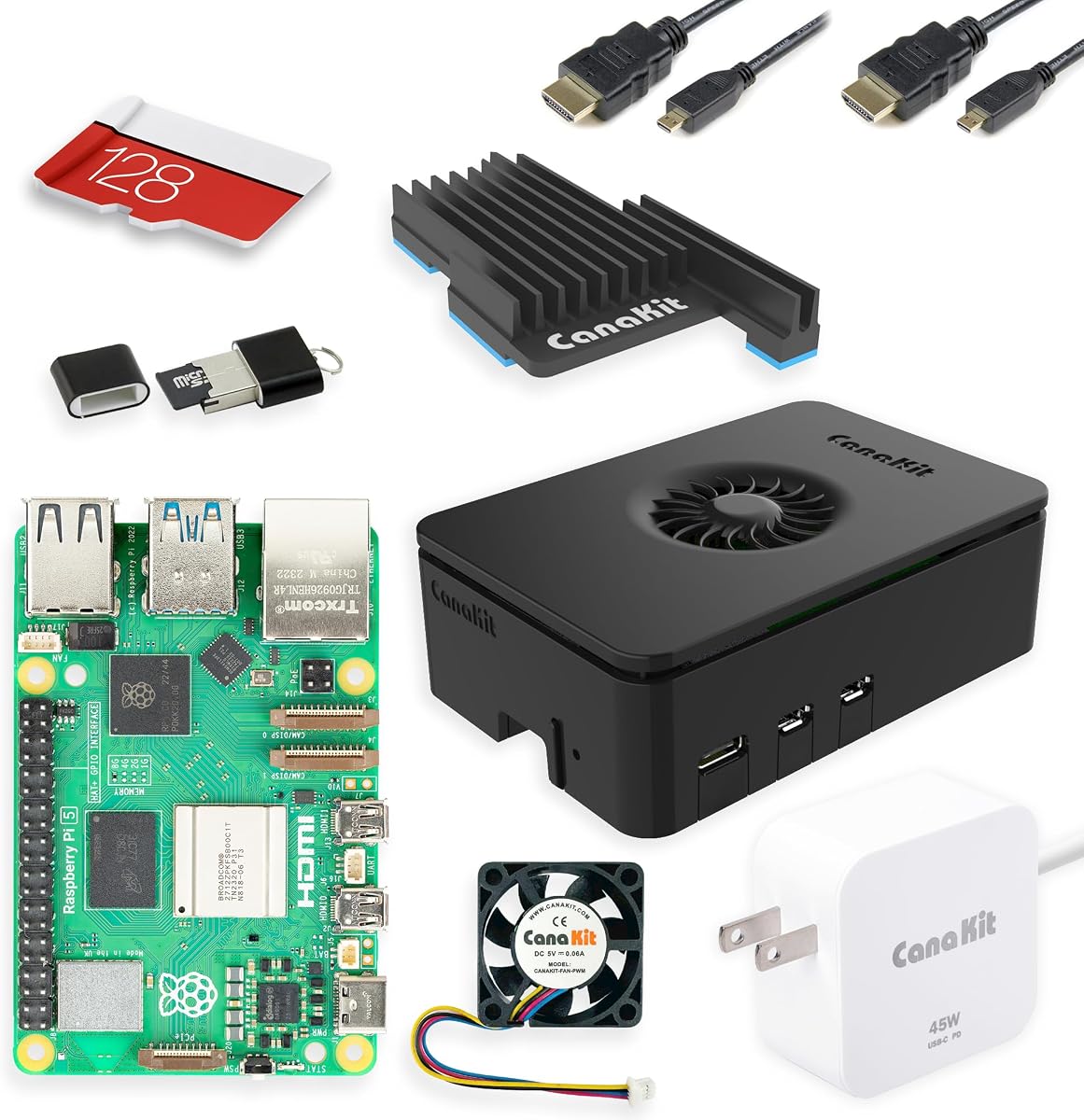
The CanaKit Raspberry Pi 5 Starter Kit PRO is a polished general-purpose foundation for Raspberry Pi 5 AI development. It carries a 4.7 rating and pairs an 8GB Raspberry Pi 5 with 128GB of preloaded microSD storage. The bundle includes a Turbine Black case, a low-noise bearing fan, a large anodized aluminum heat sink, a 45W PD power supply, and two six-foot display cables.
We may earn a commission when you buy through this link, at no additional cost to you.
Its 2.4GHz 64-bit quad-core processor provides useful performance for Python, computer vision, containers, automation, and AI experimentation. Although the kit does not include a dedicated neural-network accelerator, 8GB of memory and active cooling create a capable platform for lightweight inference, model experimentation, and software development. The preloaded Raspberry Pi OS reduces the initial setup barrier for newcomers.
This package is especially useful for someone who wants a dependable computer before adding a camera, AI HAT+, robot chassis, or other peripherals. Its main limitation is that it is not an AI-specific kit: there are no vision sensors, microphones, speakers, motors, or acceleration hardware in the box. Buyers must source those components separately based on the projects they intend to build.
Choose the CanaKit PRO for a strong Raspberry Pi 5 foundation, flexible expansion, or a general development system that will later receive AI hardware. It is a sensible choice for developers and advanced learners who prefer to select their own AI peripherals rather than follow a prearranged curriculum.
The included memory helps when running heavier Python processes, containers, visualization tools, and local model experiments. It also gives users more room to work than many lightweight Raspberry Pi starter configurations.
The case fan and substantial heat sink support sustained development work and reduce the chance of thermal throttling. The result is a more suitable foundation for processor-intensive experiments than a bare board with passive cooling alone.
We may earn a commission when you buy through this link, at no additional cost to you.
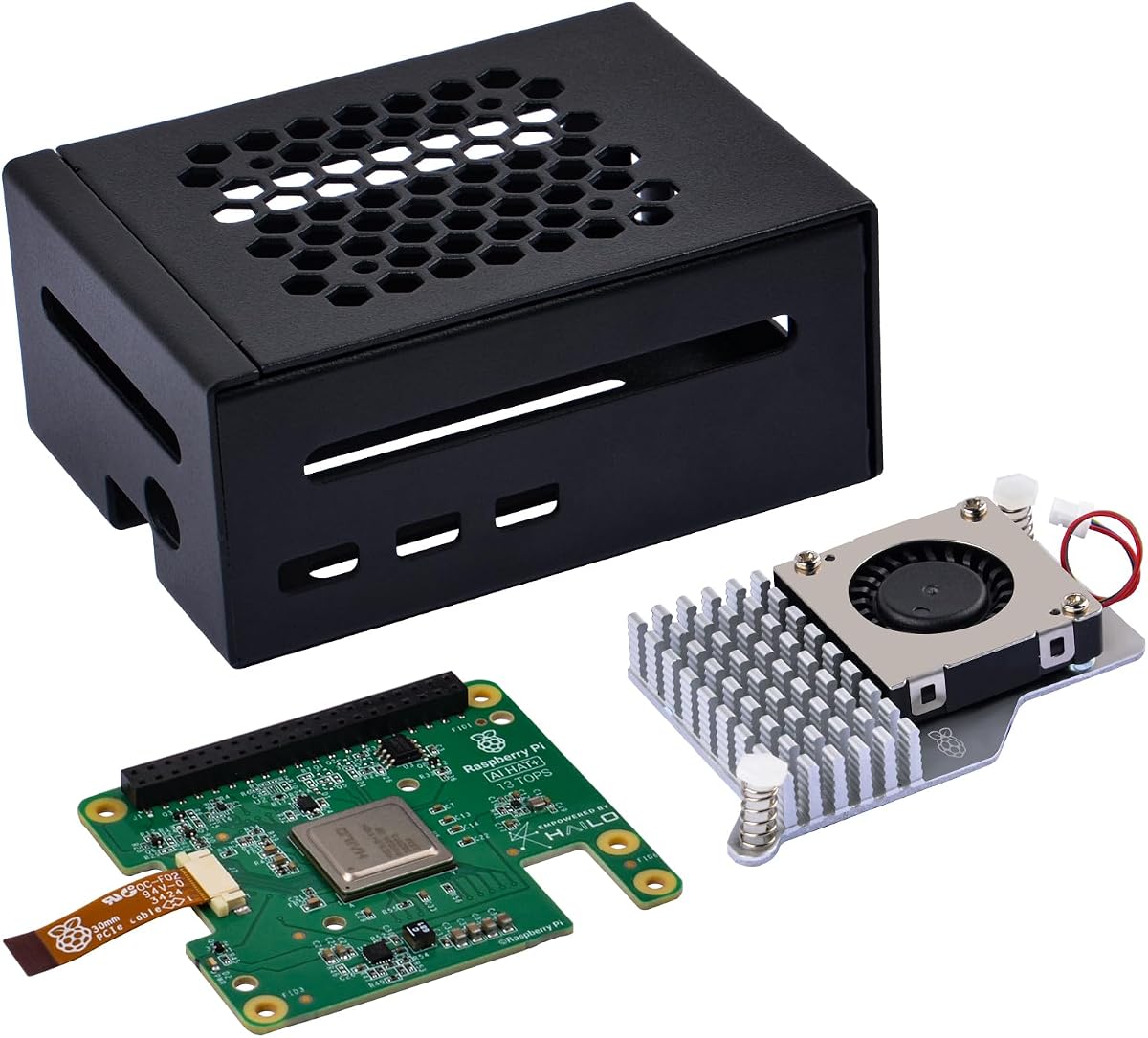
The GeeekPi AI HAT+ Bundle is a focused performance upgrade for Raspberry Pi 5 users building neural-network and computer-vision applications. It has a 4.5 rating and combines a 13 TOPS Hailo AI accelerator, a protective metal case, and an active cooler. The bundle is designed around the Raspberry Pi 5 rather than functioning as a standalone computer.
We may earn a commission when you buy through this link, at no additional cost to you.
The accelerator communicates through the Raspberry Pi 5 PCIe Gen 3 interface and is automatically recognized by an up-to-date Raspberry Pi OS image. Compatible camera post-processing applications can use the NPU directly. Supported workloads include object detection, semantic and instance segmentation, and pose estimation, making the package relevant to vision developers who want faster inference without relying entirely on the CPU.
The included metal case protects the board from dust, scratches, and physical damage while retaining access to most ports. An aluminum heatsink and PWM fan provide active temperature management, and the supplied stacking header, spacers, and screws allow installation alongside the Raspberry Pi 5 active cooler. Since no camera, Raspberry Pi board, or instructional curriculum is listed, this is a specialist upgrade rather than an all-in-one learning kit.
Choose it when your priority is efficient camera-based inference and you already own a Raspberry Pi 5. It is a better fit for experienced developers than for a beginner seeking guided projects, because the user must provide the computer, imaging hardware, software environment, and project guidance separately.
The 13 TOPS accelerator handles compatible neural-network tasks independently of the main processor. Offloading suitable workloads can improve responsiveness and leave more CPU capacity for cameras, networking, and application logic.
The enclosure and active cooler create a more complete operating environment for a Pi 5 with an expansion accelerator. Port access remains practical for connecting displays, networking, power, and external devices.
We may earn a commission when you buy through this link, at no additional cost to you.
The Seeed-built Raspberry Pi 5 Essentials Starter Kit PRO is an official-component package aimed at edge AI, Docker, development, and general workstation tasks. It has a 4.6 rating and includes the Raspberry Pi 5 board, official case with active fan, official 27W USB-C power supply, and a 128GB microSD card preloaded with 64-bit Raspberry Pi OS.
We may earn a commission when you buy through this link, at no additional cost to you.
The 8GB Raspberry Pi 5 provides ample memory for software development, containers, automation, and moderate AI experimentation. Official active cooling helps maintain stable performance during demanding workloads, while the preloaded card lets a new user begin exploring the desktop without first creating and installing an operating-system image. The official power supply is designed to provide dependable power for SSDs, cameras, AI accelerators, and other USB peripherals.
The bundle is cohesive and professionally assembled, but it remains a general Raspberry Pi 5 kit rather than a dedicated AI course or sensor package. There is no Hailo accelerator, camera, microphone, motor, or sensor array included. Those omissions make sense for buyers who already know which expansion hardware they need, but less so for someone expecting to complete an AI project immediately.
Choose this kit if you want an official, low-friction Raspberry Pi 5 base for edge development, Docker, Home Assistant, robotics control, or later AI expansion. It is particularly attractive for users who value recognizable official accessories, clear power and cooling support, and a preloaded path to first use.
The combination of memory, active cooling, reliable power, and preinstalled storage creates a sensible platform for Docker-based AI services and local development. It avoids several common early configuration problems encountered with a bare board.
Matching the official case and power supply reduces compatibility uncertainty, particularly when adding storage or expansion devices. The package also comes with a one-year warranty, professional technical support, and customer service.
We may earn a commission when you buy through this link, at no additional cost to you.
The SunFounder AI Robot Kit is an engaging way to move AI from a desktop demonstration into a physical, moving system. It carries a 4.3 rating and includes a Raspberry Pi Zero 2 W with a 32GB TF card, 12 servos, a camera, microphone, gyroscope, speaker, and other sensing hardware. The robot supports app control, first-person-view video, Python programming, voice commands, and visual recognition.
We may earn a commission when you buy through this link, at no additional cost to you.
Twelve servos drive 32 listed actions, including walking, sitting, standing, head movement, and tail movement. The varied actuator layout creates a platform for experiments involving balance, movement, gesture recognition, obstacle response, and human-computer interaction. ChatGPT-4o integration supports conversational questions and camera-assisted activities such as solving a displayed math problem or interpreting gestures.
The sensors create a much richer interactive experience than a camera-only vision kit. Ultrasonic, touch, gyroscope, sound, camera, speaker, and microphone inputs allow the robot to detect obstacles, respond to contact, react to sounds, and communicate. The trade-off is complexity: a multi-servo robot has more assembly points and moving parts than a learning board, and users will need to follow the online documentation carefully.
Choose this kit for beginners or educators who want an immediate, tangible AI project and for developers who enjoy programming physical systems. It is less suitable for buyers seeking a passive sensor station or a simple compute module, because its value comes from construction, movement, and interaction.
Servo-driven movement makes software decisions immediately visible and physical. A simple camera detection or voice response can trigger walking, turning, or expressive gestures, creating a satisfying connection between code and behavior.
Voice, gestures, app commands, and FPV viewing offer different entry points for experimentation. This variety helps users compare natural-language, visual, and manual control methods within the same robot platform.
We may earn a commission when you buy through this link, at no additional cost to you.
The ELECROW CrowPi 3 AI Learning and Development Station is a broad experimentation platform for Raspberry Pi 5 users. It holds a 4.1 rating and combines a 4.3-inch capacitive touchscreen, 2-megapixel camera, high-sensitivity microphone, and 41 sensors and modules in a clearly arranged station. The Raspberry Pi 5 is not included, allowing users to supply the board and storage configuration they prefer.
We may earn a commission when you buy through this link, at no additional cost to you.
Its software focus covers OpenCV, facial recognition, object detection, large language models, and human-computer interaction. The camera and microphone enable visual and voice-recognition projects, while the extensive module selection supports sensor experiments, embedded development, and rapid prototyping. Compatibility with Raspberry Pi 5, Arduino Nano, micro:bit, and Pico extends the platform beyond a single-board-computer workflow.
More than 200 courses cover AI interaction, Python, Node-RED IoT, microcontroller work, and hardware control. That makes the station suitable for structured instruction, but the density of components can feel less focused for a user who wants only one narrow application. Because the board is excluded, buyers should also account for the need to obtain a suitable Raspberry Pi 5 and compatible storage.
Choose CrowPi 3 for comprehensive learning across AI, coding, electronics, and IoT, particularly in a classroom with multiple learners. It is a strong fit for makers who value a ready-organized set of inputs and outputs over the streamlined, task-specific design of a robot or accelerator bundle.
The integrated sensors and modules reduce setup time and make it possible to move directly into programming experiments. Clear labeling helps beginners identify components and understand how each input or output relates to a program.
The course library spans introductory AI interaction, Python, Node-RED, and microcontroller projects. Educators can use the station for structured instruction, while self-learners can select topics in the order that matches their experience.
We may earn a commission when you buy through this link, at no additional cost to you.
The CrowPi 3 AI Learning and Development Station with Raspberry Pi 5 16GB Board combines a high-memory Raspberry Pi 5 with a comprehensive set of learning hardware. It carries a 4.5 rating and supports OpenCV, facial recognition, object detection, and large language model projects. The included 16GB board is particularly useful for users who want extra memory for development tools and demanding AI applications.
We may earn a commission when you buy through this link, at no additional cost to you.
A 4.3-inch capacitive touchscreen, 2-megapixel camera, and high-sensitivity microphone support visual and voice interactions. The 41 integrated sensors and modules cover a broad range of inputs and outputs without complicated wiring. Compatibility with Raspberry Pi 5, Arduino Nano, micro:bit, and Pico allows the same station to support Python AI, electronics, Node-RED IoT, and microcontroller exercises.
The 200-plus guided courses create a clear route from component identification to more advanced AI, coding, and hardware-control work. This makes the package ready for experimentation rather than simply serving as a collection of parts. The main considerations are physical size and the fact that the most advanced software still benefits from the learner's willingness to study examples, documentation, and camera or microphone behavior.
Choose this version when you want the CrowPi 3 ecosystem with the Raspberry Pi already included and ample RAM available immediately. It is well suited to serious students, educators, and prototype developers who value a self-contained learning station over the smaller footprint of an accelerator-only or robot-specific kit.
The higher memory capacity gives developers more room to run AI software, background services, browsers, containers, and visualization tools simultaneously. It also offers greater flexibility when testing larger models or more complex project dependencies.
The display, camera, microphone, and integrated sensors support interaction, perception, and physical input. Together with the multi-board compatibility and course library, they let a single platform bridge AI, Python, IoT, and embedded control.
We may earn a commission when you buy through this link, at no additional cost to you.
The right AI Raspberry Pi kit depends on whether you prioritize guided learning, dedicated inference, physical robotics, high-speed storage, or a flexible computer-vision workstation.
Some kits include a Raspberry Pi 5, while others expect the buyer to provide a compatible board and microSD storage. This distinction changes the starting experience considerably. A complete bundle may suit a first-time user who wants to begin without selecting a board, power supply, operating-system image, and storage separately, whereas a board-free kit can be more attractive if you already own compatible hardware.
Choose based on what you already have, not merely on the headline product. Verify whether the Raspberry Pi is included, which memory capacity is supplied, and whether storage is preloaded. Also confirm that any separate board you own appears on the kit's compatibility list.
Computer vision, local inference, language models, voice interaction, and robotics place different demands on a Raspberry Pi. Dedicated Hailo accelerators are attractive for camera inference, segmentation, pose estimation, and object detection, while a multi-LLM learning kit is better when you want to experiment with conversational interfaces and several model services. Sensor-rich stations emphasize electronics and embedded experimentation rather than maximum inference throughput.
Select the kit whose included hardware directly supports your intended projects. Consider whether you need only basic computer vision, sustained NPU acceleration, large datasets, local model support, or physical movement. A broader platform offers flexibility but may require extra accessories for any specialized task.
Sensors determine what an AI system can perceive and how it can respond. Cameras support recognition and tracking, microphones enable voice projects, ultrasonic modules help with obstacle detection, gyroscopes contribute orientation data, and touch sensors allow physical interaction. Kits with organized, labeled modules can be particularly useful for learners who do not want to build a wiring network from individual parts.
Count the sensors relevant to your plan rather than treating a larger number as automatically better. Check for the exact camera, microphone, motion, environmental, and touch capabilities you need, and verify whether a required sensor is genuinely included rather than only supported by the platform.
AI accelerators, active cameras, storage devices, and sustained processor workloads can generate enough heat and power demand to affect reliability. An active cooler and correctly sized USB-C supply are valuable when the Raspberry Pi 5 is running continuously or supporting multiple peripherals. Products that include these components create a more consistent operating environment than a bare board surrounded by mismatched accessories.
Look for active cooling whenever the kit is intended for sustained inference, servers, containers, or robotics. Follow the manufacturer's power guidance and avoid assuming that a general-purpose supply is adequate for every attached accelerator, drive, camera, and motor.
A collection of impressive components is less useful when users do not know how to connect them. Guided video courses, step-by-step instructions, sample code, component-identification exercises, and technical support can shorten the path from assembly to a functioning project. Beginner-oriented platforms benefit from a progression that introduces code, sensors, AI frameworks, and troubleshooting in a logical order.
Read the curriculum structure rather than relying only on the number of lessons. Clear explanations of wiring, Python, terminal commands, OpenCV, MediaPipe, LLM setup, and hardware control are more valuable than many short demonstrations that do not build on one another.
AI projects often generate images, audio, logs, datasets, models, and container images. A Raspberry Pi 5 kit with a microSD card is convenient for initial development, but M.2 expansion or RAID support may be useful for larger workloads. Robot platforms, by contrast, should be judged on actuator control and sensor flexibility rather than storage throughput alone.
Think about future accessories, including cameras, accelerators, displays, USB storage, motor controllers, and network equipment. Choose a platform with appropriate expansion interfaces and sufficient power, cooling, and storage headroom before your projects become more demanding.
Some kits prioritize guided discovery, others emphasize a polished workstation foundation, and others deliver an immediate embodied experience through servos and movement. The right educational format depends on your patience, preferred learning method, and desired outcome. A curriculum-rich station is excellent for structured study, while a robot can be more motivating for someone eager to see code produce immediate physical behavior.
For classrooms, check board availability, lesson clarity, replacement parts, and shared-use robustness. For independent development, prioritize documentation quality, accessible components, software examples, and the ability to integrate the kit with your preferred programming environment.
Begin by identifying every included and required component before assembly. Confirm whether the Raspberry Pi board, storage, camera, power supply, cooling system, and accelerator are present. Read the kit documentation, install any required software while the system is connected to a display, keyboard, and mouse, and complete the simplest example before combining cameras, sensors, motors, or storage.
Work through the curriculum in stages. First confirm that the operating system and camera or microphone function correctly, then add a single sensor and read its values from Python. Build an AI demonstration using recorded or static inputs before enabling live control, and verify power, wiring, and actuator movement before attaching mechanical components to a robot. Keep sample code and configuration files organized so successful steps can be reproduced.
Care for the system by using the specified power supply, maintaining airflow around the board and accelerator, and keeping the microSD card or storage device safely shut down before removal. Protect camera lenses and touchscreen surfaces, check robot joints for strain, and keep wiring away from moving parts. Update software and system images through trusted sources, back up important project files, and regularly inspect cooling, connectors, and storage health.
No. Some bundles include a Raspberry Pi 5, while others are expansion platforms designed for a separately purchased board. The SunFounder Fusion Lab, GeeekPi AI HAT+ bundle, and the Raspberry Pi 5 version of CrowPi 3 are examples that require an external board. Always check the inclusion list before ordering, particularly for storage and power accessories.
The ELECROW CrowPi3 Basic Kit and the SunFounder AI Fusion Lab Kit both emphasize guided learning with step-by-step instructions, sample code, and projects. CrowPi3 is particularly broad because it combines 41 modules with 200 lessons, while Fusion Lab offers a more focused exploration of LLMs, speech, vision, and pan-tilt tracking. The easiest choice depends on whether you value breadth or guided multimodal AI projects.
Not for every project. A Raspberry Pi 5 can run Python-based AI, OpenCV, and smaller inference workloads, but dedicated Hailo hardware can substantially improve compatible camera applications. The Vilros bundle and GeeekPi HAT+ package are most attractive when object detection, segmentation, pose estimation, or real-time response is central to the project.
Yes, although the experience depends on the kit and the model configuration. The SunFounder Fusion Lab explicitly supports several hosted and local model platforms, while CrowPi 3 is designed for LLM projects. Smaller models, efficient runtimes, and sufficient storage are generally better suited to a Raspberry Pi than demanding models intended for a full desktop workstation.
The SunFounder AI Robot Kit is the most purpose-built choice because it includes 12 servos, a camera, microphone, gyroscope, speaker, and other sensors. It supports voice commands, visual recognition, app control, and FPV viewing. Alternative learning stations can also drive motors, but they require additional chassis, actuator, and motor-control hardware.
It is highly recommended for the Raspberry Pi 5, especially with an AI accelerator, NVMe storage, or sustained processor use. Active cooling helps maintain stable performance and reduces the risk of thermal throttling. Kits that include a compatible cooler, such as the Vilros, GeeekPi, CanaKit, Seeed, and complete CrowPi configurations, provide a more reliable foundation.
A microSD card is suitable for operating systems, code, and modest project data, but large image collections, models, and logs may benefit from NVMe or external storage. The SunFounder Fusion Lab with Dual NVMe Raft is designed for two M.2 drives and RAID configurations. For any kit, check available storage before downloading large models or recording continuous video.
Prior Python knowledge is helpful but not essential for many beginner projects. The Fusion Lab and CrowPi 3 include structured lessons that introduce programming and terminal use, while robot kits provide tutorials and sample workflows. Start with the supplied examples, learn how each component is read, and gradually move from copied code to modified experiments.
The SunFounder AI Fusion Lab Kit offers the broadest balance of guided instruction and multimodal experimentation, making it the most versatile choice for learners exploring LLMs, speech, sensors, and computer vision together. The Vilros Raspberry Pi 5 AI Kit stands out as a complete accelerated workstation, while the ELECROW CrowPi3 Basic Kit provides the richest organized environment for electronics and programming education.
Prioritize the project type that matters most to you. Choose a Hailo-equipped package for efficient camera inference, a robot kit for physical interaction, a high-memory CrowPi system for a complete classroom station, and a general Raspberry Pi 5 bundle when you already know which AI peripherals you need. Also verify board inclusion, cooling, power, storage, and curriculum before ordering.
Product configurations, included accessories, and component availability can change, so check the current listing and compatibility information before purchasing. Compare the complete package rather than judging only by the product name, and ensure your chosen kit supports the Raspberry Pi model, AI software, and accessories required for your planned projects.