
HHSOET Heavy Duty 8-Outlet Power Strip
4.7Editor score
Eight widely spaced outlets
Durable metal housing
Screw-mounted installation
Discover the best Power Strip for under Desk options, comparing mounting, outlets, USB charging, surge protection, cords, and desk fit.
A power strip for under a desk should do more than provide extra outlets. It should fit neatly around the desktop, keep charging cables accessible, protect connected electronics, and avoid the loose tangle of floor-level extension cords. The right model turns an awkward power zone into a practical, organized workstation.
We compared ten options based on mounting method, number and spacing of AC outlets, USB charging options, cord length, surge protection, overload protection, and suitability for different desk structures. The list covers clamp-on, screw-mounted, and flexible mountable designs for home offices, studios, workshops, and shared workspaces.
Each review identifies the product's strongest use case and any practical limitations, while the top picks summarize the most capable choices for different priorities. Product listings and availability can change, so confirm the current specifications and compatibility with your desk before purchasing.
4.7Editor score

4.5Editor score

4.7Editor score
The comparison below highlights the major differences among all ten power strips, including their installation methods, outlet counts, USB options, cord lengths, and protective features.

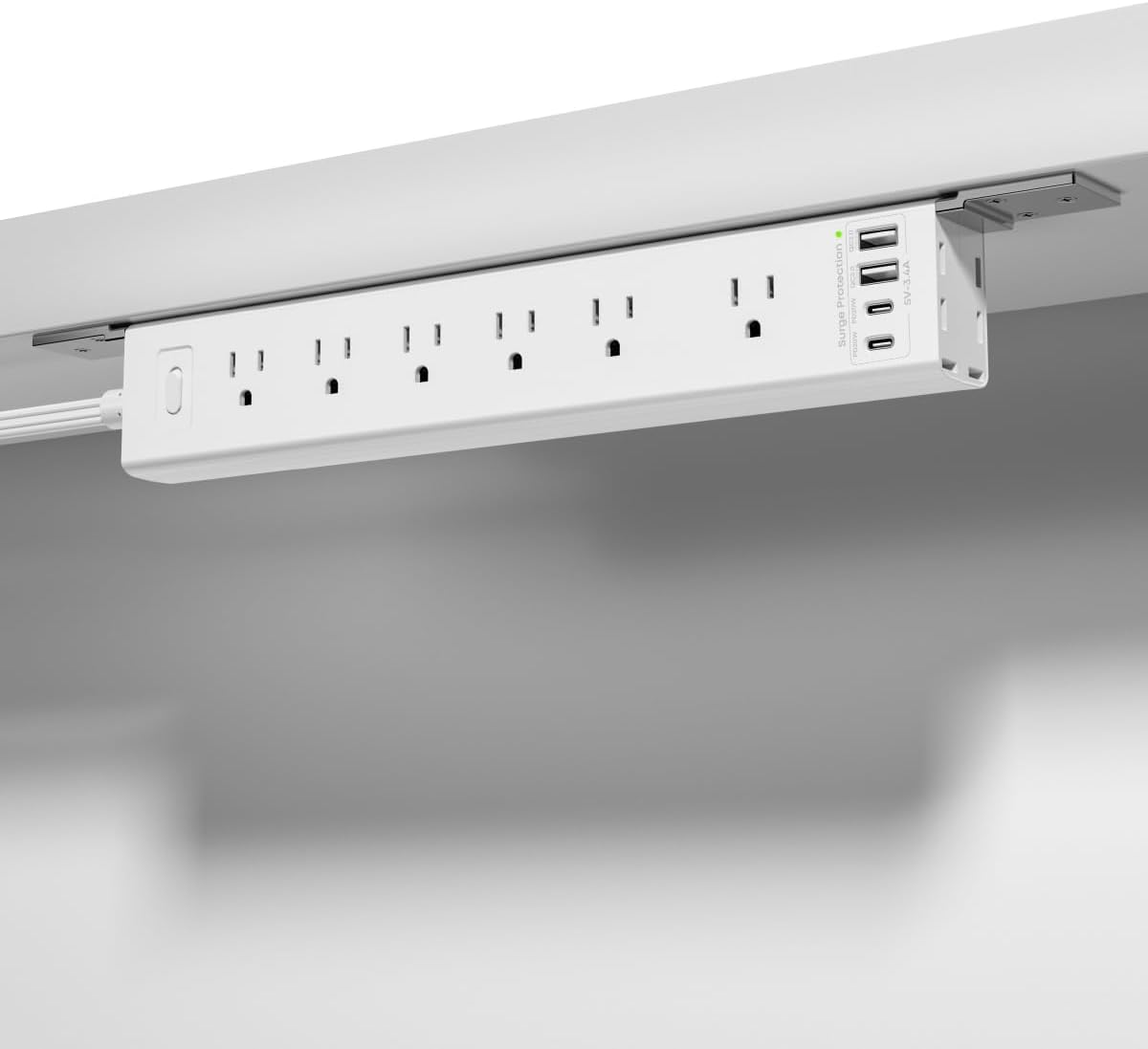


The VIPWELL 360-Degree Mountable Surge Protector Power Strip earns a 4.5 rating and stands out for its unusually flexible installation system. Its flexible clip can be positioned vertically on a wall, horizontally beneath a desk, or wrapped around a table leg, making it useful when drilling is undesirable or the desk has an unusual shape.
We may earn a commission when you buy through this link, at no additional cost to you.
This model combines six AC outlets with four USB ports, including two USB-A and two USB-C connections. A six-foot cord provides enough reach for many office layouts, while the 45-degree flat plug is designed to sit behind furniture without blocking the lower receptacle of a nearby wall outlet. The 1625W and 13A rating also gives it a useful balance of capacity and outlet spacing.
The main limitation is that the flexible mounting clip is not the same as a screw-tight clamp. A desk with a very thin edge or irregular surface may not provide a consistently secure hold. Buyers should also note that only two of the four USB ports are USB-C, making this less convenient for a collection of USB-C-only accessories than some competitors.
It is a strong recommendation for anyone who wants one strip to move between a desk, wall, and corner without changing the overall approach. It is particularly useful for renters, home offices, entertainment areas, and workspaces where drilling would be inconvenient. The combination of mounting flexibility, surge protection, USB charging, and a space-conscious plug makes it a broadly capable choice.
The wraparound clip is the defining feature, allowing the strip to follow the underside of a desktop or move to a wall or furniture leg. This makes one product suitable for several workspaces without requiring separate mounting hardware.
Two USB-A and two USB-C ports cover common charging needs, while the angled flat plug helps preserve access to wall receptacles. The six-foot cord offers a useful compromise between reach and compactness.
We may earn a commission when you buy through this link, at no additional cost to you.
The white version of the VIPWELL 360-Degree Mountable Power Strip has a 4.6 rating and offers the same flexible installation concept in a light-colored housing. It blends more naturally with white desks, wall panels, and contemporary furniture, which is a meaningful advantage in a visible home-office setting.
We may earn a commission when you buy through this link, at no additional cost to you.
Six AC outlets are supplemented by two USB-A and two USB-C ports, allowing the strip to serve computers, monitors, lamps, and several smaller devices from one central location. Its six-foot flat cord and 45-degree plug improve routing and access to wall outlets. Overload protection is designed to interrupt power if connected loads exceed the stated 13A or 1625W limit.
As with the black VIPWELL, the mounting system is a flexible clip rather than a conventional clamp. It should work best around a suitable desk edge, panel, or leg, and users wanting a fixed hold should check dimensions before installation. Detailed per-port charging speeds are not provided, so demanding charging workloads may favor a model with explicitly stated wattage.
This strip is ideal for a light, minimalist office where a black power hub would look visually heavy. It also appeals to users who need flexible placement and multiple charging formats without a complicated installation. For those priorities, the clean finish and versatile mounting approach make it a particularly polished option.
The white housing reduces visual clutter beneath a light desk or beside pale furniture. It provides the same useful combination of AC outlets and USB connections without drawing as much attention as a dark enclosure.
The wraparound design can move from beneath a desk to a wall, entertainment area, or table leg. It is especially useful when a permanent drilling-free installation is preferred.
We may earn a commission when you buy through this link, at no additional cost to you.
The HOPOW Dual Layer Desk Clamp Power Strip has a 4.5 rating and is built for users who have more devices than a conventional four- or eight-outlet strip can handle. Its two-layer construction provides 13 AC outlets and four USB ports, including two USB-C connections, for a total capacity of 17 connections.
We may earn a commission when you buy through this link, at no additional cost to you.
The upper strip can be removed for travel, while the lower section can be used as a wall-mounted power strip. The clamp adjusts to desktop thicknesses up to 2.75 inches and uses non-slip pads for stability. A ten-foot flat cord gives ample reach from distant receptacles, and the 0.33-inch angled plug helps preserve access to adjacent wall outlets.
Its sheer size is the main tradeoff. On a compact desk, a dual-layer unit with 13 AC outlets may occupy more space than necessary. The stated USB port count is generous, but individual charging outputs are not detailed, so users with specific fast-charging requirements should investigate device compatibility separately.
This is an excellent pick for a large command center, shared office desk, gaming setup, or editing suite where many powered devices must remain connected. The no-drill installation and removable design add flexibility that screw-mounted alternatives do not provide. For high outlet demand, it is one of the most complete solutions in this roundup.
Thirteen AC outlets reduce the need for multiple adapters and strips. That capacity is valuable when monitors, computers, speakers, lamps, and recording equipment all need dedicated connections.
The adjustable clamp accommodates a broad range of desktop thicknesses and avoids screws in the furniture. Non-slip pads help the mounted assembly resist shifting during daily use.
We may earn a commission when you buy through this link, at no additional cost to you.
The HHSOET Heavy Duty Long 8 Outlets power strip carries a 4.7 rating and focuses on a rugged, straightforward design. Its metal housing, wide-spaced receptacles, and screw holes make it a practical option for a workbench, garage wall, standing desk, or other utilitarian installation.
We may earn a commission when you buy through this link, at no additional cost to you.
All eight outlets provide room for large plugs without the crowding found on compact strips. The six-foot 14AWG cord and 15A, 125V, 60Hz, 1875W electrical rating support a solid power-delivery profile. A built-in switch and 1200-joule surge-protection module add everyday control and protection, while the stated ETL certification provides an additional mark of manufacturing scrutiny.
The omission of USB ports makes this less convenient for a modern charging station. Users must rely on wall chargers or separate USB adapters, which can reintroduce the cable clutter the strip is meant to solve. The product information also notes that it is not compatible with rack equipment, so it should not be treated as a network-rack power distribution unit.
Choose this model for a workshop, garage, or office where durability and accessible AC outlets matter more than integrated charging. The screw holes and wide spacing are particularly valuable for bulky power adapters. It is a dependable-looking, no-frills solution for users who need a sturdy mounted strip.
The metal enclosure is suited to workshops, garages, and other spaces where a lighter plastic housing may feel less appropriate. Its physical construction supports the strip's heavy-duty positioning.
Wide-spaced outlets reduce competition for room between adjacent plugs. This is especially useful for monitor power supplies, laptop bricks, and other larger adapters.
We may earn a commission when you buy through this link, at no additional cost to you.
The Acozvin 40W Total Fast Charging Station has a 4.7 rating and combines nine AC outlets with eight USB ports. This unusually broad USB selection includes four USB-A and four USB-C connections, making it a strong choice for desks where many accessories need to charge at once.
We may earn a commission when you buy through this link, at no additional cost to you.
The charging information is more specific than on many competing strips. Two orange USB-C ports are rated for up to 20W each, two black USB-C ports for up to 12W each, and each USB-A port can deliver up to 3A. Total USB output is capped at 40W, so the shared rating should be considered when several devices charge simultaneously.
Its installation is secure and adaptable: screws secure the clamp, which accommodates desk edges up to 1.7 inches thick. A ten-foot flat cord and 0.3-inch flat plug improve routing and access around furniture. The narrower clamp range compared with the HOPOW model is the main concern, as many modern desktops exceed that thickness.
This station is ideal for a shared office, creative studio, or technology-heavy home desk where USB-C and USB-A accessories are both common. It provides more integrated charging choices than most alternatives. Buyers with a thick desktop should verify measurements, while those needing maximum AC outlet count can compare it with the dual-layer HOPOW.
Four USB-A and four USB-C ports remove the need for many separate wall adapters. That makes the station especially useful for desks with several phones, headphones, tablets, and accessories.
The 40W figure applies to the USB system as a whole, not to each port. A single compatible device can use a 20W port, while several active devices will share available power.
We may earn a commission when you buy through this link, at no additional cost to you.
This mountable 10-in-1 power strip has a 4.4 rating and provides a balanced mix of six AC outlets, two USB-A ports, and two USB-C ports. It is designed for installation beneath a desk, behind a television, on a wall, or sideways in a confined area.
We may earn a commission when you buy through this link, at no additional cost to you.
Detachable adjustable brackets provide more precise placement than a basic adhesive strip. The 45-degree, 0.35-inch flat plug is useful when furniture needs to sit close to a wall, and the low-profile cord reduces visual bulk. USB-C fast charging is listed at up to 20W, while surge protection is rated at 1800 joules.
The specification description presents the overload circuit as cutting off power beyond 1625W but also lists a 16A figure, which is inconsistent with the product's stated 1625W rating at 125V. Users should rely on the manufacturer's current instructions and certification details rather than attempting to reconcile that wording themselves. Bracket mounting is also less convenient than a true edge clamp.
This is a sensible option for a media area, compact workstation, or under-desk installation that needs both AC and USB access. It offers more placement control than adhesive-only designs and more integrated charging than basic workshop strips. It is a versatile middle ground for users who do not need the very high outlet count of a dual-layer station.
Adjustable detachable brackets support horizontal, vertical, and side-oriented placement. This is helpful behind furniture or below a desktop where a conventional strip would occupy too much room.
Two USB-A and two USB-C ports support common accessories, and the 20W USB-C output offers a convenient charging option for compatible devices. This reduces the number of separate adapters around the desk.
We may earn a commission when you buy through this link, at no additional cost to you.
The QBA 8-in-1 Under Desk Power Strip has a 4.7 rating and offers a compact mix of four AC outlets and four USB ports. It is well suited to home offices, conference areas, dorm rooms, and workshops where a full-size floor strip would be excessive.
We may earn a commission when you buy through this link, at no additional cost to you.
One USB-C port supports PD charging up to 20W, while one USB-A port is listed for up to 18W and two additional USB-A ports provide standard 5V/2A output. The four USB connections share 5V/3A in total. A six-foot 14AWG cord supports placement from a distant receptacle, and the included screws allow secure attachment beneath a desktop or to nearby furniture.
Its primary limitation is the modest AC outlet count. A desk with several large adapters could fill all four receptacles quickly. Unlike a clamp model, it requires mounting holes, which may be a problem for renters or desks with finished surfaces. The total shared USB output also means the full 20W USB-C capability is not available while several other USB devices are charging at once.
This is a strong recommendation for a clean, compact workstation that mainly needs a few powered devices and a couple of charging connections. ETL listing, fire-resistant ABS construction, 1200-joule surge protection, and an accessible power switch make it particularly appropriate for professional or shared environments.
Four AC outlets and four USB connections cover many typical desk setups without creating a large floor-level strip. The housing is easier to conceal under a desktop than a dual-layer station.
The 20W USB-C port is useful for compatible phones and tablets. Because the USB system shares 5V/3A, users should avoid expecting every port to deliver maximum output at the same time.
We may earn a commission when you buy through this link, at no additional cost to you.
The CRST 8-Outlet Mountable Metal Power Strip has a 4.7 rating and combines a refined, compact profile with high protection capacity. Its eight widely spaced outlets are housed in a 1.6-inch slim aluminum body, giving it a less bulky appearance than many workshop-style strips.
We may earn a commission when you buy through this link, at no additional cost to you.
The product is rated for 2100 joules of surge protection, the highest figure among the products in this guide. A resettable 15A circuit breaker and indicator light provide overload control. The six-foot 14AWG cord and flat plug add routing flexibility, while detachable adjustable brackets allow wall, under-desk, side, or clean concealed mounting.
There are no USB ports, so this is primarily a power-distribution model rather than an all-in-one charging station. It also relies on mounting brackets instead of clamping directly to a desktop. Users who need USB-C charging may find the QBA or Acozvin more convenient, while those with bulky AC adapters will appreciate the generous outlet spacing.
The CRST is a compelling option for workshops, offices, garages, and standing desks where a slim metal strip, high surge protection, and flexible mounting are priorities. The included cable strap adds a useful finishing touch for cable control. It stands out as a durable, uncluttered alternative to larger plastic power hubs.
A 2100-joule rating provides substantial stated surge protection. The narrow aluminum housing allows the eight outlets to remain useful without making the assembly excessively deep.
Detachable brackets can be adjusted, reversed, or hidden for a cleaner appearance. This makes the strip useful under a desk, beside a wall-mounted display, or in a workshop.
We may earn a commission when you buy through this link, at no additional cost to you.
The 40W Under Desk Power Strip has a 4.4 rating and combines five AC outlets with two PD USB-C ports and two QC3.0 USB-A ports. It is a versatile option for users who want a mounted outlet box and meaningful fast-charging support in the same device.
We may earn a commission when you buy through this link, at no additional cost to you.
The USB system has a 40W total ceiling, with up to 20W available through each USB-C port and up to 20W through the QC3.0 USB-A connections. A ten-foot cord offers generous reach, while the unusually thin 0.15-inch cable can run along walls or beneath carpet. The flat plug is designed to disappear behind furniture and avoid wasted wall space.
Installation uses a sliding cover and body that can be fixed under a desk or on a wall. This method is less intuitive than attaching a conventional bracket or tightening a clamp, so care is needed to prevent the strip from pulling free. Shared total output also means maximum charging speeds are not available simultaneously across all four USB ports.
This strip suits a flexible home office or media setup where long cord reach and fast charging are both important. It is particularly useful when a wall receptacle is far from the desk and cables must travel through a concealed route. Buyers who prioritize quick, tool-free-looking placement may prefer this over screw-mounted products.
The ten-foot cord and 0.15-inch thickness make the strip practical when the nearest outlet is not directly beside the desk. A slim cable is easier to route without creating a bulky visible line.
Two USB-C and two USB-A ports cover modern and older accessories. The 40W shared output is useful for a mix of devices, though heavy concurrent charging will reduce individual speeds.
We may earn a commission when you buy through this link, at no additional cost to you.
The white HOPOW Dual Layer Desk Clamp Power Strip has a 4.5 rating and offers the same high-capacity, removable design as the black version in a lighter finish. It is a strong choice for a large workstation where visual brightness and numerous connections both matter.
We may earn a commission when you buy through this link, at no additional cost to you.
Thirteen AC outlets and four USB ports support up to 17 devices. The upper power layer can be removed for travel or used independently, while the lower layer may be wall-mounted. Its adjustable clamp handles desktop thicknesses up to 2.75 inches, and the ten-foot flat cord offers ample reach with a slim profile.
Like the black HOPOW, this is a substantial unit that may feel oversized on a narrow desk. It also does not specify individual USB-C or USB-A charging rates. Users should consider whether they need the outlet capacity or whether a more compact four- or five-outlet hub would better suit their setup.
The white housing is a thoughtful choice for light offices, studio furniture, and contemporary interiors where black hardware would contrast sharply. The combination of no-drill mounting, removable construction, and 17-connection capacity makes it particularly useful for shared or highly equipped desks.
The broad clamp range and non-slip pads allow the station to attach to a substantial desktop without permanent modification. It is well suited to offices where installation flexibility is important.
The white housing blends with light desks and cabinetry. Combined with the flat ten-foot cord, it creates a less visually intrusive solution for a visible workstation.
We may earn a commission when you buy through this link, at no additional cost to you.
The best under-desk power strip depends on your desk construction, device count, charging habits, and the amount of space you want to keep clear.
Clamp-on strips attach to a desktop edge without drilling, making them convenient for renters and movable furniture. Their secure fit is especially useful in busy work areas, but users should verify the maximum supported thickness and the shape of the edge. Screw-mounted strips are better for a permanent workstation and usually provide a more stable installation, although they require appropriate holes and careful placement. Flexible clip models offer fewer installation commitments but may not hold as firmly. Bracket-mounted strips fall between those approaches and can be repositioned among walls, furniture, and undersides of desks.
Count every device that requires a wall-plug connection rather than relying only on USB charging. A monitor, computer, speaker, lamp, and printer can quickly consume five or more AC outlets. Compact four-outlet strips suit basic offices, while five- and six-outlet models provide more breathing room. Eight-outlet options are practical for workshops and entertainment centers, and 13-outlet dual-layer stations are intended for highly equipped command centers. Wide outlet spacing also matters because many laptop and monitor power bricks occupy more room than a simple plug.
USB ports are most valuable when a desk contains several accessories that charge over USB. USB-A remains useful for older devices and accessories, while USB-C supports newer phones, tablets, earbuds, and some laptops. Pay attention to whether charging wattage is stated per port or shared across the system. A 20W USB-C port can serve a single compatible phone efficiently, but several devices connected together will reduce individual output. A large total port count does not necessarily mean high charging speed or support for every fast-charging standard.
Surge protection and overload protection address different electrical events. Surge protection diverts transient voltage spikes, while overload protection disconnects the strip when the connected load is too high. Both are valuable for computers, monitors, and other sensitive electronics. Compare the stated joule rating, amperage, wattage, and whether the breaker is resettable. Higher joule ratings indicate greater stated surge capacity, while a clear on-off switch and indicator light make it easier to know when protection has shut the circuit down.
A six-foot cord works well when the wall outlet is near the desk, while a ten-foot cord gives more freedom to reach a distant receptacle. Longer cables can be routed neatly but may also become more visible if they cross a walkway. Flat cords are easier to tuck behind furniture and under desks, and an angled plug can preserve access to the lower outlet on a duplex receptacle. Measure the route from the wall to the intended mounting point before choosing, especially if a cord must pass under carpet, along a baseboard, or around a desk leg.
The wall plug can determine whether furniture can sit close to the receptacle. A bulky rectangular plug may prevent a desk, cabinet, or sofa from sitting flush, while a thin angled plug tucks neatly into the corner. This matters in tight home offices and rooms where outlets sit behind large furniture. Also consider outlet orientation and spacing, since a plug that fits the wall outlet may still block the strip's own sockets if the cord bends sharply.
A large power strip can solve connectivity while making a compact desk feel crowded. Four- and five-outlet hubs are easier to conceal, whereas dual-layer 13-outlet models need vertical room and a sturdy edge. Black finishes suit dark or industrial furniture, while white finishes blend with lighter desks and cabinetry. The mounting orientation also affects appearance: a strip mounted flat beneath a desktop may be less visible than one attached vertically to a leg.
Before installation, unplug every device and identify the nearest outlet, the intended mounting point, and the direction of the wall plug. Check the strip's rated amperage and wattage against the combined requirements of the devices you plan to connect. Never treat the number of physical outlets as proof that every attached appliance can operate at the same time.
Mount the strip firmly using the specified clamp, screws, or brackets. Route the cord along a desk frame, wall base, or protected floor route without creating a sharp bend. Connect the wall plug without forcing it and use the on-off switch when appropriate. If the breaker trips, unplug devices, reduce the load, and reset it according to the manufacturer's instructions.
Inspect the strip periodically for cracked housing, loose sockets, discoloration, unusual heat, or a damaged cord. Do not use a strip with visible damage, and avoid placing it under rugs where heat can build up. Keep liquids away from the unit, and follow the instructions for the devices and the strip. Unplug the wall plug before cleaning or changing the installation.
A tabletop or desk-edge mount usually keeps outlets close to the equipment and cables shorter, while a wall mount can work well in narrow or shared spaces. Choose a clamp if you want a drilling-free installation, and choose screws or brackets for a more permanent setup. Whichever method you use, route the cord where it cannot be pinched or tripped over.
A space heater is a high-load appliance, so it is best plugged directly into a properly rated wall outlet rather than into a power strip. If the manufacturer's instructions allow use with a surge protector, confirm that the strip's current and wattage ratings are appropriate. Never ignore a repeatedly tripping breaker, as that indicates a load or connection problem.
Count the equipment that requires an AC plug, then add room for large laptop and monitor adapters. Four outlets may be enough for a basic workstation, while six or eight offers more flexibility. A 13-outlet station is useful for command centers or shared desks but may be unnecessarily large for ordinary use.
No. The connected device, cable, and charging protocol all affect the result. A 20W port may deliver up to 20W with a compatible device and cable under suitable conditions, but some devices draw less. On strips with shared total output, charging many ports at once reduces the rate available to each one.
A flat or angled plug can prevent furniture from sitting flush against the wall and may preserve access to a second wall receptacle. It is especially useful with desks, cabinets, and sofas positioned close to the wall. A standard plug can work if there is enough clearance behind the furniture.
Surge protection is intended to handle sudden voltage spikes, while overload protection disconnects the strip when the total connected load exceeds its rating. A useful under-desk strip provides both, along with a resettable breaker or switch. Neither feature replaces careful loading or proper electrical installation.
No. Check the maximum desktop thickness, edge shape, and material before purchasing. A clamp designed for a thin panel may not secure properly on a thick, rounded, or heavily upholstered desk. The mounting area should also be firm and free from obstacles that could weaken the grip.
Leaving it switched on is generally convenient when the connected equipment is intended to remain available, but switching it off during long absences can reduce unnecessary standby power use. Use the strip's switch rather than repeatedly unplugging the wall plug. If the breaker trips, identify and remove excess load before resetting it.
The VIPWELL 360-Degree models offer the most flexible mounting approach, with six AC outlets, four USB ports, and a space-conscious angled plug. The HOPOW dual-layer clamp is the strongest high-capacity option, while the HHSOET metal strip and CRST mountable strip serve users who value rugged outlets, surge protection, and a cleaner industrial approach without USB charging.
For most desks, prioritize the installation method first, then count AC-powered equipment and compare USB charging output. Clamp models avoid drilling, screw-mounted products deliver a stable permanent hold, and high-capacity stations make sense only when the outlet count will actually be used. Cord length, outlet spacing, and flat-plug clearance are equally important to a clean installation.
Before ordering, verify current product specifications, desktop thickness, device requirements, and mounting clearances. Product listings and availability can change, and the included information should be checked for the most current instructions. The right strip is the one that fits safely, supplies the connections you need, and keeps daily cable management out of the way.