
Mini Keyboard with Touchpad-2.4GHz & Bluetooth
4.2Editor score
Bluetooth 5.0 and 2.4GHz
Seven-color adjustable backlight
Integrated rechargeable touchpad
Explore the best mini keyboard with touchpad options, comparing connectivity, portability, backlighting, touchpad features, battery life, and device compatibili
A mini keyboard with touchpad combines compact physical typing with the pointer control normally provided by a separate mouse. That combination makes these devices especially useful for smart TVs, streaming boxes, tablets, phones, projectors, and portable setups where space is limited or navigating on-screen menus feels awkward.
The products in this guide were compared using the information available for each model, including supported connection methods, touchpad design, lighting, battery configuration, portability, and stated device compatibility. The list covers budget-oriented options, rechargeable dual-mode models, a full-size Logitech alternative, and premium compact designs.
Each review explains the features that distinguish its keyboard and the compromises buyers should consider. The top three represent the strongest combinations of value, functionality, and premium construction in this roundup. As with all buying guides, current prices, availability, ratings, and compatibility details can change over time.
4.2Editor score

4.3Editor score

4.0Editor score
This side-by-side comparison highlights each mini keyboard with touchpad's connection modes, lighting, touchpad orientation, battery approach, portability, and intended device range, helping narrow the field before a detailed review.


This compact dual-mode keyboard earns a 4.2 rating by combining a usable QWERTY layout, an integrated touchpad, adjustable seven-color lighting, and rechargeable power in a highly portable package. It is particularly well suited to Android TV boxes, projectors, smart TVs, tablets, PCs, and other systems where a full-size keyboard and separate mouse would be inconvenient.
We may earn a commission when you buy through this link, at no additional cost to you.
Its strongest feature is the choice between Bluetooth 5.0 and a 2.4GHz USB receiver. Bluetooth keeps the setup cable-free and can serve phones and tablets, while the supplied receiver offers plug-and-play operation for compatible systems. The touchpad supports multi-finger navigation and includes distinct left- and right-click buttons, while the compact proportions make it easier to carry than a conventional desktop keyboard.
The adjustable backlight provides useful visibility in dim rooms without forcing a single fixed color. A built-in 600mAh rechargeable lithium battery charges through the Type-C port, while automatic sleep and wake functions help conserve energy. Buyers should still consider that battery performance can decline with prolonged use and that compatibility should be confirmed before purchasing.
This is the strongest overall value for shoppers who want more than the bare minimum from a mini keyboard with touchpad. The main caveat is setup complexity for certain streaming devices: Amazon Fire TV Stick support requires Bluetooth mode, while 2.4GHz use requires an OTG adapter. For Android boxes, presentations, travel, and compact desktop use, it offers an unusually balanced feature set.
Bluetooth 5.0 and 2.4GHz support give this keyboard broader utility than a single-mode remote. The receiver automatically connects when inserted, while Bluetooth pairing is initiated with the stated FN+F3 command, making the transition between portable and stationary use straightforward.
Seven selectable backlight colors let users adjust visibility and appearance for different environments. The evenly distributed lighting makes keys easier to locate during evening streaming, travel, or bedside use without adding the bulk of an illuminated full-size keyboard.
We may earn a commission when you buy through this link, at no additional cost to you.
The K808 carries a 4.3 rating and stands out through its unusually adaptable touchpad, built-in laser pointer, dual-mode wireless operation, and genuinely compact dimensions. Its approximately 6-by-2.33-by-0.51-inch size makes it a practical travel keyboard while remaining large enough to provide a recognizable QWERTY layout.
We may earn a commission when you buy through this link, at no additional cost to you.
Its most distinctive feature is a touchpad that rotates by 90 degrees through the FN+Alt command. That lets users align cursor movement with a vertically held phone or horizontally oriented television and laptop. Dedicated left- and right-click buttons improve precision, while the rotating layout is especially helpful when one device is being used in different physical orientations.
The seven-color backlight supports comfortable use in dark rooms, and a rechargeable 600mAh battery charges through Type-C. Automatic sleep and wake help reduce unnecessary power consumption. A 2.4GHz receiver supports PCs and televisions, while Bluetooth frees up ports on compatible laptops, tablets, and phones. The built-in laser pointer adds value during presentations.
Buyers should expect some compromises from the extremely small footprint. Keys will feel cramped for extended writing, and the Bluetooth version is not the newest generation, although the stated platform support remains broad. For travel, presentations, home theater use, and controlling several device types, however, the K808 offers one of the strongest balance of flexibility and portability in this list.
The 90-degree rotating touchpad is more useful than it may initially appear. It can follow the direction of a phone screen, suit a television, or adapt to a laptop without forcing the user to work around a fixed cursor axis.
The integrated laser pointer gives the keyboard a useful role beyond basic text entry. Combined with its small body, rechargeable battery, and dual wireless modes, it fits neatly into a travel bag or presentation kit.
We may earn a commission when you buy through this link, at no additional cost to you.
The Fosmon Mini Keyboard with Touchpad Mouse has a 4.0 rating and differentiates itself with Bluetooth 5.2, a 2.4GHz nano receiver, a rechargeable battery, and a broad list of entertainment devices. It is designed for users who want one compact controller across streaming boxes, televisions, consoles, tablets, phones, and computers.
We may earn a commission when you buy through this link, at no additional cost to you.
Its listed compatibility includes Apple TV, Amazon Fire Stick, Google TV, PlayStation 4, PlayStation 4 Pro, PlayStation 5, HTPC and IPTV systems, virtual reality headset boxes, and mobile or laptop platforms. The stated working range is approximately 33 feet, which should be sufficient for a living room or desktop, although actual performance depends on the host device and environment.
Battery life is another strength. The built-in rechargeable lithium-ion battery is listed for up to ten days of continuous working time and up to 50 days of standby, with indicators for low and full charge. USB-C charging helps reduce cable friction, while the backlit keyboard is useful in darker viewing areas. A limited lifetime warranty also adds reassurance.
The most important caution is platform compatibility. Fosmon specifically notes that smart television support is not guaranteed, so buyers should verify Bluetooth capability, and Xbox Series consoles are excluded. The 4.0 rating is also the lowest in this roundup. Even so, the combination of newer Bluetooth, extensive device support, and proven rechargeable convenience makes this a strong premium choice for compatible systems.
The extensive compatibility list is the Fosmon's defining strength. It supports modern phones and laptops alongside major streaming ecosystems and PlayStation models, reducing the need to carry several different controllers.
Separate status indicators make it easier to know when charging is needed or complete. The stated multi-day working time also makes the keyboard practical for regular entertainment and travel use.
We may earn a commission when you buy through this link, at no additional cost to you.
The Logitech K400 Plus earns a 4.4 rating and offers a more conventional living-room keyboard experience than most ultra-compact alternatives. It combines a full-width layout, large touchpad, dedicated click controls, and a 33-foot wireless range, making it especially appropriate for a PC connected to a television.
We may earn a commission when you buy through this link, at no additional cost to you.
Its size remains smaller than a standard office keyboard, yet it offers more room for familiar typing than palm-sized models. The large touchpad is listed at 2.99 inches high by 1.85 inches wide, providing a meaningful navigation area for media interfaces. Quiet keys make it less disruptive during movies or evening streaming, and the spill-resistant design adds everyday resilience.
The primary strength is the Logitech Unifying receiver. Plugging it into a USB port provides a simple connection, and Logitech Options Software can be used to adjust controls and save preferences. The keyboard is compatible with Windows 7, Windows 8, Windows 10 and later, Android 7 or later, and Chrome OS, making it a focused solution for PCs, Android systems, and Chrome OS devices.
The important limitations are that it lacks Bluetooth and integrated backlighting. It also relies on a battery rather than a rechargeable cell, although the stated battery life of up to 18 months is one of the strongest in this roundup. Choose the K400 Plus when ease of use, familiar spacing, and dependable long-term operation matter more than maximum portability.
The K400 Plus is not as pocket-sized as the smallest models in the guide, but its wider layout and larger touchpad reduce the learning curve. It is a practical middle ground for viewers who want familiar keys without a full desktop keyboard.
With a stated battery life of up to 18 months and an on-off control, the keyboard is designed to stay ready without frequent charging. That makes it a low-maintenance option for a permanently placed media center.
We may earn a commission when you buy through this link, at no additional cost to you.
The Rii i4 has a 4.4 rating and appeals to buyers who prioritize portability, a rechargeable battery, and the freedom to connect by Bluetooth without carrying a separate wireless receiver. Its pocket-sized body is designed for travel, gaming, media-center use, and quick control of mobile or tablet screens.
We may earn a commission when you buy through this link, at no additional cost to you.
Bluetooth 4.0 pairing is activated with the stated FN+Tab command, while the included 2.4GHz dongle provides an alternative for compatible computers and other USB-equipped systems. Its compatibility list includes Fire TV devices, Android TV boxes, Apple iOS products, tablets, Windows, and Mac OS 6.0 or later. The package contains the keyboard, charging cable, and USB dongle.
The rechargeable lithium-ion battery avoids routine disposable battery changes, and the compact construction makes the keyboard easy to carry between rooms or pack for a trip. For home theater users, the combination of tactile typing and touchpad navigation reduces the need to depend entirely on a voice remote or on-screen keyboard.
The principal drawbacks are age-related: Bluetooth 4.0 is an older specification, and the product title's reference to blacklighting is less clear than the explicit seven-color lighting descriptions used elsewhere. Buyers focused on the smallest possible footprint, dependable rechargeable convenience, and broad platform support will find the Rii i4 compelling.
Because Bluetooth is built in, a phone or tablet can be controlled without occupying a USB port with a receiver. The 2.4GHz dongle remains available for devices that favor a plug-and-play connection.
The rechargeable design and pocket-sized form make this a natural fit for travelers and mobile users. It provides actual key input where screen keyboards can be slow and cumbersome.
We may earn a commission when you buy through this link, at no additional cost to you.
This Ultra-Thin Dual-Mode Keyboard has a 4.3 rating and combines a rotating touchpad, adjustable sensitivity, seven-color lighting, a laser pointer, and both major wireless connection styles. Its listed dimensions of about 15.3 by 5.9 by 1.3 centimeters reinforce its role as a portable control hub rather than a full-size writing tool.
We may earn a commission when you buy through this link, at no additional cost to you.
The touchpad rotates 90 degrees with FN+Alt, allowing its orientation to match different screens. Gesture support and dedicated mouse buttons aid navigation and editing, while FN+Space changes the DPI among three levels. That adjustment is useful when the same device is used for precise document work and casual media browsing.
Its stated platform support includes Windows, macOS, Android, smart TVs, and Linux, with phones, tablets, computers, and streaming devices as possible applications. A built-in laser pointer adds presentation value, while seven-color backlighting helps in dark rooms. The rechargeable battery uses USB-C charging, and automatic sleep and wake functions reduce power consumption.
The package includes the keyboard, USB receiver, USB-C cable, and guide. A full two-hour initial charge is recommended. The main trade-off is the small footprint, which will be less comfortable for long documents but excellent for navigating menus, streaming, and presentations. Its broad customization features make it appealing to users who want more control from a tiny keyboard.
Three DPI levels let users match cursor speed to the task. The rotating touchpad and dedicated buttons also make this more versatile than simple remotes with a fixed directional pad.
Support for Windows, macOS, Android, Linux, and smart TVs gives the keyboard a broad operating-system appeal. Bluetooth handles modern mobile devices, while the receiver covers compatible USB-based systems.
We may earn a commission when you buy through this link, at no additional cost to you.
The K809 Mini Wireless Keyboard has a 4.2 rating and distinguishes itself with an aluminum frame, a relatively large 1000mAh rechargeable battery, RGB lighting, and a sensitive touchpad. Its dimensions of roughly 5.98 by 2.36 by 0.45 inches preserve a genuinely compact profile without relying on a highly flexible or unusually small construction.
We may earn a commission when you buy through this link, at no additional cost to you.
Bluetooth 5.2 and 2.4GHz wireless provide two practical setup paths. Bluetooth is intended for compatible iPads, Macs, and smartphones, while the included USB receiver offers plug-and-play access for USB-only PCs and gaming devices. The listed range of up to 33 feet is appropriate for a desk or entertainment area, and compatibility extends across Windows, macOS, Linux, iOS, Android TV boxes, smart TVs, and HTPCs.
The RGB backlight is controlled with one-touch color cycling, helping users find keys in low-light rooms. Touchpad sensitivity can be adjusted among three DPI levels with Ctrl+Space. The package includes a keyboard, receiver, USB-C cable, and guide, and auto sleep and wake functions are designed to preserve battery life between sessions.
Its main limitation is that the touchpad does not rotate, so users needing orientation flexibility should choose one of the rotating-touchpad models. It also focuses on media control rather than elaborate productivity software. Even so, the aluminum frame, long-lasting battery, modern Bluetooth version, and responsive-feeling keycaps make the K809 a refined option for a premium compact setup.
The aluminum frame gives the K809 a more substantial feel than many all-plastic mini keyboards. RGB lighting adds visibility and visual customization without changing the compact dimensions.
A 1000mAh battery is larger than the 600mAh cells cited by several competing models. Combined with automatic sleep and wake, it should suit users who expect the keyboard to remain ready between regular sessions.
We may earn a commission when you buy through this link, at no additional cost to you.
This Ultra-Thin Dual-Mode Keyboard carries a 4.3 rating and is especially feature-rich for a device small enough to carry in a bag or pocket. It supports both Bluetooth and 2.4GHz wireless, includes a rotating touchpad, offers adjustable DPI, and adds seven-color lighting and a laser pointer.
We may earn a commission when you buy through this link, at no additional cost to you.
Its most useful controls are activated through straightforward Fn combinations. FN+Alt rotates the touchpad, FN+Space selects among three DPI levels, and holding FN+RF starts 2.4GHz re-pairing when the yellow indicator flashes. The receiver is stored in the back of the keyboard, reducing the chance of leaving it behind when changing connection methods.
The keyboard is listed as compatible with Windows, macOS, Android, smart TVs, Linux, phones, tablets, computers, and streaming devices. Its 15.3 by 5.9 by 1.3 centimeter size and low profile make it particularly appropriate for travel, office mobility, presentations, and shared household entertainment.
A 600mAh rechargeable battery charges over USB-C, while sleep and wake functions manage energy use. A full initial charge is recommended. The tradeoff is a very small key layout that will not match the comfort of a larger keyboard for extended writing. For navigation, presentations, and control of screens that lack convenient physical keyboards, the added touchpad adjustments make it particularly capable.
Keeping the USB receiver in the back of the keyboard helps prevent it from being misplaced. This is a thoughtful touch for a portable device intended to alternate between wireless modes.
Three selectable DPI levels help balance fast movement across a large display with slower, more precise positioning. Users can change the setting as their device or task changes.
We may earn a commission when you buy through this link, at no additional cost to you.
The Mini Bluetooth Touchpad Keyboard has a 4.4 rating and focuses on flexible orientation, multi-device use, and travel-friendly dimensions. It supports Bluetooth and 2.4GHz connectivity for smartphones, tablets, PCs, projectors, and smart TVs, with a receiver that stores neatly in the back of the unit.
We may earn a commission when you buy through this link, at no additional cost to you.
Its 90-degree rotating touchpad can be aligned with vertical mobile applications or horizontal television and laptop interfaces. The FN+Alt command performs the rotation, while FN+Space adjusts cursor speed across three DPI levels. This makes the keyboard particularly effective for users who move between a phone held upright and a screen viewed from farther away.
A built-in laser pointer supports presentation use, and the seven-color backlight improves key visibility in dark rooms. Stated compatibility covers Windows, macOS, Android, and smart TVs, creating a broad base for media-center, classroom, and mobile use. The slim 15.3 by 5.9 by 1.3 centimeter profile reinforces its travel positioning.
The rechargeable 600mAh battery charges through USB-C and uses automatic sleep and wake. A full two-hour initial charge is advised. Buyers should understand that the very small footprint is optimized for short bursts of typing and navigation rather than long writing sessions. For portable control across unlike screens, its orientation controls and high rating make it an attractive choice.
A fixed touchpad can feel awkward when a phone is vertical and a television is horizontal. Rotating this model helps maintain natural directional movement across both arrangements.
The laser pointer and broad platform support make the keyboard relevant to classroom instruction and presentations. Its 4.4 rating also places it among the strongest customer-rated options in the guide.
We may earn a commission when you buy through this link, at no additional cost to you.
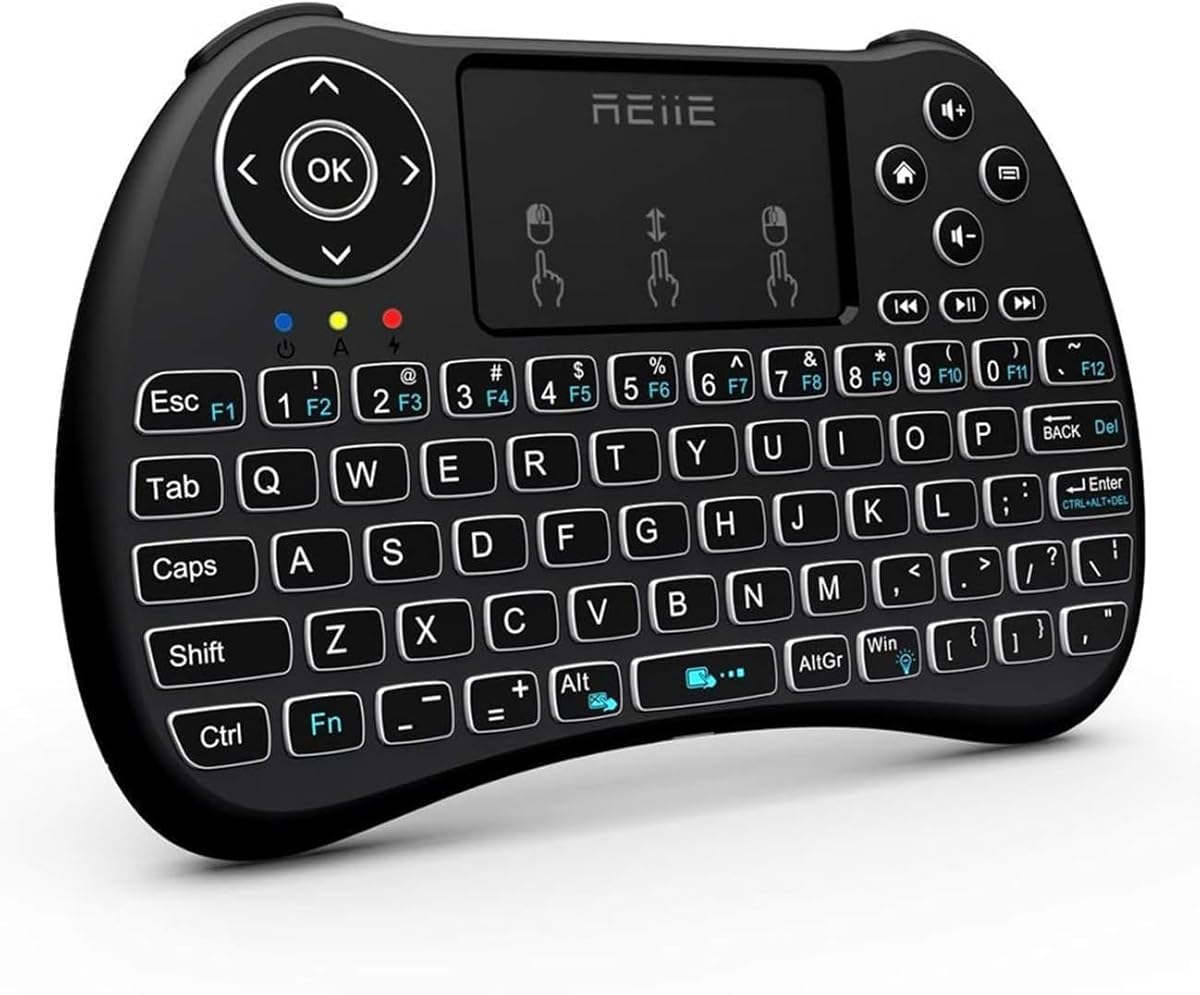
The REIIE H9+ has a 4.3 rating and serves as a straightforward 2.4GHz remote keyboard for PCs, Raspberry Pi systems, tablets, smart televisions, Android TV boxes, and compatible Windows versions. It combines 73 QWERTY keys, a touchpad, and white LED backlighting in a compact handheld design.
We may earn a commission when you buy through this link, at no additional cost to you.
Because it uses a USB receiver, setup is refreshingly direct. The device does not support Bluetooth, so it will not suit a buyer who specifically wants cable-free pairing with a phone. The target device must have an available USB port, and the keyboard should be charged for one hour before first use because low battery power can interfere with pairing or connection stability.
Its touchpad supports several gestures: a single-finger tap acts as a left click, a two-finger tap acts as a right click, and a two-finger drag scrolls. The white soft backlight is enabled with Fn+Win and makes the keys easier to see in a dark room. The product description also notes that the battery may arrive nearly empty for safe transportation.
This model is a good match for users who want one uncomplicated receiver-based controller for a compatible television or computer setup. It is less flexible than dual-mode alternatives, and its charging behavior requires an initial setup step. In exchange, buyers avoid Bluetooth pairing complexity and gain a focused remote keyboard designed around 2.4GHz control.
The included 2.4GHz receiver gives a direct connection path for compatible devices. This straightforward approach can be preferable when the keyboard is dedicated to one permanently placed media system.
Single-finger tapping, two-finger clicking, and two-finger scrolling cover the most common pointer actions. The white backlight also helps users find keys without switching on bright room lighting.
We may earn a commission when you buy through this link, at no additional cost to you.
The most useful mini keyboard with touchpad is the one that matches your devices, preferred connection method, and tolerance for compact typing. Consider compatibility, pointer control, lighting, battery life, and portability before making a choice.
Start with the device you expect to control. Some keyboards support Bluetooth, 2.4GHz receivers, or both, but compatibility still depends on the operating system and device. Smart TVs may support only certain Bluetooth profiles, streaming sticks can require an OTG adapter for receiver mode, and game consoles vary in how they recognize wireless input devices. The listed supported platforms are a useful starting point, but the manufacturer's current compatibility notes should be checked before purchase.
If the keyboard will serve one fixed home-theater computer, a 2.4GHz receiver may be the simplest choice. For phones and tablets, Bluetooth is usually more convenient because it avoids occupying a USB port. Check the port and power requirements of the intended host as well as its Bluetooth version.
Bluetooth removes the need for a receiver and is ideal for portable use, while 2.4GHz often provides a straightforward plug-and-play path on PCs and televisions. Dual-mode keyboards offer the most flexibility but introduce mode-switching commands and may need separate pairing procedures. USB receivers should also be stored safely, because losing a tiny dongle can make an otherwise functional keyboard difficult to connect.
For frequent travel, prioritize Bluetooth. For a stationary media center, a supplied receiver may be simpler. Buyers who alternate between computers, tablets, phones, and televisions will usually appreciate both connection options in one device.
Touchpad quality depends on more than whether the device has one. Check for dedicated left- and right-click buttons, multi-finger gestures, adjustable DPI, and orientation changes. A rotating 90-degree touchpad is especially helpful when switching between a vertically held phone and a horizontally viewed television or laptop. Fixed touchpads may work perfectly for one screen arrangement but feel less natural for another.
Look for gesture support that matches how you navigate. Single-finger tapping, two-finger clicking, scrolling, and drag operations can make media interfaces much less cumbersome. Adjustable sensitivity provides another degree of control, particularly when switching between a large display and a smaller mobile screen.
Mini keyboards vary significantly in footprint. The smallest models are excellent for travel and navigation but may feel cramped during extended writing. Larger living-room designs, such as the Logitech K400 Plus, provide more familiar spacing and a larger touchpad but take up more space. Decide whether the device will primarily control menus or also support regular typing, email, and document work.
A touchpad can make on-screen input easier, but it cannot fully replace the precision of a conventional mouse for demanding editing. For light productivity, the touchpad and compact QWERTY layout should be sufficient. For extensive writing, consider a larger compact keyboard or a full-size alternative.
Rechargeable models use USB-C charging and typically include an automatic sleep and wake function, reducing the need for disposable batteries. Models with 600mAh cells are common, while the K809 lists a larger 1000mAh battery. Some alternatives, such as the Logitech K400 Plus, use replaceable batteries and claim notably longer operating time. The most convenient choice depends on whether you prefer to recharge occasionally or replace batteries infrequently.
New rechargeable models may need a full initial charge. That is especially relevant to receiver-based keyboards, because insufficient charge can lead to unstable pairing or connection. Always follow the supplied charging instructions before the first setup attempt.
Backlighting is valuable for evening streaming, bedside browsing, and darkened presentation rooms. Seven-color options add visual customization, while RGB lighting can match a broader desk setup. Some models use a single white soft backlight, which can be easier for users who want visibility without distraction. Consider brightness control as well as color selection if the keyboard will be used in a shared room.
Lighting does not guarantee that every key legend will remain equally visible at every angle, but it generally makes the keyboard easier to locate than an unlit model. For home theater use, a white backlight may blend into the device more discreetly than brightly colored illumination.
Portability is usually measured by dimensions, weight, and receiver storage. A keyboard that fits into a bag is convenient for presentations and travel, but very small models can feel less substantial in the hand. The K809 distinguishes itself with an aluminum frame while retaining a compact body, offering a more premium feel than many plastic alternatives. Pocket-sized models prioritize the lowest possible footprint.
Also notice where the receiver is stored. A built-in compartment helps prevent loss and keeps the control setup organized. If a keyboard will be used mostly on a desk, a slightly larger design may provide better touchpad accuracy and key comfort than an extremely thin alternative.
A built-in laser pointer can make a compact keyboard considerably more useful in presentations. Media hotkeys add convenience for home-theater users, and dedicated mouse buttons improve touchpad control. Low-battery and charging indicators help prevent unexpected shutdowns, while sensitivity controls allow the pointer to suit different screen sizes. These extras are not essential, but they can meaningfully improve day-to-day usability.
Avoid choosing solely on the longest feature list. Confirm that the most important functions work with your intended device. A reliable pointer, straightforward pairing, and a comfortable layout matter more than a laser or colorful lighting when the keyboard will be used every day.
Begin by fully charging a rechargeable keyboard according to the manufacturer's instructions. New units may arrive with limited charge because of shipping regulations, and an insufficient battery can make receiver pairing or wireless performance unreliable. Install the batteries or connect the charging cable for a rechargeable model, then confirm that the keyboard powers on before beginning setup.
Choose the appropriate connection mode. For 2.4GHz operation, insert the supplied receiver into a compatible USB port and use the stated re-pairing combination if necessary. For Bluetooth, open the device's Bluetooth settings, select the keyboard when it appears, and complete any requested pairing code. Dedicated mode or function keys will vary by model, so follow the included guide rather than assuming one shortcut works universally.
Use the touchpad to move the cursor and the dedicated buttons or gesture commands for clicking and scrolling. If a model supports touchpad rotation or DPI adjustment, experiment with those settings while navigating a large television interface, a laptop, and a phone. Keep the keyboard on a stable surface, clean the touchpad gently, and avoid spilling liquids over the keys. Store the USB receiver in its designated compartment when traveling, and avoid leaving a rechargeable unit uncharged for long periods.
A mini keyboard with touchpad is usually better when you need to type, search, enter passwords, or navigate complex menus. A conventional voice remote is more convenient for basic playback controls and voice search. Many users benefit from owning both, using the remote for everyday viewing and the compact keyboard for tasks that require text entry.
It can, but compatibility depends on the television's wireless support and operating system. Bluetooth and 2.4GHz are not interchangeable, and some streaming sticks require an OTG adapter for receiver mode. Check the manufacturer's compatibility list and confirm that your television supports the relevant Bluetooth profile or USB receiver before buying.
A rotating touchpad changes its usable orientation by 90 degrees, allowing cursor movement to align more naturally with a phone, tablet, or television. A fixed touchpad uses the same direction in every situation. Rotation is helpful for users who alternate between vertical mobile screens and horizontal displays.
Most models in this guide support Bluetooth pairing with compatible phones and tablets, which is usually the most convenient method. Some also include a 2.4GHz receiver for systems with a usable USB port. The target device must support external keyboard input, and its operating system must be included in the product's compatibility information.
They are better suited to short entries, search terms, passwords, and menu navigation than long documents. Larger living-room models such as the Logitech K400 Plus offer more familiar spacing, while ultra-compact models prioritize portability. Users who write extensively should consider the physical key size, touchpad area, and their own hand comfort.
Runtime varies with battery capacity, lighting, connection method, activity, and the product itself. The models in this guide list rechargeable batteries of either 600mAh or 1000mAh, while the Logitech K400 Plus is a battery-powered alternative with a much longer stated operating life. Automatic sleep and wake can extend standby performance.
Bluetooth is often easier for phones and tablets because no receiver is required. A 2.4GHz receiver can be ideal for a PC or compatible television with an accessible USB port. Some streaming devices need an OTG adapter for 2.4GHz operation, so verify the streaming stick's requirements before choosing a connection method.
First, charge the keyboard fully and re-seat the USB receiver in a different port if applicable. For Bluetooth, remove the saved device and pair it again. Some models have a dedicated re-pairing command, such as holding FN+RF until an indicator flashes. Moving away from wireless interference and restarting the host device can also resolve temporary problems.
The top choices cover several priorities. The dual-mode Mini Keyboard with Touchpad-2.4GHz & Bluetooth offers the strongest overall value with modern Bluetooth, adjustable lighting, and a rechargeable battery. The K808 stands out for its rotating touchpad, built-in laser pointer, and travel-friendly proportions, while the Fosmon stands apart through Bluetooth 5.2, broad entertainment support, and a strong battery specification.
Your device should determine the best option more than any single feature. Select Bluetooth for portable phone and tablet control, 2.4GHz for a straightforward receiver setup, and a rotating touchpad if you alternate between vertical and horizontal screens. Buyers who type frequently should favor a larger layout, while dedicated travel users can prioritize the smallest footprint and built-in receiver storage.
Before purchasing, confirm current compatibility, the required charging or pairing steps, and the current cost of the exact model and accessory bundle. Prices, ratings, seller offers, and firmware or platform behavior can change, so checking the latest listing information helps ensure the selected mini keyboard with touchpad remains a good fit.