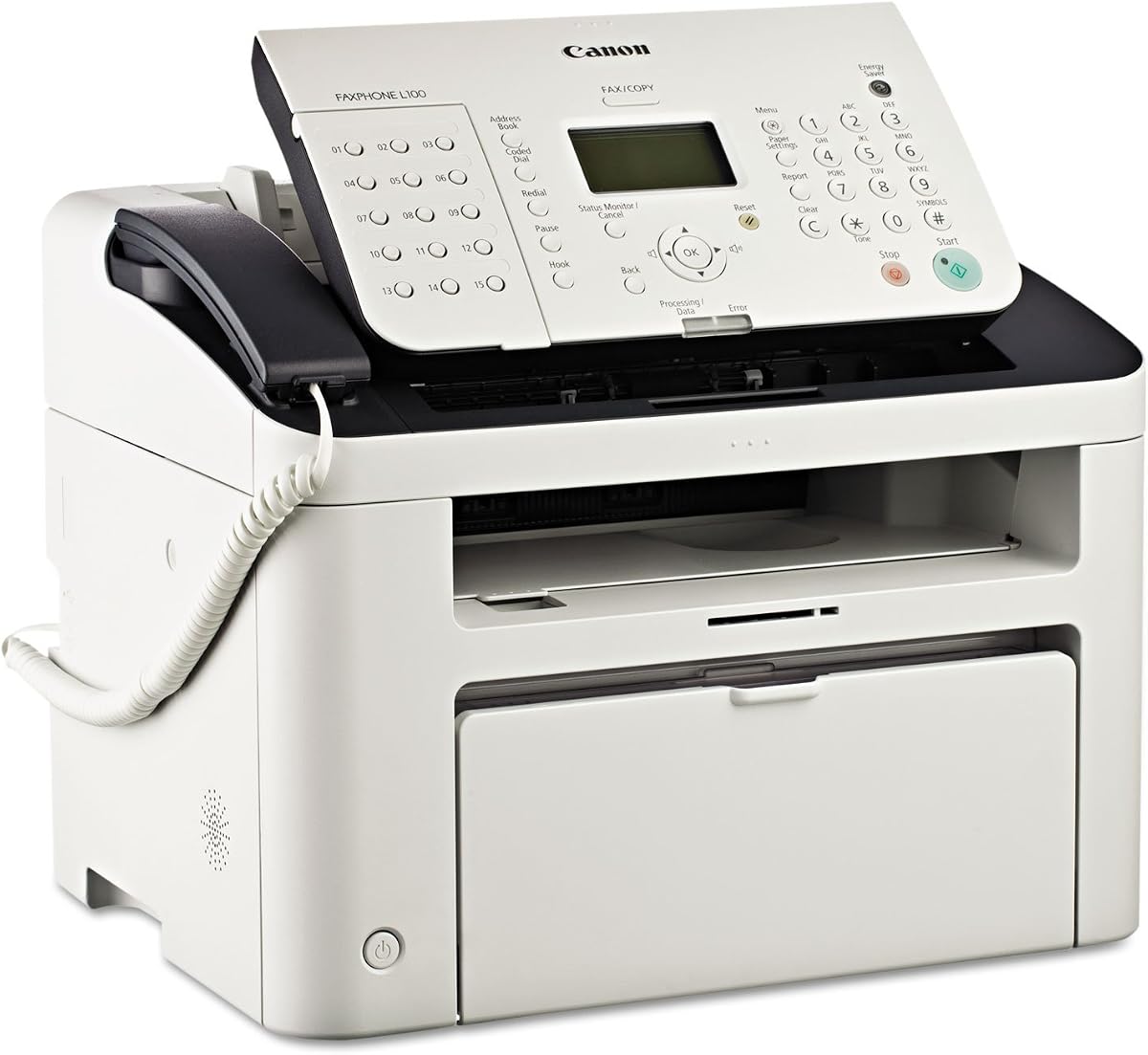
Canon FAXPHONE L100
4.1Editor score
19-page-per-minute printing
150-sheet paper capacity
30-sheet document feeder
512-sheet fax memory
A fax machine with phone combines traditional document transmission with a built-in telephone or multi-function office equipment. A worthwhile model should deliver reliable faxing, straightforward controls, adequate paper handling, and a telephone design that suits the intended user. The right choice depends on whether you need a personal device, a shared office machine, or a computer-based alternative.
The products in this guide were compared using the supplied specifications, including fax speed, document feeder capacity, memory, printing technology, telephone functions, connectivity, and copy or scan capabilities. The list includes standalone plain-paper and laser fax machines, multifunction printers, renewed equipment, and a paperless service that can send faxes through computers and mobile phones.
Each review identifies the product's most useful qualities and the compromises that may affect your decision. The top selections balance factors such as rating, capacity, usability, and functionality, while the full comparison shows how the machines differ. Product availability, seller offers, and prices can change, so confirm the current listing and condition before purchasing.
4.1Editor score

4.4Editor score

4.2Editor score
As an Amazon Associate we earn from qualifying purchases.
This side-by-side comparison covers the supplied fax machines and paperless fax option, with emphasis on transmission speed, document handling, memory, paper capacity, telephone functions, and connected features.


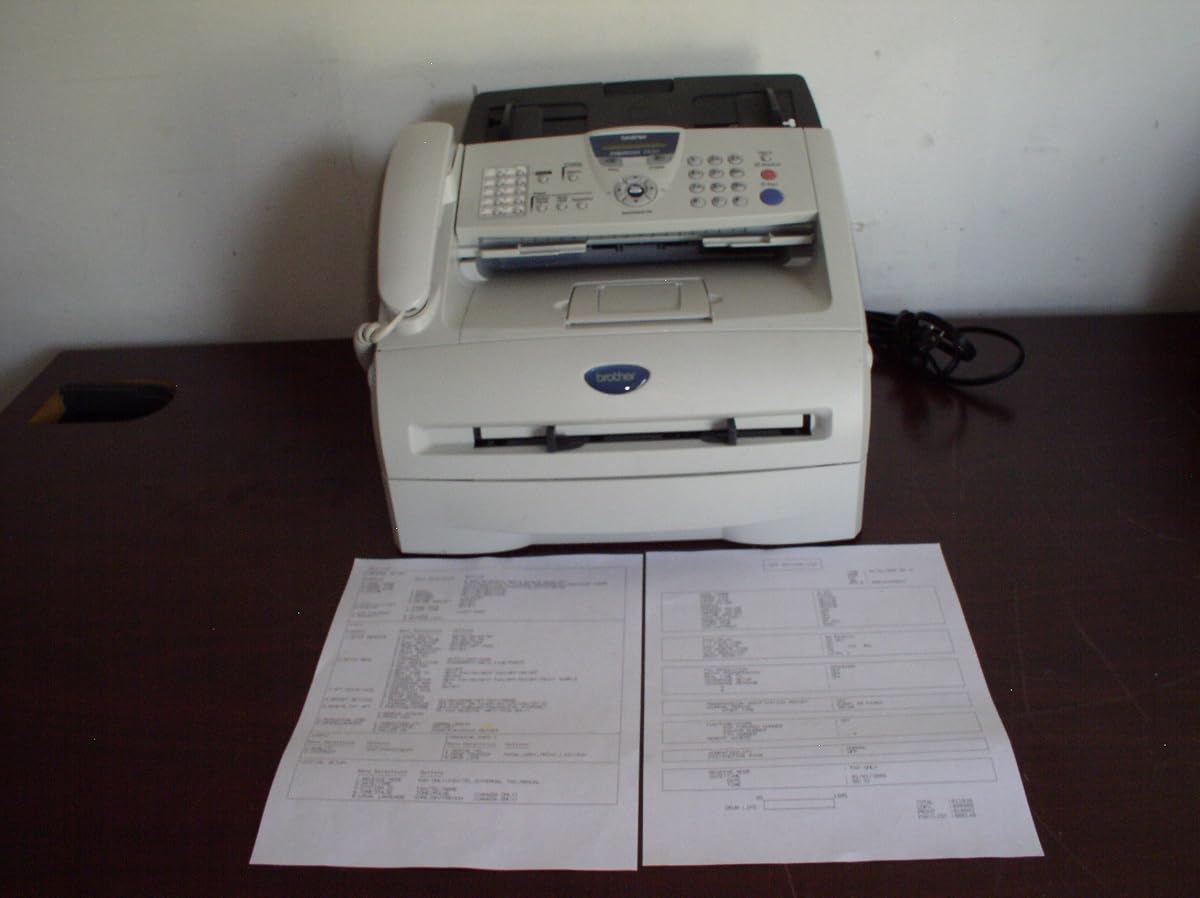

The Brother FAX-575 is a personal fax machine, telephone, and copier designed to cover several common document tasks without the complexity of a larger office multifunction system. It carries a 4.1 rating, placing it among the stronger-rated products in this guide. Its defining combination is a dedicated handset, straightforward fax operation, monochrome copying, and a compact footprint for homes or individual offices.
We may earn a commission when you buy through this link, at no additional cost to you.
Its 9,600 BPS modem transmits at about 15 seconds per page, which is a practical level for routine documents rather than high-volume institutional traffic. The 512 KB of memory can store up to 25 pages, providing a useful buffer for incoming or outgoing fax jobs. Copying is handled in black and white at up to 400 by 400 dpi, while the 50-sheet paper capacity suits regular personal use.
The main compromise is its relatively limited paper handling. A 50-sheet supply is not as accommodating as the 150- or 250-sheet trays found on several alternatives, and the listed functions do not include scanning. Its fax transmission speed is also modest compared with the faster modem specifications in the list. For a user sending occasional pages and making occasional copies, however, those limitations are easy to accept.
This is a sensible recommendation for someone who wants a straightforward phone-and-fax unit for personal correspondence, home-office use, or a small workspace. It may be less suitable for an office that produces large daily volumes, routinely scans documents, or expects substantial unattended paper capacity. For those needs, the Canon FAXPHONE L100 or a Brother multifunction model offers more room to grow.
The FAX-575 keeps the core workflow focused: send a fax, receive a fax, use the telephone, or make black-and-white copies. That specialization makes it easier to understand than a full multifunction printer, particularly for users who do not need scanning or computer connectivity.
Storing up to 25 pages provides a practical buffer when documents arrive while no paper is loaded or the user is occupied. It also means the machine can manage queued outgoing pages without requiring the original document to remain in the feeder throughout the entire session.
We may earn a commission when you buy through this link, at no additional cost to you.
The renewed Brother FAX-575 offers the same combination of personal fax, telephone, and copier functions as the standard model, with a 3.8 rating. It is a practical alternative for a value-conscious buyer who accepts a refurbished product in exchange for a potentially more economical purchase. Its most important advantage is that the core feature set remains well defined.
We may earn a commission when you buy through this link, at no additional cost to you.
The machine uses a 9,600 BPS modem and sends pages at approximately 15 seconds per page. Its 512 KB memory stores up to 25 pages, while the 50-sheet paper tray supports routine printing and copying. Black-and-white copies can be produced at up to 400 by 400 dpi, and the integrated phone makes the unit suitable for users who still depend on conventional calling.
Renewed status is the most important consideration. It may have previously used components, and the visual or functional condition may not match a new unit. The listing's 3.8 rating also sits below that of the standard FAX-575, which may reflect differences in condition or customer experience. Buyers should examine the seller's condition details, return terms, and warranty information before deciding.
This renewed model makes sense for a home user, freelancer, or small office that needs basic fax, phone, and copy functions at a reduced acquisition cost. It is less attractive for a business that values consistent appearance, a new-machine warranty, or high document volume. If the primary consideration is a low-cost way to send occasional faxes, the familiar core functions remain useful.
A renewed product can make a dedicated fax telephone more accessible when new models are outside the intended budget. The important trade-off is uncertainty: inspect the condition description closely and confirm what support accompanies the unit.
This version retains the 25-page memory, 50-sheet paper capacity, 9,600 BPS modem, and monochrome copying functions. Buyers still receive a focused fax, phone, and copier combination rather than a basic telephone alone.
We may earn a commission when you buy through this link, at no additional cost to you.
The Canon FAXPHONE L100 combines a monochrome laser fax machine, copier, and telephone in a high-capacity configuration. Its 4.1 rating and comparatively fast 19-page-per-minute output make it a strong choice for buyers who want a dedicated machine without paying for full multifunction scanning. The telephone handset and 30-sheet automatic document feeder help it serve as a complete small-office fax station.
We may earn a commission when you buy through this link, at no additional cost to you.
Paper handling is one of its strongest attributes. The main tray accepts up to 150 sheets, and the 30-sheet simplex feeder simplifies sending multi-page documents. Up to 512 sheets can be stored in memory, allowing the machine to retain multiple faxes. It also uses less than 2 watts in Energy Saver mode and takes Canon Genuine Toner 128, which is listed as yielding 2,100 pages.
The principal limitation is that it is a laser fax and copier rather than a scanner, so users who need to digitize paper will need another device or a different category of product. Canon Genuine Toner 128 is also an ongoing consumable to consider when comparing total ownership requirements. These are meaningful constraints, but neither prevents the L100 from serving routine fax, copy, and telephone needs efficiently.
The FAXPHONE L100 is well suited to a home office, medical office, reception area, or small business with recurring document transmission. It is our Best Budget selection because it offers substantially more paper capacity and print speed than the compact personal fax models without introducing the broader complexity of a multifunction printer. It is the stronger choice for users who value fast monochrome output and less frequent paper refills.
The 150-sheet tray and 30-sheet feeder make this fax phone more suitable for sustained office use than a compact personal machine. More pages can remain loaded, and longer documents can be transmitted without repeated manual intervention.
Printing at up to 19 pages per minute supports quick copies and keeps a multipage fax moving efficiently. This makes the L100 especially attractive for users who send more documents than an occasional personal machine can comfortably handle.
We may earn a commission when you buy through this link, at no additional cost to you.
The CimFAX A5 takes a fundamentally different approach to the fax-machine-with-phone category by providing a paperless service that sends and receives faxes through computers and mobile phones. It has a 4.0 rating and supports Windows, Mac, Android, and iOS devices. Rather than operating a standalone telephone or paper feeder, it turns connected hardware into a fax interface.
We may earn a commission when you buy through this link, at no additional cost to you.
Sending can be completed through a right-click, drag-and-drop, or tap workflow in three steps. The service supports 24/7 operation, includes lifetime technical support, and does not require an additional support payment according to the supplied information. Incoming faxes can be automatically saved as PDF files in a local or network-shared folder, while an auto-forward feature can send incoming documents to email.
This approach eliminates a physical machine but also removes familiar features such as a handset, keypad, automatic document feeder, and paper tray. Users must have a compatible computer or mobile phone and an active line to use the service. It is therefore not a direct replacement for somebody who wants to walk into a room, place a paper original into a feeder, and manage a traditional fax console.
CimFAX A5 is an excellent match for a remote worker, a small company that wants searchable digital records, or a user who already creates most documents on a phone or computer. Automatic PDF storage and email forwarding can be more valuable than physical output for those workflows. It is less suitable for a household that needs a simple telephone and standalone fax machine with no digital device dependency.
Windows, Mac, Android, and iOS support lets the service fit into many existing workflows. The option to right-click, drag and drop, or tap also reduces the learning curve for people accustomed to different operating systems.
Automatic saving to a local or network folder and email forwarding as PDF help users organize received pages electronically. That can make records easier to retain, locate, and forward than paper pages stored near a fax machine.
We may earn a commission when you buy through this link, at no additional cost to you.
The Brother MFC7240 is a wired monochrome multifunction printer that combines printing, copying, scanning, and faxing. Its 4.2 rating reflects a versatile feature set for a small office, and the device stands out for its relatively fast 21-page-per-minute output, 250-sheet adjustable paper tray, and 20-page automatic document feeder. It is more expandable than a dedicated fax phone but also more complex to operate.
We may earn a commission when you buy through this link, at no additional cost to you.
Print resolution reaches 2400 by 600 dpi, while monochrome scanning is listed at up to 19,200 by 19,200 dpi interpolated resolution. The adjustable main tray accepts 250 sheets and can be supplemented through the manual feed slot. Its supported paper sizes include letter, legal, executive, A4, A5, and several smaller formats, providing flexibility for mixed office documents.
The most important compromise is connectivity. The MFC7240 uses wired USB and does not list built-in wireless networking or Wi-Fi. That makes it straightforward to share with a nearby computer but less convenient for a multi-user office, a remote workforce, or a location where a network cable is impractical. It also has more moving parts and controls than a dedicated fax machine.
This MFC is recommended for a home office or small business that wants one monochrome device to handle several document tasks. The scanning function, generous paper tray, and 21 ppm performance can replace separate equipment for many routine needs. Choose it when wired placement is acceptable; if wireless access is essential, the supplied list does not identify a model that meets that requirement.
Printing, copying, scanning, and faxing make the MFC7240 useful beyond occasional document transmission. Users can scan and preserve information, print ordinary office pages, and make copies without maintaining several separate machines.
The 250-sheet adjustable tray and 20-page feeder provide a meaningful capacity increase over compact personal fax units. A manual feed slot adds another route for sheets that do not need to be placed in the main cassette.
We may earn a commission when you buy through this link, at no additional cost to you.
The Panasonic KX-FHD331 is a dedicated plain-paper fax machine designed around a traditional telephone workflow. It has a 2.8 rating, the lowest in this guide, so buyers should pay close attention to current seller and product details. Its basic appeal lies in plain-paper operation and integration with familiar telephone features such as caller ID and an answering-machine interface.
We may earn a commission when you buy through this link, at no additional cost to you.
The machine uses a 9.6 Kbps modem, which is slower than the 14.4 Kbps and 33.6 Kbps specifications of several Brother and Canon alternatives. Its more important distinguishing features are the telephone-related functions: caller ID compatibility and an answering-machine interface. These may be particularly useful for a home, reception desk, or small office that wants one device to handle calls and faxes.
The supplied specifications are limited, providing less detail about paper capacity, document feeder size, memory, copying speed, and output resolution than the listings for competing products. The 2.8 rating is another reason not to treat it as a default selection without checking recent customer feedback. The listed six-month warranty with an exchange program should also be considered carefully when comparing ownership support with longer coverage on other models.
The Panasonic KX-FHD331 is most appropriate for a buyer who values its caller ID and answering-machine interface, uses plain paper exclusively, and has straightforward fax needs. It may be less convincing for someone who prioritizes a high rating, rapid transmission, large memory, or extensive document handling. Those users will likely find more support in one of the Brother models or the Canon FAXPHONE L100.
Caller ID compatibility and an answering-machine interface make this more than a fax-only box. It can fit into a home or small-office communication setup where the same line serves both calls and document transmission.
The machine is designed to print received or copied pages on plain paper, avoiding the need for specialized thermal rolls. That keeps the consumable model simple for users who want readable paper records.
We may earn a commission when you buy through this link, at no additional cost to you.
The Brother PPF-2800 is a plain-paper fax machine aimed at users who need substantial stored documents and convenient automatic dialing. Its 3.6 rating is moderate rather than exceptional, but the 90-page memory, 108-station auto-dial list, and 20-page document feeder create a useful set of productivity features. It prints at up to 10 pages per minute.
We may earn a commission when you buy through this link, at no additional cost to you.
Its defining advantage is memory. Storing up to 90 pages provides a larger buffer than the 25-page memory in the Brother FAX-575 and supports more flexible handling of incoming or outgoing documents. The 108-station auto dialing helps regular contacts remain readily accessible, while the 20-page feeder supports multi-page transmission. The machine can also make as many as 99 copies from an original.
The tradeoff is that the PPF-2800 is less compelling for buyers who want fast laser output or extensive connectivity. Its 10-page-per-minute speed is below the 19, 21, and 33.6 Kbps-era specifications offered by several alternatives, and the supplied data does not list modern network features. The 3.6 rating suggests a more mixed customer experience than the highest-rated products here.
This fax is most suitable for a small business, medical practice, or administrative office that regularly sends forms and appreciates a large auto-dial list and document memory. A home user with only occasional faxing may find a more compact model easier to justify. Even with its moderate rating, the 90-page memory and 20-page feeder make the PPF-2800 a functional choice for repetitive document work.
The ability to store up to 90 pages gives the PPF-2800 considerable working memory for a dedicated fax. It can retain more document data than compact personal models, which can be useful in an office that receives or sends several documents each day.
A 108-station auto-dial list reduces repetitive manual number entry. For organizations that send the same forms to many recipients, this feature improves the practicality of a dedicated standalone fax.
We may earn a commission when you buy through this link, at no additional cost to you.
The Brother IntelliFax 2820 is a monochrome laser fax and copier with a strong emphasis on memory, capacity, and high-volume communication. It carries a 4.2 rating and stands out with 8 MB of memory capable of storing up to 500 pages. That combination of stored-document capacity, a 250-sheet input tray, and advanced dialing functions makes it our Best Premium pick.
We may earn a commission when you buy through this link, at no additional cost to you.
The machine has a 14.4 Kbps modem, a 20-page automatic document feeder, and a 220-station auto-dial memory. It can broadcast to as many as 270 locations, which is a notable feature for offices that need to distribute the same document to numerous recipients. A USB 2.0 interface is included for future printing capability with optional drivers, adding a limited route to computer integration.
The primary limitation is that the listed feature set does not include scanning. It is also primarily a fax-and-copy device rather than a modern printer, scanner, and fax all-in-one, and the USB printing statement refers to future support through optional drivers. Buyers who need immediate computer-based printing or digital scanning should not assume those functions are included.
The IntelliFax 2820 is well suited to a busy administrative office, legal practice, medical facility, or property-management company that regularly stores and distributes documents. Its 500-page memory and broadcast capability can materially improve workflow compared with a compact personal fax. It is a premium choice for communication volume, not for general-purpose scanning, which should guide the final purchase decision.
Eight megabytes of memory can hold up to 500 pages, substantially more than the other Brother fax models in the list. That capacity suits offices that receive, retain, or queue large quantities of faxed material.
Auto-dial memory for 220 stations and broadcast capability for up to 270 locations streamline repeated outreach. These functions are particularly useful for organizations that routinely send identical forms or notices to many contacts.
We may earn a commission when you buy through this link, at no additional cost to you.
The Brother PPF4750E IntelliFax 4750e is a high-performance, business-class monochrome laser fax with the highest rating in the guide at 4.4. It uses Super G3 plain-paper fax technology and can copy at up to 15 pages per minute. Its focus is professional document handling rather than general-purpose printing, which makes it our Editor's Choice for buyers seeking a capable dedicated fax machine.
We may earn a commission when you buy through this link, at no additional cost to you.
The combination of laser output, a business-class designation, and 15-page-per-minute copying supports a steady workflow. Super G3 technology is designed for efficient conventional fax transmission, while plain-paper output produces reusable documents that can be filed or distributed. This combination is useful in offices where thermal-paper output is less desirable and documents need to be retained for longer periods.
The supplied information is concise and does not provide a document-feeder size, sheet capacity, memory amount, telephone-handset details, or connectivity specifications. No scanning function is listed, so it should not be mistaken for a modern multifunction printer. Buyers who require detailed capacity figures, automatic document feeding, or network scanning should review the complete product listing before making a final choice.
The PPF4750E is recommended for a business or professional office that wants a dedicated, fast monochrome laser fax. Its 4.4 rating provides the strongest customer-feedback signal among the supplied products, while its copy speed and plain-paper Super G3 design indicate serious performance. It is our Editor's Choice because it delivers a focused, business-oriented fax solution without unnecessary features.
A 4.4 rating distinguishes the IntelliFax 4750e from every other product listed. While ratings are not a complete buying guide, they provide a useful signal that many customers have been satisfied with the overall offering.
Super G3 plain-paper faxing, monochrome laser output, and copying at up to 15 pages per minute give the machine a clear professional focus. It is aimed at users who value a dedicated document-transmission device and dependable paper output.
We may earn a commission when you buy through this link, at no additional cost to you.
The Canon FAXPHONE L80 is a laser fax and printer with a telephone handset, a 33.6 Kbps modem, and a USB interface. Its 3.6 rating is shared with the Brother PPF-2800, placing it below several laser-focused alternatives. Even so, the fast modem and telephone-equipped design make it a distinctive option for users who want conventional communication and computer connectivity in one unit.
We may earn a commission when you buy through this link, at no additional cost to you.
Its standout specification is the 33.6 Kbps modem, the highest modem speed in the supplied group. That can favor efficient transmission of conventional fax documents, while the included handset lets the unit serve as a desk telephone. Laser output is another useful feature for producing more durable, professional-looking pages, and the USB interface creates a path for connecting to a computer.
The main drawback is its listed print speed of only 6 pages per minute. That is considerably slower than the Canon L100's 19 ppm and the Brother MFC7240's 21 ppm. The supplied specifications also omit document-feeder capacity, paper capacity, memory, copying details, and supported paper sizes, so the L80 may be less attractive for sustained high-volume use. The included one-year exchange warranty is a positive point, though it should be confirmed with the seller.
The FAXPHONE L80 is best for a home office or small business that needs a telephone, a conventional laser fax, and a USB connection. It is less suitable for a busy shared office that prioritizes quick copying and large paper capacity. Buyers attracted by the modem should also consider whether the slower print speed will affect their daily workflow.
The 33.6 Kbps modem is the highest speed listed and gives the L80 a distinct advantage in conventional fax transmission. It should appeal to users who regularly communicate with traditional fax devices.
The included telephone handset makes the machine useful as a desk phone, while USB adds a computer-oriented connection. This makes it more adaptable than a fax unit that offers telephone features only through a separate device.
We may earn a commission when you buy through this link, at no additional cost to you.
The right fax machine with phone depends on document volume, available space, telephone habits, and the need to store or digitize pages. Compare the following factors before choosing a dedicated machine or a paperless alternative.
A standalone fax machine keeps the controls and workflow narrowly focused on calling, faxing, and sometimes copying. It is often easier to understand than a multifunction printer and can serve a small office without the need to manage print and scan software. A multifunction model is more suitable when you also need local printing, scanning, and computer connectivity, but it generally introduces a larger body, more controls, and additional consumables. In this guide, the Brother MFC7240 is the clearest all-in-one choice, while the Brother FAX-575 and Canon FAXPHONE L100 are more focused fax machines.
Choose a dedicated fax for simpler operation, or a multifunction printer for broader document functions.
A fax machine with phone should ideally include a handset, keypad, and familiar telephone controls. Some models add useful functions such as caller ID compatibility or an answering-machine interface. The Canon FAXPHONE L100 and L80 explicitly include a telephone handset, while the Panasonic KX-FHD331 emphasizes caller ID and answering-machine compatibility. A paperless service can be attractive to people who already make calls through computers or mobile phones, but it does not duplicate a physical desk telephone.
Check for a handset and calling features if the fax will double as your office phone.
Paper capacity determines how often the machine must be refilled, while the automatic document feeder determines how many original pages can be transmitted in one batch. The compact Brother FAX-575 has a 50-sheet paper capacity. The Canon L100 increases that to 150 sheets and includes a 30-sheet feeder, while the Brother MFC7240 and IntelliFax 2820 provide 250-sheet input capacity and 20-page feeders. High-volume users should prioritize these numbers over cosmetic design or compact size.
Match tray and feeder capacity to your typical daily document volume.
Fax memory can buffer incoming pages and queued outgoing documents, reducing interruptions when paper or attention is unavailable. The Brother FAX-575 stores up to 25 pages, the PPF-2800 stores up to 90 pages, the Canon L100 offers up to 512 sheets of memory, and the IntelliFax 2820 stores up to 500 pages in 8 MB. More memory is especially useful in an office that receives documents regularly or wants to retain faxes for later printing.
Choose more memory for frequent receiving, delayed sending, and document retention.
Modem speed affects fax transmission, while pages per minute affects printing and copying. The Brother FAX-575 and renewed version use a 9,600 BPS modem, while the Canon L80 reaches 33.6 Kbps. Copy speeds range from 6 ppm on the Canon L80 to 21 ppm on the Brother MFC7240, with the Canon L100 and Brother PPF4750E offering 19 ppm and 15 ppm respectively. Faster output is valuable for multi-page jobs, even if your individual documents are short.
Balance modem speed for faxes with ppm for faster copies and printed output.
Laser fax machines generally produce high-contrast monochrome output and are suited to office documents, while simpler personal machines may use more basic printing approaches. The Canon L100 requires Canon Genuine Toner 128, listed as yielding 2,100 pages. Other machines also require toner or consumable supplies, so you should consider whether the relevant cartridge is readily available. Plain-paper models are convenient for filing and reusing received pages.
Confirm the required toner or consumables and their availability before buying.
A wired USB connection is useful for a computer placed near the machine, but it cannot provide the flexibility of wireless access. The Brother MFC7240 provides a full scanning and printing workflow over wired USB, while the Canon L80 has a USB interface with future printing support through optional drivers. The CimFAX A5 goes furthest toward digital workflows by supporting Windows, Mac, Android, and iOS, saving faxes as PDF files, and forwarding incoming pages by email.
Choose USB for a fixed desk or paperless tools for remote and mobile workflows.
Customer ratings can help identify products that have delivered broadly positive experiences, but they should be considered alongside specifications. The Brother PPF4750E leads this group with a 4.4 rating, while the Canon L100, Brother FAX-575, MFC7240, and IntelliFax 2820 have ratings of 4.1 or 4.2. Renewed products may provide value but introduce condition uncertainty. Warranty length also varies, with the Canon L80 listing a one-year exchange warranty and the Panasonic listing a six-month exchange program.
Compare ratings, warranty terms, and new versus renewed condition carefully.
Begin by unpacking the machine, removing packing material, installing the correct toner or print consumable, and adding an appropriate supply of plain paper. Connect the telephone line and power the unit, then set the current date, time, and any required sender identification. If the model has a mobile or computer service, complete its account and device setup before attempting the first transmission. Reading the included quick-start guide is worthwhile because button names and setup steps can differ between manufacturers.
For outgoing faxes, place the original pages in the feeder in the correct orientation and select the recipient number from the keypad or auto-dial list. Choose the appropriate resolution or document quality setting, confirm the number carefully, and start the transmission only when the page count and recipient are correct. Allow the document feeder to return to its starting position, and keep the original until a confirmation appears. For incoming faxes, ensure that paper is loaded and that the machine's memory or storage limit is appropriate for the expected volume.
For routine care, wipe the exterior and document feeder with a soft, dry cloth and avoid spraying liquid directly into the machine. Use the correct paper size and avoid overfilling the tray. Replace toner or other consumables according to the manufacturer's instructions, and keep the feed path free of dust, adhesive, and paper debris. Review stored fax memory periodically, install current optional drivers when using USB printing features, and arrange manufacturer-authorized service if the machine develops repeated transmission, paper-feed, or copy-quality problems.
Not necessarily. A handset is useful when the device will serve as your primary desk telephone or when you need one-button access to frequently called numbers. If you already rely on a separate phone, computer, or mobile device, a fax machine with calling features may not be necessary. The Canon FAXPHONE L100 and L80 explicitly include handsets, while the CimFAX A5 is better suited to users who prefer computer and mobile calling.
A conventional fax machine emphasizes telephone transmission, incoming fax printing, and sometimes copying. A fax printer combines fax transmission with broader printer functions and may also include scanning and computer connectivity. The Brother MFC7240 is an example of the latter category, with printing, copying, scanning, and faxing, while the Canon FAXPHONE L80 is described as a laser fax and printer.
It can be easier for people who create documents on a computer or phone because sending can be completed by right-clicking, dragging and dropping, or tapping. It also stores incoming pages as PDFs and can forward them by email. However, it requires compatible connected hardware and does not provide a physical telephone, paper tray, or automatic document feeder, so it is not a direct substitute for every traditional fax setup.
The right amount depends on how often you receive documents and whether you need to store pages for later printing. Memory of 25 pages suits lighter personal use, while 90 pages offers more room for a small office. The Canon L100 and Brother IntelliFax 2820 can store hundreds of pages, making them better suited to frequent or unattended operation. Choose based on workload rather than on the largest number alone.
A new machine is generally the more straightforward choice when appearance, warranty consistency, and predictable condition matter. A renewed model can be attractive when the core functions meet your needs and the seller provides a clear condition description and return policy. The renewed Brother FAX-575 has the same listed 25-page memory, 50-sheet capacity, and 9,600 BPS modem as the standard version, but the lower rating and uncertain condition deserve careful consideration.
Only if your workflow includes turning paper into digital files or producing many local print jobs. A dedicated fax handles transmission and copying, sometimes at a lower acquisition cost and with simpler controls. If you regularly need searchable digital records, the Brother MFC7240 provides scanning, copying, printing, and faxing, while the CimFAX A5 saves incoming faxes digitally as PDF files.
It means the feeder can accept up to 20 original pages for a transmission or copy session. This reduces the need to reload pages one at a time and is particularly useful for forms, contracts, and multi-page correspondence. The Canon FAXPHONE L100 has a larger listed 30-sheet simplex feeder, while the Brother MFC7240 and IntelliFax 2820 each have 20-page feeders.
A traditional fax machine generally requires a compatible analog telephone signal, so compatibility depends on the VoIP provider or mobile-line equipment. The supplied product data does not confirm that every listed model supports those services. A paperless fax option may be easier for some users because it can send through a computer or mobile phone, but you should confirm that the relevant line can carry the required fax traffic.
The Brother PPF4750E IntelliFax 4750e is the strongest overall recommendation because it combines the guide's highest rating with business-class monochrome laser performance and 15 ppm copying. The Canon FAXPHONE L100 is the best value-oriented choice for users who prioritize a 19 ppm speed, 150-sheet tray, 30-sheet feeder, and substantial fax memory. For premium office capacity, the Brother IntelliFax 2820 provides 500-page memory, a 250-sheet input capacity, 20-page feeder, and advanced broadcast dialing.
Before buying, prioritize the features tied to your actual workflow. A home user may value the compact Brother FAX-575, while a small office that needs scanning should consider the wired Brother MFC7240. Frequent callers may appreciate the Panasonic's caller ID and answering-machine interface, and remote or mobile workers may find the CimFAX A5's PDF storage and email forwarding more valuable than physical paper output. Match memory, paper capacity, feeder size, and speed to the volume of documents you regularly handle.
Finally, check the current product listing, seller information, condition, warranty, and consumable availability before placing an order. Ratings and specifications provide a strong starting point, but they cannot account for changes in availability or individual setup needs. Prices and offers also fluctuate, so compare the final terms at the time of purchase and choose the machine that best supports your calling and document workflow.