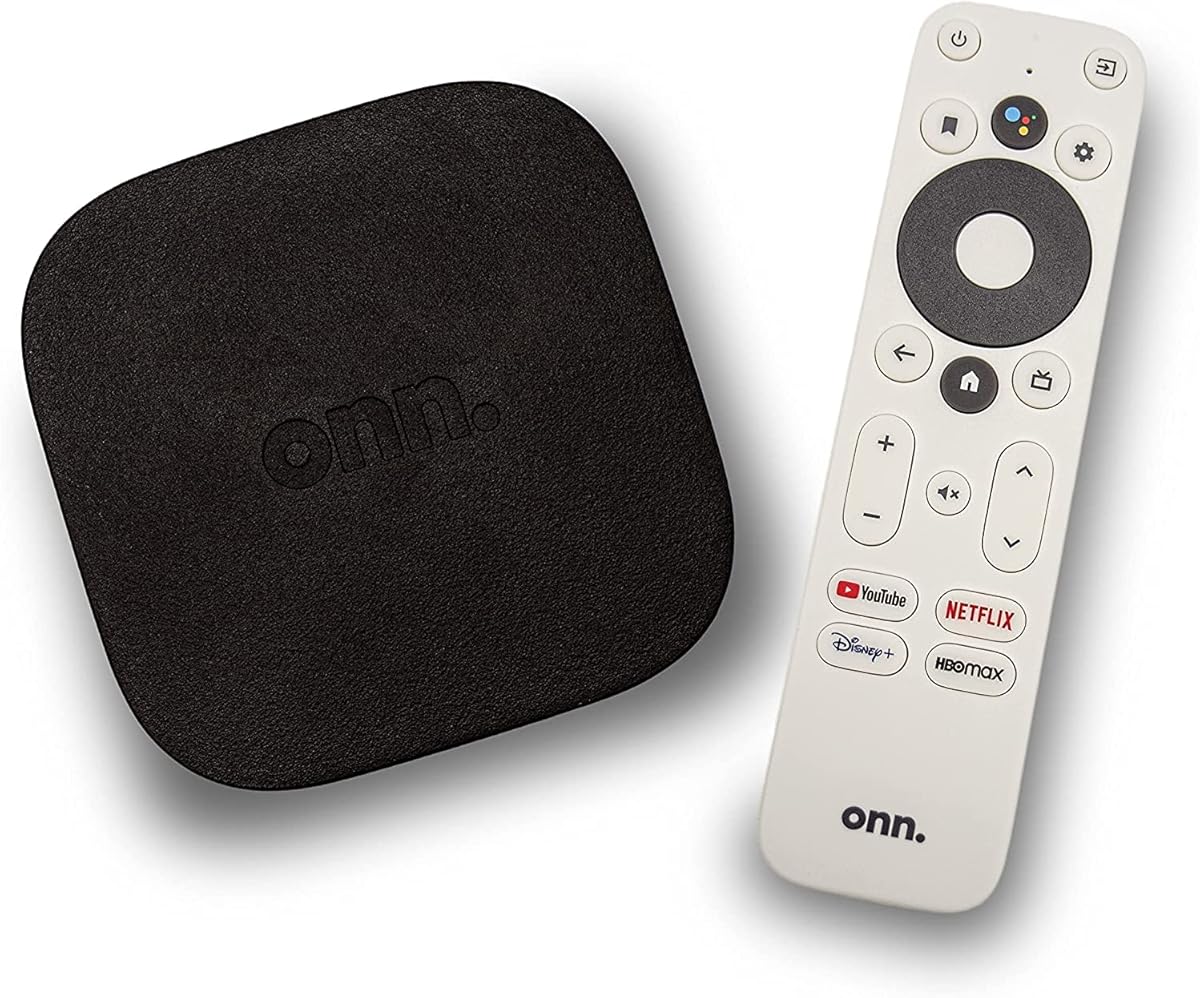
ONN Android TV 4K UHD
4.4Editor score
4K Ultra HD output
Google Assistant voice remote
Built-in Chromecast
Our 4K Android Box guide compares ten leading streaming devices for picture quality, app access, voice control, connectivity, storage, and ease of use in 2026.
A 4K Android Box can transform an older television into a modern entertainment hub while giving access to streaming apps, live programming, voice search, and screen casting. The strongest models combine sharp 4K output with responsive navigation, reliable networking, useful HDMI connectivity, and a remote that feels straightforward to operate.
This guide compares ten Android TV streaming devices across video formats, audio support, memory, storage, wireless standards, wired options, remotes, and platform features. It covers models for everyday streaming, larger installations with demanding displays, budget-conscious buyers, and users who want flexible connectivity for media playback or light productivity tasks.
Each review explains the product's most useful characteristics, along with the trade-offs revealed by its specifications and customer rating. The top three receive distinct award labels, while the complete comparison shows where every model stands. Prices and promotions can change, so check the current listing before buying.
4.4Editor score

4.2Editor score

4.3Editor score
The table below compares the ten featured Android TV boxes by their most important visible specifications, including output resolution, memory, storage, wireless connectivity, and major platform or audio capabilities.


The ONN Android TV 4K UHD Streaming Device combines a familiar Android TV experience with an approachable setup, making it a compelling choice for people adding streaming to a television without spending heavily. Its customer rating of 4.4 reflects generally favorable experiences, particularly for buyers who value straightforward operation, useful voice features, and a remote that does not require a learning curve.
We may earn a commission when you buy through this link, at no additional cost to you.
Picture output is listed at 4K Ultra HD, offering a sharper canvas than Full HD and a noticeable improvement on compatible televisions. The voice remote places a Google Assistant button at the center of the experience, letting users search for programming, launch content, and control compatible functions by speaking. Built-in Chromecast adds another convenient route for sending movies, television shows, and photos from an Android or iOS device.
Setup is designed to be approachable: users connect through the included HDMI cable, sign into a Google account, select a language, and join a Wi-Fi network. Enhanced audio is also included, although the product information does not list specific Dolby formats. The principal limitation is that memory, storage, wireless generation, and wired networking details are not provided, making it harder to compare the device with more technically transparent models.
This is a strong recommendation for a first Android TV box, a secondary room, or a budget-conscious household that wants 4K, Google Assistant, and Chromecast without complexity. It is especially suitable for owners of compatible ONN, Samsung, Sony, RCA, Vizio, Hisense, TCL, Philips, or Magnavox televisions. Buyers prioritizing newer connectivity standards or documented high-end audio may want to look farther down the list.
The included remote makes the Google Assistant immediately available, reducing the need to navigate small on-screen keyboards. It is a practical feature for finding programs, starting supported content, and issuing common playback or smart-home commands.
Built-in Chromecast makes it easy to share compatible content from a phone or tablet. The supplied HDMI cable and straightforward setup process also make this a practical upgrade for an older or non-smart television.
We may earn a commission when you buy through this link, at no additional cost to you.
The TiVo Stream 4K stands apart by reducing the friction of moving among different streaming services. Rather than requiring users to open each app independently, it provides one place to search, browse, and create watchlists. Its 4.2 rating indicates a generally favorable reception, and its central selling point is an interface designed around the needs of people who subscribe to several services.
We may earn a commission when you buy through this link, at no additional cost to you.
Its multimedia specifications are among the strongest in this group. The device supports 4K UHD, Dolby Vision HDR, and Dolby Atmos, making it a good match for televisions and sound systems capable of taking advantage of those formats. Supported services include Netflix, Prime Video, Disney+, Peacock, and many others, while integrated Google Assistant supports app launches, content searches, and compatible smart-home control.
The most important benefit is less about raw specifications and more about organization. Cross-service recommendations are based on what users like rather than where content happens to be hosted. That design can save time and reduce the inconvenience of maintaining separate queues in every service. On the other hand, the supplied information does not detail memory, internal storage, wireless generation, or wired networking, so buyers focused on technical expansion have less information to evaluate.
Choose the TiVo Stream 4K when you use several streaming services and value a single, consistent way to find content. It is also a strong fit for home-theater setups that support Dolby Vision and Dolby Atmos. If raw storage specifications, newer Wi-Fi standards, or a precisely documented Ethernet option are more important, one of the more recently specified Xiaomi or onn models may provide a clearer fit.
TiVo's unified approach brings search, browsing, and watchlists together rather than trapping each subscription in a separate environment. That convenience is especially valuable for users who regularly move between live television, network shows, and streaming originals.
Dolby Vision HDR and Dolby Atmos support make this a capable match for modern televisions and compatible audio equipment. The benefit is greatest when the selected apps and source material support those formats.
We may earn a commission when you buy through this link, at no additional cost to you.
This Xiaomi Android Google TV Box S 3rd Gen entry combines 4K picture support, modern connectivity, and a broad collection of premium audio and video formats. Its 4.1 customer rating reflects a generally positive reception, while the detailed specification sheet makes it easier to compare with other technically focused boxes. It appeals to buyers who want current standards without moving to a larger, more complex system.
We may earn a commission when you buy through this link, at no additional cost to you.
The device supports HDR10+, Dolby Vision, Dolby Atmos, and DTS:X, giving it a broad compatibility range for modern televisions and audio systems. Its 6nm, 64-bit platform uses a quad-core A55 processor reaching up to 2.5GHz, paired with 2GB of memory and 32GB of storage. The operating system is Google TV, which provides personalized recommendations, cross-app search, Google Cast, and Google Assistant through a 360-degree Bluetooth remote.
Wi-Fi 6 can deliver improved bandwidth and transmission efficiency, but it requires a compatible router. HDMI 2.1 provides a modern connection to compatible televisions, while Bluetooth remote control removes the need to point a traditional infrared remote directly at the box. The trade-off is the modest 2GB memory allocation, which is adequate for normal streaming but not as generous as the 3GB or 4GB options elsewhere in this guide.
This Xiaomi is well suited to viewers who value Dolby Vision, DTS:X, Wi-Fi 6, and HDMI 2.1 but do not need a large internal storage capacity. It is also attractive for users who want a compact Google TV device with casting and voice control. Buyers planning extensive local libraries or heavy app use should investigate expandable storage or one of the higher-memory alternatives.
Dolby Vision, HDR10+, Dolby Atmos, and DTS:X provide useful flexibility across streaming services and local media. This makes the box a strong match for owners of modern displays who want more than basic 4K playback.
Wi-Fi 6 can improve throughput on a compatible network, while Google Cast enables convenient phone and tablet casting. The Bluetooth remote offers flexible placement and easier navigation from the couch.
We may earn a commission when you buy through this link, at no additional cost to you.
The Xiaomi TV Box S 3rd Gen presented under this listing is one of the most clearly specified devices in the guide. It supports 4K resolution at 60FPS, Dolby Vision, HDR10+, Dolby Audio, and DTS:X surround sound. Its 4.4 rating is among the strongest shown, suggesting favorable overall satisfaction, and its compact dimensions make it easy to place discreetly near a television.
We may earn a commission when you buy through this link, at no additional cost to you.
A quad-core processor running up to 2.5GHz and an ARM G310 V2 GPU support navigation and multitasking. Memory totals 2GB RAM and 32GB of internal storage. Connectivity includes dual-band 2.4GHz and 5GHz Wi-Fi, Bluetooth 5.2, HDMI 2.1, and USB 2.0. Google Cast, Google Assistant, and access to major apps such as Netflix, YouTube, and Disney+ are also included.
The supplied package includes the box, voice remote, power adapter, HDMI cable, and user manual, which makes it easier to begin without sourcing separate accessories. Its main limitation is the 2GB of memory, which offers less headroom for demanding multitasking than the 3GB onn 4K Pro or 4GB models. There is also no stated Ethernet connection, so placement may need to stay near a strong Wi-Fi signal.
This is an excellent choice for a compact, well-documented streaming setup that supports Dolby Vision, Dolby Atmos, 4K at 60FPS, and modern HDMI standards. It suits living rooms where visible hardware should be minimal and for users who want a straightforward Google TV interface with voice control and casting. Those needing abundant memory or a wired network connection should compare the other highlighted specifications.
At 95.25 by 95.25 by 16.7 millimeters, the device is designed to blend into a television setup. Despite its small footprint, it supports 4K at 60FPS, advanced HDR formats, and multiple surround-sound standards.
The included remote, power adapter, HDMI cable, and manual create a straightforward installation path. Google TV onboarding, voice search, and Google Cast make the box approachable for new streaming-box users.
We may earn a commission when you buy through this link, at no additional cost to you.
The Android TV Box 4GB RAM 32GB ROM stands out for offering more memory than most competing models in the guide. Its 4.4 rating indicates a strong customer reception, while a quad-core processor, 4GB of RAM, and 32GB of internal storage create a useful foundation for streaming, app use, and general smart-TV tasks.
We may earn a commission when you buy through this link, at no additional cost to you.
The product is aimed particularly at owners of traditional televisions. It supports 4K Ultra HD, HDR, and H.265 decoding, while dual-band 2.4GHz and 5GHz Wi-Fi offers flexibility in crowded home networks. Bluetooth 5.0 is included for peripherals, and standard HDMI and USB ports provide both television connectivity and a possible route for file expansion.
Its plug-and-play positioning is appealing for simple installations, and the listed specifications make it suitable for home, office, or everyday entertainment use. The limitation is a lack of detail about the operating system, specific streaming applications, high-end audio formats, and voice-control functions. Buyers who want a fully documented Google TV environment may prefer a model whose platform and remote features are clearly listed.
This box is a good match for users upgrading a non-smart television, especially if generous memory and useful ports matter more than premium Dolby specifications. It is also attractive for installing a separate system in a guest room or office. For a standardized Google TV experience with explicit app support, integrated casting, and an established voice remote, consider the ONN, TiVo, or Xiaomi choices.
The 4GB allocation provides more working memory than most 2GB streaming boxes in this comparison. That extra headroom can help when switching among apps, loading content, or using additional television functions.
HDMI connectivity, 4K Ultra HD output, and a plug-and-play design make this a straightforward upgrade for a non-smart set. Dual-band Wi-Fi and USB expansion add useful flexibility in a permanent installation.
We may earn a commission when you buy through this link, at no additional cost to you.
The IT'S BRAZILIAN onn 4K Pro is the most fully specified premium model in the group, combining 4K Ultra HD, Dolby Vision, Dolby Atmos, 3GB of RAM, 32GB of storage, Wi-Fi 6, and an Ethernet option. Its 4.3 rating supports a positive overall picture, while the feature set makes it a natural fit for modern home-theater installations.
We may earn a commission when you buy through this link, at no additional cost to you.
Its 3GB of RAM is described as 50 percent more than the 4K Plus model, providing additional headroom for app performance, navigation, and multitasking. Wi-Fi 6 supports high-speed wireless streaming, while the optional Ethernet port offers a wired route for users who want dependable connectivity in a fixed location. The Google TV platform also includes Gemini according to the product title, adding another interface for voice-assisted discovery.
A particularly thoughtful accessory is the Find My Remote with Backlight. Locating a missing remote in a dim room can otherwise be frustrating, so the backlight and finder function are meaningful convenience features in a dark living room. The principal trade-off is that Ethernet is optional rather than universally built in, and the listing's gaming language should be understood as general platform capability rather than evidence of dedicated gaming hardware.
Choose the onn 4K Pro when picture quality, sound support, memory, modern networking, and remote convenience all matter. It is particularly suitable for a large or newer television, a wired home-theater arrangement, and users who want enough memory for smooth app switching. It may offer more than a basic viewer needs, but it is one of the most complete specifications available in this roundup.
Dolby Vision, Dolby Atmos, 4K UHD, and Wi-Fi 6 cover the major requirements of a contemporary streaming setup. The optional Ethernet port adds flexibility for fixed installations where a stable wired path is preferable.
Three gigabytes of RAM gives the device more multitasking headroom than 2GB alternatives. The included remote's finder and backlight features improve everyday usability, especially during evening viewing.
We may earn a commission when you buy through this link, at no additional cost to you.
This Xiaomi Android Box S 3rd Gen listing provides another version of a well-regarded compact streaming platform, with a 4.4 rating tying for the highest shown. The supplied feature highlights cover 4K UHD, voice control, Wi-Fi 6, Google TV entertainment, and a 6nm platform, making it a broadly capable option for modern television viewing.
We may earn a commission when you buy through this link, at no additional cost to you.
The combination of 2GB of memory and 32GB of storage is specified directly, giving buyers a clearer idea of its capacity than listings that omit memory details. Wi-Fi 6 is a meaningful update for compatible routers, and the 360-degree Bluetooth remote allows convenient navigation without requiring direct line of sight to the device. Google TV adds personalized recommendations and access to major streaming applications.
The drawback is that this listing's supporting description is less detailed than some of the other Xiaomi entries. It does not repeat specific output frame rates or fully list the accompanying accessories, and the duplicated model name may make it harder for shoppers to distinguish it from closely related listings. Comparisons should therefore focus on the visible ASIN and the currently published details rather than the model name alone.
This option is worth considering for buyers who want Wi-Fi 6, a modern voice remote, and Google TV in a compact package. It is well suited to homes with a recent router and a 4K television, particularly when wireless placement is preferred. Buyers who need the most complete documentation or a larger memory allocation should compare the more extensively specified Xiaomi listing or the onn 4K Pro.
Wi-Fi 6 support is designed for compatible routers and can provide additional bandwidth and efficiency. It is a useful reason to choose this listing over older streaming hardware when the rest of the home network is ready.
The 360-degree Bluetooth remote places voice control and navigation within easy reach. Its ability to operate without a direct line of sight also makes placement behind or beside a television more convenient.
We may earn a commission when you buy through this link, at no additional cost to you.
The KP1 Android TV Box emphasizes a complete, current Google TV platform rather than unusual hardware specifications. It is Google Certified and runs Android TV 14, giving buyers access to a defined app ecosystem, voice search, and a familiar interface. Its 4.1 rating indicates generally favorable experiences, with particular appeal to households that want organized streaming and easy casting.
We may earn a commission when you buy through this link, at no additional cost to you.
The Amlogic S905Y4 quad-core Cortex-A35 processor is designed for responsive everyday use, while 2GB of RAM supports normal app switching. Internal storage is 16GB and can be expanded through USB according to the product information, offering a practical way to keep local media or additional files. Built-in Chromecast supports casting from phones, tablets, and laptops to the television.
Wi-Fi 5 and Bluetooth 5.0 are less advanced than the Wi-Fi 6 models elsewhere in the guide. That limitation may matter in a busy household with several high-bandwidth devices, although dual-band or otherwise robust home networking can still provide an effective connection. The 16GB storage figure is also the smallest clearly stated figure among the models reviewed, making the expansion option relevant.
The KP1 is a strong fit for a first smart-TV upgrade, a child-friendly room, or any setup where Google certification and a current Android TV release matter more than premium Dolby Vision support. Its voice remote and Chromecast make everyday use approachable. For a larger local media library, a 4K television with advanced audio, or a future-oriented router, choose a model with more storage or newer wireless support.
Google certification supports a defined app environment and a consistent Google TV interface. Android TV 14 also provides a current platform foundation with OTA updates intended to keep the device usable over time.
Built-in Chromecast provides one-tap casting from compatible devices, while the voice remote supports search, recommendations, and smart-home commands. USB expansion helps offset the box's relatively small internal storage.
We may earn a commission when you buy through this link, at no additional cost to you.
The Xiaomi TV Box S 3rd Gen entry with ASIN B07KLWGGYS carries the highest customer rating in the guide at 4.5, making it a well-regarded option for typical streaming. It supports 4K Ultra HD, HDR, Chromecast, Google Assistant, and a large selection of applications, giving it a broad feature foundation for both new and experienced Android TV users.
We may earn a commission when you buy through this link, at no additional cost to you.
The listed Android TV 8.1 platform is the most important caution. Although it supports a useful range of apps and services, including Netflix, VUDU, and YouTube, the operating-system generation is less current than Android TV 14 listed for the KP1 or Android 14 listed for the LEFFOT M2 Plus. Long-term app compatibility and update support may therefore deserve careful consideration for buyers who expect to keep the device for many years.
A quad-core CPU and 3+2-core GPU support rendering and video playback, while 32GB of storage provides a reasonable amount of room for applications. The built-in Chromecast is convenient for content from compatible phones, and Google Assistant can handle searches, alarms, weather information, and supported app actions. The main missing details are the amount of RAM and whether the box offers current high-end audio formats.
This listing makes sense for a buyer who values a high customer rating, 4K HDR output, a broad app selection, and a familiar Google TV experience without needing the newest operating system. It is a capable option for a main television or second room. Buyers who place greater importance on current software, Wi-Fi 6, or explicitly documented memory should review the newer Google TV choices.
A 4.5 rating is the highest among the ten products and is a meaningful endorsement of the overall experience. It should still be considered alongside platform age and the specific functions a household needs.
Netflix, VUDU, YouTube, and a large catalog of additional applications make this suitable for varied viewing habits. Chromecast and Google Assistant add convenient ways to find and share content.
We may earn a commission when you buy through this link, at no additional cost to you.
The LEFFOT M2 Plus is the most versatile device in the guide, extending beyond conventional television streaming into local media, communication, light office work, and casual gaming. It has the lowest customer rating at 3.4, so buyers should treat the specification sheet as a guide rather than evidence of universal satisfaction. Even so, its connectivity and port selection distinguish it from simpler boxes.
We may earn a commission when you buy through this link, at no additional cost to you.
It runs Android 14 with 4GB of RAM and 32GB of internal storage, powered by a Rockchip RK3528 quad-core processor and Mali-450 GPU. Video support includes 4K at 60FPS, 8K decoding at 23FPS, H.265 and H.264, and HDR10. Connectivity is particularly flexible, with Wi-Fi 6, 100M Ethernet, Bluetooth 5.4, and support for DLNA, Airplay, and Wi-Fi Display casting.
The physical ports are broad for a streaming box, including HDMI, USB, AV, and LAN connections. It can pair with speakers, headphones, or game controllers, and the included 2.4GHz keyboard and mouse extend its usefulness as a light workstation. The trade-offs are its lower customer rating and less explicit information about premium surround-sound formats or long-term software support.
This is a practical option for a household that wants one box to handle streaming, local playback, and occasional productivity tasks. It is especially attractive when both wired and wireless connections are useful and the included keyboard and mouse have genuine value. Buyers focused solely on polished streaming and premium home-theater audio may prefer a higher-rated model with better documented Dolby support.
Wi-Fi 6 and a 100M Ethernet connection give users both flexible placement and a dependable wired option. That makes the LEFFOT M2 Plus useful where wireless reception is inconsistent or where a fixed connection is preferable.
Bluetooth pairing, AV and USB ports, multiple screen-mirroring methods, and the included keyboard and mouse broaden the device's role. Local media playback, light office tasks, and casual gaming are all within the stated use cases.
We may earn a commission when you buy through this link, at no additional cost to you.
Choosing a 4K Android Box means balancing picture and sound support with the platform, hardware, network, and connection features you will actually use. The following factors help narrow the field before you compare individual models.
Start by confirming that the television can display 4K content, because a streaming device cannot create detail that the connected display or source lacks. All ten products support 4K in some form, but frame-rate details vary. Some listings explicitly specify 4K at 60FPS, while others simply state 4K UHD. HDR support can improve contrast and color on compatible content, and models mentioning Dolby Vision or HDR10+ are likely to be better choices for a newer television.
Choose a model with clearly stated 4K, HDR, and frame-rate support when image quality is the priority. Pay attention to the television's own capabilities before paying for advanced box features.
Dolby Vision concerns the picture, while Dolby Atmos and DTS:X concern sound. A streaming box with broad audio support is useful when the television or soundbar can decode the relevant format, but the final experience also depends on the streaming service and the particular title being watched. TiVo supports Dolby Atmos, while the Xiaomi models add Dolby Vision, Dolby Atmos, and DTS:X in their detailed descriptions.
Prioritize named codecs and formats when your home theater includes an advanced television or sound system. For ordinary television viewing, standard audio and clear dialogue are more important than adding support you will never use.
RAM affects smooth navigation and app switching, while internal storage determines how much room is available for applications and local media. The featured capacity ranges from 2GB to 4GB of RAM and from 16GB to 32GB of storage. Models with 2GB may be sufficient for focused streaming, while 3GB and 4GB options provide more headroom for numerous apps, background tasks, and a shared household television.
For light streaming, prioritize 4K output and reliable networking over a large specification list. For heavy app use or local media, favor more memory, at least 32GB of storage, and a clearly documented USB expansion option.
Android TV provides the familiar tile-based interface, Google Assistant integration, and access to a broad application catalog. However, not every Android box runs the same platform version or offers the same degree of Google certification. The KP1 is described as Google Certified and running Android TV 14, while another Xiaomi listing specifies Android TV 8.1, making platform age a meaningful point of comparison.
Check the current app requirements for the services you subscribe to and favor a recent, clearly identified platform. A familiar interface is useful, but long-term update support and verified app compatibility matter even more.
Streaming quality depends on both the box and the home network. Wi-Fi 6 models such as the Xiaomi Box S, onn 4K Pro, and LEFFOT M2 Plus are prepared for compatible routers and newer networks. Dual-band Wi-Fi can improve stability by separating crowded 2.4GHz traffic from faster 5GHz traffic. A wired Ethernet option can be even more dependable in a fixed entertainment center, and the onn 4K Pro and LEFFOT M2 Plus provide that flexibility.
Upgrade your router when necessary rather than expecting a box to overcome a weak network. If the device will remain stationary beside the television, an Ethernet option may reduce streaming uncertainty.
A good remote can make an unfamiliar interface much easier to use. Google Assistant is standard across many of the selections, while the Xiaomi remotes use Bluetooth and provide 360-degree operation. The onn 4K Pro adds a backlight and remote-finder function for evening use. Casting support also varies: Chromecast appears on the ONN, KP1, and one Xiaomi listing, while the LEFFOT M2 Plus supports DLNA, Airplay, and Wi-Fi Display.
Choose voice control if searching by typing is inconvenient, and consider a backlight if the television is viewed in a dark room. Verify that your preferred phone casting method is supported before buying.
HDMI is essential for connecting a television, and almost every modern box includes the necessary cable. USB is useful for media storage, peripherals, or expansion, while Ethernet supports fixed wired networking. Older televisions may benefit from an AV output, making the LEFFOT M2 Plus a relevant option for legacy installations. The onn 4K Pro also includes an Ethernet port, while the Xiaomi boxes list HDMI 2.1 and USB 2.0.
Check which ports your setup actually needs before selecting a model. A box with more options can be more adaptable, but unused features do not improve image quality or everyday performance.
A compact device can be easier to conceal beside a television and may leave room for a clearer signal or simpler cable management. The Xiaomi listing gives exact dimensions of 95.25 by 95.25 by 16.7 millimeters. Local media libraries can also consume storage quickly, making 32GB preferable when compared with 16GB. A box's flash and unused apps can affect the space available for downloaded content.
Choose a compact enclosure for a visible living-room television and consider higher storage for locally stored files. Leave room around vents and place the unit where the remote and any wired network connection can operate conveniently.
Begin by placing the box near the television, connecting it with the supplied HDMI cable, and attaching the power adapter. Before switching it on, check the television input and select the matching HDMI channel. Turn on the box, follow the on-screen instructions, connect to Wi-Fi, and sign in with the Google account required for Google TV, casting, and many voice or app features.
After setup, explore the app row, install only the services you use, and check that the television's picture and sound settings match the box's capabilities. Enable 4K and HDR when supported by the television, then select the matching audio format for the connected television or soundbar. Use voice search for applications and programs, and test Chromecast, DLNA, Airplay, or other casting methods that your chosen model supports.
For ongoing care, keep the unit in an open, ventilated position away from enclosed cabinets and direct heat. Dust it gently with a dry or lightly dampened cloth, and avoid spraying liquid into openings. Use firmware and app updates as they become available, remove unused apps to free storage, and periodically check cables and network performance. For a Bluetooth remote, replace batteries as needed and keep the included finder feature useful in a dedicated location.
You can still use many Android TV boxes with a Full HD television, but the extra 4K capability will not be visible at the television's lower resolution. The box can still provide access to streaming apps, casting, voice control, and a smart interface. If you may replace the television later, a 4K-capable model offers more flexibility for modern displays.
Android TV is designed primarily for television viewing, with a simpler interface optimized for remote navigation. A regular Android box may offer more conventional tablet or desktop features but can feel awkward on a large screen. The products in this guide primarily use Google TV or Android TV interfaces, although the supplied information for some models is less explicit about their exact platform edition.
Wi-Fi 6 can provide additional capacity and efficiency, but it does not guarantee smooth playback by itself. Your router, internet connection, network congestion, television, streaming service, and the selected file format all affect the result. A well-configured dual-band network can work well, while a nearby or wired connection may be more reliable than upgrading only the streaming box.
Two gigabytes of RAM and 16GB or 32GB of storage can be sufficient for normal streaming, especially when only a few apps are installed. Three or four gigabytes of RAM provides more room for app switching and background activity, while 32GB is preferable for local media or a larger application library. The best balance depends on how many people use the box and what they install.
No. The streaming service must provide a compatible stream, the box must pass the correct format to the television or soundbar, and the connected equipment must decode it. Automatic format switching can sometimes cause a brief screen or sound change. You generally get the intended benefit only when the entire playback chain supports the selected format.
Most boxes work with older televisions that have a compatible HDMI input. The ONN model is listed as compatible with major television brands and includes an HDMI cable. For very old sets without HDMI, confirm that the box offers an appropriate AV output and that your television can accept the selected video and audio format.
Voice control can be especially useful for finding programs without typing long search terms. Google Assistant is included across many of the featured models, with capabilities such as app launching, playback control, and compatible smart-home functions. The remote design and language recognition quality can still affect the experience, so a physical navigation button remains useful for precise movement.
Choose more storage if you install many applications or keep local videos, and prioritize a newer processor if you expect heavy multitasking, demanding applications, or frequent switching. For ordinary streaming, the television's 4K and HDR support, network stability, and app responsiveness may matter more than a minor processor-generation difference. Compare the entire specification set rather than relying on one component.
The ONN Android TV 4K UHD is the strongest value-oriented option, combining 4K output, Google Assistant, Chromecast, an included HDMI cable, and broad television compatibility. The TiVo Stream 4K is ideal for viewers who want one organized place to search and manage content from multiple services, while the onn 4K Pro represents the most fully equipped premium choice with 3GB of RAM, Dolby Vision, Dolby Atmos, Wi-Fi 6, and an Ethernet option.
Prioritize the features that will affect daily use: current Google TV support for the services you subscribe to, enough memory for smooth switching, reliable dual-band or wired networking, and the picture and sound formats your television can actually display. Remote design, casting, storage expansion, and compact dimensions matter when the box serves a shared living room, a second television, or a mixed home-entertainment installation.
Finally, verify the current listing, included accessories, compatibility information, and promotion before ordering. Ratings and product configurations can change, and closely related models may appear under different ASINs. Checking the live product page at the time of purchase helps ensure that the exact device, warranty terms, and current features still align with your needs.