
4FT USB to Dual 3.5mm
5.0Editor score
Built-in high-resolution DAC
USB to dual 3.5mm
Driver-free plug-and-play design
A mic and speaker splitter can solve two common audio problems: separating a headset microphone from its headphone output, or sharing one audio source among several listeners. The right adapter depends on connector direction, CTIA or OMTP wiring, device support, and whether the splitter carries USB audio.
This guide compares ten splitters and adapters selected from ten distinct options, focusing on their connector layouts, supported equipment, construction, portability, and microphone capabilities. It covers traditional 3.5mm Y-cables, USB-to-dual-jack adapters, and models designed to share audio and calls with two headsets.
The first three recommendations represent the strongest choices for different needs, while the full ranking explains the advantages and limitations of every product. Product designs and compatibility can change, and current prices fluctuate, so check the latest listing details before purchasing.
5.0Editor score

4.7Editor score

4.6Editor score
As an Amazon Associate we earn from qualifying purchases.
The table below compares all ten splitters by connector configuration, primary use, microphone support, and construction, making it easier to identify the correct model for your equipment.





The D & K Exclusives splitter is a compact 3.5mm Y-cable for connecting a modern combination headset to a PC or laptop with separate headphone and microphone jacks. Its 4.3 rating reflects a practical design aimed at voice chat, online meetings, messaging, and other applications that use the headset microphone.
We may earn a commission when you buy through this link, at no additional cost to you.
The splitter has one 3.5mm female side and two 3.5mm male outputs, allowing the headset's audio and microphone connections to reach separate computer inputs. Gold-plated contacts and oxygen-free copper are intended to support conductivity, while the short format makes it easy to carry between work locations.
Its main limitation is that connector direction is easy to misread. The product description also refers to connecting two headsets to one source, but the most clearly documented use is separating one CTIA-style headset into microphone and audio connections. Device and headset standards still need to be checked before purchase.
This is a sensible option for someone who wants a simple adapter for a legacy computer with separate 3.5mm microphone and speaker jacks. It particularly suits users of VOIP, chat, and online communication software who need a portable solution without installing internal audio hardware.
The two male outputs handle headphone sound and microphone input separately, making this useful with computers that still provide dedicated 3.5mm audio jacks. It can also serve compatible smartphones equipped with a single 3.5mm combination connection.
Its compact cable and lightweight connector housing are convenient for a laptop bag or shared workspace. The gold-plated contacts and copper wiring are intended to preserve signal quality while reducing corrosion over repeated use.
We may earn a commission when you buy through this link, at no additional cost to you.
This UGREEN splitter adapts a four-pole CTIA headset to a PC or laptop with separate 3.5mm headphone and microphone sockets. Its 4.5 rating and broad gaming-headset compatibility make it a strong all-purpose option for voice communication, online classes, meetings, and gaming.
We may earn a commission when you buy through this link, at no additional cost to you.
The adapter uses polished gold-plated connectors, oxygen-free copper wire, an aluminum alloy casing, and a nylon-braided jacket. The jacket is stated to withstand more than 10,000 bending tests, a useful characteristic for a small cable that may be packed and unpacked regularly.
Compatibility requires attention. The product supports CTIA headsets and requires a CTIA-compliant TRRS cable for microphone output, while OMTP and other standards will not work. Apple earbuds and Beats headphones are also identified as incompatible, and the connector direction must match the legacy computer equipment.
Choose this splitter if you own a CTIA gaming headset and a computer with separate 3.5mm audio and microphone jacks. It is a well-constructed, portable solution for users who want dependable construction without installing a USB adapter or opening their computer.
The adapter is designed around CTIA gaming headsets and computer applications such as Skype, chat software, online gaming, classes, and team meetings. It offers a straightforward way to connect one combined headset to separate legacy inputs.
The nylon exterior protects against twisting, tugging, and tangling, while the aluminum connector housings add mechanical strength. A seven-inch cable keeps the setup compact without creating excess clutter around a desktop.
We may earn a commission when you buy through this link, at no additional cost to you.
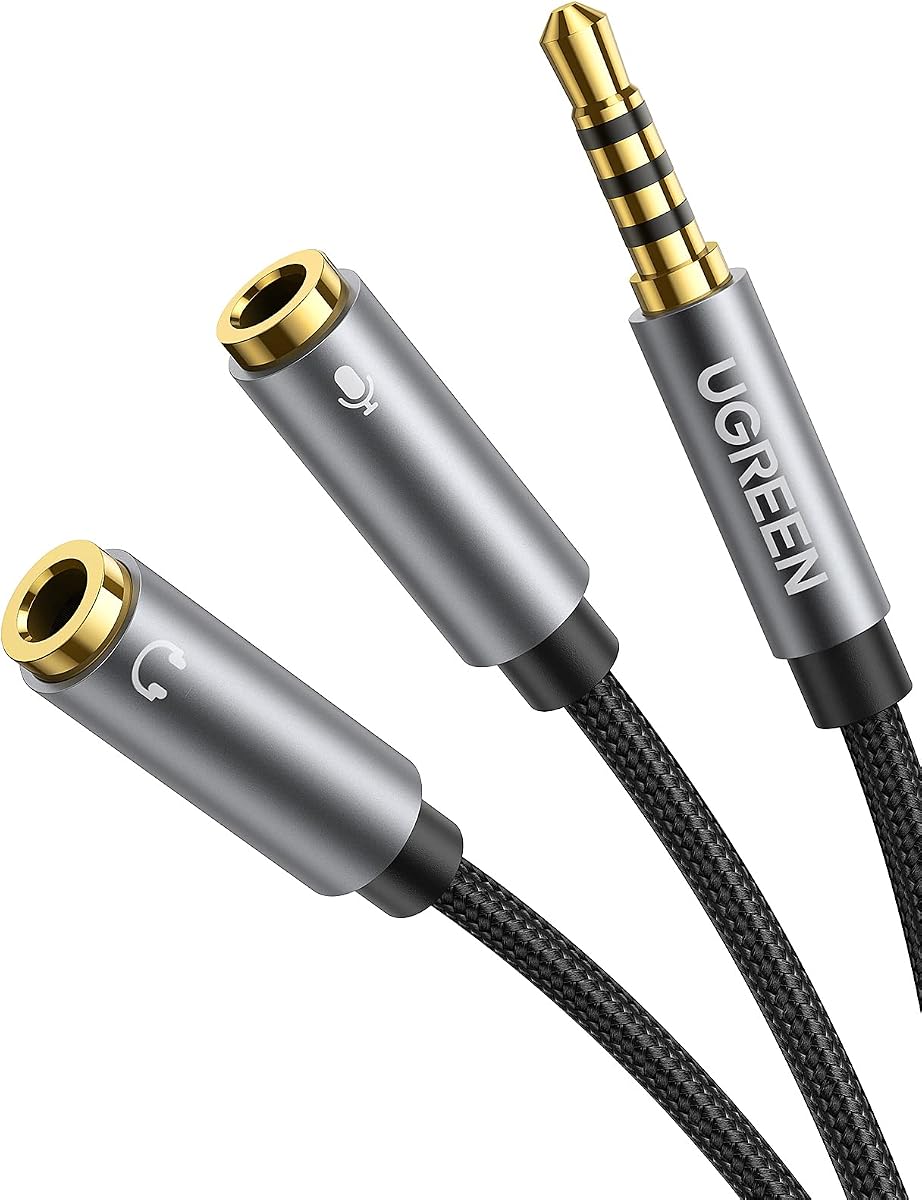
The UGREEN 2 Female to 1 Male splitter converts one CTIA combination headset into separate headphone and microphone connections for a legacy PC, laptop, or tablet. Its 4.5 rating reflects a useful, well-reviewed design for users whose computer lacks a single combination audio port.
We may earn a commission when you buy through this link, at no additional cost to you.
A soft TPE cable section provides flexibility around a desk, while the braided nylon exterior helps protect against scratches and everyday damage. Gold-plated connectors are intended to resist corrosion, and the copper core supports conductivity across the short cable run.
The critical caveat is CTIA compatibility. The headphone connection does not support iPhone headsets, OMTP headphones, Lightning accessories, or other standards. Users should also connect the headset and microphone to the adapter before attaching the adapter to the computer, as noted in the product guidance.
This adapter is a good fit for CTIA wired gaming headsets and compatible Android equipment used with devices that expose separate audio and microphone sockets. It is less suitable for Apple-centric setups or anyone uncertain about the wiring standard used by their headset.
Unlike a female-to-dual-male PC adapter, this model uses one male connection for a single-port device and two female sockets for the headset's separate microphone and headphone plugs. It fills a different gap in the category.
The TPE material allows the short cable to bend and adjust more easily than a rigid adapter. Its compact form also makes it convenient to carry between a home computer, office, classroom, or travel setup.
We may earn a commission when you buy through this link, at no additional cost to you.
The Bordsek Headphone Mic Splitter is a highly rated 3.5mm adapter that combines a headset's audio and microphone into one CTIA connection for a PC or other compatible device. Its 4.7 rating is the strongest among the conventional splitters in this list.
We may earn a commission when you buy through this link, at no additional cost to you.
Its most useful feature is the clearly differentiated two-male output: black is identified for the headphone port and red for the microphone port. The adapter uses 24K gold-plated contacts, aluminum housings, and braided wire stated to survive more than 40,000 bending tests.
Compatibility remains the main consideration. The listing specifically says the microphone will not work with Apple original earphones or Beats headphones, and it is aimed at CTIA-standard headsets. The product also cannot resolve every device that lacks a physical 3.5mm connection.
This is the most balanced recommendation for a PC gamer, remote worker, or student using a CTIA headset with separate microphone and headphone plugs. Color coding, sturdy construction, and broad headset compatibility make it easier to recommend and set up.
The black and red male outputs help users match the headset correctly to the corresponding computer socket. This reduces setup errors when audio and microphone ports sit close together on a laptop or desktop.
The cable and aluminum connector housings are designed for repeated repositioning around a computer. A claimed bend-test endurance above 40,000 cycles supports its suitability for gaming desks and frequently mobile setups.
We may earn a commission when you buy through this link, at no additional cost to you.
The SYNCWIRE Headphone Splitter is a one-male-to-two-female cable for sharing stereo sound from one source with two output devices. Its 4.6 rating makes it an attractive general-purpose audio-sharing option rather than a dedicated microphone adapter.
We may earn a commission when you buy through this link, at no additional cost to you.
Compatible sources include iPhones, iPods, iPads, Samsung devices, MP3 players, CD players, laptops, tablets, and PlayStation systems. Gold-plated contacts and double shielding are intended to provide clean stereo transmission, while the soft nylon jacket adds flexibility and protects the internal conductors.
The listing states that the cable can withstand at least 15,000 ninety-degree bend cycles, which is useful for portable use. However, it is a conventional audio-sharing Y-cable, not a splitter designed to separate a CTIA headset microphone into a dedicated computer microphone input.
This product fits users who want two people to hear the same music, movie, game, or presentation from one source. It is less appropriate for the core mic-and-speaker use case when a computer requires separate headset microphone and headphone inputs.
The two female outputs allow two compatible headphones or speakers to receive the same stereo signal. That makes the splitter useful for shared listening sessions and travel situations where carrying multiple source cables would be inconvenient.
Its slim, lightweight design fits easily into a bag, while the nylon exterior and shielded construction are intended to withstand regular handling. Gold-plated contacts are included to support signal quality and corrosion resistance.
We may earn a commission when you buy through this link, at no additional cost to you.
The KINGTOP adapter is designed for dual-plug gaming headsets that need to connect to a device with one CTIA combination port. Its 4.4 rating reflects a focused solution for separating headset audio and microphone signals rather than sharing one music source with two people.
We may earn a commission when you buy through this link, at no additional cost to you.
The configuration includes one 3.5mm male plug and two female sockets labeled for microphone and audio. It is listed for PS4, PS5, Xbox One, Switch controllers, newer laptops, and Android phones, with support for headsets from brands such as Logitech, Turtle Beach, HyperX, Razer, and SteelSeries.
Apple compatibility is a firm limitation. The listing excludes iPhone, iPad, MacBook Pro, iMac, other Mac systems, and Apple-designed Beats or Bose headphones. It also cannot be repurposed as a standard two-person music-sharing splitter.
Choose the KINGTOP when a CTIA gaming headset has separate plugs and the target device has a single combo jack. It is particularly useful for console and mobile gaming, though buyers should verify the exact headset connector and device standard before ordering.
The adapter's broad console support makes it useful for players moving between systems with a single 3.5mm headset port. It also supports compatible Android phones and newer laptops, subject to their audio standards.
The dedicated microphone and headphone sockets prevent the confusion associated with generic music-sharing Y-cables. This focused wiring makes the adapter easier to identify and use with a dual-plug gaming headset.
We may earn a commission when you buy through this link, at no additional cost to you.
This PC headset Y-splitter connects a four-pole CTIA gaming headset to separate 3.5mm microphone and headphone ports. The 4.4 rating and extensive compatibility list position it as a practical choice for PC and console gaming setups.
We may earn a commission when you buy through this link, at no additional cost to you.
The listed compatible equipment includes Astro A10 and A40 headsets, Turtle Beach, BENGOO, HyperX Cloud, SteelSeries, Razer Kraken, Sennheiser, and Sades. It can also serve compatible PS4, Xbox One, Switch, and smartphone headsets when those devices accept a CTIA combination connection.
The product is narrowly focused on the CTIA standard. It does not present itself as a universal two-listener music splitter, and the listing offers fewer construction details than some competing options. Users should also verify that the target device has the required 3.5mm microphone and audio sockets.
It is a good choice for gamers who already know their headset uses CTIA wiring and want a simple PC adapter without software. Its broad supported-brand list adds confidence for common gaming headsets, while the eight-inch cable remains easy to manage.
The single female connection accepts a CTIA combination headset, while the two male ends feed separate microphone and headphone inputs. This is a recognizable arrangement for gaming computers with legacy-style audio jacks.
Beyond PC use, the adapter is listed for compatible PS4, Xbox One, Switch, and smartphone headsets. It can also support communication applications where a combined headset is connected to a computer with separate ports.
We may earn a commission when you buy through this link, at no additional cost to you.
The 4FT USB to Dual 3.5mm cable is a digital-to-analog audio adapter with separate headphone or speaker and microphone outputs. Its 5.0 rating makes it the leading choice for adding conventional 3.5mm audio connections to a USB-only computer.
We may earn a commission when you buy through this link, at no additional cost to you.
A built-in DAC decodes the USB signal and supports output up to 16-bit and 48kHz, while noise reduction is intended to improve clarity. The four-foot length provides more reach than the short Y-cables, and a cotton jacket, aluminum shells, gold-plated contacts, and copper cores support durability and signal quality.
Unlike a passive 3.5mm splitter, this is active USB audio hardware. It therefore needs a compatible USB port and may appear as a sound device in the operating system. CTIA wiring is required, and the cable cannot create analog inputs on hardware that lacks a compatible USB audio path.
This is the premium pick for a modern laptop or desktop with limited analog audio ports. It also suits users who want microphone input, speaker or headphone output, and a longer cable in one driver-free package.
The adapter gives USB-equipped systems access to separate analog headphone or speaker and microphone connections. It is especially useful for ultraportable laptops that omit the legacy 3.5mm jacks.
The integrated DAC supports up to 16-bit and 48kHz output and includes noise-reduction processing. Because conversion occurs inside the cable, no separate external audio box is required.
We may earn a commission when you buy through this link, at no additional cost to you.
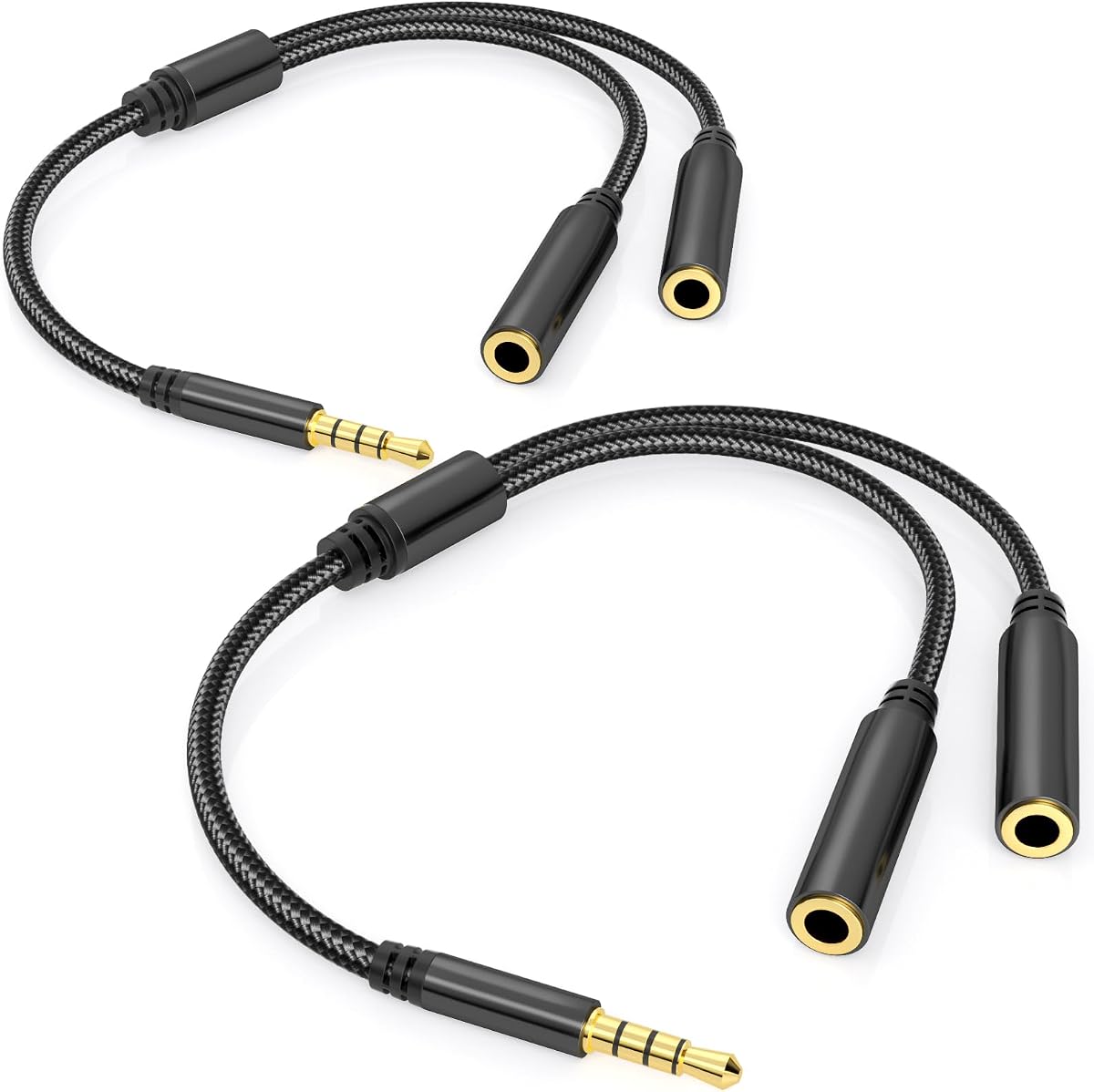
This two-pack is designed for sharing one source with two TRRS headsets, allowing both users to hear audio and provide microphone input. Its 4.5 rating distinguishes it from ordinary music splitters by explicitly supporting both sound and communication functions.
We may earn a commission when you buy through this link, at no additional cost to you.
Two 30-centimeter braided cables are included, each with a gold-plated male plug and dual 3.5mm female outputs. The aluminum housings are designed to resist scratches and corrosion, and the nylon braiding helps the cables resist wear and tangling during travel or storage.
TRS headphones and speakers can receive sound through the adapter, but they cannot contribute microphone input. As with any passive splitter, the source must accommodate two connected headsets, and individual output volume may be lower than when only one pair is attached.
The set is best for a pair of travelers, gamers, or coworkers who want to watch media or join a call from a phone, tablet, laptop, PC, MP3 player, or compatible console. The two-pack also offers a spare for another device or location.
Both TRRS headsets can carry sound and microphone signals through the splitter. This makes the product useful for shared calls, gaming sessions, movies, and music where both participants need to interact.
The two-pack provides one cable for each participant or a backup for a separate setup. Thirty-centimeter braided leads are short enough for a pocket or laptop bag while remaining easy to route around a device.
We may earn a commission when you buy through this link, at no additional cost to you.
The Maeline splitter connects a wired headset with combined audio and microphone contacts to a PC or laptop with separate 3.5mm sockets. Its 4.4 rating reflects a straightforward computer-focused adapter for voice communication and compatible CTIA Android headsets.
We may earn a commission when you buy through this link, at no additional cost to you.
Polished 24K gold-plated contacts, oxygen-free copper wire, aluminum shells, shielding, and a nylon-braided cable are specified to support reliable transmission. Strain-relief rings at the connectors are intended to improve stability and flexibility during frequent plugging and repositioning.
The product is limited to CTIA standard Android headphones, with Apple earbuds specifically excluded. It also needs a computer that provides separate 3.5mm audio and microphone jacks, so it will not solve connectivity on a system with only USB or a single combo socket.
This is a worthwhile compact adapter for a compatible Android gaming headset, a home office, or a laptop with separate analog ports. Users should check the headset standard and computer ports before buying, especially if their equipment includes Apple-designed earbuds.
The aluminum housings, shielding, and strain-relief rings are intended to protect the connection where cable movement is greatest. These details make the adapter suitable for a frequently used gaming or office setup.
The adapter supports popular VOIP and chat applications by routing headset audio and microphone signals to separate computer inputs. Its short braided lead is easy to carry between fixed workstations.
We may earn a commission when you buy through this link, at no additional cost to you.
A useful splitter begins with the ports on both ends: the source device, the headset, and the required microphone path. Connector direction, signaling standard, active or passive construction, and intended users determine which model will work correctly.
Mic and speaker splitters are easy to confuse because several models look similar but wire in opposite directions. A female-to-dual-male adapter generally accepts one combined headset plug and presents separate male microphone and headphone plugs for a legacy computer. A male-to-dual-female adapter takes the opposite route, accepting two separate headset cables at a device that has one combination output. A dual-headphone sharing splitter instead presents two female outputs for two attached headsets.
Choose the direction that matches the actual sockets on your device and headset rather than relying only on the shape of the connector. Inspect every endpoint before buying, because a physically fitting plug can still produce audio failure when its wiring is reversed.
CTIA and OMTP are the two major 3.5mm headset wiring standards, and they place microphone and headphone contacts in different positions. Most PC gaming headsets and many Android phones use CTIA, while some mobile accessories use OMTP. Several products in this guide explicitly support CTIA only, and some also exclude Apple-designed earbuds even when those earbuds use a CTIA-related arrangement.
Verify the standard used by your headset and the intended source device. If the microphone is silent while audio plays, an incompatible standard may be the cause. Do not assume that every smartphone or Apple earbud will work with a PC-focused splitter.
A traditional 3.5mm splitter requires the source to have a usable analog combination jack or separate analog microphone and headphone ports. A USB-to-dual-3.5mm model is different because it creates analog audio connections from a USB host. Check whether your computer has a 3.5mm jack, whether that jack is combination or separated, and whether the operating system supports the adapter.
The USB model in this roundup supports Windows, Mac OS X, Linux, Chromebook, Surface 3 Pro, Raspberry Pi, PS4, and PS5 according to its listing. Even with listed operating-system support, confirm that the specific device exposes an audio input through the USB connection.
A headset adapter and a music-sharing Y-cable solve different problems. A dedicated mic splitter separates one CTIA headset into a headphone output and microphone input for a computer. A standard audio splitter sends one source's music or video to two sets of headphones, usually without providing two microphone paths. A more advanced TRRS sharing cable can support two complete headsets, including two microphones.
Avoid buying a basic two-female audio splitter when your real requirement is chat or gaming with a computer that has separate microphone and headphone ports. Conversely, a dedicated PC headset adapter will not let two friends listen independently. Match the product to the number of listeners and microphone users.
Most computer headset adapters are compact and approximately 20 centimeters long, while the USB model provides a four-foot cable and the shared-headset option uses one-foot leads. Short cables are easy to carry and avoid clutter around a laptop, but they may be tight when ports are placed far apart or on opposite sides of a desktop.
Consider how the splitter will actually be used. A permanent desktop setup may benefit from the USB cable's extra reach, while frequent travel favors a short braided adapter that fits in a pocket or laptop bag. Long cables should be routed carefully to avoid pressure on the connector.
Gold-plated contacts, oxygen-free copper, shielding, braided jackets, and aluminum housings are common quality signals in this category. These materials are intended to improve conductivity, resist corrosion, reduce interference, and protect the cable from repeated bending. They do not guarantee that an incompatible connector arrangement will work, so electrical construction should complement rather than replace compatibility checks.
Also look for practical details such as strain relief, color-coded microphone and audio outputs, and a stated bend-test rating. The strongest options in this guide combine clear wiring with durable housings, while a basic one can still be adequate for occasional use.
An active USB adapter may include a digital-to-analog converter, amplification, and noise reduction that a passive Y-cable cannot provide. These features can make the USB option valuable for a modern computer with poor analog output or no 3.5mm jack. The included model advertises a high-resolution DAC, 16-bit and 48kHz output, and plug-and-play operation without drivers.
Active features are unnecessary when a device already provides clean analog audio and you only need to change the wiring. They also add complexity because the adapter must communicate with the host through USB. Choose active processing for modern computer integration, not simply because a longer cable is available.
Gaming, office calls, online classes, and shared entertainment create different demands. Gaming adapters often emphasize CTIA compatibility with named headset brands, while office adapters focus on voice applications and portable construction. Shared-media splitters may optimize for two listeners and, in some cases, two microphone inputs rather than separate computer ports.
Consider how often the adapter will move, whether color coding would prevent setup mistakes, and whether the included warranty or support matches your needs. The best choice is the one that fits the exact devices, avoids excluded standards, and is convenient enough to remain on hand.
Start by identifying the source and headset ends of the cable. For a female-to-dual-male PC adapter, connect the headset's combined plug into the female socket, then identify the male microphone and headphone outputs. Plug the headphone output into the computer's headphone or speaker port and the microphone output into the microphone input. If your source instead has one combination port, use a male-to-dual-female or TRRS sharing model as appropriate.
For a USB-to-dual-3.5mm adapter, connect the USB plug directly to the computer before attaching the microphone and speaker or headphones. Allow the system to recognize the new audio device, then select it in the operating system's sound or recording settings. Test the microphone in a recording or call application and confirm that the correct output device is selected before beginning a long session.
Store passive adapters loosely in a bag pocket or cable organizer without sharply bending the plug housings. Do not pull on the cable when removing it, and avoid moisture, crushing, or repeated twisting near the strain relief. If audio is distorted, the microphone is silent, or channels are reversed, disconnect the cable and recheck connector direction, CTIA compatibility, and the selected device input before assuming the splitter is defective.
A mic splitter is designed to separate the headphone and microphone contacts of a CTIA headset so each signal can reach the correct computer port. A conventional headphone splitter shares one audio source with two sets of headphones or speakers, and it generally does not provide two microphone connections. Read the connector direction and supported wiring standard before selecting either type.
It will work only if the laptop has the required analog audio connection. A female-to-dual-male adapter needs separate microphone and headphone jacks, while a male-to-dual-female model needs a single combination port. A USB-to-dual-3.5mm adapter is the better option for a USB-only laptop, provided the operating system recognizes it as an audio device.
The most likely causes are an incompatible CTIA or OMTP standard, reversed connector wiring, or plugging the microphone into the wrong computer input. Some CTIA adapters also exclude particular Apple-designed earbuds or Beats headphones. Test a known-compatible CTIA headset and confirm that the system has selected the correct recording device.
Only a splitter designed for two TRRS headsets can carry both audio and microphone signals for two users. A standard music-sharing Y-cable may send sound to both headsets, but it will not necessarily provide a microphone path for each person. The two-pack TRRS option in this guide specifically supports simultaneous audio and microphone use.
Passive splitters divide one source signal, and loading two outputs can reduce the volume available at each output. Cable quality, connector fit, shielding, and electrical design can also affect signal consistency. An active USB adapter with a built-in DAC may offer a different result because it performs digital-to-analog conversion and signal processing inside the cable.
Both are 3.5mm headset wiring standards, but they place the microphone contacts differently. CTIA is common with PC gaming headsets and many Android devices, while OMTP appears on some mobile accessories. Because the contact order differs, a headset may play audio but fail to transmit its microphone through an incompatible splitter.
The USB-to-dual-3.5mm model in this guide is described as plug-and-play and requires no drivers or external power. The operating system should recognize it automatically, though users may need to choose it manually in sound settings. Passive 3.5mm splitters require no software at all because they do not communicate digitally with the host.
Look at which device has the single socket and which device has the separate sockets. A female-to-dual-male adapter usually connects a combined headset to a computer with separate headphone and microphone jacks. A male-to-dual-female adapter usually connects separate headset plugs to a device with one combination socket. Physical connector shape alone is not enough; the signal wiring must also match.
The Bordsek Headphone Mic Splitter is the strongest all-around conventional choice because it combines a 4.7 rating, color-coded microphone and audio outputs, sturdy construction, and broad CTIA gaming-headset support. The 4FT USB to Dual 3.5mm stands out as the premium pick for USB-only computers, while the SYNCWIRE Headphone Splitter provides a practical, budget-conscious way to share stereo audio with two listeners.
Prioritize connector direction and CTIA compatibility before any other feature. Confirm whether the source has one combination jack, separate 3.5mm ports, or USB, and determine whether the headset uses CTIA, OMTP, or separate plugs. Then choose based on the task: microphone separation, two-person audio sharing, two complete headset connections, or active USB audio conversion.
Product details and current prices can change, so review the latest listing, supported-device information, and warranty terms before ordering. Checking those details at the point of purchase helps avoid a connector mismatch and makes it easier to select a splitter that will work reliably with your existing equipment.