
Samsung T9 Portable SSD 1TB
4.6Editor score
Up to 2,000MB/s transfer speeds
Advanced thermal management system
Magician software management suite
External SSD for MacBook Neo guide comparing ten portable drives for speed, capacity, durability, compatibility, security, and everyday storage use.
An external SSD can give a MacBook Neo more room for creative projects, local backups, large media libraries, and files that should not remain on the internal drive. A worthwhile model should combine fast transfers with a Mac-friendly USB-C connection, dependable construction, and enough capacity for the way you work.
The ten drives in this guide were compared using the supplied specifications, including stated transfer speeds, interfaces, capacities, dimensions, durability features, encryption, and device support. The list covers portable options from SanDisk, Samsung, Lexar, SSK, and Western Digital at different capacity and performance levels.
Each review explains where a particular drive stands out and where another model may fit your needs better. The recommendations reflect the stated specifications rather than personal testing, and availability, software versions, and product configurations can change over time.
4.6Editor score

4.6Editor score

4.5Editor score
The table below places all ten portable SSDs side by side, emphasizing the attributes that most affect MacBook Neo use: stated speed, capacity, physical size, durability, and additional features such as encryption or hardware-backed connectors.


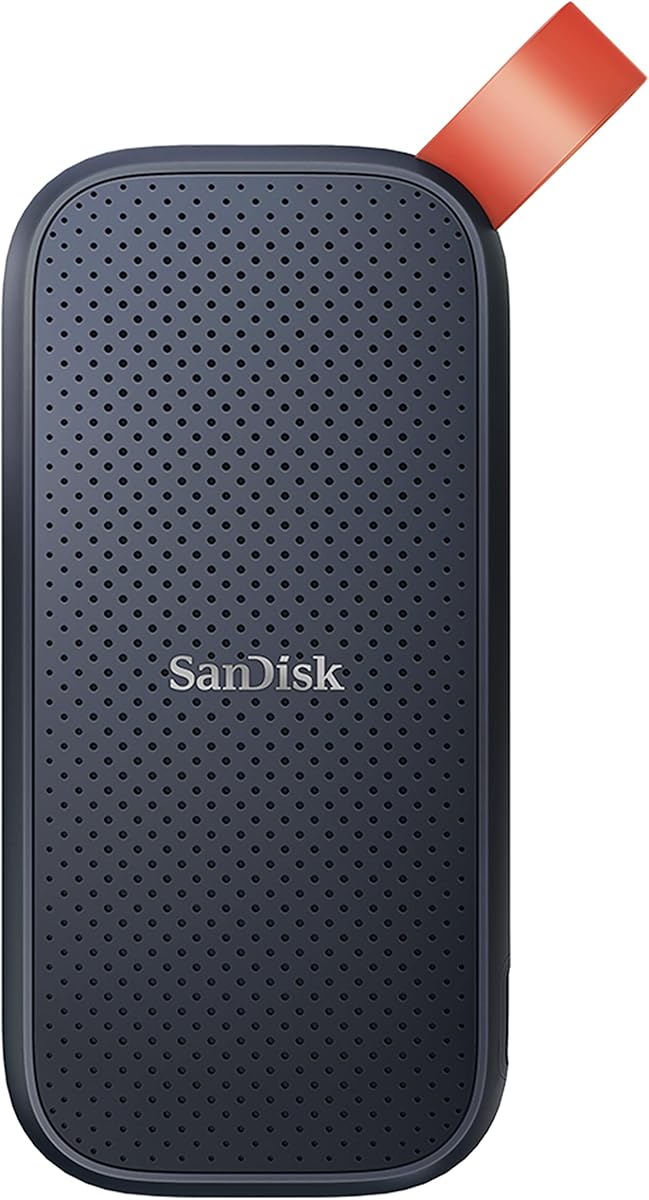




The Sandisk Extreme Portable SSD combines a generous two-terabyte capacity with the balanced feature set that makes it especially useful for a MacBook Neo. Its supplied specifications list read speeds up to 1,050MB/s and write speeds up to 1,000MB/s, while a 4.6 rating places it among the stronger-reviewed products in this guide.
We may earn a commission when you buy through this link, at no additional cost to you.
Its main appeal is the combination of capacity and portability. A two-terabyte drive can hold large project folders, photo libraries, backups, and media without becoming a desk-bound accessory. The included carabiner loop makes it easy to attach to a backpack, while its stated IP65 water and dust resistance and three-meter drop protection suit frequent travel.
The drive also supports 256-bit AES hardware encryption through password protection, allowing sensitive files to remain protected with less reliance on software-only safeguards. The SanDisk Memory Zone app can help manage files and automate space-saving tasks, although installation is required and the app is not essential to basic storage use.
This is our top overall recommendation because it does not ask the buyer to choose between speed, room, durability, and security. The main limitation is that its USB 3.2 Gen 2 interface is not as advanced as the dual-lane USB 3.2 Gen 2×2 interfaces found on some newer alternatives. Even so, its stated performance should be more than sufficient for a MacBook Neo handling routine backups, document transfers, and media workflows.
Choose the Sandisk Extreme if you want one drive to serve several roles: portable scratch storage, a local working library, and a protected backup destination. For buyers who need the newest interface rather than high capacity and ruggedness, the Samsung T9 and Lexar D70E deserve close attention.
The two-terabyte capacity is the defining practical advantage of this Sandisk model. It leaves room for compressed project archives, exported video, high-resolution photographs, and multiple working sets without requiring frequent cleanup between tasks.
Password protection with 256-bit AES hardware encryption adds a useful layer for sensitive material, while the stated IP65 rating and three-meter drop protection support use in mobile environments. The carabiner loop also reduces the chance of leaving the drive behind.
We may earn a commission when you buy through this link, at no additional cost to you.
The SSK Portable SSD is a straightforward one-terabyte option for MacBook Neo users who want fast everyday transfers without paying for a more advanced premium interface. It has a 4.5 rating, a compact 2.6-by-1.5-by-0.5-inch body, and a stated weight of just 36.6g.
We may earn a commission when you buy through this link, at no additional cost to you.
Its specification sheet lists read speeds up to 1,050MB/s and write speeds up to 1,000MB/s over a 10Gbps connection. Both USB-C and USB-A cables are included, reducing friction when moving between modern and older systems. An LED indicates drive activity, while S.M.A.R.T. diagnostics and adaptive TRIM support ongoing drive management.
Thermal design is another strength. The two-millimeter aluminum alloy case is intended to dissipate heat, with a listed peak case temperature of 105.58°F. The product data also states that 25% of currently available capacity can be allocated as SLC cache, which helps sustain fast transfers within that cache limit.
Its principal compromise is the amount of included storage and the less advanced interface compared with dual-lane models. It also lacks the hardware encryption and IP-rated protection highlighted by several competitors. Those omissions matter if you are storing confidential files or routinely taking the drive into harsh environments.
For students, travelers, and general MacBook Neo users, the SSK remains a practical budget-focused recommendation. Its small size, light weight, fast stated transfers, and included cables make it easy to carry, while the one-terabyte capacity is best suited to active project files and rotating backups rather than unlimited archiving.
At only 36.6g and 10.4 millimeters thick including the stated dimensions, the SSK is easy to keep in a pocket, small bag, or laptop sleeve. The aluminum shell gives it a more substantial feel while helping move heat away from the storage components.
The included USB-C and USB-A cables make the drive convenient for a MacBook Neo as well as older computers, tablets, phones, and cameras. That versatility is valuable when a portable SSD becomes part of a broader creative workflow instead of a Mac-only accessory.
We may earn a commission when you buy through this link, at no additional cost to you.
The Samsung T9 Portable SSD is the premium recommendation in this guide, built around a USB 3.2 Gen 2×2 interface and sustained read and write speeds listed as high as 2,000MB/s. Its 4.6 rating and creator-focused feature set make it a natural fit for a MacBook Neo used for demanding media and project workflows.
We may earn a commission when you buy through this link, at no additional cost to you.
Performance is only half of the story. Samsung describes a Dynamic Thermal Guard system that controls heat during heavy use, and the product is designed to maintain high speeds during longer processes. Magician Software adds firmware updates, encryption options, and continual drive-health monitoring for a more managed storage experience.
The T9 is also designed to move between a desktop, camera, or gaming console, making it less dependent on a single machine. It supports iPhone 15 ProRes 4K video at 60fps and more according to the supplied information, with the included SSD cable recommended for compatible workflows.
The tradeoff is that this is a premium-positioned product, and some buyers may not need dual-lane transfer speeds. A one-terabyte drive may also become limiting for expansive archives, although capacity can be expanded by keeping older projects on separate media. Actual results will also depend on the host device, cable, workload, and system support.
Buy the T9 if fast sustained transfers, thermal control, and software-based management are priorities. It is particularly compelling for creators who regularly move large working files or want one premium portable SSD that can also serve compatible cameras, consoles, and mobile devices.
The 2,000MB/s stated transfer rate places the T9 ahead of USB 3.2 Gen 2 models, while the emphasis on sustained speeds matters when moving large video clips or editing files directly from the drive rather than completing only brief transfers.
Magician Software can provide firmware updates, encryption controls, and drive-health monitoring. These features make the T9 more attractive when the drive is expected to remain part of a serious production system rather than serve as temporary file space.
We may earn a commission when you buy through this link, at no additional cost to you.
The Lexar ES3 Portable SSD is built for users who prioritize a slim, pocketable design. At 10.5 millimeters thick and 42g, it is one of the more compact products in the guide, while its USB-C connection and one-terabyte capacity make it convenient for everyday MacBook Neo storage.
We may earn a commission when you buy through this link, at no additional cost to you.
Its stated performance reaches up to 1,050MB/s read and 1,000MB/s write when the host supports USB 3.2 Gen 2. The supplied information notes that performance can be lower on Macs or other systems without the necessary interface support, so the drive's rating should not be interpreted as guaranteed speed on every computer.
DataShield software provides 256-bit AES encryption, adding a security option for users who need to protect selected files. The product data also lists compatibility with recent iPhone models, Android devices, laptops, cameras, Xbox and PlayStation systems, and other devices, although users should verify the exact model and required adapter or cable.
The most important caveat is that this silver version does not include MagSafe. It also uses a conventional USB 3.2 Gen 2 interface rather than the faster dual-lane design found in the premium alternatives. Those limitations are modest for a general-purpose drive but meaningful for buyers seeking the newest connection standard.
The ES3 is a strong fit for people who want a discreet, lightweight drive that can handle backups, document storage, and routine creative transfers. It is particularly suitable for users who value portability and encryption software over maximum speed or a two-terabyte working capacity.
The 10.5-millimeter aluminum-style body and 42g weight make the ES3 easy to carry between locations. A small footprint is valuable when a MacBook Neo is already traveling with several accessories.
Lexar DataShield adds 256-bit AES encryption for protected folders, while the broad compatibility list makes the drive useful beyond a Mac setup. Exact device support can vary, so checking the connected device's port and protocol is important.
We may earn a commission when you buy through this link, at no additional cost to you.
The Samsung T7 Portable SSD earns the highest rating in this selection at 4.7, offering a balanced combination of speed, construction, portability, and broad compatibility. Its supplied specifications list read and write speeds up to 1,050MB/s and 1,000MB/s over USB 3.2 Gen 2.
We may earn a commission when you buy through this link, at no additional cost to you.
The solid aluminum unibody is designed to resist shock, with fall protection stated at up to six feet. That makes the T7 appealing for a MacBook Neo used in school, at work, or while traveling. It also supports 4K 60fps recording from compatible cameras and mobile devices, including iPhone 15 ProRes workflows.
Samsung positions the drive for makers, photographers, gamers, students, and professionals, and the stated compatibility extends across PCs, mobile devices, cameras, and consoles. The one-terabyte version offers enough room for working projects, game data, high-resolution media, and regular backups while remaining easy to transport.
Its main technical limitation is that USB 3.2 Gen 2 is not the fastest interface available in the guide. It also does not emphasize IP-rated environmental sealing in the supplied data. Those points should matter most to buyers who require maximum transfer rates or frequent exposure to water and dust.
The T7 is an excellent general recommendation for most MacBook Neo owners. It avoids the complexity of specialized dual-connector designs, provides a reassuring physical design, and has the strongest rating among the ten products. Choose it when dependable everyday performance and durability matter more than having the absolute latest interface.
The aluminum unibody and stated six-foot drop protection make the T7 a sensible choice for frequent travel. Its compact form also complements a MacBook Neo without requiring a separate enclosure or powered docking setup.
Up to 1,050MB/s reads and 1,000MB/s writes provide ample speed for backups, project files, and media transfers. The drive can also serve compatible cameras and mobile devices, extending its usefulness across a creative setup.
We may earn a commission when you buy through this link, at no additional cost to you.
The Sandisk 1TB Portable SSD is a straightforward mobile storage option with a 4.5 rating and read speeds listed at up to 800MB/s. Although it is identified as an old model, the core feature set remains relevant for MacBook Neo users seeking a simple drive for backups and everyday file transfer.
We may earn a commission when you buy through this link, at no additional cost to you.
Its main appeal is ease of use. The compact enclosure includes a rubber hook that can secure the drive to a belt loop or backpack. Stated two-meter drop protection helps it tolerate ordinary travel, and the one-terabyte capacity is a familiar working size for documents, photographs, and active project folders.
The data also identifies SanDisk as a brand used by professional photographers, which may inspire confidence for assignment work. However, this model lacks the clearly stated encryption and IP65 protection found on the newer Extreme and Extreme PRO products in the guide.
Its lower speed and old-model status are the key trade-offs. Transfers will generally be less impressive than on 1,050MB/s Gen 2 drives or the much faster dual-lane models. It is also less attractive if a new purchase should offer the newest enclosure features, firmware tools, or current-generation connectivity.
For users who simply need dependable, portable storage and do not chase maximum transfer rates, this Sandisk remains easy to justify. It is best viewed as a basic backup or working drive rather than the top choice for intensive video editing or very large media libraries.
The integrated rubber hook provides a convenient way to keep the drive attached to a bag or belt loop. That makes it easier to establish a routine of moving important files away from the MacBook Neo without adding another loose accessory.
The stated 800MB/s read rate is suitable for common documents, photographs, backups, and moderate media transfers. Users moving exceptionally large video files continuously may prefer a higher-speed dual-lane model.
We may earn a commission when you buy through this link, at no additional cost to you.
The Lexar 2TB ES3 External SSD combines a large capacity with up to 1,050MB/s read and 1,000MB/s write speeds. Its 4.5 rating and two-terabyte configuration make it a strong candidate for MacBook Neo users who want more local storage without moving to a premium dual-lane model.
We may earn a commission when you buy through this link, at no additional cost to you.
Thermal handling is a notable design point. Double-layer graphite sheets are used to conduct heat away from internal components, supporting performance during fast transfers. The drive is also stated to resist drops up to two meters, giving it a useful level of protection for commuting and office use.
A two-in-one USB-C and USB-A cable provides flexible connection options. The supplied information describes plug-and-play compatibility with PCs, Macs, tablets, smartphones, and other devices, making the drive convenient for cross-platform file movement and backup tasks.
Encryption is not listed among this model's stated features, which is a meaningful difference from the one-terabyte Lexar ES3 with DataShield. The interface is also limited to USB 3.2 Gen 2, and a two-terabyte drive can consume more of a user's available budget than a smaller model.
The ES3 is a compelling choice when storage room takes priority over cutting-edge speed or software-assisted security. It is particularly well suited to photographers, students, and MacBook Neo users who want a single drive for extensive working files, media, and local backups.
A two-terabyte capacity gives MacBook Neo users more freedom to keep large photographs, video files, project archives, and backup snapshots together. It can also reduce the need to rotate multiple smaller drives between a desk and a travel bag.
The double-layer graphite sheets help move heat away from the drive, which is valuable during sustained transfers. Heat management becomes increasingly important as file sizes and transfer durations grow.
We may earn a commission when you buy through this link, at no additional cost to you.
The Lexar D70E Dual Drive is built around convenience and modern performance. It has a 4.7 rating, integrated USB-C and USB-A connectors, and stated USB 3.2 Gen 2×2 performance of up to 2,000MB/s read and 1,800MB/s write.
We may earn a commission when you buy through this link, at no additional cost to you.
Because the connectors are built into the drive, there is no separate cable to lose or misplace. That makes the D70E particularly convenient for a MacBook Neo that travels with different devices, especially when moving between USB-C and USB-A systems. The design supports direct, seamless backups across Mac, PC, tablet, and mobile devices according to the supplied data.
USB-A users receive lower stated rates of up to 1,000MB/s read and 900MB/s write. Mac users may also see reduced results when their system does not support USB 3.2 Gen 2×2, so the headline 2,000MB/s figure should be treated as a maximum under supported conditions.
The enclosure weighs 55g and includes a metal housing with an integrated lanyard loop. The Lexar App can automate photo and video backups, adding practical value for users who want scheduled or more consistent protection for valuable media.
The D70E is best for buyers who want high-speed dual-lane performance without carrying a separate cable. Its main trade-off is that integrated connectors add a small amount of bulk compared with a bare USB-C device, while older USB-A connections cannot deliver the highest stated speed.
The integrated USB-C and USB-A connectors remove the need to choose or carry a cable for each connection. This is a practical advantage in travel kits where small accessories are easily lost.
The drive can reach up to 2,000MB/s read and 1,800MB/s write over USB 3.2 Gen 2×2. Real-world performance depends on the MacBook Neo's interface support, the connected device, and the selected connection type.
We may earn a commission when you buy through this link, at no additional cost to you.
The Sandisk Extreme PRO Portable SSD delivers an impressive combination of speed and physical protection. It carries a 4.5 rating and lists NVMe performance of up to 2,000MB/s for reads and writes, making it one of the fastest products shown in the guide.
We may earn a commission when you buy through this link, at no additional cost to you.
Its forged aluminum chassis doubles as a heatsink, helping support higher sustained speeds while keeping the enclosure rigid. The stated IP65 water and dust resistance and three-meter drop protection are especially appealing for travel, fieldwork, and mobile creative work. A carabiner loop adds another practical carrying feature.
The drive includes password protection with 256-bit AES hardware encryption, so sensitive data can benefit from hardware-backed security. The SanDisk Memory Zone app assists with file management and automatic space freeing, although downloading and installing it is required.
The model is explicitly listed as an old model, and its one-terabyte capacity may be modest for users with large archives. It also shares the same general need to check host-device support as other high-speed portable SSDs: the maximum transfer rate is not guaranteed on every MacBook Neo configuration.
This Extreme PRO remains attractive for buyers who want rugged construction, strong security, and very high stated speeds. It is well suited to media professionals, photographers, and users who regularly move large files between locations, provided the old-model status and capacity are acceptable.
The forged aluminum shell provides structural strength and doubles as a heatsink. Combined with IP65 protection and three-meter drop resistance, it is designed for users who carry storage into demanding environments.
Up to 2,000MB/s stated performance supports large project transfers, while 256-bit AES hardware encryption helps protect sensitive files. Checking interface support on the MacBook Neo remains necessary for maximum results.
We may earn a commission when you buy through this link, at no additional cost to you.
The Western Digital 1TB My Passport SSD is a security-focused portable drive with a 4.5 rating. It uses NVMe technology and lists transfer speeds up to 1,050MB/s read and 1,000MB/s write, placing its performance near the top of the standard USB 3.2 Gen 2 group.
We may earn a commission when you buy through this link, at no additional cost to you.
Password-enabled 256-bit AES hardware encryption is the standout feature. It is particularly useful for a portable drive containing client documents, personal records, or business material that should remain protected even when the SSD is disconnected from the MacBook Neo.
The enclosure is also designed for mobile use. Western Digital states that it resists shock and vibration and can withstand drops up to 6.5 feet, or 1.98 meters. USB 3.2 Gen 2 and USB-C compatibility are listed, with USB-A support for older systems.
As with the other one-terabyte models, storage capacity is the main limitation for expansive media archives. The interface is also older than the dual-lane options, and the product data does not highlight an IP rating for dust or water resistance.
The My Passport SSD is a sound recommendation for users who place a high value on hardware encryption and physical resilience. It balances fast everyday performance with security in a portable format, making it especially suitable for work-related files that regularly leave the office or home.
Password-enabled 256-bit AES hardware encryption is a meaningful advantage when a drive carries confidential or professional material. Unlike basic folder hiding, hardware encryption protects access at the drive level.
Shock and vibration resistance, plus the stated 6.5-foot drop rating, make the drive suitable for commuting and mobile work. USB-C support suits a MacBook Neo directly, while USB-A helps maintain compatibility with older systems.
We may earn a commission when you buy through this link, at no additional cost to you.
The right MacBook Neo companion depends on the files you move, the protection you need, and how often the drive leaves your desk. Capacity, interface support, sustained performance, durability, encryption, and connector design should be weighed together rather than judged by speed alone.
Start with the connection available on the MacBook Neo and the protocol the drive supports. USB-C is essential for a modern direct connection, while a USB 3.2 Gen 2 or Gen 2×2 interface determines the maximum transfer rate the drive can potentially achieve. Faster interfaces are useful only when the host, cable, system, and workload all support them, so the advertised peak figure should be treated as a ceiling rather than a promise for every transfer.
One terabyte is often a practical starting point for active documents, a recent photo collection, and rotating backups. Two terabytes is more appropriate when you regularly work with large video files, need multiple project versions, or want one drive to hold both active work and an archive. Remember that available capacity displayed by an operating system can differ from the nominal capacity because drive manufacturers use decimal gigabytes while some systems report binary values.
Peak read speed describes the best short transfer, while sustained speed reflects how the drive behaves during a long copy, backup, or media workflow. Models with stated thermal management and sustained-performance claims are preferable for large archives and video. When comparing the supplied figures, note that some products list separate read and write speeds, others describe combined read and write rates, and each number depends on the host and test conditions.
Drop resistance protects against the everyday knocks associated with travel, while IP ratings add protection against water and dust. A drop rating is useful in a bag or on a desk, but it does not make a drive waterproof. If the SSD will be used outdoors, near a camera kit, or in environments where spills and dust are likely, an IP65-rated model provides a more complete physical defense than a drop rating alone.
A portable drive can expose important information whenever it leaves your MacBook Neo. Hardware-backed 256-bit AES encryption is a stronger choice for sensitive files because protection is tied to the drive itself and can require a password after connection. Software-based encryption can still be valuable, but buyers should confirm how the application is installed, whether the protection is password-based, and whether it functions with the intended Mac workflow.
A drive with a standard USB-C port usually arrives with a cable and works with a wide range of modern devices. A dual-connector design can be even more convenient because the connectors are built into the enclosure. That avoids searching for the right cable and makes the drive useful across USB-C and USB-A systems, although integrated connectors may make the body slightly bulkier and USB-A operation can deliver lower transfer rates.
Fast flash storage produces heat, and a drive that cannot dissipate it may slow down during extended transfers. Aluminum housings, graphite heat-spreading layers, and dedicated thermal controls all indicate attention to sustained performance. The enclosure should also feel solid enough for portable use, with a stable connection that does not put unnecessary strain on the MacBook Neo's port.
Software can improve the ownership experience through health monitoring, firmware updates, encryption controls, and automatic backup scheduling. The Samsung Magician suite and Lexar App provide these kinds of management features, while SanDisk Memory Zone focuses on file organization and storage cleanup. Software is helpful, but it should support rather than replace a sensible backup plan, and you should confirm that required applications are available for your Mac and current operating system version.
Before transferring important files, format the drive using the MacBook Neo's Disk Utility with a file system and organization method appropriate for your workflow. APFS is a natural choice for a Mac-centered drive, while exFAT allows the same drive to work more easily with some Windows systems. Give the drive a clear volume name so it is easy to identify when several storage devices are connected.
Copy files normally for everyday use, and use the appropriate backup tools when maintaining a primary copy of important documents. For a working drive, leave enough free space for the operating system and applications to maintain healthy write performance. For a dedicated backup, run a scheduled copy and occasionally open a few archived files to confirm that the process completed correctly rather than relying only on the presence of the backup drive.
Always use the Eject command before unplugging the SSD. Keep the connector and enclosure free of dust, avoid liquids, and do not move the drive while a transfer is underway. If performance declines during a large operation, allow the drive to cool and verify that the connection, cable, and host device support the expected interface. Periodically review drive-health information and replace the device if important files are no longer being backed up elsewhere.
In most cases, a modern external SSD with a USB-C connector will be recognized after it is plugged into the MacBook Neo. Actual transfer speed depends on the drive's interface, the Mac's supported protocol, the cable, and the size of the files. Check the drive's stated USB generation and ensure the included or supplied cable supports the intended connection.
No. A stated 2,000MB/s figure is a maximum under supported conditions, and it may require USB 3.2 Gen 2×2 or another compatible high-bandwidth connection. Host-device limitations, cable quality, file size, thermal conditions, encryption, and sustained workloads can all reduce the result. The product specifications also state that performance may be lower depending on the host and other factors.
It can be enough for active documents, recent photos, and a rotating selection of essential files. A two-terabyte drive is more useful for large video libraries, multiple creative projects, or longer-term local archives. The best capacity is the one that allows you to complete regular backups without constantly deleting older working files.
An IP rating is most valuable if the drive will encounter rain, dust, sandy conditions, or other environmental exposure. A drive with a strong drop rating is sufficient for many desk and commuting uses, but an IP rating adds protection against particles and water. Neither rating makes the SSD immune to all physical damage, so careful handling remains important.
Hardware encryption is worth prioritizing when the drive will contain confidential business data, personal records, or client material. It protects content at the storage-device level and can require a password after the drive is connected. For non-sensitive files, software management and disciplined backups may be sufficient, but encryption adds valuable protection for a portable device.
APFS is generally the most natural choice for a drive used primarily with macOS because it matches the system's native file system features. exFAT is more convenient when the same drive must move between a Mac and a Windows computer. The best choice depends on your devices and workflow rather than on transfer speed alone.
USB 3.2 Gen 2 generally refers to a single-lane connection, while Gen 2×2 combines two lanes for greater bandwidth. A Gen 2×2 drive can offer a higher theoretical maximum, but both the MacBook Neo and the connected device must support it. Plugging a Gen 2×2 drive into a Gen 2 port will limit performance to the slower connection.
Yes. An external SSD is useful for local working files, expanded storage, and backup copies, but it can still fail or be lost. Important data should ideally have more than one copy, with at least one stored separately from the MacBook Neo. An external drive can be one part of that strategy rather than the only surviving copy.
The Samsung T9 is the premium choice for buyers who want the fastest stated transfer class, sustained performance, and advanced thermal management. The Sandisk Extreme Portable SSD stands out as the most balanced overall option because it combines two-terabyte capacity, solid travel protection, and hardware encryption, while the SSK offers a compact and budget-focused one-terabyte alternative.
Prioritize MacBook Neo interface support first, then choose capacity according to the size of your working files. Durable and IP-rated models are best for frequent travel, hardware encryption is valuable for sensitive material, and dual connectors or built-in management software can simplify a busy creative workflow. Faster specifications matter most for large, continuous transfers rather than ordinary document copying.
Finally, verify the current specifications, included accessories, and system compatibility before purchasing, since models and configurations can change. Keep important files protected with more than one backup, use a format appropriate to your devices, and always eject the drive cleanly before moving it.