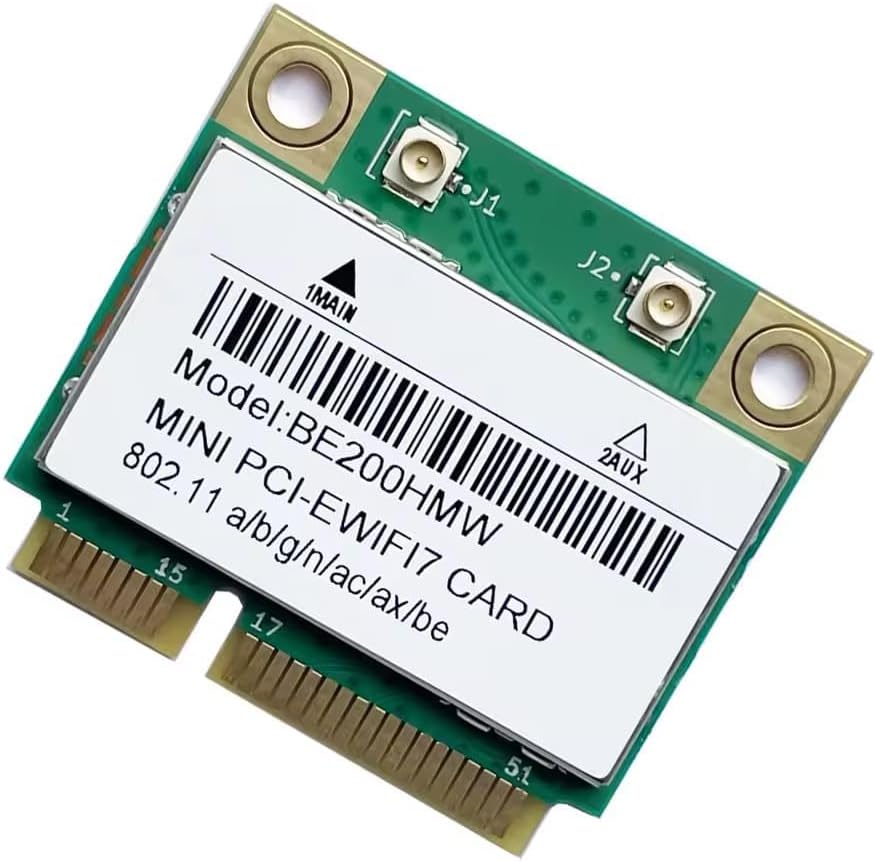
Wireless BE200 Half Mini PCIe Card
4.6Editor score
Up to 5.8 Gbps
Bluetooth 5.4 support
WPA, WPA2, WPA3 security
Modern tri-band wireless support
Compare 10 Half Mini Pcie WiFi Bluetooth Card options for speed, Bluetooth, compatibility, and easy laptop upgrades in this expert guide for 2026.
A Half Mini Pcie WiFi Bluetooth Card can restore wireless connectivity to an older laptop, mini PC, or compatible desktop while adding Bluetooth without a separate dongle. The right card depends less on headline speed and more on the device’s slot layout, antenna connections, operating system, and wireless whitelist restrictions.
This guide compares ten cards across WiFi generation, supported frequency bands, theoretical throughput, Bluetooth version, physical interface, operating-system support, and installation requirements. It includes AC, WiFi 6, and WiFi 6E options, plus older 802.11n choices for systems that need a straightforward replacement.
Each review explains the most useful benefits, practical limitations, and ideal buyer, while the comparison table makes the differences easier to scan. Ratings and specifications reflect the supplied product information, and current prices can change, so shoppers should verify compatibility and compare current offers before purchasing.
4.6Editor score

4.6Editor score
4.7Editor score
The table below compares the ten cards by wireless standard, headline connection rate, Bluetooth support, and practical compatibility considerations. The shorter specifications make it easier to identify an option that matches your device before reading the detailed reviews.
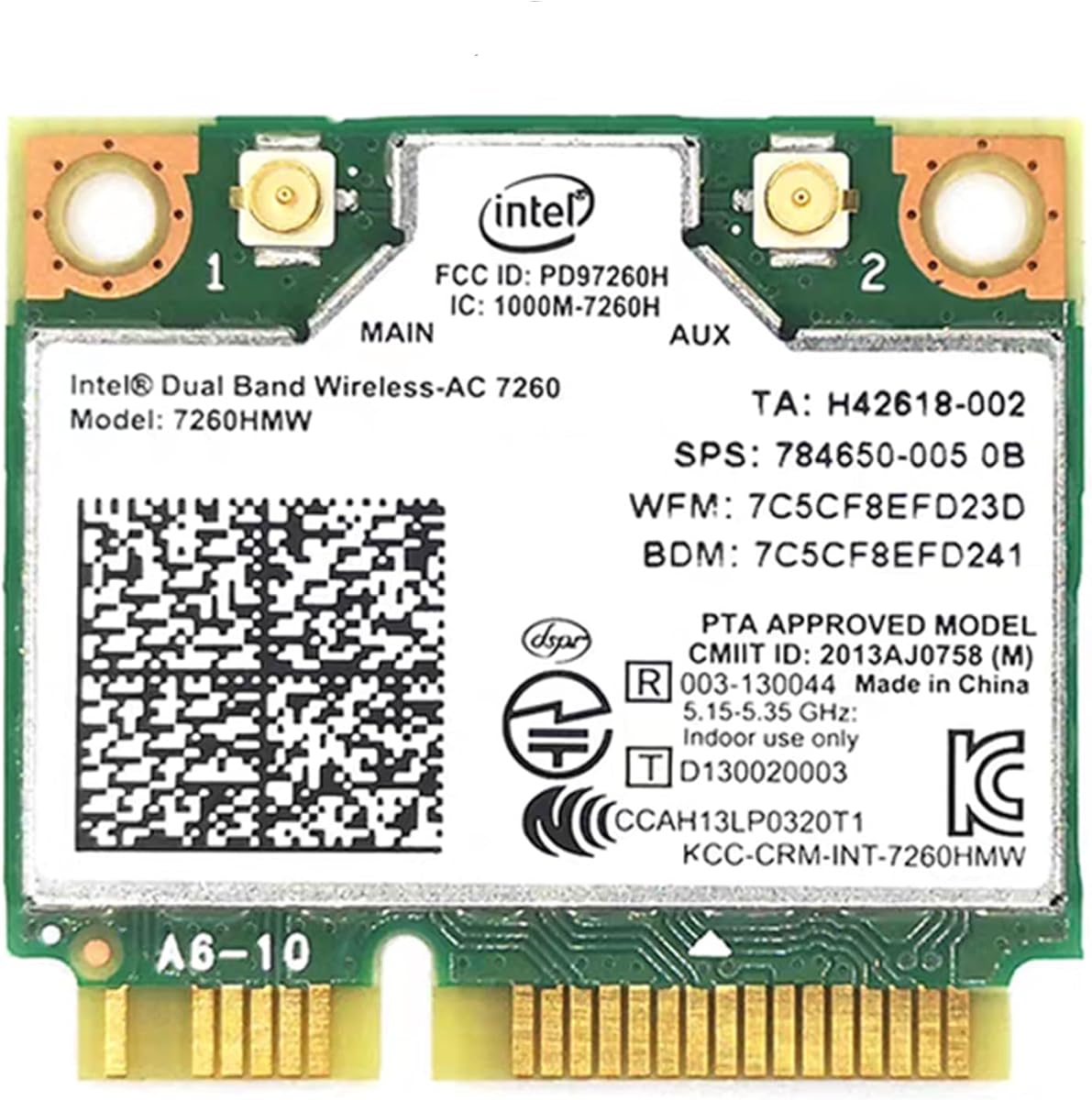


The 7260HMW Mini PCIe WiFi Card is a balanced 802.11ac upgrade for compatible laptops that need faster dual-band WiFi and built-in Bluetooth. Its supplied rating is 4.6, and its standout qualities are practical rather than futuristic: 867 Mbps on the 5GHz band, 300 Mbps on 2.4GHz, and Bluetooth 4.0 in a compact half mini PCIe module.
We may earn a commission when you buy through this link, at no additional cost to you.
The card supports Windows 7, Windows 8, and Windows 10, giving it broader appeal for older business notebooks than most WiFi 6E alternatives. Dual-band operation lets the system choose between the less congested 5GHz band and the longer-reaching 2.4GHz band, while the integrated radio eliminates the need for a separate Bluetooth adapter for compatible peripherals.
The important trade-off is that Bluetooth 4.0 and 802.11ac are older than the newest standards in this list. That means the card may not deliver the 6GHz performance, WPA3 support, or newer Bluetooth capabilities associated with newer modules. Buyers should also confirm antenna arrangements, screws, and physical clearance before ordering.
This is an especially sensible recommendation for an aging laptop that supports half mini PCIe and currently relies on slower 802.11n hardware. It suits users who want a meaningful wireless refresh without moving to the most demanding modern platform, and its operating-system range makes it more flexible than several newer alternatives.
Supporting both 2.4GHz and 5GHz gives the card more flexibility than a single-band replacement. The 5GHz side is suited to faster local transfers and streaming, while 2.4GHz can offer better reach in cluttered environments.
Integrated Bluetooth 4.0 lets compatible users connect headsets, speakers, keyboards, and other peripherals through the card. It is a basic but useful feature for a laptop that lacks built-in wireless Bluetooth hardware.
We may earn a commission when you buy through this link, at no additional cost to you.
This Intel 7260.HMW-based card combines dual-band 802.11ac performance with Bluetooth 4.0 and a 4.3 supplied rating. Its 867 Mbps maximum on 5GHz makes it a familiar upgrade for compatible systems that need more speed than 802.11n while retaining support for older Windows releases.
We may earn a commission when you buy through this link, at no additional cost to you.
The detailed compatibility information is particularly useful. It lists 32-bit and 64-bit versions of Windows 7, 8, 8.1, and 10, along with Linux Root 4.2.0 or later. It can serve laptops, desktops, small consoles, all-in-one systems, advertising machines, and other equipment provided they have the correct half mini PCIe interface.
Bluetooth has an important condition: the motherboard must expose a USB bus. If it does not, the Bluetooth hardware may not appear in the device manager and cannot provide the expected Bluetooth function. The listing also warns that the card is not compatible with certain IBM, ThinkPad, Lenovo, and HP variants, making model-level verification essential.
Choose this option when a system specifically supports the Intel 7260.HMW platform and you value broad legacy OS coverage. It is less attractive for a new installation requiring WiFi 6E or modern Bluetooth, but it can be an effective AC-class upgrade for older supported equipment.
The 7260.HMW is a widely recognized form of 802.11ac hardware for half mini PCIe systems. Its combination of up to 867 Mbps on 5GHz and 300 Mbps on 2.4GHz makes it suitable for general browsing, streaming, and everyday network use.
The Bluetooth portion depends on an available USB bus. Checking the service manual or system documentation before buying can prevent an otherwise successful WiFi installation from leaving Bluetooth unavailable.
We may earn a commission when you buy through this link, at no additional cost to you.
The Wireless BE200 Half Mini PCIe Card is the premium option in this guide, combining a listed connection rate of up to 5.8 Gbps with Bluetooth 5.4 and a supplied rating of 4.6. Its modern feature set makes it the strongest choice for compatible systems that support the Wireless BE series and need high-bandwidth wireless capability.
We may earn a commission when you buy through this link, at no additional cost to you.
WiFi 7 positioning gives the card a substantial theoretical advantage over 802.11ac and WiFi 6E alternatives. It also supports WPA, WPA2, and WPA3 encryption, Intel Smart Connect, and wireless display technologies, making it more relevant to contemporary networks and connected workflows.
Compatibility is narrower than the headline specifications may suggest. It fits a half mini PCIe slot but will not work in M.2 or CNVi slots. Antennas and screws are not included, so users should be prepared to reuse compatible antenna hardware and source any necessary mounting hardware separately.
This card is best for a compatible older or compact PC whose owner wants modern BE performance without replacing the entire system. It is less sensible for a device without an exposed half mini PCIe slot, for users who need WiFi 6E rather than BE support, or for anyone unwilling to source the required antenna accessories.
The listed 5.8 Gbps maximum gives this card the highest theoretical throughput in the comparison. Actual results will depend on the computer, router, antennas, network conditions, and distance, but the platform is aimed at demanding downloads, streaming, and gaming.
WPA3 support strengthens network protection, while Intel Smart Connect can help the adapter select and maintain suitable wireless connections. Bluetooth 5.4 also supports current peripherals without requiring an external dongle.
We may earn a commission when you buy through this link, at no additional cost to you.
The EDUP Intel AX210HMW is a feature-rich WiFi 6E upgrade with a supplied rating of 4.5. It supports 2.4GHz, 5GHz, and 6GHz bands, with listed maximum rates of 574 Mbps, 2400 Mbps, and 2400 Mbps respectively, plus Bluetooth 5.3.
We may earn a commission when you buy through this link, at no additional cost to you.
Its Intel AX210D2W chipset and uplink MU-MIMO support are designed to improve performance in congested environments where multiple clients are active. Bluetooth 5.3 allows connections to headsets, stereo equipment, keyboards, and mice, while the mini PCIe interface targets notebooks, mini PCs, and compatible desktop systems.
Software requirements are significant. The card supports Windows 10 and 11 in 64-bit mode and Linux kernel 5.10 or later with compilation. Drivers must be installed before use from the Intel or EDUP website. Compatibility also varies: many Samsung, Dell, Sony, Acer, ASUS, MSI, Clevo, Terransforce, and Hasee systems are mentioned, but not all IBM, ThinkPad, Lenovo, HP, or AMD-based systems are supported.
This is a strong choice for a compatible Windows 10 or 11 mini-PC or laptop that can exploit tri-band WiFi. Its one-year warranty and lifetime technical support add reassurance, but the need to check both physical fit and driver requirements keeps it from being a universal plug-in replacement.
The 2.4GHz band supports longer-range connections, 5GHz handles fast local traffic, and 6GHz offers additional spectrum when the router supports WiFi 6E. Having all three available lets the adapter adapt to different network conditions.
Downloading the AX210 driver before removing the existing card makes the swap easier. It also allows a technician to confirm driver availability for the intended operating system and hardware configuration before committing to the upgrade.
We may earn a commission when you buy through this link, at no additional cost to you.
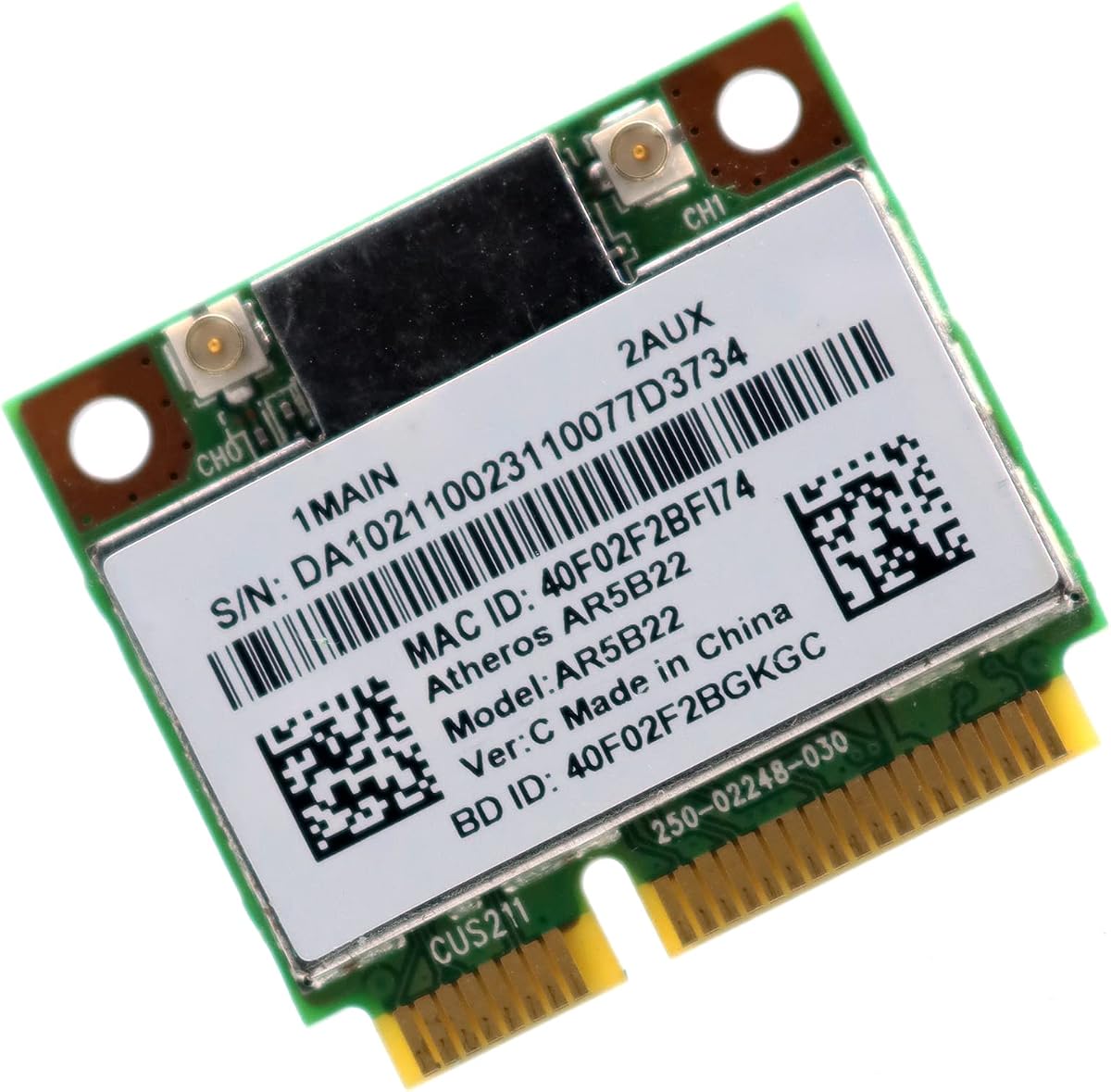
The Deal4GO AR5B22 combines dual-band 802.11n and Bluetooth 4.0 in a half mini PCIe card, and its supplied rating of 4.7 is the highest among these listings. It is a practical choice for replacing a failed Qualcomm Atheros AR9462-class adapter or upgrading an older supported system that does not need newer wireless standards.
We may earn a commission when you buy through this link, at no additional cost to you.
The module supports 2.4GHz and 5GHz, with data rates up to 150 or 300 Mbps on 2.4GHz and up to 300 Mbps on 5GHz. Two IPEX MHF4 antenna connectors provide separate main and auxiliary paths, and the package includes the card and two screws.
Its central limitation is explicit: it does not work with 802.11ac. That makes it unsuitable for users seeking modern throughput or WiFi 6E. Some Lenovo, IBM, and HP laptops may also block it through BIOS whitelisting, despite the card's broader support for Dell, Sony, Acer, ASUS, MSI, Clevo, Terransforce, Hasee, and industrial systems.
For an older laptop or industrial PC with a matching half mini PCIe slot and antenna setup, this card offers a sensible value-focused refresh. It works best when basic connectivity, broad legacy Windows support, and an available replacement path matter more than contemporary speed.
Support for 32-bit and 64-bit versions of Windows XP, 7, 8, 8.1, and 10 makes this one of the broadest legacy options here. It is particularly useful when maintaining an older installation rather than deploying a current Windows platform.
The package includes two screws, reducing the chance of a small installation part being missing. The two IPEX antenna connectors still require compatible antenna cables and antennas to be attached correctly.
We may earn a commission when you buy through this link, at no additional cost to you.
The WiFi 6E AX210 Card offers a modern 2.4GHz, 5GHz, and 6GHz upgrade with a listed combined rate of 5400 Mbps and a supplied rating of 4.6. It is designed for compatible laptops that can use a half mini PCIe slot and want access to WiFi 6E without replacing the entire computer.
We may earn a commission when you buy through this link, at no additional cost to you.
The 6GHz band provides access to more exclusive 160MHz channels in suitable WiFi 6E router environments. The listing highlights reduced interference, 160MHz channel width, and support for activities such as 4K streaming, video calls, gaming, and file transfers. Bluetooth 5.3 adds support for multiple peripheral categories and is backward compatible with older Bluetooth devices.
The limits are equally important. A 6GHz connection requires a WiFi 6E router, and only 64-bit Windows 10 and 11 are supported. Lenovo, HP, and IBM systems are excluded in the supplied information because BIOS whitelisting can prevent third-party cards from working. The existing antennas can be reused, but their connectors and placement must be appropriate.
This card is well suited to a compatible Windows 10 or 11 laptop on a modern mixed network. It is less appropriate for a legacy operating system, a system without 6GHz router support, or a laptop whose manufacturer prevents third-party wireless hardware.
The 6GHz band can provide access to less crowded spectrum and wider channels. That is especially useful in dense wireless environments where the 2.4GHz and 5GHz bands are heavily occupied.
The recommended process is to download and save the AX210 WiFi 6E driver before removing the old adapter. Doing so minimizes the period in which the computer has no working network connection and simplifies the hardware swap.
We may earn a commission when you buy through this link, at no additional cost to you.
The MPE-AX3000H is a dual-band WiFi 6 card for compatible laptops, with a supplied rating of 4.5. It combines up to 2.4 Gbps on 5GHz and 574 Mbps on 2.4GHz through 160MHz channels, providing a major theoretical upgrade over older 7260-series hardware.
We may earn a commission when you buy through this link, at no additional cost to you.
OFDMA and MU-MIMO are central to its multi-device story. The supplied information associates these technologies with handling 10 or more devices more efficiently, which is relevant to smart homes and households running simultaneous video calls, streaming, downloads, and gaming. Bluetooth 5.2 supports common headsets, speakers, keyboards, and mice.
It must be a half mini PCIe card and cannot fit an NGFF M.2 or CNVio slot. The listing also notes that most Lenovo systems, including ThinkPad models, along with IBM and some HP laptops, may reject it through BIOS whitelisting or hardware design. Windows 10 or 11 in 64-bit mode is required, and both WiFi and Bluetooth drivers must be downloaded manually.
This is a compelling option for an Intel 7260 or 7265 laptop owner who needs modern WiFi 6 but does not require the 6GHz band of a WiFi 6E card. It is less suitable for older systems, restricted laptop models, or users who want a completely automatic driver experience.
OFDMA and MU-MIMO are designed to improve efficiency when several wireless clients are active. The benefit is most relevant in busy homes and offices, although actual performance still depends on the access point and network configuration.
The card is presented as an upgrade for systems carrying Intel 7260 or 7265 modules. Buyers should compare the dimensions, antenna connectors, and mounting arrangement of the existing card before beginning the replacement.
We may earn a commission when you buy through this link, at no additional cost to you.
The BroadCom BCM943228HMB is a targeted half mini PCIe replacement card with a supplied rating of 5.0. It is especially relevant to HP and Compaq laptops associated with part numbers 718449-001 and 718451-001, as well as specified HP G-series models including the 210, 820, 840, 850, 640, 440, 430, and 445.
We may earn a commission when you buy through this link, at no additional cost to you.
It supports 802.11a/b/g/n on both 2.4GHz and 5GHz, with throughput up to 300 Mbps, and includes Bluetooth 4.0 connectivity. The operating-system list extends from Windows 2000 and XP through Vista, 7, and 10, in both 32-bit and 64-bit formats.
The card is not a general-purpose modern upgrade. Its 802.11n performance and older operating-system focus place it firmly in the legacy repair category. The listing says it is not suitable for IBM, ThinkPad, or Lenovo laptops, even though other compatible brands such as Samsung, Dell, Sony, Acer, ASUS, MSI, Clevo, Terransforce, and Hasee are mentioned.
Buyers with one of the explicitly named HP or Compaq systems should check the original part number and antenna arrangement before buying. For everyone else, a more current AC or WiFi 6 option may offer a better long-term foundation, provided the computer and router support it.
The product is intended for systems using BCM943228HMB or the listed HP and Compaq references. Matching those identifiers is more reliable than assuming every half mini PCIe shape will fit physically or function correctly.
Compatibility with Windows 2000, XP, Vista, 7, and 10 makes this useful for maintaining or repairing old equipment. Confirm the exact 32-bit or 64-bit system and its original wireless hardware before installation.
We may earn a commission when you buy through this link, at no additional cost to you.
The Intel Dual Band Wireless-AC 7260 is an established half mini PCIe platform with a supplied rating of 4.3. Its short product title leaves some detailed specifications unstated, but the device is positioned as a compact WiFi and Bluetooth upgrade for compatible systems.
We may earn a commission when you buy through this link, at no additional cost to you.
The main attraction is the familiar 7260 family identity and its combination of dual-band Wireless-AC with Bluetooth. This card is a natural consideration for a computer that originally used a 7260HMW module or for an owner seeking a conventional half mini PCIe replacement rather than a modern WiFi 6E or Wireless BE card.
The supplied listing offers little in the way of detailed compatibility information. It does not state supported operating systems, exact band rates, antenna configuration, or the precise Bluetooth version. It also does not clarify which accessories are included. That makes direct comparison less precise than for several other products in this guide.
The recommendation is cautious but reasonable for buyers who already know their system uses the Intel 7260 platform and recognize the module they need. For anyone starting from scratch, comparing the more fully specified AX210, AX3000H, or BE200 options may provide better guidance before making a purchase.
Intel 7260-based cards have long been used in half mini PCIe laptops and compact systems. A direct like-for-like replacement can simplify installation when the original card used the same platform and antenna arrangement.
Because the supplied listing has limited technical details, check the required card model, interface, antennas, screws, drivers, and operating-system support independently. That extra verification is especially important with less fully documented listings.
We may earn a commission when you buy through this link, at no additional cost to you.
The Intel Wireless-N 7260HMW BN card is presented as a half mini PCIe WiFi and Bluetooth replacement for HP laptops associated with part numbers 717384 and 710661-001. Its supplied rating is 4.2, and its chief purpose is direct compatibility with a particular class of legacy laptop rather than maximum speed.
We may earn a commission when you buy through this link, at no additional cost to you.
The listing identifies 802.11b/g/n wireless and Bluetooth capability. That places it in the same broad performance era as the Deal4GO AR5B22 and the BroadCom BCM943228HMB, making it more appropriate for restoring connectivity in an older system than for building a modern high-speed wireless platform.
The available description does not specify frequency bands, maximum data rates, supported operating systems, antenna connectors, included screws, or driver procedures. Those omissions create more installation uncertainty than the more thoroughly documented WiFi 6, WiFi 6E, and Wireless BE options.
This is best considered when the original HP card is labeled 7260HMW BN and its replacement part number can be matched to 717384 or 710661-001. Other buyers should favor a better-documented model or consult the laptop service manual before making a similarly specific purchase.
The stated HP references provide useful identifiers for owners repairing a known configuration. Comparing the original label and physical layout is safer than selecting the card only by generic half mini PCIe dimensions.
The stated 802.11b/g/n support can restore basic wireless connectivity on a compatible older laptop. Users who regularly transfer large files or use congested modern networks may prefer a faster, clearly specified alternative.
We may earn a commission when you buy through this link, at no additional cost to you.
Choosing a Half Mini Pcie WiFi Bluetooth Card starts with the computer rather than the advertised speed. Confirm the slot, antenna arrangement, operating system, and manufacturer restrictions before comparing wireless standards or Bluetooth versions.
A half mini PCIe card is a specific physical format and is not interchangeable with every small wireless module. Many listings confusingly distinguish half mini PCIe from full mini PCIe, NGFF M.2, and CNVi slots. The products in this guide are intended for systems with a compatible half mini PCIe slot, but the exact dimensions, mounting arrangement, and slot clearance should still be confirmed from the service manual or by comparing the original adapter.
Also account for the card’s height, cable routing, and antenna connector position. A card may physically enter the slot yet sit differently from the original module or interfere with nearby components. When replacing a card, matching the original part number and connector layout is the safest route.
Some laptop manufacturers restrict third-party wireless hardware through BIOS whitelists. The supplied product information repeatedly notes problems with many Lenovo, ThinkPad, IBM, and HP models, even when the card uses the correct interface. A card can therefore be physically compatible but fail to appear or function in the operating system.
Check the manufacturer’s service documentation, compatibility list, or technical support before buying. If the system originally used a BroadCom or Intel card, some models may permit a replacement only when it matches an approved platform or part number. Do not rely on the generic statement that the card fits the slot.
A card’s maximum link rate is useful for comparison, but it cannot create a faster network than the router or access point provides. A WiFi 6E card needs a WiFi 6E router to use the 6GHz band. A modern dual-band router cannot take advantage of tri-band features, and an older 802.11n router will limit even advanced adapters to shared connection rates.
Consider both your current router and the likelihood of an upgrade. AC options offer a practical balance for many existing networks, WiFi 6 cards improve efficiency and throughput on supported systems, and Wireless BE is aimed at the newest compatible hardware. For a very old network, the Deal4GO AR5B22 may be sufficient, while demanding users should favor AX210, AX3000H, or BE200-class options.
Dual-band cards support 2.4GHz and 5GHz, while the BE200 and AX210 options described here add 6GHz. The 2.4GHz band generally provides longer reach and better penetration, making it useful across a home or office. The 5GHz band supports higher throughput and is often less congested. The 6GHz band adds fresh spectrum but requires compatible router support.
Tri-band capability is unnecessary if the home network is only dual-band, yet it can future-proof a compatible system. Always check the router model and the wireless networks available nearby. Also verify that the antennas and cables in the computer support the intended bands.
Bluetooth versions in this guide range from 4.0 through 5.4. The basic 4.0 options remain useful for standard headsets, keyboards, mice, and speakers, while Bluetooth 5.2, 5.3, and 5.4 are better aligned with more current devices and energy-efficient peripherals. The exact features available may also depend on the operating system, drivers, and hardware routing.
For the older Intel 7260.HMW card, Bluetooth requires the motherboard to expose a USB bus. Check that condition carefully before purchasing. On any system, plan to install the correct WiFi and Bluetooth drivers, which may need to be downloaded manually before or after the hardware swap.
Operating-system support varies sharply across the list. Some legacy cards support Windows XP and older releases, while AX210 and AX3000H options require 64-bit Windows 10 or 11. Linux support is mentioned for the 7260.HMW and AX210HMW cards, but the latter requires kernel 5.10 or later and compilation.
Download the appropriate driver before removing the working adapter whenever possible. It can be difficult to obtain internet access after changing the only wireless card. Also verify that the driver supports both the WiFi radio and Bluetooth function, since a single package may not cover every hardware feature.
A wireless card needs correctly positioned antennas to achieve useful range and signal quality. Some products include screws and others do not, while the BE200 explicitly excludes antennas and screws. Replacement cards may use IPEX connectors, but the existing laptop antenna cables must match the connectors on the new module.
Note the original card’s main and auxiliary antenna assignments and route the cables without sharp bends or strain. If the computer lacks functioning antenna hardware, purchase compatible antennas and cables as part of the upgrade plan. Placement matters because internal antennas perform poorly when folded, blocked, or placed near large metal components.
The newest card does not automatically produce the best experience. An old operating system, an outdated processor, a basic router, and weak internal antennas can all limit practical performance. A straightforward AC card may provide a noticeable improvement over 802.11n without demanding extensive driver setup, while a WiFi 6E or BE card makes more sense for a capable modern computer connected to advanced networking equipment.
Use the comparison table to match the standard, bandwidth, and Bluetooth generation to your needs. Focus first on confirmed hardware compatibility, then on features that your router and daily use can actually exploit. That sequence avoids paying for theoretical performance the system cannot deliver.
Before opening the computer, identify the exact card model, record the antenna connections, and check the service manual for access instructions. Save the correct WiFi and Bluetooth drivers to a USB drive or another network-connected device. Disconnect power and the battery where appropriate, then remove the existing half mini PCIe card without pulling on the antenna cables.
Attach the replacement antennas to the correct connectors, slide the new card into the half mini PCIe slot, and secure it with the proper screw. Reconnect the battery and power the computer, then install the saved drivers in the required order. Restart if prompted and confirm that the wireless adapter appears with its expected network and Bluetooth functions.
After installation, connect to the intended network and test speed near the router before moving the computer to its normal position. Keep the antenna cables routed as they were, avoid sharp bends, and leave adequate clearance around the card. Update drivers when needed, use current operating-system security settings, and avoid installing a card until the slot and whitelist restrictions have been confirmed.
No. These cards require a compatible half mini PCIe slot, and a full mini PCIe slot does not automatically mean the smaller card will be supported. Check the service manual for the exact card dimensions, mounting arrangement, antenna connections, and clearance. The card must also be accepted by the laptop manufacturer’s BIOS wireless whitelist.
The card may fit physically, but the laptop must support the required drivers, chipset, antennas, and operating system. Without a WiFi 6E router, the adapter can still use its available 2.4GHz and 5GHz bands, but it cannot provide a 6GHz connection. Check the router and computer documentation before upgrading.
The most common causes include BIOS whitelisting, an incompatible card or driver, a missing USB bus for Bluetooth, or a slot that does not truly support the module. Windows 7, 8, 10, and 11 also have different driver availability. Confirm the hardware part number, install the manufacturer’s drivers, and check the device manager for any reported error.
That depends on the card and the computer. Some listings include screws, while the BE200 explicitly excludes both antennas and screws. Many laptops already have compatible antennas and internal cables, allowing them to be reused. Confirm the connector type and physical routing before ordering so the installation has every required component.
802.11ac is dual-band WiFi 5, commonly providing up to 867 Mbps on the 5GHz side in the cards reviewed here. WiFi 6 improves efficiency and supports features such as OFDMA and MU-MIMO. WiFi 6E adds the 6GHz band, while Wireless BE represents the newer WiFi 7 generation with even higher listed potential throughput.
For standard keyboards, mice, speakers, and headsets, Bluetooth 4.0 can provide a useful basic upgrade. Newer Bluetooth versions offer improvements for compatible devices and energy efficiency. If the system has no Bluetooth hardware, a 4.0 card may be enough, but you must verify that the computer’s motherboard routes Bluetooth through the required USB bus.
Only when the antenna connectors match and the antennas support the intended wireless bands. A replacement may use different IPEX connector types or a different main and auxiliary arrangement from the original module. Compare the connector markings and routing carefully, and source compatible antennas if needed.
Not automatically. The best choice depends on router support, processor and system age, operating system, antenna condition, and actual use. A modern card cannot exceed the network supplied by the router, and legacy computers may lack suitable drivers. Choose the fastest option only when the computer, router, antennas, and software all support it.
The 7260HMW Mini PCIe Card is the most balanced recommendation for a compatible laptop seeking an 802.11ac refresh with Bluetooth and broad Windows coverage. The Wireless BE200 HMW Card stands out for modern Wireless BE performance, Bluetooth 5.4, and WPA3 support, while the Deal4GO AR5B22 offers a budget-conscious route to basic dual-band and Bluetooth 4.0 connectivity.
Prioritize confirmed fit over headline speed. Verify the half mini PCIe slot, antenna connectors, operating system, driver availability, and manufacturer whitelist before selecting any model. AX210-based cards suit compatible Windows 10 or 11 systems seeking WiFi 6E, the AX3000H provides efficient dual-band WiFi 6, and the older BroadCom and Intel HMW options remain relevant for specific legacy replacements.
Finally, compare current prices and recent availability after confirming the technical requirements. Product offers and listings can change, and installation kits or included accessories may vary. A slightly lower cost does not make a card a better value if its interface, drivers, antenna arrangement, or Bluetooth routing are incompatible with your device.