
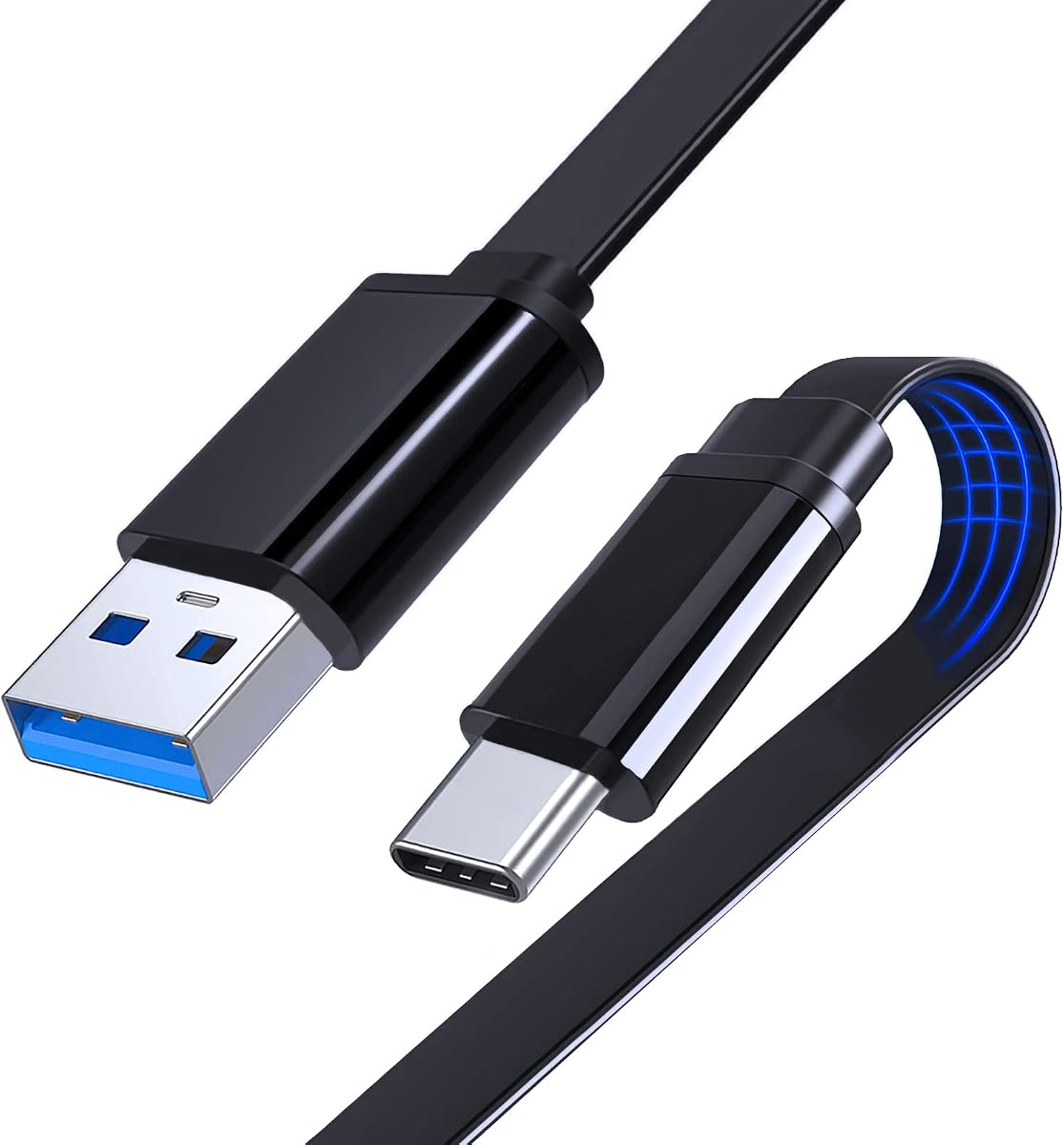
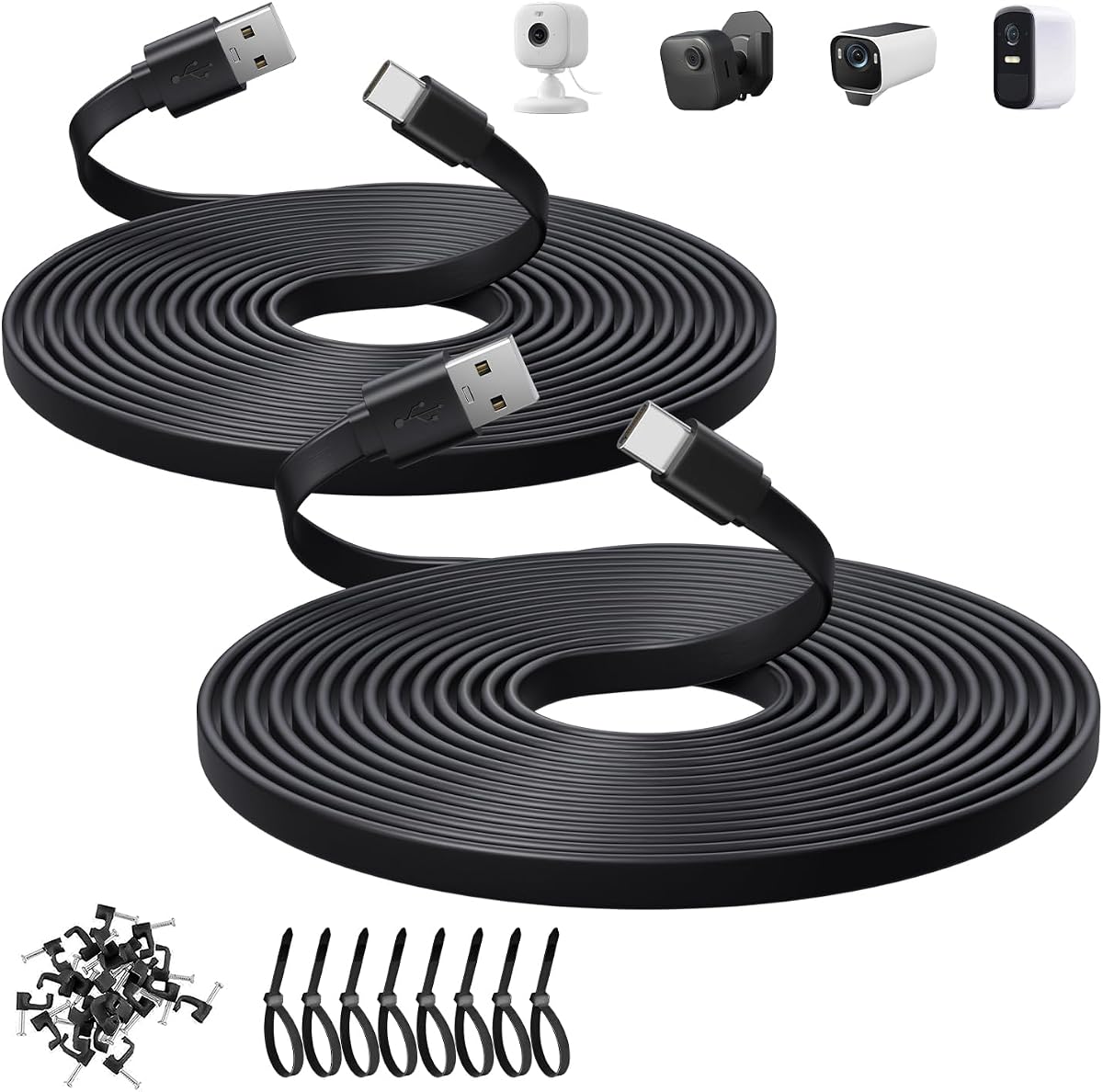
2 Pack 10ft Flat Type USB C Cable
4.6Editor score
Two 10-foot cables
5V 2A charging
Installation clips included
A flat USB C cable combines a low-profile connector with a cable body that is easier to route, store, and carry than a conventional round cord. The best examples balance charging performance, data transfer capabilities, useful connector angles, durable construction, and a length suited to the devices and spaces where they will be used.
This guide compares ten flat USB C cables based on connector configuration, supported charging and data standards, physical construction, length, and intended applications. It covers USB-A to USB-C options for cameras, phones, and standard charging, as well as USB-C to USB-C cables for modern laptops, tablets, and high-output charging setups.
Each review identifies the cable configuration, standout capability, and practical limitations so you can choose with confidence. The first three entries are our featured picks for different priorities, while the remaining reviews explain where shorter angled cables, extra-long installation cords, and high-speed USB4 models are most useful. Prices and availability can change.
4.6Editor score
4.6Editor score

4.4Editor score
As an Amazon Associate we earn from qualifying purchases.
The comparison below shows how the ten cables differ in connector layout, length, charging capability, data speed, and intended use, making it easier to identify the right model for phones, laptops, security cameras, and compact installations.


The 1M Flat USB C Android Auto Cable has a 4.6 rating and stands out as the most versatile general-purpose choice in this guide. Its USB-A to USB-C layout works with common wall chargers, power banks, laptops, and vehicle USB ports, while the flat ABS body measures approximately 2mm thick and 8mm wide. That low profile is particularly useful behind desks, beside furniture, and in narrow spaces where a round cable can create an unwanted bulge.
We may earn a commission when you buy through this link, at no additional cost to you.
Data performance is the cable's defining feature. It is built with USB 3.1 wire and is described as supporting SuperSpeed+ transfer rates up to 10Gbps. It also supports Android Auto, allowing a compatible phone to charge while connected to a vehicle's USB-A charging port. The included intelligent chip and 56kΩ pull-up resistor are intended to provide a more stable connection and help protect the device battery.
The flat construction is not merely cosmetic. According to the product information, the cable is rated for more than 10,000 bending tests and is designed to resist tangling while remaining easy to route through confined areas. Compatibility is extensive across USB-C phones, tablets, cameras, and other devices, although actual charging and data performance always depends on the connected source, device, and protocol.
This is the strongest recommendation for someone who wants one dependable cable for a phone, a car, and a USB-A charging setup. Its three-foot length is easy to manage, unlike a long installation cable, and its combination of 10Gbps data transfer, Android Auto support, and a genuinely flat body covers more daily uses than the basic charge-and-sync options. It is our featured overall pick for practical versatility.
The 10Gbps specification makes this cable useful for moving large files between compatible USB-C devices and USB-A computers or storage. To achieve that speed, both connected devices must support USB 3.1 SuperSpeed+ and the host must expose a compatible port.
The 8mm-wide cable body can slide beneath furniture, behind screens, or along a wall more easily than a thick round lead. Its stated 10,000-plus bending endurance also makes it a practical choice for a frequently handled daily cable.
We may earn a commission when you buy through this link, at no additional cost to you.
The 2 Pack 10ft Flat Type USB C Cable carries a 4.6 rating and is a practical choice when one long lead is not enough or when you want a spare. Each package contains two white, 10-foot USB-A to USB-C cables. The thin profile is designed to pass through small gaps at doors and windows, remain fixed along a wall or floor, and reduce clutter around permanently powered devices.
We may earn a commission when you buy through this link, at no additional cost to you.
Charging is specified at 5V and up to 2A. The product supports both power delivery and data transfer, making it suitable for compatible phones, USB-C security cameras, and Switch Pro controllers. It can also connect to laptops, wall chargers, and power banks that expose a standard USB-A port. Copper conductors and a stated 10,000-plus bend life support regular use and repeated installation.
The supplied accessories set this model apart from a standard charge cable. Nail-in clips and eight cable ties help hold the cords in position, while the two-cable format allows separate routes or provides a replacement. Those extras are particularly useful for cameras mounted away from an outlet, although they may be unnecessary for a desk or bedside setup.
Choose this option if low-profile routing and generous length matter more than high-current charging or multi-gigabit transfers. It is our featured budget pick because the package provides two functional installation cables together with the hardware needed to organize them. It is less appropriate for demanding laptops or modern high-output charging, but it offers strong value for security cameras, controllers, and everyday phone charging.
The 10-foot length provides enough reach to connect a camera or other USB-C device to a distant outlet, while the flat profile keeps the run close to a wall or floor. Included clips and ties reduce loose loops and make the installation look more deliberate.
The two-cable package works well when devices occupy separate rooms or when one lead is routed outdoors or behind trim. The second cable also provides a practical backup for a setup that is opened and handled regularly.
We may earn a commission when you buy through this link, at no additional cost to you.
The Thunderbolt 4 USB 4 Flat Cable has a 4.4 rating and is the premium option for users who need more bandwidth and power than a conventional charge-and-sync cable provides. It is a USB-C to USB-C lead with a 3.3-foot length, USB4 data transfer up to 40Gbps, and power delivery up to 240W when connected to a suitable charger and device.
We may earn a commission when you buy through this link, at no additional cost to you.
The USB4 specification opens the door to demanding workflows. Compatible external SSDs can transfer data at much higher speeds than USB 2.0, while 8K video at 60Hz is supported for compatible displays. The included E-Marker chip is designed to recognize the connected equipment and manage current and voltage changes during high-power charging, allowing the cable to adapt more intelligently to different devices.
Physical construction is intended to balance strength with flexibility. The cable uses a precision yarn-woven mesh for tensile strength and wear resistance, while the ultra-thin, soft body remains portable. Although it is described as space-saving and flat, its emphasis is on high-performance routing rather than squeezing into exceptionally tight gaps like some purpose-built camera cables.
This is the featured premium pick for owners of USB4 laptops, tablets, external storage, or high-resolution displays. It is overkill for ordinary phone charging, and neither the full 240W output nor 40Gbps speed will be reached with older or limited source hardware. Within a modern USB4 ecosystem, however, it delivers the most advanced capability in this list.
External storage, large media libraries, and high-resolution displays benefit most from the stated 40Gbps bandwidth. The connected host, storage, and cable must all support the appropriate USB4 mode for the higher transfer rate to be available.
A compatible USB-C charger can use the cable to deliver as much as 240W, making it relevant to demanding laptops and other USB-C power systems. The E-Marker chip helps coordinate the negotiated power profile between devices.
We may earn a commission when you buy through this link, at no additional cost to you.
The DbillionDa USB C to USB C Cable has a 4.2 rating and focuses on a simple combination of a six-foot length, 60W Power Delivery, and a 90-degree connector. The angled end is designed to reduce strain on the cable and the connected device's USB-C port, particularly when the device is positioned close to a wall or resting on a surface.
We may earn a commission when you buy through this link, at no additional cost to you.
The 60W charging capability is suitable for many phones, tablets, and smaller USB-C laptops when paired with a compatible USB-C power adapter. The generous 1.8-meter length provides more freedom than a desk cable, allowing a device to be used while it charges without keeping it tethered immediately beside the outlet.
This product is presented as a universal option for USB-C smartphones, tablets, and laptops that support Power Delivery and data transfer. It is particularly relevant to users who play games, watch video, or read for long periods while their device is connected near a wall. The angle keeps the plug from projecting directly outward and can reduce the force placed on the socket during use.
Choose this cable when ergonomic positioning and room to move matter more than a stated multi-gigabit transfer rate or advanced video support. It is a practical six-foot charging and synchronization lead for a broad range of modern devices. Buyers who routinely move large files should verify the transfer details with the manufacturer, since the supplied product information does not provide a specific maximum data speed.
The 90-degree connector can make charging more comfortable when a device is held close to a table or wall. It also reduces repeated sideways pressure at the connection, which can benefit frequently used ports.
At six feet, the lead can reach across a desk, bedside, or work area without requiring a very short compromise. The length is long enough for routine movement but shorter than the 10-foot installation options later in the guide.
We may earn a commission when you buy through this link, at no additional cost to you.
The MEOU Right Angle USB C Cable has a 4.4 rating and is designed primarily for comfortable, high-speed charging. It supports PD3.0, QC4.0, and PPS2.0 protocols up to 60W, with the included 3.3-foot version measuring about one meter. Data transfer is stated at up to 480Mbps, which is suitable for standard synchronization but not high-speed file workflows.
We may earn a commission when you buy through this link, at no additional cost to you.
The right-angle USB-C connector is the cable's most visible feature. It can make a phone or tablet more comfortable to hold during gaming, video viewing, or reading, and it reduces the need to twist the lead directly against the device's port. The product information also states that the nylon braid can withstand 175 pounds of tensile force, while the aluminum alloy housing adds protection around the plug.
This is a strong everyday cable for users who charge compatible USB-C phones, tablets, cameras, and laptops. The stated 60W maximum is available when the device, charger, and connection all support the relevant protocol. A 30W, 45W, or 60W USB-C power adapter is required to take full advantage of the cable's advertised charging ceiling.
The clear limitation is data throughput. At 480Mbps, it is considerably slower than the 10Gbps and 40Gbps options in this guide, and the cable explicitly does not support video transmission. For gaming, reading, and ordinary charging while using a device, however, the angled design and broad protocol support make this a strong fit.
PD3.0, QC4.0, and PPS2.0 support broadens the range of chargers and devices that can negotiate an efficient rate. The actual result still depends on the capabilities of the connected phone, tablet, laptop, and power adapter.
The angled connector and braided jacket are especially useful during extended gaming or media sessions. They reduce connector strain while protecting the cable body from the abrasion and tangling commonly associated with frequent handling.
We may earn a commission when you buy through this link, at no additional cost to you.
The MECCANIXITY Flat USB C Cable has a 5.0 rating, the highest listed rating among these ten products, and it is built as a compact USB-C extension cable. Its stated line length is 19.7 inches, or 50cm, with a thickness of 1.5mm and a listed outer diameter of 8mm. The black silicone body is designed to resist tangling and coil neatly for storage.
We may earn a commission when you buy through this link, at no additional cost to you.
Charging is supported up to 65W, while data transfer reaches 480Mbps under USB 2.0. The right-angle connector helps prevent cable breakage at the joint by reducing excessive bending where the cable meets the plug. That detail is particularly helpful when the device is close to a wall, on a stand, or positioned for landscape use.
The product is intended for travel, office, and gaming setups involving phones, laptops, tablets, power banks, and game consoles equipped with USB-C interfaces. It also states support for Quick Charge 2.0, and its flexible design makes it easy to route in confined areas. One package contains one flat USB-C cable.
This is an excellent short cable when a little extra reach or a lower-profile connection is all you need. Its 5.0 rating is encouraging, although ratings should not be treated as a guarantee of durability or universal performance. The principal compromise is USB 2.0 data speed, and the product information notes that it does not support Power Delivery above 65W or video transmission.
At just under 20 inches, the cable can bridge a small gap without creating the excess loop that makes a longer lead difficult to tidy. Its flat silicone body is easy to fold or coil before placing it in a bag.
The angled plug reduces direct leverage on the device's socket and fits neatly into restricted spaces. It is a particularly useful form factor for landscape gaming, where a straight plug can interfere with the user's grip.
We may earn a commission when you buy through this link, at no additional cost to you.
The Monoprice Flat USB Type-C to Type-A cable has a 4.3 rating and offers a balanced mix of charging, synchronization, and physical design. This six-foot USB 3.2 Gen1 cable supports up to 3A of battery charging and data transfer rates up to 5Gbps. It connects a reversible USB-C device to a standard USB-A source such as a laptop, charger, or power bank.
We may earn a commission when you buy through this link, at no additional cost to you.
Its flat construction is intended to withstand more bends than an ordinary cable while resisting tangling. That makes it easier to carry from room to room or place inside a bag without first spending time untangling it. The six-foot length falls between short desktop leads and the 10-foot permanent installation cables in the guide.
Compared with the Android Auto model at the top of the list, this cable offers less than half the stated maximum data speed. In return, it presents a clearly defined USB 3.2 Gen1 feature set and 3A charging, making it a more conventional option for users who do not need SuperSpeed+ performance. The reversible USB-C end also eliminates the need to judge the correct insertion orientation.
Choose this cable for a balanced USB-A connection that supports everyday synchronization and moderate charging. It is well suited to phone transfers, accessories, and compatible USB-C devices that do not require the newest high-speed standard. The choice is less compelling for a USB4 workstation or a modern laptop ecosystem built entirely around USB-C, but it remains a versatile six-foot lead for mixed-device users.
The combination of up to 3A charging and 5Gbps transfer supports common tasks without requiring a specialized USB4 ecosystem. It is a sensible middle ground for users who regularly move files and charge devices from the same USB-A port.
The cable body resists tangling and is described as more bend-resistant than a conventional lead. That makes the six-foot length easier to manage for travel or daily desk use.
We may earn a commission when you buy through this link, at no additional cost to you.
The CY Cord Angled USB-C cable has a 4.9 rating and is built for situations where compactness matters more than reach. Its 15cm length makes it closer to a connector extension than a conventional charging lead, while the ultra-slim TPE construction and aluminum alloy connector shells give it a refined, travel-friendly profile.
We may earn a commission when you buy through this link, at no additional cost to you.
Both ends use angled connector directions. This allows the cable to connect within a confined area and lets the main cable run in a straighter line from the device. The product information specifically highlights the benefit of avoiding twisted cables and preserving a stable connection when space around a female port is limited.
Despite its small size, the cable supports fast charging up to 65W and 3.25A when the charger and connected device permit it. Data transfer is listed at 480Mbps over USB 2.0, with support for two-way synchronization. Its tangle-resistant jacket is designed for repeated folding and storage without quickly taking on a permanent coil.
This is the featured ultra-slim choice for travel, laptop bags, and compact desktop arrangements. It can connect a phone to a nearby power bank or provide a short extension from a charger that sits awkwardly beside a device. The 15cm length will be too short for most room-to-room charging, and USB 2.0 transfer speed is unsuitable for large, time-sensitive file transfers.
The 15cm lead occupies almost no space in a pocket, camera bag, or laptop sleeve. It is easy to keep attached to a power bank as a dedicated charging accessory without creating another loose cable in the bag.
Angled connectors at both ends can create a cleaner cable path in crowded desk arrangements. The geometry is also useful near the edge of a desk because the connector does not project directly in the same direction as the cable.
We may earn a commission when you buy through this link, at no additional cost to you.
The Short 90 Degree USB Type C 2.0 Flat Cable has a 4.8 rating and combines a one-meter length with a right-angle connector and flexible TPE construction. It is designed to charge and synchronize compatible laptops, phones, tablets, and power banks while remaining soft enough to bend, fold, and carry without taking a pronounced permanent crease.
We may earn a commission when you buy through this link, at no additional cost to you.
The cable supports Power Delivery up to 65W, including common 61W, 30W, 18W, and 15W wall adapters when the device is compatible. Actual charging speed depends on the connected device and charger. Data synchronization runs at up to 480Mbps, which is appropriate for routine transfers and file organization but well below the 5Gbps, 10Gbps, and 40Gbps alternatives in this guide.
The 90-degree L-shaped design helps access a hard-to-reach socket and reduces the strain associated with repeated plugging and unplugging. Its short side-to-angle configuration is particularly useful beside furniture, against a wall, or while the connected device is being used in a relaxed position.
Choose this cable if you want more reach than a pocket cable, a softer foldable body, and a connector that is easier to use in restricted spaces. It is a strong travel and bedside option. However, it does not support audio or video transmission, and its data standard is limited, so it is better suited to charging and standard synchronization than advanced media work.
The TPE wire is described as highly flexible and resistant to entanglement and fracture at ordinary bends. That makes the one-meter cable convenient to coil into a compact loop and place in a drawer, bag, or device sleeve.
The right-angle connector keeps the cable close to the device and protects the socket from repeated bending forces. It is a helpful shape for bedside charging, compact workspaces, and hands-on use.
We may earn a commission when you buy through this link, at no additional cost to you.
The 2 Pack 10ft Security Camera Cable has a 4.7 rating and is tailored to permanently powered USB-C security cameras. The package includes two black, 10-foot USB-A to USB-C cables, with each cable specified for 5V and up to 2A. The product supports data transfer in addition to charging, although its primary use is providing a stable connection to cameras mounted away from an outlet.
We may earn a commission when you buy through this link, at no additional cost to you.
Compatibility is the main attraction. The listed devices include Blink Outdoor 4, Blink Mini 2, Ring Pan-Tilt Indoor Cam, eufy Cam S3 Pro, SoloCam S340, S220, and C210, 4G LTE Cam S330, TP-Link Tapo 2K C120, and WYZE Duo Cam Pan/Pan V4. The cable is for USB-C devices only and is explicitly not intended for Micro USB equipment, so checking the camera's connector is important.
The thin, flat cable is easy to pass through small door or window gaps and can be fixed along a wall or floor. A package of 25 nail-in clips and eight cable ties helps keep the installation neat. Copper conductors and a stated 10,000-plus bend life support long-term routing and repeated handling around mounted equipment.
This is the most directly targeted camera option in the guide. It is a good choice when a camera sits far from its power source, when you prefer a neat permanent route, or when a backup cable is useful. It is less appropriate for laptops, high-power phone charging, or modern video workflows because the current and data capabilities are intentionally modest.
The 10-foot length and low-profile body make it possible to carry power through a tight gap and along a wall or baseboard. Clips and ties keep the run from becoming a loose cable across a room or work area.
The two-cable format works well for a pair of cameras or for a camera and another low-power USB-C accessory. A spare also reduces downtime if one installed lead is damaged or needs to be rerouted.
We may earn a commission when you buy through this link, at no additional cost to you.
The most useful flat USB C cable depends on the source connector, required charging output, data standard, routing environment, and preferred cable length. Comparing these factors before buying prevents a low-profile cable from being inconvenient or underpowered in your setup.
USB-C to USB-C cables are designed for direct connections between two modern USB-C devices, including many phones, tablets, laptops, power banks, and monitors. USB-A to USB-C cables are more useful when one end must connect to a traditional wall charger, older laptop, car port, or USB-A power supply. A USB-C extension cable can add short reach to a host connection, but it does not replace a full charging and data cable. Check both the connector on your device and the connector available at the power source before deciding.
Choose USB-C to USB-C for a modern all-USB-C setup and USB-A to USB-C when your charger or installation still depends on Type-A. Match the intended source rather than selecting solely by the flat profile.
Charging capability ranges from basic 5V 2A power to 60W, 65W, and as much as 240W on the premium USB4 cable. A low-current cable may be perfectly adequate for a small security camera, but it can charge a phone or laptop more slowly. Higher wattage also requires a compatible charger, device, and negotiated protocol. The stated maximum is a ceiling rather than a guaranteed result, and it cannot be reached if the power adapter has a lower output.
Match the cable's maximum output to the most demanding device in your routine. Use 60W to 65W for broad modern-device support, while the 240W model is intended for compatible high-power USB-C systems. For fixed low-voltage cameras, 5V 2A may be entirely appropriate.
The listed options span USB 2.0 at 480Mbps, USB 3.2 Gen1 at 5Gbps, USB 3.1 SuperSpeed+ at 10Gbps, and USB4 at 40Gbps. Higher transfer rates are useful for external storage, large media files, and demanding workflows, but the host device, storage, controller, and cable must all support the same standard. USB 2.0 remains suitable for ordinary synchronization and many accessory connections, while some cables are explicitly limited to charging and data without video.
Prioritize speed only when your regular workflow requires it. For routine phone syncing, the difference may be negligible. For an external SSD or USB4 laptop, use the highest standard supported across the complete connection chain.
Length should follow the distance between the device and power source without leaving excess cable that must be bundled. Short 15cm to 20cm cables suit travel, power banks, and confined spaces. A three-foot cable is convenient for daily carry, while six feet offers more freedom around a desk. Ten-foot versions are especially useful for security cameras, wall routing, and doors or windows with narrow gaps.
Choose the shortest length that comfortably reaches your setup. A longer flat cable can still create clutter if it is not clipped or tied, whereas a very short cable may force an awkward plug angle. Measure the intended route before choosing a permanent installation model.
A flat cable body resists tangling, fits beneath furniture, and takes up less room along a wall. Some models also use silicone or TPE for flexibility, while others add braided nylon or woven mesh for greater tensile strength. Right-angle connectors create a cleaner path beside a wall and can reduce strain at the device port. However, a right-angle plug may not fit every recessed socket or accessory.
Look for a combination of low-profile routing and reinforcement rather than treating flatness as the only quality measure. Confirm the connector's shape against the device, and favor a flexible jacket if the cable will be folded regularly.
Not every USB-C cable carries display video. The premium USB4 model supports 8K at 60Hz, while several USB 2.0 products explicitly exclude video transmission. A cable that handles charging and data may still fail to carry a laptop's display signal, depending on its Alternate Mode support. Phones and tablets may also have different USB-C video behavior from laptops and monitors.
Check the display requirements of every connected device before purchasing. Use a cable specifically described as video-capable when driving a display, and verify that the monitor, laptop, and selected USB-C port all support the desired resolution and refresh rate.
Permanent cable runs benefit from clips, ties, or other routing hardware. The two 10-foot options include 25 nail-in clips and eight cable ties, allowing a cable to be secured along a wall or floor without creating loose loops. Accessories are not essential for a portable cable, but they make a major difference when supplying power to a camera in a distant location.
Include clips and ties in your decision whenever a cable will remain installed. They reduce strain at both ends, keep the run neat, and make the setup easier to inspect or rearrange when equipment changes.
Before first use, confirm that the USB-C plug and the device socket are clean and free of dust or grit. Connect the cable firmly without twisting the connector, especially when using a right-angle model near a wall. For a USB-A to USB-C lead, insert the USB-A end into a verified charging source, then attach the USB-C end to the device. For USB-C to USB-C cables, use a charger, power bank, laptop, or other host that supports the cable's advertised charging and data functions.
Treat the connector as the most vulnerable part of the cable. Avoid sharp bends immediately beside the plug, pulling the cable to move a device, and using excessive force when inserting it. A right-angle connector can reduce leverage, but it still needs room to remain straight. When routing a long installation cable, use the supplied clips and ties, keep the run away from moving doors or sharp edges, and inspect the cable regularly for damage.
For storage, coil the cable in a loose loop or use a proper organizer rather than wrapping it tightly around itself. A soft flat cable can be folded, while braided or woven models benefit from a wider, gentler loop. Clean the cable with a dry or lightly damp cloth, disconnect it from power before cleaning, and stop using it if the jacket is split, conductors are visible, or the connector becomes loose. Always use a compatible charger because the cable's maximum wattage does not guarantee that every connected device can safely receive that amount.
No. A flat form describes the cable's physical shape, not its charging or data capabilities. The cables in this guide range from 5V 2A power and USB 2.0 data transfer to 240W charging and 40Gbps USB4 performance. Check the specifications, supported protocols, and your device requirements before choosing one for fast charging.
A flat cable is generally easier to place beneath furniture, behind a monitor, or along a wall than a round cable of similar electrical rating. The connector housing can still determine whether it fits, especially when a right-angle plug is used beside a recessed port. Measure the available gap and compare the cable's stated width and thickness when space is especially tight.
Many can do both when the connected source and device support the relevant functions. Some cables are optimized for power, while others support only limited USB 2.0 data transfer. The product descriptions in this guide identify which models offer data synchronization, and high-speed transfers require compatible hardware at both ends of the connection.
A USB-A to USB-C cable connects a USB-C device to a conventional Type-A charger, laptop, car port, or power bank. A USB-C to USB-C cable connects two Type-C devices and is often used with modern power adapters and laptops. The connector on your charger is the clearest factor: choose USB-A when that side is Type-A and USB-C to USB-C when both ends are Type-C.
The cable can generally be used with a compatible USB-C charger, but the charging rate will be limited by the weakest supported link. A 65W cable connected to a low-output adapter will not force the device to charge at 65W. The device must also support the relevant charging protocol, and the manufacturer may impose its own thermal or power limits.
It is often more comfortable because the cable does not project straight out of the device while it is held in landscape orientation. The angle can also reduce leverage on the port. Ensure the plug is not forced upward or sideways, as a poorly aligned right-angle connector can still place unwanted stress on the socket.
Measure the route from the camera to its power source and allow room for routing through a door, window, wall, or piece of furniture. The 10-foot options in this guide are intended for such extended runs and include clips and ties. Longer is not always better, because excess cable should be secured rather than left loose.
Only if the cable itself supports the required video mode and both the source and display support it. The USB4 cable in this guide is described as supporting 8K at 60Hz, while several USB 2.0 cables do not support video transmission. Check the laptop, tablet, monitor, port capabilities, and cable specifications as a complete set.
The 1M Flat USB C Android Auto Cable is the strongest all-purpose option because it combines a genuinely low-profile body, 10Gbps data transfer, Android Auto support, and broad device compatibility. The 2 Pack 10ft Flat Type USB C Cable is the best budget and installation choice, while the Thunderbolt 4 USB 4 Flat Cable leads the group for high-speed data, high-resolution video, and 240W charging.
For the remaining needs, match the cable to the job rather than choosing solely by appearance. A compact angled lead suits travel and power banks, a six-foot right-angle cable supports comfortable charging around a desk, and a 10-foot two-pack is well suited to fixed security cameras. Prioritize connector type, negotiated power, required data speed, and routing needs before considering the remaining details.
Finally, check the current product listing, charger compatibility, connector dimensions, and supported protocols before purchasing. Availability, ratings, and prices can change, and a cable's maximum specification is useful only when the connected devices support it. With those checks in place, the right flat USB C cable can provide a tidier setup without sacrificing the performance your devices actually need.