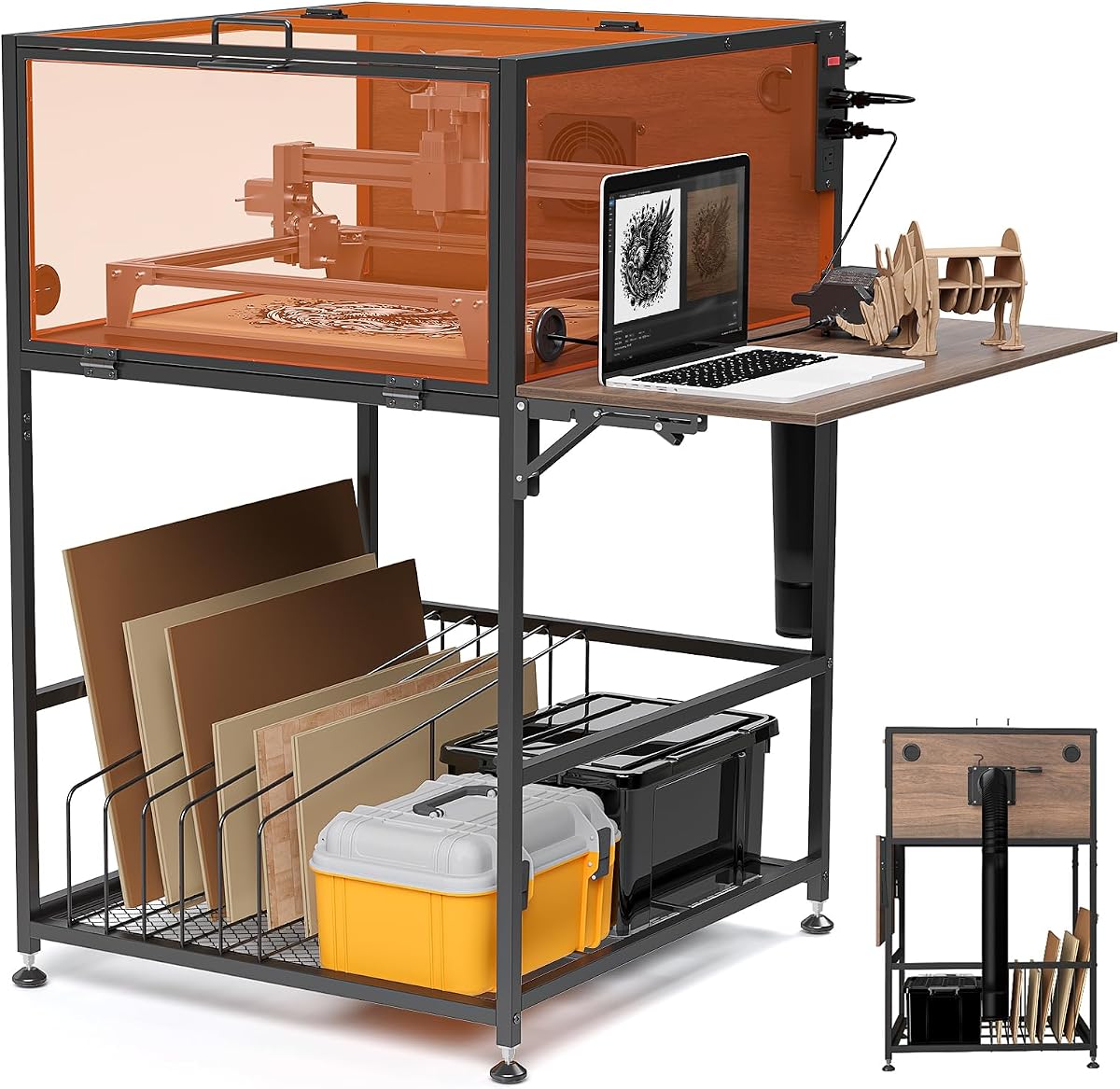
Crafit Laser Engraver Enclosure Cabinet
4.2Editor score
Large cabinet-style workspace
Integrated ventilation and power
Multi-sided filtered viewing panels
A laser engraver enclosure helps contain smoke, dust, odors, sparks, and machine noise while giving you a clearer view of the work area. The best model also fits your engraver, supports its exhaust setup, and leaves enough space for materials, accessories, and airflow.
We compared the 10 enclosures by examining interior dimensions, ventilation, viewing panels, frame or fabric construction, storage, installation, and stated machine compatibility. The list includes cabinet-style enclosures, fabric-covered tents, large protective covers, and compact models for common desktop laser engravers.
Each review highlights the enclosure's strongest benefits, practical trade-offs, and ideal owner. Our top selections cover premium, editor-recommended, and budget-friendly options, while the buying guide explains how to measure and compare an enclosure before purchase. Product prices and availability can change.
4.2Editor score

4.5Editor score

4.4Editor score
As an Amazon Associate we earn from qualifying purchases.
The table below compares all 10 enclosures across their most consequential differences: working dimensions, ventilation, viewing method, construction, storage, and compatibility.


The Crafit Laser Engraver Enclosure Cabinet is a substantial cabinet-style solution for people who want more than a lightweight tent around a desktop engraver. Its stated 4.2 rating reflects a design that emphasizes an enclosed working environment, filtered visibility, ventilation, organized power, and convenient storage. The interior measures 24.8 by 27.1 by 12.6 inches, making dimensions a priority to confirm before purchase.
We may earn a commission when you buy through this link, at no additional cost to you.
Its most impressive feature is the combination of features normally offered separately. A 20W ventilation fan and two-meter flexible exhaust pipe are intended to move smoke, particles, and odors, while semi-transparent light-filtering panels allow the user to monitor the engraving from several directions. A switch-controlled power strip with three AC outlets can support the engraver, fan, laptop, and air assist kit from one central control point.
There are also practical touches that make a cabinet enclosure feel more like a workstation. The foldable side panel can support a laptop or air assist kit, the lower rack uses dividers to store material sheets and engraving blanks, and four cable-management openings help keep wiring organized. Magnetic doors, easy-grip handles, a sturdy metal frame, heat-resistant wood, and adjustable foot pads all support regular use, although the cabinet will likely require more space than a fabric tent.
This is the premium choice for a dedicated craft corner or small studio where a permanent workstation is desirable and the engraver's dimensions fit within the stated interior. It is not the simplest option for someone wanting a compact, frequently transported enclosure, and the manufacturer explicitly states that it is not intended as professional laser safety equipment. Even so, it offers the richest combination of containment, observation, power, and storage in this list.
The rigid cabinet format is suited to users who plan to leave the engraver in one place. Its integrated rack, side work surface, power strip, cable routing, and stable feet make it easier to organize a repeated crafting workflow rather than simply cover a machine temporarily.
Multi-sided filtered panels let the user observe progress from several angles. This reduces the need to interrupt a job and open the enclosure, while the light-filtering material helps limit glare and exposure to some blue light during longer sessions.
We may earn a commission when you buy through this link, at no additional cost to you.
The Creality Laser Engraver Enclosure 2.0 is a budget-minded tent enclosure that delivers the core protections sought from this product category. Its 4.4 rating and stated compatibility with the Creality Falcon series and 95% of laser engraving machines on the market make it a practical choice for many desktop setups. The 28.3 by 28.3 by 15.7-inch dimensions also provide useful room for a range of machines.
We may earn a commission when you buy through this link, at no additional cost to you.
The enclosure combines a closed design with a 4000 RPM ventilation fan. Its product information says the fan extracts smoke, particles, and odors while the tent also isolates operating noise. A dual-window design uses blue-light-blocking PVC material, allowing real-time observation without requiring the user to look through an open side. The frame uses high-strength steel pipes, while the fabric is described as flame-retardant, waterproof, and resistant to deformation.
Its main compromise is structural simplicity. A fabric-and-frame tent does not provide the same rigid, furniture-like presence as the Crafit cabinet or the aluminum-and-acrylic enclosure. It also lacks the built-in material rack, power strip, and accessory organization found in the premium cabinet model. Nevertheless, it folds for storage, is comparatively easy to carry, and appears designed for quick assembly and frequent relocation.
This enclosure is best for a hobbyist who wants strong basic containment without taking up a permanent workstation footprint. It is particularly suitable when your engraver fits the 720 by 720 by 400 millimeter area, you need a portable tent-style cover, and ventilation plus filtered visibility matter more than rigid panels or integrated storage.
The foldable frame and lightweight form make this enclosure easier to put away when it is not needed. That convenience matters in shared rooms or home workshops where a fixed cabinet would occupy too much floor or table space.
The included fan and exhaust arrangement address smoke and odor at the same time the dual filtered windows support supervision. That combination makes the tent more useful for active jobs than a simple opaque cover.
We may earn a commission when you buy through this link, at no additional cost to you.
The Integrated LED Enclosure stands out from most fabric tents through its built-in LED strip and updated integrated-bottom design. Its 4.4 rating reflects a well-equipped 28.3 by 28.3 by 15.7-inch enclosure designed to contain smoke, dust, water, noise, and odors. It is also listed as compatible with common xTool, Ortur, Sculpfun, and Atomstack engraver models.
We may earn a commission when you buy through this link, at no additional cost to you.
The LED strip brightens the carving area, making it easier to inspect fine detail or light-colored work without relying entirely on room lighting. A thickened PVC viewing window filters blue light, while the sealed bottom helps prevent smoke from escaping through the base and collects more dust and debris during operation. These are meaningful improvements for users who want a defined, protected enclosure rather than a loose cover.
Smoke extraction uses a 4000 RPM fan and an upgraded three-layer composite exhaust pipe. The product information says the pipe's inner wall is less prone to collecting smoke and dust residue, which may help reduce lingering odor over time. Aluminum-mold Oxford cloth and iron supports are used for the structure, and the tent folds for storage without requiring the user to dismantle every component.
This enclosure is a strong choice for users who work in dimmer rooms, frequently inspect small engraving details, or want stronger bottom containment. Its trade-offs are the relatively soft fabric structure and the fact that a sealed bottom makes the tent less convenient to move while populated. Confirm that the engraver and any rotary attachment fit within the stated interior before buying.
An integrated light strip illuminates the work surface without requiring a separate lamp inside the enclosure. Better visibility can make it easier to monitor alignment, engraving progress, and the placement of small or intricate materials.
The integrated base closes a common gap found in portable tent designs. It is especially relevant when smoke and fine debris are concerns, although it should be installed carefully around the engraver's feet, cables, and exhaust connection.
We may earn a commission when you buy through this link, at no additional cost to you.
The Green Acrylic Enclosure offers a rigid, cabinet-style alternative to the fabric tents in this roundup. Its 29.9 by 16.9 by 26.7-inch dimensions are narrower than many universal covers, so buyers must check their machine carefully rather than relying on a broad compatibility claim. No current customer rating is listed for this product in the supplied data.
We may earn a commission when you buy through this link, at no additional cost to you.
Green acrylic panels help reduce smoke diffusion and block some dust, debris, and material splashing. The black aluminum alloy frame, bracket connectors, and thickened panels create a more substantial structure than a foldable fabric tent. A front hinged door includes a handle and magnetic door stop, allowing access without repeatedly removing the entire cover.
Cable threading holes with covers help route power and communication cables through the enclosure. The package includes acrylic panels, aluminum brackets, connectors, hinges, the handle, a magnetic door stop, cable hole covers, screws, nuts, tools, and an instruction manual. That comprehensive hardware list can make assembly easier for owners who want a rigid workspace but do not want to source small components separately.
The main limitation is the lack of a specified ventilation fan or exhaust pipe. Users concerned about smoke and odor may need to arrange their own extraction solution and confirm that it can be connected without restricting airflow. This enclosure is best for owners of a compatible desktop engraver who prioritize rigid panels, secure doors, and a clean viewing area over a portable, self-contained ventilation package.
The aluminum frame and thickened acrylic panels should hold their shape better than a soft tent. That makes the enclosure more suitable for a permanent desktop or workshop installation where consistent alignment and convenient front access are important.
The hinged magnetic door opens wide for loading materials and servicing the machine. Covered cable holes help keep wiring organized without requiring cables to pass through an open panel, although the enclosure still needs an appropriate smoke-extraction plan.
We may earn a commission when you buy through this link, at no additional cost to you.
The Creality Laser Engraver Enclosure 2.0 with Vent is a straightforward protective shelter for desktop engravers. Its 4.2 rating and stated compatibility with the Creality Falcon series and 95% of laser engraving machines position it as a general-purpose option. The 28.3 by 28.3 by 15.7-inch interior gives users room to place the machine and work within the enclosure.
We may earn a commission when you buy through this link, at no additional cost to you.
A large transparent viewing window filters blue light and allows the engraving process to be observed while the cover remains closed. The built-in smoke ventilation system is designed to expel smoke and dust during engraving or cutting, helping keep the interior cleaner and reducing the spread of fumes. The product information also emphasizes isolation from noise and the protective role of the fire-resistant and dust-resistant cover.
This model's straightforward design is both its strength and its limitation. It folds for storage and is described as lightweight and easy to carry, which makes it convenient for users who alternate between a protected workspace and open crafting. It does not offer the integrated LED strip found in the rank-three enclosure or the advanced multi-panel organization of the Crafit cabinet, so the experience is more focused on basic containment.
Choose this enclosure if the priority is a quick-install tent that provides filtered observation and built-in smoke ventilation without a rigid frame. It is well suited to hobbyists who need broad compatibility and easy storage. Confirm that the engraver, air assist hardware, and exhaust hose can be positioned within the stated dimensions before installation.
The foldable structure allows the cover to be installed in a few steps and removed when the engraver is not being used. It offers a practical middle ground between a permanent cabinet and a loose fabric sheet placed around the machine.
The broad viewing window improves job monitoring and helps filter blue light. It is a straightforward design for users who want to watch the cut without opening the enclosure and repeatedly releasing smoke into the room.
We may earn a commission when you buy through this link, at no additional cost to you.
The LONGER Laser Engraver Large Size Enclosure is designed for people who need more vertical and horizontal working room than a standard desktop tent provides. Its 4.4 rating reflects a large 31 by 28.7 by 20.8-inch interior, and the product information specifically identifies compatibility with the Longer B1 series while describing broader suitability for many laser engraving machines.
We may earn a commission when you buy through this link, at no additional cost to you.
The extra height and depth can be valuable for larger accessories, rotary equipment, service access, or a less cramped workflow. A large transparent panel allows real-time observation of the machine while it is running. The built-in smoking fan supports air circulation, smoke extraction, and odor removal, while the enclosure is described as isolating fumes, burning odors, and operating noise.
Construction uses fire-retardant, easy-clean materials intended for durable workshop use. These attributes make it relevant to repeat engravers who expect to clean dust and residue regularly. The trade-off is a large footprint that can dominate a workbench or floor area, and the enclosure does not provide the cabinet-style storage, integrated power controls, or wide multi-angle viewing offered by the Crafit model.
This enclosure is a good fit for owners of a Longer B1 or another similarly sized engraver who prioritize usable interior space. It is less suitable for a small apartment craft corner where storage efficiency matters more than room around the machine. Before buying, measure the engraver with cables and accessories attached and verify that your external exhaust arrangement remains effective.
The taller interior can reduce conflicts between the enclosure frame and taller machine components or attachments. Users should still confirm specific rotary dimensions, but the generous footprint offers more flexibility than the compact 720-square-millimeter tents.
The easy-clean, fire-retardant construction suits regular use where dust and residue accumulate. A large transparent window keeps monitoring convenient, but the enclosure still needs routine cleaning to maintain visibility and airflow.
We may earn a commission when you buy through this link, at no additional cost to you.
The Creality Laser Engraver Cover V2.0 offers one of the strongest balances of ventilation, visibility, compatibility, and portability in this guide. Its 4.5 rating is the highest numerical customer rating among the listed enclosures. The second-generation design uses 28.3 by 28.3 by 15.7-inch dimensions and is stated to fit many common models from xTool, Creality, Ortur, Sculpfun, and Atomstack.
We may earn a commission when you buy through this link, at no additional cost to you.
Upgraded metal support rods improve stability, which addresses a common weakness of portable fabric tents. A 4000 RPM high-efficiency fan is designed to extract smoke, particles, and odors quickly. The square shape supports better window observation, while the dual-view window uses anti-blue-light PVC material so the user can monitor the job from more than one position.
The enclosure remains foldable, making it easy to remove and store without rebuilding the entire structure. Its stated interior is also tall enough to accommodate a rotary roller, which broadens its usefulness for users who engrave cylindrical items. It does not include the integrated LED lighting found in one alternative, nor does it offer the powered accessory station and divided storage rack of the premium cabinet.
For most owners of a compatible desktop laser engraver, this is the strongest all-around choice. It addresses the major reasons to buy an enclosure—smoke control, noise reduction, eye-protective viewing, dust containment, and easy observation—without requiring a permanent cabinet-sized footprint. Confirm machine and accessory dimensions, then install the support rods and exhaust path carefully for the best result.
The 4000 RPM fan and included pipe make smoke extraction a core feature rather than an optional addition. The foldable design allows users to deploy that ventilation only during engraving and reclaim the workspace afterward.
Metal rods give the tent a more dependable shape than all-fabric frames, while dual windows reduce the need to move around a single viewing side. These details improve comfort during longer supervised jobs.
We may earn a commission when you buy through this link, at no additional cost to you.
The Creality Laser Engraver Enclosure is a well-reviewed 4.5-rated cover with a 27.5 by 28.3 by 15.7-inch working area. Its product information identifies compatibility with several popular desktop engraver families and states that the increased height allows a rotary roller to be installed. That makes it a versatile option for flat projects and cylindrical work.
We may earn a commission when you buy through this link, at no additional cost to you.
The enclosed design is intended to isolate the machine from water and dust while reducing the spread of noise, smoke, fire, and odors. A built-in smoke ventilation system helps expel particles and dust during engraving or cutting. A large transparent window filters blue light and provides a convenient view of engraving progress without exposing the operator to direct blue light through an open side.
Installation deserves particular attention because the supplied instructions specifically advise pressing the two-way and three-way pipe tightly against the connecting rods. Doing so is intended to avoid excessive pressure on the cover body during placement. While the frame folds for storage, careful positioning around the exhaust components is important to preserve stable operation and intended containment.
This enclosure is an excellent choice for owners of compatible xTool, Creality, Ortur, Sculpfun, or Atomstack machines who want rotary capability and strong core protections in a portable design. It shares the top rating tier in the list but does not include integrated lighting. As with all tent-style covers, it offers less rigidity and easier access than a cabinet enclosure.
The stated interior height is a meaningful advantage for rotary attachments. Users should verify the full dimensions of their roller unit and account for the space required to load and remove cylindrical work.
The pipe connections need to sit securely against the frame without creating unnecessary stress. A careful setup helps maintain the intended smoke-extraction path and prevents the flexible enclosure from shifting during use.
We may earn a commission when you buy through this link, at no additional cost to you.
The Creality Ventilated Enclosure combines a 27.5 by 28.3 by 15.7-inch interior with flame-retardant material described as capable of withstanding temperatures up to 1000°C. It carries a 4.5 rating and is intended to isolate smoke, odor, noise, water, and dust. The design is stated for Creality, xTool, and other common laser engraving machines.
We may earn a commission when you buy through this link, at no additional cost to you.
Its exhaust fan and pipe help move smoke and dust out of the work area. The large viewing window uses light-filtered material to block blue light while retaining a broad view of the engraving. The product information also notes that the extra height supports a rotary roller, making the tent useful for more than basic flat-material projects.
Installation requires no additional tools according to the listed information, and the structure folds down for storage and transport. The heat-resistant material is a notable feature for a fabric enclosure, but it should not be interpreted as permission to operate without ventilation. Fans, exhaust routing, material compatibility, and local safety practices remain essential even when using flame-retardant fabric.
This model is well suited to users seeking strong material specifications, a large filtered window, and rotary compatibility without the footprint of a rigid cabinet. It is less appealing for anyone who values a permanent furniture-like structure or the most extensive built-in storage. Confirm that the cover does not obstruct the engraver's cooling vents and that the fan can exhaust outdoors or into an appropriate filtration arrangement.
The listed flame-retardant material gives the soft enclosure a more safety-conscious construction description. It still requires proper exhaust and ventilation, since heat resistance alone does not make an enclosed workspace safe to operate.
Rotary clearance broadens the range of jobs the tent can support, while the tool-free foldable design simplifies seasonal storage. Those benefits make it attractive for mobile hobbyists and compact studios.
We may earn a commission when you buy through this link, at no additional cost to you.
The VEVOR Laser Engraver Enclosure is a large fabric enclosure with a 31.5 by 31.5 by 19.6-inch interior. Its 4.1 rating is the lowest numerical customer rating among the rated products in this list, but the design offers useful features for organized workshop setups. It is stated to fit most laser engravers and is marketed to both hobbyists and professionals.
We may earn a commission when you buy through this link, at no additional cost to you.
A 4000 RPM exhaust fan helps extract smoke, dust, noise, and odor, while exhaust ports on both sides offer flexibility in where the enclosure is placed. That two-sided routing is particularly useful in rooms where the best outlet is not directly beside the engraver. The fully enclosed design is intended to reduce smoke leakage while the fabric provides fire-resistant and flame-retardant protection.
Storage is the most distinctive feature. A 19.69-inch fastener strip is installed on each side, and the hanging elements are adjustable to accommodate tools of different shapes. This keeps frequently used implements visible and within reach, although exposed fabric strips and hooks will need regular cleaning as engraving debris accumulates.
The enclosure folds quickly without a complete reinstallation and is described as lightweight and easy to carry. That makes it useful for small studios and families that need to reclaim space after a project. It is best for owners who want generous working room, flexible exhaust routing, and organized tool access in one portable package.
Ports on both sides allow the exhaust pipe to run toward the more convenient wall or filtration point. This can simplify installation and reduce awkward pipe routing in crowded work areas.
Adjustable hanging strips keep compatible tools visible and organized inside the enclosure. Users should avoid placing heat-sensitive accessories where they could interfere with exhaust airflow or become exposed to accumulated heat.
We may earn a commission when you buy through this link, at no additional cost to you.
The right enclosure balances fit, containment, ventilation, visibility, and convenience. Measure your machine and available workspace first, then compare the features that affect safe, uninterrupted operation.
Begin with the enclosure's stated interior dimensions rather than its exterior footprint. Compare those measurements with the engraver's length, width, and height, including feet, control boxes, air assist components, exhaust connections, and any rotary attachment. A machine that technically fits may still be difficult to load, service, or vent if clearance is minimal. Measure the full working area and remember that the enclosure also needs to accommodate material entering from the front and the space required to move finished pieces.
In short, measure the complete machine and accessory setup, then allow practical working clearance for loading and ventilation.
Ventilation is one of the most important practical features because a closed enclosure can concentrate smoke, dust, and odor. Look for a built-in fan, an included exhaust pipe, and enough port or pipe length to reach a suitable outlet or filtration system. Higher stated fan speeds may improve extraction, but real performance also depends on a sealed fit, clean filters, correct hose routing, and a continuous path to the outside.
In short, choose a model with a complete, properly routed exhaust system rather than relying on an open panel for airflow.
A filtered window lets you monitor the job without opening the enclosure and releasing smoke. Blue-light-filtering material can improve viewing comfort, but it does not replace the eye protection appropriate for your laser system. Dual windows offer more viewing angles, while an integrated LED strip can make small details easier to see in a dim room. Consider glare, tint clarity, and whether the window becomes too dark when the room lighting changes.
In short, prioritize a broad, clear filtered window and add task lighting if your workspace is not brightly illuminated.
Cabinet-style enclosures use metal frames and rigid panels, while portable covers usually combine metal rods with fabric or coated textile. Rigid construction offers better door alignment and durability but occupies more space. Fabric models are easier to fold and carry, although their shape depends on frame tension and careful installation. Flame-retardant or fire-resistant material is desirable, but it should be treated as one layer of protection rather than a guarantee of fire safety.
In short, select construction that matches your workspace: rigid panels for permanence or a supported foldable cover for portability.
A fully enclosed or sealed-bottom design can reduce smoke leakage and help collect fine dust. However, the base must fit around the machine without blocking feet, cooling paths, cables, or the exhaust connection. Foldable tents often leave a small opening at the bottom, which can be useful for moving the machine but less effective at containment. Inspect how your enclosure meets the floor and whether it can be secured without creating strain on the fabric.
In short, favor tighter bottom containment only if it can be installed cleanly around every connected component.
A useful enclosure may include a lower material rack, folding side panel, hanging tool strips, adjustable fastener strips, or a wide front door. Storage helps keep blanks and accessories ready, but crowded surfaces can restrict airflow or become coated with dust. A hinged magnetic door offers better repeated access than a full zippered opening, while covered cable holes help keep wires organized. Evaluate whether the added parts make the enclosure easier to use or merely increase assembly complexity.
In short, choose storage that improves workflow while leaving ventilation openings, doors, and cables unobstructed.
If the enclosure is only needed during a project, foldability can be more important than rigid construction. Look for metal support rods that release without separate tools, a design that stores compactly, and components that are easy to identify during setup. A heavier cabinet may feel stable during use but require dedicated floor space. The best portable model balances a supported frame, easy disassembly, manageable weight, and a footprint you can store between sessions.
In short, favor a quick-fold design if the workspace must be reclaimed regularly, and check that it fits in its folded storage area.
Dust will settle on the floor, panels, fan, pipe, filters, and frame no matter how clean the enclosure starts. Easy-clean surfaces and removable parts make routine maintenance more realistic. Plan how you will access the exhaust fan and pipe, whether the window can be wiped without scratching, and whether the machine can be removed without dismantling the entire structure. Clean residue promptly because buildup can reduce airflow and obscure your view of the job.
In short, prioritize accessible, easy-clean surfaces and establish a routine for inspecting and cleaning the ventilation path.
Before assembling the enclosure, read the included instructions, inventory the hardware, and confirm that the engraver and its accessories fit within the stated interior dimensions. Position the enclosure on a stable, level surface with enough clearance for loading materials and servicing the machine. Assemble the frame or cabinet, tighten the supports evenly, and check that doors, panels, and base do not pinch the machine's cables or cooling components.
Install the exhaust fan and pipe according to the manufacturer's guidance, routing the hose continuously toward an appropriate outlet or filtration arrangement. Avoid sharp bends, crushed sections, and blocked vents. Position the filtered windows so you can see the work area, turn on task lighting if available, and confirm that airflow feels consistent across the enclosure. Before beginning a job, check that the exhaust path is unobstructed and that the engraver's ventilation openings remain clear.
During use, keep the enclosure closed except when loading or unloading materials. Monitor the fan for unusual noise, inspect the pipe for condensation or residue, and keep loose objects away from moving fan parts. Afterward, allow hot components to cool as directed by the engraver manufacturer, remove debris, wipe the interior panels, and clean the fan or filter according to the enclosure instructions. Fold or store the enclosure only when it is dry and completely cool.
An enclosure is useful when smoke, dust, odor, sparks, or noise are concerns in your workspace. It can improve containment and visibility, but it does not replace proper ventilation, machine safeguards, filtered eye protection, or safe material handling. A suitable outlet and correctly routed exhaust are especially important for indoor use.
Measure the engraver's maximum length, width, and height, then add the dimensions of any rotary attachment, air assist unit, and cable connections. Compare those figures with the enclosure's stated interior dimensions rather than its exterior footprint. Also allow enough clearance to load material and access the controls.
No enclosure should be assumed to fit every machine. Several models state compatibility with broad ranges of desktop engravers, while others identify specific dimensions or brands. Always check the stated dimensions against your own machine, especially if it includes a tall frame, external control box, rotary roller, or other accessory.
An outside exhaust is generally the most direct way to remove smoke and particulates from the room. If that is not possible, use an appropriate filtration system and follow local guidance. A fan inside the enclosure can improve circulation, but it cannot replace a sound route for contaminated air.
Some are made from flame-retardant or fire-resistant materials, but that does not make the enclosure completely fireproof or eliminate fire risk. Continue using approved materials, maintain ventilation, avoid blocking cooling paths, keep the machine clean, and follow both the engraver and enclosure manufacturers' safety instructions.
It depends on the enclosure height and the dimensions of the rotary unit. Some products in this guide specifically state that their interiors can accommodate a rotary roller. Measure the complete rotary assembly and confirm that loading, removal, and cable routing will still work inside the enclosure.
Clean it whenever visible dust, residue, or condensation accumulates, and inspect the fan and exhaust pipe at least regularly during heavy use. Wipe the viewing panels with a suitable nonabrasive cleaner and keep filters or fan components clear according to the instructions. A clean enclosure supports visibility and reliable airflow.
Cabinet enclosures are generally better for permanent workstations because they provide rigid panels, organized storage, and sometimes integrated power controls. Fabric tents are usually easier to fold, carry, and store while still offering ventilation and filtered viewing. The better choice depends on your available space, portability needs, and accessory requirements.
The Crafit Enclosure Cabinet is the strongest premium workstation, combining a rigid enclosure, integrated power strip, filtered multi-sided visibility, ventilation, and useful storage. The Creality Cover V2.0 is the best balanced option for most compatible desktop engravers, with a 4.5 rating, strong fan, upgraded rods, and dual windows. The Creality Enclosure 2.0 stands out as the budget pick because it delivers the essential tent features in a portable format.
Before choosing, prioritize the machine's actual dimensions, the availability of a continuous exhaust route, and the amount of space you need for materials and accessories. Choose a cabinet for a permanent organized station, a fabric tent for portable projects, and a rigid acrylic enclosure when structural stability and front access matter most. Viewing quality and task lighting are worthwhile additions, but they should not replace safe ventilation.
Product prices, ratings, availability, and configuration details can change over time, so confirm the current listing before purchasing. Check the enclosure dimensions against the exact machine and rotary setup you own, review the included hardware, and follow the instructions for installation and cleaning. With those checks completed, the right enclosure can create a cleaner, quieter, and more organized engraving workspace.