
Logitech M705 Marathon
4.5Editor score
Up to three-year battery life
Near-frictionless metal scroll wheel
Laser-grade tracking performance
Discover the best durable computer mouse for home, office, and travel, with expert comparisons of wireless, wired, ergonomic, compact, and high-DPI designs
A durable computer mouse should feel dependable from the first click, remain comfortable through long work sessions, and suit the way you move between a desk, laptop, and shared workspace. The best models combine sturdy construction, accurate tracking, useful controls, and dependable connectivity without demanding a complicated setup.
This guide compares ten mice across wired and wireless designs, compact and full-size shapes, ambidextrous or right-handed ergonomics, adjustable sensitivity, and specialized features such as silent clicks, programmable buttons, and multi-device pairing. The assessment emphasizes published specifications, stated durability features, comfort, connectivity, battery considerations, and platform support.
Each recommendation identifies a different use case, from a straightforward wired mouse to a premium wireless model built for heavy scrolling. Ratings and specifications come from the supplied product information, while availability and pricing can change. Always confirm current details and compatibility before purchasing.
4.5Editor score

4.6Editor score

4.6Editor score
The comparison below covers connection style, fit, tracking, battery or cable design, and the most useful control features. It makes it easier to identify a durable mouse that fits your hand, operating system, workspace, and scrolling habits.





The Logitech M185 is a compact, ambidextrous wireless mouse rated 4.4 out of 5. Its defining qualities are simple setup, a contoured shape, dependable 2.4 GHz connectivity, and an advertised battery life of up to one year. Rather than chasing specialized controls or gaming features, it concentrates on the fundamentals needed for document work, browsing, and everyday laptop use.
We may earn a commission when you buy through this link, at no additional cost to you.
Its small-to-medium-hand focus makes the M185 especially useful in tight offices, shared desks, classrooms, and travel situations where a full-size mouse would occupy unnecessary space. The included nano receiver can remain connected to the computer, while the mouse itself remains easy to carry. Smart sleep mode helps conserve power, and the supplied AA battery keeps setup uncomplicated.
The main limitation is that the M185 does not offer customizable buttons, adjustable sensitivity, or a faster-scroll mode. It is a basic pointing device for people who want a comfortable mouse without managing software or charging cables. Its ambidextrous body also means the shape is more general-purpose than deeply sculpted around a particular hand.
Choose the M185 when portability, affordability, and dependable wireless operation matter more than advanced productivity controls. It is a sensible first mouse for a student, frequent traveler, or anyone replacing a difficult touchpad. For a desk-bound user with larger hands or heavy document scrolling, the M510 or another full-size model may be more comfortable.
The contoured shell is shaped for either hand, while the compact footprint suits small workspaces and travel bags. Plugging in the nano receiver is all that is required before using the mouse with a compatible Windows PC, Mac, or laptop.
A stated one-year battery life, supported by automatic sleep behavior, reduces routine maintenance. The 2.4 GHz connection is advertised to remain strong as far as 33 feet from the computer, making it practical for a room-sized setup.
We may earn a commission when you buy through this link, at no additional cost to you.
The Logitech M510 earns a 4.6 rating and stands out as the most balanced option in this guide. It combines a full-size, contoured body, soft rubber grips, programmable navigation buttons, and a battery life stated at up to two years. Those features make it appropriate for extended office sessions, document-heavy work, and users who want more control than a basic three-button mouse.
We may earn a commission when you buy through this link, at no additional cost to you.
Comfort comes from gently curved sides, a broad palm area, and rubberized surfaces that help keep the hand stable. The back and forward buttons can be programmed for functions such as application switching or full-screen navigation, while horizontal and vertical scrolling is useful for spreadsheets, maps, media libraries, and wide documents. Logitech SetPoint on Windows or Control Center on Mac OS X is needed for the stated customization options.
Although the body is described as ambidextrous, the placement of the side controls and the overall sculpting particularly favor right-handed users. Left-handed buyers may find the M185's simpler symmetrical design more neutral. The M510 also does not provide adjustable DPI or the metal wheel found on higher-end Logitech models.
The M510 is a strong recommendation for office workers, students, and home users who want dependable wireless performance, useful controls, and a comfortable full-size fit. It is especially convincing for anyone upgrading from a basic laptop mouse without needing a complicated gaming or productivity device. It remains one of the most versatile choices here.
Back and forward buttons add genuinely useful navigation without overcrowding the primary click surfaces. Programmable options can adapt those controls to application switching, full-screen use, and other frequent tasks.
The broad palm area, curved sides, and soft rubber grips support steady use through long sessions. Its full-size proportions are better suited to a permanent desk than to highly compact travel use.
We may earn a commission when you buy through this link, at no additional cost to you.
The Logitech B100 is a straightforward wired mouse with a 4.6 rating. It has no battery to charge, no receiver to pair, and no software required for basic operation. That simplicity is precisely why it remains relevant: it offers accurate cursor control, a comfortable ambidextrous shape, and immediate USB or PS/2 connectivity.
We may earn a commission when you buy through this link, at no additional cost to you.
An 800 DPI sensor provides sufficient precision for standard office applications, including editing documents, navigating websites, and working with common spreadsheets. Side-to-side scrolling and zoom add a little versatility, although the B100 is not intended to replace a high-DPI mouse for detailed design work. Its symmetrical body makes it a practical choice for shared workstations or either hand.
The cable is the clearest compromise. It can occupy precious space on a compact desk, and it cannot offer the uncluttered surface of a wireless mouse. The fixed 800 DPI setting also provides less sensitivity adjustment than several competing models in this roundup. Buyers seeking plug-and-play operation should still verify that their computer has the required USB or PS/2 connection.
The B100 is ideal for fixed desks, school computers, office systems, and anyone who values reliability over wireless convenience. It is a particularly sensible choice for a shared environment where charging and receiver management would add unnecessary complexity. The modest feature set is not a flaw; it is the reason the mouse remains easy to use.
The B100 begins working as soon as it is connected, with no pairing process or battery maintenance. This makes it a dependable choice for offices, classrooms, and home computers where simplicity matters.
Its contoured symmetrical body accommodates either hand, while 800 DPI sensitivity supports precise everyday navigation. That resolution is modest by modern standards but sufficient for conventional productivity work.
We may earn a commission when you buy through this link, at no additional cost to you.
The TECKNET USB Wired Mouse is rated 4.5 and targets users who want more sensitivity control and navigation buttons than a conventional office mouse provides. Its four DPI levels cover 1000, 1600, 3200, and 6400, while a six-button layout includes large back and forward controls for browsing and document movement.
We may earn a commission when you buy through this link, at no additional cost to you.
The stated durability testing exceeds six million keystrokes, giving the product a clear advantage for buyers who prioritize longevity specifications. Tru-Wave tracking is also advertised for precise cursor control across a range of surfaces, including smooth surfaces such as glass. A five-foot cable provides a practical amount of movement for most desktop and laptop arrangements.
Its soft rubber grips and shaped body should be more accommodating than an entirely flat basic mouse, though the product information does not identify a specific hand orientation. The main platform limitation is the side buttons, which do not work on Mac. Some older Windows versions are listed as supported, but current systems should be checked before purchase.
This TECKNET model is a good fit for Windows users who want adjustable sensitivity, easy navigation, and a wired connection without software. It is less suitable for Mac users who depend on the extra buttons, or for anyone seeking a compact wireless travel device. Its feature set is especially attractive for spreadsheet, browsing, and general productivity workloads.
Four selectable DPI levels let users move between efficient everyday movement and higher precision. The 6400 setting can be useful for detailed navigation, while lower levels suit broad cursor travel across a large display.
Testing beyond six million clicks supports the mouse's position as a long-term wired choice. The stable USB connection also removes wireless pairing and battery concerns from the equation.
We may earn a commission when you buy through this link, at no additional cost to you.
The Logitech Signature M550 L is a full-size wireless mouse designed specifically for larger hands. It carries a 4.5 rating and combines a contoured shape, soft thumb area, rubber side grips, SmartWheel scrolling, and SilentTouch click technology. It is a strong option for users who find many compact mice too small or too shallow.
We may earn a commission when you buy through this link, at no additional cost to you.
Connectivity is flexible because the mouse supports both Bluetooth Low Energy and the Logi Bolt USB receiver. The supplied AA battery is advertised to last up to 24 months, while SmartWheel lets users switch between line-by-line precision and faster scrolling. SilentTouch technology is stated to reduce clicking noise by 90 percent, supporting focused work in shared spaces.
The principal limitation is that the product information does not mention adjustable DPI. Buyers who regularly move between precision tasks and fast navigation may prefer a mouse with more explicit sensitivity controls. Its large footprint also requires more desk space than the M185, Acer, or other compact models. The USB receiver is included, but buyers who strongly prefer Bluetooth can still use that option.
The M550 L is recommended for larger hands, quiet offices, and users who value flexible connectivity with long battery intervals. It also supports Windows, macOS, Linux, Chrome OS, iPadOS, and Android, making it a broad cross-platform choice. The combination of size, quiet operation, and connection options sets it apart from simpler wireless mice.
The large full-size shell, contoured profile, and soft thumb area are designed to support bigger hands without the cramped sensation associated with compact mice. Rubber side grips help keep the mouse steady during longer sessions.
SilentTouch reduces click noise by a stated 90 percent, while Bluetooth Low Energy and Logi Bolt provide two ways to connect. This versatility suits desks that alternate between company laptops and personal devices.
We may earn a commission when you buy through this link, at no additional cost to you.
The Logitech M705 Marathon is the premium recommendation in this guide, with a 4.5 rating and a strong emphasis on endurance. Its advertised battery life of up to three years, near-frictionless metal scroll wheel, laser-grade tracking, and sculpted right-handed body distinguish it from conventional wireless office mice.
We may earn a commission when you buy through this link, at no additional cost to you.
The wheel is the centerpiece for anyone who navigates long reports, web pages, or spreadsheets. A quick spin enables hyper-fast scrolling, while the customizable thumb buttons provide access to useful navigation functions. The sculpted shape guides the hand into a natural position and keeps controls within reach, reducing the need to reposition the mouse repeatedly.
Laser-grade tracking is specifically highlighted for polished and wood-grain surfaces that can interfere with standard optical sensors. That makes the M705 more versatile than models whose performance is less clearly defined on unusual desks. The trade-offs are a right-handed shape and a 2.4 GHz Unifying receiver rather than the newer Bluetooth and Logi Bolt combination used by the Signature series.
The M705 suits experienced computer users, heavy readers, spreadsheet users, and anyone who wants to set up a mouse and largely leave it alone. It is not the strongest choice for a left-handed user or a multi-device setup that prioritizes Bluetooth. For long-term low-maintenance use, however, its battery and wheel design make it a particularly compelling durable option.
The M705 is stated to use less power than comparable wireless mice, extending battery life to as much as three full years. That figure depends on user and computing conditions, but even the stated design target favors low-maintenance ownership.
The nearly frictionless metal wheel is designed for rapid movement through long documents and web pages. Laser-grade tracking also helps maintain smooth control on polished and wood-grain surfaces.
We may earn a commission when you buy through this link, at no additional cost to you.
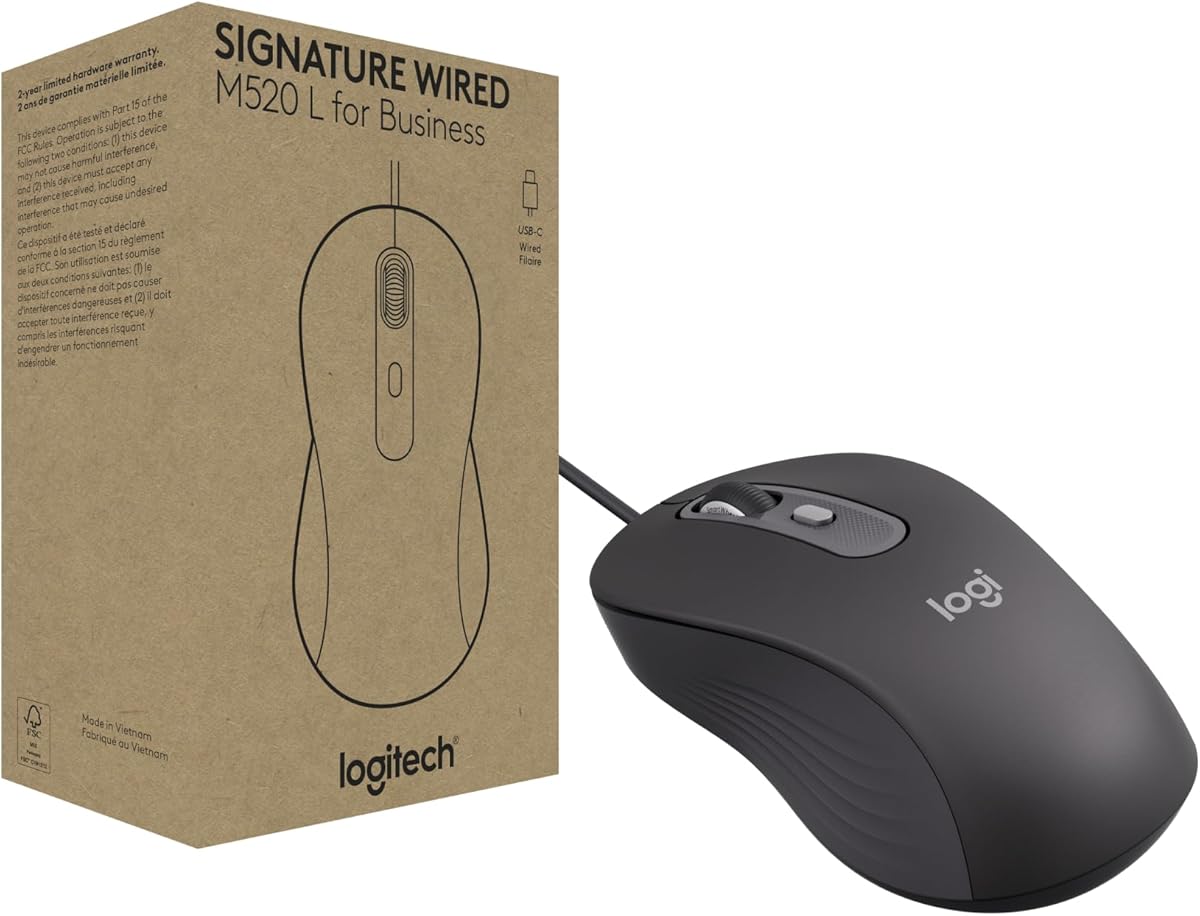
The Logitech Signature Wired M520 L for Business is a modern wired option rated 4.3. It is aimed at organizations and industries that require a dependable wired solution, including banking and medical environments. Its USB-C cable, multi-OS layout, quiet clicks, and customizable DPI button make it especially relevant to managed business deployments.
We may earn a commission when you buy through this link, at no additional cost to you.
SmartWheel scrolling changes between precise line-by-line movement and fast document navigation. SilentTouch technology is stated to reduce click noise by 90 percent, making the mouse suitable for open workspaces. The ambidextrous shape is a notable feature because it allows the same unit to serve both left- and right-handed users without changing the overall design.
One practical concern is USB-C availability. Older desktops and laptop models that rely exclusively on USB-A may require an appropriate adapter, and organizations should verify deployment requirements before standardizing on this mouse. The stated power-saving design consumes 68 percent less energy than the comparison model used in its testing, though a wired mouse does not need batteries in the usual sense.
This is a compelling business mouse where predictable connectivity, quiet operation, and broad platform support matter more than wireless freedom. It is less appealing for a highly mobile user, but its stable wired approach can simplify IT procurement. For institutions deploying many computers, the multi-OS design and customizable controls are especially valuable.
The multi-OS layout supports Windows, macOS, ChromeOS, and Linux, reducing the need to maintain separate mouse models. A wired design also avoids charging schedules and receiver inventory across large deployments.
SilentTouch lowers clicking noise by a stated 90 percent for shared workspaces. The ambidextrous shape and adjustable DPI button broaden its suitability across a range of users and preferences.
We may earn a commission when you buy through this link, at no additional cost to you.
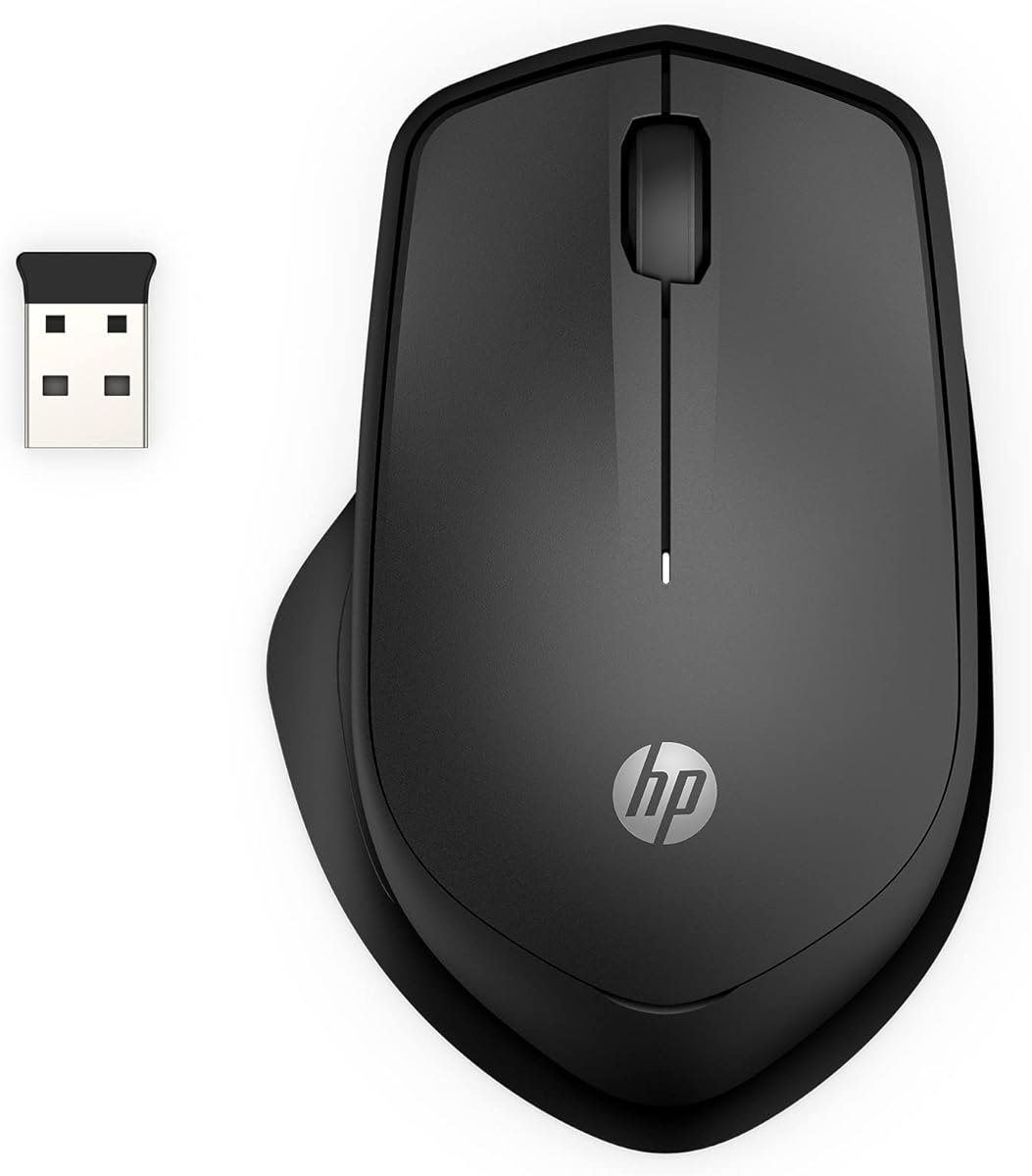
The HP 280 Silent Wireless Mouse is a 4.5-rated option for users who want a conventional ergonomic shape, adjustable sensitivity, and quiet operation. Its 2.4 GHz connection, stowable nano receiver, 1600 DPI sensor, and advertised 18-month battery life give it a balanced feature set for office and home use.
We may earn a commission when you buy through this link, at no additional cost to you.
Multi-surface technology is a major practical strength because it enables smooth movement on virtually any surface without insisting on a mouse pad. The sensor's 1600 DPI can be customized to match the user's working style, while SilentTouch-style click reduction is stated at up to 90 percent for both main buttons. That makes it attractive in libraries, shared offices, and busy homes.
The ergonomic form is specifically right-handed, which narrows its appeal compared with the neutral M185 or B100. It also uses a USB-A nano receiver rather than Bluetooth or USB-C. The receiver is stored inside the mouse for portability, but a modern laptop with limited USB-A ports may need an appropriate adapter.
The HP 280 is a strong recommendation for a right-handed user who wants quiet clicks, surface flexibility, and adjustable sensitivity without software-heavy configuration. It is less appropriate for left-handed work or for people whose devices rely exclusively on Bluetooth. Its straightforward feature mix makes it easy to recommend as a general-purpose daily driver.
Multi-surface technology allows the mouse to move smoothly across varied desks without dedicated tracking surfaces. That freedom is useful in offices, cafés, and shared workspaces where surface conditions are unpredictable.
Both primary clicks are designed for up to 90 percent noise reduction, while 1600 DPI provides useful sensitivity control. The 18-month battery target supports a long interval between maintenance tasks.
We may earn a commission when you buy through this link, at no additional cost to you.
The Logitech Signature M650 L combines a large full-size design, quiet clicks, flexible wireless connectivity, and customizable navigation buttons. Its 4.5 rating reflects a well-rounded feature set, and the L-sized version is intended to provide a more comfortable fit for larger hands.
We may earn a commission when you buy through this link, at no additional cost to you.
The SmartWheel offers two scrolling behaviors: precise line-by-line movement for documents and rapid scrolling through long web pages. SilentTouch technology is stated to reduce click noise by 90 percent, while the side buttons can be assigned to shortcuts such as back, forward, copy, and paste through Logitech Options+ on Windows and macOS.
Connection options include Bluetooth Low Energy and the Logi Bolt USB receiver, and the mouse is compatible with a wide set of systems including Windows, macOS, Linux, ChromeOS, iPadOS, and Android. Up to 24 months of battery life is advertised for the included AA battery. As with the M550 L, the supplied information does not mention adjustable DPI.
The M650 L is ideal for users who want a large, quiet mouse with meaningful button customization and several device platforms in one package. It may be excessive for basic browsing, but for productivity-focused work the additional controls are valuable. The main caveat is dependence on Logitech software for side-button assignments, which some users may prefer to avoid.
Customizable side buttons can be assigned to common actions such as navigation, copying, and pasting. This turns a standard mouse into a more efficient productivity tool without adding a complicated interface.
Bluetooth Low Energy and Logi Bolt offer flexible connections, while broad operating system support broadens its usefulness. The included AA battery and stated two-year battery target help balance power needs with everyday convenience.
We may earn a commission when you buy through this link, at no additional cost to you.
The Acer Wireless Mouse is a 4.3-rated option offering five adjustable DPI levels, navigation buttons, and a stated durability rating of up to ten million clicks. Its highest sensitivity reaches 4000 DPI, while lower settings begin at 800 DPI, giving users a wider range than most competing office mice in this roundup.
We may earn a commission when you buy through this link, at no additional cost to you.
The visual indicator is unusually informative. It flashes once through five times to correspond with the five DPI settings and then displays a continuous red light when the battery falls below 10 percent. A click-to-wake function returns the mouse from standby after 10 minutes of inactivity, helping conserve power without making reconnection difficult.
The product comes with several setup considerations. The AA battery is not included, the USB-A receiver is stored in the battery compartment, and a protective film on the bottom must be removed before use. A 33-foot wireless range is advertised, and the medium-size shape is described as comfortable for medium to large hands. There is no stated Bluetooth support.
This Acer model is a practical pick for laptop users who want broad sensitivity control, a visible battery warning, and inexpensive wireless navigation. It is less convenient for people who want a fully ready-to-use package because a battery must be added. Still, for users who already have an AA battery or prefer to keep spares at a desk, the feature set is generous.
Settings from 800 to 4000 DPI support both ordinary document work and more precise cursor movement. The indicator makes the active level visible, reducing uncertainty when changing sensitivity.
A stated ten-million-click rating indicates a focus on sustained use. Standby activation after 10 minutes and a low-battery warning help manage power, although users must supply their own AA battery.
We may earn a commission when you buy through this link, at no additional cost to you.
A long-lasting mouse should fit your hand, work reliably with your devices, and provide the controls and tracking required for your routine. The following factors help narrow the field without focusing on features that add complexity without practical value.
Wired mice provide an uninterrupted physical connection, eliminate battery charging, and remove the need to manage a receiver. That makes models such as the Logitech B100, TECKNET USB Wired Mouse, and Logitech Signature M520 L attractive for fixed desks, business fleets, and shared computers. Check whether your system uses USB-A or USB-C before choosing a wired model, especially if a USB-C adapter is required.
Wireless mice offer a cleaner desk and greater freedom of movement. Most models in this guide use 2.4 GHz technology with a USB-A nano receiver, while the Logitech Signature M550 L and M650 L also support Bluetooth Low Energy. Wireless convenience should be weighed against receiver storage, charging discipline, and battery availability.
A mouse that feels cramped can become tiring even if its electronics are durable. Compact options such as the Logitech M185 suit small-to-medium hands and travel, while full-size models such as the M510, M550 L, and M650 L provide more palm support. The HP 280 and M705 use more distinctly right-handed shapes, while the B100 and Signature M520 L offer more neutral ambidextrous layouts.
Choose a smaller shape for a cramped desk and a larger shape for extended daily use. Hand size and preference should take priority over decorative design because a durable mouse still needs to remain comfortable enough to use consistently.
Fixed 800 DPI on the Logitech B100 is sufficient for standard office navigation but offers limited flexibility. The TECKNET model provides four levels up to 6400 DPI, while the Acer Wireless Mouse provides five levels up to 4000 DPI. More sensitivity can help detailed work, while lower settings can reduce the distance needed to cross large displays.
Do not equate a higher maximum DPI with a universally better mouse. Choose adjustable sensitivity if you alternate between browsing, design, and precision tasks. If standard document and web work is all you need, a dependable fixed setting may be sufficient.
Line-by-line scrolling helps with documents, while faster modes suit long web pages, spreadsheets, and lengthy reports. The Logitech Signature M550 L and M650 L use a SmartWheel to switch between both behaviors. The M705 takes fast scrolling further with a nearly frictionless metal wheel designed for quick movement through extensive material.
Consider the type and amount of content you scroll. Standard line-by-line control is sufficient for ordinary work, but regular readers, analysts, and programmers may appreciate a faster mode or a dedicated wheel design.
Battery life varies with user behavior and computing conditions, so the published maximum is best treated as an estimate. The M705 is advertised for up to three years, the M510 and Signature models for up to two years, the HP 280 for up to 18 months, and the M185 for up to one year. The Acer model includes automatic standby but does not include an AA battery.
Long stated battery life is valuable for people who want minimal disruption. Users should still plan for occasional replacement, especially in high-activity workflows. Wired mice eliminate battery maintenance entirely, which can be a decisive advantage in unattended or frequently used office systems.
A durable mouse will not be useful if it lacks the controls or connections required by your setup. The TECKNET model's side buttons do not work on Mac, while the Logitech M510 requires SetPoint or Control Center for its programming options. The Signature M650 L similarly relies on Logitech Options+ for customizable side buttons.
Review operating system support, USB port type, receiver format, and required software before buying. Prefer models that provide their core functions without software, especially for work computers, travel, or environments where installation permissions are limited.
Mechanical click noise can distract colleagues or family members during calls and focused work. The Logitech Signature M550 L, M520 L, and M650 L use SilentTouch technology, while the HP 280 is also designed for substantial noise reduction. These models are more appropriate for quiet offices, libraries, and shared homes than click-heavy alternatives.
Quieter operation does not necessarily mean the mouse feels less responsive, but it changes the feedback experience. If you strongly prefer a pronounced click, consider handling preferences in person when possible before making a final choice.
Durability is supported by more than a rugged-looking shell. Stated click-test totals, laser-grade tracking, sleep modes, low-friction wheels, and power-saving designs all contribute to sustained performance. The TECKNET mouse has been tested for more than six million clicks, while the Acer model is rated for up to ten million. The M705 focuses heavily on power efficiency and long battery intervals.
Look for practical endurance claims tied to the parts of the mouse that wear fastest. Button durability, wheel smoothness, sensor consistency, and battery management matter more than a purely cosmetic claim that a device is rugged.
Begin by matching the mouse to your computer's connection method. Plug a wired mouse into the correct USB or compatible port, or insert the supplied 2.4 GHz nano receiver into an available USB-A port. For Bluetooth models, place the mouse into pairing mode and select it from the device's Bluetooth menu. Allow a few seconds for the system to recognize the device.
Adjust the mouse to fit your hand before beginning a long session. Keep the primary buttons under your index and middle fingers, and ensure the scroll wheel is easy to reach without moving your wrist excessively. If the model supports multiple DPI levels, choose a moderate setting first and change it according to the task. Install button-customization software only when the assigned controls are important to your workflow.
For wireless models, replace batteries promptly after a low-power warning and keep spare AA batteries available where permitted. Clean the sensor gently with a dry or lightly damp cloth, and remove dust around the scroll wheel and buttons without pushing debris into the casing. Avoid pulling the cable or receiver forcefully, and store the mouse in a dry environment when it will not be used for an extended period.
A well-designed wireless mouse can suit heavy daily work because it removes cable wear and reduces desk clutter. Durability depends on the switch quality, wheel construction, battery habits, and overall build rather than the wireless connection alone. Models such as the M705 address endurance through low power use, while the Acer mouse includes a stated ten-million-click rating. Proper care and timely battery replacement help maintain consistent performance.
Wired mice avoid battery degradation and wireless receiver issues, but their cables can wear if pulled repeatedly. Wireless mice reduce cable-related wear and may therefore feel more durable in a frequently reorganized workspace. The best choice depends on your setup: fixed professional desks often favor wired reliability, while portable users may prefer the flexibility of wireless operation.
A moderate setting is usually best for general document editing, browsing, and office work. Fixed 800 DPI on the Logitech B100 provides precise standard control, while adjustable models let you move to higher settings for detailed tasks. The important consideration is how quickly the pointer crosses the screen and how much precision your work requires.
An ambidextrous shape can reduce the need to switch hands and may feel more natural if you alternate grip positions. However, neutral shapes do not always provide the same tailored support as a sculpted right-handed or left-handed model. The M185, B100, and Signature M520 L are more neutral, while the HP 280 and M705 are explicitly shaped for right-handed use.
Core clicking, scrolling, and pointing functions generally work without software, although exact behavior varies by model. The M510 requires Logitech SetPoint or Control Center for full button programming, and the M650 L uses Logitech Options+ to customize its side buttons. Users who prefer no installation can select a model such as the B100, TECKNET, M185, or M705 for straightforward operation.
A stated battery life of 18 to 24 months is generally practical for regular office use because it limits replacement frequency. The M705 offers the longest stated interval at up to three years. Actual life varies with activity, sleep behavior, and computing conditions, so keeping a compatible spare battery nearby remains sensible.
Most of the mice listed support common Windows and Mac environments, while several Logitech Signature models extend compatibility to Linux, ChromeOS, iPadOS, and Android. The receiver or connection must also be supported by the second device. A USB-A receiver can move between compatible computers, while Bluetooth models may pair with multiple devices more conveniently.
Useful features include a low-friction or metal wheel, a fast-scroll mode, and precise line-by-line control. The M705's near-frictionless metal wheel is designed for rapid movement through long documents, while the M550 L and M650 L use a SmartWheel that offers both precise and rapid modes. Stable sensor tracking and a shape that prevents the hand from sliding also improve long scrolling sessions.
The Logitech M705 Marathon is the leading premium choice for heavy scrolling, long battery intervals, and precise tracking, while the M510 offers the most balanced combination of full-size comfort, programmable navigation, and wireless convenience. The Logitech B100 is the practical budget recommendation for anyone who prefers a simple wired mouse with no battery or pairing routine.
Prioritize the conditions you use most often. Choose a large and quiet Signature model for larger hands and shared workspaces, a wired TECKNET mouse for adjustable sensitivity, the HP 280 for multi-surface tracking, or the Acer wireless mouse for a broad DPI range. Portability, handedness, connection type, and operating system support can matter more than any isolated specification.
Review the current listing and product details before buying because compatibility, included accessories, and pricing can change. A durable mouse is one that suits your hand, offers dependable controls, and fits your work rhythm; the right combination is more valuable than simply choosing the model with the longest feature list.
