
EZP2023 USB Programmer for EEPROM Flash
4.3Editor score
Automatic chip identification
Automatic voltage selection
Broad EEPROM family support
Complete adapter assortment
Our Bios Flash Tool guide compares ten programmers, clips, adapters, and bootable recovery drives for BIOS, EEPROM, Windows, and security tasks in 2026.
A Bios Flash Tool can take several forms, from a USB programmer that reads and writes SPI EEPROM chips to a clip that reaches a motherboard-mounted BIOS chip without removing it. Other options in this category focus on booting recovery environments, reinstalling Windows, resetting access, or supporting ethical security work. The right choice depends on the chip, board, connector, and recovery task involved.
We compared the ten supplied products by examining their intended uses, supported chip families, connection methods, adapters, voltage features, and stated compatibility. The list includes CH341A programmers, an EZP2023 programmer, SOIC8 and SOP16 clips, Windows recovery media, a password-reset drive, and a Kali Linux boot drive so readers can distinguish direct chip programming from broader recovery tools.
Each review explains what the product is best suited to, where its compatibility limits matter, and which technicians or computer owners may benefit from it. Ratings and feature descriptions reflect the supplied listings, while availability and configurations can change. Readers should verify the exact chip markings, board layout, voltage, and operating-system requirements before purchasing or attempting any firmware operation.
4.3Editor score

4.4Editor score

4.1Editor score
This side-by-side comparison separates direct BIOS and EEPROM programmers from bootable recovery media and hardware accessories, making it easier to match each product to a specific maintenance, troubleshooting, installation, or security task.
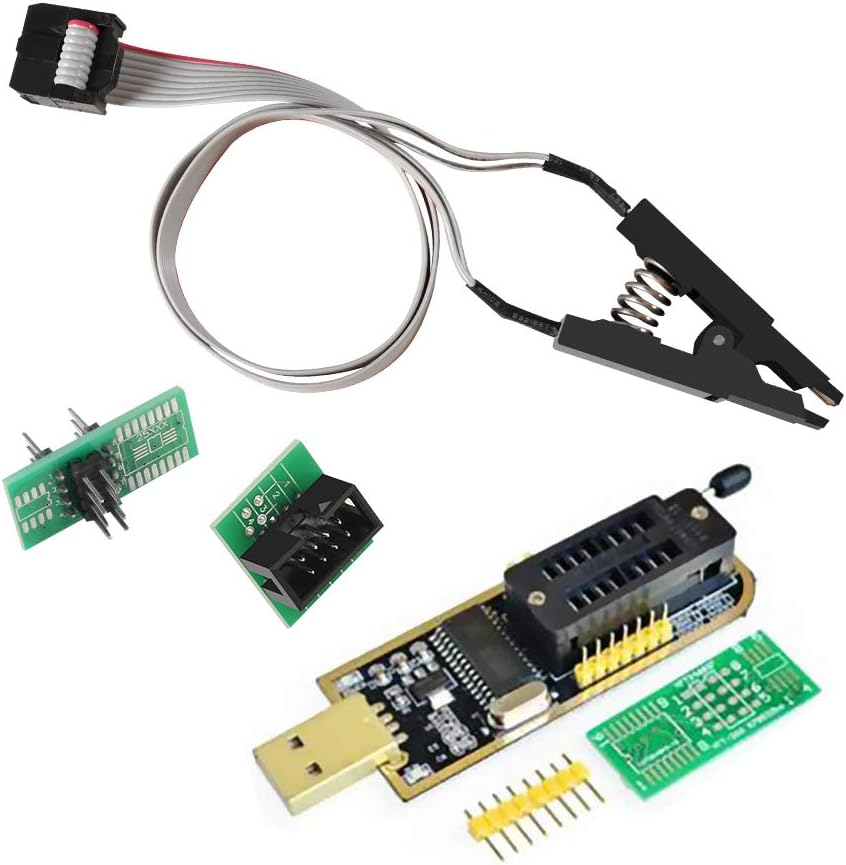





The WWZMDiB CH341A EEPROM BIOS Programmer is an approachable way to back up, erase, program, and calibrate supported 24- and 25-series flash chips. Its strongest feature is the combination of a USB programmer, an SOIC8/SOP8 test clip, and conversion hardware in one kit. That arrangement can simplify a first BIOS recovery attempt because it offers both clipped and adapter-based access.
We may earn a commission when you buy through this link, at no additional cost to you.
The listing states that the CH341A hardware is compatible with CH341A and CH341B chips, while the included clip allows direct attachment without welding. Switchable 3.3-volt and 5-volt operation is important because using the wrong supply can damage a flash chip. The SOP8 and SOP16 conversion plate adds flexibility when the target chip is removed or accessed outside its original circuit.
The trade-off is that this is a general CH341A package rather than a fully automatic universal programmer. Some board-mounted chips are affected by surrounding components, and the listing specifically asks buyers to confirm chip voltage before use. A basic compatible BIOS chip may work directly, but a complex board or a manufacturer-specific encryption scheme can still limit the result.
This kit is best for a computer owner or repair technician who has identified a standard 24- or 25-series flash chip and wants a reasonably complete starting setup. It is a particularly sensible option when soldering is undesirable and a standard-voltage device is involved. For unusual voltage requirements, automatic chip identification, or broader EEPROM families, a more specialized programmer may be a better fit.
The included SOIC8/SOP8 clip can connect to a chip while it remains mounted, reducing the need to remove it from the board. Before attempting a write, however, the surrounding circuitry should be checked because it can affect identification or communication.
The stated 3.3-volt and 5-volt switching makes the programmer useful for common flash devices, but voltage is not interchangeable. Confirm the markings on the original chip and follow the supplied guidance before connecting or programming.
We may earn a commission when you buy through this link, at no additional cost to you.
The ACEIRMC SOIC8 SOP8 Flash Chip IC Test Clips and CH341A Programmer is a well-rounded option for reading, erasing, programming, and checking common EEPROM and BIOS flash chips. It combines a USB CH341A module with test clips designed to permit in-circuit programming. That combination makes it useful when the goal is to recover or reproduce firmware without immediately removing the chip from the motherboard.
We may earn a commission when you buy through this link, at no additional cost to you.
Its strongest selling point is practical access. The clip can connect to common 24CXX, 25CXX, and 93CXX devices, while the double-clip arrangement provides flexibility for different board layouts. The CH341A side supports most 24- and 25-series devices on the market and handles common backup, erase, program, calibration, and verification tasks. It is also usable in broader electronics work involving TVs, routers, notebooks, cards, DVD equipment, and set-top boxes.
There is an important chip-specific limitation. The listing states that, because of the characteristics of the CH341A chip, ESMT SST class 25 chips can be read but not written. In addition, peripheral circuits may prevent direct clipped programming on some motherboards. Those limitations do not make the kit unreliable, but they do mean the target device must be identified before selecting it.
This is a strong general-purpose choice for a technician comfortable identifying SOP8 BIOS packages and checking board-level conditions. It offers a stronger combination of customer feedback and included access hardware than many basic modules. Choose it for common in-circuit EEPROM work, but use a broader programmer or remove the chip when the board design, voltage, or chip family falls outside its stated limits.
The supplied information identifies broad support for common 24-, 25-, and 93-series devices. Support for a family does not mean every manufacturer variant behaves identically, so chip markings and manufacturer documentation remain important.
The ESMT SST class 25 read-only limitation is the main compatibility exception. A technician who expects to write those devices should select a programmer with explicit support rather than relying on read capability as proof of full compatibility.
We may earn a commission when you buy through this link, at no additional cost to you.
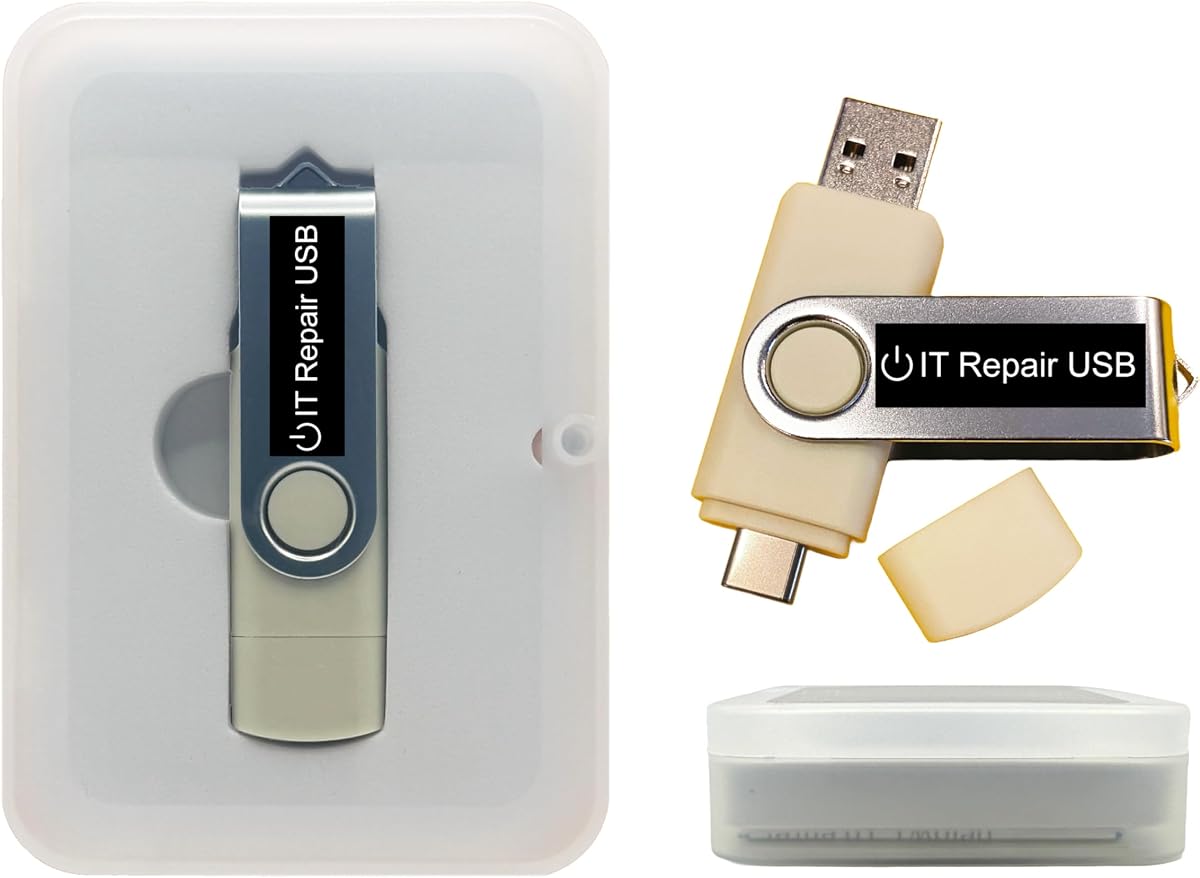
The Password Reset Bootable USB is a recovery-oriented boot drive for Windows and Linux account access rather than a device for writing BIOS chips. It supports password reset and recovery, broad operating-system coverage, and both UEFI and Legacy BIOS boot modes. Its dual USB-A and USB-C design also makes it easier to carry between different laptops, desktops, mini PCs, tablets, and servers.
We may earn a commission when you buy through this link, at no additional cost to you.
The drive is designed for guided, on-screen operation and does not require an internet connection. That makes it useful for isolated work environments or systems without working network access. The supplied information also notes that compatible bootable ISO applications, installers, and utilities can be added, replaced, or upgraded, giving experienced users more control than a fixed-purpose recovery image.
The main limitation is categorical: this product is not a CH341A or EZP programmer, and it cannot read or rewrite a motherboard's SPI flash package. It also cannot replace normal safeguards around data encryption, BitLocker, or account permissions. Its lower customer rating should be considered alongside the narrower recovery purpose rather than compared directly with a specialized programmer.
This drive is a useful option for IT staff, administrators, and advanced computer owners who need portable account-recovery media for multiple supported platforms. It is not the correct purchase for a failed POST, a damaged firmware chip, or a motherboard that cannot boot. Confirm that the target account and system can boot from USB before relying on the recovery workflow.
USB-A and USB-C connectivity reduces the need to carry different drives, while support for UEFI and Legacy BIOS expands the range of supported computers. A USB port on the target machine is still necessary for boot media use.
The ability to add or replace compatible bootable applications makes the drive adaptable for repeatable service workflows. Users unfamiliar with ISO preparation should follow the included instructions and confirm that every added application is appropriate for the target machine.
We may earn a commission when you buy through this link, at no additional cost to you.
The Windows 11 Bootable USB Drive is intended for installing or repairing Windows 11 on a computer that can power on and reach its firmware settings. Its standout feature is the stated absence of a TPM requirement, which can make it relevant to older or otherwise incompatible systems that cannot satisfy the normal Windows 11 platform requirements. It supports both UEFI and Legacy boot modes.
We may earn a commission when you buy through this link, at no additional cost to you.
This is a ready-oriented installation and recovery tool for setting up Windows rather than a programmer for firmware chips. The listing is unusually explicit that the drive will not fix a dead motherboard, bad memory, a failing hard drive, or a computer that cannot power on or enter BIOS. It is also not intended for BitLocker recovery, general data recovery, or rescuing files from a failed drive.
The hardware and operating-system limitations make careful system checks more important than the drive's nominal capacity. Users should verify that the machine can enter its firmware interface and boot from USB, and they should understand that a software installer cannot resolve a hardware fault. The product contains the operating system installer but no Windows product key.
This drive is best for a technician or enthusiast preparing a compatible older PC for a clean Windows 11 installation. It is not a solution for a system that fails before boot and it should not be confused with a BIOS chip programmer. Its value lies in simplifying installation when the hardware can boot but does not meet all of Microsoft's usual platform expectations.
The no-TPM feature broadens installation options, but it does not make every PC suitable. Processor support, firmware access, storage connectivity, and the ability to boot from USB must all be checked before installation.
A bootable operating-system image depends on the computer reaching a usable boot stage. Dead components, storage failures, and systems that do not power on remain outside the product's stated capabilities.
We may earn a commission when you buy through this link, at no additional cost to you.
The ACEIRMC CH341A Full Kit is one of the most complete conventional programmer packages in this guide. It combines a CH341A USB programmer, a 1.8-volt adapter, a SOIC8-to-DIP8 converter, and a SOIC8 test clip. Those components cover several common ways to connect 24- and 25-series flash chips, including in-circuit access, adapted socket access, and lower-voltage applications.
We may earn a commission when you buy through this link, at no additional cost to you.
The supplied description emphasizes faster programming and erasing than a basic ATMEGA8 25-series programmer, with 1.8-volt support for compatible mobile and motherboard SPI flash memory. It can be used for television memory, desktop motherboards, LCD equipment, notebooks, routers, cards, DVD systems, and set-top boxes. Backup, erasing, writing, checking, and repair are among the stated operations.
No single kit solves every board-level programming problem. The clip only works when the chip geometry and surrounding circuitry allow a reliable connection, and a converter cannot compensate for an incorrect voltage selection. The package is also centered on common SOIC8 devices, so technicians working with other package types may need separate accessories.
This kit is a strong choice for a repair technician or serious computer owner who wants more than a bare CH341A module. The low-voltage adapter, converter, and clip provide useful flexibility without requiring several separate purchases. It is especially suitable for standard SPI flash recovery on motherboards and related electronics after the target chip, voltage, and board conditions have been verified.
The included 1.8-volt adapter expands the kit beyond the common 3.3-volt and 5-volt arrangements used by basic CH341A packages. It must be used only with compatible devices and after the target voltage has been confirmed.
The test clip supports in-circuit work when board conditions permit, while the SOIC8-to-DIP8 adapter supports socket-style access. This flexibility is useful when one method is unsuitable for a particular motherboard or device.
We may earn a commission when you buy through this link, at no additional cost to you.
The EZP2023 USB Programmer is the most automation-focused option in this roundup. It automatically identifies chips, especially within the 25-series family, detects whether a chip is properly placed, and selects the supply voltage. Those features can reduce setup errors and make the device more approachable for repeated motherboard and electronics servicing.
We may earn a commission when you buy through this link, at no additional cost to you.
The supplied information gives concrete performance figures for one chip, stating that an EN25T80 can be read in three seconds and written in nine seconds. It also describes full support for 25-series SPI flash and 24-, 25-, 93-, and 95-series EEPROM devices. A full set of adapters allows the programmer to handle different physical package arrangements.
Automatic operation has boundaries. EEPROM models outside the more readily recognized group may need to be selected manually, and no adapter guarantees electrical compatibility without confirming the pinout and package. The listing also describes offline copying and BIOS work, but a successful chip write does not by itself make an image appropriate for a particular board.
This programmer is the strongest choice in the list for users who value automatic detection, convenient voltage handling, and broad family coverage. It suits professional repair work where different flash devices are likely to appear. The adapter set adds completeness, although technicians should still confirm chip markings and use a properly matching adapter before handling expensive boards.
Automatic identification and supply-voltage selection can make a programmer less intimidating and reduce the chance of choosing a common 3.3-volt or 5-volt setting incorrectly. Manual selection remains necessary for some supported EEPROM devices.
The 15 included adapters broaden the range of package styles that can be connected. The correct physical adapter is still essential because an incorrect pin mapping can produce failures or damage.
We may earn a commission when you buy through this link, at no additional cost to you.
The Windows PC Repair Bootable USB Recovery Toolkit is designed for system diagnosis and recovery rather than direct firmware-chip programming. It provides an all-in-one environment for startup troubleshooting, malware removal, partition work, account unlocking, password recovery, and other maintenance tasks. The drive can be run live or used as a recovery operating system without modifying the computer.
We may earn a commission when you buy through this link, at no additional cost to you.
Dual USB-A and USB-C connectors, along with UEFI and Legacy BIOS support, make the media suitable for a wide collection of modern and older PCs. The supplied information highlights its usefulness to technicians and computer re-sellers, particularly when a lightweight environment is needed to inspect an aging or slow system. It can operate offline and can be customized with compatible ISO applications.
The product should not be evaluated as a direct substitute for a CH341A or EZP2023 programmer. It does not rewrite a SPI flash package, and a computer that cannot complete the firmware stage may not boot the recovery environment at all. Its low customer rating may reflect varied expectations, particularly when buyers want hardware-level BIOS recovery rather than operating-system utilities.
This toolkit is best for IT technicians, system refurbishers, and advanced users who need a portable collection of Windows recovery tools. It is less suitable for someone whose immediate goal is to extract, repair, or replace a BIOS chip. Confirm the target system's bootability and the contents of the recovery environment before assigning it to a service workflow.
A live USB environment can be valuable when the installed operating system will not start or needs to be left untouched. It gives technicians a separate workspace for diagnostics, file access, and system recovery tasks.
Recovery software operates at the operating-system and boot-environment levels. If the motherboard firmware itself is corrupt, a direct programmer and a verified firmware image are the relevant tools.
We may earn a commission when you buy through this link, at no additional cost to you.
The SOP16 IC Test Clip is a specialized connection accessory for 16-pin flash chips rather than a complete programmer by itself. It is intended to make refreshing or programming easier for devices used with programmers such as the RT809F, TL866CS, and TL866A. Its support for both 150-mil and 300-mil wide or narrow bodies gives it broader package coverage than a basic SOIC8 clip.
We may earn a commission when you buy through this link, at no additional cost to you.
The listing highlights hardened construction, a thick gold-plated connector layer, and a 40-centimeter connection line. Those physical details are relevant because a stable electrical connection is essential when reading, erasing, or writing firmware. The adapter arrangement also allows a SOP16 package to be used with a programmer that expects a DIP16-style connection.
The clip cannot overcome every board design. Peripheral circuits may interfere with in-circuit identification, and the original listing states that some boards cannot be programmed online with a clip. If the chip is not recognized, it may need to be removed and programmed separately. Compatibility also depends on the selected programmer's pin definition and supported device list.
This accessory is a sensible addition for a technician who already owns a compatible programmer and regularly encounters SOP16 BIOS chips. It fills a clear package gap that an SOIC8-only setup cannot handle. It is not the right standalone purchase for a first-time user, who would generally benefit more from a complete programmer kit with a clip, adapters, and clear connection options.
Supporting 150-mil and 300-mil SOP16 bodies makes the clip useful across a wider range of board layouts. Measure the chip and inspect the available clearance before attempting an in-circuit connection.
Gold-plated contacts and the extended cable support stable communication, but a visually correct connection can still be disrupted by nearby components. Check the board for shorts and ensure the clip is oriented correctly before programming.
We may earn a commission when you buy through this link, at no additional cost to you.
The Windows 11 and 10 Bootable USB is a reinstall and recovery solution for compatible 64-bit UEFI systems. Its distinguishing feature is stated support for Secure Boot without requiring BIOS changes. It can install either Windows 11 or Windows 10 and downloads the relevant official Windows image directly from Microsoft, avoiding bundled or outdated ISO files.
We may earn a commission when you buy through this link, at no additional cost to you.
The drive is aimed at users who can reach the firmware interface and want a guided way to reinstall or repair Windows. It also emphasizes use with an existing Windows license or a separately obtained product key. Live chat and email support provide an additional advantage for buyers who need help navigating the process on a particular computer.
Compatibility is narrower than that of dual-mode recovery products. The current version requires 64-bit UEFI BIOS and does not support Legacy BIOS, so it will not serve older platforms that lack UEFI. A system that cannot enter firmware settings or boot from USB also falls outside its practical use, and the drive cannot resolve a failed storage device or other hardware fault.
This product is a good fit for a modern PC that satisfies Windows requirements except for a configuration detail, or for a technician who wants an official-image-driven reinstall workflow. It is not a BIOS flash programmer and cannot write firmware directly to a chip. Confirm UEFI, 64-bit architecture, Secure Boot behavior, and product-key status before using it.
Supporting a Secure Boot-enabled environment avoids the need to disable a firmware security feature simply to begin installation. This makes the drive less disruptive on systems where changing Secure Boot settings would otherwise be required.
Downloading Windows directly from Microsoft helps keep the installation source current. Users still need a valid license and should follow the on-screen process rather than attempting an unsupported manual image setup.
We may earn a commission when you buy through this link, at no additional cost to you.
The Kali Linux Bootable USB is a portable cybersecurity environment for ethical hacking, penetration testing, forensics, and digital investigation. It can run directly from USB or install Kali permanently for full system performance. The supplied information highlights more than 600 preinstalled tools covering network, web, and wireless auditing within a platform used by security professionals and researchers.
We may earn a commission when you buy through this link, at no additional cost to you.
Hardware coverage is broad for a Linux recovery environment. Dual USB-A and USB-C connectors, UEFI and Legacy BIOS support, and included amd64 and arm64 builds allow use on many Intel, AMD, and supported ARM-based computers. The customizable media also accepts compatible bootable ISO applications and utilities, which can extend its role beyond the preinstalled environment.
The product is unrelated to direct BIOS chip programming and will not repair a damaged firmware package. It also carries an obvious authorization requirement: security testing should only be performed on systems the user owns or has explicit permission to assess. The included tool count is impressive, but actual workflows depend on hardware support, network configuration, and the chosen testing environment.
This drive is best for a security learner, authorized penetration tester, or IT professional who wants a self-contained Linux security platform. It provides a convenient way to evaluate tools without immediately changing the host operating system. For firmware recovery, choose a programmer and clip instead; for ordinary Windows repair, a Windows recovery tool is the more focused option.
Running Kali from removable media keeps the security environment separate from the primary installation and allows it to be used across compatible hardware. Live operation is convenient for demonstrations, assessments, and recovery-oriented tasks.
The amd64 and arm64 builds increase hardware flexibility, but the exact system must still be supported. Testing tools should be used exclusively on owned or explicitly authorized systems and within applicable laws and policies.
We may earn a commission when you buy through this link, at no additional cost to you.
The best Bios Flash Tool depends on whether you need to program a physical firmware chip, recover a bootable operating system, reset an account, or create a portable security environment. Chip support, voltage handling, package access, and the ability to reach the firmware interface matter more than the number of included accessories.
A direct programmer reads, erases, verifies, and writes flash memory through a USB interface and compatible adapter or clip. A bootable recovery drive instead loads an operating system or utility environment from USB. These are not interchangeable: one may be unable to repair the layer the other is designed to handle.
Check whether the target chip belongs to the 24, 25, 93, or 95 series and whether the listing explicitly includes the exact family. General statements such as support for 24 and 25 series do not guarantee that every manufacturer variant can be read and written, and some devices have documented read-only exceptions.
Flash devices may use common 3.3-volt or 5-volt levels, while some particular systems require lower levels such as 1.8 volts. A programmer with automatic voltage selection can reduce mistakes, but a manual adapter requires the user to establish the correct setting. Using the wrong voltage can damage a chip.
The physical package determines which accessory can connect safely. SOIC8 or SOP8 clips suit eight-pin devices, while SOP16 products support sixteen-pin packages. Width, pin pitch, board clearance, and surrounding components all affect whether an in-circuit connection will work.
Automatic chip identification, placement detection, and voltage selection are especially valuable when handling varied devices. They can reduce incorrect manual settings and speed up routine work. The EZP2023 is the clearest example in this list, although some EEPROM models still require manual selection.
A bootable recovery tool must be able to access the computer's boot menu or firmware interface. Some products support both UEFI and Legacy BIOS, while others require UEFI and exclude older systems. Secure Boot support can also determine whether firmware settings need to change.
No bootable installer or recovery environment can repair a dead motherboard, failing drive, bad memory module, or system that does not power on. These tools work only after the computer can reach a usable firmware or boot stage. Direct chip programming is a separate task that also requires a valid, correct firmware image.
Nearby resistors, capacitors, level shifters, and other circuits can prevent a programmer from identifying or communicating with a mounted chip. Some boards require the chip to be removed. Clipped access is convenient, but a stable reading should be treated as evidence that the connection is electrically sound.
Begin by identifying the exact chip, package, voltage, and firmware function. For a direct programmer, compare those details with the supported device list, install the appropriate software on the technician's computer, select the right voltage and chip model, and connect the programmer through USB. For a bootable drive, confirm the target system's firmware mode and save any essential data before beginning a reinstall or recovery operation.
When programming in circuit, power the board down, disconnect power, attach the correct clip or adapter, and check the orientation carefully. Back up the original chip contents before erasing or writing anything. If identification fails, do not repeatedly force the connection; inspect the chip marking, test points, nearby components, adapter pinout, and voltage until the cause is understood.
For recovery media, create a tested boot environment before relying on it in an emergency. Verify that the computer can access its boot menu, confirm the required Secure Boot or UEFI behavior, and keep a separate copy of any needed drivers or files. Store programmers in an anti-static environment, protect clips from bent contacts, and replace damaged adapters rather than forcing them into a socket.
A Bios Flash Tool is commonly a USB programmer used to read, back up, erase, verify, and write BIOS or EEPROM flash chips. It may connect to a removed chip through an adapter or reach a mounted chip with a test clip. Some products marketed broadly as flash or recovery tools instead boot operating systems, so their functions should be checked before purchase.
No. CH341A-based programmers generally support common 24- and 25-series devices, but compatibility varies by exact chip and manufacturer. The ACEIRMC listing specifically notes that ESMT SST class 25 chips can be read but not written, and board-level circuits can also interfere with mounted-chip programming. Always check the exact chip markings before writing.
No. A flash programmer communicates directly with a memory chip and can create or restore a firmware image. A bootable recovery USB loads Windows, Linux, or diagnostic utilities from the computer's firmware boot process. Neither can repair a physically failed motherboard or storage device, and each addresses a different layer of the system.
Not always. A correctly sized SOIC8 or SOP16 clip can permit in-circuit reading and programming when the board layout and nearby components allow a stable connection. If the chip cannot be identified, the connection is inconsistent, or the device uses an unusual package, removing the chip for offline programming may be necessary.
Use the voltage specified for the exact chip rather than assuming it matches another board. Many common devices use 3.3 volts or 5 volts, while some require 1.8 volts. Automatic voltage selection is helpful when available, and a low-voltage adapter should only be used with a compatible device. An incorrect supply can destroy the chip.
The bootable tools in this guide are not substitutes for dedicated data-recovery equipment. Their stated purpose is account recovery, reinstallation, diagnostics, or security testing, and the Windows installers explicitly are not intended to save files from a failed drive. If storage failure is suspected, avoid writes and use a service that focuses on data recovery.
No. A bootable drive depends on the computer powering on, reaching the firmware interface, and accepting a USB boot. The Windows 11 drive in this list is specifically limited to operating-system installation and cannot fix a dead motherboard, bad RAM, a failing drive, or a system that does not reach BIOS.
Confirm that the image came from a trustworthy source and matches the exact board model, revision, and expected firmware version. Read the original chip and keep a backup before modifying it. After writing, verify the new contents and test the board's ability to complete POST, display firmware settings, and boot the intended operating system.
The EZP2023 is the strongest choice for automated chip identification, voltage handling, and broad EEPROM-family coverage. The ACEIRMC CH341A Full Kit offers the most balanced conventional setup, while the WWZMDiB package provides an economical entry point with both clips and conversion hardware for common standard-voltage flash devices.
Prioritize the task first: choose a CH341A or EZP2023 programmer for direct BIOS chip work, a Windows recovery drive for installation and system maintenance, a password-reset drive for authorized account recovery, and Kali Linux for a portable security environment. Before buying, verify the exact chip family, package, voltage, boot mode, and required accessories.
Availability and product configurations can change, so check the current listing and included components before ordering. Most importantly, work from a verified firmware image, preserve an original backup whenever possible, and avoid treating software tools as a remedy for failed hardware.
