
GIGABYTE B850 AORUS Elite WIFI7
4.4Editor score
Latest AM5 platform support
Three M.2 storage slots
DDR5 memory support
WiFi 7 connectivity
Five-year warranty
Discover the best Motherboard with Integrated Graphics, comparing sockets, memory, PCIe, networking, display outputs, and expansion options.
A motherboard with integrated graphics gives a new computer a useful display path without requiring a separate graphics card immediately. The right board balances processor compatibility, memory support, expansion, networking, storage, and practical rear-panel connectivity, while also fitting the case and matching the intended workload.
This guide compares ten supplied products against the needs of everyday, compact, gaming, and upgrade-oriented systems. Because the list includes both motherboards and two processors that supply integrated graphics through compatible platforms, each review clearly distinguishes the complete motherboard choices from standalone CPU options and explains where each belongs.
Every numbered pick has its own strengths, limitations, and ideal buyer, while the top selections highlight the strongest combinations of platform support, connectivity, and usability. Product specifications and availability can change, and current prices may vary, so readers should verify the latest listing details before purchasing.
4.4Editor score

4.4Editor score

4.4Editor score
The comparison covers platform generation, processor support, memory type, storage expansion, networking, and physical layout. Two entries are processors rather than motherboards, so they are included as integrated-graphics CPU options and should be paired with a separately selected compatible board.




The ASUS ROG Strix B550-F Gaming WiFi II earns the Editor's Choice position because it combines a mature AM4 platform with unusually broad connectivity. Its 4.6 rating reflects a well-regarded foundation for Ryzen 3000 and 5000 systems, including desktop processors with integrated Radeon graphics. The ATX layout offers room for expansion while retaining convenient display, storage, networking, and USB options.
We may earn a commission when you buy through this link, at no additional cost to you.
Its standout strengths begin with the 12+2 teamed power stages, ProCool power connector, alloy chokes, and durable capacitors. Storage is handled by dual M.2 slots, while PCIe 4.0 readiness and USB 3.2 Gen 2 Type-C support make the board appropriate for current and future accessories. For display output without a discrete graphics card, the board provides HDMI 2.1 and DisplayPort 1.2, with the exact supported resolutions depending on the selected processor.
Networking is another differentiator: WiFi 6E and Intel 2.5Gb Ethernet allow a builder to choose fast wireless convenience or reliable wired connectivity. BIOS Flashback is useful when troubleshooting or updating firmware, and the bundled AIDA64 Extreme subscription and UEFI BIOS dashboard add value to the software experience. The trade-off is that AM4 and DDR4 are established rather than current platforms, so a buyer should not expect the newest CPU socket or DDR5 support.
This motherboard is a strong recommendation for someone building an AM4 gaming or general-purpose system that may initially use integrated graphics but could later receive a discrete graphics card. It also suits builders who value mature connectivity over a future platform upgrade. Pair it with a supported Ryzen processor, compatible DDR4 memory, and a case designed for ATX boards, then confirm the processor's display capabilities before finalizing the build.
AM4 processors with integrated graphics can use the board's HDMI 2.1 or DisplayPort 1.2 output, making it practical for office work, media, and light gaming without a discrete card. Verify the processor's supported display resolution and refresh rate, because those capabilities vary by model.
WiFi 6E, 2.5Gb Ethernet, two M.2 slots, and a PCIe 4.0-capable platform give this board useful room for fast storage and modern networking. The combination is particularly helpful when the integrated graphics are intended as a temporary or general-purpose display solution.
We may earn a commission when you buy through this link, at no additional cost to you.
The GIGABYTE B550M K is the budget-focused selection for builders who want a straightforward AM4 board in a smaller case. Its 4.4 rating reflects a practical feature set centered on processor support, DDR4 memory, two M.2 storage positions, and PCIe 4.0 expansion. It can host Ryzen 5000, 4000, and 3000 series processors, including suitable models with integrated graphics.
We may earn a commission when you buy through this link, at no additional cost to you.
The board uses a digital 3+3 VRM design with premium chokes and capacitors, along with chipset heatsinks for heat dissipation. Four DDR4 DIMM slots provide flexibility for ordinary workstations and gaming systems, with support for Extreme Memory Profile. Storage includes one PCIe 4.0 M.2 slot and one PCIe 3.0 M.2 slot, while the primary graphics slot uses PCIe 4.0 x16 connectivity.
The compromises are visible in the networking and power specifications. There is no listed WiFi capability, so a wireless connection requires an add-in adapter if needed, and the older 3+3 power phase is less elaborate than the designs found in premium ATX boards. Four USB 3.2 Gen 1 ports provide the stated high-speed USB baseline, but the board does not list the same broad USB-C selection as several competitors.
The B550M K is a sensible choice for a compact office, home, or light gaming system that should use integrated graphics and does not require advanced wireless connectivity or extensive high-power overclocking. Buyers should choose a compatible case with micro-ATX support, install a processor with the desired integrated graphics capability, and plan for an external network adapter if wireless access is important.
The micro-ATX format helps reduce the footprint of a complete PC while retaining four memory slots and two M.2 connectors. It is a practical foundation for an inexpensive integrated-graphics build that can later accept a more powerful graphics card.
One PCIe 4.0 M.2 slot and one PCIe 3.0 M.2 slot allow a fast system drive and a second compact storage device. This makes the board more flexible than basic solutions limited to a single modern storage socket.
We may earn a commission when you buy through this link, at no additional cost to you.
The GIGABYTE B650 AORUS Elite AX stands out as the premium motherboard selection because it supports three major Ryzen generations on AM5 while combining a robust power system with current storage and networking standards. Its 4.4 rating is supported by a feature set aimed at builders who want a modern foundation for integrated graphics and eventual graphics-card upgrades.
We may earn a commission when you buy through this link, at no additional cost to you.
Support for Ryzen 9000, 8000, and 7000 series processors gives the board a long usable platform window. Four DDR5 DIMM slots accept AMD EXPO and Intel XMP memory profiles, while twin 14+2+1 power phases use 70A power stages on an eight-layer, two-ounce-copper PCB. The thermal package includes a 6mm heatpipe, covered MOSFET heatsinks, M.2 Thermal Guard, and PCIe Ultra Durable Armor.
The B650 AORUS Elite AX includes PCIe 5.0 support and a PCIe 5.0 NVMe x4 M.2 slot, along with front and rear USB-C connectivity. WiFi 6E and 2.5Gb Ethernet cover both wireless and wired networking needs. EZ-Latch and Q-Flash add practical installation and recovery features, while RGB Fusion caters to systems that include coordinated lighting.
This is a strong match for a new AM5 build that may start with a Ryzen processor featuring integrated graphics and later move to a dedicated graphics card. It suits buyers who value a modern platform and strong specifications more than the lowest possible build cost. Ensure the chosen processor includes integrated graphics, use compatible DDR5 memory, and check the case supports ATX installation.
Supporting Ryzen 7000, 8000, and 9000 families makes this board adaptable across several processor releases. That longevity gives buyers room to choose a current CPU without locking themselves into an immediately obsolete platform.
PCIe 5.0 storage, dual 2.5GbE-class network options through 2.5Gb Ethernet and WiFi 6E, and front and rear USB-C cover several modern upgrade priorities. The 14+2+1 power design adds confidence for higher-performance processors.
We may earn a commission when you buy through this link, at no additional cost to you.
The Intel Core Ultra 5 225 is not a motherboard, but it is an important option for anyone assembling a system around integrated graphics. Its 4.7 rating reflects a well-regarded processor offering with ten cores, fourteen threads, and integrated Intel graphics. It can provide a display without a discrete graphics card when paired with a compatible 800-series chipset motherboard.
We may earn a commission when you buy through this link, at no additional cost to you.
The processor combines six performance cores and four efficiency cores in a hybrid architecture that directs workloads according to performance and efficiency needs. Maximum boost reaches 4.9GHz, and the 22MB cache supports demanding multitasking. PCIe 5.0 and 4.0 support gives builders access to current graphics and storage hardware, while Intel Optane Memory support is also listed.
Its most important limitation is platform dependence. The processor needs an Intel 800-series chipset-based motherboard with the correct socket and firmware support. Buyers must also supply their own thermal solution because none is included. The integrated graphics make the chip convenient for office work, media, and general computing, but it does not replace a motherboard or complete the rest of the system.
Choose this processor when the goal is a powerful, modern CPU with integrated graphics and when another compatible 800-series board has already been selected. It is a good center of an efficient general-purpose build that may not need a discrete graphics card. Check board compatibility, memory type, cooler mounting, and operating-system requirements before ordering.
The processor combines ten cores with integrated Intel graphics in one package. This can simplify a display-only or general-purpose build, although a motherboard, memory, storage, and cooling still need to be selected separately.
Six performance cores and four efficiency cores allow the processor to divide workloads between demanding tasks and background activity. The split can be useful in mixed productivity environments where responsive foreground work matters.
We may earn a commission when you buy through this link, at no additional cost to you.
The ASRock B850M-X WiFi R2.0 combines a current AM5 platform with a compact micro-ATX layout. Its 4.6 rating makes it a persuasive all-round choice for a compact build that uses integrated graphics, especially when wireless networking and fast storage are priorities. Support spans Ryzen 9000, 8000, and 7000 series processors.
We may earn a commission when you buy through this link, at no additional cost to you.
Its two DDR5 DIMM slots operate in dual-channel configuration and can reach 8200-plus speeds with overclocking. The board includes one PCIe 5.0 x16 slot for a graphics card, one PCIe 4.0 x16 slot, one PCIe 4.0 x1 slot, and two M.2 connectors: one PCIe 5.0 x4 and one PCIe 4.0 x4. Four SATA3 connectors round out the storage options.
Display outputs include HDMI and DisplayPort, allowing a suitable AM5 processor with integrated graphics to drive a monitor without a dedicated GPU. Connectivity is strong for a compact board: Realtek 2.5G LAN, 802.11ax WiFi 6E, Bluetooth, several USB Type-C ports, and BIOS Flashback. The board also lists Realtek ALC897 7.1-channel audio with Nahimic support.
The trade-off is the two-slot memory layout. Upgrading capacity later may require replacing both modules, and smaller cases may also restrict airflow around the M.2 drives. Compatibility with all prebuilt systems is not guaranteed, so this is intended for a new build or a system using the specified platform and case format. It is well suited to buyers who want modern AM5 features in a smaller enclosure.
The micro-ATX board brings current Ryzen support and DDR5 memory into a smaller footprint. It offers a practical route to integrated-graphics computing without requiring the full dimensions of a large ATX motherboard.
Integrated WiFi 6E and 2.5Gb Ethernet remove the need for separate internal adapters for either network type. That convenience is valuable in small systems where every expansion option should be used efficiently.
We may earn a commission when you buy through this link, at no additional cost to you.
The Intel Core i5-14400 is another processor rather than a motherboard, and it offers a balanced approach for a new integrated-graphics system built around LGA1700. Its 4.6 rating reflects a popular processor with ten cores, sixteen threads, and integrated Intel UHD Graphics 730. It can serve as the graphical component of a complete build when paired with a suitable motherboard.
We may earn a commission when you buy through this link, at no additional cost to you.
The hybrid design uses six performance cores and four efficiency cores, allowing the processor to balance foreground tasks with background activity. It reaches up to 4.7GHz and includes 20MB of cache. PCIe 5.0 and 4.0 support makes it possible to use modern graphics and storage devices, while Intel Optane Memory support is listed in the product information.
A major convenience is the included Intel Laminar RM1 cooler, which reduces the number of separate items needed for a basic build. However, compatibility depends on selecting an Intel 600-series board with a suitable BIOS update or a 700-series board. The i5-14400 does not provide the motherboard itself, and the included cooler may not satisfy the thermal preferences of an enthusiast who plans substantial tuning.
This processor is best suited to home-office, school, media, and general gaming builds where integrated UHD Graphics 730 is adequate and a complete, affordable platform is desired. Buyers should choose an LGA1700 motherboard with the required memory support, confirm BIOS readiness, and account for case and motherboard size before making the full build.
Intel UHD Graphics 730 provides the display output needed for general productivity, browsing, media, and lighter games. It also avoids the immediate need for a dedicated graphics card, leaving the power and expansion budget available elsewhere.
The included RM1 cooler makes this processor easier to pair with a new system, while ten cores and sixteen threads provide ample multitasking capacity. The motherboard remains a separate purchase and must use a compatible LGA1700 platform.
We may earn a commission when you buy through this link, at no additional cost to you.
The GIGABYTE B850 AORUS Elite WIFI7 stands apart through its combination of current AM5 support, three M.2 slots, and WiFi 7. Its 4.4 rating makes it a strong choice for a new integrated-graphics build that may grow into a more capable gaming or content-creation system. It supports Ryzen 9000, 8000, and 7000 series processors.
We may earn a commission when you buy through this link, at no additional cost to you.
Four DDR5 DIMM slots provide memory flexibility, while a 14+2+2 power design and thermal features such as VRM cooling and M.2 Thermal Guard support stable operation. Storage is a major strength because three M.2 slots allow multiple compact drives without consuming SATA connections. PCIe 5.0 support and USB-C connectivity align the board with current peripheral and storage standards.
WiFi 7 provides the newest listed wireless standard in this group, while 2.5GbE supports fast wired networking. EZ-Latch can simplify the installation of compatible M.2 drives, and the five-year warranty offers a notable ownership period. As with other high-end boards, some of these features add complexity to setup and cost more than a basic micro-ATX design.
The B850 AORUS Elite WIFI7 is ideal for builders who want one board to accommodate multiple fast drives, current wireless standards, and future AM5 processor choices. It is especially compelling when the system starts with an integrated-graphics Ryzen processor but may later receive a dedicated graphics card. Confirm DDR5 memory support, the case's ATX dimensions, and the desired drive configuration before purchasing.
Three M.2 slots make it easier to keep the operating system, applications, and large project files on separate high-speed drives. This is one of the board's clearest advantages over boards with only one or two compact storage connectors.
WiFi 7 and 2.5Gb Ethernet cover the leading options for fast wireless and wired connections. For a compact computer that uses integrated graphics, onboard networking can reduce cable clutter and avoid adding an internal network card.
We may earn a commission when you buy through this link, at no additional cost to you.
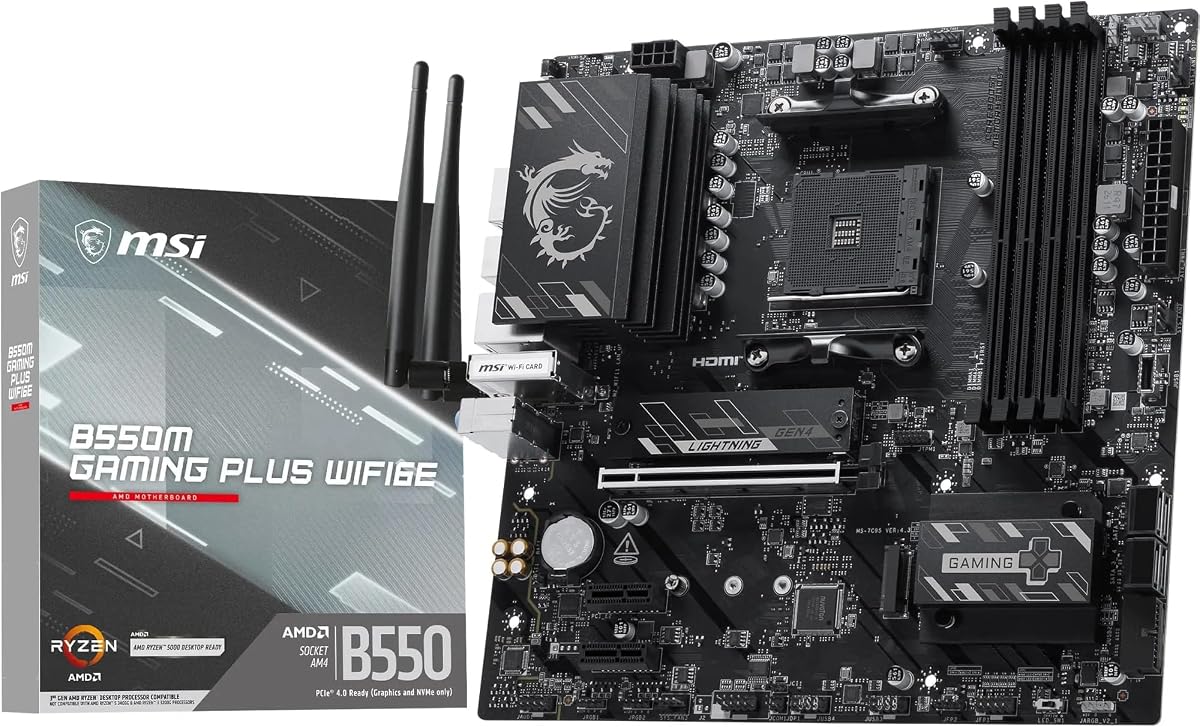
The MSI B550M Gaming Plus WIFI6E has the highest rating among the supplied products at 4.8, making it a compelling balanced pick for a compact AM4 system. It supports Ryzen 5000, 5000 G-series, 4000 G-series, and 3000 series processors, including appropriate integrated-graphics models for a display without a dedicated graphics card.
We may earn a commission when you buy through this link, at no additional cost to you.
Its gaming focus is visible in the Steel Armor PCIe 4.0 x16 slot, four DDR4 DIMM positions, and memory overclocking support listed up to 4400-plus MT/s under specified conditions. Two M.2 connectors include a PCIe 4.0 x4 slot with M.2 Shield Frozr and a PCIe 3.0 x4 slot. The VRM uses MSI Core Boost technology for stability and performance.
Cooling provisions include an extended heatsink, chipset heatsink, thermal pads, extra choke thermal pads, and a pump-system fan header. Networking combines a WiFi 6E module with Bluetooth 5.3 and 1Gbps LAN. Rear connectivity includes 5Gbps Type-A USB and 7.1-channel HD audio with Audio Boost, making the board suitably equipped for a gaming-focused compact build.
The main limitation is that its wired network is Gigabit rather than the 2.5Gb Ethernet offered by several rivals. It also uses an older DDR4 platform, so future processor upgrades are constrained to AM4. It remains a strong fit for a value-conscious gaming or general-use system with integrated graphics, especially when a small case and fast PCIe 4.0 graphics slot are priorities.
Steel Armor around the primary PCIe 4.0 x16 slot and extensive cooling hardware create a board focused on gaming use. Its micro-ATX size makes that feature set easier to accommodate in a smaller chassis.
A PCIe 4.0 x4 M.2 slot supports a high-speed boot drive, while a second PCIe 3.0 x4 slot adds storage capacity. M.2 Shield Frozr is a useful addition for managing drive temperatures.
We may earn a commission when you buy through this link, at no additional cost to you.
The ASUS TUF Gaming B550-PLUS WiFi II is a well-rounded ATX board for AM4 gaming and general-purpose builds. Its 4.5 rating and broad feature set make it a natural alternative to the ROG Strix model for builders who value strong networking, thermal controls, and useful connectivity without prioritizing the most premium power specification.
We may earn a commission when you buy through this link, at no additional cost to you.
An 8+2 DrMOS power design uses high-quality alloy chokes and durable capacitors, while a fanless VRM and PCH heatsink form an optimized thermal solution. Fan Xpert 4 and UEFI Q-Fan Control give detailed management of the listed hybrid fan headers. The board supports DDR4 memory and dual M.2 NVMe storage, with one M.2 position using PCIe 4.0 x4 connectivity.
Its networking is particularly useful for general builds: WiFi 6 provides wireless access, while 2.5Gb Ethernet with ASUS LANGuard supports fast wired connections. Display outputs include HDMI 2.1 and DisplayPort 1.2, allowing a compatible integrated-graphics processor to operate without a discrete card. USB 3.2 Gen 2 Type-C and Type-A ports, a front-panel USB 3.2 Gen 1 connector, and a Thunderbolt 3 header broaden peripheral possibilities.
The board's limitations are generational rather than fundamental. WiFi 6 is older than WiFi 6E or WiFi 7, and AM4 with DDR4 cannot expand into the newest CPU platforms. It remains well suited to a Ryzen-based gaming system, office build, or mixed-purpose computer that uses integrated graphics initially. Verify processor support, memory type, case clearance, and the desired display output before ordering.
The pairing of WiFi 6 and 2.5Gb Ethernet makes this board adaptable to different network environments. ASUS LANGuard adds network protection, while Bluetooth 5.2 is listed with the wireless feature set.
HDMI 2.1 and DisplayPort 1.2 provide integrated-graphics display options, while the mix of USB-A, USB-C, and a Thunderbolt 3 header supports varied accessories. These details help the board serve as more than a basic office platform.
We may earn a commission when you buy through this link, at no additional cost to you.
The ASRock B660M-C has a perfect 5.0 listed rating and brings Intel integrated-graphics support into a compact micro-ATX design. It supports Intel 14th, 13th, and 12th generation Core processors through LGA1700. A suitable processor with integrated graphics can use the board's HDMI 2.1 output, making it a practical choice for a smaller office, home, or study computer.
We may earn a commission when you buy through this link, at no additional cost to you.
Its power design uses a seven-phase Digi Power arrangement with premium chokes, Dr.MOS, a high-density glass-fabric PCB, and full spike protection. Four DDR4 slots support speeds up to 5333-plus with overclocking, XMP 2.0, and up to 128GB according to the supplied specifications. The primary graphics slot uses PCIe 4.0 x16, and three additional PCIe 3.0 x16 slots operate in x1 mode for expansion.
Storage and connectivity are unusually generous for a compact board. Two Hyper M.2 sockets support PCIe Gen4 x4 devices, and eight SATA3 ports provide options for larger drives. Networking combines Intel Gigabit LAN with an 802.11ac WiFi module and Bluetooth. USB connectivity includes seven USB 3.2 Gen 1 ports and eight USB 2.0 ports, while Realtek ALC897 7.1-channel audio includes Nahimic support.
The principal trade-offs are the older 802.11ac standard and the maturity of the LGA1700 platform. It may not offer the long-term CPU flexibility of newer AM5 or Intel 800-series boards, but it can still deliver a compact and capable integrated-graphics system. Check that the chassis accepts a 9.6-by-9.6-inch board, verify processor and memory compatibility, and confirm BIOS support before purchase.
The square 9.6-inch micro-ATX layout fits many compact cases while retaining four memory slots and several expansion connectors. It offers a manageable foundation for an Intel processor that includes integrated graphics.
Two PCIe Gen4 x4 M.2 sockets and eight SATA3 ports provide unusually broad storage flexibility. This allows a builder to combine compact NVMe performance with multiple traditional drive connections.
We may earn a commission when you buy through this link, at no additional cost to you.
The right choice depends first on whether integrated graphics are supplied by the processor or by the board itself, then on socket, memory, case size, expansion, and connectivity. These factors determine whether a seemingly inexpensive board will fit the rest of the build.
Most desktop motherboards do not contain their own general-purpose graphics processor. Their HDMI or DisplayPort outputs usually work only when paired with a compatible CPU that has integrated graphics. Confirm both processor graphics capability and the board's display-output layout before purchase. If the product is a standalone processor, remember that it still needs a compatible motherboard, memory, storage, and cooling.
Check the CPU and board together, not separately. A display port on the motherboard does not guarantee that every processor connected to it can output a picture.
Socket compatibility determines which processors can physically and electrically work with the board. AMD AM4 supports the listed Ryzen 3000, 4000, and 5000 families, while AM5 covers the listed Ryzen 7000, 8000, and 9000 families. Intel LGA1700 supports the listed 12th, 13th, and 14th generation Core processors, while the Core Ultra 5 225 requires a compatible 800-series chipset motherboard.
Also check BIOS support. A board may use the correct socket but require a firmware update for a newer processor.
DDR4 and DDR5 are not interchangeable. AM4 and the Intel LGA1700 boards in this guide use DDR4, whereas the AM5 boards use DDR5. DIMM capacity and speed also vary: some compact boards offer only two memory slots, while the ATX options generally provide four. Select the type and quantity based on the processor's supported configurations and the board's memory specifications.
For general use, two matching modules can be sufficient. Four slots offer more flexibility for capacity, but populating every slot can sometimes make memory upgrades or stability tuning more complicated.
A modern system often needs at least one PCIe 4.0 M.2 slot for a fast NVMe drive, but additional storage and expansion can be useful. The supplied boards range from two M.2 connectors to three, while SATA3 counts vary substantially. Count the drives and adapters actually required rather than assuming every socket will be used.
Also consider the primary graphics slot. Even when using integrated graphics initially, a full-length PCIe 4.0 x16 slot allows a dedicated graphics card to be added later without replacing the motherboard.
ATX boards require a case with room for their 305-by-244-millimeter standard, while micro-ATX boards are smaller but still need compatible mounting. Measure the chassis and consider drive bays, airflow, cable routing, and cooler clearance. A compact board may also have fewer memory slots and expansion options than a full-size alternative.
Do not assume every micro-ATX case supports every micro-ATX board. Check the manufacturer's case specification and the board dimensions.
Integrated networking can simplify a build and reduce cable clutter. Gigabit Ethernet is suitable for many ordinary connections, 2.5Gb Ethernet is useful for faster transfers and local networking, and WiFi 6, 6E, or 7 offers different levels of wireless capability. Some boards include both wired and wireless options, while others require an adapter for one or both.
Consider the router, broadband connection, nearby interference, and whether the system will operate primarily as a wired desktop.
Power-stage counts and VRM designs indicate part of a board's provisioning, but they should not be treated as the only measure of quality. Match the board to the processor and intended workload, ensure the case has adequate airflow, and confirm that the processor's power requirements fit the board's design. The B550M K uses a more modest 3+3 phase than the premium AM5 boards, while the ASRock B660M-C uses a seven-phase Digi Power design.
Processor cooling is equally important. The Intel Core Ultra 5 225 requires a separately purchased thermal solution, whereas the i5-14400 includes an RM1 cooler.
BIOS Flashback, Q-Flash, EZ-Latch, fan-control utilities, front-panel USB-C, and clear UEFI interfaces can make installation and maintenance easier. These conveniences are particularly valuable when the board may operate without integrated graphics, because a system lacking a usable processor display output cannot be configured entirely through the screen.
Prioritize features tied to the actual build. Extra lighting, audio codecs, or headers are less important than a compatible layout, sufficient storage, and networking that meets the user's needs.
Before installation, compare the board dimensions with the case mounting holes, read the manual, and identify the processor socket, memory type, M.2 positions, and display outputs. Confirm that the selected processor supports integrated graphics if the system is expected to operate without a dedicated graphics card. Gather compatible memory, storage, and cooling before beginning.
Install the processor and cooler according to the manual, apply the correct thermal interface material, and seat memory in the recommended paired slots for dual-channel operation. Secure each M.2 drive with the provided retention hardware, attach the power supply cables, and connect storage and front-panel leads before the board is difficult to reach. Keep the hardware protected from static discharge.
After assembly, use BIOS Flashback or the appropriate firmware utility if required, save the initial settings, enable the intended display output, and confirm that memory, storage, networking, and temperatures are recognized. Update firmware and system software as needed, keep ventilation openings unobstructed, and periodically clean dust from heatsinks and fans. Do not change voltages, memory ratios, or firmware settings unless the limits and recovery procedures are understood.
No. Most motherboards relay display signals from a processor rather than containing a capable graphics processor themselves. HDMI or DisplayPort usually works only when the board is paired with a CPU that includes integrated graphics. Check the processor specifications and the motherboard's supported display-output list before building a system without a discrete graphics card.
Yes, provided the motherboard has a compatible full-length PCIe slot and the case has the required clearance, power, and mounting support. All of the motherboards listed here include a PCIe 4.0 x16 primary graphics slot. Adding a dedicated card later can provide substantially greater gaming or rendering performance than integrated graphics.
AM5 offers newer Ryzen processor support, DDR5 memory, and access to newer PCIe and USB features, making it a strong choice for a new build. AM4 remains useful when compatible hardware is already available or when system cost is the main concern. The best platform depends on the processor, memory budget, case, and intended lifespan rather than one socket alone.
Yes. A motherboard does not include the system memory or the drive that stores the operating system and applications. Integrated graphics can use system RAM, so a reasonable amount of memory remains important. Builders should select compatible DDR4 or DDR5 modules and an NVMe or SATA drive according to the board's specifications.
Integrated graphics can handle many desktop tasks, video playback, older games, and some lighter modern titles, but performance varies by processor. It is generally best suited to general productivity, media use, and troubleshooting. A dedicated graphics card is advisable for demanding games, high-resolution rendering, or professional graphics workloads.
A motherboard connects the processor, memory, storage, networking, and expansion devices. A processor performs computing tasks and may include integrated graphics. Two products in this guide are processors: the Intel Core Ultra 5 225 and Intel Core i5-14400. Each still needs a compatible motherboard and the other essential PC components.
No. Wireless speed depends on the router, internet service, distance, interference, signal strength, and the capabilities of connected devices. WiFi 6E or WiFi 7 can offer greater potential than older standards, but the actual connection may be limited by the network environment. Wired Ethernet remains predictable for latency-sensitive use.
ATX offers a larger PCB and usually more slots, headers, and rear-panel options, while micro-ATX can make a smaller or simpler system. Several strong choices in this guide are micro-ATX despite having only two memory slots. Compare expansion needs, case dimensions, cooling clearance, and storage requirements rather than choosing solely by size.
The ASUS ROG Strix B550-F is the strongest all-round motherboard choice in this group, combining AM4 processor support, dual M.2 storage, WiFi 6E, 2.5Gb Ethernet, and useful display outputs. The GIGABYTE B650 AORUS Elite AX leads the premium modern-platform option, while the GIGABYTE B550M K delivers a budget-conscious micro-ATX foundation.
For buyers prioritizing newer AM5 features, compare the B650 AORUS Elite AX with the B850 AORUS Elite WIFI7 and ASRock B850M-X WiFi R2.0. The first emphasizes strong power and storage specifications, the second adds three M.2 slots and WiFi 7, and the third offers compact dimensions and strong networking. Intel builders can consider the ASRock B660M-C with a compatible LGA1700 processor.
Finally, confirm the processor, socket, memory generation, case size, cooling, and display requirements as one complete system. Product listings, specifications, and current prices can change, so review the latest manufacturer information and Amazon listing before making a final purchase decision.