
NOYAFA NF-488
4.5Editor score
PoE and continuity testing
Standard and passive detection
Backlit LCD display
DC power measurements
Explore the best Inline POE Tester options, comparing PoE standards, power readings, cable checks, displays, and field usability.
An Inline POE Tester is a diagnostic tool for technicians who install, maintain, or troubleshoot Ethernet-powered equipment. A useful model should identify PoE standards, display electrical readings, and make cable faults easier to isolate without unnecessary guesswork.
We compared ten Inline POE Testers based on supported PoE technologies, measurement functions, passive PoE handling, cable testing capabilities, power sources, displays, and portability. The guide includes dedicated power diagnostics, general cable testers, and premium inline monitors for different field needs.
Each review explains the stand-out capabilities, practical limitations, and ideal users of the product. Ratings reflect the available customer feedback, while specifications come from the supplied product information. Availability and pricing can change, so confirm current details before buying.
4.5Editor score
4.3Editor score

The comparison below highlights the major differences among ten inline and multifunction PoE diagnostic tools, including supported standards, electrical measurements, cable checks, display type, and operating method.




The NOYAFA NF-488 is a multifunction Ethernet and PoE tester with a 4.5 customer rating, making it a strong all-around choice for installation and service work. It combines PoE identification, RJ45 continuity testing, power-supply measurements, and switch loop-back diagnostics in a single enclosure.
We may earn a commission when you buy through this link, at no additional cost to you.
Its PoE function can automatically distinguish standard and non-standard power, identify af and at information, report power polarity, and describe the applicable jumper method. The specified voltage test range reaches 60V, giving technicians a way to examine both conventional and passive Ethernet power before connecting equipment.
The remote wiring function adds considerable practical value. It can identify open circuits, short circuits, and crossovers, including in shielded wiring. Backlighting improves screen visibility in closets and other poorly lit work areas, while independent backlight and shutdown timers help conserve power during intermittent use.
The NF-488 is especially useful for technicians who want one tool for both cable installation and PoE commissioning. Its limitation is that it focuses on port-side and remote testing rather than true inline power monitoring, so it is less suitable when a technician must observe live voltage, current, and power while data passes through.
The NF-488 reduces the need to carry separate wire and PoE devices for basic field work. Its combination of wiring checks, loop-back testing, and power detection makes it useful before and after network equipment installation.
A large backlit screen and concise interface help technicians interpret results quickly. The anti-slip casing and timer-controlled illumination are practical additions for work around racks, ladders, and active installations.
We may earn a commission when you buy through this link, at no additional cost to you.
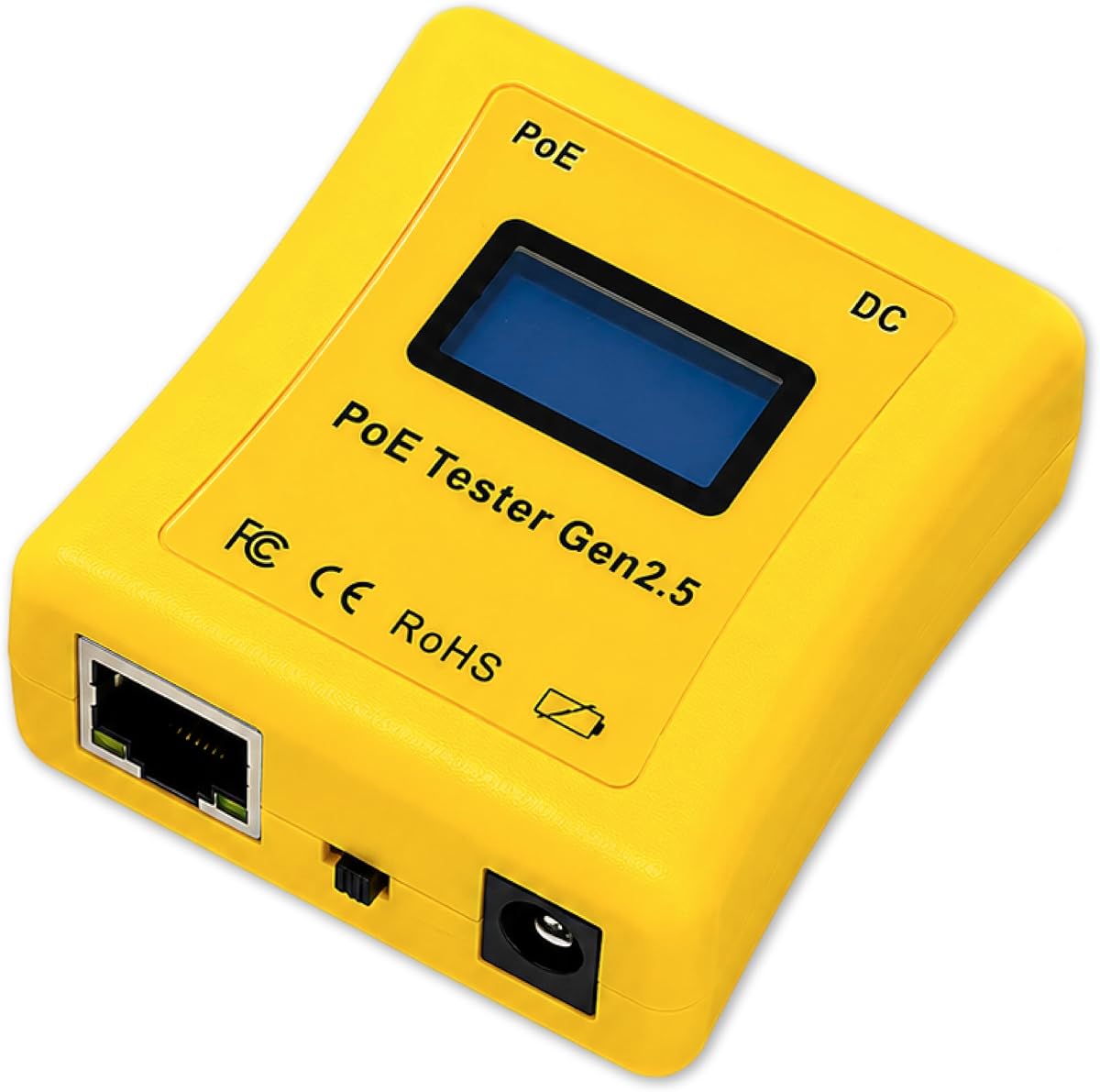
The PoE Texas GEN2.5 carries a 4.3 rating and stands out as the most balanced inline diagnostic tool in this group. It measures voltage, current, and power without requiring batteries, which makes it dependable for technicians working directly around powered Ethernet equipment.
We may earn a commission when you buy through this link, at no additional cost to you.
Its Simulate PoE Device mode is particularly valuable when a managed switch performs automatic negotiation. Instead of attaching a powered endpoint, a technician can present a PoE signature and determine whether the source is delivering power. The tester can identify the PoE type, measure DC supply voltage, detect power consumption, and reveal power loss occurring along an Ethernet run.
The measurement range extends from 3.5 to 56V, and current can be reported up to 280 watts at 56V. The LCD cycles through voltage, current, and power for Mode A and Mode B. Its compact body is described as 25 percent smaller than the earlier design, improving portability without sacrificing the information needed at the source.
This is the right pick for network technicians who need an inline monitor and frequent switch testing more than complete wire-map diagnostics. Its self-powered design removes one common source of job-site interruption: a depleted or missing battery. It cannot check cable opens, shorts, or crossovers, so it is best paired with a separate continuity tester when those checks are required.
Simulate PoE Device mode allows a technician to test a switch or injector without first finding a compatible endpoint. This makes it useful for commissioning spare ports and separating source problems from endpoint problems.
Voltage alone does not show whether an installed device is receiving adequate power. Real-time current and power readings help reveal weak delivery, unexpected consumption, or loss along the cable path.
We may earn a commission when you buy through this link, at no additional cost to you.
The PoE-T100 is a feature-rich inline tester with a 4.1 rating. It combines standard PoE, passive PoE, and conventional DC supply testing in a compact unit, with a bright OLED that puts voltage, current, power, and polarity together on one page.
We may earn a commission when you buy through this link, at no additional cost to you.
Three operating modes broaden its usefulness. PD Mode simulates a powered device, Inline Mode passes traffic between a power source and endpoint while monitoring consumption, and DC Mode measures a non-PoE supply. The tester supports 802.3af, 802.3at, 802.3bt, PoE++, four-pair PoE, and passive systems within the 12–57V range.
Its ability to differentiate standard 36–57V power from non-standard 12–57V passive power is important in mixed installations. The OLED reduces menu navigation by presenting key measurements together, helping installers identify the source type, operating power level, and real-time inline consumption more quickly.
The PoE-T100 is a good fit for engineers and installers working with modern high-power devices, legacy passive equipment, or DC-powered network hardware. It does not provide continuity, wiring-map, or cable-length testing, and its primary appeal depends on the inline measurement experience rather than a broader cable-certification feature set.
The OLED presents the most relevant electrical information together instead of forcing users to cycle through multiple screens. That layout is particularly helpful when a technician needs to assess source type, polarity, and consumption at a glance.
Support for 802.3bt, PoE++, four-pair power, passive PoE, and ordinary DC makes the tester useful across varied equipment inventories. A single diagnostic device can cover several classes of Ethernet-powered hardware.
We may earn a commission when you buy through this link, at no additional cost to you.
The TRENDnet TC-NTP1 has a 4.1 rating and offers a focused approach to testing modern Ethernet power. It supports IEEE 802.3af, 802.3at, and 802.3bt devices up to 100W, as well as non-standard passive PoE from 11V to 60V.
We may earn a commission when you buy through this link, at no additional cost to you.
Its three modes divide the work cleanly. T-mode identifies the supported PoE standard and voltage output of a switch or injector. N-mode is intended for passive devices, while I-mode performs inline testing and reports the connected endpoint's voltage, amperage, and wattage.
Two Gigabit ports allow the tester to sit between the PSE and PD without preventing normal data flow. A step button cycles through measurements and can lock the display to a selected value for continuous monitoring, which is useful while repositioning a camera or checking an unstable endpoint.
The battery-free design is ready for use without charging or battery replacement, and the compact enclosure supports mobile work. For government-focused deployments in the United States and Canada, the stated NDAA compliance is a meaningful differentiator. It is less suitable for technicians whose main task is mapping individual wire pairs or measuring cable length.
Separating source identification, passive-device testing, and inline monitoring keeps common workflows distinct. This makes it easier for a technician to choose the correct procedure and interpret the resulting readings.
The stated manufacturer protection and access to English-speaking technical support add confidence for professional integrators. These services are especially relevant when a tester will be deployed repeatedly across customer sites.
We may earn a commission when you buy through this link, at no additional cost to you.
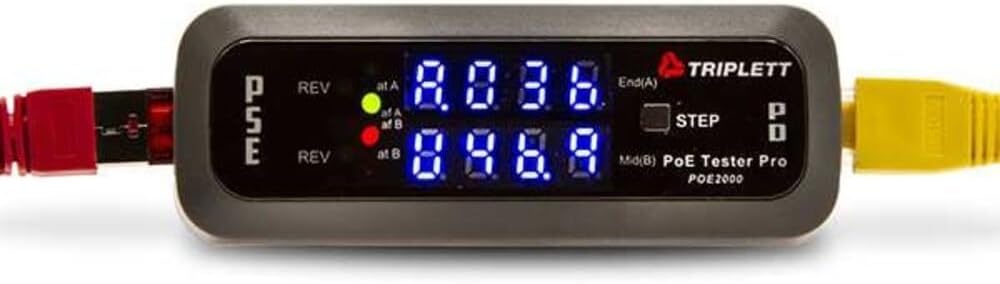
The Triplett POE2000 is built around precise identification of the power source. Its 3.5 rating places it behind several higher-rated products, but its diagnostic logic remains valuable for technicians who need to distinguish an End Span, Mid Span, or source operating across all four pairs.
We may earn a commission when you buy through this link, at no additional cost to you.
Dual seven-segment indicators reveal whether power is carried on 1/2 and 3/6, 4/5 and 7/8, or all four pair combinations. Separate yellow indicators identify reversed polarity. These dedicated visual cues can be faster to interpret than a menu-driven display when the primary task is mapping power delivery.
The tester also recognizes standard and non-standard passive PoE. When placed inline, it alternates among voltage, current, and power, and a step button allows a technician to select a preferred measurement. That combination provides both source-level and endpoint-level information without adding a separate meter.
The POE2000 is most suitable for network installers familiar with PSE terminology who need to understand exactly how a port delivers power. Its lower rating may give cautious buyers more pause, and the absence of continuity or length testing means it should not be viewed as a complete cable tester. For power-source diagnosis, however, its pair-level indicators are distinctive.
The dedicated pair indicators provide quick insight into unusual injector arrangements and multi-pair delivery. This level of detail can help resolve installation questions that a simple yes-or-no PoE detector cannot answer.
Reversed polarity is identified through separate yellow indicators. A quick visual warning helps prevent unnecessary troubleshooting of a configuration that should be corrected before connecting sensitive equipment.
We may earn a commission when you buy through this link, at no additional cost to you.
The Triplett POE3000 is the premium power-diagnostic option in this roundup. It builds on the pair and source-focused design of the POE2000 while adding explicit support for 802.3af, 802.3at, and 802.3bt, making it relevant for contemporary high-power Ethernet deployments.
We may earn a commission when you buy through this link, at no additional cost to you.
Four primary LEDs indicate the detected IEEE standard, while two yellow LEDs warn of reversed polarity. The tester also identifies PSE type and class, the power source, whether delivery comes from an End Span, a Midspan, or all four pairs, and the relevant electrical measurements.
Standard and non-standard passive PoE are both recognized, extending the tool beyond compliant installations that use familiar PSE conventions. In inline mode, voltage, current, and power can alternate automatically or be selected through the step button, allowing a technician to focus on the value that matters during a specific check.
The POE3000 is ideal for advanced technicians, integrators, and service teams that diagnose challenging power-source arrangements. It does not include general wire continuity, fault mapping, or cable-length measurement, and there is no published customer rating to provide additional evidence about long-term user experience. Its value rests on the depth of its PoE-specific analysis.
Identifying type, class, source arrangement, polarity, and pair usage creates a detailed power profile. That depth is valuable when a port works intermittently or appears to follow an unusual injection pattern.
Explicit support for 802.3bt makes the tester more relevant to modern cameras, access points, and other equipment that may require power beyond older PoE limits. Inline measurements then confirm what is actually being delivered.
We may earn a commission when you buy through this link, at no additional cost to you.
The Jonard Tools POE-1 is a complete diagnostic kit for technicians who need both Ethernet power and cable integrity checks. It supports passive PoE as well as 802.3af, 802.3at, and 802.3bt, while measuring voltage, amperage, and resistance.
We may earn a commission when you buy through this link, at no additional cost to you.
Its continuity verification covers Cat5, Cat5e, Cat6, and Cat6a cables. This makes it more versatile than dedicated inline power monitors that only establish whether power is present or how much a connected device is consuming. The ability to measure resistance adds another layer of information when investigating a questionable connection.
Powering the tester directly from PoE is convenient when testing an active installation. For unpowered cables, the supplied AA batteries provide an alternative, allowing continuity and resistance checks to proceed even where no Ethernet source is available. That dual-power approach is practical for installers moving between rough-in and commissioning stages.
The package includes a cable remote, female-to-female RJ45 adapter, instruction manual, and two AA batteries. A belt clip and compact enclosure support field portability. The main uncertainty is that no customer rating is available, and the product information does not describe the same detailed inline monitoring controls offered by some premium competitors.
The combination of a remote, adapter, batteries, and tester body reduces the need to assemble separate accessories in the field. It is especially helpful for technicians who regularly test both live and unterminated cable runs.
Resistance information can help distinguish a simple continuity problem from a more nuanced electrical issue. Combined with PoE readings, it provides a broader view of the installed link than a binary power detector.
We may earn a commission when you buy through this link, at no additional cost to you.
This PoE Cable Tester has the highest published customer rating in the group at 4.6, driven by a broad feature set. It verifies standard IEEE 802.3af, 802.3at, and 802.3bt power as well as non-standard 5–60V DC, with load detection from 2 to 80W.
We may earn a commission when you buy through this link, at no additional cost to you.
Its standout addition is cable-length measurement for Cat5 and Cat6 runs from 5 to 300 meters. It also performs continuity and fault detection up to 600 meters, identifying shorts, opens, and miswires in both shielded and unshielded cable. These functions make it useful for documenting installations as well as repairing faults.
Port flash detection helps locate active network ports, while load validation checks whether connected devices receive suitable power. A rechargeable 1500mAh battery, selectable 15-, 30-, or 60-minute automatic shutoff, and a low-battery indicator support extended field sessions.
The device is a strong choice for installers who want PoE validation, wiring diagnostics, and cable documentation in one package. It is less focused on continuously observing an endpoint's inline consumption than the dedicated inline monitors in this list, but its measurement breadth and strong customer feedback make it especially compelling for installation teams.
Length reporting and detailed fault identification extend the tester beyond basic PoE detection. These functions help technicians locate an open, short, or miswire, then verify whether the run meets the intended length.
The load-testing function is more informative than a simple power-presence check. It helps confirm that a source can deliver an appropriate amount of energy to the intended device.
We may earn a commission when you buy through this link, at no additional cost to you.
The Inline Cat5/6 Dvm and Network PoE Tester occupies a distinct niche by combining network cable diagnostics with digital multimeter-style measurement in an inline format. Its product title and supplied description are brief, so buyers should confirm the exact operating procedure and supported readings before relying on it for specialized work.
We may earn a commission when you buy through this link, at no additional cost to you.
Cat5 and Cat6 support makes it relevant to common structured-cabling environments, while the inline arrangement suggests that it can be connected during active network evaluation. Combining DVM functionality with PoE diagnostics may appeal to technicians who want basic electrical readings in the same workflow as Ethernet testing.
Its most important advantage is the consolidation of two types of troubleshooting. Instead of moving between a cable tester and a standalone meter for preliminary diagnostics, a technician can begin with a single device. The exact current, voltage, resistance, and power capabilities are not stated in the available product information, so those functions should not be assumed.
This option is best considered for users who already know its exact display behavior and controls. The lack of a published rating and limited descriptive information make it harder to recommend confidently for purchasing portfolios. It is worth comparing with better-documented tools when the decision depends on precise standards support, ranges, or guaranteed measurement functions.
The DVM-style component adds a different perspective from a dedicated PoE detector. It may help technicians investigate whether an electrical reading corresponds to the behavior observed on the Ethernet link.
The supplied listing does not detail supported PoE standards, measurement ranges, or accessories. Confirming those details with the manufacturer can prevent a mismatch between the tool and the technician's intended diagnostic process.
We may earn a commission when you buy through this link, at no additional cost to you.
The NOYAFA NF-488 Cat5e/6 has a 4.4 rating and is a capable entry-level combination tester for basic Ethernet installation and service. It checks short circuits, crossovers, and open circuits in Cat5 and Cat6 cables while also identifying PoE characteristics.
We may earn a commission when you buy through this link, at no additional cost to you.
The PoE section recognizes af and at information, reports voltage and polarity, and identifies power modes. It can also examine non-standard PoE. A loop-back test helps determine whether the installed path is operating properly, while the electrical measurement function reports voltage, current, and power used by connected DC equipment.
The stated ranges extend from 0 to 60V for voltage, 0 to 3A for current, and 0 to 180W for power. These limits make the tester useful for many common low-power installations and basic DC-powered devices. The built-in LED lamp is a small but valuable feature when inspecting a dark closet or working inside an enclosure.
This NF-488 variant is a good everyday companion for technicians handling wiring, small cameras, phones, and conventional network gear. It does not advertise support for the newest high-power PoE tiers, and its design is less suitable for real-time inline monitoring. For those requirements, one of the dedicated 802.3bt-capable instruments will be a better match.
Continuity, crossover, open-circuit, and loop-back checks cover common installation faults. These functions help a technician decide whether the problem lies in the cable path rather than the powered endpoint.
The LED lamp improves visibility in dark racks and work areas. It removes the need to carry a separate light for many basic inspection tasks, making the tool more convenient for mobile service work.
We may earn a commission when you buy through this link, at no additional cost to you.
The right Inline POE Tester depends on the equipment you service, the measurements you need, and whether cable integrity is as important as power delivery. Consider standards support, operating mode, display usability, and the accessories included before making a decision.
PoE standards determine the maximum power and delivery methods a tester should recognize. IEEE 802.3af, 802.3at, and 802.3bt cover increasingly capable devices, while 4PPoE and PoE++ relate to high-power, multi-pair delivery. A technician working with newer access points, cameras, or other demanding endpoints should verify that the tool supports the relevant standard rather than assuming every PoE product is interchangeable.
Choose a tester that explicitly identifies the standards and power class it detects. A broad range is useful for mixed environments, but the most important requirement is accurate support for the equipment already deployed on your sites.
Passive PoE lacks the full negotiation behavior expected from compliant PoE, and some non-standard devices operate at voltages outside conventional ranges. Testers that recognize passive power and report polarity can help identify non-standard injectors or incorrectly configured installations. Pay attention to the stated voltage range because a narrow range may not cover every passive source encountered in the field.
For installers working with legacy or DIY PoE equipment, passive detection is often more useful than broad standard support alone. Confirm that the tester distinguishes standard power from non-standard power and clearly reports the detected mode.
Voltage alone can show that power is present, but current and power readings reveal whether the connected device is drawing what the source intends to deliver. Real-time readings are especially valuable for unstable cameras, access points, and phones that work intermittently. A tester with a selectable inline display can also remain focused on a single value while a technician adjusts an installation.
Prioritize a product that shows voltage, current, and wattage or power together when possible. Check the stated measurement limits so the tool covers the power range of your equipment without relying on assumptions.
An inline tester is placed between the power source and endpoint, allowing a technician to monitor actual delivery while data continues through the connection. Port-side models instead test a switch port directly and may include simulation modes for managed switches. Cable testers focus on wiring faults and may combine them with PoE identification but offer little or no real-time inline monitoring.
Choose inline operation when diagnosing an installed endpoint or a marginal power path. Choose a port-side or combination tester when commissioning ports, checking standards, and mapping cable continuity are the main tasks.
General network cable testers can identify opens, shorts, crossovers, miswires, and sometimes shield problems through a remote wired to the opposite end of the cable. More advanced models add length measurement, port flashing, and load testing. These features matter when a PoE problem may actually originate in an improperly terminated run, damaged cable, or connection beyond the intended distance.
If your work includes installation or repair, look for a remote, loop-back testing, and fault identification. A dedicated PoE inline monitor is still valuable, but it is not a substitute for full cable diagnostics.
A clear display makes readings faster to interpret in a rack or installation cabinet. LCD units are often adequate for numerical readings, while OLED screens can provide a more information-dense display with strong contrast. LED indicators are useful for quick pair, source, or polarity identification, and a step button can let a user cycle through measurements or lock a preferred value.
Consider both the display and the controls. A technically capable tester is less useful if its interface is difficult to operate in a dark or cramped workspace. Backlighting, readable text, dedicated warning indicators, and a straightforward selection process all contribute to practical field usability.
Self-powered tools draw energy from the PoE source and eliminate battery management in active installations. This is convenient for continuous troubleshooting, although it can be a disadvantage when testing an unpowered cable. Battery-capable or rechargeable tools provide more freedom for installation work but require attention to charge level and battery availability.
Consider the environments in which you work. A compact, pocket-sized unit with a belt clip is easier to carry, while a larger rechargeable model with an integrated work light may be better for extended field sessions. Match the power design to the type of testing you perform most often.
Advanced power diagnostics can reveal whether a source is an End Span, Midspan, or a configuration delivering power across all four pairs. This level of detail helps when troubleshooting managed switches, injectors, and unusual passive arrangements. Dedicated pair indicators and reversed-polarity warnings are particularly useful for installations with non-standard power routing.
If power-source mapping is central to your work, choose a model that identifies PSE type, class, polarity, and pair usage. Basic yes-or-no PoE detectors are sufficient for simple confirmation but may not explain why two otherwise similar ports behave differently.
Begin by identifying the equipment on both sides of the link. Note the expected PoE standard, source type, voltage, and power class, then inspect the cable and connectors for physical damage. For a dedicated inline tester, connect it between the PSE and PD with the device powered off, then establish the correct sequence for your model before energizing the link.
Use source-identification or simulation mode when checking a managed switch or injector without an endpoint. For a port-side tester, connect the tester to the suspect port and interpret the reported standard, polarity, mode, and voltage. For an inline monitor, establish data flow and watch the displayed voltage, current, and power while the connected equipment operates under its intended load.
When a reading is abnormal, disconnect the endpoint safely and test the cable separately for opens, shorts, crossovers, miswires, or excessive length. Compare the source reading with the inline reading to determine whether the problem originates in the source, the cable path, or the powered device. Store the tester in a protective case, remove batteries from long-term storage if recommended, and clean the contacts gently before future use.
An Inline POE Tester is used to evaluate Ethernet power between a source and a powered device. Depending on the model, it can identify PoE standards, measure voltage, current, and power, check polarity, and monitor the actual power consumed by a connected endpoint. Some models also test cable continuity, length, and faults.
Not necessarily. Many inline testers draw power directly from the PoE source, making them convenient when testing active installations. Battery or battery-assisted operation is more useful for unpowered cables, rough-in work, or installations where no PoE source is available. Choose based on the work you perform most often.
Models with inline monitoring can display voltage, current, and power while the endpoint operates. This is more informative than checking only whether the switch port produces power. It can reveal weak delivery, unexpected draw, or an intermittent power problem, although not every tester in this category provides a live inline display.
Standard PoE follows recognized IEEE power and negotiation methods, whereas passive PoE may use non-standard voltage, polarity, or pair arrangements. A tester that supports passive power can identify those differences and warn about incompatible configurations. It is important to confirm the supported voltage range and detection method before connecting unfamiliar equipment.
A combined tester is often the most convenient choice for installation and general repair work. Continuity, short, open, crossover, and miswire checks can determine whether a cable path is sound, while PoE functions confirm power compatibility. A dedicated inline monitor may be better when real-time endpoint power readings are the primary requirement.
A port can indicate that power is available while the endpoint still fails because of insufficient current, reversed polarity, incompatible passive power, cable loss, excessive length, or a fault. Use a tester to compare source voltage with inline voltage, current, and power, then inspect the cable and connectors separately to isolate the problem.
No. The useful reading is the amount the source intends to deliver and the amount the connected device actually consumes. A high total source rating does not guarantee that a particular port or cable path can supply the required power. Check both the detected power class and live readings under normal operating conditions.
Keep the tester in a padded case and avoid placing it where cables, tools, or equipment can damage the display or connectors. Clean contacts gently, secure loose leads, and keep unused batteries from mixing with other cells. For a tester that draws power from PoE, follow the manufacturer's guidance for exposing ports to unknown or damaged cabling.
The PoE Texas GEN2.5 is the strongest all-around inline choice for technicians who prioritize real-time power readings, self-powered operation, and switch testing without a wired endpoint. The NOYAFA NF-488 is the most practical budget-oriented option for basic PoE identification and cable diagnostics, while the Triplett POE3000 provides the deepest premium power-source analysis.
Your priorities should guide the final selection. Choose a dedicated inline monitor for live voltage, current, and power; choose a standard-and-passive detector for port commissioning; and choose a combined cable tester when wiring faults, loop-back checks, or documentation are routine parts of the job. Accessories, display clarity, and supported standards can be just as important as the headline measurement functions.
Ratings and product details can evolve as customer feedback and manufacturer information change. Before purchasing, verify the current specification, included accessories, warranty terms, and compatibility with the exact equipment in your toolkit, and check current prices to confirm that the selected model fits the intended budget.