
ASRock Micro ATX DDR3 2400 FM2 Motherboard FM2A58M-VG3+ R2.0
3.8Editor score
FM2+ processor socket
Two DDR3 memory slots
PCIe 3.0 graphics slot
Micro ATX compact layout
Our Micro ATX FM2 Motherboard guide compares sockets, memory, expansion, storage, networking, and display options for compact AMD builds.
A Micro ATX FM2 motherboard can anchor a compact, practical AMD system, but the abbreviated category can be misleading. True FM2 boards use older processors and DDR3 memory, while similarly sized modern boards use AM4, AM5, and other platforms. Understanding socket, chipset, memory, and case compatibility is essential before buying.
We compared all ten listed boards by processor support, form factor, memory configuration, expansion slots, storage connections, networking, display outputs, and practical feature sets. The list includes four genuine FM2 or FM2+ models alongside newer AM4 and AM5 alternatives, making it useful for both legacy-system builders and shoppers seeking a current compact platform.
Each selection reveals a different balance: some focus on straightforward legacy computing, others emphasize modern graphics support, fast storage, wireless networking, or compact gaming features. Product ratings and availability can change over time, and retailer pricing fluctuates, so confirm the CPU, memory, operating system, and case requirements before ordering.
3.8Editor score

4.4Editor score
4.8Editor score
This side-by-side comparison highlights major platform differences, including true FM2 and FM2+ support, modern AM4 and AM5 alternatives, memory generation, graphics capabilities, storage, networking, and display connectivity.




The GIGABYTE B550M K is a well-rounded AM4 motherboard rather than a literal FM2 model, but it is an important comparison for anyone searching by the broad category keywords used for compact AMD motherboards. Its 4.4 rating reflects a generally favorable owner reception, while the combination of Ryzen 5000, 4000, and 3000 support, four DDR4 slots, PCIe 4.0, and two M.2 positions makes it a practical foundation for a small modern desktop.
We may earn a commission when you buy through this link, at no additional cost to you.
Its most useful feature is the balance between platform breadth and physical compactness. The digital 3+3 VRM design, premium chokes and capacitors, and chipset heatsinks support steadier power delivery and heat management. A full-length PCIe 4.0 x16 slot accommodates a modern graphics card, while one PCIe 4.0 M.2 slot and one PCIe 3.0 M.2 slot allow both a high-speed NVMe drive and an additional PCIe storage device without relying exclusively on SATA.
There are important compromises. Although the motherboard fits the Micro ATX format used by many compact cases, buyers should still verify dimensions and connector clearance. It does not accept DDR3 or FM2 processors, and integrated Wi-Fi is absent, so a separate network adapter may be needed. The listed connectivity is also more modest than that of feature-rich gaming boards, with four USB 3.2 Gen 1 ports, making the specification less ambitious than premium alternatives.
This is the strongest general-purpose choice in the list for a compact AM4 system that may later receive a discrete GPU, faster storage, or a memory upgrade. It is particularly appropriate for users who want a current-enough platform without paying for extensive gaming extras. For an actual FM2 restoration or legacy project, however, choose one of the genuine FM2+ boards reviewed below.
Support for Ryzen 5000, 4000, and 3000 desktop processors gives builders a broad selection of upgrade paths. The board does not support older FM2 chips, but it does cover the widely used AM4 family.
Two M.2 slots and a PCIe 4.0 x16 slot offer a sensible mix of modern storage and graphics capacity. Four SATA connectors and four DIMM slots add flexibility for conventional drives and memory.
We may earn a commission when you buy through this link, at no additional cost to you.
The Gigabyte GA-F2A68HM-H is one of the strongest genuine FM2+ options in the roundup. It carries a 4.4 rating and is designed around the AMD A-series and Athlon processor families. Unlike the AM4 and AM5 boards elsewhere in the list, it directly serves the FM2+ hardware and DDR3 memory sought by a buyer searching for that specific legacy platform.
We may earn a commission when you buy through this link, at no additional cost to you.
Storage and expansion are the board's most attractive qualities. Four SATA 6Gb/s connectors support several hard drives or solid-state drives, with RAID 0, RAID 1, RAID 10, and JBOD listed among the supported configurations. It includes a full-length PCIe x16 slot, a PCIe x1 slot, and a legacy PCI slot, providing more mixed expansion potential than several other budget FM2 options in this comparison.
The connectivity is also useful for a legacy compact system. Two rear USB 3.0 ports move data faster than the older USB 2.0 standard, while eight USB 2.0 ports are split between the rear panel and internal headers. Display support includes D-Sub for a maximum resolution of 1920×1200 and HDMI for up to 4096×2160, although the exact usable resolution depends on the processor and operating environment.
Its limitation is the two-DIMM memory layout and the inherent constraints of the FM2+ generation. Buyers should not expect modern NVMe support, PCIe 4.0 bandwidth, or current-generation wireless features. Within those boundaries, this board is ideal for a compact office, media, or retro-gaming system built around an existing compatible processor and DDR3 memory.
Four SATA 6Gb/s ports and listed RAID support make this board more accommodating than simpler two-drive alternatives. It can serve as a practical core for a multi-drive home or media build.
HDMI and D-Sub outputs simplify monitor selection. A processor with integrated graphics is generally required, so that capability should be confirmed before purchase.
We may earn a commission when you buy through this link, at no additional cost to you.
The ASRock FM2A58M-VG3+ R2.0 is a straightforward FM2+ board for builders who prioritize the correct socket, compact size, and familiar expansion over modern features. Its 3.8 rating places it below the stronger-rated alternatives, but the core specification is coherent: an FM2+ socket, AMD A58 chipset, two DDR3 slots, a PCIe 3.0 x16 slot, and four SATA2 connectors.
We may earn a commission when you buy through this link, at no additional cost to you.
Memory support extends to DDR3-2400+ in overclocking terminology, as well as 2133, 1866, 1600, 1333, and 1066 modules. The slots operate in dual-channel mode and accept non-ECC, unbuffered memory up to a listed maximum capacity of 32GB. That capacity is adequate for light productivity, media playback, older games, and general retro-computing use, although it cannot expand beyond the two-slot limit.
The principal limitation is SATA2 rather than the faster SATA 6Gb/s found on the Gigabyte FM2+ board. SSDs will still work, but interface speed may become a bottleneck in transfers. The board also has fewer dedicated connectivity features in its supplied specification, with only the primary PCIe x16 and x1 expansion slots called out. The 3.8 rating suggests some compromises in the broader ownership experience.
Choose this model for a compact legacy project where an FM2+ CPU and DDR3 memory are already available and basic operation is the goal. It is less attractive for a new performance-oriented machine, but it can deliver a functional foundation for older software, a retro-gaming station, or a lightweight replacement system without adding unnecessary modern components.
The board centers on FM2+ processors and DDR3 memory, making it a direct match for older AMD components. That narrow focus can be an advantage when rebuilding around hardware already on hand.
A PCIe 3.0 x16 slot handles a suitable graphics card, while four SATA2 ports support conventional storage. The feature set is intentionally less advanced than newer platforms.
We may earn a commission when you buy through this link, at no additional cost to you.
The ASUS Prime B550M-A WiFi II is a feature-rich AM4 board with a 4.5 rating, making it one of the strongest modern alternatives to a literal FM2 motherboard. It supports third-generation AMD Ryzen processors and pairs the AM4 socket with DDR4 memory, PCIe 4.0, dual M.2 storage, and integrated wireless networking.
We may earn a commission when you buy through this link, at no additional cost to you.
Its connectivity is particularly well balanced. WiFi 6 provides wireless access without requiring a USB adapter, while 1Gb LAN covers wired networking. One M.2 slot has PCIe 4.0 x4 connectivity for a high-speed NVMe drive, and the second M.2 slot adds another NVMe option. Rear USB 3.2 Gen 2 Type-A, HDMI 2.1, D-Sub, and DVI outputs cover a broad range of peripherals and displays.
Thermal and reliability features include a VRM heatsink, PCH heatsink, hybrid fan headers, Fan Xpert 2 utility, and ASUS 5X Protection III. The latter includes LANGuard, DRAM overcurrent protection, overvoltage protection, SafeSlot Core safeguards, and a stainless-steel rear I/O frame. OptiMem trace layout is designed to help memory kits reach higher frequencies at lower voltages.
The tradeoff is platform separation: none of the FM2 processors or DDR3 modules will work with it. It is also more elaborate than a basic legacy board. For a compact AM4 build that needs wireless connectivity, several display options, and fast storage, though, it offers a convincing feature set and a strong rating.
WiFi 6 and 1Gb LAN provide two convenient ways to connect. This makes the board convenient for desks where a cable is inconvenient or where a home network is primarily wireless.
HDMI 2.1, D-Sub, and DVI outputs improve monitor compatibility. Their practical use depends on the graphics capabilities of the installed Ryzen processor.
We may earn a commission when you buy through this link, at no additional cost to you.
The ASRock B550M WiFi combines an AM4 platform with an unusually dense list of compact-build features. Its listed rating is 5.0, the highest in this group, and the board supports Ryzen 3000 through 5000 processors, four DDR4 slots with a listed overclocked speed of 4733+, and memory capacity up to 128GB.
We may earn a commission when you buy through this link, at no additional cost to you.
Storage and expansion are well specified. The primary PCIe 4.0 x16 slot supports a modern graphics card, and the board also includes PCIe 3.0 x16 operating at x4 and an x1 slot. A Hyper M.2 interface is listed as PCIe Gen4 x4, accompanied by four SATA3 ports, allowing a mix of NVMe and conventional storage.
Networking is a major strength. WiFi 6E support extends to the 6GHz band, and Realtek ALC1220 7.1-channel HD audio with Nahimic is listed for entertainment use. The board also offers eight USB 3.2 Gen1 ports, including four rear and four front connections, plus six USB 2.0 ports. HDMI 2.1 and DisplayPort 1.4 outputs support multi-monitor configurations when a compatible processor with integrated graphics is used.
It is not a genuine FM2 board, so it should be viewed as a modern alternative rather than a substitute for one. As with any model identified by a recent-looking ASIN, buyers should also verify the exact retail listing and current manufacturer specifications before purchase. Subject to that verification, the 5.0 rating and broad feature set make it a notable compact AM4 recommendation.
WiFi 6E support includes the 6GHz band, offering more available spectrum than conventional WiFi 6. It is useful for a compact system intended for flexible placement within a home or office.
Four memory slots, a listed maximum capacity of 128GB, dual graphics-oriented expansion, and fast storage create room for a capable compact workstation.
We may earn a commission when you buy through this link, at no additional cost to you.
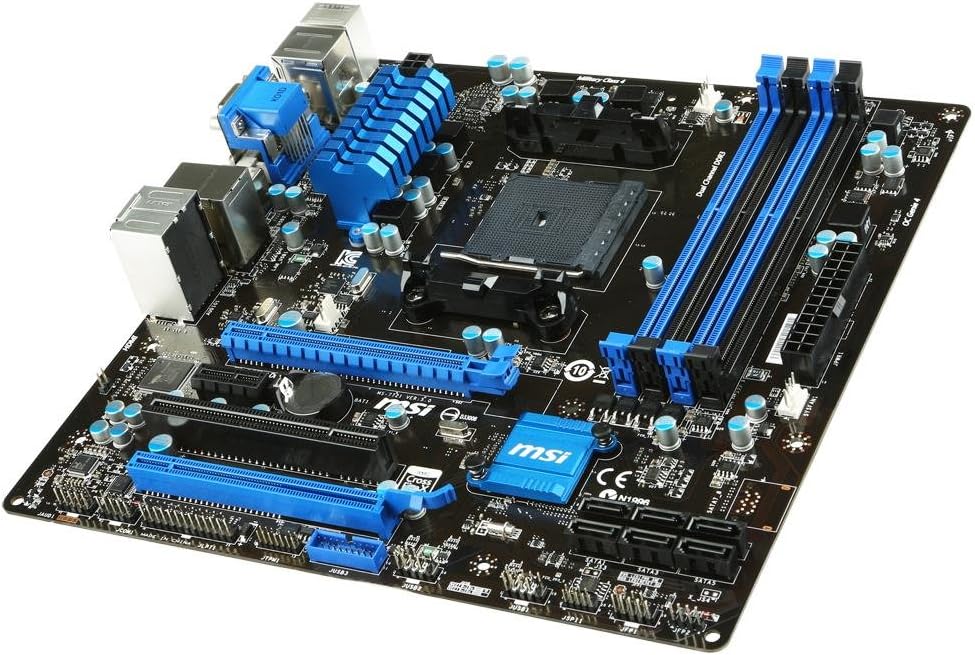
The MSI A78M-E45 is a true FM2+ Micro ATX board distinguished by its selection of display outputs and expansion. Its 3.7 rating is the lowest among the ten products, which warrants attention when comparing owner satisfaction, but the specification remains useful for particular legacy builds.
We may earn a commission when you buy through this link, at no additional cost to you.
The board uses the AMD A78 chipset and includes HDMI, DVI, and VGA outputs. That trio can be valuable in an older system because it allows connection to a wide range of monitors, projectors, and displays without immediately replacing legacy equipment. CrossFire readiness and the listed 2x PCI-E 3.0 arrangement also distinguish it from simpler boards with only one modern graphics slot.
The expansion layout comprises two PCI Express 3.0 mechanical slots described in the supplied information as 1×16 and 2×8, along with one PCIe x1 slot and one conventional PCI slot. This provides more room for older add-in cards than a minimalist board, although users should check physical compatibility and lane arrangements before planning a multi-card installation.
Military Class 4 components and Fast Boot are the other highlighted features. The older platform still cannot match modern NVMe, PCIe 4.0, or current wireless standards, and its lower rating may reflect an experience that is less refined. It is best suited to someone preserving FM2+ hardware and valuing its broad legacy I/O, especially multiple display formats and unusual expansion-card requirements.
HDMI, DVI, and VGA make this a practical choice when existing displays use mixed standards. It reduces the need to replace perfectly functional peripherals during a legacy rebuild.
The mix of modern PCIe and conventional PCI slots can help when a build depends on an older capture, tuning, or control card. Availability of compatible drivers is the key caveat.
We may earn a commission when you buy through this link, at no additional cost to you.
The ASUS A78M-A is a compact FM2 motherboard for users who prefer a recognizable established brand and a straightforward legacy platform. Its 4.1 rating is solid within the group, although the supplied product information is less detailed than for several newer boards. The title identifies DDR3 2400 support and the Micro ATX form factor.
We may earn a commission when you buy through this link, at no additional cost to you.
One of the most useful features is the UEFI BIOS, which provides a more modern setup interface than legacy BIOS utilities and can make navigation and configuration easier. ASUS 5X Protection is highlighted as an all-round reliability and durability feature. These qualities are particularly relevant when a system will depend on the board for years of service in an office, kiosk, or retro-computing role.
USB 3.0 Boost with UASP support is also listed, claiming faster transfers than conventional USB 3.0. Network iControl provides real-time bandwidth management. While these features make the board more versatile, buyers should not infer modern motherboard capabilities from them: no PCIe 4.0, NVMe, WiFi 6, or current graphics support is specified.
The practical challenge is that the provided details do not fully document memory capacity, storage connectors, expansion slots, or rear-panel outputs. Prospective buyers should therefore inspect the exact listing and manual before committing. This model makes sense for an FM2 rebuild when ASUS software and protection features are priorities and the rest of the system matches the older platform.
The UEFI interface is a meaningful usability benefit on an older platform. It can present firmware settings and system information more clearly than older BIOS environments.
ASUS 5X Protection and Network iControl are designed to support dependable operation. Actual outcomes still depend on correct installation, compatible components, and appropriate firmware settings.
We may earn a commission when you buy through this link, at no additional cost to you.
The GIGABYTE B850M Eagle WIFI6E is the premium modern alternative in this list, although it is an AM5 board rather than an FM2 product. It supports Ryzen 9000, 8000, and 7000 processors, uses DDR5 memory, and carries a 4.6 rating. Its PCIe 5.0, USB-C, WiFi 6E, and 2.5GbE capabilities make it suitable for a new high-performance compact build.
We may earn a commission when you buy through this link, at no additional cost to you.
The 8+2+2 power design and EZ-Latch mechanisms for M.2, PCIe, and Wi-Fi installation are especially builder-friendly. Two M.2 slots provide dedicated NVMe storage positions, while the newest processor and memory platform provides a clear path beyond older FM2 and AM4 systems. The included three-year warranty adds reassurance for buyers assembling a new system around it.
Its 2.5GbE LAN is a meaningful upgrade for a modern network, especially when paired with compatible infrastructure. WiFi 6E adds flexible wireless connectivity, and USB-C provides a convenient modern peripheral interface. Because this is an AM5 board, all compatible systems require DDR5 memory rather than the DDR3 used by the true FM2 models.
This motherboard does not answer a request for FM2 compatibility, and the added platform capabilities can make it unnecessary for a simple office machine. However, it is the best choice in the roundup for a premium, current compact AMD system. Choose it when processor longevity, modern networking, fast expansion, and easy installation matter more than legacy reuse.
Support for three Ryzen generations positions the board for current and future AM5 upgrades. DDR5 and PCIe 5.0 also make it more relevant to a new high-bandwidth compact build.
The combination of 2.5GbE and WiFi 6E gives the board stronger networking credentials than most alternatives. It suits users with compatible routers, switches, and storage infrastructure.
We may earn a commission when you buy through this link, at no additional cost to you.
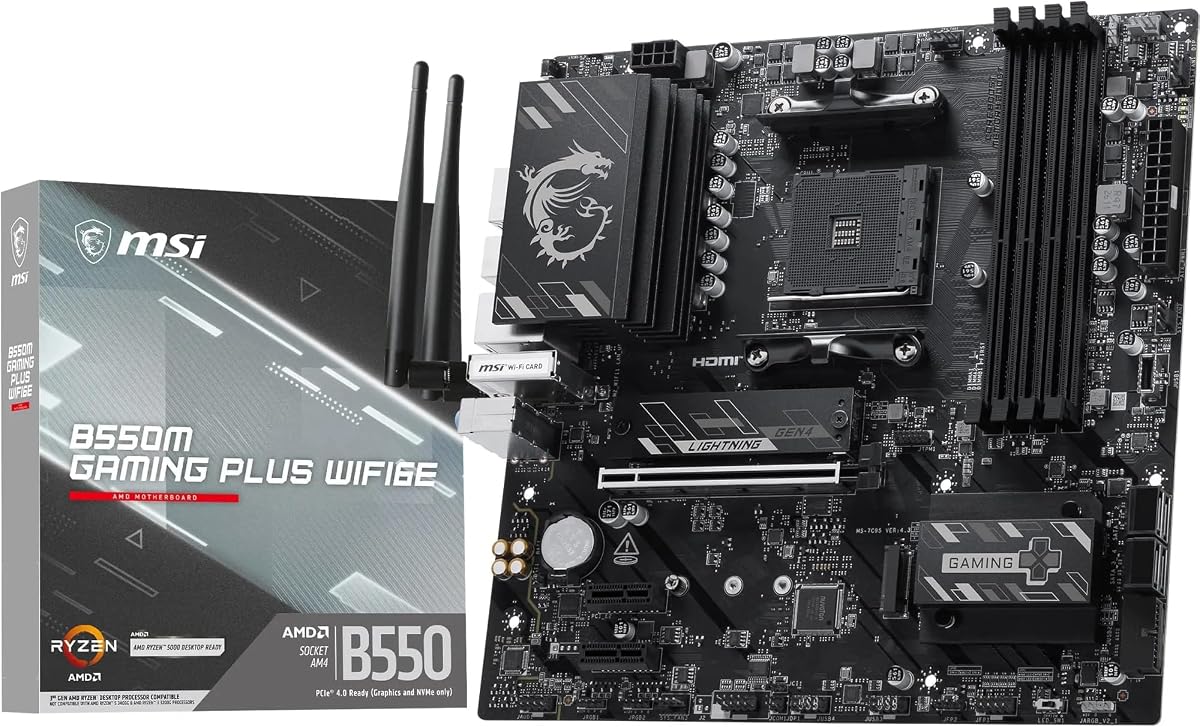
The MSI B550M Gaming Plus WIFI6E is the strongest compact gaming-oriented AM4 option in the comparison. Its 4.8 rating is the second-highest listed score, and the board supports Ryzen 5000, 5000 G, 4000 G, and 3000 series processors. It combines that broad compatibility with DDR4 memory, PCIe 4.0 graphics, dual NVMe storage, WiFi 6E, and Bluetooth 5.3.
We may earn a commission when you buy through this link, at no additional cost to you.
Cooling is a central selling point. MSI's Core Boost VRM, thermal pads on the chokes, an extended heatsink, a chipset heatsink, M.2 Shield Frozr, and a pump-system fan header create a coordinated thermal approach. The PCIe 4.0 x16 slot uses Steel Armor, while the primary M.2 Gen4 x4 slot includes the Shield Frozr to help reduce storage thermal throttling.
The four DDR4 slots can run at a listed 4400+ MT/s in overclocked one-DIMM-per-channel configurations. Storage flexibility comes from one PCIe Gen4 x4 M.2 slot and one PCIe Gen3 x4 M.2 slot. Connectivity includes a WiFi 6E module, Bluetooth 5.3, 1Gbps LAN, rear USB 5Gbps Type-A, and 7.1-channel HD audio with Audio Boost.
This is not an FM2 board and cannot reuse DDR3 memory. It is instead ideal for a compact gaming build using an AM4 processor, modern graphics card, NVMe drive, and wireless connection. Buyers who want a current platform but do not need AM5's newest features may find this combination more attainable and broadly compatible.
Heatsinks, thermal pads, and the M.2 Shield Frozr help manage heat in a densely packed case. The design is especially relevant when the board is used with a sustained high-power CPU.
WiFi 6E and Bluetooth 5.3 reduce cable clutter, while dual M.2 slots support a high-speed primary drive and a second NVMe device. A discrete GPU can use the reinforced PCIe 4.0 slot.
We may earn a commission when you buy through this link, at no additional cost to you.
The ASUS Prime B550M-K WiFi is a practical AM4 starting point for a compact build, with a 3.8 rating and support for Ryzen 5000, 5000 G, 4000 G, and 3000 series desktop processors. It uses DDR4 memory and includes PCIe 4.0, dual M.2 storage, WiFi 6, Realtek 1Gb Ethernet, and USB 5Gbps Type-A connectivity.
We may earn a commission when you buy through this link, at no additional cost to you.
Its feature set extends beyond bare necessities. A PCH heatsink, hybrid fan headers, and Fan Xpert 2+ software support thermal configuration, while Q-LED Core assists with installation and diagnosis. Three addressable RGB Gen 2 headers and Aura Sync compatibility let builders coordinate lighting with other compatible components. ASUS DriverHub, GlideX, and Armoury Crate are also included in the listed software support.
Despite these features, the board is not for an FM2 build. DDR3 modules and FM2 processors are physically and electrically incompatible with AM4, so old components cannot simply be moved into the system. Its lower rating may also suggest that some buyers were less satisfied with aspects of the product or its value relative to nearby alternatives.
It is best suited to a general-purpose compact AMD desktop where wireless convenience, two NVMe positions, and modern Ryzen compatibility are priorities. It can also form the basis of a modest gaming system with a discrete graphics card. For a higher-rated enthusiast option with more pronounced thermal and gaming features, the MSI B550M Gaming Plus WIFI6E is a stronger fit.
Q-LED Core and Fan Xpert 2+ improve setup and fan management. These are practical benefits for first-time builders who want clearer motherboard status indications and thermal controls.
Three addressable RGB headers and Aura Sync support allow coordinated lighting in a small case. The feature is optional rather than essential, but it adds flexibility for themed builds.
We may earn a commission when you buy through this link, at no additional cost to you.
The most important decision is platform compatibility rather than branding or cosmetic features. Confirm the processor socket, memory generation, case dimensions, graphics needs, and operating-system requirements before narrowing the field.
FM2 and FM2+ are not interchangeable labels for modern sockets, and AM4 and AM5 are entirely different platforms. A true FM2 board accepts the specified older AMD processor family, while an FM2+ board adds backward-compatible processor support. The AM4 alternatives support Ryzen 3000, 4000, and 5000 families, while the AM5 board supports Ryzen 7000, 8000, and 9000 families. Match the motherboard socket to the exact processor model rather than relying on a broad family name.
The CPU's integrated graphics capability also matters. A board with HDMI, DVI, DisplayPort, D-Sub, or VGA cannot display an image without either a supported processor with integrated graphics or a discrete graphics card. The case must have physical clearance for the selected card as well.
Short version: choose the socket that exactly matches your CPU, and include a compatible GPU if the processor lacks integrated graphics.
FM2-era boards use DDR3 and generally provide two memory slots. The supplied capacities range from 32GB on the ASRock FM2A58M-VG3+ to 64GB on the Gigabyte GA-F2A68HM-H. Modern AM4 boards use DDR4 with four slots, while the AM5 alternative requires DDR5. A DDR3 module cannot operate in a DDR4 or DDR5 slot, and memory modules cannot be mixed across generations.
Consider both speed and capacity. The listed FM2+ memory speeds top out around DDR3-2400 in overclocked mode, while AM4 boards advertise much higher potential DDR4 speeds. For general office use, capacity and dual-channel operation are often more important than a small difference in rated speed. For gaming or memory-heavy work, four slots and higher supported capacity offer a clearer upgrade path.
Short version: match both DDR generation and module specification, then prioritize the capacity your workload actually needs.
Micro ATX is smaller than full ATX but larger than Mini-ITX, making it a practical middle ground. It generally offers more expansion and memory options than the smallest boards without requiring the footprint of a full-size model. Still, each case has a specified supported motherboard size, and component clearances can vary beyond the basic form factor.
Measure the distance from the rear I/O to the front of the case for long graphics cards, and account for tall CPU coolers, power-supply placement, and M.2 heatsink clearance. The ASRock B550M WiFi listing explicitly notes that the board measures 9.6 by 9.6 inches and advises verifying chassis support. A compact-looking motherboard can still conflict with a case designed around a different board size.
Short version: verify the exact dimensions and clearance requirements even when the case advertises Micro ATX support.
The expansion layout determines what add-in hardware can be installed. A PCIe x16 slot is the usual location for a graphics card, while additional x16 physical slots, x1 slots, and legacy PCI slots can support capture cards, storage controllers, network cards, and older peripherals. The MSI A78M-E45 stands out for its mixture of PCIe and conventional PCI expansion options.
Check both the number of slots and their electrical lane configuration. A physical x16 slot may operate at x4, which can limit bandwidth for certain devices. Multi-GPU features also require matching processors, supported cards, and the correct chipset or platform features; simply having two suitable slots does not guarantee that a legacy CrossFire configuration will be useful.
Short version: list every add-in card, verify lane speeds, and check whether the intended multi-device feature is supported.
SATA support separates the boards in this comparison. The ASRock FM2A58M-VG3+ offers four SATA2 ports, the Gigabyte GA-F2A68HM-H has four SATA 6Gb/s ports, and the MSI A78M-E45 is identified as supporting SATA 6Gb/s. Modern AM4 and AM5 boards add M.2 NVMe storage, with some boards providing two M.2 positions.
NVMe is the preferred choice for operating systems and active applications when the platform supports it. SATA drives remain useful for mass storage, and a SATA port can also be occupied by an optical drive or adapter. Ensure the operating system installer includes the necessary storage driver, particularly when booting from NVMe on an older platform.
Short version: favor native NVMe for speed, but confirm SATA and M.2 support for every drive in your planned system.
A discrete graphics card is essential if the chosen processor lacks integrated graphics, while a board with multiple display outputs can reuse more existing equipment. The MSI A78M-E45 offers HDMI, DVI, and VGA, making it unusually accommodating for a legacy display setup. The Gigabyte FM2+ board combines HDMI with D-Sub, and the modern boards offer combinations including HDMI 2.1, DisplayPort 1.4, and DVI.
Output specifications can be limited by the processor and operating system. High-resolution claims do not guarantee that every supported mode will be available in every configuration. For a new system, favor the modern digital outputs and a graphics card appropriate to the intended workload. For an older machine, the presence of VGA or D-Sub can be more valuable than newer standards.
Short version: check processor graphics support, monitor connectors, and resolution needs before choosing the board.
Wired Ethernet is present across the modern options, while wireless support varies. The ASUS Prime B550M-A WiFi II, ASUS Prime B550M-K WiFi, and ASRock B550M WiFi include WiFi 6, while the ASRock B550M WiFi, MSI B550M Gaming Plus WIFI6E, and GIGABYTE B850M Eagle WIFI6E list WiFi 6E. Bluetooth support is explicitly noted for the MSI and ASRock B550M WiFi models.
Faster Ethernet can be worthwhile when a home network includes gigabit or 2.5GbE equipment and high-speed NAS storage. Wireless convenience depends on router support, antenna placement, interference, and room layout. A motherboard with WiFi is not automatically better for every workspace, but it reduces desk clutter and simplifies setups where running an Ethernet cable is inconvenient.
Short version: choose between reliable Ethernet, flexible WiFi, or both according to your router and network hardware.
Compact cases restrict airflow, so VRM and chipset cooling deserve attention. The MSI B550M Gaming Plus WIFI6E lists an extended heatsink, choke thermal pads, a chipset heatsink, and M.2 Shield Frozr. ASUS includes VRM and PCH heatsinks on its B550M-A WiFi II, while the GIGABYTE B550M K uses chipset heatsinks and a digital 3+3 power design. The AM5 board uses an 8+2+2 power phase arrangement.
Reliability features can include overvoltage protection, memory overcurrent protection, reinforced slots, and stainless-steel rear I/O. These protections are valuable, but they do not replace stable power delivery, good case ventilation, and correct CPU installation. A stronger board also does not guarantee that an unsupported processor or memory configuration will run reliably.
Short version: prioritize adequate heatsinks and verified platform support, then use added protection features as a secondary advantage.
Before installation, read the exact motherboard manual and identify every connector, header, and clearance requirement. Confirm that the case accepts the Micro ATX board, the selected CPU is supported by the socket and firmware, and the memory modules match the required DDR generation. Install the processor and cooler according to the manual, attach the power supply cables, and route wires away from airflow paths and sharp edges.
For the first boot, use the memory slots recommended in the manual and fit one module at a time if troubleshooting is necessary. Enter the BIOS or UEFI setup, confirm that the processor, memory, and storage devices are recognized, and update the firmware only if the manufacturer specifically advises it. Load optimized defaults after any major hardware change, then adjust memory, fan, and storage settings conservatively.
Care for the motherboard by keeping it away from moisture, dust, and electrostatic discharge. Use grounded, antistatic precautions during installation, avoid forceful insertion of components, and check cables for strain. Periodically clean dust from heatsinks and case vents with compressed air, monitor temperatures under sustained load, and save important BIOS settings before making changes. Legacy systems benefit especially from confirming that capacitors, drives, and power connections remain reliable.
No. FM2 and FM2+ use different processor sockets and DDR3 memory, while AM4 and AM5 Ryzen platforms use DDR4 and DDR5 respectively. A CPU or memory module from one platform cannot be installed in another. You must purchase a motherboard designed for the exact processor already in your system or choose a complete new platform.
A compatible AMD A-series or Athlon processor with an FM2+ package is required for the Gigabyte GA-F2A68HM-H and MSI A78M-E45. The ASRock FM2A58M-VG3+ also uses an FM2+ socket. Check the board manual and the exact processor model, because naming conventions can differ even within the same product family.
Usually not. A Micro ATX board is larger than Mini-ITX, and cases designed for Mini-ITX generally do not provide the mounting holes or clearance required for a Micro ATX board. You need a case that explicitly lists Micro ATX support, or a larger case if you are assembling from scratch.
That depends on the processor. Processors with integrated graphics can use the motherboard's HDMI, DisplayPort, DVI, D-Sub, or VGA output as appropriate, although exact modes vary. A processor without integrated graphics requires a compatible discrete graphics card, and the case must have enough space and power for that card.
For a new general-purpose or gaming build, an AM4 model such as the GIGABYTE B550M K or MSI B550M Gaming Plus WIFI6E offers a more capable platform with modern storage, graphics, and networking options. A genuine FM2+ board makes more sense when rebuilding around an existing FM2+ processor and DDR3 memory, or when a specific legacy application requires that hardware.
No. NVMe support is listed for the modern AM4 and AM5 boards, which include M.2 connectors and PCIe 4.0 or 5.0 capabilities. The genuine FM2-era boards do not list M.2 support in the supplied specifications, so their storage options center on SATA connectors. Confirm the connector type and key compatibility for any drive before purchasing.
No. A WiFi 6E adapter can connect to conventional WiFi 6 and older routers, but access to the 6GHz band requires a compatible router and appropriate network configuration. Distance, walls, interference, and nearby congestion can also affect performance. Ethernet remains a dependable alternative for sustained transfers and low-latency activities.
For basic browsing, office work, and light media use, 8GB of compatible memory is a practical starting point, although 16GB provides more comfortable headroom today. The listed FM2+ boards support capacities up to 32GB or 64GB depending on the model, while modern boards offer larger limits. Choose modules with the correct DDR generation and verify the board's supported speed and capacity list.
The best choice depends on whether you are preserving an FM2-era system or starting a modern compact build. The Gigabyte GA-F2A68HM-H offers the richest genuine FM2+ feature set, while the ASRock FM2A58M-VG3+ provides a simpler path into the platform. For newer systems, the GIGABYTE B550M K is the most balanced AM4 option, and the MSI B550M Gaming Plus WIFI6E stands out for compact gaming features.
Prioritize exact socket and memory compatibility before considering wireless networking, lighting, or secondary expansion. Confirm the case dimensions, processor's integrated graphics status, storage interfaces, display connectors, and cooling needs. For a truly modern premium system, the GIGABYTE B850M Eagle WIFI6E brings AM5, DDR5, PCIe 5.0, WiFi 6E, and faster Ethernet, but it is not a legacy-platform solution.
Finally, check current retailer pricing, availability, warranty terms, and the exact product listing before ordering, since these factors can change. A motherboard may look inexpensive in isolation but become a poor value if it requires an unavailable processor, mismatched memory, or a different operating system than you already own. Compatibility is the foundation of a successful compact build.