
NIMO Ryzen 7 8745HS
5.0Editor score
Radeon 780M RDNA 3
64GB DDR5 memory
2TB PCIe 4.0 storage
Expandable dual-SSD design
Laptops for emulators must balance processor speed, graphics performance, memory, and thermals while remaining portable enough for school, work, or travel. Retro titles may run on modest hardware, but demanding games, shader compilation, video filters, and multitasking reward a more capable system. The right laptop depends on which consoles, arcade systems, and settings you plan to emulate.
We compared all ten supplied laptops using their processor and graphics specifications, memory and storage capacities, displays, connectivity, portability, and support details. The guide covers everything from lightweight everyday systems to a dedicated gaming laptop with discrete graphics, helping readers identify realistic emulator workloads without relying on unsupported performance promises.
Each review explains the strongest use case, important limitations, and the kinds of emulators the hardware is best suited to handle. Product ratings and configurations can change, and retailer prices fluctuate, so readers should verify the current listing and exact component details before making a purchase.
5.0Editor score

4.4Editor score

4.5Editor score
As an Amazon Associate we earn from qualifying purchases.
The comparison below highlights the major processor, graphics, memory, storage, and display differences among these ten laptops, making it easier to match a system to a particular emulator collection, workspace, or portability need.


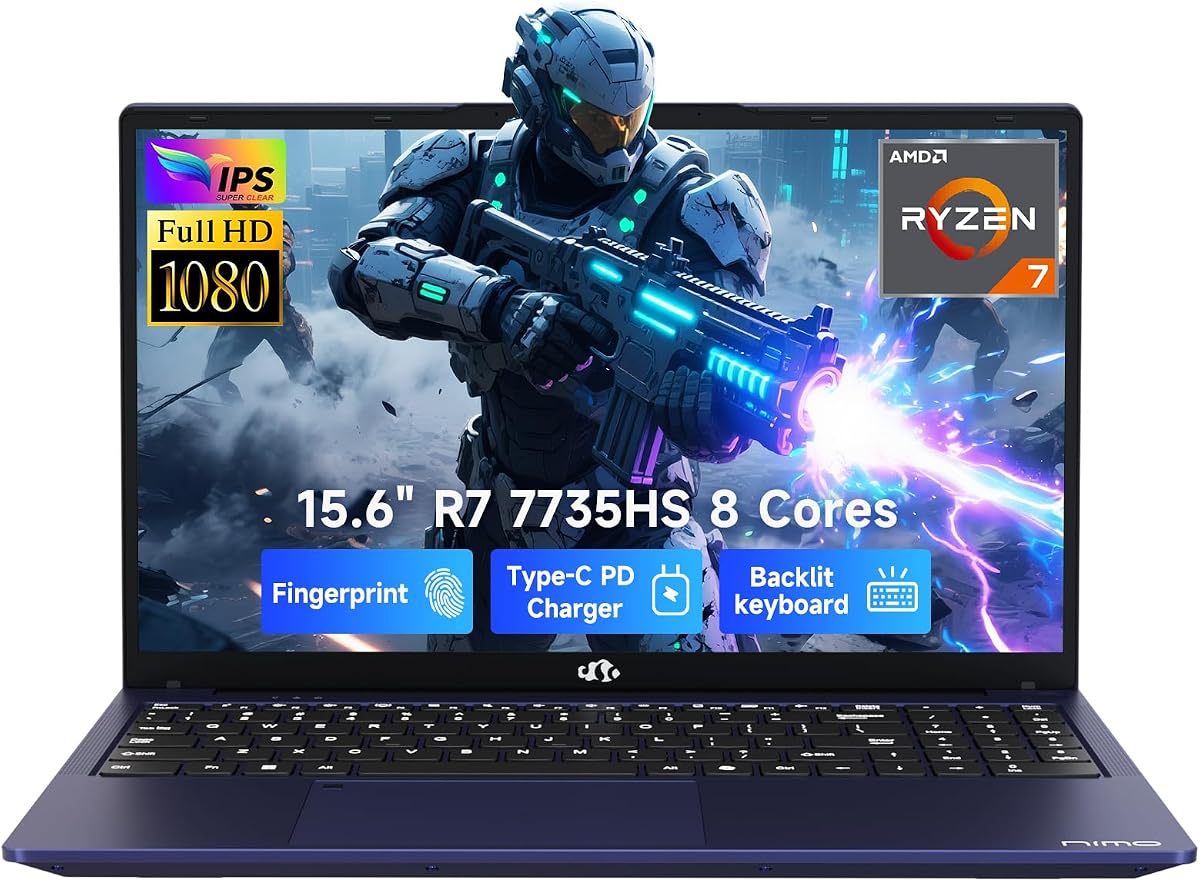


The NIMO Light Gaming Laptop combines an AMD Ryzen 7 7735HS processor with Radeon 680M integrated graphics, giving it more emulator headroom than many conventional ultraportables. Its supplied rating is 4.4 out of 5. The 15.6-inch Full HD screen provides enough room for emulator windows, documentation, and recording tools, while the overall design remains suited to schoolbags and travel bags.
We may earn a commission when you buy through this link, at no additional cost to you.
The processor has eight cores and reaches boost speeds of up to 4.75GHz, which is useful for compiling shaders, translating ROMs, running background utilities, and keeping a game open while recording gameplay. Radeon 680M graphics based on RDNA 2 are a meaningful advantage for systems without a discrete GPU. The laptop also supports dual DDR5 SO-DIMM slots and a PCIe 4.0 M.2 drive, allowing buyers to strengthen memory or storage after purchase.
Its main limitation is that integrated graphics still cannot match a dedicated gaming GPU in demanding 3D emulation, especially when high-resolution textures, advanced post-processing, and complex shaders are involved. The supplied information does not clearly state the installed RAM capacity, so buyers should verify that before buying. Nevertheless, the CPU, display, charging, and port combination makes this a practical middle ground for many emulator users.
Choose this NIMO if you want a capable, portable laptop for console emulation, arcade systems, indie games, and moderate 3D titles without moving to a full-size gaming machine. It is particularly attractive for students or travelers who may need to install demanding emulator frontends, browse compatibility lists, and run multiple applications. For the most demanding emulation, however, the ASUS ROG Strix G16 offers a more appropriate discrete-GPU path.
Radeon 680M graphics make this laptop better suited to emulator workloads than a basic display-oriented notebook. It can handle more demanding 2D and 3D systems, though users wanting advanced 3D rendering should still consider a discrete GPU.
Two full-featured USB-C ports, HDMI 2.0, three USB-A ports, and a microSD reader make it easier to connect controllers, external storage, capture equipment, and a larger display without relying on a permanent adapter setup.
We may earn a commission when you buy through this link, at no additional cost to you.
The NIMO 17.3-inch Gaming Laptop is built around an AMD Ryzen 5 6600H processor, Radeon 660M graphics, 32GB of DDR5 memory, and a 1TB SSD. Its supplied rating is 4.2 out of 5. The large anti-glare Full HD IPS display is particularly useful for emulator frontends that place the game beside cheat references, system settings, video previews, or a live chat window.
We may earn a commission when you buy through this link, at no additional cost to you.
Memory is the standout specification. Thirty-two gigabytes gives the system room to retain several games, browser tabs, Discord, recording tools, and background applications without immediately exhausting available RAM. The dual SO-DIMM configuration allows an upgrade to 64GB, while the M.2 2280 storage supports expansion to 4TB. That combination is especially helpful for large ROM collections, installers, shader caches, and personal media libraries.
The 45W Ryzen 5 6600H provides six cores and 12 threads with boost speeds up to 4.5GHz. Radeon 660M is suitable for many popular 2D and lighter 3D emulator workloads, but it is not the strongest option here for high-end emulation. The larger 17.3-inch chassis also trades portability for screen space, so buyers should consider how often they need to carry the computer.
This laptop makes sense for users who emulate a broad library and keep several demanding programs open. The memory capacity and large anti-glare panel give it a workspace-oriented advantage over smaller and less expandable systems. It is less compelling for graphics-intensive emulation or frequent travel, but for students and home users who want room to grow, the configuration is unusually practical.
Thirty-two gigabytes of DDR5 is useful beyond simple game loading. It helps when a launcher, browser, chat client, capture program, and one or more emulated systems are running at the same time, while the listed upgrade path provides extra flexibility.
The 17.3-inch anti-glare IPS panel gives emulator windows more room than a typical compact laptop. The larger dimensions are advantageous for controllers, menus, documentation, and split-screen workflows, although they reduce backpack friendliness.
We may earn a commission when you buy through this link, at no additional cost to you.
The KAIGERR Ryzen 7430U laptop is a straightforward option for classic 2D emulation, handheld-console emulation, and lightweight 3D systems. It has a supplied rating of 4.6 out of 5, 16GB of SODIMM DDR4 memory, and a 512GB M.2 NVMe SSD. Its thin-bezel Full HD display provides a comfortable view for both games and ordinary productivity.
We may earn a commission when you buy through this link, at no additional cost to you.
The six-core Ryzen 7430U reaches speeds of up to 4.3GHz, offering enough performance for many retro titles and background tasks. The listed integrated Radeon graphics are the main limitation for demanding 3D emulation because they are not equivalent to a discrete gaming GPU. On the other hand, 16GB of RAM is sufficient for a broad collection of older emulators and leaves room for several background applications.
Its 512GB NVMe drive supports quick startup and application loading, but emulator users should consider the volume of ROMs, operating systems, shader caches, and recording files they plan to install. Connectivity includes HDMI, USB-C, USB 3.2, a 3.5mm audio connector, and a memory card slot. Wi-Fi 6 and Bluetooth 5.2 are also listed for convenient wireless peripherals.
This is a sensible pick for students, casual collectors, and travelers who want a simple machine for established systems rather than the newest console libraries. Its strong rating, 16GB memory, and portable design make it more attractive for emulation than a similarly basic office laptop. Buyers who regularly emulate complex 3D games should step up to a system with stronger graphics.
A modern Ryzen processor and 16GB of memory give the laptop enough headroom for classic 2D titles, older handheld systems, and many mid-3D libraries. It is a more logical emulator platform than a low-powered office notebook with limited memory.
The NVMe drive improves everyday responsiveness, while Wi-Fi 6 and Bluetooth 5.2 simplify use with wireless controllers and accessories. Owners who accumulate large ROM collections should monitor free space and confirm upgrade options before adding content.
We may earn a commission when you buy through this link, at no additional cost to you.
The NIMO Ryzen 7 7735HS combines eight CPU cores, Radeon 680M graphics, 32GB of DDR5 memory, and a 1TB PCIe 4.0 SSD. Its supplied rating is 4.3 out of 5. This configuration makes it one of the more balanced integrated-graphics options for emulation, especially when the user wants ample memory without moving to a bulky gaming notebook.
We may earn a commission when you buy through this link, at no additional cost to you.
The Ryzen 7 7735HS provides eight cores and 16 threads with speeds up to 4.75GHz. That headroom benefits emulator compilation, multitasking, background recording, and demanding 2D systems. Radeon 680M remains the deciding factor for 3D compatibility: it is considerably more capable than basic integrated graphics, but it still lacks the dedicated memory and processing resources of a discrete GPU such as the RTX 5060.
The supplied product information describes the machine as having 32GB of DDR5 memory and a 1TB PCIe 4.0 SSD. A 15.6-inch Full HD IPS anti-glare display offers a useful balance of image clarity, working space, and portability. The included 100W GaN II USB-C charger, backlit keyboard, and fingerprint sensor are convenient additions for regular use, but they do not change the central graphics limitation.
This model is most attractive to users who emulate a wide mix of 2D, handheld, and moderate 3D systems while running several applications. It is also a good candidate for emulation-based creative workflows involving captures and editing. For demanding polygons, high-resolution 3D titles, or consistent high-frame-rate emulation, the ASUS ROG Strix G16 remains the stronger graphics-focused recommendation.
The 32GB memory configuration offers comfortable headroom for multiple emulators, game libraries, browser tabs, and recording software. It is a particularly useful feature for users who do not want to upgrade memory immediately after purchase.
The anti-glare 15.6-inch panel reduces visual distraction while preserving a useful amount of screen space. Coupled with fast USB-C charging, the laptop balances a gaming-oriented specification list with everyday portability.
We may earn a commission when you buy through this link, at no additional cost to you.
The NIMO Ryzen 7 8745HS is the premium integrated-graphics choice in this guide, combining an eight-core Ryzen 7 8745HS processor with Radeon 780M graphics, 64GB of DDR5 memory, and 2TB of PCIe 4.0 storage. It carries a supplied rating of 5.0 out of 5. The configuration is designed for heavy multitasking, content creation, and advanced emulator workflows rather than only lightweight retro gaming.
We may earn a commission when you buy through this link, at no additional cost to you.
Radeon 780M uses RDNA 3 architecture and is the strongest integrated graphics option listed here. That advantage can matter for 3D emulation, higher resolutions, modern shader stacks, and visual enhancements. The 45W processor can reach 4.9GHz, while 64GB of memory makes it comfortable to run emulator frontends, creative applications, video editing, streaming software, and multiple chat or browser processes at once.
Storage is equally generous, with a listed 2TB PCIe 4.0 SSD and support for dual SSD expansion. USB4, HDMI 2.1, USB 3.2, a microSD reader, and an audio jack create a modern connection platform for external SSDs, controllers, displays, and studio accessories. The trade-off is that it still relies on integrated graphics. Even capable RDNA 3 graphics do not equal a dedicated high-end GPU for the most demanding 3D emulation.
This laptop is ideal for creators who also emulate, power users who value massive memory, or enthusiasts who want high storage capacity in a portable chassis. The supplied information also describes a slim metal body under 1.7kg, a 180-degree hinge, fingerprint login, and a two-year warranty. Buyers should select it when multitasking and future-proof capacity matter more than obtaining a discrete gaming GPU.
Radeon 780M is the most advanced integrated graphics option in this roundup. It offers a meaningful advantage for compatible 3D systems, enhanced visuals, and higher internal resolutions, although a discrete GPU remains preferable for the most demanding workloads.
The listed 64GB of RAM and 2TB SSD provide excellent room for large libraries, creative software, capture files, and many concurrent applications. Dual SSD expansion also gives owners a path to add capacity without replacing the entire laptop.
We may earn a commission when you buy through this link, at no additional cost to you.
The KAIGERR Ryzen 7 5700U laptop is powered by an eight-core, 16-thread AMD processor based on Zen 3, paired with 16GB of DDR4 memory and a 512GB M.2 2280 NVMe SSD. Its supplied rating is 4.6 out of 5. It is a strong fit for 2D and older 3D emulation where CPU responsiveness and multitasking matter more than dedicated graphics.
We may earn a commission when you buy through this link, at no additional cost to you.
Boost speeds reach 4.3GHz, with a listed 16MB L3 cache supporting quick data access. The processor's eight cores provide useful capacity for compiling shader batches, running multiple emulators, and keeping communication or recording software open. Integrated AMD Radeon graphics handle the visual workload, but they restrict performance in more demanding 3D systems compared with the Radeon 680M, Radeon 780M, or RTX 5060 options elsewhere in the list.
The thin-bezel Full HD display is appropriate for both games and productivity, while the portable design makes the system less cumbersome than a large gaming notebook. Connectivity includes HDMI, USB-C, USB 3.2, a 3.5mm audio jack, a memory card slot, Wi-Fi 6, and Bluetooth 5.2. A 512GB SSD helps with fast startup, but large ROM collections can consume that capacity quickly.
This laptop is best for classic arcade, console, and handheld libraries, as well as users who want a general-purpose computer that can also run emulators. It is less appropriate for 4K-heavy 3D emulation or for users planning to capture and edit high-resolution emulator footage. Within that intended scope, the eight-core processor and 16GB memory form a convincing package.
The eight-core, 16-thread design provides useful parallelism for emulator frontends, background applications, and shader work. It is especially relevant when users want a lightweight computer for established retro platforms rather than a high-end gaming laptop.
USB-C, USB 3.2, HDMI, an audio jack, and a card reader cover common accessories, while the compact chassis is easier to carry. These qualities make the system useful as both a daily computer and a portable emulation setup.
We may earn a commission when you buy through this link, at no additional cost to you.
The Intel Core i7 gaming laptop offers a simple, ready-to-use route into PC emulation. It includes Windows 11 Pro, Office software, 16GB of RAM, and a 512GB SSD. The supplied rating is 5.0 out of 5. Its Intel Core i7 processor reaches speeds up to 3.9GHz, making it suitable for office work, online classes, streaming, and many standard emulator tasks.
We may earn a commission when you buy through this link, at no additional cost to you.
One of its most useful features is software readiness. Windows 11 Pro provides the stated operating-system foundation, while the included Office applications support document, spreadsheet, and presentation tasks. That makes the laptop practical for students or workers who want one machine for productivity and retro gaming rather than managing two separate systems.
The 15.6-inch Full HD display presents sharp content, and the backlit keyboard helps during evening sessions. Port selection includes two USB 3.0 ports, Mini HDMI, a microSD reader, a headphone jack, Wi-Fi 5, and Bluetooth 5.0. The exact graphics model is not provided, so buyers cannot confidently assess advanced 3D emulation performance from the supplied specifications alone.
This laptop is a good choice for straightforward emulation, document-heavy use, and users who value included software and support. The supplied details mention a 3.5-pound weight, a 0.8-inch thickness, a 38.5Wh battery, a two-year warranty, and a 180-day free return and replacement period. It is less compelling for enthusiasts comparing precise graphics performance, but the convenience factor is strong.
Windows 11 Pro and Office are included according to the supplied listing. That turns the laptop into a general-purpose work machine with emulator support, rather than a barebones system intended only for games.
At a listed 3.5 pounds and 0.8 inches thick, the laptop is positioned for easy transport. A backlit keyboard, 15.6-inch Full HD screen, and 38.5Wh battery support use in classrooms, offices, and during travel.
We may earn a commission when you buy through this link, at no additional cost to you.
The ASUS ROG Strix G16 is the strongest choice for graphics-intensive emulation because it pairs an Intel Core i7 14650HX processor with a dedicated NVIDIA GeForce RTX 5060 Laptop GPU. Its supplied rating is 4.4 out of 5. Unlike every other product in this guide, it includes a discrete graphics GPU designed for demanding games and GPU-intensive emulation workloads.
We may earn a commission when you buy through this link, at no additional cost to you.
The RTX 5060 uses NVIDIA Blackwell architecture and supports DLSS 4 and Max-Q technologies. That distinction matters for 3D emulation because it offers substantially more graphics processing capability than integrated Radeon chips. The 16-inch FHD+ 16:10 display has a 165Hz refresh rate and 3ms response time, giving modern emulated games a smooth, responsive presentation.
Cooling is another major strength. The supplied information describes an end-to-end vapor chamber, tri-fan technology, and Conductonaut extreme liquid metal on the chipset. These features help maintain performance during extended emulator sessions, reducing the chance that a demanding game will be limited as quickly by heat. The full-surround RGB lightbar and Stealth Mode add flexibility for switching between gaming and professional environments.
The main trade-off is portability: this is a full gaming laptop with a 16-inch display rather than a compact ultraportable. Its 16GB of DDR5 memory and 1TB PCIe Gen 4 SSD are good, though some competing configurations offer more RAM or storage. Even with those caveats, the dedicated GPU makes this the most appropriate pick for demanding 3D emulation, high-resolution output, and games that benefit from GPU upscaling.
The RTX 5060 is the decisive reason to choose this laptop for advanced 3D emulation. It has dedicated graphics resources rather than relying on system memory, providing more headroom for demanding titles, enhanced resolutions, and GPU-assisted features.
The vapor chamber, three-fan cooling arrangement, and liquid-metal chipset cooling are particularly relevant during long emulator sessions. Better sustained performance can be more valuable than a brief benchmark peak, especially for demanding 3D systems.
We may earn a commission when you buy through this link, at no additional cost to you.
The HP OmniBook 3 is the large-screen budget option in this guide, pairing an AMD Ryzen 3 30 processor with Radeon 610M graphics, 8GB of LPDDR5 memory, and a 512GB PCIe NVMe SSD. Its supplied rating is 4.5 out of 5. It is best suited to lighter emulation, educational software, media playback, and users who value a large display more than advanced graphics.
We may earn a commission when you buy through this link, at no additional cost to you.
The Full HD IPS panel offers 178-degree viewing angles, which is useful when using the laptop at a desk or positioning an external keyboard for extended sessions. Radeon 610M graphics are designed for streaming, casual games, and general visual tasks. They can handle less demanding emulator systems, but they do not provide the headroom needed for advanced 3D emulation.
Memory is the primary constraint. Eight gigabytes can support a retro emulator and several ordinary applications, but heavy browser use, recording, creative software, and multiple emulators may make the system feel constrained. The 512GB NVMe SSD compensates with quick startup and file access, while the listed battery specification of up to 14 hours and 15 minutes makes the laptop appealing for long study or gaming sessions away from an outlet.
HP also provides useful everyday features, including Wi-Fi 6, Bluetooth 5.4, an FHD camera with HDR auto-switch, and AI noise reduction for calls. This is a sensible budget choice for a student learning older console emulation or a user building a first collection. It should be chosen for established and lightweight platforms rather than demanding current-generation 3D titles.
The 17.3-inch Full HD IPS display gives the laptop a desktop-like appearance and makes emulator interfaces easy to read. It is a good fit for a stationary desk setup where screen area matters more than compact dimensions.
The listed battery runtime of up to 14 hours and 15 minutes supports a mobile study or entertainment routine. HP Fast Charge is also stated to restore the battery from zero to 50 percent in approximately 45 minutes.
We may earn a commission when you buy through this link, at no additional cost to you.
The KAIGERR Ryzen 7430U combines a six-core, 12-thread processor with 16GB of DDR4 memory and a 512GB M.2 SSD. Its supplied rating is 4.7 out of 5, the highest among the products that do not also carry one of the three featured awards. A 16-inch thin-bezel display and a physical webcam cover give it a practical, modern presentation.
We may earn a commission when you buy through this link, at no additional cost to you.
The Ryzen 7430U reaches up to 4.3GHz and provides enough processing power for classic 2D systems, many handheld-console emulators, and lighter 3D titles. Sixteen gigabytes of memory is a useful starting point for a system that will also handle browsers, messaging apps, and ordinary productivity tasks. The integrated UHD graphics, however, offer substantially less room for demanding 3D emulation.
Storage uses a replaceable M.2 SSD design, and the supplied information states that the drive can be replaced with one up to 2TB. That is useful for emulator users because ROM collections, operating system images, shader caches, and captured videos can expand quickly. The connection list includes USB 3.2, USB-C, and Wi-Fi 6, while the webcam cover adds a simple layer of privacy for calls.
The 38Wh battery is listed for up to eight hours of use, which is adequate for many short mobile sessions but less generous than the HP OmniBook 3's stated maximum. This KAIGERR is most compelling for buyers seeking a large display, 16GB of memory, and a good rating in a general-purpose system that can handle retro emulation. Advanced 3D games are better served by a dedicated GPU.
Sixteen gigabytes of DDR4 is enough for retro emulation and normal multitasking, especially when compared with systems offering only 8GB. It also leaves more room for controllers, background utilities, and browser-based compatibility guides.
The listed maximum replacement SSD capacity of 2TB makes the laptop more adaptable to a growing ROM collection. Users should still maintain organized folders and monitor available space because shader caches and installation files can add up quickly.
We may earn a commission when you buy through this link, at no additional cost to you.
Emulator performance depends on the target platform, graphics complexity, display preferences, cooling, and the number of programs you expect to run. Use the factors below to separate a basic retro setup from a system capable of demanding 3D emulation and content creation.
The processor handles emulator logic, menu navigation, video decoding, shader compilation, and the background tasks associated with launching games. Modern Ryzen 7 and Core i7 processors offer a useful balance for emulation, while a Ryzen 3 or Core i7 system with unspecified details may require closer verification. Check core count, sustained thermal behavior, and supported boost speeds rather than relying only on the processor family label.
Graphics capability is often the decisive factor for 3D console emulation. Radeon 680M and Radeon 780M integrated chips offer more headroom than basic Radeon 610M or UHD graphics, while the ASUS ROG Strix G16's dedicated RTX 5060 provides the largest graphics upgrade in this list. Match graphics power to the most demanding system you intend to emulate rather than to your favorite 2D title.
Emulation software often runs alongside launchers, browsers, Discord, recording tools, and video editors. Sixteen gigabytes is a sensible minimum for a versatile system, while 32GB or 64GB provides more comfortable headroom. Prefer laptops with accessible memory expansion when possible, and check whether the listed memory is soldered before planning a future upgrade.
ROMs are not the only storage consideration. Emulator frontends, operating system images, shader caches, save files, and recorded gameplay can consume substantial space. An NVMe or PCIe 4.0 drive improves loading times, while a 1TB or 2TB capacity reduces the need for constant cleanup. A replaceable M.2 drive offers another way to expand storage as a collection grows.
A 15.6-inch Full HD display is a practical middle ground for most emulator frontends, while 16-inch and 17.3-inch screens provide more room for game windows, guides, chats, and recording applications. IPS panels offer useful viewing angles, and anti-glare surfaces can improve comfort in bright rooms. High-refresh displays also make modern 3D emulation feel more responsive.
Emulator sessions can last for hours, especially when using demanding 3D systems or recording gameplay. A robust cooling system helps processors and graphics maintain performance instead of throttling. Gaming laptops with vapor chambers, multiple fans, and effective heat transfer are especially attractive for long sessions, while thin laptops should be evaluated with realistic expectations about sustained workloads.
Emulators often require gamepads, specialty controllers, external storage, headphones, capture devices, keyboards, and occasionally additional displays. USB-A remains useful for many controllers, USB-C simplifies modern accessories and charging, HDMI supports external displays, and a card reader helps transfer files. Confirm that a preferred controller has the appropriate wired or wireless connection before buying.
Gaming laptops with discrete graphics and large screens generally weigh more than ultraportables, but they can deliver much higher graphics performance. A compact integrated-graphics laptop is easier to carry and may last longer between charges. The HP OmniBook 3 lists the strongest maximum battery figure in this group, while several USB-C-equipped systems benefit from convenient 100W charging.
Begin by creating clearly named folders for emulator frontends, BIOS or firmware files, legal game dumps or homebrew, save states, and screenshots. Keep each emulator in its own folder when practical and make regular backups of save files, especially when using multiple emulators or experimenting with different versions. Use a controller supported by your chosen frontend, and test save-state behavior before beginning a long game.
For stable performance, close unnecessary applications, keep the laptop on a hard surface, and allow its vents to remain unobstructed. Increase the emulator's internal resolution gradually rather than starting with an extreme setting. If frame pacing feels uneven, verify the refresh rate, VSync setting, render mode, and any dynamic-resolution or upscaling features offered by the graphics hardware.
Treat emulator software and game content responsibly. Download only frontends and content from reputable sources, follow applicable local laws, and avoid untrusted executable files. Keep the operating system, emulator versions, drivers, and firmware files updated, use reputable security software, and back up important saves. Periodic cleaning of shader caches and temporary files can prevent storage pressure, but avoid deleting files that belong to saved games.
A laptop with a modern eight-core processor and stronger graphics is the most practical choice for demanding 3D systems such as PS2 and GameCube. Radeon 680M or 780M integrated graphics can work, but a dedicated RTX-class laptop GPU provides much more headroom. Look also for 16GB or more of RAM, fast SSD storage, effective cooling, and a display that makes shader settings easier to manage.
A budget laptop with a modern Ryzen 3 or Core i7 and 16GB of RAM can handle many older 2D and handheld emulators comfortably. Performance varies greatly for 3D systems, and basic integrated graphics are more likely to encounter limitations than Radeon 680M, Radeon 780M, or discrete graphics. Treat stated specifications as a starting point and check current emulator compatibility and recommended settings.
Yes, especially when an emulator is used alongside browsers, launchers, recording software, and other applications. Sixteen gigabytes is a comfortable minimum for a flexible setup, while 32GB or 64GB helps prevent memory pressure during heavy multitasking. Memory is not the only factor, however, because CPU and GPU performance determine how quickly the emulated game itself runs.
An external monitor can provide more room for an emulator window, guide, chat, and capture tools. A high-refresh display may also make supported 3D emulation feel smoother, although the frame rate must be appropriate for the emulated system. Make sure the laptop supports the desired output resolution and refresh rate through its HDMI or USB-C connections.
Not for most classic 2D, arcade, and older handheld titles. A modern processor and 16GB of RAM can provide an excellent experience for those systems. A dedicated GPU becomes more valuable as you move toward complex 3D emulation, high internal resolutions, shader-based effects, and demanding console libraries.
At least 512GB is useful for a starter setup, but 1TB or 2TB is more comfortable for large ROM collections, operating system images, shader caches, and recordings. Fast NVMe or PCIe 4.0 storage improves application loading and transfers. The KAIGERR models in this guide use an M.2 SSD, which is convenient for storage expansion when the listed maximum capacity applies.
Both processor families can run emulators, and the choice depends on the complete configuration. AMD Ryzen systems here offer a range of core counts and integrated Radeon graphics, while the ROG Strix G16 pairs an Intel Core i7 with a dedicated GPU. Compare sustained performance, graphics, memory, thermals, display, and price rather than selecting a brand by itself.
Start with the recommended settings for your target system and avoid immediately changing every option. Choose a render mode that works with your laptop, begin at native or lightly enhanced resolution, and verify correct aspect ratio and frame pacing. Increase enhancements gradually, save separate configurations for different games, and close unnecessary background applications if performance drops.
The ASUS ROG Strix G16 is the strongest all-around choice for demanding 3D emulation because its dedicated RTX 5060, high-refresh display, and advanced cooling provide the greatest graphics headroom. The NIMO Ryzen 7 8745HS is the premium integrated-graphics option, pairing Radeon 780M with exceptional memory and storage capacity. The HP OmniBook 3 serves as the budget and large-screen alternative for lighter emulation and everyday use.
Prioritize the components that affect your actual library. Choose more graphics power for modern 3D systems, more memory for intensive multitasking, faster or larger storage for extensive collections, and a lighter chassis if portability is a priority. The other NIMO, KAIGERR, and Intel configurations offer useful combinations for 2D, handheld, and less demanding 3D emulation without reaching for a full-size gaming laptop.
Before purchasing, verify the exact current component configuration, graphics details, memory configuration, and available storage. Ratings and retailer listings can change, and prices fluctuate over time. Checking the final specification and current listing helps ensure the laptop you choose remains a good match for your emulator collection and working habits.