
VOYEE Switch Controller
4.4Editor score
Compact multi-platform design
Programmable macro controls
RGB lighting and vibration
Our Gaming Controller for Apple TV guide compares 10 controllers for compatibility, battery life, motion controls, connectivity, comfort, and value for
A good gaming controller for Apple TV can turn a compatible television into a more comfortable, engaging gaming hub. The best options combine reliable Bluetooth or wired input, responsive buttons, accurate analog sticks, useful battery life, and broad support for games available through the Apple ecosystem. A secure iPhone or iPad mount can also improve the experience on screens that are farther away.
We compared ten controllers using the specifications and compatibility information supplied for each product. The list covers Apple-licensed and multi-platform models, retro-inspired designs, pro-style gamepads, and renewed options. We also considered connection methods, battery capacity, motion sensors, programmable controls, tactile feedback, and whether each controller explicitly supports Apple TV, tvOS, or the broader Apple device ecosystem.
The first three recommendations represent the strongest balance of Apple TV compatibility, control features, and everyday versatility. Later reviews cover capable alternatives for different needs, including less conventional layouts, shared multi-device use, compact portability, and cloud gaming. Product ratings and availability can change over time, and retailers frequently adjust prices, so confirm the current listing and platform requirements before purchasing.
4.4Editor score

4.7Editor score

4.0Editor score
This side-by-side overview highlights each controller's Apple TV connection, core control features, battery configuration, and strongest use case, helping buyers separate dedicated Apple accessories from broader multi-platform gamepads.




This compact Bluetooth gamepad earns a 4.0 rating and stands out for exceptional flexibility. It supports Apple TV, Apple Arcade MFi games, iPhone, iPad, Mac, Android, Nintendo Switch, Windows, Steam, and other connected devices. The unusually deep customization suite includes programmable loops, interchangeable button and control assignments, adjustable turbo, six-axis motion, vibration, and Switch wake-up functions.
We may earn a commission when you buy through this link, at no additional cost to you.
Its most impressive strength is the freedom to tailor the controller to individual habits. Owners can record custom operation combinations lasting up to 30 seconds, swap the left joystick with the directional pad, or reassign combinations of face and shoulder buttons. The 650mAh battery is rated for up to 15 hours, while Type-C charging allows play during a recharge. That combination makes the controller practical for both stationary and travel-oriented gaming.
The tradeoff is that the feature set may feel more complicated than a buyer with a simple Apple TV setup needs. Connection instructions differ by platform, and users are advised to follow the included manual carefully. Apple TV appears in the stated platform list, but the description does not use the same level of explicit official support language found for some 8Bitdo products.
This is a strong recommendation for a multi-device player who wants macros, motion control, and platform sharing in one small gamepad. It is especially appealing for users who alternate among Apple Arcade, Switch, PC, and mobile games. Buyers focused only on streamlined Apple TV integration may prefer a model with a more clearly documented Apple-specific setup.
Programmable operations, interchangeable inputs, and adjustable turbo make the controller adaptable to action games, platformers, and titles that benefit from repeated commands. The flexible layout can also reduce dependence on on-screen prompts when playing across several supported platforms.
Bluetooth removes cable restrictions, while the Type-C connection permits charging and continued use. The stated 15-hour runtime and compact body make the controller easier to move between a television, laptop, tablet, and phone than a full-size console pad.
We may earn a commission when you buy through this link, at no additional cost to you.
The SteelSeries Nimbus+ is the clearest dedicated choice in this roundup, carrying a 4.0 rating and Apple-licensed support for iOS, iPadOS, and tvOS devices. It is designed around wireless mobile gaming and includes an iPhone mount, making it useful when a phone serves as the playing device or acts as a convenient display near a television.
We may earn a commission when you buy through this link, at no additional cost to you.
Its defining advantage is the rechargeable battery, which is stated to provide more than 50 hours of play on a charge. That endurance substantially reduces charging anxiety compared with controllers offering shorter active use. The upgraded tactile directional pad supplies clear clicking feedback, while clickable L3 and R3 joystick inputs add another layer of control for games that recognize those commands.
SteelSeries recommends downloading or updating the SteelSeries Engine software to optimize compatibility across iOS devices. That added setup step is a minor inconvenience, particularly for buyers who want to pair and play immediately. Its Apple-focused design also means it offers less appeal than the broad multi-platform alternatives when Nintendo Switch or Windows gaming is the main objective.
For an Apple household wanting a controller expressly licensed for tvOS and the wider Apple ecosystem, the Nimbus+ is an especially coherent choice. The included phone mount, long battery life, and precise directional controls make it particularly useful for casual Apple Arcade sessions, longer adventures, and sessions where a phone is positioned near the television.
Apple licensing and explicit support for iOS, iPadOS, and tvOS provide more certainty than a generic platform list alone. Updating the controller through SteelSeries Engine helps keep its software current and is recommended for optimal compatibility.
A stated runtime exceeding 50 hours gives the Nimbus+ an advantage for marathon gaming sessions. Recharging after only a few uses is less likely to interrupt a long evening, particularly when the controller is shared across an iPhone, iPad, or television setup.
We may earn a commission when you buy through this link, at no additional cost to you.
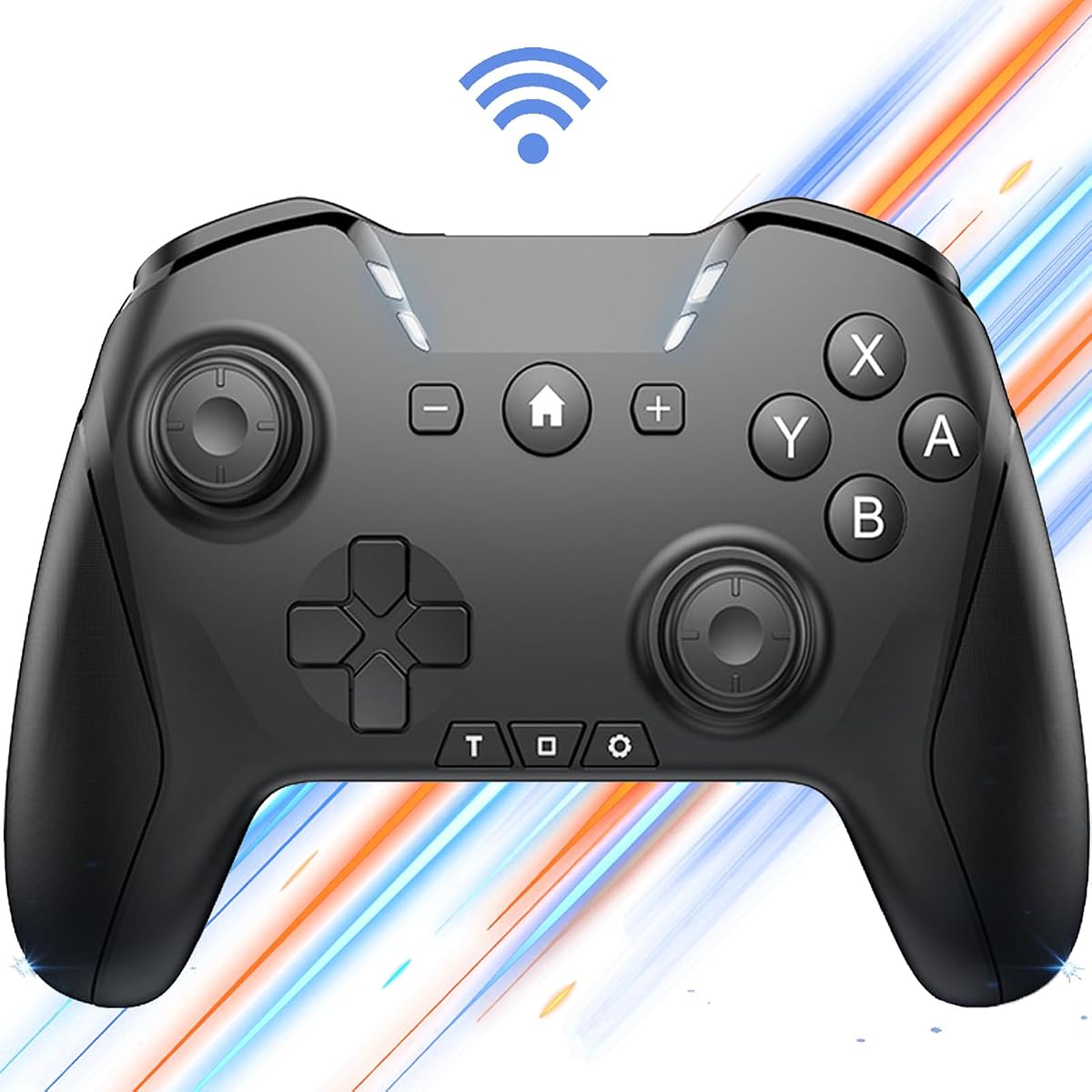
The VOYEE Switch Controller has a 4.4 rating and delivers a colorful, feature-rich alternative for users who enjoy customizable gamepads. Its lightning-bolt design and four lighting choices—including solid, breathing, strobe, and off modes—give it a more expressive appearance than many conventional mobile controllers.
We may earn a commission when you buy through this link, at no additional cost to you.
Programmable M1 and M2 buttons can handle single or multiple mappings, while the turbo system offers three burst rates. A six-axis gyro sensor supports motion-oriented play, and dual motors provide four vibration levels. These are useful additions for compatible games, although their usefulness depends on the title and its Apple platform support.
The most important limitation is platform clarity. The supplied information specifically names Switch, Switch Lite, Switch OLED, and Windows PC, with PC limited to wired use. Apple TV is not explicitly mentioned, so buyers should confirm the current pairing instructions and game support rather than assuming general multi-platform behavior. The stated 10–15 hours of runtime is also shorter than the SteelSeries Nimbus+ battery claim.
This controller makes the most sense for a buyer who values programmable controls, lighting, and a compact body and who already knows the target game supports its features. It remains a capable secondary controller, but a model with explicit Apple TV or tvOS support is the safer choice when Apple TV is the primary destination.
Four LED modes make the controller visually distinctive, while four vibration levels allow users to tune tactile feedback. These details are most enjoyable in games that properly recognize standard controller input and expose their own feedback options.
The programmable buttons can simplify complex sequences, and three turbo speeds provide options for rapid repeated commands. Buyers should check whether a particular game permits these functions before relying on them for competitive play.
We may earn a commission when you buy through this link, at no additional cost to you.
The 8Bitdo SN30 Pro holds the highest rating in this selection at 4.7 and offers explicit, official support for Apple TV. It combines a retro-inspired body with modern features, including Hall effect joysticks, clickable analog sticks, rumble, motion controls, Bluetooth, a rechargeable battery, and a USB-C connector.
We may earn a commission when you buy through this link, at no additional cost to you.
Its Hall effect sticks are a meaningful technical upgrade over many conventional analog sticks because they use magnetic sensing to detect movement. The product information presents this as a source of greater precision, sensitivity, durability, and resistance to drift. A proper directional pad, complete face-button arrangement, and clickable sticks give the retro appearance more practical substance.
The compact 144 by 63.5 by 32.5 millimeter size makes it easy to carry, although the familiar retro shape may feel unconventional for games demanding separate analog movement. Apple TV is now explicitly listed as officially supported, but individual games still need to recognize standard gamepad input. The battery is stated to last 18 hours following a one-to-two-hour charge.
For Apple TV owners who want a controller with clearly stated platform support, strong stick technology, and a distinctive design, this is the most complete recommendation in the guide. It is particularly well suited to retro games, arcade-style titles, and players who prefer a compact controller with modern motion and rumble capabilities.
Magnetic Hall effect sensing supports accurate movement detection and can reduce the drift associated with aging potentiometer-style sticks. The SN30 Pro is a sensible choice for owners who play frequently and value consistent directional input.
The SN30 Pro preserves the visual language of classic gamepads while adding rumble, motion, clickable sticks, wireless pairing, and USB-C. That blend appeals to players who want nostalgia without giving up contemporary conveniences.
We may earn a commission when you buy through this link, at no additional cost to you.
This renewed SteelSeries Nimbus+ carries a 3.6 rating and provides an explicitly Apple-compatible alternative for iPhone, iPad, iPod touch, and Apple TV. Its familiar controller layout, responsive buttons, analog sticks, and triggers suit games that follow standard gamepad conventions, while the rechargeable battery avoids disposable battery replacements.
We may earn a commission when you buy through this link, at no additional cost to you.
A stable wireless connection is particularly useful on a television setup because it lets the player relax at a comfortable distance from the screen. The renewed listing states that each unit is professionally inspected, tested, and cleaned to meet Amazon Renewed quality standards, which offers some reassurance regarding basic functionality.
The 3.6 rating is the lowest among the ten products, and the listing provides less detail than the standard Nimbus+ listing about clickable joysticks, tactile directional buttons, and battery duration. Renewed products may also have cosmetic marks or other signs of previous use. The performance specifications are broadly similar, but the lower rating and limited detail make this less transparent than the standard model.
This renewed Nimbus+ is best considered when Apple TV support and a familiar wireless controller are the priorities and the buyer wants the renewed route. Comparing the condition, warranty information, and current listing details with a new Nimbus+ is sensible before making a final decision.
Traditional buttons, analog sticks, and triggers provide an accessible transition from on-screen touch controls. The explicit support for Apple devices makes the controller more immediately relevant to tvOS gaming than generic gamepads with uncertain platform claims.
Professional inspection and testing help establish that the controller functions, but renewed units can still show signs of use. Review the seller's condition notes and return terms carefully, especially if cosmetic condition matters to the buyer.
We may earn a commission when you buy through this link, at no additional cost to you.
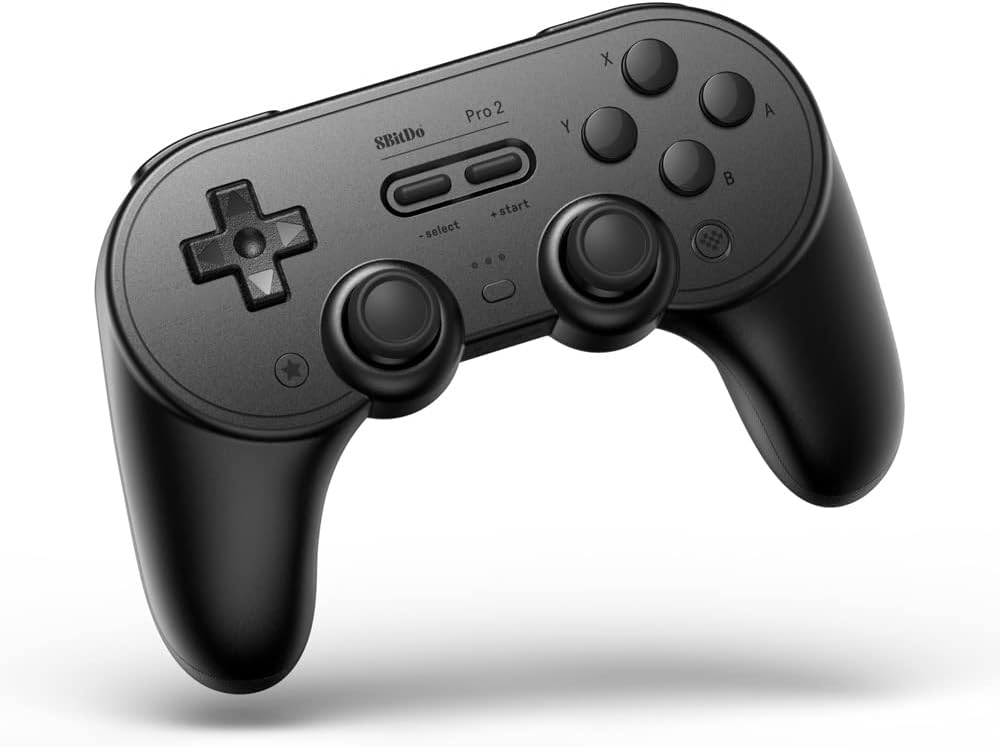
The 8Bitdo Pro 2 earns a 4.5 rating and is one of the strongest all-around choices for Apple TV owners who also play across other systems. Apple TV, iPhone, iPad, and macOS are explicitly listed as officially supported, alongside Switch, PC, Android, Steam Deck, and Raspberry Pi.
We may earn a commission when you buy through this link, at no additional cost to you.
Two rear buttons add useful customization for eligible games, while software support provides custom profile switching and an enhanced four-way mode-switching button. The controller also includes Bluetooth, USB-C, rumble vibration, and a rechargeable battery stated to last 20 hours. These features make it especially compelling for households that regularly rotate between a television and other compatible hardware.
One important qualification is that the product information limits motion controls to Switch. Rear buttons also take time to learn because they require different finger placement from standard shoulder controls. Users who need Apple TV motion support should not assume the gyro function carries over, and individual tvOS games must recognize the extra inputs.
Despite those caveats, the Pro 2 provides the most flexible premium package in the guide. Its official Apple TV support, strong 4.5 rating, rear controls, profiles, and lengthy battery make it a top recommendation for a versatile gaming setup.
The two rear buttons can be assigned for additional actions in supporting games, reducing reliance on crowded face-button combinations. Profile switching and the four-way mode button further help owners move between control layouts without repeatedly reconfiguring the controller.
Official support across Apple devices, Switch, PC, Android, Steam Deck, and Raspberry Pi creates broad household utility. The Pro 2 is particularly useful for a gaming setup that moves between a television, desktop, laptop, and handheld.
We may earn a commission when you buy through this link, at no additional cost to you.
This SteelSeries Nimbus+ listing has a 4.1 rating and identifies iPhone, iPad, iPod touch, and Apple TV among its compatible devices. It is positioned as a rechargeable wireless mobile gaming controller, providing a direct alternative for Apple users who want physical controls without a permanently connected cable.
We may earn a commission when you buy through this link, at no additional cost to you.
Its principal benefit is clear platform focus. Instead of relying on broad compatibility language, the product name directly addresses Apple hardware and Apple TV. A rechargeable internal battery also provides a cleaner setup than disposable batteries, while wireless operation allows comfortable couch-distance play.
The supplied information for this particular listing is sparse. It does not spell out the directional pad design, clickable joystick function, battery runtime, or software recommendation provided in the separate Nimbus+ mobile listing. Buyers should therefore consult the current product page and compatibility documentation for the exact revision offered.
This option remains a sensible choice for an Apple-centric buyer seeking a simple wireless controller. Its 4.1 rating slightly exceeds the related mobile Nimbus+ listing, but the more detailed model may be easier to evaluate if specific control features are important to the decision.
Bluetooth operation reduces cable clutter around a television and makes it easier to use the same controller with an iPhone, iPad, iPod touch, or Apple TV. The rechargeable format supports repeated long-term use without routine battery replacement.
This listing's abbreviated specification set leaves questions about battery life and specific inputs. Buyers should verify the package contents, supported controls, and current firmware situation on the retailer listing before ordering.
We may earn a commission when you buy through this link, at no additional cost to you.
The AceGamer Aurora II has a 4.2 rating and combines 2.4G and Bluetooth connectivity with Hall effect sticks, programmable rear buttons, and a 1000mAh battery. Its stated platform support includes PC, Android, Switch, iOS, and Steam Deck, making it a capable general-purpose gamepad for buyers with a varied device collection.
We may earn a commission when you buy through this link, at no additional cost to you.
The upgraded receiver and encryption dongle are presented as providing a more stable 2.4G connection, while reduced Hall effect drift is intended to improve directional accuracy. Two rear buttons can be programmed for trigger combinations or other actions. A four-way directional pad, upgraded face buttons, and an automatic sleep mode after five minutes round out the feature set.
Apple TV is not explicitly named in the compatibility list, which is the main reason this controller does not rank among the top three for this search. iOS support does not automatically guarantee Apple TV support, and the controller is also incompatible with Xbox systems. The pairing process requires holding specific buttons in sequence, which may be less convenient than an automatic device-discovery experience.
The Aurora II is worth considering for a multi-platform gaming household that values Hall effect sticks, rear controls, and a large battery. An Apple TV buyer should first confirm current tvOS pairing information and the compatibility of the desired games, making it better viewed as a broad alternative than a dedicated Apple TV recommendation.
The included 2.4G receiver can provide a stable direct connection, while Bluetooth supports pairing with compatible mobile and handheld devices. The choice between them depends on the specific platform and the game being played.
Hall effect sensors support accurate movement detection, while two programmable rear buttons create room for game-specific actions. Together they make the Aurora II appealing to players who value adjustability over a simple mobile controller design.
We may earn a commission when you buy through this link, at no additional cost to you.
The Official Luna Controller has a 4.4 rating and is built primarily for Amazon Luna cloud gaming rather than the Apple TV ecosystem. Its most distinctive feature is Cloud Direct technology, which connects directly to Amazon's custom game servers for low-latency play over Wi-Fi.
We may earn a commission when you buy through this link, at no additional cost to you.
Luna users can pause a game on one screen and continue on another supported device, making the controller useful in a multi-screen household. The supported device list includes Windows, Mac, Fire TV, Fire tablet, iPhone, iPad, Chromebook, and Android. It can also serve as a standard Bluetooth controller on compatible hardware or connect by USB to Windows and Mac computers.
Apple TV is not among the explicitly listed destinations, so the controller should not be treated as a native tvOS recommendation. It also remains optimized around Luna, which may make it less attractive than a dedicated Apple or multi-platform gamepad for buyers who primarily play games installed on a television.
The Luna Controller is a strong recommendation for subscribers who regularly use the cloud gaming service and want to move between compatible screens. It is less compelling for an Apple TV shopper unless Bluetooth gamepad recognition is confirmed and cloud gaming is a significant part of the intended setup.
Cloud Direct links the controller to Amazon's game servers without routing input as a conventional local Bluetooth connection. That design supports responsive cloud gameplay and gives the controller a clear purpose within the Luna ecosystem.
The ability to pause on one supported device and resume on another is valuable for users who move between a television, tablet, laptop, and phone. Compatibility with Bluetooth and USB further broadens its role beyond the primary cloud-gaming mode.
We may earn a commission when you buy through this link, at no additional cost to you.
The GMBACK Wireless Controller has a 4.1 rating and explicitly supports Apple TV, Apple Arcade MFi games, iPhone, iPad, and Mac. It also works with Nintendo Switch and Switch 2, Android devices, Android TV, TV boxes, Windows PCs, and Steam, giving it one of the broadest platform lists in the guide.
We may earn a commission when you buy through this link, at no additional cost to you.
Its standout capability is the loop macro system. Owners can record custom button sequences lasting up to 30 seconds using joysticks, triggers, the directional pad, face buttons, and plus or minus commands. A Turbo and Macro combination starts or stops the loop, while adjustable turbo and four vibration levels provide additional control over feedback.
A six-axis gyro supports motion-oriented play across Switch, PC, mobile, and television environments. The controller also offers RGB lighting, remappable face buttons, one-click screenshots, and wake-up functionality. These advanced tools may be unnecessary for casual games, and unsupported titles may ignore motion, remapping, or macro commands.
For an Apple TV owner who also plays on multiple systems and enjoys extensive customization, this controller offers considerable value in one package. It is especially compelling for repetitive tasks and games that support programmable sequences. Buyers should still verify that the target Apple TV game recognizes standard gamepad input and the additional features they intend to use.
The controller can record and replay sequences involving several input types, which is useful for repetitive actions in supporting games. The recording workflow and Turbo plus Macro shortcut provide more granular control than a simple rapid-fire button.
Explicit support for Apple devices, Android, Switch, Windows, Steam, and TV-based systems makes the GMBACK suitable for a mixed household. Its appeal is strongest for users who value programming and motion functions alongside standard directional input.
We may earn a commission when you buy through this link, at no additional cost to you.
The right Apple TV controller depends on how you play, which Apple devices you own, and how much customization you need. Prioritize verified tvOS support, reliable input, comfortable controls, and a connection method that suits your television setup.
Check the product page, manual, and supported-game list before buying. For dedicated Apple use, favor a controller whose manufacturer directly identifies tvOS compatibility rather than relying only on generic Bluetooth wording.
Choose a layout that feels familiar and provides every control your games require. Retro designs are attractive and compact, while modern pro-style pads may feel more natural for long sessions.
Prioritize a rechargeable controller for regular use. Also consider whether it supports play while charging, since wired operation can be useful during unusually long sessions.
Match the connection method to your primary device. Check pairing instructions, as some controllers require holding particular buttons rather than appearing automatically in the device menu.
Check whether your intended Apple TV games support motion, remapping, and macro functions. Casual players can often prioritize simpler controls, while enthusiast players may value customization.
Imagine the controller in your hands rather than judging only its specification list. Choose a layout, size, and weight that suit long sessions and the television or device stand in your home.
Read each platform's notes carefully. Separate basic connection compatibility from feature compatibility, and avoid assuming a PC-only wired mode will work with an Apple TV.
Check whether updates are available for your device and operating system. Favor a controller from a brand with clearly documented support if you expect to use multiple platforms over time.
Begin by fully charging the controller with the specified cable, then place it into Bluetooth pairing mode according to its manual. On the Apple TV, open the relevant gamepad or Bluetooth settings and select the controller from the available device list. Some models also require a firmware update or companion software before they appear, so complete any setup prompts before entering a game.
After pairing, test the directional pad, analog sticks, face buttons, shoulder controls, and triggers in a compatible menu or game. Assign the controller in the game's settings if it offers multiple input choices. Keep the controller within a reasonable range of the television, avoid placing it behind obstacles, and use a stable 2.4G receiver position when that connection method is selected.
For maintenance, store the controller in a dry area, clean the shell with a soft lightly damp cloth, and avoid liquid cleaners around the controls. Charge it periodically rather than allowing the battery to remain deeply depleted, and remove the controller from any device before replacing a cable or changing connection modes. Check the manufacturer's instructions before opening the housing or replacing parts.
No. A controller may support iPhone or iPad without being explicitly designed for tvOS. Look for Apple TV, tvOS, or official compatibility in the product information. You should also confirm that the controller's buttons match the inputs recognized by the specific game you intend to play.
The Nimbus+ emphasizes Apple-licensed mobile gaming, a 50-plus-hour stated battery life, and an included iPhone mount. The SN30 Pro offers official Apple TV support, Hall effect sticks, motion, vibration, and a more compact retro layout. The better choice depends on whether battery longevity, phone support, or modern stick technology matters more.
The products are controllers and do not automatically mirror or transmit an Apple TV game onto another screen. A phone or tablet can serve as a separate gaming display for supported mobile or cloud games. The SteelSeries Nimbus+ includes an iPhone mount, which is useful when the phone is the primary play device rather than a separate display.
Some do, but support depends on both the controller and the game. The 8Bitdo SN30 Pro, 8Bitdo Pro 2, and GMBACK controller include motion-related features, though the Pro 2's listed motion support is specifically limited to Switch. Check the game requirements before relying on gyro aiming or movement.
Bluetooth is built into Apple TV and other modern devices, so it usually does not require a receiver. A 2.4G controller uses a dedicated USB dongle and can provide a direct low-latency connection on platforms that support it. The AceGamer Aurora II supports both approaches, making its connection mode dependent on the device being used.
No. Each developer decides which external inputs and automation features a game supports. The VOYEE and GMBACK controllers offer programmable or looping functions, but those features only work as intended when the game recognizes them. Check the rules and settings of competitive titles before using macros or rapid-fire functions.
It depends on the model and how heavily the controller is used. Products in this guide state runtimes ranging from roughly 10 to 20 hours, while the SteelSeries Nimbus+ mobile listing claims more than 50 hours. Vibration, active lighting, motion sensors, and wireless signal strength can also influence real-world battery life.
A new controller generally offers clearer condition information and may include stronger support terms, while a renewed unit can be inspected and tested before resale. The renewed SteelSeries Nimbus+ is professionally inspected and cleaned, but may show cosmetic wear. Compare the seller's condition details, warranty, and return policy with the standard model.
The 8Bitdo SN30 Pro is the leading overall recommendation because it combines official Apple TV support with Hall effect sticks, motion, vibration, and a highly portable retro design. The SteelSeries Nimbus+ is ideal for Apple-focused households that value explicit licensing, a long battery life, and an included iPhone mount, while the 8Bitdo Pro 2 offers the strongest premium mix of Apple TV support, rear buttons, and broad device compatibility.
When choosing, prioritize verified tvOS or Apple TV compatibility, the controls required by your favorite games, and a comfortable layout. Battery life, motion, macros, RGB lighting, and programmable buttons matter only when they improve the specific games you play. For a simple household setup, an officially supported Apple model with wireless controls and dependable battery life offers the clearest experience.
Ratings, firmware support, game compatibility, availability, and prices can change, so check the current product listing before ordering. Verify the controller's pairing process and the latest compatibility notes, then compare the final purchase with your television setup and the games you expect to play most often.

