
Paperlike Pencil Grips
4.3Editor score
Two coordinated grip colors
Preserves core Pencil functionality
Designed for iPad case use
Expert guide comparing the best Apple Pencil Grips for comfort, control, charging compatibility, fit, durability, and everyday writing or drawing needs.
An Apple Pencil grip can make extended writing and drawing more comfortable, improve control, and reduce the chance of the stylus slipping from your fingers. The best accessory depends on pencil generation, grip shape, material, charging behavior, case compatibility, and how you prefer to hold the stylus.
This guide compares ten Apple Pencil grips using the supplied compatibility claims, design details, material descriptions, customer ratings, and feature information. It covers first-generation, second-generation, USB-C, and Pro models, with particular attention to magnetic charging, double-tap access, installation, and everyday usability.
Each pick highlights the reason it stands apart, from a highly rated ergonomic design to a compact two-pack or a feature-rich premium grip. Product ratings and commercial details can change, so verify the current listing and your own Apple Pencil model before ordering.
4.3Editor score

4.6Editor score
4.3Editor score
The table below compares all ten grips by compatibility, construction, control, and charging considerations, making it easier to identify the option that matches your Apple Pencil generation and preferred writing or drawing setup.




The UPPERCASE NimbleGrip is a strong all-around choice for anyone who wants one grip to cover every supported Apple Pencil model. It carries a 4.6 customer rating, the highest among the products reviewed, and its defining feature is the combination of broad compatibility, premium silicone, and a dual-sided exterior that provides both round and hexagonal holding options.
We may earn a commission when you buy through this link, at no additional cost to you.
The ergonomic shape is intended to reduce hand fatigue during extended writing or drawing, while the ribbed interior helps keep the grip from shifting along the Pencil. A dust-free coating is designed to limit lint attraction, which is useful for owners who carry their stylus in a bag or work in environments where loose fibers are common. The round side offers a familiar cylindrical feel, while the flatter hexagonal side can give users a more defined edge to orient the Pencil against their fingers.
There are practical trade-offs. The product information specifically advises removing the NimbleGrip for wireless charging on compatible models and notes that some Pencil features may require adjustments. For double-tap access, the user is instructed to leave approximately half an inch of the sensitive area exposed. Those limitations matter most if you frequently charge the Pencil directly against an iPad rather than in a case.
This is the recommendation for buyers who want broad model support, a refined ergonomic design, and meaningful control over how the Pencil feels in the hand. It is also a sensible choice for households containing more than one Apple Pencil generation, since the stated compatibility covers Pro, second-generation, first-generation, and USB-C models.
The exterior is intentionally more versatile than a standard round sleeve. Users can switch between the rounded side for a natural, relaxed hold and the faceted side for more precise placement between the fingers.
For routine magnetic charging, plan to remove the grip as directed or use a charging setup that does not place the covered charging area directly against the iPad. Leaving the double-tap area exposed also preserves access to that gesture.
We may earn a commission when you buy through this link, at no additional cost to you.
Paperlike Pencil Grips are the most feature-complete premium entry in this guide, with a 4.3 rating and a package containing grips in Charcoal and Paperlike Blue. The set is designed for first-generation, second-generation, USB-C, and Pro Apple Pencils, making it one of the broadest compatibility claims in the roundup.
We may earn a commission when you buy through this link, at no additional cost to you.
Its silicone zones are positioned to preserve magnetic charging, double-tap, Squeeze, Barrel Roll, and Haptic Feedback functionality while the grip remains installed. Angled sidewalls are intended to avoid interference with many iPad cases, and the manufacturer notes a guaranteed match when paired with the Paperlike Folio or Bumper Case. The ergonomic form is shaped to improve control and reduce fatigue during prolonged work.
The tradeoff is that this is a more elaborate accessory rather than a minimal sleeve. The two-color set may also be more than a buyer needs, and the guaranteed case fit applies specifically to Paperlike cases rather than every third-party folio. Nevertheless, the emphasis on preserving core Pencil functions addresses one of the most common concerns with grips.
Choose this grip if you use an iPad case, own more than one compatible Pencil generation, or want an accessory that supports both casual note-taking and serious illustration. It is also a good fit for Paperlike Folio or Bumper Case users who value a coordinated setup and expect to rely on magnetic charging while the grip is installed.
The grip's thin functional areas are designed to maintain the gestures and feedback features associated with modern Apple Pencils. This makes it more convenient for workflows that alternate between writing, drawing, and direct Pencil navigation.
Including identical grips in Charcoal and Paperlike Blue gives buyers two appearance options without changing the core shape. That is useful for matching different setups or keeping a spare grip within reach.
We may earn a commission when you buy through this link, at no additional cost to you.
ProElife's modern two-pack offers a practical combination of versatility and convenience, earning a 4.3 rating. It supports Apple Pencil Pro, second-generation, and USB-C models and includes two flexible silicone grips, allowing one to remain installed while the other serves as a spare or alternate color.
We may earn a commission when you buy through this link, at no additional cost to you.
The sleeve uses a concave middle section intended to follow the curvature of the hand and improve support. Its special molding is designed to help the grip remain secure without sliding left or right, while the ultra-thin skin is stated not to interfere with magnetic wireless charging for second-generation Pencils. The silicone also provides some protection from scratches, dust, dirt, and accidental desk drops.
The most important limitation is explicit: this pack does not fit the first-generation Apple Pencil. It also does not claim in the supplied information that every gesture area remains unobstructed, so buyers who depend heavily on double-tap should check the installed fit. Within those boundaries, the design appears straightforward and useful.
This is the pick for owners of a recent Apple Pencil who want two grips without paying for a premium accessory system. It is particularly appealing if you use one Pencil for work and another for drawing, rotate between cases, or simply prefer having a replacement nearby.
The two-pack format reduces the inconvenience of losing or misplacing a grip. It also allows users to keep different grips on separate Pencils, which is convenient for shared devices or distinct writing and illustration roles.
The ultra-thin sleeve is specifically designed not to influence second-generation wireless charging. As with any grip, the Apple Pencil should still align correctly with the charging area, and a case should not create an obstruction.
We may earn a commission when you buy through this link, at no additional cost to you.
The ProElife Ergonomics Grip Holder is a strong choice for first- and second-generation Apple Pencil users, with a 4.5 rating. It uses a tapered shape that is wider at the bottom than the top, intended to follow the hand's curvature and create a more secure, comfortable grip during writing.
We may earn a commission when you buy through this link, at no additional cost to you.
Internal anti-slip grooves help the sleeve hold the Pencil firmly, while the product's adjustable design lets users move the grip to a different position along the barrel. That flexibility can accommodate different finger placement or create more space between the hand and the Pencil's smooth surface. The molded silicone is designed for straightforward installation and removal.
Compatibility is the main limitation. Unlike several competing grips, the supplied details do not list Apple Pencil Pro or USB-C support. Buyers should also check the fit before settling into a long session because the adjustable position is useful only if the sleeve remains where it is placed.
This grip makes sense for older Apple Pencils that do not need to remain attached for magnetic charging. It is a particularly good fit for users who want a traditional ergonomic sleeve, internal traction, and the ability to choose where the grip sits along the stylus.
A sleeve that can be repositioned is valuable when your preferred grip changes between tasks. Moving it toward the tip, middle, or lower barrel lets you test which location feels best before committing to a writing style.
The internal grooves add texture at the contact point, reducing the likelihood that the Pencil will move inside the sleeve. This supports steadier control when writing, sketching, or navigating detailed on-screen interfaces.
We may earn a commission when you buy through this link, at no additional cost to you.
The Grip for Apple Pencil Pro, rated 4.4, combines broad model compatibility with a distinctive split-back structure. Although the product was designed around the features of the second-generation Pencil, the supplied information says it can also be used with a first-generation model.
We may earn a commission when you buy through this link, at no additional cost to you.
The split-back design is central to its charging and installation approach. Without a case, the Pencil's flat edge can be aligned with the opening in the back of the grip, after which the grip is rolled over the iPad's edge to widen the split. The edges then wrap around the iPad for a more secure fit. The described method is more involved than simply sliding a sleeve over the Pencil.
That process is the main tradeoff. Users need to understand how their own case is oriented before installation, and the product information contains a note that international versions may have different terms, fit details, age ratings, and labeling. Despite the unconventional method, the grip aims to improve both Pencil security and hand comfort.
This is a worthwhile option for users who want a substantial grip that supports modern Apple Pencil functions and is likely to stay attached during active use. It is best for someone willing to learn the split-back installation method and verify compatibility with the specific iPad case in use.
The grip is designed for two different situations. Without a case, its split expands as the Pencil is rolled over the iPad edge; with a compatible case, the removable design allows access for charging when needed.
The wrapping edges help prevent the grip from shifting once it is fitted around the iPad. That security is valuable during intensive drawing or note-taking sessions where a loose accessory could interrupt the task.
We may earn a commission when you buy through this link, at no additional cost to you.
The three-pack iPencil Holder Grips provide multiple silicone sleeves in White, Pink, and Purple, along with a 4.4 rating. It supports second-generation, USB-C, and Pro Apple Pencils and emphasizes a soft, threaded surface intended to resist slipping and perspiration.
We may earn a commission when you buy through this link, at no additional cost to you.
Its 0.35-millimeter thickness is designed to remain magnet friendly and avoid interfering with charging and the double-click function under suitable conditions. The silicone is described as durable, soft, and easy to install, making this a relatively uncomplicated accessory for users who want a fresh grip for different devices or activities.
Charging is the important caveat. The product instructions warn that no obstruction should sit between the iPad's charging position and the grip, because doing so may prevent wireless charging. The three-pack also contains grips only, not the Apple Pencil or other accessories. With multiple colors included, however, the package offers flexibility for owners who enjoy color coordination.
Choose this set when you want several color options, a thin sleeve, and support for modern Pencils. It is especially useful for users who rotate between an iPad with a case and one without, provided they confirm that the grip's charging section remains unobstructed in each setup.
The three included sleeves allow separate grips for multiple iPads or for different roles such as note-taking and illustration. Matching a grip to a case or changing its color also helps users identify the Pencil they use most.
The low-profile construction seeks to preserve close contact with the iPad while the textured silicone adds traction. The threading also helps reduce the sensation of a slick stylus during longer sessions.
We may earn a commission when you buy through this link, at no additional cost to you.
The elago Grip is a straightforward ergonomic accessory with a 4.5 rating and compatibility spanning Apple Pencil Pro, first generation, second generation, and USB-C models. Its shape is designed to improve traction and reduce fatigue, offering a comfortable hold without an elaborate attachment mechanism.
We may earn a commission when you buy through this link, at no additional cost to you.
Premium silicone serves both functional and protective purposes. It helps shield the Pencil and nearby surfaces from scratches while supplying a softer, more secure contact point. The product was designed in-house, according to the supplied description, and its appearance is intended to complement the minimal profile of the Apple Pencil rather than conceal it.
Compared with feature-focused grips, this entry provides less detail about magnetic charging, double-tap access, or case clearance. Buyers who regularly charge the Pencil against an iPad should therefore confirm the installed fit rather than assuming every functional area will remain available.
The elago Grip is a good general recommendation for broad compatibility, comfortable handling, and surface protection. It suits users who want a clean, uncomplicated grip, first-generation owners, and anyone who values a familiar, uncluttered appearance over specialized case-wrapping features.
The ergonomic silhouette is intended to sit naturally in the hand and distribute the Pencil more comfortably across the fingers. That makes it a practical choice for long handwritten notes, detailed sketching, or repeated interface work.
Silicone contacts are gentler on a Pencil or desk than bare hard surfaces. The protective benefit is subtle but useful when the stylus is set down frequently or carried loosely with other accessories.
We may earn a commission when you buy through this link, at no additional cost to you.
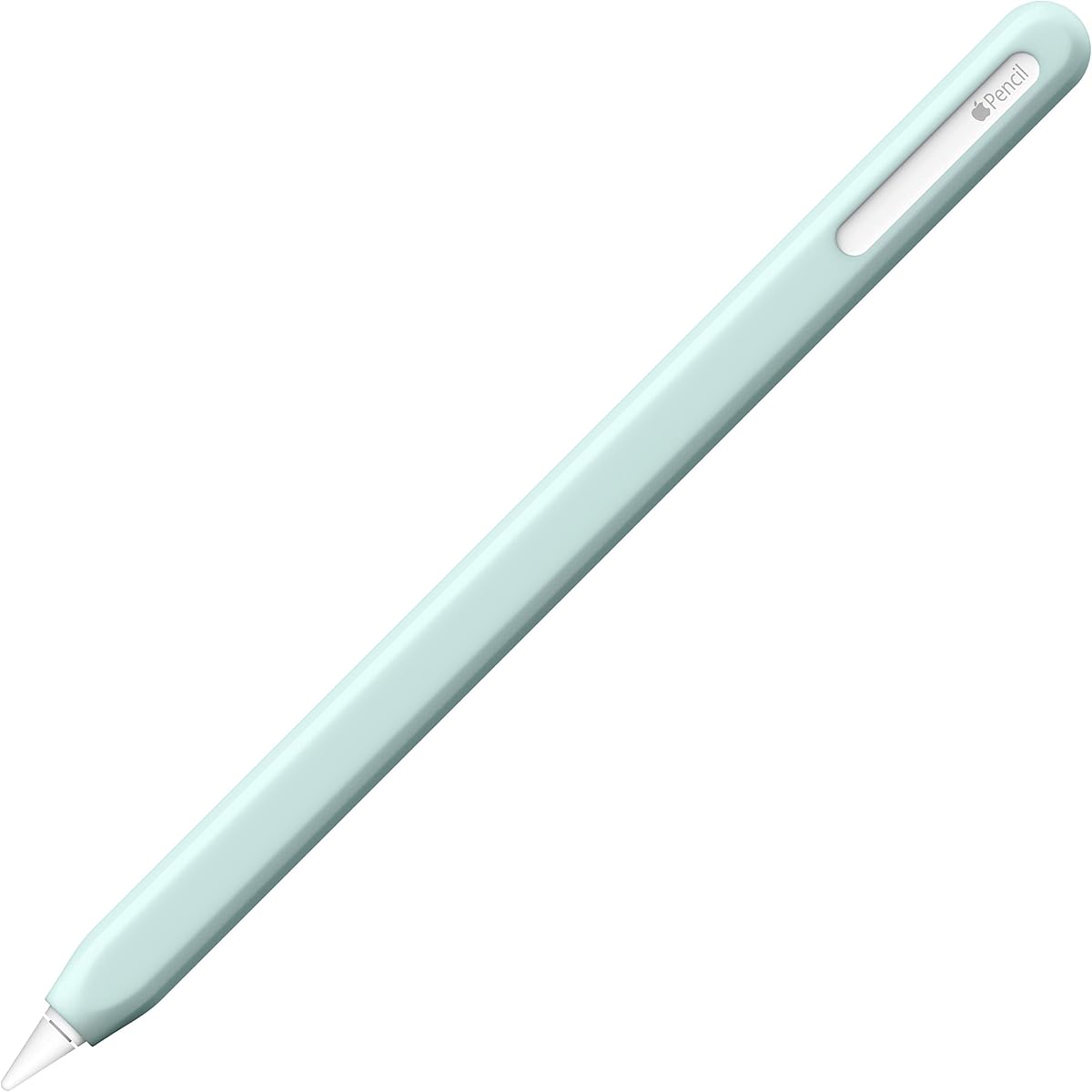
NimbleSleeve is a faceted silicone sleeve for the Apple Pencil 2 and Pro, earning a 4.3 rating. Its most distinctive benefit is resistance to rolling: the angular exterior helps the Pencil remain in place after it is set down, which is especially useful on desks with slopes or in bags that are moved around.
We may earn a commission when you buy through this link, at no additional cost to you.
The sleeve offers complete soft silicone coverage for grip, comfort, and protection from dust, dirt, and accidental drops. Its interior finish is intended to keep the Pencil secured rather than allow the sleeve to slide around the barrel. A dust-free coating helps maintain the clean appearance of the mint exterior.
The slim profile is designed to maintain magnetic charging and double-tap functionality on compatible models. The supplied warning is important, however: third-party iPad cases need an Apple Pencil cutout for wireless charging to work with the sleeve. First-generation compatibility is not listed.
NimbleSleeve is the pick for buyers who often set their Pencil down or carry it in a crowded bag and value roll resistance. It is also a strong choice for second-generation or Pro owners who want a clean protective sleeve and already own a case with an appropriate charging cutout.
Instead of allowing the Pencil to roll freely, the faceted exterior creates flatter contact points. This can reduce the need to chase a stylus across a desk and helps keep it from moving inside a bag.
Full silicone coverage helps isolate the Pencil from dust, dirt, and minor impacts. It also gives the smooth barrel a softer, more tactile surface for prolonged use.
We may earn a commission when you buy through this link, at no additional cost to you.
The SIXFU two-pack combines round and square holding styles in black and white grips for Apple Pencil Pro, second-generation, and USB-C models. Its 4.2 rating reflects a design that prioritizes choice, anti-slip handling, and a thin charging section rather than a uniform sleeve shape.
We may earn a commission when you buy through this link, at no additional cost to you.
The mixed geometry gives users several ways to position the Pencil between their fingers. This can help users find a more comfortable orientation while writing or drawing. The anti-sweat, non-slip surface is also intended to keep the stylus from rotating or falling away during use.
A tiny storage box is included with the two grips. Compatibility is limited to the modern models listed, and the product is explicitly incompatible with compact pen slots. As with other charging-compatible grips, the thin section must align correctly with the Pencil's charging area, and no case or accessory should obstruct that connection.
This pack is a practical option for users who want two colors and enjoy experimenting with grip shapes. It is less suitable for owners who store their Pencil in a narrow slot or need a first-generation fit, but it offers a distinctive combination of control, color, and modern-model support.
Different finger positions suit different tasks. The combined shape gives users an opportunity to rotate the grip and choose a more comfortable edge without changing accessories.
The ultra-thin cross-section is designed to preserve magnetic charging and double-tap use on supported models. Correct alignment is essential, particularly when an iPad case surrounds the Pencil's charging area.
We may earn a commission when you buy through this link, at no additional cost to you.
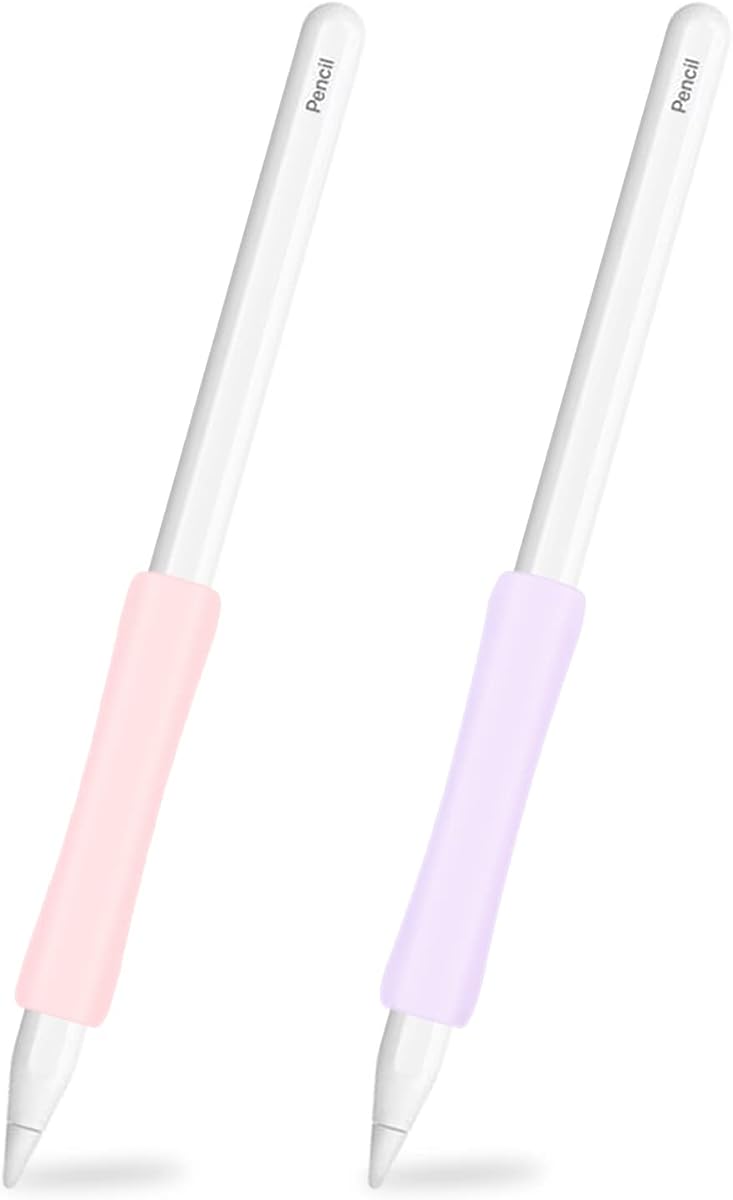
ProElife's pink and purple two-pack provides one of the broadest compatibility ranges in the guide, supporting Apple Pencil Pro, USB-C, second-generation, and first-generation models. It carries a 4.4 rating and uses a concave middle section intended to align with the curvature of the user's hand.
We may earn a commission when you buy through this link, at no additional cost to you.
The silicone is soft and stretchy, making installation straightforward and helping the sleeve hold firmly around the Pencil. The grip can also be moved to another position, allowing users to adjust the distance between their fingers and the stylus. Internal friction is designed to reduce slipping during writing.
The supplied information does not make detailed claims about magnetic charging or double-tap behavior, so owners who rely on those functions should inspect the fit. A flexible sleeve can also feel less rigid than a molded ergonomic accessory, and the stated adjustability should not be confused with a locking mechanism.
This two-pack is a good option for buyers who want colors and broad model coverage in an adjustable format. It is particularly useful for households with different Pencil generations or for anyone who wants to experiment with grip placement before committing to a fixed sleeve position.
The concave center gives the grip a more hand-shaped profile than a straight cylinder. That change can improve finger placement and create a more natural writing posture.
The pink and purple sleeves can be assigned to different Pencils or swapped according to preference. Broad compatibility makes the pair convenient for users who may upgrade or share an iPad setup.
We may earn a commission when you buy through this link, at no additional cost to you.
The most useful grip is one that fits your exact Apple Pencil, matches your preferred hold, and preserves the functions you use. Review model compatibility, charging clearance, material, shape, and case interaction before making a selection.
Compatibility is the first filter because the supported generations vary considerably. Some grips explicitly fit first-generation and second-generation models, while others support Pro and USB-C versions. Several products cover all four types, but a few are designed only for newer models. The ProElife modern two-pack, for example, expressly excludes the first-generation Pencil, while the UPPERCASE NimbleGrip states support for Pro, second generation, first generation, and USB-C.
Match the grip against the exact model in your hand rather than relying on a general reference to Apple Pencil accessories. Also consider whether you own more than one stylus, because a multi-model grip can simplify a shared or changing setup.
Modern Apple Pencils use magnetic charging and gesture-sensitive areas, so a grip that covers too much of the barrel can interfere with daily use. Some designs use ultra-thin sections to maintain charging and double-tap access, while others require removal of the grip before wireless charging. The UPPERCASE NimbleGrip, for example, advises exposing part of the double-tap area, while the Paperlike grip is specifically designed to preserve a broad set of functions.
Think about how often you charge directly against an iPad and whether you use a folio. A removable grip may be more convenient for frequent magnetic charging, whereas a thin, feature-conscious sleeve may suit users who keep the Pencil installed throughout the day.
Ergonomic grips use tapered, concave, faceted, or mixed geometries to fit the hand more naturally than a bare cylindrical Pencil. A tapered or concave middle can improve finger spacing, while flat or hexagonal surfaces give users a clearer edge to control. The ProElife products use widened or concave centers, and the SIXFU grip combines round and square holding areas.
Choose a shape that feels natural rather than assuming one ergonomic form suits everyone. If possible, compare the grip's width and surface angles with how you currently hold a pen, pencil, or stylus. A shape that encourages a relaxed grip may be more valuable than one that feels technically innovative but awkward.
Most options in this category use silicone because it is soft, flexible, and naturally resistant to slipping. Internal ribs, grooves, friction, or molded contours can help the grip stay fixed on the Pencil, while a threaded exterior may improve control when hands become damp. The elago grip also uses silicone to reduce scratches against nearby surfaces.
Look for a balance between softness and support. Very flexible sleeves are easy to install but may move or bunch, whereas firmer molded shapes can feel more stable. Pay attention to whether the product claims internal anti-slip grooves, a ribbed interior, or adjustable positioning, because these details directly affect control.
The grip is only one part of the setup; the iPad case determines whether the Pencil can charge and remain accessible. Some cases include a wide opening or dedicated Pencil holder, while compact folio designs and narrow slots can leave too little clearance. The Paperlike grip uses angled sidewalls to fit many cases and offers a guaranteed match with the Paperlike Folio or Bumper Case. The SIXFU grip, conversely, states that it is incompatible with compact pen slots.
Check the case opening, charging alignment, and storage method together. A grip that feels secure on a bare iPad may sit too high in a case, preventing direct magnetic contact. For owners of third-party cases, specifically look for a stated charging cutout or manufacturer guidance.
A sleeve can provide more than comfort. Full silicone coverage can help protect against dust, dirt, minor impacts, and scratches, while a faceted profile may keep the Pencil from rolling away after it is set down. The NimbleSleeve emphasizes complete protection and anti-roll behavior, while the elago grip highlights scratch prevention during contact.
Consider where you use and store your Pencil. A more protective full sleeve may be beneficial in a bag or shared workspace, while a minimal grip may be enough for stationary desk use. Anti-roll shapes are especially helpful for sloped desks, crowded tablet covers, and travel pouches.
A multi-pack can be more convenient than a single grip because you can keep a spare, use different colors, or assign grips to separate Pencils. The iPencil Holder set includes three sleeves, while both ProElife two-packs include two. The Paperlike product also includes Charcoal and Paperlike Blue grips with identical shapes.
Single-grip options may feel cleaner if you only own one Pencil and already know which design suits you. Multi-packs are better when compatibility, color variety, or a backup matters more. Confirm that the package contains grips only unless the listing explicitly states that an Apple Pencil is included.
Most silicone sleeves use a simple stretch-on installation, while the Pro-Draw Grip uses a split-back design that can wrap around an iPad edge. Simpler sleeves are usually easier to reposition or remove, but a more structured attachment may feel more secure during intensive use. Product instructions should be reviewed before applying any grip.
Also consider access to the Pencil's controls and charging area after installation. A grip that is easy to remove can be useful if you charge frequently, whereas one that stays firmly attached may be better for continuous drawing. The best installation method is the one that fits both your case and your routine.
Start by identifying your Apple Pencil generation and reading the grip's installation instructions. For a conventional silicone sleeve, align the opening with the end of the Pencil and gently roll the grip over the barrel rather than forcing it in one abrupt movement. A split-back model should be opened by following its specific alignment and iPad-edge procedure.
Once installed, check that the grip sits firmly and does not cover the double-tap, squeeze, or charging areas that you need. When charging the Pencil magnetically, align it with the correct iPad position and make sure no case, sleeve, or other accessory blocks the charging connection. Remove the grip first if the instructions call for it.
For care, clean the grip with a soft, slightly damp cloth and allow it to dry before reinstalling it. Avoid harsh chemicals and do not pull forcefully from an area where the silicone has stretched. Store the Pencil in a dry place, and remove the grip if it becomes dirty, distorted, difficult to position, or incompatible with a newly added case.
It depends on the grip and how it is installed. Some designs use ultra-thin sections intended to preserve magnetic charging, while others instruct users to remove the grip before charging. You should also check that your iPad case does not leave the grip between the Pencil and charging area.
A grip can interfere if it covers the gesture-sensitive portion of the Pencil. Some products include ultra-thin zones or provide specific exposure instructions, while others recommend removing or repositioning the sleeve. Follow the product guidance and leave any required area uncovered.
Compatibility differs by product. Several grips support first-generation, second-generation, USB-C, and Pro models, while others focus on first- and second-generation versions or only modern Pro, second-generation, and USB-C models. Always verify the exact model listed for the grip you intend to buy.
It depends on the case's Pencil opening, storage slot, and charging clearance. Full-coverage sleeves may not fit compact folio slots, while grips designed with angled sidewalls are more likely to work with wider cases. Check both the grip and case specifications before ordering.
Silicone adds softness and traction, while tapered, concave, faceted, or hexagonal shapes can support a more natural finger position. Comfort still depends on hand size and personal preference, so a grip that feels good during a short demonstration may not suit every writing style.
A single grip is sufficient for one Pencil and one preferred setup. A multipack is more useful when you own multiple Pencils, want different colors, need a spare, or use several iPads with different cases. The included quantity does not change the compatibility of the grips themselves.
Some flexible silicone sleeves can be moved along the Pencil to suit different finger placement. Molded or tightly fitted grips may have less flexibility, so check whether the manufacturer describes the grip as adjustable. Avoid forcing a fixed-position sleeve if doing so stresses the silicone.
A faceted or non-round grip can prevent the Pencil from rolling because it creates flat contact points on a desk. The NimbleSleeve specifically emphasizes this feature, while some mixed-shape grips also help reduce rolling. A case with a secure Pencil holder can provide additional protection during travel.
The UPPERCASE NimbleGrip is the strongest all-around recommendation because of its high rating, support for every Apple Pencil model, and choice between round and hexagonal holding surfaces. Paperlike Pencil Grips stand out for their premium feature set, two-color package, and emphasis on preserving modern Pencil functions.
For buyers who want a practical two-grip set, the ProElife modern two-pack offers modern-model support and magnetic charging compatibility, while the ProElife classic holder is a solid option for first- and second-generation users. Prioritize exact model fit, charging clearance, grip geometry, and case compatibility rather than choosing solely by appearance or package quantity.
Finally, review the current listing before ordering because ratings, availability, and product details can change. Confirm the supported Apple Pencil generation, read the charging and double-tap instructions, and check your iPad case so the grip works as intended in your daily setup.