
Nylavee 2.1 PC Soundbar
4.3Editor score
Dedicated 5.25-inch subwoofer
60-watt peak bass power
Bluetooth 5.4 wireless audio
Silk-dome tweeters
Side-mounted multifunction knob
Our guide compares 10 of the best PC Gaming Speakers under 100, covering soundbar and stereo designs, connectivity, bass, controls, and compact setups for
PC Gaming Speakers under 100 can make a surprisingly large difference to a gaming setup, especially when a laptop or monitor produces thin, position-dependent sound. The strongest options balance convincing directional audio, useful bass, straightforward connections, and a footprint that does not dominate the desk.
This guide compares ten speakers using their supplied specifications, including driver layouts, wireless standards, wired inputs, power methods, control options, dimensions where listed, and intended device compatibility. It covers compact soundbars, traditional two-piece stereo systems, and a 2.1 arrangement with a dedicated subwoofer.
Each numbered review explains who the speaker is best suited for, what it does well, and where it falls short. The top selections prioritize gaming features, clear sound, practical connectivity, and sensible desk placement. Product listings and promotions can change, so readers should verify current specifications, compatibility, and pricing before purchasing.
4.3Editor score

4.2Editor score

4.2Editor score
The comparison below places the ten shortlisted systems by design, audio hardware, connectivity, power, controls, and gaming-oriented features, making it easier to identify the right fit for a particular desk and setup.




The Razer Leviathan V2 X is a compact PC soundbar built for gamers who want clearer desktop audio without placing separate speakers on either side of the monitor. Its supplied specifications describe two full-range drivers, two passive radiators, Bluetooth 5.0, and a maximum volume output of up to 90dB. The result is a gaming-focused package that combines practical audio hardware with Razer Chroma lighting and software control.
We may earn a commission when you buy through this link, at no additional cost to you.
Its most appealing feature is the USB Type-C arrangement, which provides both power and audio through one cable. That makes placement under a monitor straightforward and reduces desk clutter. Passive radiators add low-frequency extension without requiring a separate subwoofer, while Bluetooth allows the soundbar to move between a gaming PC and a paired mobile device. Fourteen lighting zones and dynamic in-game effects also make the system feel at home in an RGB-equipped battlestation.
The main limitation is that Bluetooth 5.0 is an older standard, even though the supplied information still describes its low-latency performance. The soundbar is also designed primarily around computer and Bluetooth use rather than acting as a complete home entertainment hub. Buyers who require a headphone jack, built-in microphone, or the newest wireless specification should verify those details before ordering.
This is a strong recommendation for a gamer with a compact desk who values a clean installation, wireless flexibility, and synchronized lighting more than a large subwoofer. The combination of dedicated drivers, passive bass radiators, and one-cable operation makes it especially suitable for competitive gaming, music, videos, and everyday desktop use.
Sending power and audio through USB Type-C reduces the number of cables crossing the desktop. The low-profile enclosure also fits naturally beneath a monitor, preserving open space for a keyboard, mouse, and other accessories.
Razer Chroma RGB adds fourteen controllable lighting zones, dynamic effects, and integration with the wider Razer lighting ecosystem. Users can also adjust audio behavior and device selection through Razer Audio App and Razer Synapse.
We may earn a commission when you buy through this link, at no additional cost to you.
The Nylavee Computer Speakers for Desktop PC, Bluetooth & AUX PC Sound Bar offers a denser internal driver arrangement than many compact alternatives. Its specification lists four speaker units, two independent bass diaphragms, double-layer neodymium magnets, and mica-fiber diaphragms. With a 4.3 rating, it stands out as a flexible desktop system for listeners who want more internal speaker hardware without a separate subwoofer.
We may earn a commission when you buy through this link, at no additional cost to you.
The cavity-designed enclosure is intended to improve loudness and reproduce both rich upper frequencies and deeper bass. Bluetooth 5.0 provides wireless playback, while the 3.5mm AUX connection gives users a dependable wired route. USB power removes the need for a built-in battery, and a side knob handles operation without forcing users to navigate a complicated control panel. Compatibility extends to laptops, desktop PCs, phones, tablets, Xbox consoles, and PS5 systems.
There are some compromises. The product does not list RGB lighting, so it will not complement a lighting-focused gaming setup as directly as the Razer option. Bluetooth 5.0 is also less current than newer standards appearing elsewhere in this guide, and the single-knob control scheme may offer less granular adjustment than a dedicated app.
Choose this model if you want a substantial single-bar design, multiple input options, and easy USB operation in a bedroom, office, or gaming room. It is particularly useful for a gamer who wants to alternate between a wired desktop and a wireless phone without investing in a larger multi-component system.
Four speaker units and two independent bass diaphragms create a more elaborate internal layout than a conventional two-driver desktop bar. The design focuses on improving volume, upper-frequency detail, and bass response from a single enclosure.
Bluetooth 5.0 and 3.5mm AUX cover two common listening habits, while side-mounted knob operation keeps everyday adjustments simple. USB power means the system stays ready without a charging routine.
We may earn a commission when you buy through this link, at no additional cost to you.
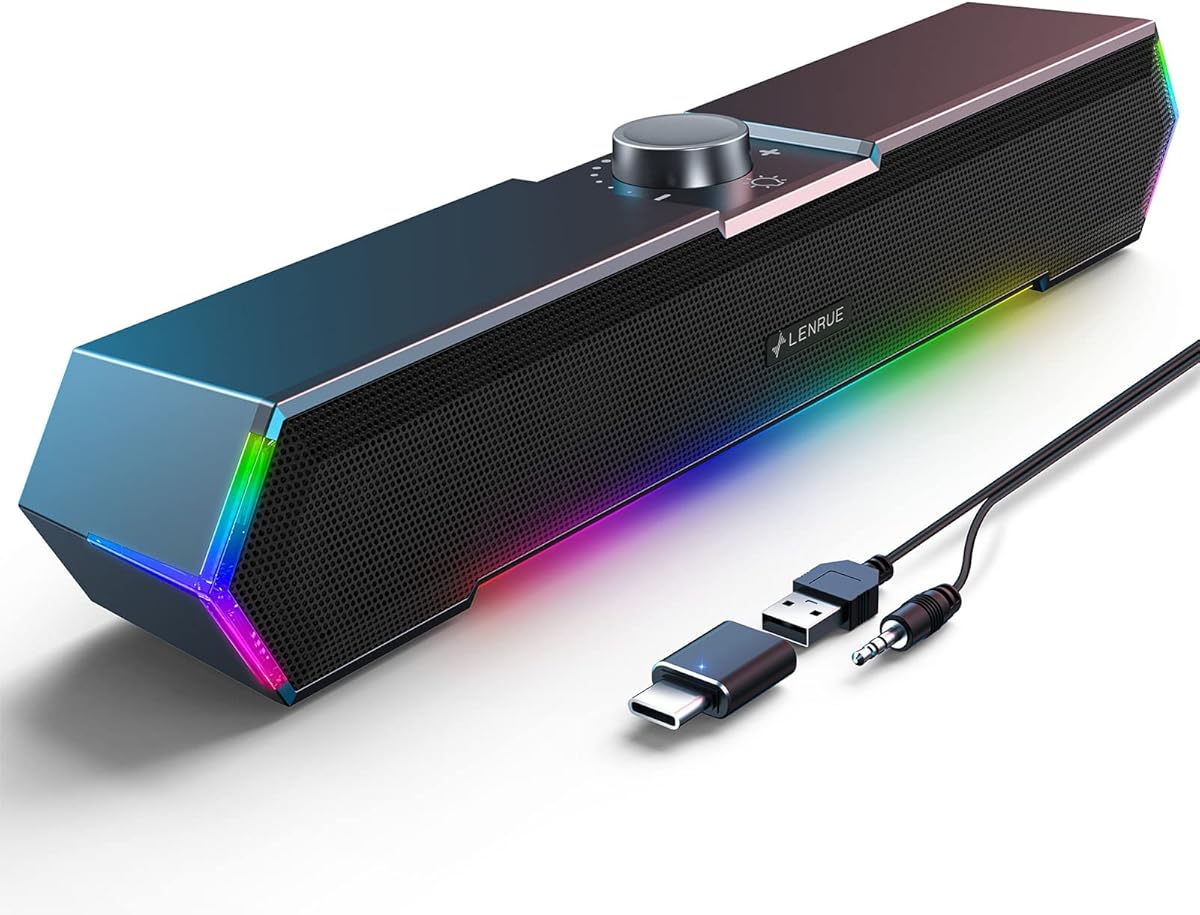
The LENRUE Computer Speakers for PC and Laptop, Under Monitor Sound Bar, Black focuses on a simple proposition: provide a cleaner computer-speaker upgrade without wireless complexity. It uses USB for power and a 3.5mm AUX cable for audio, making the setup immediately understandable for desktop and laptop users. Its 4.3 rating reflects a practical design aimed at work, study, media, meetings, and casual gaming.
We may earn a commission when you buy through this link, at no additional cost to you.
The under-monitor enclosure is designed to preserve desk space and keep the listening unit visually unobtrusive. Compatibility extends to Windows, Mac, and Chromebook computers with USB power and a 3.5mm audio output. A USB-C adapter is included for laptops without USB-A ports, while the wired signal path avoids the delay and dropout concerns that can accompany wireless links.
Its limitations are equally clear. There is no Bluetooth, built-in microphone, microphone input, headphone jack, HDMI, optical audio, or TV ARC. It is therefore best treated as a dedicated computer speaker rather than a universal soundbar. Users who want to switch to a phone or console without changing cables will need a more flexible model.
This LENRUE soundbar is a sensible choice for a student, office worker, or casual gamer who values reliability and a compact footprint. It is particularly attractive when the PC already has a standard headphone output and the user prefers stable wired audio over pairing or configuration.
USB power and 3.5mm AUX audio separate the essential functions clearly. There is no battery to charge, wireless pairing process, or driver installation, so the system can be ready with a basic plug-and-play routine.
The elongated, low-profile body keeps the listening unit close to the display and leaves more room on the desktop. It suits compact workstations, dorm rooms, home offices, and restrained gaming environments.
We may earn a commission when you buy through this link, at no additional cost to you.
The LENRUE G11 Computer Speakers for Desktop are a small two-piece system with a more conspicuous gaming aesthetic than a conventional office speaker. The angular housing, touch-activated game lighting, and top-mounted volume knob distinguish it visually and functionally. Its supplied specifications describe four large amplifier IC horns intended to deliver distortion-free stereo sound for games, music, video, and movies.
We may earn a commission when you buy through this link, at no additional cost to you.
The pair is designed to fit beneath a monitor and conserve desk space. Its cables are bundled together to reduce clutter, while a top knob provides direct volume adjustment. Power and audio use USB and 3.5mm connections, and the package includes a Type-C adapter. Compatibility is listed for Windows, Mac OS, and Chrome OS computers, making it broadly practical across common platforms.
The trade-offs are the lack of Bluetooth, a headphone port, and a microphone. Those omissions mean the G11 is best suited to computer audio rather than serving as a flexible hub for several entertainment devices. Its lighting also needs power, so it is not the neutralest option for a minimalist workspace, although the touch interface prevents the need to hunt for a small physical light button.
For a gamer who wants visible lighting and a conventional stereo layout in a compact package, the G11 is a worthwhile choice. It balances playful styling with simple wired operation and is better suited to casual and general gaming than to users seeking a dedicated subwoofer or advanced wireless switching.
A one-touch interface controls the lights, removing the traditional power-light button from the top of the speaker. The result is easier daily operation while preserving a dramatic angular appearance.
Unlike a single soundbar, the two separate enclosures can create a wider left-right presentation. Their under-monitor positioning preserves usable space while giving games and media more conventional stereo placement.
We may earn a commission when you buy through this link, at no additional cost to you.
The FUNLOGY Speaker pairs a compact enclosure with a relatively assertive 14-watt output figure. Dual 48mm full-range drivers and passive radiators are specified to produce clear mids, crisp highs, and punchy bass. Its 30-degree upward-facing layout is especially noticeable during use because the drivers are directed toward the listener rather than straight into the desk.
We may earn a commission when you buy through this link, at no additional cost to you.
Setup is refreshingly uncomplicated. Included USB and 3.5mm cables provide power and audio without driver installation or Bluetooth pairing, while a volume dial provides direct control. The gold-plated AUX input is intended to reduce signal noise during PC startup and shutdown. The system also works with desktop PCs, laptops, monitors, smartphones, and gaming consoles, giving it more source flexibility than a computer-only model.
The main limitations are straightforward. It is wired, so users cannot stream from a paired phone without an adapter, and its compact 2.0 design does not include a separate subwoofer. The supplied information does not list a headphone output or microphone, so it should not be treated as a full audio hub.
The FUNLOGY is a strong value-oriented recommendation for a compact workstation where desk space matters. Its angled drivers, clearly stated 14-watt output, noise-conscious input, and simple dial control give it more gaming relevance than a bare-bones office speaker while keeping setup minimal.
The 30-degree tilt helps the upward-facing drivers reach the seated user's ears more directly. That geometry can improve clarity while allowing the unit to remain small and visually restrained.
Dual 48mm drivers and passive radiators are combined to deliver 14 watts of total output. That makes the system appropriate for close listening at a computer without requiring separate satellite speakers.
We may earn a commission when you buy through this link, at no additional cost to you.
The Bluedee Computer Speakers for Desktop PC, Rechargeable Computer Sound Bar is built for users who want to move their audio between a fixed desk and another room. Its rechargeable design supports up to 13 hours of cordless playback at moderate volume, while USB-C power can keep it connected during extended sessions. A 4.3 rating makes it one of the stronger all-around options in the group.
We may earn a commission when you buy through this link, at no additional cost to you.
Sound comes from dual full-range drivers and tweeters, with the specification highlighting crisp highs, clear vocals, and good bass. Connectivity is notably flexible: Bluetooth 5.3, 3.5mm AUX, USB flash-drive playback, and TF-card playback are all listed. The 16.5 by 3 by 3-inch enclosure is sized to fit under a monitor, and side-mounted buttons and knobs provide quick access to volume and playback modes.
One important limitation is that the USB port supports flash-drive playback only; it is not described as a USB audio input. The rechargeable battery also introduces a charging routine and may deliver less listening time at higher volumes. Users needing a permanently connected computer speaker may find the wired-only alternatives simpler.
This soundbar is well suited to flexible spaces such as dorm rooms, bedrooms, home offices, and mixed-use desks. It is especially useful for a gamer who alternates between a computer and a phone, wants to carry music elsewhere, and values multiple source options in a compact enclosure.
The built-in rechargeable battery is the defining feature, allowing the speaker to move to another room without carrying cables. Users can keep it plugged into USB-C for uninterrupted listening or use it cordlessly when mobility matters.
Bluetooth, AUX, flash-drive playback, and TF-card support cover computers, phones, and locally stored media. That variety makes the system useful beyond a single gaming station.
We may earn a commission when you buy through this link, at no additional cost to you.
The Amazon Basics Stereo 2.0 Speakers remain one of the most approachable ways to improve computer audio. The set includes two black external speakers, USB power from a computer or laptop, a 3.5mm AUX input, and convenient in-line volume control. Its 4.4 rating is the second-highest listed figure in the group, indicating a well-regarded general-purpose option.
We may earn a commission when you buy through this link, at no additional cost to you.
The conventional satellite format gives each side of the desk an independent speaker, which can create a more natural stereo image than a single bar. Blue LED lights add visual definition, while the metal finish and scratch-free padded bases provide a practical desktop foundation. A bottom radiator is included to give the low end more extension than a basic miniature speaker.
The trade-offs are its conventional feature set. There is no Bluetooth, dedicated subwoofer, headphone jack, microphone, RGB lighting, or gaming-focused spatial processing listed. It also cannot provide the deeper low-frequency impact of a 2.1 system, so demanding players may find it better for general use than bass-heavy titles.
This is a dependable recommendation for a student, office user, or casual gamer who wants an uncomplicated stereo upgrade. Choose it when USB power, a 3.5mm connection, accessible volume control, and a familiar two-piece layout matter more than wireless convenience or advanced gaming features.
Two separate speakers can be positioned around the monitor for left-right separation. The understated black finish and compact scale suit offices and gaming rooms that do not need a large entertainment system.
USB power removes the need for a wall adapter, and the inline control places volume adjustment within reach. The system is designed for immediate use with a computer or laptop.
We may earn a commission when you buy through this link, at no additional cost to you.
The Klipsch ProMedia 2.1 THX Certified Computer Speaker System is the most substantial traditional speaker set in the lineup. It pairs two two-way satellite speakers with a 6.5-inch side-firing, ported subwoofer and carries a 4.5 rating, the highest customer rating supplied. The system is designed to fill a room with sound for games, films, and music rather than remain a minimal desktop accessory.
We may earn a commission when you buy through this link, at no additional cost to you.
Klipsch Microtractrix horn technology is used to improve clarity, efficiency, and dispersion toward the listener. The three-inch midrange drivers complement the subwoofer's full-bandwidth low-end output. Maximum output is specified at 200 watts of peak power and 110dB in the room. A control pod provides main volume and subwoofer gain adjustments, while a 3.5mm input supports computers, televisions, music players, and gaming consoles.
The main drawback is physical scale. The listed dimensions show a substantial subwoofer and two satellites, so the system will demand considerably more room than a soundbar or palm-sized stereo pair. It is also not compatible with the guide's stated budget and is included as a higher-end reference rather than a qualifying budget selection. Users shopping strictly by the keyword should not confuse strong sound quality with budget compliance.
Despite that limitation, the ProMedia 2.1 is an excellent choice for a desktop user who has room for a full speaker system and wants substantial bass, clear midrange detail, and independent control over the low end. It is especially fitting for a larger gaming setup where the speakers can be positioned properly around the listening area.
A separate 6.5-inch ported subwoofer provides low-frequency output that a small 2.0 desktop set cannot match. Independent subwoofer gain lets the user balance bass against game dialogue and system sounds.
Each satellite combines a three-inch midrange driver with Klipsch horn technology. The system is designed to control dispersion and direct useful sound toward the listener while the subwoofer handles the lowest frequencies.
We may earn a commission when you buy through this link, at no additional cost to you.
The Logitech Z207 offers a balanced mix of traditional stereo design and useful wireless convenience. Each speaker has one active, powered full-range driver and one passive radiator for bass extension. Bluetooth 4.2 and a 3.5mm cable cover both modern wireless use and dependable wired listening, while the system's 4.3 rating reflects a broadly favorable user response.
We may earn a commission when you buy through this link, at no additional cost to you.
Logitech Easy-Switch technology is designed to make movement between devices less disruptive. Pausing audio on one source and pressing play on another can move control to the second device. On-speaker buttons and knobs handle power, volume, and wireless pairing, and a headphone jack provides a convenient way to use the system with larger or more private listening headphones.
The principal drawback is that Bluetooth 4.2 is not the newest wireless standard. It is also a 2.0 system, so deep bass and strong virtual surround effects are outside its design scope. The soundbar-style devices in this guide may be better choices for users who prefer a single enclosure, while the Z207 remains ideal for those who want two speakers and a headphone output.
The Z207 is a versatile recommendation for a gamer who alternates between a desktop and a phone, wants a headphone jack, and does not need a subwoofer. It fits home offices, dorm rooms, and smaller gaming desks where wireless convenience and traditional stereo separation are the priorities.
Easy-Switch supports a convenient transition between a computer and another paired device. The system accepts audio through either Bluetooth or its 3.5mm connection.
A headphone output on one of the speakers allows the user to switch from the room-filling desktop system to personal headphones without unplugging the computer.
We may earn a commission when you buy through this link, at no additional cost to you.
The Nylavee Computer Speakers with Subwoofer, 2.1 PC Soundbar combines a multi-driver desktop bar with a standalone 5.25-inch bass driver. The subwoofer is rated at 60 watts peak power, or 30 watts RMS, while the bar includes soft-dome silk tweeters and full-range drivers. The result is a more layered gaming presentation than a basic 2.0 system, particularly for effects-heavy games, films, and music.
We may earn a commission when you buy through this link, at no additional cost to you.
The enclosure's cavity design is intended to produce consistent sound around a desktop or monitor setup. Bluetooth 5.4 and a 3.5mm AUX connection provide wireless and wired routes, and compatibility is listed for desktops, laptops, MacBook, iMac, Xbox, and PS5 systems. A side knob handles power, mode switching, volume, and reset functions, so daily use does not require software or complicated menus.
The obvious trade-off is footprint. A separate subwoofer takes up additional floor or desk space, and the included power adapter means the system is not designed for cordless portability. The supplied specifications also do not mention a headphone jack, microphone, RGB lighting, or surround-processing controls beyond the stated 2.1 configuration.
This is the premium pick for a gamer who wants deeper impact and clearer high-frequency detail while retaining a practical 2.1 layout. Place the bar beneath the monitor, position the subwoofer to suit the room, and use Bluetooth when switching between devices or AUX when maximum connection stability is the priority.
The standalone 5.25-inch driver provides a clearer division of frequency ranges than passive desktop radiators. That separation can preserve vocal and effect detail while the subwoofer delivers deeper low-frequency impact.
Bluetooth 5.4 provides the newest wireless specification in this group, while dual silk-dome tweeters target clear highs. The combination suits users who regularly alternate between games, music, and streamed video.
We may earn a commission when you buy through this link, at no additional cost to you.
The most useful gaming speaker is not necessarily the one with the longest specification list. Audio design, connection stability, controls, and desk placement should be matched to the games, computer, and physical space you actually use.
A soundbar places multiple drivers in one enclosure, making it easy to position beneath a monitor and reducing visual clutter. Separate speakers can create a wider left-right image and give each driver more room, but they require two units and more careful placement. Soundbars are convenient for compact desks, while satellite systems may feel more natural with games that use positional audio.
Choose a soundbar for minimal setup and a unified appearance. Choose two-piece speakers when stereo separation matters more and there is room on both sides of the display.
A 2.0 system relies on its full-range drivers and passive radiators to create all frequencies. A 2.1 system adds a dedicated subwoofer for deeper low-end output, making explosions, engines, footsteps, and music more impactful. The added bass also requires more space and careful subwoofer placement to avoid boomy or uneven results.
For general desktop use, a capable 2.0 set may be enough. Choose a dedicated 2.1 arrangement when strong bass and cinematic impact are central to your gaming priorities.
A wired 3.5mm AUX connection provides a direct signal and avoids pairing, compression, and wireless dropouts. Bluetooth allows easier movement between a computer, phone, or tablet, but the listed version and implementation should be considered. Newer Bluetooth specifications in this group include 5.3 and 5.4, while older versions still provide a practical way to switch sources.
Prioritize wired audio for a stationary competitive setup. Prioritize Bluetooth when you regularly move between devices or want a less cable-heavy desk.
Most compact desktop speakers draw power through USB, allowing them to run directly from a computer or laptop without a dedicated power brick. Rechargeable systems add cordless use but introduce charging and battery-management considerations. Systems that use an external adapter may still be easier to position because the power connection can sit farther from the listening position.
USB power is the simplest choice for a fixed desk. A rechargeable model is better when you want to carry the speaker between rooms. Check whether the system includes the necessary adapter before purchase.
A long soundbar can fit beneath a monitor, while a pair of speakers may sit too far apart on a compact desk. Upward-facing drivers can direct sound toward a seated listener, and low-profile cases preserve room for a keyboard and mouse. A separate subwoofer needs its own placement and should not be squeezed into a confined corner.
Measure the available space before ordering. Compare the speaker footprint with your monitor base and leave enough distance for controls, cables, and airflow.
A volume dial or inline control is convenient when a game is running and a software interface would be distracting. App-based control can be useful for RGB lighting, device switching, equalization, or firmware functions. A multifunction knob keeps the hardware simple but may not expose as many adjustment options as a dedicated control panel.
Choose physical controls when convenience and reliability are the priority. Choose app control when lighting, device management, or deeper personalization is important to your setup.
RGB lighting can reinforce a gaming aesthetic, synchronize effects with other peripherals, or simply make a desk setup feel more cohesive. It does not improve sound quality, so it should be considered alongside driver design, bass capability, and connectivity. Some gaming speakers also prioritize low-latency operation, while others provide virtual surround or spatial processing.
Treat lighting as an aesthetic benefit rather than a substitute for audio quality. Check that the lighting software works with your operating system and existing peripherals before making it a priority.
A headphone output is valuable for late-night gaming, while a microphone input can support a separate desk microphone without reaching behind the speaker. Bluetooth, AUX, USB audio, and memory-card playback make a system more useful outside a single PC setup. Some compact models intentionally omit these extras to keep their footprint and operation simple.
List the connections you actually need before choosing. A simple wired bar may suit a computer-focused user, while a multi-input system is better for games, music, phones, and consoles in one setup.
Position the speakers at the beginning rather than at the end of setup. For a soundbar, center it beneath the monitor and keep the drivers unobstructed. For separate speakers, place them to form a triangle with the listening position, and put the subwoofer near the front of the desk or on the floor. Start with the volume low, then increase it gradually.
Choose the connection that matches the source. Use USB for power and the included audio cable for a stable wired link, or pair Bluetooth only when the device is close and the system is ready to use. Select the correct source through the speaker controls, confirm that the computer is outputting to the intended device, and set a moderate in-game volume before testing bass, dialogue, and directional effects.
Keep the drivers and ports free from dust, and do not push the volume to maximum for extended periods. Route cables away from moving parts and sharp edges, especially around a subwoofer. Rechargeable speakers should be kept away from excessive heat and wet conditions. Update any available control software, and recheck the input and volume settings after connecting a new computer or console.
Soundbars are usually better when desk space and simple placement are priorities, while separate speakers can provide a wider stereo image and more flexible left-right positioning. A soundbar is especially convenient under a monitor, but it should not be blocked by objects. Separate speakers are worth considering in a larger setup where accurate positioning is easier.
A subwoofer is not essential for every game, but it can make explosions, vehicles, footsteps, and cinematic music feel more impactful. A 2.0 system with capable full-range drivers may be sufficient for competitive titles where dialogue clarity and directional cues matter most. A 2.1 system offers a wider frequency range at the cost of additional desk or floor space.
Bluetooth can be convenient, particularly for switching between a computer and a phone, but a wired connection is generally the safest choice for consistent gaming audio. The product specifications in this guide include several Bluetooth versions, and newer versions may improve efficiency and switching. For a stationary gaming PC, AUX remains the simplest low-latency option.
Many of the listed models support devices with a 3.5mm audio output, including Xbox and PS5 systems. Compatibility depends on the console, controller, display, or adapter used, so check the port requirements before connecting. A model with Bluetooth or multiple inputs can also be shared more easily between a console and computer.
Center a soundbar beneath the monitor and keep any upward-facing drivers clear. Separate speakers should be placed symmetrically and angled toward the listening position. A subwoofer benefits from room to develop clean low frequencies, so avoid enclosing it in a tight corner where bass may sound exaggerated or boomy.
Most of the models described here are designed for plug-and-play operation and do not require operating-system drivers. Razer models add control through Razer Audio App and Razer Synapse, mainly for functions such as lighting, device switching, and soundbar settings. Other systems are intended to be controlled directly through their buttons, knobs, or side controls.
USB-powered speakers are dependable for a stationary desk and draw power directly from a computer or laptop. Rechargeable speakers provide the freedom to move the system to another room without cables, making them useful in flexible living spaces. The trade-off is the need to recharge the battery and the possibility of shorter cordless use at higher volumes.
Start with sound quality, reliable input options, and a footprint that fits the available desk area. Bluetooth, RGB lighting, headphone outputs, and app controls can be useful, but they should support rather than replace a solid basic design. For a single monitor setup, an under-monitor soundbar is often the cleanest solution.
The Razer Leviathan V2 X is the most complete gaming-focused choice, combining a compact under-monitor design, full-range drivers, passive radiators, one-cable USB Type-C operation, Bluetooth, and Chroma RGB. The Nylavee 2.1 PC Soundbar stands out for dedicated bass, silk-dome tweeters, and modern Bluetooth, while the FUNLOGY 14W Stereo PC Speakers deliver a focused, affordable upgrade with an angled compact design.
Prioritize the connection method, physical footprint, and sound configuration that suit your habits. Wired systems offer dependable operation, Bluetooth improves flexibility, separate satellites can widen the stereo field, and a subwoofer provides the strongest low-end impact. Controls and lighting are worthwhile additions, but they should complement rather than determine the choice.
Before ordering, confirm the speaker's inputs, power requirements, dimensions, and compatibility with your computer or console. Product listings, ratings, features, and promotions can change, so verify the current information at the retailer and compare the final cost with your available budget.