
StarTech 2-Port GbE SFP
5.0Editor score
Two unlocked 1Gb SFP slots
Intel I350-AM2 controller
IPv4 and IPv6 support
PXE and VLAN tagging
Low-profile bracket included
This Fiber Optic Network Interface Card guide compares 10 options for speed, ports, controller features, operating-system support, expansion-slot fit, and
A fiber optic network interface card adds high-speed Ethernet connectivity to a desktop, workstation, or server that lacks a suitable built-in port. The best choice depends on port count, controller, PCIe lane requirements, operating system, form factor, and whether you need SFP, SFP+, or SFP28 connectivity.
The products in this guide were compared using their published specifications, compatibility statements, supported networking features, physical requirements, and customer ratings. Coverage includes single-port and dual-port adapters, one-gigabit and ten-gigabit models, a twenty-five-gigabit RDMA option, and one copper-based 10GBase-T card.
Each review identifies the strongest use case for its card while noting relevant limitations. The top selections favor versatile dual-port design, broad virtualization support, and a practical single-port configuration. Product availability, driver maturity, and prices can change, so verify current details before purchasing.
5.0Editor score

4.9Editor score

4.4Editor score
This side-by-side comparison highlights each adapter's network speed, port configuration, host interface, controller, and most notable platform or management capabilities.


The StarTech 2-Port GbE SFP Network Card is a polished two-port option for administrators who want fiber connectivity without moving to 10GbE. It holds a 5.0 customer rating and uses the Intel I350-AM2 chipset, a recognizable platform for dependable desktop and server networking. Its two open SFP slots make it more flexible than a fixed copper adapter.
We may earn a commission when you buy through this link, at no additional cost to you.
Each port can deliver full-duplex 1Gbps performance through compatible MSA-compliant or branded SFP modules, including direct-attach copper modules. The controller supports IPv4, IPv6, link aggregation, jumbo frames, VLAN tagging, PXE boot, checksum offloading, and Intel virtualization technologies. LED indicators and a built-in heatsink add practical management and thermal features.
The main limitation is speed: this card is intended for 1GbE networks rather than modern 10GbE storage fabrics. A PCIe x1 or larger slot is sufficient, which makes installation easier, but two simultaneous full-speed links still need a suitable upstream switch. The SFP hardware and associated transceivers or cables are additional considerations for the complete setup.
This is an excellent choice for fiber-rich 1GbE environments, especially servers that benefit from two ports, link aggregation, PXE deployment, and hardware-assisted networking. It is not the right fit when transferring large files over 10GbE, but within the Gigabit category, its feature set, physical design, and customer feedback make it stand out.
Two SFP slots allow separate fiber or direct-attach copper links, giving administrators more freedom than a single-port card. The open cage is especially useful when switch hardware, transceivers, and cable lengths vary between deployments.
PXE boot, VLAN tagging, jumbo-frame support, link aggregation, and virtualization offloads make the adapter suitable for managed infrastructure. LED status indicators also simplify physical troubleshooting.
We may earn a commission when you buy through this link, at no additional cost to you.
The LinksTek X520-DA1 is a single-port 10GbE adapter aimed at NAS owners, desktop users, and servers that need a dedicated high-speed fiber link. Its 4.3 rating reflects a generally capable design built around the Intel 82599 controller. The PCIe 2.0 x4 interface supplies enough host bandwidth for a 10GbE connection.
We may earn a commission when you buy through this link, at no additional cost to you.
The SFP+ port supports 10GbE and 1GbE optical transceivers as well as compatible DAC and AOC cables. Storage-over-Ethernet protocols including iSCSI, FCoE, and NFS are supported, making the card relevant to NAS and virtualization setups. Intel Ethernet features cover QoS, traffic management, Flexible Port Partitioning, VMDq, SR-IOV, Receive Side Coalescing, and Flow Director.
Driver installation is more involved on consumer Windows releases, while Windows Server and listed Linux distributions are better established. The card also requires a PCIe x4, x8, or x16 slot, and its own transceiver or cable. Its single port limits redundancy options compared with the dual-port alternatives in this guide.
Buyers seeking one dependable 10GbE connection for a NAS, workstation, or lightly virtualized server will find this card practical. It is less attractive when dual links, simpler purchasing, or broader platform support matter more than its mature Intel feature set.
Support for iSCSI, FCoE, and NFS makes the adapter more than a basic web-browsing upgrade. These protocols can be valuable when consolidating storage traffic or connecting a NAS over a dedicated high-speed link.
VMDq, SR-IOV, traffic management, and Flexible Port Partitioning provide useful tools for virtualized servers. The feature set gives administrators more control over workload isolation and bandwidth allocation.
We may earn a commission when you buy through this link, at no additional cost to you.
The Asus XG-C100F is a straightforward 10GbE SFP+ card for systems that need one high-speed fiber connection without a large multi-controller design. It carries a 4.3 customer rating and uses a PCIe 2.0/3.0 x4 interface. Its physical design emphasizes a compact card and an integrated aluminum heatsink.
We may earn a commission when you buy through this link, at no additional cost to you.
The SFP+ cage accepts compatible fiber optic and direct-attach copper connections, allowing the same card to serve different cabling environments. Built-in QoS automatically prioritizes important streams or games, while the aluminum heatsink is designed to maintain cooler operation during sustained workloads. The specified operating range is 0 to 40 degrees Celsius.
Compared with the Intel 82599-based options, the published product data provides fewer details about virtualization, operating systems, and management capabilities. Buyers should therefore verify driver support for their exact platform before ordering. The single SFP+ port also means redundancy or link aggregation would require a different solution.
The XG-C100F makes sense for a compact workstation or desktop that needs one 10GbE uplink and values a simple, thermally considered design. It is best for users who can confirm platform compatibility and do not need the extensive storage and virtualization feature list offered by the higher-end adapters.
The integrated aluminum heatsink helps dissipate heat without requiring a large cooling assembly. That makes the card potentially convenient for smaller workstations, although enclosure airflow still matters.
The cage supports both fiber and direct-attach copper connections. This flexibility lets the adapter follow a switch's transceiver and cable ecosystem instead of locking the installation to one media type.
We may earn a commission when you buy through this link, at no additional cost to you.
The 10Gtek X520-10G-1S delivers a familiar Intel 82599EN platform in a practical single-SFP+ format. Its 4.4 rating places it among the better-reviewed options, and the card targets servers, high-speed desktops, and NAS installations that need 10GbE connectivity. A PCIe x8 lane design provides ample host-side bandwidth.
We may earn a commission when you buy through this link, at no additional cost to you.
The adapter supports iSCSI, FCoE, and NFS, along with I/O virtualization for stable server operation. Both a profile bracket and a low-profile bracket are included, simplifying installation in compact cases. The published compatibility list covers multiple Windows Server releases, Windows client systems, Linux, ESX, and ESXi, with a driver caveat for Windows 11.
Unlike some adaptable 10GbE cards, this model is explicitly limited to 10Gb operation and does not support 2.5GbE, 5GbE, or 1GbE. It also lacks hot-swapping. The SFP+ module or cable must be supplied separately, and users of QNAP or Synology systems are directed to confirm compatibility before buying.
This is a strong budget-oriented choice when an Intel 82599EN controller, 10GbE SFP+, and broad server compatibility are priorities. It is less suitable for installations that need multi-speed fallback or physically hot-swappable media, but it remains an efficient route to a dedicated fiber connection.
The 82599EN is a widely recognized controller with established driver paths in server and virtualization environments. Its I/O virtualization support also makes it relevant to hosts running multiple virtual workloads.
Both profile and low-profile brackets are supplied, giving the card a better chance of fitting servers and compact workstations. Buyers should still confirm the bracket dimensions against their enclosure.
We may earn a commission when you buy through this link, at no additional cost to you.
The 10Gtek Realtek RTL8127 is notable for combining a 10GbE SFP+ port with a PCIe Gen4 x1 design. Its 4.5 rating is strong, and the narrow host interface can make installation easier in systems where expansion-slot space matters. The card fits PCIe x1, x4, x8, and x16 slots.
We may earn a commission when you buy through this link, at no additional cost to you.
The SFP+ port accepts compatible 10G modules, DAC cables, and AOC cables. RealWoW technology supports wake-up and diagnostics, while PXE, WOL, jumbo frames, IEEE 802.1Q VLAN tagging, 802.3x flow control, and double VLAN support cover common management needs. Both full-height and low-profile brackets are included.
Platform support is narrower than several Intel-based competitors. The card lists Windows Server 2019, 2022, and 2025, Windows 10 and 11, and Linux kernels through 6.15, but it does not support FreeBSD, ESX, or ESXi. Those exclusions are important for hypervisor-focused installations.
This card is a good match for a Windows or Linux workstation that needs 10GbE fiber but has limited expansion lanes. It also suits anyone prioritizing a compact, lane-efficient design over the broad virtualization and storage features associated with the 82599 and ConnectX families.
Using one PCIe lane lets the card operate in nearly any modern expansion slot while preserving other lanes for other devices. This is useful in compact desktops and older workstations with limited expansion bandwidth.
PXE, WOL, diagnostics, jumbo frames, VLAN tagging, and flow control cover common administration needs. The card is still not a universal choice because its virtualization operating-system support is limited.
We may earn a commission when you buy through this link, at no additional cost to you.
The FebSmart X520-DA1 Compatible card combines an Intel 82599EN controller with a compact four-lane design and broad platform recognition. Its 4.5 rating reflects a well-received general-purpose option for NAS systems, virtual machines, storage networks, and conventional desktops. The PCIe 2.0 x4 interface works in x4, x8, and x16 slots.
We may earn a commission when you buy through this link, at no additional cost to you.
Unlike an adapter restricted to one vendor's recognized modules, the open SFP+ cage accepts third-party DAC, AOC, 10GBASE-SR multimode, and 10GBASE-LR single-mode optics. The link can also step down from 10GbE to 2.5GbE, 1GbE, and 100M, adding flexibility when the connected switch cannot provide a full-speed link.
Proxmox, TrueNAS, Unraid, ESXi, QNAP, Synology, Ubuntu, Debian, and CentOS are specifically described as detectable without a separate driver step. Windows instead requires the Intel Ethernet Adapter Complete Driver Pack. The passive heatsink is designed to run warm, so a well-ventilated chassis or additional fan may be appropriate in a silent build.
This card is especially attractive to users who want a single 10GbE SFP+ port without giving up fallback speeds or broad operating-system support. It is less ideal for a quiet, poorly ventilated system, but its four-lane footprint, unrestricted media options, and strong platform coverage make it a versatile choice.
The SFP+ cage works with several categories of DAC, AOC, multimode, and single-mode connections. Buyers can select equipment based on deployment needs rather than being restricted to a narrow approved-module list.
Fallback to 2.5GbE, 1GbE, and 100M can simplify troubleshooting and temporary connections. It also provides a path for establishing service before the full 10GbE infrastructure is available.
We may earn a commission when you buy through this link, at no additional cost to you.
The LinksTek CX4121A is the strongest all-around option in this guide for infrastructure that needs more than a basic 10GbE uplink. It has a 4.9 customer rating and combines two 25GbE SFP28 ports with a Mellanox ConnectX-4 Lx EN controller. A PCIe 3.0 x8 host interface supports the dual-port design.
We may earn a commission when you buy through this link, at no additional cost to you.
RDMA over RoCE, I/O virtualization, SR-IOV, PXE, iSCSI, NVGRE, VXLAN, and GENEVE make the adapter well suited to virtualized servers, storage platforms, cloud systems, databases, and data analytics. It supports 25GbE and 10GbE standards, 9.6KB jumbo frames, VLAN tags, priority, link aggregation, and time synchronization features.
The card is designed for SFP28 transceivers, DAC cables, and AOC cables using PAM4 Ethernet links. Its broad platform list includes several Windows and Windows Server releases, RHEL, CentOS, FreeBSD, VMware, and other Linux-based systems. Link negotiation can adjust to x8 or x4 operation and older PCIe generations, making it adaptable to different host slots.
This is the top recommendation for a server operator who wants dual high-speed optical ports, RDMA capability, and sophisticated virtualization support. The hardware is more specialized than a standard 10GbE card, so the switch, optics, operating system, and workload must all align before installation.
RDMA over RoCE can reduce CPU involvement and latency in data-intensive network paths. That makes the adapter particularly relevant to clustered storage, analytics, and heavily virtualized environments.
Two SFP28 ports provide room for separate networks, aggregation, or redundant paths. The 64Gbps aggregate PCIe 3.0 x8 bandwidth is sufficient to carry simultaneous 25GbE traffic.
We may earn a commission when you buy through this link, at no additional cost to you.
The 10Gtek X520-SR1 stands out because it includes a multimode optical module, reducing the need to source a separate basic optic for compatible short-range links. It uses the Intel 82599EN controller and offers one 10GbE SFP+ port. The product data does not show a customer rating, so its assessment relies on specifications rather than review history.
We may earn a commission when you buy through this link, at no additional cost to you.
Its PCIe x1 host interface is unusually compact and can fit x1, x4, x8, or x16 slots. The card offers TCP/UDP/IP checksum offload and TCP segmentation to reduce processor work. Gold-plated edge fingers and automatic speed and duplex adaptation support steadier physical operation.
The SFP+ interface can accept single-mode or multimode optical modules, AOC cables, and DAC cables even though one multimode module is supplied. Its full-height and low-profile brackets fit different chassis styles, while the listed operating systems include Windows, Windows Server, Linux, VMware, CentOS, Ubuntu, and FreeBSD.
This is a useful choice for a workstation or server that already uses compatible multimode infrastructure and wants an included starting optic. The included module should be checked against the required reach and connector arrangement, and the lack of customer feedback is worth considering against more established models.
The bundled multimode module can make a compatible short-range installation more complete from the start. It does not replace the need to verify distance, connector, and fiber type against the destination switch.
Checksum offload and TCP segmentation allow the processor to focus on other tasks while the controller handles network processing. These features are valuable in servers handling sustained file or backup traffic.
We may earn a commission when you buy through this link, at no additional cost to you.
The TP-Link TX401 is the most approachable option for users who want 10GbE performance over twisted-pair copper rather than an optical transceiver. It has a 4.2 rating and a single 10GBase-T port. Because the connection uses RJ45-style copper cabling, it is not technically a fiber optic NIC despite its relevance to the broader upgrade category.
We may earn a commission when you buy through this link, at no additional cost to you.
The adapter automatically negotiates among 10Gbps, 5Gbps, 2.5Gbps, 1Gbps, and 100Mbps. That makes it useful for mixed-speed switches and easier to test before a full 10GbE environment is ready. Quality of Service support prioritizes latency-sensitive traffic, including online games, while a 1.5-meter CAT6A cable is included.
Its biggest limitation is distance compared with fiber. Copper cabling is easier to deploy in a nearby office or rack but cannot match the reach and electromagnetic isolation of optical media. The card also occupies a single port and does not provide the storage, RDMA, or multi-port features found in several SFP+ alternatives.
The TX401 is a sensible choice for a desktop close to a 10GbE switch, especially when avoiding transceiver and fiber-patch expenses is important. Buyers specifically seeking long-distance optical connectivity should instead choose one of the SFP, SFP+, or SFP28 cards in this guide.
Five supported rates make the TX401 practical in environments where computers and switches operate at different speeds. A connection can begin at a lower rate and negotiate upward when the full infrastructure is available.
Full-height and low-profile brackets support different desktop and server formats. The included CAT6A cable also removes the need to identify a suitable high-speed copper cable as a separate step.
We may earn a commission when you buy through this link, at no additional cost to you.
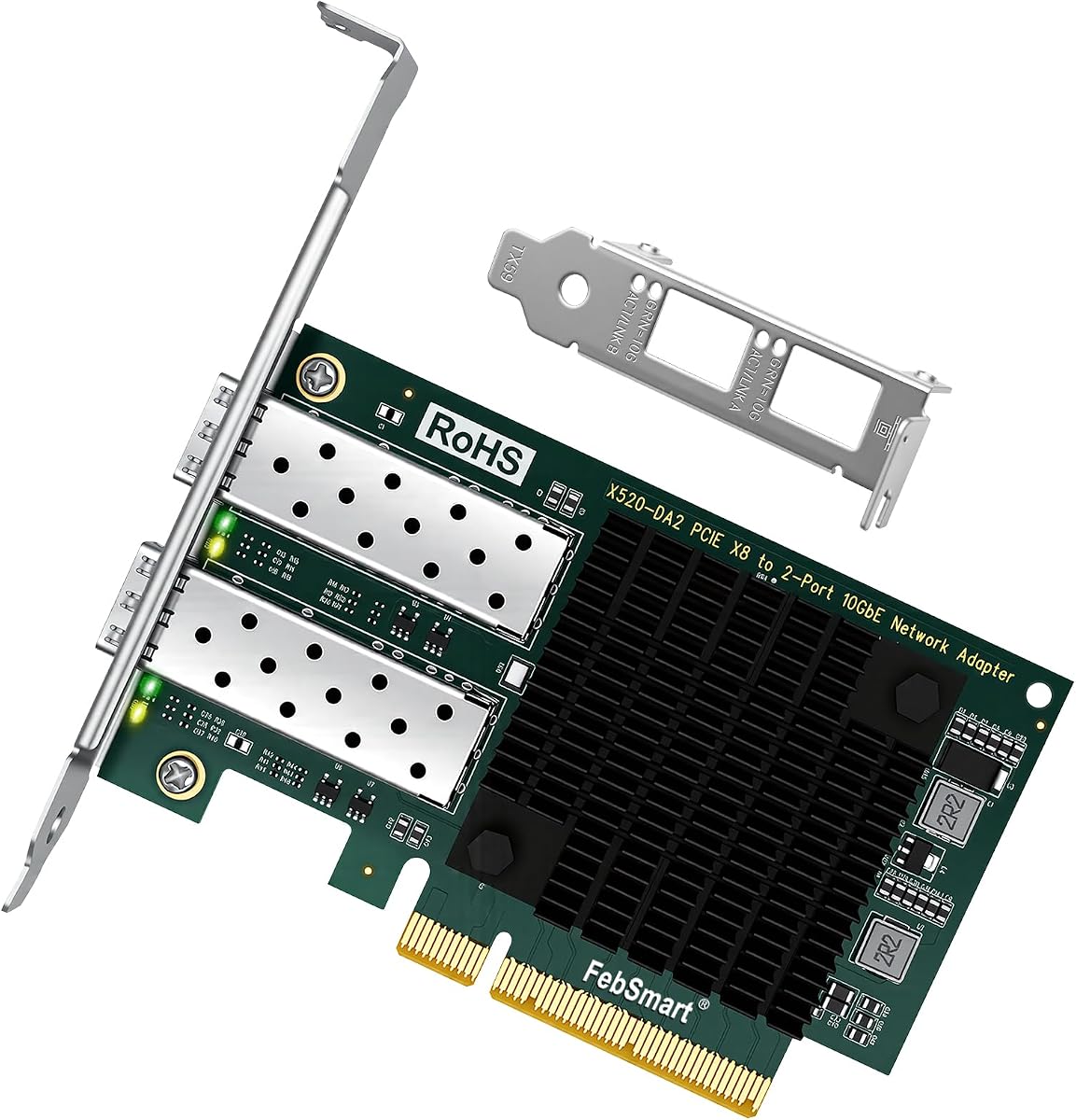
The FebSmart X520-DA2 is a strong dual-port alternative for users who want more than the single-port 10GbE options in this guide. It holds a 4.8 customer rating and uses an Intel 82599ES controller with two 10GbE SFP+ ports. Its PCIe 2.0 x8 interface provides 40Gbps of total host bandwidth.
We may earn a commission when you buy through this link, at no additional cost to you.
Both ports support 10GbE and 1GbE media, including SFP+ transceivers, DAC cables, and AOC cables. The adapter covers LAN and SAN use, storage over Ethernet, FCoE, PXE, IEEE 1588, Data Direct I/O, intelligent offloads, VLAN-related traffic management, VMDq, and SR-IOV. These capabilities suit NAS devices, servers, virtualization hosts, and storage-intensive desktops.
Driver requirements vary by platform. Windows Server releases are described as driver-free, while Windows 11, 10, 8.x, and 7 need drivers. Linux systems use the IXGBE driver, and the product lists RHEL, SLES, Ubuntu, Debian, FreeBSD, and VMware ESXi editions as supported. The card requires an x8 or x16 slot, and optics or cables are not included.
For buyers who want two 10GbE optical links in a single card, this is an excellent fit. It is less convenient for beginners because driver setup and compatible media must be handled, but its broad feature set, strong rating, and dual-port design justify serious consideration.
Dual SFP+ ports can serve separate networks, provide a redundant path, or support a link-aggregation design. The x8 interface is appropriately sized to keep both 10GbE ports supplied with data.
Storage over Ethernet, FCoE, iSCSI-oriented workflows, VMDq, SR-IOV, and traffic-management features make the card appropriate for consolidated infrastructure. It is particularly attractive when separate host connections are needed.
We may earn a commission when you buy through this link, at no additional cost to you.
The most important factors are network speed, port count, controller capabilities, PCIe requirements, operating-system support, and the physical form factor of the target computer.
Choose the card around your real workload, not merely the highest headline speed available.
Verify the exact SFP format and module compatibility before buying a multi-port card.
Match both electrical lane requirements and physical card dimensions to the host system.
Choose the controller whose virtualization, storage, and offload features match the workload.
Check the exact operating-system version and hypervisor before finalizing a purchase.
Check bracket height, card length, connector clearance, and available airflow.
Choose media based on distance, interference, cable management, and transceiver availability.
Plan adequate airflow and use only supported media, slots, and drivers for reliable operation.
Before installation, shut down the computer, disconnect its power cable, and follow the motherboard or server manual for safe expansion-card handling. Confirm that the host has an available PCIe slot with the required lane width, adequate clearance, and a compatible bracket. Install the appropriate operating-system driver before or immediately after adding the card, following the card supplier's instructions for the specific platform.
Connect a compatible SFP, SFP+, or SFP28 transceiver and fiber assembly, or attach an appropriate DAC or AOC cable. Do not force a module or cable into the port. After powering the system, confirm that the adapter is detected, review its negotiated speed, and test the link with a small local transfer before moving large workloads onto it. Port LEDs can help distinguish activity from physical-link problems.
Keep the card and its media protected from dust, sharp objects, and excessive heat. Check that airflow reaches any passive heatsink, particularly in compact or silent systems. Update drivers when doing so improves compatibility, but follow the documented procedure for the controller and operating system. If link speed, duplex mode, or connectivity changes unexpectedly, inspect the module, cable, switch port, and driver status before replacing the card.
No. The SFP format, supported network speed, optical reach, connector type, and vendor compatibility all need to match the card and switch. Some open SFP+ cages accept several third-party modules, while other implementations maintain stricter approved-vendor lists. Check the card specifications and documentation before purchasing a transceiver or cable.
It can be worthwhile when a NAS transfers large files to workstations, supports virtual machines, or records and serves high-bitrate media. A 1GbE link may become the limiting factor during simultaneous access or backups. The card, switch port, transceivers, storage, and client all need to support 10GbE for the upgrade to provide a meaningful benefit.
SFP generally refers to lower-rate Gigabit optical modules, SFP+ supports 10GbE, and SFP28 supports 25GbE. They are not mechanically interchangeable even when the connector shape looks similar. The card cage, module, and connected switch equipment must use the same appropriate format and speed.
No. A single-port 10GbE card can operate through a smaller PCIe interface if both the card and host support that lane configuration, although the connection may be limited by host bandwidth. Dual-port cards often use x8, and the 25GbE dual-port model uses PCIe 3.0 x8. Always confirm the card's stated requirements and the motherboard's slot capabilities.
Most models support at least one or both families, but compatibility varies by controller and exact operating-system version. Some cards work without manual driver installation on selected platforms, while Windows desktops may require the Intel Ethernet driver pack. Linux users should confirm the distribution, kernel version, and required IXGBE or other driver package before installation.
A direct computer-to-computer link is possible, but both ends need compatible adapters and the link must be configured manually with matching addresses or a network configuration that supports that arrangement. In most installations, a switch is more practical because it handles cabling, discovery, and network segmentation more conveniently.
Full-height brackets fit many standard towers, while low-profile brackets are intended for compact cases and many rack servers. The products in this guide generally include both styles, but bracket dimensions and orientation can vary. Confirm the chassis type and measure the available space before installation.
RDMA over RoCE enables data transfer with reduced CPU involvement and lower latency when the complete network path is appropriately configured. It can benefit clustered storage, analytics, and certain virtualization workloads. The benefit is not automatic, since switches, operating systems, drivers, applications, and network policy must all support the intended RDMA design.
The LinksTek CX4121A is the strongest overall choice for buyers seeking dual 25GbE SFP28 connectivity, RDMA over RoCE, and advanced virtualization features. The StarTech 2-Port GbE SFP card is the premium pick for a feature-rich Gigabit environment, while the 10Gtek X520-10G-1S offers an efficient single-port 10GbE configuration based on the Intel 82599EN controller.
For most high-speed NAS and server needs, an SFP+ card around 10GbE is the practical center of the category. Choose the Intel 82599ES dual-port card for two links, the 82599EN single-port cards for established server platforms, or the Realtek-based option when a one-lane footprint and current Windows or Linux support matter most. Match the adapter to your switch, media, slot, and workload rather than selecting only by headline speed.
Finally, verify current driver support, bracket dimensions, module compatibility, and the total cost of the optical or copper connection before ordering. Product prices and availability change, and the same adapter can cost differently across sellers. Checking those details at the time of purchase helps prevent a technically capable card from becoming an awkward or incompatible installation.