
SSYA Dementia Clock
4.6Editor score
Extra-large 11.5-inch display
Twelve customizable alarms
Automatic daylight saving adjustment
Eight-language support
Best Digital Clock with Date and Day of Week guide comparing displays, alarms, voice features, dimming, language support, and ease of use for seniors.
A digital clock with date and day of week does more than tell the time. It can reduce uncertainty for seniors, students, and anyone who benefits from a clear calendar view, especially when large text, automatic dimming, spoken reminders, and distinct time-of-day indicators are included.
The ten products in this guide were compared using the information supplied for display clarity, calendar detail, alarm and reminder capabilities, brightness controls, language support, power requirements, and special features such as voice announcements or photo playback. The list includes wall-oriented, bedside, desk, and multifunction designs.
Each review explains the features that distinguish a particular model, along with practical limitations to consider before buying. Ratings reflect the supplied customer feedback, while feature availability and retailer details can change. Always check the latest listing, included accessories, and setup requirements.
4.6Editor score

4.6Editor score

4.7Editor score
This side-by-side comparison highlights each clock's display size, core calendar functions, alarm features, and distinguishing extras. It is designed to help shoppers identify the model that best matches their viewing distance, routine, language needs, and preferred level of automation.


The SSYA Dementia Clock is a large-format calendar clock designed to make the time, full day of the week, month, and date immediately understandable. Its supplied rating is 4.6, and its standout quality is the 11.5-inch housing with a 10-inch 1280-by-800 screen. The display spells out words rather than relying on confusing abbreviations, a useful characteristic for seniors, children, and anyone unfamiliar with calendar notation.
We may earn a commission when you buy through this link, at no additional cost to you.
This model goes well beyond showing the current time. It offers seven display modes, including wall-clock and analog-plus-digital presentations, and divides the day into morning, afternoon, evening, night, and predawn periods. Sun and moon icons reinforce the time of day. Twelve customizable alarms can serve medication, hydration, and appointment reminders, while eight-language support and alternate time formats make the interface more adaptable to different households.
Automatic daylight saving adjustment is another practical strength, reducing the need to intervene twice each year. A built-in timer, AM/PM or 24-hour selection, and flexible date ordering add further convenience. The trade-off is size: this is not designed to be a discreet bedside clock, and its power cord requires a nearby outlet. Some buyers may also find seven display modes more than they need.
This clock is best for a living room, bedroom wall, classroom, or caregiving space where visibility from across a room matters. It offers the strongest combination of oversized text, calendar detail, alarms, and time-of-day cues in this guide. Choose it when physical viewing distance is the central concern and wall placement is practical.
The 11.5-inch enclosure and 10-inch screen create a much larger visual target than conventional desk models. Fully written time periods and calendar labels also reduce the mental work required to interpret abbreviated information.
Twelve customizable alarms can be assigned to medication, hydration, appointments, or other recurring events. The combination of written cues and sun-and-moon visuals helps users understand both when an alert occurs and where they are in the day.
We may earn a commission when you buy through this link, at no additional cost to you.
The Mitoart Digital Dementia Clock combines a seven-inch screen with spoken time announcements, making it a strong choice for users who benefit from hearing information as well as seeing it. It has a supplied rating of 4.7, the highest among the products in this guide. The display clearly presents the week, month, and date in large lettering without complex abbreviations.
We may earn a commission when you buy through this link, at no additional cost to you.
Its voice timing function can be activated by pressing the OK button on the included remote or by pressing the control on the back of the clock. Nine languages are supported for announcements, which adds flexibility for multilingual households. Multiple alarms provide medication, schedule, and general reminders for people living with dementia, Alzheimer's disease, or memory loss.
Automatic dimming is scheduled to reduce the display at 7:00 p.m. and brighten it at 7:00 a.m. This structured schedule is easier to maintain than constant manual adjustment. The interface is described as intuitive and designed for one-click setup, although buyers should still allow time to configure each alarm, language, and reminder before handing it over.
This is a strong recommendation for anyone who wants spoken orientation without moving to a much larger wall clock. The most important advantage is the combination of large visual information and an audio cue. Confirm remote placement and the final language selection during setup so the voice function remains easy to reach.
Voice announcements let users ask for the current time without decoding small display details. Remote activation is particularly helpful when the clock is mounted or positioned where the back controls are difficult to reach.
Scheduled dimming reduces the visual intensity at night and restores brightness in the morning. The stated light levels indicate a clear difference between daytime and nighttime conditions.
We may earn a commission when you buy through this link, at no additional cost to you.
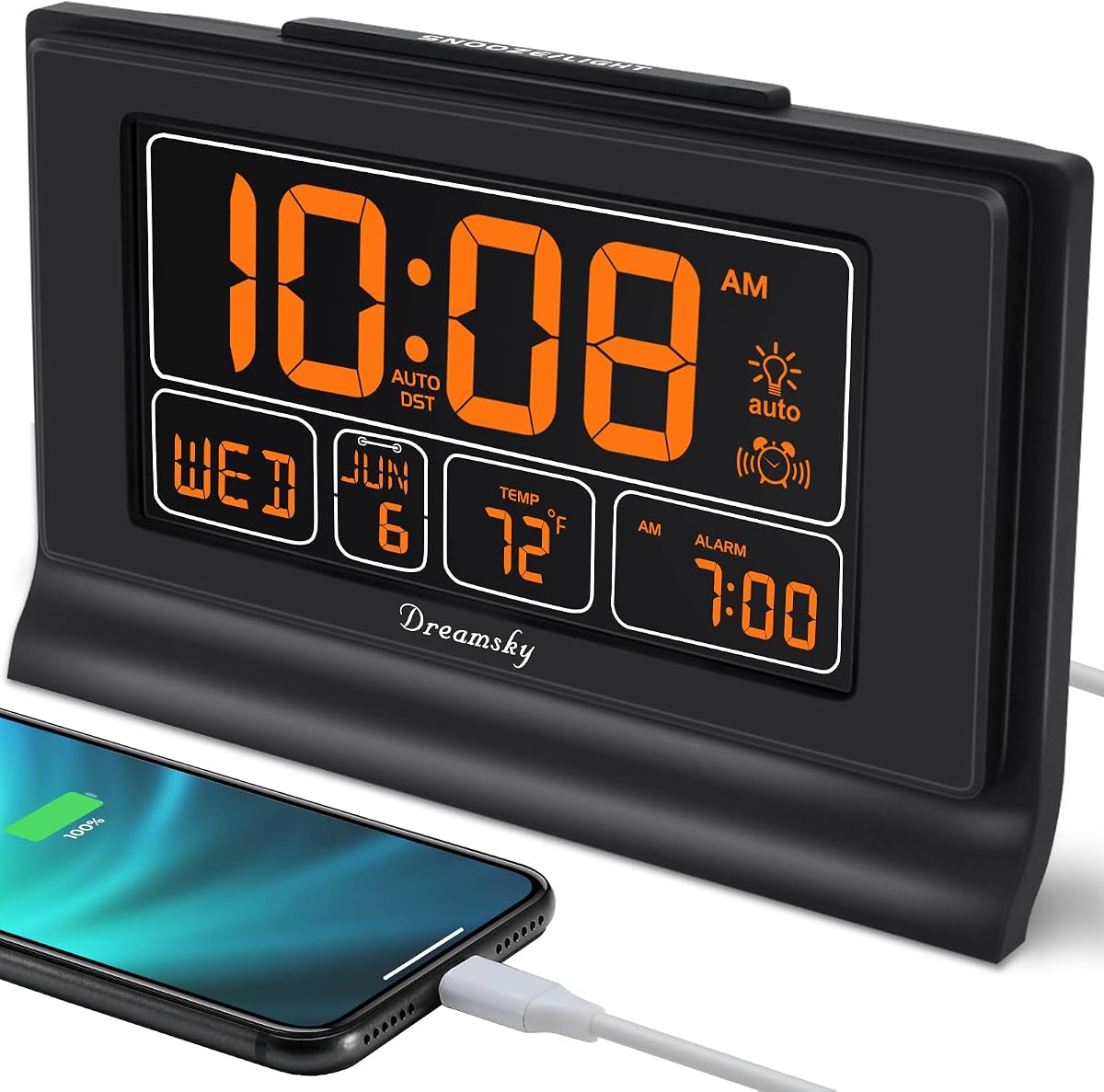
The DreamSky Large Digital Clock is a well-rounded choice for a bedroom, living room, or office. Its supplied rating is 4.6, and the 7.6-inch LCD presents the time, date, day of the week, and indoor temperature together. The stated dimensions are compact enough for regular furniture placement while still offering a screen large enough for convenient viewing.
We may earn a commission when you buy through this link, at no additional cost to you.
Automatic dimming is complemented by four manually selectable brightness levels. The display becomes dimmer at 9:01 p.m. and brighter at 7:00 a.m., reducing the need for daily intervention. Four adjustable alarm-volume levels are designed to accommodate different hearing preferences, from gentler tones to louder alerts.
The clock uses an included adapter for primary power and provides battery backup to preserve settings during an interruption. A rear USB port can also charge a compatible device, which may reduce the need for an additional bedside charger. Automatic daylight saving adjustment keeps seasonal timekeeping simpler.
This is the most balanced everyday recommendation in the guide for a shopper who wants a large calendar display, adjustable brightness, useful alarms, temperature, and a charging port without a highly specialized feature set. It lacks voice announcements and photo playback, so users who need spoken orientation should look instead to the Mitoart or Nimukol models.
Combining the clock, complete calendar, and indoor temperature on one screen reduces the need for separate devices. The layout is appropriate for a bedside table, desk, or nearby shelf.
Automatic dimming, adjustable alarm volume, daylight saving adjustment, and a charging port cover common daily needs. Battery backup also limits the disruption caused by a temporary power loss.
We may earn a commission when you buy through this link, at no additional cost to you.
The Large Senior Wall Clock is the most feature-dense model in this guide, offering a seven-inch 1024-by-600 LCD, extensive reminders, multiple themes, and photo playback. Its supplied rating is 4.4. The screen shows the time, date, and full day of the week while visually dividing the day into periods such as morning, afternoon, evening, night, midnight, and predawn.
We may earn a commission when you buy through this link, at no additional cost to you.
The defining feature is its reminder capacity. It supports up to 20 standard alarms and 20 customizable reminders, each of which can be configured for daily use, weekdays, weekends, or specific dates. This makes the clock useful for medication, hydration, waking, and recurring household events. Nine volume levels, 18 ringtones, and three selectable snooze intervals provide additional alarm control.
Customization extends to 12 display themes, multiple color options, and ten brightness levels ranging from dim to fully bright. A one-touch sleep mode turns the display off completely. The clock can also play photographs from an SD or USB flash drive, although the storage media is not included, and it supports six languages, 12/24-hour formats, and manual daylight saving control.
This clock is best for a technically comfortable user or a caregiver willing to invest time in setup and personalization. Its breadth can be a strength or a drawback. People wanting only a simple calendar clock may find the menus unnecessarily complex, but households seeking many individualized reminders will find an unusually broad toolkit.
Separate standard alarms and customizable reminders provide room for recurring, weekday, weekend, and date-specific events. The user can assign different tones and inspect a written alert when it appears.
Twelve themes, several color treatments, and ten brightness levels allow the display to fit personal preferences. Adding an SD card or USB flash drive also turns the unit into a digital photo frame.
We may earn a commission when you buy through this link, at no additional cost to you.
The Nimukol Digital Alarm Clock is a senior-focused seven-inch calendar clock with a supplied rating of 4.7. It shows the week, month, and date in large, bold text without complex abbreviations, making it suitable for users with reduced vision. The product also includes multiple alarm types and a voice timing function.
We may earn a commission when you buy through this link, at no additional cost to you.
The voice feature supports nine languages and can be triggered through the remote control or the clock's rear control. This allows a user to request the current time audibly, which is useful when the display is distant or when visual reading is difficult. Multiple alarms can handle medication, daily schedules, and other recurring reminders associated with dementia, Alzheimer's disease, or memory loss.
Automatic dimming is set to darken the screen at 7:00 p.m. and brighten it at 7:00 a.m. The supplied lighting figures indicate a soft nighttime transition rather than an abrupt change. One-click setup and an intentionally simple interface are also emphasized, making this model appealing for users who do not want to navigate a complex menu.
The Nimukol is a compelling pick for a household that values voice orientation and uncomplicated operation more than extensive themes or media features. Check the final language menu, alarm schedules, and remote behavior during setup. It offers a focused combination of visibility, spoken time, reminders, and automated dimming.
A remote-controlled voice function can announce the time in a supported language, providing a quick alternative to reading the display. The available language choices broaden its usefulness in multilingual homes.
The uncluttered interface, one-click setup emphasis, and scheduled dimming reduce daily management. Multiple alarms add flexibility without requiring the extensive theme controls found in more complex models.
We may earn a commission when you buy through this link, at no additional cost to you.
The American Lifetime Calendar Clock combines a large, high-contrast display with a traditional digital calendar layout. It has a supplied rating of 4.6 and is positioned as a straightforward senior-friendly clock rather than an entertainment device. Time, period of the day, full day of the week, month, and date are presented clearly without confusing abbreviations.
We may earn a commission when you buy through this link, at no additional cost to you.
The clock supports multiple languages and different time formats, while automatic ambient-light dimming helps maintain readability in both bright rooms and dim bedrooms. An included manual is intended to make setup approachable, and the housing is described as suitable for regular everyday handling.
Up to five daily alarms can be configured for medication, appointments, and other routine events. A backup option is provided to maintain the correct time and date during a power interruption, automatically restoring them when power returns. The package intentionally avoids prominent references to dementia, Alzheimer's disease, and memory loss, which may make it a more comfortable gift.
The product is a refined, relatively straightforward choice for a family seeking a traditional-looking senior clock. The trade-off is that five alarms are less flexible than the 20-alarm, 20-reminder arrangement offered by the Large Senior Wall Clock. It also comes with a one-year warranty and support from a U.S.-based company.
The display spells out the day and calendar details, reducing ambiguity for people who may not recognize shortened weekday names. A high-contrast presentation supports visibility in changing room conditions.
The backup system is intended to preserve the correct time and date when normal power is unavailable. That makes the clock more dependable for routines involving medication or appointments.
We may earn a commission when you buy through this link, at no additional cost to you.
The DIWAKREM 7-Inch Clock is a flexible calendar clock designed to work as either a desk clock or a wall-mounted unit. Its supplied rating is 4.5. The seven-inch IPS screen shows the time, date, day of the week, and calendar information, while a stated 175-degree viewing angle helps limit image distortion or fading when viewed from different positions.
We may earn a commission when you buy through this link, at no additional cost to you.
Direction, confirmation, and menu keys are used to set the time, date, alarms, and reminders. Up to 12 alarms and reminders can be created for medication, gardening, or other activities, and corresponding cartoon pictures appear on the display. Seven display models and four color options add some visual flexibility, while eight-language support broadens the user base.
Automatic or manual brightness adjustment is available, with the automatic schedule becoming brighter at 7:00 a.m. and darker at 7:00 p.m. A time-memory function is designed to restore the current time and date following an abnormal power failure. The clock is not battery operated and requires a power source, so placement near an outlet is necessary.
This model suits buyers who want a wall clock and a tabletop calendar device in one relatively compact format. It is less specialized than voice-announcement models and offers fewer alarm types than the largest reminder-focused unit, but its viewing angle, color choices, and flexible placement make it a versatile middle-ground option.
The stated 175-degree IPS viewing range is useful when the clock is mounted high, placed to one side, or viewed from a bed or chair. Large type remains the central focus even with several display modes available.
The clock is marketed for both desk and wall use, which makes it useful in rooms where furniture arrangements change. Reminder illustrations can make routine activities easier to recognize than text alone.
We may earn a commission when you buy through this link, at no additional cost to you.
The KOSUMOSU Digital Alarm Clock is a modern 6.7-inch LED calendar clock suited to bedrooms, offices, and living rooms. Its supplied rating of 4.1 is the lowest in this guide, but the product offers a useful collection of everyday features. Large white and sky-blue digits show the time, seconds, date, day of the week, and indoor temperature.
We may earn a commission when you buy through this link, at no additional cost to you.
Two independent alarms can follow workdays, weekends, or every day, allowing different schedules for home and working life. Snooze adds five minutes, and the alarm itself lasts five minutes. The display supports both 12- and 24-hour formats, with a mirror-clock visual style that is less clinical than many dedicated senior models.
Automatic dimming uses a light sensor, while manual controls offer low, medium, high, or completely off. This lets users choose how prominent the clock remains at night. A button battery preserves the time during a power interruption, but the clock itself requires a 5V, 1A AC adapter, which is not included.
This is a good pick for a user who values a stylish bedroom clock and needs the date, weekday, temperature, and standard alarms without a large wall footprint. It is less suitable for users requiring oversized senior text, spoken announcements, extensive reminders, or wall mounting. Verify adapter availability before purchase and check the final display readability in the intended room.
Two alarms with workday, weekend, and daily cycles provide useful separation between home and work schedules. The snooze control adds flexibility for users who need a brief second chance to wake.
The black mirror-style housing and restrained color palette can fit a modern bedroom more naturally than a clinical-looking senior clock. Complete screen-off mode helps control nighttime distraction.
We may earn a commission when you buy through this link, at no additional cost to you.
The Peakeep Large Display Clock is a practical bedroom clock that shows the time, complete date, and day of the week together. Its supplied rating is 4.6. The oversized display is intended to be readable from a distance, making it suitable for bedrooms, living rooms, and offices where the clock is not immediately beside the viewer.
We may earn a commission when you buy through this link, at no additional cost to you.
The month, day, and weekday appear on the same screen, removing the need to check a separate calendar for basic orientation. Adjustable brightness allows the display to be comfortable during both daytime and nighttime hours, while five alarm-volume levels accommodate different hearing preferences.
Automatic daylight saving adjustment updates the clock twice each year without routine manual intervention. A rear USB charging port provides a convenient place to charge a phone overnight, potentially freeing a wall outlet. The clock uses a dependable plug-in power connection rather than relying on routine battery replacement.
This is a well-rounded choice for shoppers who want an easy-to-read calendar clock, adjustable alarms, seasonal automation, and device charging without paying for voice announcements or extensive reminder menus. Its limitation is a relatively standard feature set, making it less attractive for users who need spoken orientation, multiple specialized reminders, or photo playback.
Showing the time, month, day, and weekday together makes the display useful for people who regularly ask what day it is. The single-screen approach is simple and dependable.
Five alarm-volume settings cover softer and louder wake-up preferences. Automatic daylight saving and the rear USB port add everyday convenience with little additional complexity.
We may earn a commission when you buy through this link, at no additional cost to you.
The DreamSky Auto-Set Clock is a compact bedside model that prioritizes quick setup and dependable timekeeping. It has a supplied rating of 4.6. The five-inch LCD shows the time, date, and temperature, with an almost full range of dimming controlled through six levels plus automatic dimming.
We may earn a commission when you buy through this link, at no additional cost to you.
Its main convenience is automatic initialization. Once plugged in, the clock sets the correct time, date, and temperature. The user then selects the time zone and wake-up time, with manual setting available if automatic synchronization is not satisfactory. Seven U.S. time zones and one Newfoundland time zone are listed, along with automatic daylight saving adjustment.
The alarm uses an ascending beeping sound designed to become louder as the wake-up period continues. Snooze provides another eight-minute opportunity to rest. During a main-power interruption, three AAA backup batteries preserve the settings and keep the time running, although those batteries are not included.
This clock is most appropriate for a bedroom user who prioritizes automatic setup over large senior-oriented text. The five-inch display is smaller than most models in this guide, and the supplied feature summary does not highlight a written day-of-week display. It nevertheless serves as a straightforward, auto-setting bedside clock with thoughtful dimming and alarm behavior.
The clock establishes the current time, date, and temperature automatically after connection. Selecting a time zone and alarm time completes most of the basic setup.
The ascending alarm begins softly and becomes more insistent over time. Snooze adds eight minutes, offering a practical alternative to disabling the alarm entirely.
We may earn a commission when you buy through this link, at no additional cost to you.
The most useful calendar clock is not necessarily the one with the most features. Display size, spoken information, alarm flexibility, dimming behavior, and placement should be matched to the user's vision, hearing, routines, and room layout.
Screen size should reflect the distance from which the clock will normally be viewed. Seven-inch displays are common among senior-focused models, while the SSYA option uses an 11.5-inch housing with a 10-inch screen. The five-inch DreamSky Auto-Set Clock is more compact and may work better on a bedside table. Text quality matters as much as physical size: full words, high contrast, large characters, and clear time-period labels are easier to interpret than abbreviations.
Choose a large, high-contrast display for wall viewing or reduced vision. Choose a more compact screen when bedside placement and visual restraint are the priorities.
Voice timing can provide the current time without requiring the user to read and decode the display. The Mitoart and Nimukol models support nine languages and allow activation through a remote or rear control. Audio orientation is especially helpful for people with limited vision, but it may be unnecessary for a user who reads the calendar comfortably. Consider whether the voice is clear, whether the correct language is available, and whether the remote can be kept within reach.
Select a voice-enabled model for auditory orientation. If spoken information is not needed, prioritize screen size, alarm options, and charging convenience instead.
A basic alarm helps someone wake at a scheduled time, while customizable reminders can support medication, hydration, appointments, and recurring activities. The guide includes models with up to five daily alarms, 12 alarms, multiple alarm types, or a combination of 20 standard alarms and 20 custom reminders. More slots are useful in complex households, but they also increase setup time and may make the interface harder for a less technical user.
Match alarm capacity to routine complexity. Choose five simple alarms for a single schedule, or a larger programmable system when several people and recurring tasks need distinct cues.
A bedroom clock should remain readable at night without becoming unnecessarily bright. Automatic dimming schedules reduce the need to press buttons before sleep, while manual levels offer additional control. Some models dim at 7:00 p.m., others at 9:01 p.m., and some let users select 10 or more brightness levels. A complete display-off function is also useful for sleep, though it removes the clock's visual orientation while disabled.
Prioritize automatic dimming for bedrooms and compare the stated dimming times. Use manual brightness settings when users need fine control or strongly prefer a completely dark screen.
Most calendar clocks require a power adapter, while some preserve the time and settings with a backup battery. The DreamSky Large Digital Clock uses backup for settings, and the Large Senior Wall Clock automatically restores the correct time and date when power returns. Other models state that batteries store settings rather than sustain continuous operation. The distinction matters for anyone who wants a clock to remain trustworthy during outages.
Check whether backup batteries are included, whether they are only for settings, and whether the clock restores the correct time automatically. Households that depend on timely reminders should prioritize dependable restoration.
Language support ranges from six languages in some models to nine in the voice-enabled Mitoart and Nimukol clocks. Different options may control the displayed calendar, spoken announcements, or both, so the listing should be checked carefully. Flexible 12-hour and 24-hour formats are also useful because they can make morning and evening times less ambiguous. For multilingual homes, language support may be more important than photo playback or decorative themes.
Confirm that the required language applies to the feature you need, not merely to the manual. Choose 24-hour time for users who find AM and PM confusing.
Consider whether the clock will live on a bedside table, a desk, a kitchen counter, or a wall. Some models are marketed for both desk and wall placement, while very large displays need more room. View angle also matters: the DIWAKREM model specifies a wide 175-degree IPS viewing range, which can help when a wall-mounted clock is viewed from an angle. Battery and cord placement should also leave the unit accessible for controls.
Measure the intended surface and viewing distance before ordering. Choose a compact model for crowded nightstands and a larger, wall-oriented display for shared rooms.
Additional features can improve convenience without defining the core purchase. Indoor temperature, USB charging, timer functions, sun-and-moon indicators, and digital photo playback each serve different needs. USB ports may reduce outlet clutter, while a photo function can make the display more personal. These extras are most useful when they complement the clock's intended location rather than adding complexity to essential setup.
Treat secondary features as tie-breakers. Prioritize readable time and date information, dependable alarms, suitable brightness, and straightforward operation first.
Begin by placing the clock where it will be viewed most often, then connect its specified power source. Before setting alarms, confirm the time, date, day of the week, language, 12- or 24-hour format, and daylight saving setting. Enter the alarms one at a time and choose distinctive tones for different routines. Voice-enabled models should also be tested from the normal viewing location and with the remote within easy reach.
Allow several days to evaluate the display under real conditions. Check whether automatic dimming occurs at the stated time, whether the calendar remains visible from across the room, and whether every alarm is easy to dismiss. Caregivers can label recurring reminders in plain language, such as morning medication or afternoon appointment, rather than relying on vague labels. A brief written schedule placed nearby may complement the electronic reminders.
For care, unplug the clock before cleaning and use a soft, dry or lightly dampened cloth rather than spraying liquid directly onto the housing. Keep ventilation openings clear, avoid placing the unit in direct sunlight or near excessive heat, and check the power cord for damage. If backup batteries are supported, replace them on a regular schedule and test the backup procedure periodically. Update the clock after major travel or if power is interrupted for an extended period.
The SSYA Dementia Clock offers the largest supplied display, with an 11.5-inch housing and a 10-inch screen. It also spells out the day of the week and time periods in large text. A smaller model may be easier to operate physically, so display size and button complexity should be considered together.
A spoken announcement lets a user hear the time without needing to read or interpret the display. This can be valuable for people with reduced vision or those who sometimes feel disoriented. Models with remote activation are particularly useful when the clock is mounted or positioned where its rear controls are difficult to reach.
Several models support wall placement, including the SSYA, DIWAKREM, and feature-rich Large Senior Wall Clock. Other products are primarily designed for a bedside table, desk, or shelf. Check the listing, mounting hardware, cord length, and viewing angle before committing to a wall installation.
Backup behavior varies by model. Some backup cells preserve settings or keep the time operating, while other batteries are used only to restore the correct time and date after power returns. The SSYA also includes an adapter and offers automatic time restoration, but the exact interruption behavior should still be confirmed in the manual.
It removes the need to remember a one-hour adjustment twice each year. Some models change automatically, while the Large Senior Wall Clock uses a manual daylight saving button. Automatic adjustment is convenient, but users should still check the clock after the seasonal change to confirm that the setting and time agree.
Five or 12 alarms are usually enough for a straightforward daily schedule. A system with 20 standard alarms and 20 custom reminders offers more flexibility for multiple medicines, appointments, and household tasks, but it also requires more initial configuration. The best choice depends on how many distinct recurring events need separate alerts.
The DreamSky Large Digital Clock, KOSUMOSU clock, and DreamSky Auto-Set Clock include indoor temperature information according to the supplied details. Temperature is a secondary convenience rather than a substitute for accurate time and calendar data. Buyers primarily concerned with senior orientation may prioritize larger text and voice features instead.
A plug-in clock normally requires continuous access to power, but some models use backup batteries to preserve settings or maintain time during an outage. Batteries are not a substitute for the main power supply. Check whether they are included, because some models specify that backup cells are not included.
The SSYA Dementia Clock stands out for its exceptionally large display and extensive time-of-day cues, while the Mitoart Digital Dementia Clock is a balanced choice for shoppers who want voice announcements and multilingual support. The DreamSky Large Digital Clock offers the most practical all-around feature set with a large screen, temperature display, brightness controls, backup, and USB charging.
Prioritize the information that matters most in daily life. Reduced vision generally calls for a large, high-contrast screen; difficulty remembering the date favors full weekday and period labels; limited reading can justify a voice-enabled model; and complex routines benefit from more programmable alarms. Simple setup, stable brightness, and dependable time restoration are equally important once the novelty fades.
Before purchasing, review the current listing for included accessories, adapter requirements, battery details, mounting options, and the exact language or time-format controls. Retailer offers and configurations can change, so checking the latest product page will help ensure that the chosen model fits the intended space and routine.