
Silverstone Grandia 11
4.5Editor score
Supports 240mm radiators
Positive-pressure airflow design
Fully meshed front intake
Adjustable LED indicator
Discover the best horizontal PC cases for home theaters, compact builds, and media systems, with key features, compatibility, cooling, and design compared.
Horizontal PC cases are purpose-built enclosures that can sit flat beneath a television, inside a media cabinet, or beside a monitor. A successful choice should balance a low profile with useful clearance, quiet cooling, accessible connectors, and a layout that suits the components you already own or plan to buy.
The ten cases in this guide were compared using the supplied specifications, covering motherboard support, graphics card limits, cooling options, power supply clearance, front connectivity, orientation, and physical design. The list includes traditional home theater enclosures, compact micro-ATX models, dual-position cases, and a portable mesh chassis designed for powerful small-form-factor builds.
Each review explains where a particular case stands out, where its compromises matter, and which builders are most likely to appreciate it. Product ratings reflect the listed customer feedback, while compatibility details should always be checked against your exact hardware. Prices and availability can change, so confirm the current listing before purchasing.
4.5Editor score

4.5Editor score

4.5Editor score
The comparison below highlights each enclosure's core hardware limits, cooling approach, orientation flexibility, and practical appeal for a flat-laid or media-cabinet installation.


The Silverstone GD09 is a conventional horizontal home theater case with a clear purpose: accommodating a full-size ATX or Micro-ATX system while keeping the enclosure low and restrained. It carries a 4.5 rating, and its strongest qualities are the positive-pressure design, support for SSI-CEB, ATX, and Micro-ATX motherboards, and a 358mm depth that helps it fit naturally inside a media cabinet.
We may earn a commission when you buy through this link, at no additional cost to you.
Thermal management is the central strength. Positive air pressure can reduce dust entering through the chassis while helping maintain a steady internal airflow, a useful characteristic for a living-room PC that may operate for long periods. Quick-access filters make routine maintenance more convenient, while the enclosure's 358mm depth provides useful room for cable routing and full-size components without turning the system into a large tower.
The design is not as flexible as some modern dual-orientation alternatives. It focuses on ATX-class boards rather than E-ATX, and the supplied information does not promise the latest front-panel Type-C connectivity or unusually long graphics card support. Those omissions are reasonable for a dedicated home theater design, but builders who need the newest ports or workstation expansion should investigate their chosen hardware before ordering.
This is the strongest general recommendation for anyone building a quiet, full-size system intended to sit flat near a television. It combines familiar home theater styling, useful motherboard support, and a considered dust-management strategy. Choose it when standard component compatibility and dependable orientation matter more than fashion-forward details or the ability to use an E-ATX board.
The 358mm depth and low horizontal format are tailored to entertainment cabinets rather than tower-first workspaces. That makes the GD09 most convincing when the finished system should look like part of the room rather than a conventional desktop tower.
Positive air pressure works together with the included quick-access filters to support cooling and reduce dust accumulation. This combination is particularly valuable in a long-running media center installed in a less ventilated entertainment unit.
We may earn a commission when you buy through this link, at no additional cost to you.
The Cooler Master QUBE 540 combines mid-tower hardware support with a flexible horizontal layout. It has a 4.4 rating and can be placed in either orientation, with a reversible I/O panel and movable handles supporting easier repositioning. It is one of the most versatile cases here for a powerful gaming system that may alternate between a flat media-cabinet position and a vertical desktop setup.
We may earn a commission when you buy through this link, at no additional cost to you.
Hardware compatibility is unusually broad for a horizontally usable case. The motherboard specification covers ITX, ATX, and large E-ATX boards up to 11 inches wide, while graphics card clearance reaches 415mm without the front fan. Full front mesh and a pre-installed SickleFlow 120mm fan emphasize thermal performance, giving high-output processors and graphics cards a more favorable airflow environment.
The front panel also handles modern accessories well, offering two USB 3.2 Gen1 ports and a USB 3.2 Gen2 Type-C port. The trade-off is physical scale. A chassis that accommodates E-ATX boards and long graphics cards is less space-efficient than a dedicated 10.35-liter media enclosure, and the tempered-glass presentation may feel more like a gaming mid-tower than understated AV equipment.
Buyers should choose the QUBE 540 when they want one case to handle a powerful PC without giving up horizontal placement. It is especially compelling for a living-room gaming machine that needs substantial GPU clearance, modern connections, and the option to stand vertically later. It is less compelling for a tiny office system or a cabinet with very little vertical clearance.
Support for graphics cards up to 415mm and E-ATX motherboards up to 11 inches wide allows a high-end build to function in a horizontal enclosure. The result feels more like a flexible mid-tower than a conventional theater-only chassis.
Front USB Type-C and two USB-A ports make the case convenient when it is tucked into a cabinet. Cable reach and operating-system support for the Type-C connection should still be confirmed before the build is finalized.
We may earn a commission when you buy through this link, at no additional cost to you.
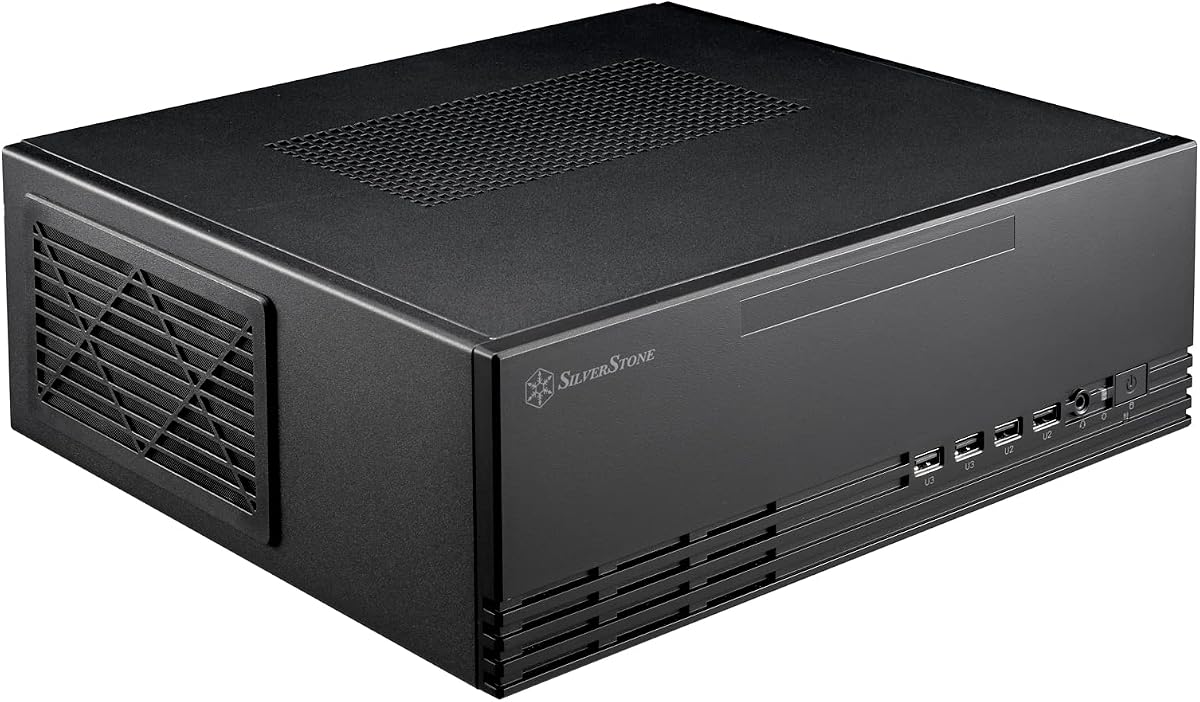
The Silverstone Grandia 11 is a premium home theater enclosure designed around a stereo-shaped chassis and a large meshed intake. It earns a 4.5 rating and supports SSI-CEB, ATX, and Micro-ATX motherboards. Its 240mm radiator capability adds a meaningful cooling option for builders who want a discreet system capable of handling sustained workloads.
We may earn a commission when you buy through this link, at no additional cost to you.
The shortened chassis and broad front mesh panel create a large intake surface, while the positive-pressure design supports both cooling and dust prevention. An adjustable LED indicator adds a small but welcome control for a case likely to sit near a display, allowing the build to present the status information most appropriate for the room rather than leaving it permanently visible.
Its main limitation is that the feature set is deliberately specialized. The motherboard support stops at ATX-class formats, and the listing does not mention modern front USB Type-C, unusually long graphics cards, or a reversible I/O panel. Those are not flaws for the intended theater use, but they make the case less versatile than the Cooler Master QUBE 540 or the Lian Li A3.
The Grandia 11 is the most compelling option for a polished media-center build that needs better cooling flexibility than a basic HTPC enclosure. Choose it when appearance, radiator support, and a dedicated home theater layout matter. Builders seeking general-purpose connectivity, E-ATX support, or easy vertical conversion should compare the other horizontal-capable alternatives first.
The 240mm radiator option makes this enclosure more adaptable than a simple passive-filter media case. It gives an installer a way to manage a warmer CPU while preserving the low-profile visual treatment.
A fully meshed front panel and shortened chassis increase the usable intake area. This combination helps maintain airflow while keeping the enclosure focused on cabinet-friendly dimensions.
We may earn a commission when you buy through this link, at no additional cost to you.
The Lian Li B4-mATX combines a 21.3-liter compact format with a refined wood finish and hardware support that exceeds many similarly sized cases. It has a 4.5 rating, accommodates micro-ATX motherboards, graphics cards up to 358mm, and CPU coolers up to 165mm tall. The black walnut finish makes it especially suitable for a desk or entertainment cabinet where visible industrial styling would be distracting.
We may earn a commission when you buy through this link, at no additional cost to you.
Two slim 120mm non-RGB fans come preinstalled, offering a useful starting point without requiring immediate fan purchases. The case can operate horizontally for a desktop-oriented look or vertically for a smaller footprint, and its modular cooling design allows more fans and radiators to be added depending on the power supply selection.
The biggest constraint is motherboard format. Unlike the Silverstone home theater cases, the B4 does not accept full-size ATX boards, so it will not serve as a conventional home theater enclosure for a standard desktop motherboard. Cooling expansion is also linked to the PSU choice, making power-supply dimensions and mounting requirements part of the case selection rather than a later detail.
This case is ideal for a compact micro-ATX system where visual presentation matters as much as performance. It offers more modern styling and orientation flexibility than a basic office chassis, enough graphics card room for a substantial gaming card, and useful preinstalled cooling. Buyers should start with a micro-ATX processor and motherboard platform if they want the broadest possible fit.
The real wood finish gives the B4 a more residential appearance than a conventional metal gaming case. That makes it easier to integrate into a media shelf, entertainment unit, or minimalist desktop arrangement.
A 358mm graphics card allowance and 165mm CPU cooler height create useful headroom in a 21.3-liter enclosure. The two included slim fans provide immediate airflow, while further radiator configurations depend on the selected PSU.
We may earn a commission when you buy through this link, at no additional cost to you.
The Cooler Master Q300L V1 is a practical entry point for builders creating a compact horizontal system. It holds a 4.5 rating and supports Micro-ATX or Mini-ITX motherboards, CPU coolers up to 159mm, graphics cards up to 360mm, and power supplies up to 160mm long. The transparent side panel gives a compact build a recognizable visual identity.
We may earn a commission when you buy through this link, at no additional cost to you.
Its open thermal design uses perforated sections across the sides to encourage airflow, while the case can accommodate a 240mm liquid cooler and up to five fans. The modular I/O panel can be positioned at the front, top, or bottom on either side, which is especially helpful when the system is lying horizontally and the original port placement would be awkward.
Magnetic dust filters add a practical maintenance feature, but the enclosure still has limits that buyers should recognize. It accepts only Micro-ATX and Mini-ITX motherboards, and its 160mm PSU limitation rules out some compact SFX power supplies. It is also a more conventional transparent mini-tower than a deliberately styled media-center chassis, so its horizontal appearance may be less integrated.
The Q300L V1 makes the most sense for a value-conscious micro-ATX build, a compact office computer, or a first system where useful expansion and easy installation outweigh a specialized exterior. The flexible I/O panel, long GPU allowance, and broad fan support create more flexibility than the case's entry-level positioning might initially suggest.
The adjustable I/O panel can move among the front, top, and bottom on both sides. That flexibility makes the case easier to use horizontally because ports can be positioned according to furniture and cable routing rather than a fixed factory arrangement.
Support for a 240mm cooler and five fans is generous for a compact case. The perforated enclosure and magnetic filters work together to encourage airflow while making routine cleaning more convenient.
We may earn a commission when you buy through this link, at no additional cost to you.
The Shiny Snake G300 is a 16.8-liter portable micro-ATX chassis aimed at users who want substantial computing performance in a small, transportable enclosure. It has a 4.4 rating and supports graphics cards up to 340mm, including four-slot models, along with CPU air coolers up to 164mm and ATX power supplies up to 140mm.
We may earn a commission when you buy through this link, at no additional cost to you.
Its cooling architecture changes according to the power supply. A standard ATX PSU up to 140mm long supports the air-cooled route, while an SFX or SFX-L PSU opens support for a 240mm or 280mm AIO radiator. Tool-free access, a removable PCI bracket, horizontal PSU placement, and full mesh side panels make maintenance and component swaps more approachable in a densely packed chassis.
The front panel offers a USB 3.2 Gen 2 Type-C port rated at 10Gbps, two USB 3.0 ports, and two USB 2.0 ports, reducing the need for adapters. The listed handle is rated for 30kg, and the vibration-dampened base is intended to protect components during transport. These are attractive specifications for LAN events, dorm moves, or a gaming system that must be carried between locations.
This case is best for an experienced builder who accepts deliberate power-supply planning. The choice between ATX and SFX hardware affects cooling options, so that decision should be made before the rest of the system. It also asks users to balance portability against a dense layout. For anyone wanting a true transport case with more integrated protection, a dedicated carrying solution remains sensible.
Support for long, four-slot graphics cards and 164mm CPU coolers avoids the severe component restrictions found in many ultra-compact cases. The 16.8-liter layout therefore remains aimed at serious desktop-class components.
A 10Gbps front Type-C port, tool-free access, and a removable PCI bracket make the G300 practical for repeated maintenance. The removable bracket is particularly helpful when a dense layout would otherwise complicate graphics card access.
We may earn a commission when you buy through this link, at no additional cost to you.
The Lian Li A3-mATX stands out with a 4.8 rating, the highest customer rating in this collection. It packs a 26.3-liter compact enclosure with extensive compatibility: Micro-ATX and ITX motherboards, four expansion slots, graphics cards up to 415mm, and support for a 360mm radiator. It is particularly appealing when a compact build still needs considerable cooling capacity.
We may earn a commission when you buy through this link, at no additional cost to you.
Steel mesh panels on the sides and top promote airflow around high-heat components and radiator configurations. The case can house up to ten 120mm fans, although the actual installed arrangement will depend on the other components and radiator placement. A walnut front panel softens the technical appearance, offering a more residential look than a fully exposed industrial mesh design.
Power supply installation is flexible, with front and side options and support for ATX, SFX, SFX-L, and LIAN LI EDGE power supplies. This lets builders trade PSU size against radiator placement, which is especially useful in a small chassis. The main drawback is that its 26.3-liter volume and substantial cooling potential make it larger than the most compact media-center cases, so it may not fit every narrow cabinet shelf.
Choose the A3-mATX for a compact high-airflow build with a long graphics card or ambitious liquid cooling. The mesh construction, flexible PSU arrangement, and broad fan support give it exceptional adjustment potential. It is less suited to a build that must use a full-size ATX motherboard or occupy the smallest possible footprint.
The mesh side and top panels support unrestricted airflow around radiators and high-output graphics cards. Compatibility with a 360mm radiator makes this one of the more ambitious cooling platforms among the compact cases reviewed.
Front and side PSU placement options allow builders to resolve tight cable-routing conflicts. Support for several PSU formats also lets the cooling plan influence which power supply should be selected.
We may earn a commission when you buy through this link, at no additional cost to you.
The Silverstone GD09B-C is a horizontal home theater case distinguished from related models by a front USB Type-C port. It has a 4.3 rating and retains the familiar Silverstone strengths: positive air pressure for cooling and dust prevention, support for SSI-CEB, ATX, and Micro-ATX motherboards, and quick-access filters.
We may earn a commission when you buy through this link, at no additional cost to you.
Front Type-C is a meaningful convenience for a system installed in a cabinet near a television or monitor. It can simplify connections to compatible peripherals and reduce dependence on adapters. The faux aluminum exterior keeps the presentation understated, while rackmount ear support adds a subtle option for enthusiasts who want a more integrated installation.
As with other traditional HTPC enclosures, the case is less accommodating of the newest expansion hardware than the QUBE 540, Lian Li A3, or G300. The supplied data does not list extended graphics card clearance, E-ATX support, or a broad fan and radiator range. Its value therefore depends more on the established media-center layout than on maximizing every dimension of future hardware support.
Buyers who want a recognizable Silverstone HTPC enclosure but require front Type-C should choose this model over the standard GD09. It is a sensible fit for a living-room PC, a compact workstation that must use an ATX board, or an existing home theater system being refreshed with newer external connectivity.
The front Type-C port adds convenience without changing the basic home theater approach. It is a practical distinction for owners who regularly connect modern peripherals to a cabinet-mounted system.
Positive air pressure and quick-access filters address the two recurring concerns of living-room operation: managing heat and limiting dust. The result is a considered enclosure for extended media use.
We may earn a commission when you buy through this link, at no additional cost to you.
The Silverstone GD09B is a classic aluminum-styled home theater case for ATX and SSI-CEB systems. Its 4.3 rating reflects a generally favorable reception, while the 358mm chassis depth, support for expansion cards up to 12.2 inches, and positive air pressure design make it a capable traditional media enclosure.
We may earn a commission when you buy through this link, at no additional cost to you.
Quick-access filters simplify dust removal, and the positive-pressure layout supports stable airflow while reducing the amount of particulate drawn through unfiltered openings. Its deep chassis can also make cable routing and full-size component installation more comfortable than a very shallow entertainment box. The understated black aluminum finish should fit naturally into a media cabinet.
The limitation is its older feature set. Front USB Type-C is not listed, and the case does not advertise the extensive motherboard and radiator options found in the latest dual-orientation designs. Buyers should also verify the exact graphics card and PSU dimensions, because the supplied data emphasizes expansion card length and chassis depth rather than a full modern clearance matrix.
This model makes the most sense for a straightforward home theater build using ATX components and conventional connections. It is a sensible option when a recognizable Silverstone media chassis, removable filters, and adequate expansion room are the priorities. For USB-C accessories, newer graphics cards, or the ability to switch between horizontal and vertical placement, one of the more contemporary alternatives may be a better fit.
ATX motherboard support and expansion cards up to 12.2 inches provide useful capacity for a conventional desktop-derived media PC. The 358mm depth also leaves room for practical cable management.
The black aluminum enclosure avoids the aggressive styling of many gaming cases. That restrained presentation is valuable when the system is intended to blend into entertainment furniture.
We may earn a commission when you buy through this link, at no additional cost to you.
The Silverstone ML11B is the smallest enclosure in this guide, offering a 10.35-liter micro-ATX design for office or home theater use. It has a 4.1 rating and can be placed horizontally or vertically, making it well suited to a compact media shelf, workstation nook, or concealed installation where every centimeter matters.
We may earn a commission when you buy through this link, at no additional cost to you.
Its defining requirement is a TFX-form-factor power supply, which is sold separately. That requirement allows the case to remain exceptionally compact, but it also means the PSU is an integral part of the build plan rather than an afterthought. The case supports one 9.5mm slim optical drive, reflecting its focus on compact, specialized system layouts.
This is not the right enclosure for a large gaming GPU, a full-size ATX motherboard, or extensive radiator configurations. The low 4.1 rating among this group also warrants careful consideration, particularly if future upgrades are likely. A buyer should confirm all component dimensions and connector requirements before committing to a system built around a very specialized footprint.
The ML11B is best for a small office PC, a lightweight home theater system, or an enthusiast who values minimum volume over component flexibility. Its dual orientation and dedicated design make it a legitimate horizontal PC case, but the separate TFX PSU and micro-ATX limitation make it a specialized choice rather than a general recommendation.
At 10.35 liters, the ML11B is well suited to locations where a conventional tower will not fit. Its compactness is especially useful behind a television or inside a small cabinet.
A TFX power supply must be purchased separately and should be selected early. The PSU form factor affects internal clearance and the overall convenience of the build.
We may earn a commission when you buy through this link, at no additional cost to you.
The right horizontal PC case depends on your motherboard, graphics card, cooling plan, available cabinet space, and how often you will access the finished system. Measure first, then use these factors to narrow the options without overlooking future upgrades.
Motherboard support is the first constraint to verify because it determines whether a case can accept your processor platform at all. The Silverstone GD09, GD09B-C, GD09B, and Grandia 11 support full-size ATX boards as well as Micro-ATX and SSI-CEB formats. The QUBE 540 is more ambitious, accepting ITX, ATX, and E-ATX boards up to 11 inches wide. By contrast, the Lian Li B4 and A3, the Shiny Snake G300, the Q300L V1, and the Silverstone ML11B focus on Micro-ATX or smaller layouts. Choosing a case around the wrong format can require replacing the motherboard, processor, and memory together.
A horizontal case must accommodate a long graphics card while leaving room for power cables, drive connectors, and airflow. The QUBE 540 and Lian Li A3 offer the listed maximum at 415mm, followed by the Q300L V1 at 360mm and the Lian Li B4 at 358mm. The G300 supports 340mm four-slot cards, while the Silverstone GD09B lists expansion cards up to 12.2 inches. Actual fit can be influenced by front fans, radiators, cable bends, and the position of the power supply, so use the clearance figure as a starting point rather than a guarantee.
Horizontal placement changes how air moves through a chassis, making intake design and fan options important. The Grandia 11 supports a 240mm radiator, the Lian Li A3 supports a 360mm radiator, and the G300 supports 240mm or 280mm AIO configurations when paired with an SFX or SFX-L PSU. The Q300L V1 supports a 240mm liquid cooler and up to five fans, while the B4 includes two slim 120mm fans and allows further configurations. If the case is mostly sealed inside furniture, prioritize a generous mesh front, removable filters, and enough fan positions to create a deliberate intake and exhaust path.
Power supply size can determine whether a compact build is practical. The Silverstone ML11B requires a TFX PSU, while the G300 supports ATX power supplies up to 140mm for air cooling or smaller SFX and SFX-L units for radiator use. The Q300L V1 accepts a PSU up to 160mm long, and the Lian Li A3 supports ATX, SFX, SFX-L, and LIAN LI EDGE options with front or side installation. Cable routing, modular connectors, and the space needed to bend power leads matter as much as the nominal PSU length, especially in a shallow horizontal chassis.
A case that can operate in both horizontal and vertical positions provides more freedom if the television, desk, or cabinet arrangement changes. The QUBE 540, Lian Li B4, and Silverstone ML11B explicitly support both orientations. The QUBE 540 adds a reversible I/O panel and movable handles, while the B4's visual design works well in either position. Traditional Silverstone home theater cases are designed around a horizontal installation, which is acceptable when the intended location is fixed.
Front connectors can save considerable inconvenience when the system is tucked into a cabinet. The QUBE 540 provides two USB 3.2 Gen1 ports and a USB 3.2 Gen2 Type-C connection, while the G300 adds a 10Gbps USB 3.2 Gen 2 Type-C port, two USB 3.0 ports, and two USB 2.0 ports. The GD09B-C includes front Type-C. The Q300L V1 has a modular I/O panel that can move to the front, top, or bottom on either side. Confirm that the case's connector positions remain reachable in the intended orientation and that your motherboard has a matching internal header.
A horizontal case still needs enough height, width, and depth for airflow, cables, and the ports you will use. The 358mm depth of the Silverstone GD09 is explicitly designed to fit inside a home theater cabinet, while the 10.35-liter ML11B is aimed at much tighter locations. Measure the cabinet shelf, wall clearance, and any door hinges before selecting a model. Leave enough space to remove filters, access a removable PCI bracket, or reach the I/O panel without pulling the entire system into the room.
The visual treatment should match the location rather than only the component list. The Lian Li B4 and A3 use wood-accented fronts for a residential appearance, the Silverstone HTPC cases use understated aluminum styling, and the QUBE 540 and Q300L V1 use more recognizable gaming-case presentation. Maintenance features are also important: magnetic filters, full mesh panels, tool-free access, and removable brackets make it easier to control dust and service components in a confined enclosure. The G300 goes furthest with tool-free access and a removable PCI bracket, while the Silverstone cases emphasize quick-access filters.
Before installing components, confirm the orientation in which the case will operate and plan the I/O, display outputs, network connection, and power cable routes. If the system will stand vertically, check that the I/O panel and front buttons remain accessible. If it will lie flat inside a cabinet, keep enough clearance around the intake and leave the removable filters within reach.
Install the power supply and drive cages first, followed by the motherboard, memory, storage, graphics card, and cooling hardware. Route cables away from fans and mesh intake areas, and avoid sharply bending the power leads of a long graphics card. Follow the case's component diagram rather than assuming the layout of a standard tower, particularly in a dual-position chassis.
Once the system is running, compare its temperatures and fan noise with expectations for the selected cooling configuration. Clean removable filters regularly, especially in a dusty media cabinet, and inspect mesh panels for blocked intake. Keep the case dry, avoid blocking ventilation with cables or stored objects, and power down the system before opening it for cleaning or changing hardware.
Yes, but only certain models in this guide support full-size ATX boards. The Silverstone GD09, GD09B-C, GD09B, and Grandia 11 accept ATX motherboards, while the QUBE 540 goes further with E-ATX support. The smaller Lian Li, Cooler Master Q300L V1, Shiny Snake G300, and Silverstone ML11B options are intended for Micro-ATX or smaller platforms.
They can be, particularly if the enclosure has a restricted intake or is installed inside a closed cabinet. Good airflow depends on the front mesh, fan placement, radiator support, and whether cool air can enter and warm air can leave. Cases such as the Grandia 11, A3-mATX, QUBE 540, and G300 provide substantial mesh or fan provisions for this reason.
A dedicated HTPC case is primarily designed for horizontal installation near a television and often emphasizes a low-profile appearance, filter access, and standard ATX support. A dual-orientation case can operate horizontally or vertically and often offers more modern ports, flexible I/O, wider hardware compatibility, or a stronger gaming-case aesthetic. The two categories can overlap, so the intended room and future flexibility should guide the choice.
Only if the stated clearance exceeds the card's full length and the case has room for the power connector and cable bend. The QUBE 540 and A3-mATX list 415mm support, while the Q300L V1 and B4 list 360mm and 358mm respectively. Radiators, front fans, and the selected PSU can reduce practical clearance, so check the full component layout.
Some models do require a particular form factor. The Silverstone ML11B requires a TFX PSU sold separately, and the G300 uses SFX or SFX-L power supplies to unlock its AIO radiator option. Other cases support standard ATX units but impose length limits. Power supply selection should therefore happen early in the build.
They can be especially useful when the system is placed in a cabinet and frequently connects to storage, phones, or other USB-C accessories. The QUBE 540, G300, and GD09B-C list front Type-C, but you should confirm that your motherboard includes a matching internal header and that the case's port is accessible in the intended orientation.
The enclosure should have a stable, level surface and enough clearance for its intake and exhaust. Hard drives, high-output graphics cards, and compact power supplies may benefit from a small amount of space around the chassis, especially if the cabinet is poorly ventilated. Use the case's feet or supports and avoid placing fabric or other dust-collecting material over the vents.
The appropriate interval depends on dust, airflow, and how often the system operates. Quick-access filters make routine inspection easy, and checking them every few months is sensible for many homes. Clean sooner if fan noise increases, intake temperatures rise, or visible dust accumulates, particularly in a home theater cabinet where airflow is more restricted.
The Silverstone GD09 is the strongest all-around home theater recommendation, combining ATX support, a positive-pressure layout, quick-access filters, and cabinet-friendly depth. The Silverstone Grandia 11 is the premium option for polished media-center builds that benefit from a 240mm radiator, while the Cooler Master Q300L V1 delivers the most approachable combination of Micro-ATX support, cooling flexibility, and value.
Prioritize the enclosure that already accepts your motherboard, graphics card, CPU cooler, and PSU. Consider orientation, front connectivity, and the amount of open space around the final installation. Powerful or compact systems deserve careful thermal planning, while visually exposed builds benefit from cases with quieter materials and more residential finishes.
Ratings, product details, and availability can change over time, and current prices should always be checked before ordering. Compare the current listing against the compatibility requirements in this guide, then select the case whose layout best matches the room, the hardware, and the amount of future expansion you realistically need.