
BIYTC Switch Dock
4.2Editor score
Compact travel design
Switch 1 and 2 support
USB 3.0 data port
PD charging connection
Dock for Nintendo Switch Portable Play options compared for HDMI output, charging, portability, port selection, and device compatibility.
A portable Nintendo Switch dock can turn handheld gaming into a TV or monitor experience without asking you to carry the original console dock everywhere. The most useful models balance a compact footprint, dependable charging, straightforward HDMI connections, and compatibility with the Switch, Switch OLED, or Switch 2.
The products in this guide were compared using the information supplied for each model, including supported consoles, port layouts, output claims, charging specifications, size or weight, and included accessories. The list covers both compact travel docks and larger desktop-style alternatives, so you can prioritize portability, connectivity, or cooling.
Each review explains the strongest reasons to consider a particular dock, along with compatibility limits and missing accessories that may affect your decision. Ratings and product details can change over time, and retailer listings may be updated, so confirm the current specifications and accessory package before purchasing.
4.2Editor score

4.4Editor score

4.4Editor score
The table below compares all ten docks by their stated console compatibility, physical portability, charging approach, and connectivity. Pay particular attention to the included accessories and whether the product is a traditional dock or a cable-based Switch 2 design.



The pdobq Switch Dock is a compact HDMI adapter designed for Nintendo Switch, Switch OLED, and Switch 2 use, with additional compatibility claimed for the Steam Deck. Its 4.2 rating reflects a versatile design that combines TV output, USB 3.0 connectivity, and USB-C power delivery without approaching the bulk of the official dock.
We may earn a commission when you buy through this link, at no additional cost to you.
Its three-port arrangement gives it a useful balance for travel. The HDMI 2.0 output supports up to 4K at 60Hz, although the supplied information notes that Nintendo Switch output remains limited to 1080p. The USB 3.0 port is valuable for compatible peripherals, while the PD charging connection allows the console to remain powered during a TV session. Compatibility also extends to many HDTVs, monitors, and projectors with HDMI inputs.
The principal limitation is that Nintendo Switch Lite is not supported, which rules the product out for buyers using that model. The instructions also recommend the official Nintendo charger and an appropriate HDMI cable. In addition, 4K at 60Hz for Steam Deck use requires a compatible television and an HDMI 2.0 cable, so the dock alone does not guarantee the highest advertised output.
This is a strong option for travelers who want one small adapter to serve a Switch and other USB-C devices. It is less suitable for Switch Lite owners or anyone who expects the box to include a charger and cable. For standard Nintendo television play with broad device support, it is one of the more versatile selections in the guide.
The combination of HDMI 2.0, USB 3.0, and PD power makes the dock practical beyond the console itself. You can connect a display, use a high-speed peripheral, and maintain power without relying on a larger desktop dock.
The lightweight, compact enclosure is intended to fit in a backpack, making it easier to take television gaming to a hotel room, friend's home, or alternate display.
We may earn a commission when you buy through this link, at no additional cost to you.
The RREAKA TV Dock combines a 4.4 rating with an exceptionally small 1.5-ounce aluminum design, making it one of the strongest all-around choices for portable console play. It supports Nintendo Switch 2, the original Switch, and Switch OLED while presenting a direct four-port layout for connected equipment.
We may earn a commission when you buy through this link, at no additional cost to you.
Its HDMI 2.0 output is specified for 4K at 60Hz and 1080p, with a USB 3.0 port, USB 2.0 port, and USB-C PD charging connection completing the hub. The 100W charging capability allows compatible devices to charge while in use, and the stated protection features include short-circuit, overcurrent, and overheating protection.
Compatibility extends beyond Nintendo hardware to iPads, MacBook Air, MacBook Pro, iPhone 17, Samsung Galaxy devices, and other USB-C equipment, subject to each device's display and power requirements. The product is not listed as compatible with Switch Lite, and you should verify whether a particular game or device supports the docking arrangement.
The RREAKA dock is well suited to anyone who prioritizes a tiny footprint, modern port selection, and broad device support. It is a particularly convincing travel replacement because it weighs very little and needs little space in a bag. This recommendation assumes you already own a suitable charger and HDMI cable, as neither is listed as included.
Four ports in a 1.5-ounce housing make this dock unusually useful for travel. It provides display, data, and charging connections without requiring the bulk of the original desktop dock.
The 100W PD input supports the common docked-gaming routine of powering the console while connected to a television. A compatible high-output charger remains necessary for the intended experience.
We may earn a commission when you buy through this link, at no additional cost to you.
The Kstkry Switch Dock earns a 4.4 rating through a simple combination of portability, useful ports, and broad display support. Its wear-resistant silicone construction is designed to withstand travel better than a rigid plastic shell, and the compact form can fit into a pocket or small bag.
We may earn a commission when you buy through this link, at no additional cost to you.
HDMI, USB 3.0, and USB-C charging ports cover the essentials for docked gaming. Video output is advertised at 4K, 1080p, and 720p, with the important clarification that Nintendo Switch itself supports up to 1080p. USB 3.0 is specified for data transfer at up to 5Gbps, and the console can continue charging while games are shown on a larger screen.
The dock is stated to work with Nintendo Switch, Switch OLED, Steam Deck, MacBook Air, MacBook Pro, and Samsung devices including the S8 and S9. Nintendo's original charger is recommended, which helps avoid power-related problems in TV mode. The supplied information does not explicitly list Switch 2 support, so buyers with that console should confirm compatibility.
Choose this model if a pocketable, protective travel adapter is more important than having the newest console explicitly named in the compatibility list. It is a polished, straightforward option for original Switch and OLED owners, particularly those who also want to use a USB-C laptop or phone with the same adapter.
The silicone shell is described as resistant to scratches and damage, which is a meaningful advantage for a device that is repeatedly packed, removed, and connected in temporary locations.
Beyond the Switch, the HDMI, USB 3.0, and USB-C connections turn the unit into a general-purpose adapter for compatible devices, increasing its usefulness between gaming sessions.
We may earn a commission when you buy through this link, at no additional cost to you.
The iPLYGAM Switch Dock is a 2.6-ounce traditional-style station for Nintendo Switch and Switch OLED. It stands out for its six-in-one control layout, one-button TV and tabletop mode selection, and a set of protection features intended to provide stable operation during longer sessions.
We may earn a commission when you buy through this link, at no additional cost to you.
The port configuration includes one HDMI 2.0 output, two USB 2.0 ports, a USB-C input rated to 100W, a Type-C output, and the physical TV or tabletop mode button. The HDMI side supports 4K and 1080p output as a docking feature, although the original Switch remains limited to 1080p when connected to a television.
Its built-in chip is described as providing overcharge, overheating, short-circuit, and recovery protection. The blue status light, anti-skid feet, and 5.7 by 1.9 by 1.2-inch size make it feel more like a compact desktop accessory than a tiny cable adapter. However, the product includes only the dock, manual, and packaging.
This is a practical choice for Switch and OLED owners who want more ports and a simple mode button. It falls short for buyers who need Switch 2 compatibility, and the absence of an HDMI cable or charger means the total setup cost is higher than the listing alone suggests. The original Switch power adapter is specifically recommended.
The rear TV and tabletop mode button removes ambiguity when switching between using the console's screen and sending the image to a television or monitor.
Two USB 2.0 ports expand the dock beyond basic display and power connections, allowing compatible accessories to remain attached to the console setup.
We may earn a commission when you buy through this link, at no additional cost to you.
The Travel Portable Switch 2 Dock is the most complete cable-based travel package in this guide. It is designed for the Nintendo Switch 2 released in 2025 while remaining compatible with the original Switch and Switch OLED, and its package includes the docking cable and instruction manual.
We may earn a commission when you buy through this link, at no additional cost to you.
Unlike a traditional console dock, this product uses a USB-C-to-HDMI-style cable arrangement that connects to the console. The stated output reaches 4K at 60Hz when the connected television or monitor supports that mode. PD charging up to 100W allows the console to remain powered during tabletop or television play.
The supplied instructions recommend the original Switch power adapter and specifically note that insufficient power may prevent TV mode from activating. A 60W 20V 3A official adapter is identified as a suitable option. The television or monitor in TV mode displays the game while the Switch 2's own screen remains black, which can take first-time users by surprise.
This dock is a strong premium recommendation for a Switch 2 owner who values an all-in-one travel arrangement and appreciates having the HDMI connection integrated into the supplied cable. It is less attractive for Switch Lite users, and because the charger is excluded, you still need a suitable official power source. The included cable reduces one common source of setup friction.
Including the cable creates a more cohesive travel package than docks that provide only the adapter body. It is especially helpful when visiting a display where you do not want to pack a separate HDMI lead.
The instructions clearly identify the risk of trying to enter TV mode with insufficient power. Following the recommended official adapter helps ensure the dock activates consistently.
We may earn a commission when you buy through this link, at no additional cost to you.
The Generic Switch Dock is a three-in-one portable station with a broad compatibility list that reaches beyond Nintendo hardware. It supports the Nintendo Switch, Steam Deck, ROG Ally, and Legion Go, giving it particular appeal to buyers who own more than one portable gaming device.
We may earn a commission when you buy through this link, at no additional cost to you.
Its connections include a 100W PD input, a 4K at 60Hz HDMI port, and a USB 3.0 data port. The data connection can accommodate devices such as controllers, flash drives, mice, or keyboards, while pass-through power is intended to keep the connected handheld running during play. The listing describes a plug-and-play arrangement with no drivers or complicated setup.
The compact base is designed to slide into a bag and work at a friend's house, hotel, or other temporary display location. As with other docks in this category, the advertised 4K capability depends on the source device, display, and connected equipment. The Switch itself is constrained by its own output support, while the Switch 2 is not explicitly included in the stated compatibility list.
This dock makes the most sense for owners of one of the listed handheld PCs who also want the console to use the same adapter. Buyers who prioritize a clearly identified Switch 2 model, a defined accessory bundle, or a more conventional console dock may prefer another option. The simplicity of the three-port design is its primary strength.
Support for the Steam Deck, ROG Ally, and Legion Go gives the adapter value beyond standard Switch television play. Each handheld's own display and power limits still determine the final experience.
The USB 3.0 port can support faster peripherals than a basic USB 2.0 connection, including compatible storage, input devices, or controllers.
We may earn a commission when you buy through this link, at no additional cost to you.
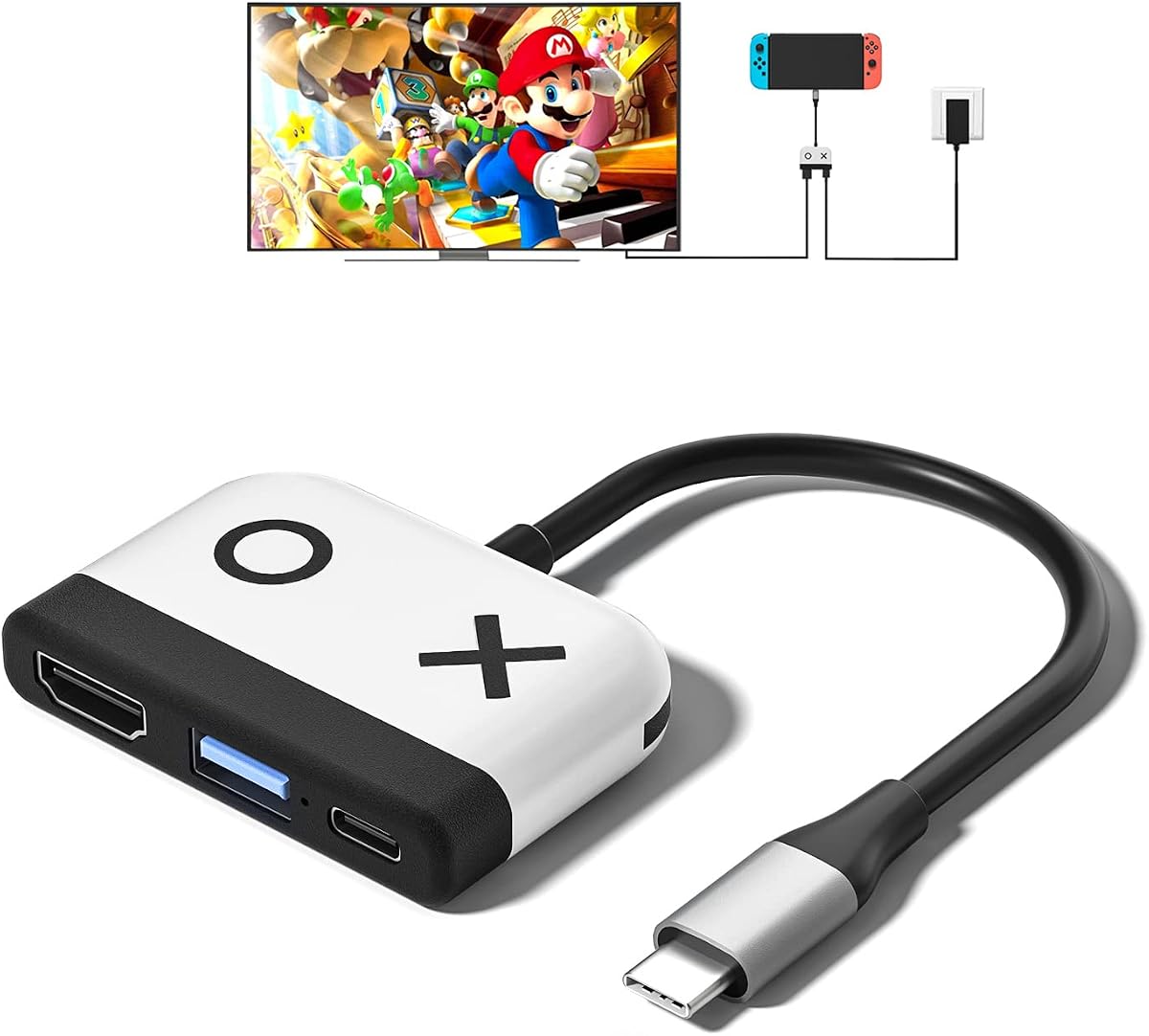
The BIYTC Switch Dock focuses on the essential functions of portable television gaming at a budget-friendly level. It explicitly supports Nintendo Switch 1 and Switch 2 and uses a pocket-size design that can easily fit into a handbag or backpack.
We may earn a commission when you buy through this link, at no additional cost to you.
The dock offers HDMI output, a USB 3.0 data port, and a PD charging connection. Its listed video mode is 1080p at 30Hz for Switch television play, which is lower than the 60Hz and 4K specifications emphasized by several alternatives. The setup involves connecting power and the television's HDMI cable, selecting the correct input, waking the console, and attaching the dock's USB-C output.
The straightforward sequence makes it approachable for users who want a small travel dock without a large accessory ecosystem. The USB 3.0 port remains valuable for compatible data devices. There is no mention of multiple USB ports, a physical mode button, a protective chip, or a cooling system in the supplied product information.
The BIYTC dock is a sensible selection for a traveler with a Switch or Switch 2 who values low bulk over advanced specifications. It is less attractive when smooth 60Hz television output is a priority or when you want the product to work with several kinds of USB-C devices. Confirm that 1080p at 30Hz satisfies your display expectations before buying.
The pocket-size form and basic three-port layout keep the adapter easy to carry. It can provide a television connection without adding the size of the original console dock.
The supplied instructions describe a familiar sequence involving power, HDMI, the correct television input, and the console connection. This makes the process approachable even for first-time dock users.
We may earn a commission when you buy through this link, at no additional cost to you.
The AHGEIIY Switch 2 Dock is among the smallest and lightest options listed, weighing about 39 grams, or 1.4 ounces. It is positioned as a combined Nintendo Switch dock, Samsung DeX station, and USB-C hub, with support for Switch 2, Switch 2 OLED, the original Switch, and Switch OLED.
We may earn a commission when you buy through this link, at no additional cost to you.
Its three main connections cover 4K at 60Hz HDMI, USB 3.0 data transfer, and up to 100W Power Delivery. The original Switch is still limited to 1080p by the console, while the Switch 2 benefits from the dock's higher stated output capability. A connected device must support DisplayPort Alternate Mode for the display adapter to function.
The product also lists compatibility with the Steam Deck, Mac and MacBook, iPad Pro, and other USB-C devices. For Nintendo Switch or Samsung DeX operation, an external power source is required. The recommended choice is the original Switch charger or another charger with output above 39W, and the listing excludes a wall charger, HDMI cable, and USB-C charging cable.
This is an appealing option for travelers who want the lightest multi-device hub in the guide and who already own the required accessories. Its main caveat is device dependence: a compatible USB-C port, the right power source, and an appropriate cable are all necessary. The broad compatibility makes it useful beyond gaming, provided the connected equipment supports the relevant protocols.
At 1.4 ounces, the dock is easy to add to a pocket or computer bag. Its small footprint is especially attractive for travelers who carry their display and power accessories separately.
The ability to work with compatible Mac, iPad, and other USB-C systems adds value between gaming sessions. DisplayPort Alternate Mode support is the key protocol to verify before relying on that function.
We may earn a commission when you buy through this link, at no additional cost to you.
The Portable HDMI Switch 2 Dock offers a balanced combination of size, connectivity, and console support. Its 4.3 rating places it among the stronger choices in the guide, while the 1.59-ounce aluminum body keeps it close in weight to the smallest cable-free docks.
We may earn a commission when you buy through this link, at no additional cost to you.
The dock supports Nintendo Switch 2, the original Switch, and Switch OLED. Its HDMI 2.0 output is specified for 4K at 60Hz, while USB 3.0 provides a high-speed data connection and the USB-C PD port supports charging up to 100W. Additional compatibility is listed for iPhone, MacBook, iPad, Samsung DeX stations, and other suitable USB-C devices.
The setup process requires a 15V 3A PD charger, an HDMI cable, selection of the correct television input, and attachment to the console. The instructions warn that insufficient power may prevent TV mode from activating and recommend the official 60W Switch power adapter. In TV mode, the Switch 2's built-in screen remains black while the external display shows the game.
The product is a good middle ground between a basic travel adapter and a larger multi-port hub. It suits a Switch 2 owner who wants a polished, compact aluminum unit and a 100W charging path. You must supply the charger and HDMI cable yourself, however, and Switch Lite owners should choose a different product.
Three important connections are packed into a small aluminum housing. This offers a practical balance for owners who want fast data and reliable charging without carrying a desktop dock.
The manufacturer explicitly recommends the official 60W adapter for the Switch 2. That guidance helps prevent a frustrating situation in which a weaker charger cannot activate television mode.
We may earn a commission when you buy through this link, at no additional cost to you.
The Portable Dock Station distinguishes itself with a cooling-oriented design and a top-mounted console arrangement. It is compatible with Nintendo Switch and Switch OLED and offers 4K, 1080p, and 720p output claims, while noting that the original Switch itself supports up to 1080p.
We may earn a commission when you buy through this link, at no additional cost to you.
Rather than requiring the console to slide into an enclosed cradle, the Switch sits on top of the station. A flexible spring stand supports the Type-C connector and reduces pressure during insertion and removal. Multiple ventilation openings are intended to improve heat dissipation during long gaming sessions, and anti-slip pads help stabilize the setup.
A built-in smart protection chip is described as guarding against overcharging, over-discharging, overheating, and short circuits. The top button switches between TV output and tabletop display modes, and multiple USB ports allow accessories to be connected. The product's 3.6 rating is the lowest listed, although its stated feature set is more focused than that of many alternatives.
This dock is worth considering for owners who expect long sessions and value a ventilated, stable console stand. The missing explicit Switch 2 support narrows its appeal for newer hardware, while its 3.6 rating suggests checking recent owner feedback carefully. It is best for original Switch and OLED users who prioritize cooling and a top-mounted layout.
The ventilation openings and smart protection system target heat management during extended sessions. This makes the dock more relevant to players who dock their console regularly rather than use it only for short trips.
A flexible spring stand supports the Type-C plug and reduces the force placed on the console's charging port. The top-mounted format also simplifies lifting the console away from the dock.
We may earn a commission when you buy through this link, at no additional cost to you.
The right portable Switch dock depends on the console you own, the way you travel, the display you use, and which accessories you already carry. The following factors help separate the essential requirements from features that are merely convenient.
Start with the exact model in your possession. Most products support the original Switch and Switch OLED, while only a portion explicitly list Nintendo Switch 2 compatibility. Switch Lite is excluded by several docks because of its different design and port arrangement. The pdobq and RREAKA products list Switch 1, Switch 2, and OLED support, while the Travel Portable Switch 2 Dock and Portable HDMI Switch 2 Dock are specifically designed around the newer system. Do not assume that a Switch 2 label also guarantees support for every older or alternative handheld.
A dock can advertise 4K output while the connected console remains limited to 1080p. The original Nintendo Switch is identified in several product descriptions as supporting up to 1080p, even when the adapter itself handles a 4K signal. For Switch 2, a 4K at 60Hz dock can provide the appropriate output, but the television or monitor must also support 4K at 60Hz and the connected cable may need to meet the required HDMI standard. BIYTC lists 1080p at 30Hz, which is an important distinction for viewers sensitive to motion or refresh rate.
Docked Nintendo systems generally need more reliable and consistent power than a handheld session. Several products advertise 100W USB-C Power Delivery, but the charger itself is usually not included. Some instructions explicitly recommend an official Nintendo adapter, and the Travel Portable Switch 2 Dock warns that using less than the recommended 60W may prevent TV mode from activating. The AHGEIIY dock also recommends an original Switch charger or another output above 39W. Treat the dock's maximum wattage as a capability rather than proof that a low-output wall charger can support it.
HDMI and USB-C power are the essential connections for a basic docked setup. USB 3.0 adds value when you plan to use fast storage, a keyboard, a mouse, or another compatible peripheral, while a second USB port makes it easier to leave accessories attached. The RREAKA model includes four ports, including USB 3.0 and USB 2.0. The iPLYGAM dock goes further with two USB 2.0 ports and multiple Type-C connections. More ports increase flexibility, although they can make a travel setup less streamlined than a minimal adapter.
Portable play depends on both size and weight. The RREAKA, AHGEIIY, and Portable HDMI Switch 2 docks are each around 1.4 to 1.6 ounces, while the iPLYGAM dock is listed at 2.6 ounces. The Kstkry and BIYTC docks emphasize pocket-size or compact construction, while the Portable Dock Station uses a larger top-mounted format with ventilation and anti-slip pads. Consider the complete travel bundle as well as the dock itself, because an HDMI cable, a charger, and a protective pouch can occupy more space than a lightweight adapter.
Several docks are sold as the dock unit only. The Travel Portable Switch 2 Dock includes an HDMI cable and instruction manual, which makes it more convenient for immediate travel use. The iPLYGAM package excludes both the charger and cables, while the Portable HDMI Switch 2 Dock includes the dock and manual but no HDMI cable or PD charger. AHGEIIY also excludes a wall charger, HDMI cable, and USB-C charging cable. Check the packing list carefully, especially if you already own a suitable charger but still need the right display lead.
Cooling can matter during long television sessions. The Portable Dock Station is the clearest option in this group because it has multiple ventilation openings, a protective smart chip, and a flexible spring stand for the Type-C connection. More conventional docks often emphasize compactness and port count instead. A top-mounted design can make the console easier to lift, while a dock that holds the console within its enclosure may create a tidier footprint. Check whether the design stabilizes the console and leaves the screen, controls, and ventilation areas unobstructed.
Several docks double as general-purpose USB-C adapters for Steam Deck, MacBook, iPad, Samsung Galaxy, iPhone, and other compatible equipment. That versatility can justify a larger purchase if you travel with more than one device. It also introduces additional requirements, particularly DisplayPort Alternate Mode support and an adequate power supply. The RREAKA dock lists a particularly broad device range, while the AHGEIIY dock explicitly states that only USB-C devices supporting DisplayPort Alternate Mode will work. Always confirm the protocol and power requirements of the secondary device.
Before connecting the console, inspect the dock's USB-C plug, HDMI port, and power input for visible damage. Set the television or monitor to the correct HDMI input, attach the charging cable to the dock, and connect the HDMI cable to the display. For traditional docks, position the console securely and connect the dock's USB-C output. For the cable-based Switch 2 model, plug the supplied cable into the console. Wake the Switch and allow the indicated few seconds for the television image to appear.
If the display remains blank, first check that the television is on the correct input and that the console is awake. A weak or incompatible charger can prevent TV mode from activating, so use a compatible high-output wall adapter and the recommended official charger where applicable. For the cable-based Switch 2 design, reconnect power before HDMI and the console. The Switch 2's own screen may stay black in TV mode because the game is intended to appear only on the external display.
To protect the console and dock, remove the console carefully without pulling on the attached USB-C cable. Do not place the setup on a soft surface that blocks ventilation, particularly with a model designed around active cooling. Keep the connectors free of dust and moisture, avoid sharply bending the cable near its plug, and pack the dock in a separate pouch or a protected section of your bag. When traveling, confirm that you have the correct charger and HDMI cable before leaving home.
A compatible portable dock can perform the core functions of sending video to a television or monitor and supplying power during play. The experience may differ from the official dock in port placement, build, cooling, and included accessories. Confirm that the replacement supports your exact console model and that your charger and display meet its requirements.
No. Some docks advertise a 4K-capable HDMI output, but the original Nintendo Switch remains limited to 1080p. Switch 2 output can reach 4K at 60Hz when the dock, display, source game, and cable all support it. BIYTC lists 1080p at 30Hz, so inspect the individual specifications rather than assuming every model offers the same result.
Several docks designed for Switch 2 also list the original Switch and Switch OLED as compatible. The Travel Portable Switch 2 Dock, RREAKA, AHGEIIY, and Portable HDMI Switch 2 Dock all describe support for more than one model. Buyers should still verify the latest listing details because compatibility statements can change as products are updated.
Several of the featured docks explicitly do not support Nintendo Switch Lite, including the RREAKA, BIYTC, and the cable-based Switch 2 travel models. Switch Lite has a different physical and connection design, so a dock that fits another Switch should not be assumed to work. Check the product's compatibility list before buying for a Lite console.
Use a compatible charger with sufficient output for the console and dock. Several manufacturers specifically recommend an official Nintendo power adapter, and the Travel Portable Switch 2 Dock identifies 60W as a suitable official option. A dock that supports 100W does not make a weaker charger adequate; the total power path must still meet the console's TV-mode requirements.
It varies by product. The Travel Portable Switch 2 Dock includes an HDMI cable, while the iPLYGAM dock includes neither cables nor a charger. The Portable HDMI Switch 2 Dock includes the dock and manual but no HDMI lead or PD wall adapter. AHGEIIY also excludes a wall charger, HDMI cable, and USB-C charging cable. Always check the packing list before ordering.
Most models state compatibility with HDTVs, monitors, and projectors that have HDMI connections. The dock must receive a signal from the console, and the display must support the resolution and refresh rate you want to use. Setting the television or monitor to the matching HDMI input is also necessary before the image appears.
Yes, several models support compatible USB-C devices. The RREAKA dock lists MacBook, iPad, iPhone, Samsung Galaxy, and other USB-C systems, while the AHGEIIY dock adds Steam Deck, Mac, and iPad support. Compatibility depends on the device supporting the required video protocol, especially DisplayPort Alternate Mode, and on adequate power delivery.
The RREAKA TV Dock is the strongest all-around choice because it combines a 4.4 rating, four ports, 100W charging, and a 1.5-ounce aluminum body. The BIYTC dock is a practical budget option for basic Switch and Switch 2 travel, while the Travel Portable Switch 2 Dock earns the premium distinction by including an HDMI cable and providing purpose-built support for the newer console.
Prioritize exact console compatibility, the power path, and the resolution your display can actually use. A small dock is valuable for travel, but a larger design with cooling and multiple USB ports may be better for permanent or extended sessions. Do not overlook missing chargers and HDMI cables, as those accessories are excluded from many packages.
Product listings, ratings, and specifications can change, and retailer offers also move over time. Before purchasing, confirm the current compatibility statement, package contents, charger requirements, and output mode for the exact console and display you plan to use.