
miadore SNES USB Controller
4.4Editor score
Two wired USB controllers
Driver-free computer operation
Concave face buttons
Wide operating system support
Snes Nes Emulator Controller guide compares 10 wired and wireless retro gamepads for PC, Mac, Linux, and Raspberry Pi, covering setup, controls, and compatibili
An SNES and NES emulator controller should recreate a familiar retro layout while working reliably with your chosen games, operating system, and display. The strongest options provide responsive buttons, a comfortable D-pad, broad emulator support, and a connection method suited to desktop or portable gaming setups.
This guide compares ten products using their supplied compatibility information, control layouts, connection types, ratings, battery details, and included accessories. It covers wired USB, 2.4GHz wireless, Bluetooth, multi-controller packs, and one all-in-one retro console, while clearly identifying important limitations.
The selections reveal different paths to a good retro experience: the top picks balance practical features, familiar styling, and straightforward operation. Product details and availability can change over time, so readers should verify current specifications, emulator requirements, and prices before making a final purchase.
4.4Editor score

4.7Editor score

4.3Editor score
This side-by-side comparison highlights each product's connection style, platform support, control configuration, and standout features so shoppers can identify the most suitable option for their emulator setup.




The KIWITATA Classic SNES USB Controller is a two-controller wired solution for people who want to play emulated SNES and NES games on computers, laptops, and compatible Raspberry Pi systems. Its supplied rating of 4.3 reflects a generally favorable reception, while its strongest selling point is the combination of a traditional gamepad layout, two included controllers, and broad operating system support.
We may earn a commission when you buy through this link, at no additional cost to you.
Each controller uses a standard USB connection and includes a 1.5-meter, or five-foot, cable. No drivers are required, which makes the hardware approachable for users who do not want to install additional operating system components. The supplied compatibility information covers Windows versions from 98 through 11, Mac OS X, Linux, and Raspberry Pi, giving the pack a useful range across common retro-gaming environments.
The controls include a concave, frosted cross-shaped D-pad, face buttons, and the familiar shoulder and central buttons associated with classic-style gaming. The stated design aims to improve grip and reduce slipping, while button mapping still has to be configured manually within the selected emulator because inputs are not assigned automatically. This setup step is normal for many USB gamepads but is worth considering before buying.
This is a strong choice for two-player couch sessions, shared desktop use, or anyone who prefers a dependable wired connection without managing wireless pairing or battery levels. It is not compatible with an original SNES console, and it does not support Nintendo Switch. Those limitations make it a computer-focused emulator controller rather than a universal retro accessory, but within that category the two-pack format is practical and economical.
The familiar D-pad and face-button arrangement gives emulated classics an intuitive feel, especially for games designed around physical buttons. It is intended exclusively for USB-equipped computers and compatible Raspberry Pi hardware, not original console ports.
Two controllers make local multiplayer more convenient because a second player does not need another device. Each pad has its own attached USB lead, keeping wired input simple and predictable.
We may earn a commission when you buy through this link, at no additional cost to you.
The ZAMPAM Wireless SNES Controllers provide a cable-free alternative for PC retro gaming, with two controllers and a 2.4GHz connection. The supplied rating is 4.0, placing it among the well-regarded options in this list, and the pair is especially relevant to multiplayer sessions where a short USB lead could otherwise restrict movement.
We may earn a commission when you buy through this link, at no additional cost to you.
Compatibility is broad for an emulator controller: the product information lists Nintendo Switch 1, Windows PC, Mac OS, Linux, Raspberry Pi, RetroPie, and Recalbox. It is also described as suitable for standard USB game-controller programs, including RetroArch, BSNES, OpenEmu, and systems associated with NES, SNES, Genesis, and GBA titles. Nintendo Switch 2 is explicitly excluded.
Setup is described as a simple plug-and-play process. A USB receiver connects to the device, and the controller uses 2.4GHz wireless technology with a stated range of up to 10 meters, or 32 feet. The supplied information says no drivers or additional software are required, although individual programs may still present their own mapping or connection menus.
The built-in 240mAh rechargeable battery provides up to three hours of continuous play and takes about an hour to charge. A battery indicator provides a convenient way to monitor remaining use. This package suits users who want two wireless controllers, broad program compatibility, and a recognizable retro design, but people who regularly game for much longer sessions may prioritize the longer runtime offered by some competing models.
The stated platform list extends beyond Windows to include macOS, Linux, Raspberry Pi, RetroPie, and Recalbox. That makes the pair useful for desktop setups and dedicated retro distributions when the relevant software recognizes a standard USB gamepad.
The 2.4GHz system removes the need for controller cables during play, while the USB receivers maintain a straightforward computer connection. Players should still confirm that their chosen emulator supports multiple connected gamepads.
We may earn a commission when you buy through this link, at no additional cost to you.
The miadore SNES USB Controller offers one of the strongest combinations of familiar design, broad system support, and two-player convenience in the group. Its supplied rating of 4.4 is the second-highest among the products with numeric ratings, making it a compelling choice for buyers who prioritize classic ergonomics and a straightforward wired experience.
We may earn a commission when you buy through this link, at no additional cost to you.
The package includes two USB controllers with cables measuring approximately five feet. They support Windows systems ranging from 98 and ME to Windows 10, Mac OS X, emulators, Raspberry Pi, Raspberry Pi 2 Model B, RetroPie OS, and Retropi System. No drivers or extra software are required for basic USB recognition, although the supplied guidance recommends plugging in the controller before starting an emulator and mapping the buttons if necessary.
Its controls are designed to evoke an original-era gamepad: an eight-way directional pad, concave X and Y buttons, convex A and B buttons, rubber Start and Select buttons, and additional face and shoulder controls. That deliberate arrangement may appeal to players accustomed to 16-bit-era layouts, while sensitivity-focused button claims suggest the controllers are intended to provide clear input during fast retro action.
The miadore set is best for shared computer play, especially when two people want traditional controllers without managing wireless connections. It can also serve as the input solution for a Raspberry Pi retro gaming build. It is a third-party controller rather than an original SNES or NES peripheral, and that distinction matters: buyers looking for a replacement plug directly into a classic console will need a different product.
The mixture of concave and convex face buttons preserves differences that existed across classic gamepad layouts. That visual and tactile variety can make emulator play feel more authentic than using a generic modern gamepad.
Two included controllers eliminate the need to find a second compatible gamepad for cooperative games. Plug-and-play USB operation also reduces setup complexity for family members or casual players.
We may earn a commission when you buy through this link, at no additional cost to you.
The Wireless USB SNES Controller is a two-pack designed for retro emulators on Windows PC, macOS, Linux, and Raspberry Pi. Its supplied rating of 4.2 indicates a solid overall reception, and its defining advantage is the stated ten-hour rechargeable battery, which is considerably longer than the three-hour runtime listed for the ZAMPAM pair.
We may earn a commission when you buy through this link, at no additional cost to you.
Controllers communicate through 2.4GHz wireless technology with a listed range of 10 meters, or 33 feet. A standard USB receiver provides the connection to the host device, and the product information says no drivers are needed for compatible devices. The box includes the wireless controllers, USB receivers, charging cables, and a user manual, providing the main accessories required to begin using the set.
The gamepad uses responsive, high-sensitivity buttons and a classic-style control arrangement. It is aimed at Windows, macOS, Linux, and Raspberry Pi systems rather than original Nintendo consoles. The exclusions are significant: Android TV Box, Fire TV, Chromebook, SteamOS, Tesla, C64, and Switch are all listed as incompatible, with Switch specifically called out as lacking the required button configuration.
This controller pair is well suited to users who value long wireless sessions and do not need support for the excluded smart or console platforms. A ten-hour runtime can reduce charging interruptions compared with shorter-life alternatives. Users should still inspect the relevant emulator's supported input devices and plan for possible per-program button mapping.
The supplied ten-hour runtime makes this pair more suitable for long gaming sessions or all-day availability. Charging cables are included, and the wireless format avoids cable restrictions around a desk or television.
The controller supports major desktop environments and Raspberry Pi. Its exclusions make it less versatile for Android TV, Fire TV, Chromebook, SteamOS, Tesla, C64, or Switch-oriented setups.
We may earn a commission when you buy through this link, at no additional cost to you.
The ZAMPAM Wireless Turbo Controller is built for players who want programmable rapid-fire behavior alongside a familiar gamepad layout. It has a supplied rating of 4.2 and supports Windows, Linux, and Android devices with game-emulator software through a USB wireless receiver. It is explicitly not designed for a Super Nintendo, Mini SNES, or other classic Nintendo console.
We may earn a commission when you buy through this link, at no additional cost to you.
Its 2.4GHz connection has a stated range of up to 24 feet. The controller uses a rechargeable lithium-ion battery, and the product information states that one charge can last around 100 hours. That long figure makes it appealing for casual, intermittent use because the controller can remain ready without frequent charging, although real usage patterns and battery condition can affect runtime.
The standout control feature is turbo functionality. In USB mode, holding Select while pressing A, B, X, or Y can turn the corresponding rapid-input function on or off. This is useful with compatible arcade, action, and retro titles, but the buyer should be aware that turbo behavior depends on the game and emulator rather than altering native console hardware.
The main setup caveat is input configuration. The supplied instructions recommend using software such as Joystick Mapper to assign keys when needed. People comfortable with that process gain a flexible wireless controller; those expecting completely automatic assignment may prefer a simpler product. The product title also mentions iOS compatibility, while the detailed information discusses a USB adapter for PC and Android, so buyers should confirm the exact connection method required by their device before purchasing.
The configurable A, B, X, and Y turbo controls can be useful in compatible titles. It remains a software-driven feature and should not be expected to reproduce original hardware behavior in every emulator.
The stated 100-hour battery life is particularly notable for a controller likely to be used in shorter sessions. Wireless pairing and the receiver simplify cable-free play after initial setup.
We may earn a commission when you buy through this link, at no additional cost to you.
The 8Bitdo SN30 Pro is the most feature-rich controller in this guide and carries the highest supplied rating at 4.7. It combines a retro-inspired appearance with modern conveniences including clickable Hall effect joysticks, Bluetooth, a USB-C connection, rumble, motion controls, and a rechargeable battery. That makes it a natural choice for users who want more than a basic emulator gamepad.
We may earn a commission when you buy through this link, at no additional cost to you.
The 144 by 63.5 by 32.5 millimeter design is intended to be portable, and the SN30 Pro supports Switch, Windows, Steam Deck, Android, Raspberry Pi, iPhone, iPad, macOS, and Apple TV. The product information describes the latter Apple platforms as officially supported. Compatibility breadth is one of the strongest aspects of the controller, allowing it to move between desktop gaming, handheld use, and mobile devices.
The clickable joysticks use Hall effect technology and are described as providing greater precision and sensitivity. A proper D-pad supports games that depend on directional input, while dual vibration motors provide different effects depending on the game scene. A six-axis gyro enables motion controls, and turbo functionality is included for compatible games. Firmware updates add another layer of maintainability for changing software environments.
The rechargeable 480mAh battery is stated to deliver up to 18 hours of play and requires roughly one to two hours for charging. This is a more sophisticated option than a basic SNES-shaped USB pad, so buyers should consider whether the additional controls, setup, portability, and platform support justify a more advanced design. For emulators, handheld PCs, and multi-device players, the SN30 Pro offers the strongest overall balance of features in the supplied list.
Hall effect clickable joysticks provide a modern input experience while the dedicated D-pad remains useful for classic titles. The combination allows players to choose an appropriate control for different games.
Bluetooth and USB-C connectivity make the SN30 Pro adaptable to supported computers, handhelds, mobile devices, and consoles. Firmware support can help keep behavior aligned with changing software.
We may earn a commission when you buy through this link, at no additional cost to you.
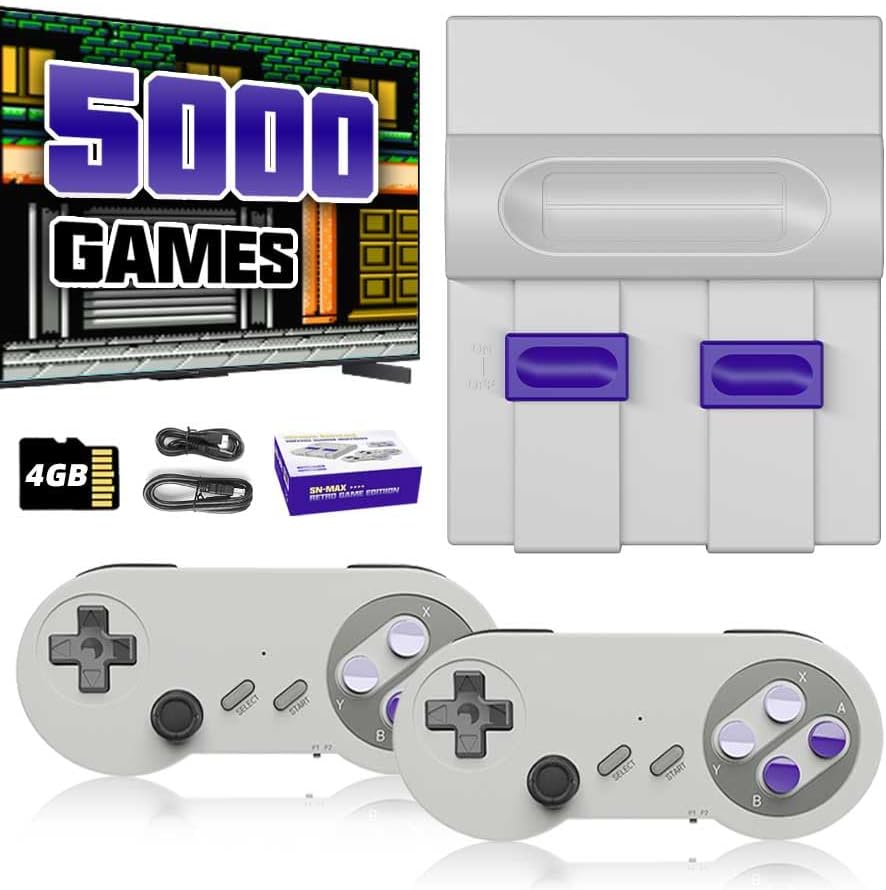
The Retro Game Console is an all-in-one alternative to building a computer-based emulator station. It comes with 5,000 preloaded 8-bit and 16-bit-style games, two controllers, and an HDMI-compatible television connection. The supplied rating of 3.5 is lower than that of every controller-focused product in the list, so buyers should view it as a different category rather than a direct controller recommendation.
We may earn a commission when you buy through this link, at no additional cost to you.
Its main convenience is the elimination of setup. The product is described as requiring no downloads, installations, or emulator configuration before play. Connecting it to a television and using the included controllers creates a straightforward retro-gaming environment for casual users, families, or anyone who does not want to manage ROM libraries, emulators, button mapping, and computer settings.
The visuals and sound intentionally reproduce an old-school pixel-art style rather than modern high-definition presentation. Although the system is described as 4K HDMI-compatible, the games retain the visual characteristics of classic 8-bit and 16-bit software. That distinction is central to the product's appeal: it prioritizes nostalgia and immediate access rather than enhanced graphics or advanced controller features.
This console is best for a gift recipient, beginner, or secondary television setup where the priority is plug-and-play entertainment. It is not appropriate for someone searching specifically for a SNES or NES emulator controller for a PC, and it offers no stated compatibility with computers or external emulator software. Prospective buyers should also consider the legitimacy and rights status of the included game content, which the supplied product information does not address.
The preloaded library removes the need to install emulators or configure individual titles. This makes the system approachable for users who want immediate access to a television-based retro experience.
The deliberate pixel-art presentation reflects the appearance of older systems. Players seeking upgraded modern graphics may find the lack of enhancements less appealing than the intentionally nostalgic output.
We may earn a commission when you buy through this link, at no additional cost to you.
The Purple and Gray Wireless SNES Controller is a visually coordinated two-pack that combines a familiar retro profile with 2.4GHz wireless operation. Its supplied rating of 4.4? No—the product data lists a 4.2 rating, placing it alongside the other well-regarded wireless options. The set is designed for Windows PC, macOS, Linux, and Raspberry Pi users.
We may earn a commission when you buy through this link, at no additional cost to you.
Each controller has responsive, high-sensitivity buttons and connects through a USB receiver. The listed wireless range is 10 meters, or 33 feet, and no drivers are required for compatible devices. A built-in rechargeable battery is stated to provide up to ten hours of runtime, while the package includes controllers, a USB receiver, a charging cable, and a user manual.
The purple-and-gray color treatment makes the controllers easy to distinguish from some modern gamepads and gives a two-player set a more deliberate visual identity. The controls follow a classic SNES-inspired arrangement, helping emulated games feel more natural than they might with a contemporary controller whose buttons and sticks are designed for a different library.
Platform limitations deserve attention. The supplied information specifically excludes Android TV Box, Fire TV, Chromebook, SteamOS, Tesla, C64, and Switch, with the Switch explanation centered on the lack of a required button configuration. The set is best for desktop and Raspberry Pi emulator use, particularly when two matching wireless controllers and a long battery runtime are priorities.
The two-pack provides a coordinated set for cooperative and competitive local play. Wireless operation gives each player more freedom to position the controller around a desk.
A stated ten-hour battery life reduces the need for mid-session charging. The included charging cable and USB receiver cover the essential connection and maintenance needs.
We may earn a commission when you buy through this link, at no additional cost to you.
The ZAMPAM 2 Pack 2.4GHz Wireless USB Controllers with Turbo is a two-controller option aimed at PC, Mac, Linux, Raspberry Pi, and Android-device emulator use. Its supplied rating of 3.9 is respectable, though not among the highest in the guide. The package differentiates itself through configurable rapid input and a long stated battery life.
We may earn a commission when you buy through this link, at no additional cost to you.
Controllers connect wirelessly through 2.4GHz technology with a range of up to 10 meters. A USB wireless adapter provides the host connection, and the supplied instructions recommend configuring the keys with software such as Joystick Mapper when needed. As with many generic USB gamepads, automatic input recognition should not be assumed in every emulator or operating system.
Turbo functionality can be assigned according to the player's preference. The included manual explains how to set the rapid button, which can be useful for games that accept repeated inputs. The product information also warns that turbo may be activated accidentally for certain keys and can be canceled, so a brief setup and familiarity with the controls are important.
The built-in rechargeable lithium-ion battery is stated to last around 100 hours of playing time. This is appealing for intermittent use, and two wireless controllers make local multiplayer more convenient. However, the controllers are not compatible with Super Nintendo, Mini NES, or NES Classic Edition, and the need for mapping software makes the set more involved than the simplest plug-and-play wired options.
The ability to choose a rapid button makes turbo behavior adaptable to different games and player preferences. The manual is relevant because accidental activation is possible if the setting is not reviewed.
The two-pack supports shared play without additional gamepads, while the stated 100-hour runtime suits casual use. USB adapter mapping remains the primary setup consideration.
We may earn a commission when you buy through this link, at no additional cost to you.
The KIWITATA Original SNES Wireless Controller stands apart because it can serve both an original SNES Entertainment System and computer-based emulator environments. It supports 2.4GHz wireless communication through a USB dongle for Windows and Mac, as well as a seven-pin connector adapter for an original SNES console. No numeric rating was supplied for this product.
We may earn a commission when you buy through this link, at no additional cost to you.
For console use, the included adapter plugs into the corresponding original SNES interface, after which the controller is paired and the Start button is pressed. The wording indicates that a console owner does not need to use a USB computer connection for this mode. The product is a third-party controller rather than an original Nintendo accessory, but it is designed specifically to bridge that classic hardware gap.
The controller's 2.4GHz wireless range is stated at up to 30 feet, which offers more freedom than a short console cable. Its built-in 3.7V, 500mA lithium-ion battery is stated to operate continuously for over ten hours. The frosted, concave cross-shaped D-pad and contoured body follow a familiar SNES-style design intended to provide a comfortable grip and more precise directional input.
The Windows compatibility covers versions from 98 through 11, while Mac OS X 10.0 and later are listed. Raspberry Pi support includes several models, including Pi 3 Model B, Pi Zero W, and Pi 4. This makes the controller a strong choice for someone who owns an original console and also wants wireless emulation on a computer, although buyers needing two-player packs should look to the wired and 2.4GHz multi-controller alternatives.
The seven-pin console adapter allows an original SNES system to be used without a permanently attached controller cable. The stated 30-foot range gives the player more freedom around a television.
A separate 2.4GHz USB dongle connects the same style of controller to compatible computers. This dual-mode approach is particularly useful for owners of both classic hardware and modern emulation setups.
We may earn a commission when you buy through this link, at no additional cost to you.
The right emulator controller depends on your hardware, preferred game style, number of players, and tolerance for setup. Connection type, platform support, control layout, battery behavior, and mapping requirements usually matter more than decorative authenticity.
A wired USB controller is usually the simplest and most consistent option for a computer. It avoids pairing, radio interference, and charging interruptions while providing a direct connection through the host device. The KIWITATA and miadore packs use approximately five-foot USB cables, giving players enough reach for many desk or television arrangements without requiring wireless configuration. Their main limitation is that the attached cable can restrict where each player sits.
Wireless designs use either 2.4GHz receivers or Bluetooth. The 2.4GHz products generally include a USB receiver and advertise no-driver operation on compatible computers, while the 8Bitdo SN30 Pro combines Bluetooth with a USB-C wired connection. Wireless freedom is valuable for couch multiplayer, but buyers should verify range, recharge time, and whether the target program recognizes the receiver as a standard gamepad.
In short, choose wired for dependable low-friction desktop play and wireless for freedom around a display. The right choice depends on setup priorities rather than one connection being universally better.
Before selecting a controller, list every operating system and emulator you expect to use. The products in this guide commonly support Windows, while many also include macOS, Linux, Raspberry Pi, RetroPie, or Recalbox. The 8Bitdo SN30 Pro extends the range to Switch, Steam Deck, Android, iPhone, iPad, and Apple TV, although users should still confirm the exact platform version and software mode.
Emulator support can be broader or narrower than the stated operating system support. Programs such as RetroArch, BSNES, OpenEmu, VirtuaNES, and other platform-specific emulators are mentioned in various product descriptions, but recognition still depends on how the controller identifies itself. Check the emulator's settings menu for gamepad or joystick support before buying.
The bottom line is to match every device in your planned setup, not merely the computer. A controller that works well on Windows can still be unsuitable for a television-only Android device, Chromebook, SteamOS, or an original console.
Many players prefer the visual and tactile familiarity of an SNES-style gamepad. An eight-way D-pad, four main face buttons, shoulder controls, Start, and Select closely resemble the layouts of classic systems. The KIWITATA and miadore wired products emphasize this approach, with concave D-pad designs and mixed convex or concave face buttons.
Controls should also be evaluated by function. A good D-pad helps with platformers and menu navigation, while responsive face buttons matter in action games. The 8Bitdo SN30 Pro adds clickable Hall effect joysticks, a proper D-pad, and rumble, giving it more flexibility for games and platforms that extend beyond traditional 16-bit input.
In summary, classic shape is valuable for familiarity, but precise inputs and useful extras can matter more. Consider the games you play, not just the system the controller resembles.
Two-player support is one of the clearest reasons to choose a pack. The KIWITATA, miadore, and ZAMPAM 2.4GHz models include two controllers, as do the two wireless SNES-style sets. That is a practical advantage for cooperative games, competitive titles, and family sessions because each player can use a matched device.
Single-controller products may still be adequate for solo gaming, but they do not provide the same immediate multiplayer arrangement. Before buying a pair, verify that the emulator recognizes two USB gamepads and that the program can assign controls independently. Some emulators make this process automatic, while others require manual configuration for every player.
The practical advice is straightforward: buy two when shared play is likely and one only when the controller will primarily serve a single player. A dedicated display and adequate player spacing can also influence the value of wireless models.
Battery specifications vary dramatically across the wireless choices. The ZAMPAM models are stated to last around 100 hours, the 8Bitdo SN30 Pro is listed at up to 18 hours, the other 2.4GHz SNES-style controllers offer ten hours, and the first ZAMPAM pair offers approximately three hours. These are supplied figures rather than independently verified test results, so usage time can vary.
Consider both runtime and recharge time. A controller that lasts for several shorter sessions may be more convenient than one intended for all-day use, while a home setup may not need long wireless operation at all. A battery indicator, as included with the first ZAMPAM wireless set, can make charging planning easier.
For dependable results, choose a battery life that comfortably exceeds your typical session length. Wired controllers sidestep the issue entirely, while wireless buyers should keep the supplied charging cable accessible.
Turbo functions can provide rapid repeated inputs in games that support them. The ZAMPAM Wireless Turbo Controller allows A, B, X, or Y to be used for turbo through a Select combination, and the ZAMPAM two-pack offers a configurable rapid button. These features are useful, but they operate through the controller and emulator rather than changing a game's original behavior.
Mapping is another key distinction. The basic KIWITATA and miadore wired controllers generally use standard USB plug-and-play recognition, but button assignments may still need to be set in the emulator. The ZAMPAM products explicitly recommend joystick-mapping software for some setups, while the 8Bitdo supports firmware updates. More advanced configuration can offer flexibility but may intimidate a first-time emulator user.
Choose automatic simplicity if you want the shortest setup, and choose programmable controls if you frequently switch among emulators or need turbo. Read the mapping instructions before choosing a more complex model.
Most controllers in this guide are computer accessories and do not plug into original consoles. The KIWITATA Original SNES Wireless Controller is the notable exception, offering a seven-pin adapter for original SNES hardware as well as a 2.4GHz USB dongle for computers. The all-in-one Retro Game Console is another different category because it includes a complete system and two controllers rather than acting as an emulator peripheral.
Labels such as SNES, NES, Mini SNES, Super Nintendo, and NES Classic Edition can describe styling, supported software, or a specific console platform. They should not be treated as interchangeable compatibility claims. A controller that works with SNES emulators on Windows may have no physical or electronic relationship to the original console.
Always confirm the exact target device. If original hardware matters, buy the bridge-style controller; if a complete console is the goal, consider the all-in-one system; for computer emulation, choose from the standard USB and Bluetooth gamepads.
Begin by confirming that the controller's connection method suits your setup. Plug a wired USB gamepad into the computer before opening the emulator, or connect the supplied 2.4GHz receiver into a compatible USB port. For a Bluetooth model such as the 8Bitdo SN30 Pro, use the device's supported Bluetooth pairing process and select the appropriate connection mode. For original SNES hardware, install the included seven-pin adapter before pairing the KIWITATA wireless controller.
Open the emulator's controller or input settings and map the D-pad, face buttons, shoulder controls, Start, and Select according to the software's prompts. If a controller is recognized but the inputs feel wrong, disconnect and reconnect it, then review the mappings rather than assuming the hardware is defective. Products that recommend joystick-mapping software should be configured with that tool before launching the game. Testing movement and menus in a simple title can confirm that every input responds correctly.
For wired controllers, route the cable so it cannot become a tripping hazard and avoid sharp bends near either plug. Wireless controllers should be charged with the supplied or appropriately compatible cable, and their battery indicators should be checked before long sessions. Keep the receiver in a clear location within its stated range, and avoid exposing controllers, receivers, or console adapters to moisture, excessive heat, or dusty storage conditions.
It can work if the emulator supports standard USB gamepads. The KIWITATA and miadore products are described as suitable for both SNES and NES-style games, but users may need to assign the D-pad, face buttons, and other inputs within the emulator. The controller's appearance does not guarantee automatic recognition, so check the software's input menu after connecting it.
Most of the computer-oriented controllers do not, and several descriptions explicitly say they are not compatible with original Nintendo hardware. The KIWITATA Original SNES Wireless Controller is the exception because it includes a seven-pin adapter for an original SNES console and a separate USB dongle for computer use. Always check whether a product includes the appropriate console adapter rather than assuming the shape is sufficient.
Wireless controllers provide more freedom around a television and avoid cable restrictions during multiplayer sessions. Wired controllers are usually simpler to connect and do not require charging, making them convenient for a stationary computer. The best choice depends on whether freedom of movement or setup simplicity matters more in your particular gaming area.
A computer can recognize a controller without knowing which physical control should represent an in-game action. Emulators often ask users to press a D-pad direction or face button and assign that input to a virtual control. Mapping can vary between products and emulators, so check the input settings every time you connect a new controller or change software.
Several products explicitly support Raspberry Pi, RetroPie, or Retropie OS, including the wired KIWITATA and miadore sets and multiple ZAMPAM and wireless models. The Retro Game Console is a complete standalone system and does not function as a Raspberry Pi controller. Confirm the version of Raspberry Pi and the operating system installed on it before making a purchase.
Turbo can send a selected button input repeatedly at a faster rate when the game and emulator support that behavior. It may be useful in arcade and action titles but does not change the original rules or capabilities of a game. The two ZAMPAM turbo products allow configurable rapid buttons, and their manuals explain activation and cancellation.
No. The first ZAMPAM wireless pair supports Nintendo Switch 1 but not Switch 2, while other generic wireless controllers explicitly exclude Switch because they lack the required button configuration. The 8Bitdo SN30 Pro lists Switch among its supported platforms. Check the exact console model and the controller's stated button-layout requirements before buying.
Buy a controller pack if you already own a suitable computer, emulator, or Raspberry Pi and want to customize the software library. Choose a complete retro console if you want immediate television access to preloaded games with minimal configuration. The complete system is convenient, but it does not provide the flexibility of a computer-based emulator setup.
The 8Bitdo SN30 Pro leads for shoppers who value broad device support, clickable Hall effect joysticks, rumble, motion controls, and modern connectivity. The miadore and KIWITATA wired pairs stand out for their classic layouts, simple USB operation, and two-controller value, while the ZAMPAM and other wireless options serve buyers who prefer cable-free multiplayer or programmable turbo functions.
Prioritize the hardware you actually plan to use, the number of players, and the amount of setup you are comfortable managing. A standard wired pad is often the least complicated choice, a wireless pack is useful around a television, and the KIWITATA bridge controller fills the unusual need for both an original SNES console and computer emulation. Verify button layouts, receiver requirements, and excluded platforms before ordering.
Product specifications, ratings, software compatibility, and prices can change over time. Review the current listing and emulator requirements immediately before purchasing, and compare the included accessories as well as the headline features. That final check helps ensure the selected controller integrates cleanly with the devices, games, and play style you already have.