
240W Invisible Foldable Stand Kit
4.5Editor score
Four-piece accessory kit
240W USB-C support
Foldable landscape and portrait stand
Our Sideways Phone Charger with Stand guide compares charging speeds, connector types, stand designs, compatibility, protection, and portability for a better
A sideways phone charger with stand combines charging, cable management, and hands-free viewing in one compact accessory. The right model should charge your device efficiently, direct the cable away from your hands, support a comfortable viewing angle, and fit neatly on a desk, nightstand, or travel bag.
We compared all ten products by charging capability, connector type, stand design, adjustability, case compatibility, data support, portability, and device coverage. The list includes cable-based holders, adapters, and wireless charging stands so readers can compare practical alternatives rather than treating every design as the same.
Each review explains the product's strongest benefits, limitations, and ideal user, while the table provides a quick side-by-side reference. Ratings reflect the supplied customer feedback, while pricing and availability can change, so confirm current details before purchasing.
4.5Editor score

4.6Editor score

4.4Editor score
This comparison highlights the differences between cable-integrated holders, rotatable adapters, and wireless stands. Pay particular attention to connector compatibility, maximum charging output, included components, and whether the stand is fixed, folding, or fully adjustable.


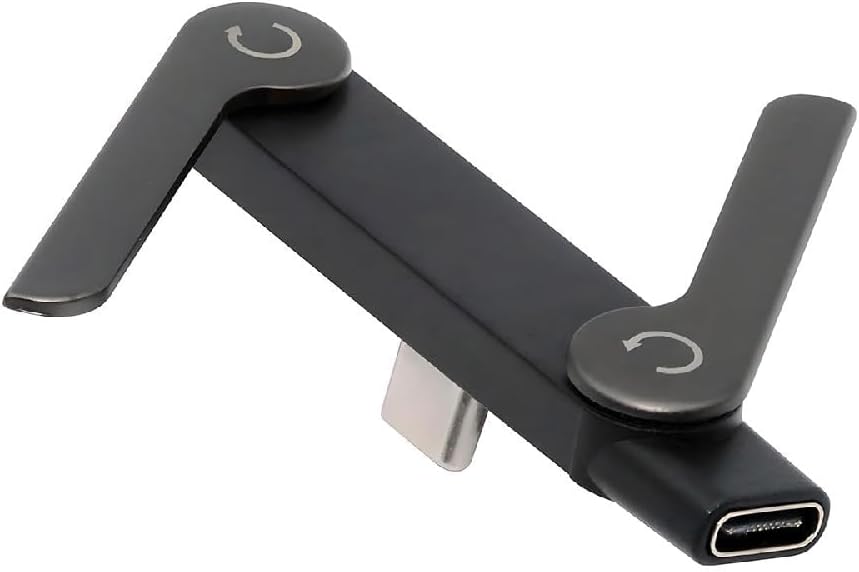


This four-piece kit is a budget-friendly way to combine a USB-C charging cable, folding phone holder, and basic device-cleaning tools. It carries a 4.5 rating and stands out for offering 240W charging support when paired with a suitable cable, charger, and device. The compact format is particularly appealing for users who want fewer separate accessories on the desk.
We may earn a commission when you buy through this link, at no additional cost to you.
The hidden support legs are the central feature. They open to create a stable platform for portrait or landscape viewing and fold into the cable body when not needed. This makes the holder useful for video calls, streaming, recipes, gaming, and general office tasks. Its 90-degree connector routes the cable away from the user's hands, reducing interference during sideways use.
The included orange, gray, and black adapters expand the kit's value for travel or multi-device setups, while the dual-sided brush can help remove ordinary debris from charging ports. The main limitation is its focus on USB-C-to-USB-C connections, so it is less useful for users who still rely heavily on Lightning devices. Maximum charging output also depends entirely on the connected equipment.
This is the strongest choice for budget-conscious buyers who want a portable all-in-one kit for modern USB-C devices. It offers more versatility than a basic fixed stand and avoids the need to carry a separate holder and long charging cable. For users who need Lightning support, the two-cable set in second place offers broader connector coverage.
The foldable legs remain hidden until needed, allowing the charger to lie flat in a bag or on a crowded surface. Once opened, they support both common screen orientations without taking up much room.
Three adapters and a cleaning brush make the kit more versatile than a standalone cable. The folding design also reduces the chance of snagging on the support in transit.
We may earn a commission when you buy through this link, at no additional cost to you.
This two-cable set earns the Editor's Choice position because it combines broad connector compatibility, high charging potential, and a genuinely integrated stand. Its 4.6 rating is the highest among the products with a listed numeric score. One cable uses USB-C to USB-C, while the other provides USB-C to Lightning, covering many current phones, tablets, and laptops as well as Lightning-based iPhones.
We may earn a commission when you buy through this link, at no additional cost to you.
Each cable has a concealed foldable bracket that opens into a viewing support. The design works in landscape or portrait orientation and accommodates compatible cases up to 0.08 inches thick. The T-shaped 90-degree connector helps separate the cable from the user's hands, which is valuable during gaming, scrolling, long video calls, and horizontal streaming.
The USB-C cable includes an E-Marker chip and supports output up to 240W when used with appropriate hardware. The MFi-certified Lightning cable offers up to 30W Power Delivery, and both support 480Mbps data synchronization. Their flat braided construction is designed to resist tangles and kinks, although carrying two 4.9-foot cables may take more room than a single-cable setup.
This is the most balanced recommendation for households mixing USB-C and Lightning devices. It provides the flexibility of two connector standards, a useful side-viewing function, and enough output potential for higher-powered devices. Choose it when connector versatility and everyday organization matter more than carrying the absolute smallest cable assortment.
The paired USB-C and Lightning cables reduce the need to choose one connector at checkout. This is especially helpful when family members or travel companions use different device ecosystems.
Flat braided cables, reinforced right-angle connectors, and case-friendly hidden brackets support repeated use. The four-point-nine-foot length also provides practical reach across a desk or nightstand.
We may earn a commission when you buy through this link, at no additional cost to you.
The YUWISS Z23 is a cordless charging stand for people who want the cleanest possible bedside or desktop setup. It has a 4.2 rating and supports up to 10W wireless charging, with faster modes listed for compatible iPhone and Samsung Galaxy devices. Unlike the cable-based products in this guide, it keeps the charging cord physically separate from the phone.
We may earn a commission when you buy through this link, at no additional cost to you.
The stand supports both vertical and horizontal placement, making it useful for alarms, notifications, music, calls, and video. An LED indicates charging status, while anti-slip bars help keep the device in position. Most rubber, hybrid, plastic, TPU, and PC cases up to 5mm thick can remain on, although magnetic and metallic attachments may disrupt charging.
The main drawback is that a suitable QC3.0 adapter is not included. Users must already own a compatible power supply or purchase one separately. Wireless charging is also generally less flexible than a wired connection for data transfer, and metal plates, magnetic mounts, or other foreign objects should be removed from the charging area.
This is an appealing choice for users who prioritize a clean desk, bedside charging, and flexible viewing angles over high wattage. It is particularly suitable as a dedicated charging dock rather than an all-purpose cable system. Ensure your power adapter supports the required output and remove accessories that could interfere with the charging coil.
Because the phone rests directly on the charging surface, no plug or cable crosses the screen. That freedom makes horizontal viewing and bedside use noticeably less cluttered.
The stand can accommodate many lightweight cases up to the stated thickness limit. Magnetic wallets, metal plates, and similar objects should be removed before placing the phone.
We may earn a commission when you buy through this link, at no additional cost to you.
This two-pack of 30W invisible holder cables is a focused solution for iPhone and iPad users. It has a 4.6 rating, matching the highest numeric rating among the listed products. Each cable combines USB-C power input, a Lightning device connector, data synchronization, and a concealed foldable phone support.
We may earn a commission when you buy through this link, at no additional cost to you.
The hidden bracket opens for stable viewing in landscape or portrait modes. It accommodates cases up to 0.08 inches thick, which helps the phone remain supported without requiring users to remove a thin everyday cover. The 90-degree elbow keeps the cable away from the user's fingers and reduces direct tension at the device port.
Charging output reaches 30W with suitable equipment, while data transfer is specified at 480Mbps. Protection against overcharging, overheating, overvoltage, and short circuits adds reassurance for routine charging. The trade-off is that the 30W limit and Lightning connector are less future-facing than a high-output USB-C-to-USB-C arrangement.
Buyers who need two matching Lightning cables will appreciate the complete set, particularly for separate desk and travel locations. It is less suitable for USB-C tablets or laptops that require a USB-C-to-USB-C connection. For those users, the two-cable set in second place offers a more balanced connector combination.
The pair can be placed at home and carried for travel, or used at a desk and nightstand. This avoids sharing one cable across several daily charging points.
The built-in protections cover common electrical risks, while 480Mbps data transfer remains useful for routine synchronization. Suitable charging equipment is still required for the stated output.
We may earn a commission when you buy through this link, at no additional cost to you.
The 240W rotating holder adapter offers a more mechanically adjustable stand than the folding brackets used by most cable products. It does not have a supplied numeric customer rating, so it is best evaluated on its stated design and specifications. The USB-C male-to-female construction fits into a compatible USB-C charging source.
We may earn a commission when you buy through this link, at no additional cost to you.
Its integrated metal stand rotates through 360 degrees and tilts to preferred angles. That range is useful for switching between portrait and landscape viewing, following recipes, or moving the phone out of the way. The adapter format also keeps the phone from laying directly on a desk, which can improve airflow around the device.
The stated charging capability reaches 240W, with support for multiple power profiles. As with other high-output accessories, actual delivery depends on the host charger, cable, and connected device. The 90-degree angled connection is described as reducing port strain and improving comfort, although its effectiveness depends on how the adapter is positioned.
This is the best pick for buyers who prioritize adjustability and a compact adapter form. It may appeal to users with a USB-C laptop or charging hub that can accept the male connector. Confirm that your equipment supports the adapter and verify the desired angle before ordering.
The rotating and tilting metal support provides more directional control than a simple folding leg. This makes the adapter useful for calls, cooking, and streaming.
The adapter concentrates the stand near the connection point, reducing the amount of extra hardware needed. A suitable host charger and connection remain necessary.
We may earn a commission when you buy through this link, at no additional cost to you.
This MFi-certified Lightning cable is a straightforward single-cable option for users who value official compatibility and a low advertised charging rate. It carries a 3.9 rating, the lowest numeric score in this group, but its specifications include 30W Power Delivery and 480Mbps data synchronization.
We may earn a commission when you buy through this link, at no additional cost to you.
A hidden folding bracket turns the cable into a hands-free stand in landscape or portrait orientation. It works with most cases up to 0.08 inches thick. The T-shaped 90-degree connector redirects the cord away from the user's hands, which is useful during gaming and scrolling, while the flat braided jacket resists fraying and kinking.
Compatibility covers listed iPhone models from the 14 series through several older generations, along with iPad Pro, Air, and mini models. Built-in safeguards are specified for overcharging, overheating, and short circuits. The product is limited by its Lightning output and does not offer the higher charging ceiling of USB-C-to-USB-C alternatives.
This cable suits users who want one recognizable, certified Lightning connection with a usable built-in stand. It is less appropriate for newer USB-C-centric ecosystems or for charging a laptop. The 3.9 rating suggests some variability in customer satisfaction, so checking current customer feedback is advisable.
MFi certification provides a clear compatibility standard for supported iPhone and iPad models. It is particularly useful for buyers who prefer a formally certified accessory.
The right-angle connector and hidden bracket address two common problems: a cable pressing into the hand and a separate stand taking up desk space. Together they create a more compact setup.
We may earn a commission when you buy through this link, at no additional cost to you.
This detachable-stand cable combines a universal Type-C connection with unusually flexible viewing adjustments. It has a 4.1 rating and supports up to 240W output, 480Mbps data transfer, and a broad range of Type-C phones, tablets, laptops, and gaming devices. The removable holder can also be shared between compatible devices.
We may earn a commission when you buy through this link, at no additional cost to you.
The stand supports 360-degree rotation and a tilt range of zero to 120 degrees, allowing the phone to move between portrait, landscape, and intermediate positions. Because the holder attaches directly to a Type-C port, it does not depend on a permanently integrated folding bracket. This makes the cable useful across multiple compatible devices.
The soft silicone exterior is designed to remain flexible and resist scratches, fraying, and wear, with reinforced joints tested for more than 10,000 bends. Its 59-inch length provides substantial reach, although that size can be inconvenient for travel. The silicone surface may also attract visible marks more readily than a conventional braided jacket.
Choose this product when you want one adjustable stand that can move between several USB-C devices or be shared with family members. It balances high charging potential with flexible positioning. For more compact travel, consider a shorter cable with a permanently integrated or fully folding holder.
The detachable design lets users move the holder between USB-C phones and tablets without buying a separate stand for each product. It also makes sharing the accessory more convenient.
The extended silicone cable can reach across larger work surfaces and avoid cable tension. Its length should be coiled carefully during travel to prevent knots or tangles.
We may earn a commission when you buy through this link, at no additional cost to you.
This three-in-one magnetic charging station is built for users who regularly charge an iPhone, Apple Watch, and AirPods. It has a 4.4 rating and consolidates three wireless charging positions into one base, reducing the number of separate cables and pads around a desk or nightstand.
We may earn a commission when you buy through this link, at no additional cost to you.
The phone section uses upgraded N52 magnets to create a secure attachment and supports portrait or landscape positioning. The listing specifies up to 15W charging for compatible iPhones and notes that magnetic alignment relies on iPhone 12 or later or a compatible magnetic case. A blue ambient light can be toggled or adjusted through the base's touch control.
Compared with a sideways cable holder, this dock provides less direct cable control because the phone connects magnetically. It also concentrates on the Apple ecosystem rather than broad USB-C compatibility. Users with several non-Apple devices may find a universal wired or wireless stand more useful.
This is the strongest choice for consolidating Apple accessories at a bedside or office. It is especially practical for StandBy-style viewing, alarm, calendar, and video functions. Ensure the magnetic case or supported iPhone configuration is available and verify that the charging source meets the station's requirements.
Combining the phone, watch, and earbud charging areas reduces desktop clutter. It is a convenient central station for a compatible Apple device collection.
The adjustable blue night light provides subtle guidance at night and can be turned off for complete darkness. This adds bedside utility beyond charging alone.
We may earn a commission when you buy through this link, at no additional cost to you.
The black and orange cable set provides two Type-C charging cables with detachable adjustable stands. Its 4.1 rating aligns it with the other flexible silicone model in the guide. Each cable supports up to 240W Power Delivery and 480Mbps data synchronization across compatible phones, tablets, laptops, and handheld gaming devices.
We may earn a commission when you buy through this link, at no additional cost to you.
The removable stand provides adjustable viewing angles for streaming, calls, gaming, and everyday use. A 90-degree connector moves the cable away from the user's hand and reduces strain around the device's charging port. The liquid silicone exterior is soft, flexible, and designed to resist tangles and wear.
Its two-color format makes it easy to distinguish cables assigned to different locations or purposes. However, both use USB-C connections, so the set offers no Lightning support. The detachable holder must also be transferred manually when changing devices, which is convenient but not quite as immediate as a permanently integrated folding bracket.
This set is most suitable for USB-C households that want flexible cables, high potential output, and movable viewing hardware. It works well for travel, gaming, or sharing between compatible devices. Buyers with mixed connector needs should choose a two-standard cable set instead.
The black and orange pair can be separated easily between a travel bag and a permanent desk setup. Distinct colors also make it easier to locate the intended cable.
The stated 240W ceiling gives the cables broad potential across phones, tablets, and laptops. Actual charging speed still depends on the device, charger, cable connection, and protocol.
We may earn a commission when you buy through this link, at no additional cost to you.
The Belkin 10W Wireless Charging Stand is a premium-looking desktop dock for Qi-enabled devices. It has a 4.4 rating and an advantage over many competing wireless stands: an AC adapter is included. That removes the need for buyers to source a compatible wall charger separately before first use.
We may earn a commission when you buy through this link, at no additional cost to you.
The stand supports up to 10W fast wireless charging and includes integrated LEDs that indicate phone alignment and charging status. It can hold a phone upright for calls, messages, music, and video, delivering a cleaner setup than a cable lying across the desk. The design is also stated to work with most lightweight Apple and Samsung cases up to 3mm thick.
Its limitations are inherent to wireless charging. It cannot match the potential speed of a 240W wired connection, and it does not provide the data-transfer functionality of several USB-C cables. Some cases with metal, magnetic, or thick protective elements may also interfere with charging.
This is an excellent premium choice for buyers who value a recognizable brand, an included power supply, and a simple Qi charging experience. It is especially suitable as a stationary bedside or desk dock. For users needing faster charging or a physical cable connection, one of the high-output wired options will be more appropriate.
The included AC adapter removes a common source of setup friction. Users can connect the stand and begin using it as a dedicated viewing and charging dock.
Integrated lights help users position the phone on the charging surface and confirm its status. This is useful for a stand that remains in place throughout the day.
We may earn a commission when you buy through this link, at no additional cost to you.
The best sideways phone charger with stand depends on your connector, charging speed, viewing habits, and tolerance for desk clutter. Review these factors before choosing between a cable-integrated holder, adapter, and wireless dock.
Start with the port on the devices you use most often. USB-C-to-USB-C cables offer broad compatibility with modern phones, tablets, and many laptops, while USB-C-to-Lightning cables serve compatible iPhone and iPad models. Some products in this guide include both connector types, which is useful for mixed-device households. A detachable Type-C holder can also move between several compatible devices.
Charging output should be considered alongside device requirements. Wireless stands in this group offer up to 10W or 15W, while wired products range from 30W to a stated 240W maximum. A high ceiling is useful for tablets and laptops, but the actual result depends on the charger, cable, device, and charging protocol. Fast charging is not guaranteed simply because a product lists a high maximum.
Integrated folding stands are compact and convenient because the support disappears into the cable. Fixed wireless stands provide broad orientation choices but take up more space. Rotating adapters and detachable holders provide the greatest flexibility, allowing portrait, landscape, and intermediate positions. Consider how you use your phone: upright reading favors portrait, while video and gaming usually benefit from landscape.
A 90-degree connector is central to the sideways experience because it directs the cable away from the user's hands. This can improve comfort during gaming, scrolling, and long calls while reducing direct pull on the device port. T-shaped and right-angle designs may differ in orientation, so review the product imagery carefully if your grip or workstation is unusual.
Case compatibility varies considerably across the list. Several cable holders support cases up to 0.08 inches thick, while the YUWISS and Belkin wireless stands accommodate certain lightweight cases within their stated limits. A thicker case can prevent a folding bracket from opening correctly or interfere with a wireless charging coil. Stability also depends on the phone's weight, center of gravity, and the angle selected.
Cable length determines reach but also affects packing convenience. The 4.9-foot options suit many desks and nightstands, while the 59-inch silicone cable provides more flexibility for larger workspaces. A folding stand can make even a moderate cable easy to carry. Coiled cables should be secured loosely, and the stand should be closed before placing the product in a bag.
Wireless charging offers the cleanest desktop appearance because no cable connects to the phone. It is ideal for stationary viewing and bedside routines, although it can be slower and offers no data transfer. Wired solutions usually provide faster charging, data synchronization, and more freedom to position the phone. Your routine and device ecosystem should determine which approach is more valuable.
Look for temperature control, over-current protection, overvoltage protection, and short-circuit safeguards. These safeguards are especially important for compact adapters that handle high power levels. Also note included components: some products provide a wall adapter, some include multiple cables, and one kit adds adapters and a cleaning brush. A complete package can be convenient, but unnecessary extras add bulk.
Begin by identifying the correct connector, connecting the cable or adapter to a compatible charging source, and opening the hidden support or adjusting the detachable stand. Position the phone with its charging port unobstructed. For a folding holder, follow the indicated opening direction and ensure both support legs are fully extended before placing the phone in portrait or landscape orientation.
For sideways use, route the cable away from the hands and let the right-angle connector sit close to the device. Avoid pulling the cable to reposition the phone; adjust the stand instead. Wireless users should align the phone with the charging coil and remove magnetic wallets, metal plates, or other conductive attachments that may interfere with charging. Confirm that the charging indicator confirms power.
To care for the product, coil cables without tight bends and keep the stand mechanism free of dust. Do not pull the phone sideways while it is charging, and avoid using the holder as a structural handle. Inspect the connector and support for damage, clean debris gently with the included brush where applicable, and keep liquids away from the charging surfaces. Use only compatible chargers and cables.
A 90-degree connector routes the cable away from the user's hands, improving comfort during landscape gaming, scrolling, and video calls. It also reduces direct tension at the device's charging port. The result is a cleaner and more ergonomic charging position than a straight connector extending into the grip area.
Most products in this guide support landscape viewing, although their stability mechanisms differ. Folding cable brackets typically open to a fixed angle, while rotating adapters and detachable holders offer more adjustment. Users should fully open or position the support before placing a heavier phone in landscape mode.
No. The rating represents the product's maximum supported output, not the power every connected device will receive. Actual charging depends on the phone, charger, cable, connection, and protocol. A phone may draw less power, while some laptops and tablets may require compatible high-output equipment to approach the stated maximum.
Many cable-integrated stands support cases up to 0.08 inches thick, and the wireless stands accommodate certain lightweight cases within their stated limits. Thick, metal, or magnetic cases can interfere with a folding mechanism or wireless charging coil. Remove incompatible attachments and follow the manufacturer's case guidance.
Choose wired if fast charging, data transfer, or greater viewing flexibility matters most. Choose wireless if you want the cleanest desk and frequently use the phone as a stationary bedside or desk display. Wireless charging is generally more convenient for viewing but usually offers less output than the highest-wattage cable options.
Yes, these stands are specifically designed for hands-free viewing, including video calls. Open the support fully and position the phone at eye level or near the center of the workspace. For stability, use a stable surface and avoid pressing the phone or dragging the cable while the call is active.
The listed detachable models are designed to fit Type-C ports and can move among compatible phones, tablets, and other supported devices. Connector size and device dimensions can vary, so confirm that the holder fits both the phone and the port before use. USB-C and Lightning devices are not interchangeable.
The correct adapter depends on the product's supported input and the device being charged. High-output wired products need a compatible USB-C power source capable of negotiating the required protocol. The Belkin stand includes an AC adapter, while the YUWISS stand explicitly requires a separate compatible adapter.
The four-piece 240W invisible stand kit is the strongest budget option for modern USB-C users, while the two-cable set with USB-C and Lightning connectors is the most versatile overall choice. The Belkin 10W wireless stand stands apart for buyers who value a premium, ready-to-use dock with an included power adapter and a completely cable-free phone placement.
Prioritize connector fit, actual device requirements, and the viewing arrangement you use most. High-wattage cables suit power-hungry devices and flexible portability, fixed wireless stands favor clean viewing, and adjustable detachable holders serve multi-device setups. In every case, check case thickness, right-angle orientation, included accessories, and the power source before purchase.
Ratings and product availability can change over time, so review current customer feedback and the latest product specifications before ordering. Confirm the supported charging protocol, verify that your device and case fit, and choose a model that suits your connector needs rather than relying on maximum wattage alone.
